LightBlog

samedi 27 août 2022

Xiaomi CEO Lei Jun confirms a global release for the 12 S Ultra successor

Xiaomi CEO Lei Jun declared via Twitter that Xiaomi would be available in global markets. More specifically, Jun was talking about the next iteration of the Xiaomi 12 S Ultra. It is unclear whether Jun was talking about a true successor to the Xiaomi 12 S Ultra, or a 12 S Ultra that will be made specifically for the global market.

Xiaomi has been around for a little over a decade and sold its first smartphone in 2011. A few years later it would dominate its local region having the largest marketshare in China. For the most part, Xiaomi’s main business lies in China, but it has expanded to other regions like India and Europe. The one market that it has not managed to enter is the United States. While it has never formally entered the market, it did previously experience some unpleasantness with the US government. Thankfully, the issues were later resolved.

Xiaomi going after global consumers is an important step, not only for the company but also for consumers. Despite there being a wealth of options for Android devices, the push forward to create something special has stagnated. Our own Adam Conway discussed this for mid-range devices, but it applies to flagship models too. Samsung has long had a stranglehold on the U.S. market and because of this, it has erred on the side of caution and continued to deliver iterative updates to its smartphones. With more competition, companies like Samsung would be forced to push hard and deliver more innovation.

The Xiaomi 12S Ultra is a perfect example of what happens when a company pushes the envelope. You end up with a smartphone that has an alluring design that is supported by top specifications, and has an amazing camera. Furthermore, pricing for the 12S Ultra is in line with other flagships, which is great. While Xiaomi has enforced a sales strategy in its home territory, it will be interesting to see how much it invests into the global market going forward. Unfortunately for now, there isn’t a timeline of when its devices will begin to arrive to the global market.


Source: Lei Jun (Twitter)

The post Xiaomi CEO Lei Jun confirms a global release for the 12 S Ultra successor appeared first on XDA.


from XDA https://ift.tt/YtKmRB1
via IFTTT

vendredi 26 août 2022

The Summer Recap playlist rolls out to YouTube Music subscribers

Summertime is quickly coming to an end, and YouTube Music is ready to give you one last hurrah. The service has released its Summer Recap, filled with some of your most memorable music tracks from the past couple of months.

If you’re confused about the Summer Recap, it’s part of a new YouTube Music offering that started in June. The platform first introduced seasonal recaps a couple of months ago after it found that its annual recap feature was a hit. So, going forward, listeners will get customized seasonal playlists for spring, summer, fall, and winter. Subscribers will get a total of five music recaps a year, including the annual recap.

YouTube Music Summer Recap

As mentioned before, as part of the Summer Recap, YouTube has prepared your favorite music, from all of the albums and singles to playlists you have listened to all summer long, and organized it into one huge listening experience. When you open YouTube Music, you’ll get a new landing page that shows the personalized music playlist. YouTube Music subscribers can share the playlist with friends and family.

If you completely forgot about YouTube Music, you’ll probably be surprised, as a lot has changed. The app has seen several improvements, like introducing Snapchat integration in March and refining its radio algorithm. Furthermore, if you’re running Android 13, the app will have many visual changes, including updated media controls. The app now also offers improved support on Wear OS devices.

If you haven’t tried it in a while, it might be worth checking out. YouTube Music is currently priced at $9.99 monthly in the United States. It offers access to millions of ad-free songs and the ability to download music for offline listening. If you’re more into YouTube, you can access YouTube Music for free with a YouTube Premium account.

YouTube Music (Free, Google Play) →


Source: YouTube Blog 

The post The Summer Recap playlist rolls out to YouTube Music subscribers appeared first on XDA.


from XDA https://ift.tt/8SJ9UVK
via IFTTT

The Summer Recap playlist rolls out to YouTube Music subscribers

Summertime is quickly coming to an end, and YouTube Music is ready to give you one last hurrah. The service has released its Summer Recap, filled with some of your most memorable music tracks from the past couple of months.

If you’re confused about the Summer Recap, it’s part of a new YouTube Music offering that started in June. The platform first introduced seasonal recaps a couple of months ago after it found that its annual recap feature was a hit. So, going forward, listeners will get customized seasonal playlists for spring, summer, fall, and winter. Subscribers will get a total of five music recaps a year, including the annual recap.

YouTube Music Summer Recap

As mentioned before, as part of the Summer Recap, YouTube has prepared your favorite music, from all of the albums and singles to playlists you have listened to all summer long, and organized it into one huge listening experience. When you open YouTube Music, you’ll get a new landing page that shows the personalized music playlist. YouTube Music subscribers can share the playlist with friends and family.

If you completely forgot about YouTube Music, you’ll probably be surprised, as a lot has changed. The app has seen several improvements, like introducing Snapchat integration in March and refining its radio algorithm. Furthermore, if you’re running Android 13, the app will have many visual changes, including updated media controls. The app now also offers improved support on Wear OS devices.

If you haven’t tried it in a while, it might be worth checking out. YouTube Music is currently priced at $9.99 monthly in the United States. It offers access to millions of ad-free songs and the ability to download music for offline listening. If you’re more into YouTube, you can access YouTube Music for free with a YouTube Premium account.

YouTube Music (Free, Google Play) →


Source: YouTube Blog 

The post The Summer Recap playlist rolls out to YouTube Music subscribers appeared first on XDA.


from XDA https://ift.tt/omVvqNL
via IFTTT

These New OPPO ColorOS 13 Features Will Boost Your Productivity

Android 13 is here, and it brings many new updates and improvements to Android phones. OPPO is working to bring you the latest update in the form of ColorOS 13, which is scheduled to hit phones at different times throughout the year, starting this August. Because ColorOS is a very highly reviewed platform, we are excited to see what new features are in store for OPPO users in the second half of 2022. We are also thrilled to share how these additions work together to boost your productivity, making ColorOS 13 the ultimate helper for your smart work and life. Keep reading for a quick look at everything new in ColorOS 13.

New Features in ColorOS 13 that Improve Your Work Efficiency

Multi-Screen Connect makes using multiple devices a seamless experience. Your workflow now transfers easily between your phone, your OPPO Pad Air, and your PC computer — without any disruptions. This allows you to easily keep your tasks in sync with a more unified system.
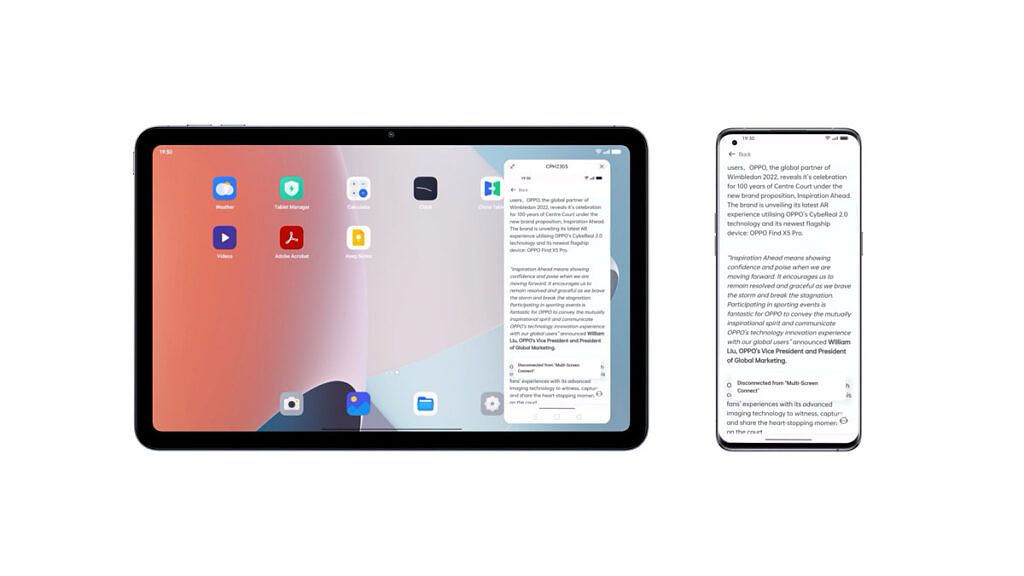
ColorOS 13 Multi-Screen Connect

With the new Multi-Screen Connect feature in ColorOS 13, you can transfer various types of files between your devices, without consuming data. This direct connection works even without an internet connection, as the devices connect directly to one another. This feature also supports clipboard sharing between devices to help you copy and paste with ease. When using Multi-Screen Connect on your PC, you can display multiple apps at once, on the larger screen of your desktop or laptop. With Multi-Screen Connect, you can forget about wasting time, and constantly switching between apps.


ColorOS 13 Multi-Screen Connect

The popularity of online meetings exploded over the past two years, with more people working from home than ever. OPPO improves your online meetings with their new feature called Meeting Assistant. When your meeting begins, Meeting Assistant prioritizes wireless data packets, to ensure that you have a stable connection. Your banner notifications are simplified to be less intrusive as well, reducing distractions and saving you the trouble of swiping away large notifications to see someone’s video properly. Lastly, you can also add a shortcut to OPPO Notes*, which can be viewed as an easy-to-access floating popup.

ColorOS 13 Meeting Assistant simplifies notifications during online meetings

New features for a Smart Life

New updates to the home screen let you make more customizations, for quicker access to common functions and features. ColorOS 13 comes with a feature called Shelf, which provides a quick glimpse at a collection of useful information with all kinds of widgets. With a search function at the top, finding the local and online information you need is easier than ever.

Find new Home Screen Widgets that can display useful information with a dynamic layout. Then use the Large Folder option to create a folder of apps that can be launched from the home screen. Forget about having to open the folder anymore; app icons can be seen from the default view!

ColorOS 13 Large Folder

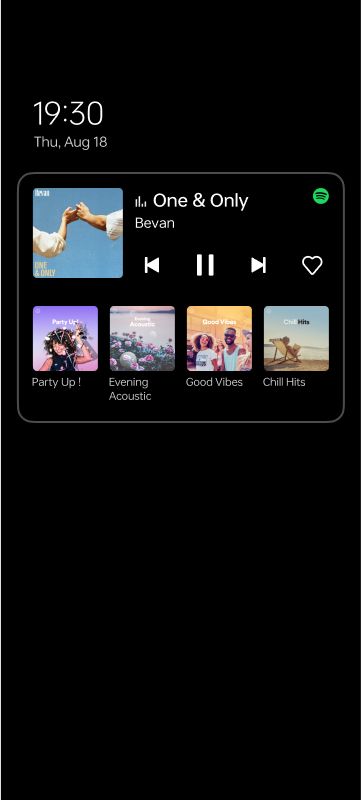
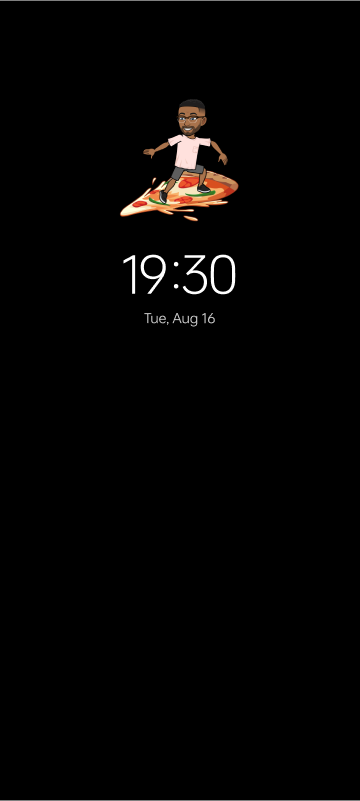
OPPO’s Always-On Display has been one of the highlights of ColorOS for the past few versions, and it gets even better with the ColorOS 13 update. Always-On Display reduces the menu hierarchy and helps users access important information at a quick glance. This brings users quicker access to information with less effort. Smart Always-On Display brings Spotify controls to your AOD, allowing you to play, pause, and shuffle the songs; and this is displayed alongside food delivery information from Zomato and Swiggy. Bitmoji Always-On Display brings your animated character to the AOD, and it imitates what your phone thinks you might be doing in real life at the time. Insight Always-On Display shows a user’s digital behavior right on their AOD, using a color bar that tracks the number of times you’ve unlocked the phone and the time spent.

Alongside the Insight Always-On Display, Blossom Wallpaper also helps you monitor your smartphone usage and achieve a better life balance. It visualizes the growth of a plant shoot on the wallpaper to indicate how much time you spend glued to your phone screen.

ColorOS 13 Blossom Wallpaper
Updates in UI can be found throughout the system. Thanks to the new, concise, and comfortable Aquamorphic Design; ColorOS 13 comes with an improved layout and system hierarchy, as well as updated fonts and typography that improve readability. Overall, you’ll experience a significantly improved and much more cohesive UI in ColorOS 13, thanks to the new Card-Style Layout, Aquamorphic Design, and a new Adaptive Layout that formats your display for different screen sizes and aspect ratios.

OPPO’s new self-developed Dynamic Computing Engine is implemented in this latest update, which provides a system-level technical solution to deliver a more smooth and more stable system. It enhances the fundamental user experience by improving the scheduling of hardware resources. This results in extended battery life by achieving a better balance between high performance and low power consumption. It also allows users to keep more apps alive in the background while switching between multiple apps, without experiencing lagging or losing the status within an app. This is great news for people who do heavy multitasking on their phones!

Screenshots are getting a great new safety feature that lets you blur out avatars and usernames with one click. Auto Pixelate can automatically detect sensitive information, and it gives you the option to blur it out before posting it online or sending it to a friend. The Private Safe is now encrypted with the widely-used Advanced Encryption Standard (AES) to provide high levels of security. And the underlying privacy protection features of Android 13 are also integrated. Features like this are why ColorOS is one of the best solutions for privacy-conscious users.

ColorOS 13 Auto Pixelate

Update Schedule

OPPO has been releasing some of the best smartphones available in 2022, packed with amazing hardware and cutting-edge technology. With ColorOS 13, the potential of your OPPO device is pushed even further in the areas of productivity, customization, and entertainment. Look for an update for your OPPO phone following this beta release schedule:

  • August 2022: Find X5 Pro, Find X5
  • September 2022: Find X3 Pro, Reno8 Pro 5G
  • October 2022: Reno8 5G, Reno7 Pro 5G, Reno7 5G, Reno7, Reno6 5G, F21 Pro, K10 5G, A77 5G, A76
  • November 2022: Reno7 Z 5G, Reno6 Pro 5G, Reno6 Pro 5G Diwali Edition, Reno6 Z 5G, Reno5 Pro 5G, Reno5 Pro, F21 Pro 5G, F19+ Pro, K10, A96
  • December 2022: Find X5 Lite, Find X3 Neo 5G, Find X3 Lite 5G, Find X2 Pro, Find X2 Pro Automobili Lamborghini Edition, Find X2, Reno8, Reno8 Z 5G, Reno5 5G, Reno5 Z 5G, A94 5G, A74 5G
  • From H1 2023: Pad Air, Reno8Lite 5G, Reno7 Lite 5G, Reno7 A, Reno6, Reno6 Lite, Reno5, Reno5 Marvel Edition, Reno5 F, Reno5 Lite, Reno5 A, F19 Pro, F19, F19s, A95, A94, A77, A74, A57, A57s, A55, A54 5G, A53s 5G, A16s

* Note: OPPO Notes are available on certain models with ColorOS13.0 and on the rest with further OTA updates. Please refer to the actual model introduction for more information.

We thank OPPO for sponsoring this post. Our sponsors help us pay for the many costs associated with running XDA, including server costs, full time developers, news writers, and much more. While you might see sponsored content (which will always be labeled as such) alongside Portal content, the Portal team is in no way responsible for these posts. Sponsored content, advertising and XDA Depot are managed by a separate team entirely. XDA will never compromise its journalistic integrity by accepting money to write favorably about a company, or alter our opinions or views in any way. Our opinion cannot be bought.

The post These New OPPO ColorOS 13 Features Will Boost Your Productivity appeared first on XDA.


from XDA https://ift.tt/MLFjvyD
via IFTTT

These New OPPO ColorOS 13 Features Will Boost Your Productivity

Android 13 is here, and it brings many new updates and improvements to Android phones. OPPO is working to bring you the latest update in the form of ColorOS 13, which is scheduled to hit phones at different times throughout the year, starting this August. Because ColorOS is a very highly reviewed platform, we are excited to see what new features are in store for OPPO users in the second half of 2022. We are also thrilled to share how these additions work together to boost your productivity, making ColorOS 13 the ultimate helper for your smart work and life. Keep reading for a quick look at everything new in ColorOS 13.

New Features in ColorOS 13 that Improve Your Work Efficiency

Multi-Screen Connect makes using multiple devices a seamless experience. Your workflow now transfers easily between your phone, your OPPO Pad Air, and your PC computer — without any disruptions. This allows you to easily keep your tasks in sync with a more unified system.

ColorOS 13 Multi-Screen Connect

With the new Multi-Screen Connect feature in ColorOS 13, you can transfer various types of files between your devices, without consuming data. This direct connection works even without an internet connection, as the devices connect directly to one another. This feature also supports clipboard sharing between devices to help you copy and paste with ease. When using Multi-Screen Connect on your PC, you can display multiple apps at once, on the larger screen of your desktop or laptop. With Multi-Screen Connect, you can forget about wasting time, and constantly switching between apps.


ColorOS 13 Multi-Screen Connect

The popularity of online meetings exploded over the past two years, with more people working from home than ever. OPPO improves your online meetings with their new feature called Meeting Assistant. When your meeting begins, Meeting Assistant prioritizes wireless data packets, to ensure that you have a stable connection. Your banner notifications are simplified to be less intrusive as well, reducing distractions and saving you the trouble of swiping away large notifications to see someone’s video properly. Lastly, you can also add a shortcut to OPPO Notes*, which can be viewed as an easy-to-access floating popup.

ColorOS 13 Meeting Assistant simplifies notifications during online meetings

New features for a Smart Life

New updates to the home screen let you make more customizations, for quicker access to common functions and features. ColorOS 13 comes with a feature called Shelf, which provides a quick glimpse at a collection of useful information with all kinds of widgets. With a search function at the top, finding the local and online information you need is easier than ever.

Find new Home Screen Widgets that can display useful information with a dynamic layout. Then use the Large Folder option to create a folder of apps that can be launched from the home screen. Forget about having to open the folder anymore; app icons can be seen from the default view!

ColorOS 13 Large Folder

OPPO’s Always-On Display has been one of the highlights of ColorOS for the past few versions, and it gets even better with the ColorOS 13 update. Always-On Display reduces the menu hierarchy and helps users access important information at a quick glance. This brings users quicker access to information with less effort. Smart Always-On Display brings Spotify controls to your AOD, allowing you to play, pause, and shuffle the songs; and this is displayed alongside food delivery information from Zomato and Swiggy. Bitmoji Always-On Display brings your animated character to the AOD, and it imitates what your phone thinks you might be doing in real life at the time. Insight Always-On Display shows a user’s digital behavior right on their AOD, using a color bar that tracks the number of times you’ve unlocked the phone and the time spent.

Alongside the Insight Always-On Display, Blossom Wallpaper also helps you monitor your smartphone usage and achieve a better life balance. It visualizes the growth of a plant shoot on the wallpaper to indicate how much time you spend glued to your phone screen.

ColorOS 13 Blossom Wallpaper
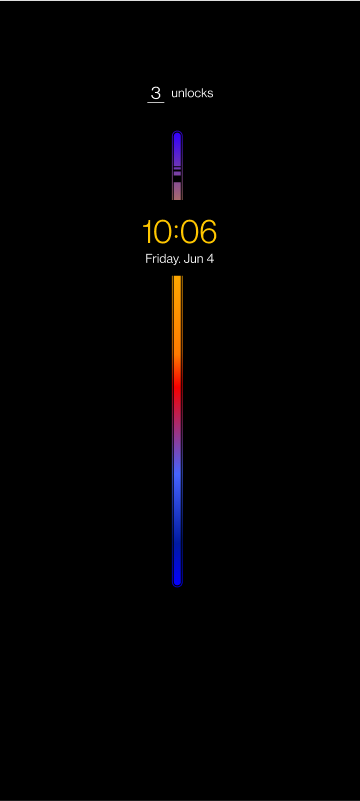
Updates in UI can be found throughout the system. Thanks to the new, concise, and comfortable Aquamorphic Design; ColorOS 13 comes with an improved layout and system hierarchy, as well as updated fonts and typography that improve readability. Overall, you’ll experience a significantly improved and much more cohesive UI in ColorOS 13, thanks to the new Card-Style Layout, Aquamorphic Design, and a new Adaptive Layout that formats your display for different screen sizes and aspect ratios.

OPPO’s new self-developed Dynamic Computing Engine is implemented in this latest update, which provides a system-level technical solution to deliver a more smooth and more stable system. It enhances the fundamental user experience by improving the scheduling of hardware resources. This results in extended battery life by achieving a better balance between high performance and low power consumption. It also allows users to keep more apps alive in the background while switching between multiple apps, without experiencing lagging or losing the status within an app. This is great news for people who do heavy multitasking on their phones!

Screenshots are getting a great new safety feature that lets you blur out avatars and usernames with one click. Auto Pixelate can automatically detect sensitive information, and it gives you the option to blur it out before posting it online or sending it to a friend. The Private Safe is now encrypted with the widely-used Advanced Encryption Standard (AES) to provide high levels of security. And the underlying privacy protection features of Android 13 are also integrated. Features like this are why ColorOS is one of the best solutions for privacy-conscious users.

ColorOS 13 Auto Pixelate

Update Schedule

OPPO has been releasing some of the best smartphones available in 2022, packed with amazing hardware and cutting-edge technology. With ColorOS 13, the potential of your OPPO device is pushed even further in the areas of productivity, customization, and entertainment. Look for an update for your OPPO phone following this beta release schedule:

  • August 2022: Find X5 Pro, Find X5
  • September 2022: Find X3 Pro, Reno8 Pro 5G
  • October 2022: Reno8 5G, Reno7 Pro 5G, Reno7 5G, Reno7, Reno6 5G, F21 Pro, K10 5G, A77 5G, A76
  • November 2022: Reno7 Z 5G, Reno6 Pro 5G, Reno6 Pro 5G Diwali Edition, Reno6 Z 5G, Reno5 Pro 5G, Reno5 Pro, F21 Pro 5G, F19+ Pro, K10, A96
  • December 2022: Find X5 Lite, Find X3 Neo 5G, Find X3 Lite 5G, Find X2 Pro, Find X2 Pro Automobili Lamborghini Edition, Find X2, Reno8, Reno8 Z 5G, Reno5 5G, Reno5 Z 5G, A94 5G, A74 5G
  • From H1 2023: Pad Air, Reno8Lite 5G, Reno7 Lite 5G, Reno7 A, Reno6, Reno6 Lite, Reno5, Reno5 Marvel Edition, Reno5 F, Reno5 Lite, Reno5 A, F19 Pro, F19, F19s, A95, A94, A77, A74, A57, A57s, A55, A54 5G, A53s 5G, A16s

* Note: OPPO Notes are available on certain models with ColorOS13.0 and on the rest with further OTA updates. Please refer to the actual model introduction for more information.

We thank OPPO for sponsoring this post. Our sponsors help us pay for the many costs associated with running XDA, including server costs, full time developers, news writers, and much more. While you might see sponsored content (which will always be labeled as such) alongside Portal content, the Portal team is in no way responsible for these posts. Sponsored content, advertising and XDA Depot are managed by a separate team entirely. XDA will never compromise its journalistic integrity by accepting money to write favorably about a company, or alter our opinions or views in any way. Our opinion cannot be bought.

The post These New OPPO ColorOS 13 Features Will Boost Your Productivity appeared first on XDA.


from XDA https://ift.tt/t23UjVB
via IFTTT

Samsung patent shows off transparent display technology

It’s hard to believe but the first Samsung Galaxy Z Fold was released close to three years ago. Before 2019, a device with a foldable display was something you’d only see in technology demos or science fiction movies. In 2022, foldable smartphones are produced by nearly every major manufacturer, and it’s become quite common. So we ask ourselves, what’s next? A recent Samsung patent application has popped up on the World Intellectual Property Organization (WIPO) website and shows off a display that could give us a potential look at the smartphones of the future.

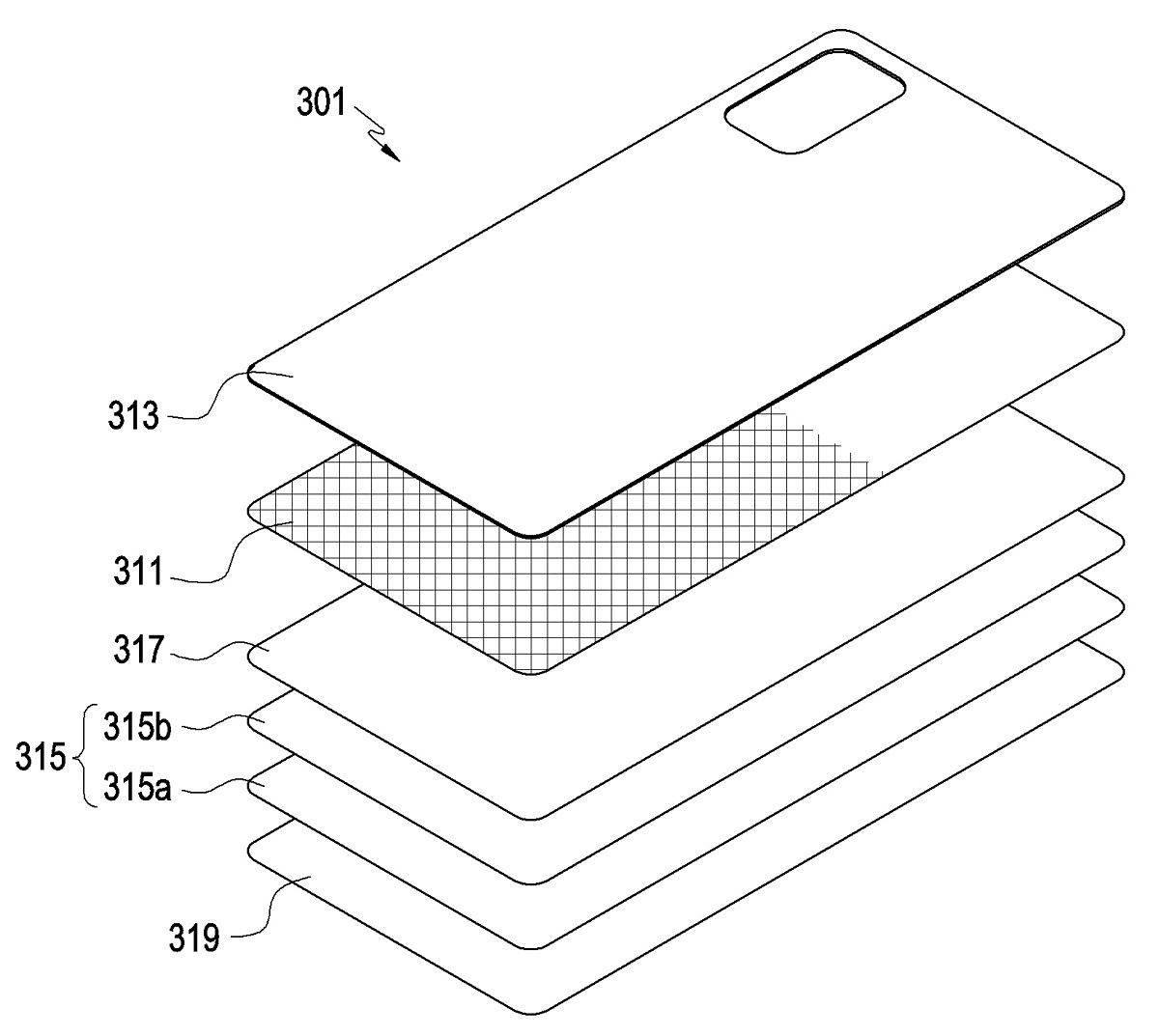
Samsung patent for new display technology Samsung patent for new display technology

While the wording in the patent sounds complex, mainly because it’s through an English translation, the folks at SamMobile seem to have broken things down, giving us a better idea of the technology involved. Looking at the images, there is a mobile phone with what looks like a secondary display on its rear. While this kind of technology has been seen before, Samsung’s version in the patent application is slightly different. Samsung’s rear display panel is apparently transparent and can work like a standard display or in a more subdued role like an always-on display. The panel can be customized to display different designs, device information, and more. Furthermore, when the display is paired with a camera, it can also display a live view feed from the unit.

Samsung did file this application, but there’s no telling how far the company has gone with it. But, of course, this is Samsung and we know that they are working on exciting things when it comes to displays. The company recently showcased some of its future technologies, showing off foldable, rollable, and even expandable displays. You can see some of these in the video above. So while the patent filing may never come to fruition, the future of Samsung devices looks bright.


Source: World Intellectual Property Organization
Via: SamMobile

The post Samsung patent shows off transparent display technology appeared first on XDA.


from XDA https://ift.tt/NzDsU5T
via IFTTT

Samsung patent shows off transparent display technology

It’s hard to believe but the first Samsung Galaxy Z Fold was released close to three years ago. Before 2019, a device with a foldable display was something you’d only see in technology demos or science fiction movies. In 2022, foldable smartphones are produced by nearly every major manufacturer, and it’s become quite common. So we ask ourselves, what’s next? A recent Samsung patent application has popped up on the World Intellectual Property Organization (WIPO) website and shows off a display that could give us a potential look at the smartphones of the future.

Samsung patent for new display technology Samsung patent for new display technology

While the wording in the patent sounds complex, mainly because it’s through an English translation, the folks at SamMobile seem to have broken things down, giving us a better idea of the technology involved. Looking at the images, there is a mobile phone with what looks like a secondary display on its rear. While this kind of technology has been seen before, Samsung’s version in the patent application is slightly different. Samsung’s rear display panel is apparently transparent and can work like a standard display or in a more subdued role like an always-on display. The panel can be customized to display different designs, device information, and more. Furthermore, when the display is paired with a camera, it can also display a live view feed from the unit.

Samsung did file this application, but there’s no telling how far the company has gone with it. But, of course, this is Samsung and we know that they are working on exciting things when it comes to displays. The company recently showcased some of its future technologies, showing off foldable, rollable, and even expandable displays. You can see some of these in the video above. So while the patent filing may never come to fruition, the future of Samsung devices looks bright.


Source: World Intellectual Property Organization
Via: SamMobile

The post Samsung patent shows off transparent display technology appeared first on XDA.


from XDA https://ift.tt/YawEJyO
via IFTTT