LightBlog

mardi 23 août 2022

Samsung Galaxy A53 5G vs Motorola Moto G Stylus 5G (2022): The battle of US mid-rangers

For some time now, the Samsung Galaxy A53 5G has been easy to recommend to anyone looking to buy a great mid-range smartphone in the US. But the arrival of Motorola’s stylus-equipped Moto G Stylus 5G (2022) has shaken up things in the sub-$500 smartphone segment. Both phones are similarly priced and offer an enticing hardware package. The Galaxy A53 has a beautiful design, a high refresh rate AMOLED display, and capable cameras. The Moto G Stylus 5G has a large display, a built-in stylus, a triple camera setup, and a clean software experience. But which one is the best mid-ranger? We find out in this Galaxy A53 vs Moto G Stylus 5G face-off.

Navigate this article:

Samsung Galaxy A53 5G Vs Motorola Moto G Stylus 5G: Specifications

Samsung Galaxy A53 5G Motorola Moto G Stylus 5G
Build
  • Plastic body
  • Gorilla Glass 5 front panel
  • IP67 water/dust resistance
  • Plastic body
  • Glass front panel
  • Water-repellent coating
Dimensions and Weight
  • 159.6 x 74.8 x 8.1mm
  • 189 g
  • 168.9 x 75.8 x 9.3 mm
  • 215g
Display
  • 6.5-inch Super AMOLED
  • 120Hz refresh rate
  • 1080 x 2400 pixels
  • 6.8-inch LCD
  • 120Hz refresh rate
  • FHD+ (1080 x 2460)
  • 450 nits (typ) max brightness
SoC Samsung Exynos 1280 Qualcomm Snapdragon 695 5G
RAM and Storage
  • 6GB/8GB RAM
  • 128GB/256GB internal storage
  • microSD card slot (up to 1TB)
  • 8GB RAM
  • 256GB internal storage
Battery and Charging
  • 5,000mAh battery
  • 25W Super Fast Charging
  • No charger in the box
  • No wireless charging
  • 5,000mAh
  • 10W wired charger in the box
  • Max Charging:
    • Unlocked variant: 15W
    • Verizon variant: 18W
Security Optical in-display fingerprint sensor Side-mounted fingerprint scanner
Rear Camera(s)
  • 64MP ƒ/1.8 main camera (with OIS)
  • 12MP ƒ/2.2 Ultra-wide
  • 5MP ƒ/2.4 Depth sensor
  • 5MP ƒ/2.4 Macro
  • 50MP main camera with OIS
  • 8MP ultra-wide 118° FoV
  • 2MP depth sensor
Front Camera(s)
  • 32MP ƒ/2.2
  • 8MP, f/2.0, 1.12µm pixel size
Ports
  • USB Type-C
  • No headphone jack
  • USB-C
  • 3.5mm headphone jack
Connectivity
  • 5G
  • LTE
  • Wi-Fi 802.11 a/b/g/n/ac (2.4G+5GHz)
  • Bluetooth 5.1
  • NFC (market dependent)
  • 5G
  • LTE
  • Wi-Fi 802.11 a/b/g/n/ac (2.4G+5GHz)
  • Bluetooth 5.1
  • NFC
Software
  • One UI 4.1 (Android 12)
    • 4 years of Android OS updates
    • 5 years of security updates
  • Android 12
    • One major OS update
    • 3 years of bi-monthly Android security patch updates
Price $449.99 $449.99

Design & Display

The Galaxy A53 and the Moto G Stylus 5G share some design similarities. Both phones have a plastic frame and plastic back that’s coated to look like glass. They also have a hole-punch display. Speaking of the Galaxy A53, it opts for a boxy design with flat chassis and a flat back. It has a large camera module that protrudes slightly from the back, though not as much as its predecessor.

Galaxy A53

By comparison, the Moto G Stylus 5G is more curvy and rounded. Its camera bump is also more discreet than the Galaxy A53.

The Moto G stylus rests on a table with words written on the screen.

The Galaxy A53 flaunts a 6.5-inch FHD+ AMOLED display with a 120Hz refresh rate. Meanwhile, the Moto G Stylus 5G has a 6.8-inch IPS LCD with FHD+ resolution and a 120Hz refresh rate. Although both panels offer similar resolution and refresh rate, the Galaxy A53’s panel is superior. Being an AMOLED panel, it offers more vivid colors and better contrast than the LCD panel of the Moto G Stylus 5G. It also fares better under direct sunlight as it can reach up to 800 nits of brightness compared to 562 nits of the Moto G Stylus 5G.

Cameras

The camera module of the Moto G Stylus 5G on a table.

Moving to the cameras, the Galaxy A53 comes equipped with a quad-camera setup, which is headlined by a 64MP main camera with OIS. The other three shooters include a 12MP ultra-wide camera and two 2MP macro and depth sensors. The Moto G Stylus has a triple camera system, comprising a 50MP main shooter, an 8MP ultra-wide camera, and a 2MP depth sensor. As for selfies and video calls, the Galaxy A53 has a 32MP camera while the Moto G Stylus 5G has a 16MP shooter. On technical merits, the Galaxy A53 has a better camera system. In good lighting, both phones are capable of producing decent shots with rich colors and ample details from their main camera. However, in low-light and dark conditions, the Galaxy A53 produces better results. And it also has a dedicated night mode for pulling in more light when shooting dark scenes.

As we noted in our review, the Moto G Stylus’ ultra-wide camera is a bit of a miss and hit. In many situations, it appears a lot darker than the main camera. The ultra-wide camera on the Galaxy A53 is also okay at best. It produces soft images in the daytime and exhibits quite a bit of noise at night.

In terms of video recording, the Moto G Stylus 5G lags behind the competition, topping out st 1080p 60fps. The Galaxy A53 can shoot 4K 30fps videos though you’ll need a tripod to get usable footage as there’s no stabilization at all when shooting at this resolution.

The Galaxy A53 wins the camera round, as it has a more versatile camera system and better low-light performance.

Galaxy A53: Camera samples
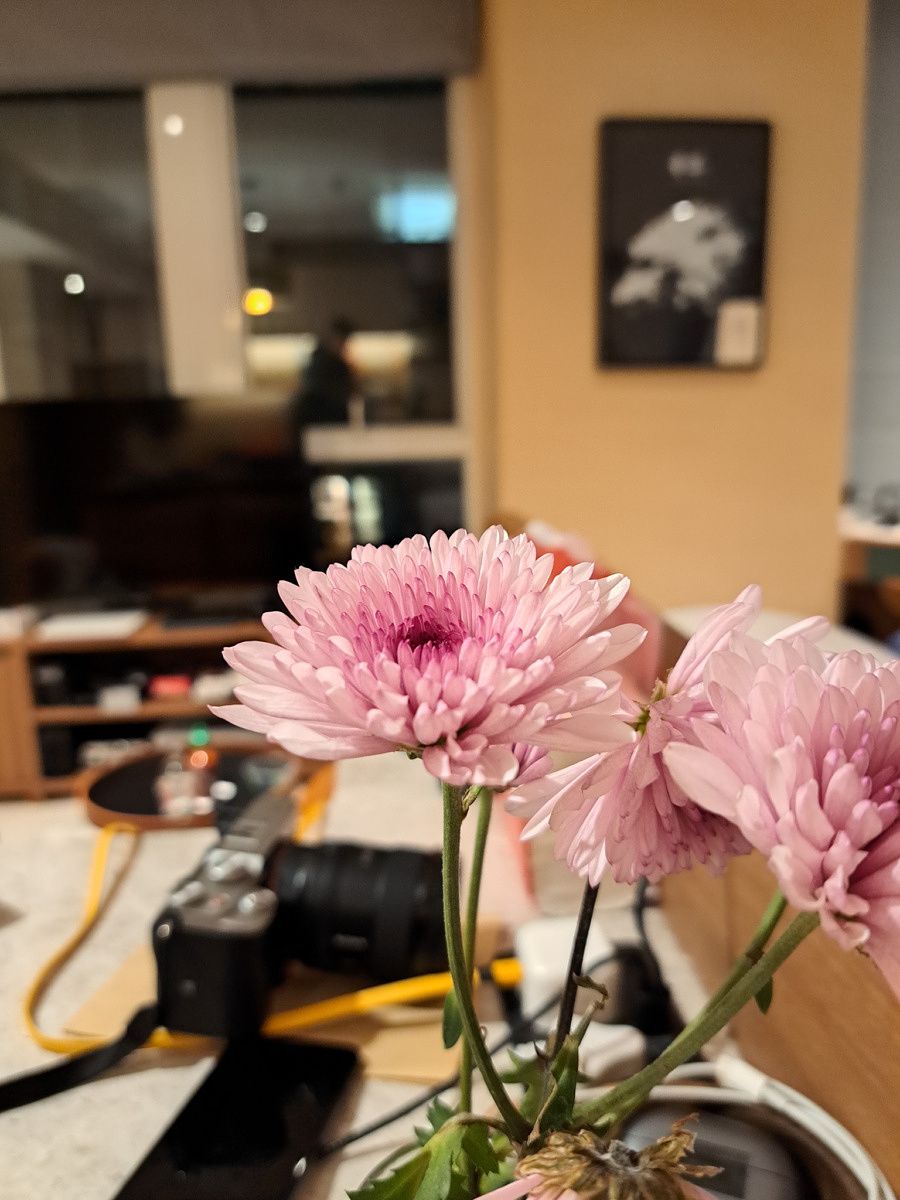
Galaxy A53, main camera Galaxy A53, main camera Galaxy A53, main camera Galaxy A53, ultra-wide Galaxy A53, selfie Galaxy A53, main camera

Moto G Stylus 5G (2022) camera samples

Moto G Stylus 5G (2022)

Performance

The Galaxy A53 packs the home-brewed Exynos 1280 chipset, featuring two Cortex-A78 performance cores clocked at 2.4GHz, and six Cortex-A55 efficiency cores running at 2.0GHz speed. The Moto G Stylus 5G is powered by Qualcomm’s mid-range Snapdragon 695 5G SoC, employing two Cortex-A78 derivatives cores clocked at 2.2GHz and six Kryo 660 Silver cores (Cortex-A55) clocked at 1.7GHz. On the face of it, the Exynos 1280 is better as it has faster clock speeds, though this difference is small and unlikely to make a huge difference in real-world performance.

In day-to-day tasks, both phones perform just fine though they’re obviously not as fast or fluid as expensive flagships.

Neither phone is a gaming champion. Graphics-intensive games such as Call of Duty: Mobile and Genshin Impact run fine at low settings but become choppy when you pushed to medium or high settings.

The Moto G Stylus 5G comes in a single variant with 8GB of RAM and 256GB of storage. The Galaxy A53 gives you multiple configurations to choose from: 6GB/8GB RAM and 128GB/256GB storage.

Battery, software, and misc.

The Galaxy A53 and the Moto G Stylus 5G both pack 5,000mAh batteries and should easily last you a full day on a single charger. However, both phones differ when it comes to the charging speed. The Galaxy A53 supports 25W fast charging though it doesn’t come with the charger inside the box. The charging speed on the Moto G Stylus 5G tops out at 15W. But for some strange reason, Motorola bundles a super-slow 10W charger inside the box. We can only imagine how much time it will take to charge a 5,000mAh battery using a 10W charger.

Galaxy A53's all screen design.

Galaxy A53 display

On the software front, the Galaxy A53 and Moto G Stylus 5G both run Android 12. However, the software experience on both phones is night and day. The Galaxy A53 runs the company’s highly customized One UI 4 skin while the Moto G Stylus 5G offers a near-stock version of Android with only a handful of tweaks on top.

The Moto G Stylus 5G stands on a table with two lego minifigs.

In terms of software support, the Galaxy A53 is leagues ahead of the Moto G Stylus 5G. It’s guaranteed to receive major OS updates for four years and five years of monthly security updates. This even beats Google’s top flagships which are promised to get three years of OS updates. The Moto G Stylus 5G, on the other hand, only promises 1 major OS update and three years of bi-monthly security updates. In other words, it won’t get any new OS updates beyond Android 13. The Galaxy A53 though should get OS updates till Android 16.

One major advantage the Moto G Stylus 5G has over the Galaxy A53 is stylus support. It comes with a built-in passive stylus and can be used to draw, take notes, annotate screenshots, or open an app. However, it’s not impressive and feature-packed as S-Pen, and as Adam Doud noted in his review “feels less intentional and polished.” But still, if you wanted a phone with stylus support without having to spend $1,200, the Moto G Stylus 5G is one of the few options on the market.

Galaxy A53 5G vs Moto G Stylus 5G: Which one should you buy?

Galaxy A53

The Galaxy A53 5G and the Motorola Moto G Stylus 5G are currently two of the best mid-range smartphones in the US. The Galaxy A53 was launched at $499 but it has come down to $449. And you can bring it down even further using deals. The Moto G Stylus 5G also has a maximum retail price of $499, but as of writing this article, it’s currently available on Amazon for $349.

    Samsung Galaxy A53 5G
    The Galaxy A53 offers a beautiful 120Hz AMOLED display, Exynos 1280 SoC, and a large 5,000mAh battery.
    Motorola Moto G Stylus 5G (2022)
    The Moto G Stylus 5G comes with a built-in passive stylus, a triple camera system, and a large 5,000mAh battery.

While both are great mid-range smartphones, we think the Galaxy A53 5G is a better smartphone overall. It has a superior display, a more versatile camera and better l0w-light camera performance, and significantly better software support. If you have the budget for it, the Galaxy A53 is what you should ideally be purchasing.

However, if you can snag the Moto G Stylus 5G at $349 and don’t mind just 1 year of OS updates, then it’s a much better value than the Galaxy A53. It’s also a no-brainer if you’re specifically looking for a phone with stylus support under $500. Not to mention the Moto G Stylus offers 8GB of RAM and 256GB of storage while the base model of the Galaxy A53 gives you 6GB RAM and 128GB of storage, making the deal even more enticing.

The post Samsung Galaxy A53 5G vs Motorola Moto G Stylus 5G (2022): The battle of US mid-rangers appeared first on XDA.


from XDA https://ift.tt/VvnfG9E
via IFTTT

Does the Google Pixel 6a have 5G support?

Google’s new Pixel 6a smartphone offers a lot of great features for the price and that includes 5G support. Even though it doesn’t have 5G in its name like the Pixel 5a 5G did, the phone does support 5G connectivity. That’s because it’s powered by Google Tensor — the same chipset used in Pixel 6 and the Pixel 6 Pro, which includes a modem that supports 5G. So to answer the main question, yes, the Google Pixel 6a supports 5G. That’s true for both unlocked and the carrier-locked models of the phone, so you will be able to connect to 5G networks regardless of the variant you pick. The 5G support on the Pixel 6a, however, comes with a catch.

Google Pixel 6a 5G support: Sub-6 GHz and mmWave

There are different types of 5G networks out there and only certain phones tend to work with all of them. Similarly, all models of the Pixel 6a don’t work with all 5G networks out there. The unlocked variants of the Google Pixel 6a only work with sub-6 5G networks. Even carrier-locked versions sold by some of the major US carriers out there including T-Mobile and AT&T only support sub-6 5G, even though they’re branded differently. Verizon, for instance, brands its Sub-6 5G as ‘Nationwide 5G’, AT&T simply calls it ‘5G’ whereas T-Mobile calls it the ‘Extended range 5G’.

Those looking to get their hands on a Pixel 6a with mmWave 5G will have to turn to Verizon. The mmWave 5G variant costs $50 more than the regular models, meaning you’ll have to pay $499 for the Verizon Pixel 6a instead of the standard $449 price tag. The Sub-6 5G should be enough for most people, but it’s nice to have the mmWave 5G support if you happen to live in a major city and want the fastest speeds possible.


    Google Pixel 6a
    The Google Pixel 6a comes with 5G support but not all models support the speedy mmWave 5G networks.

If you’re shopping for a Pixel 6a and are wondering where to get the best deals, then be sure to check out our collection of the best Pixel 6a deals to get the best price for it online. You can also stop by our collection of the best Pixel 6a cases to get a good quality case for your device.

The post Does the Google Pixel 6a have 5G support? appeared first on XDA.


from XDA https://ift.tt/E5M0RS7
via IFTTT

How to insert a SIM card in your Android phone

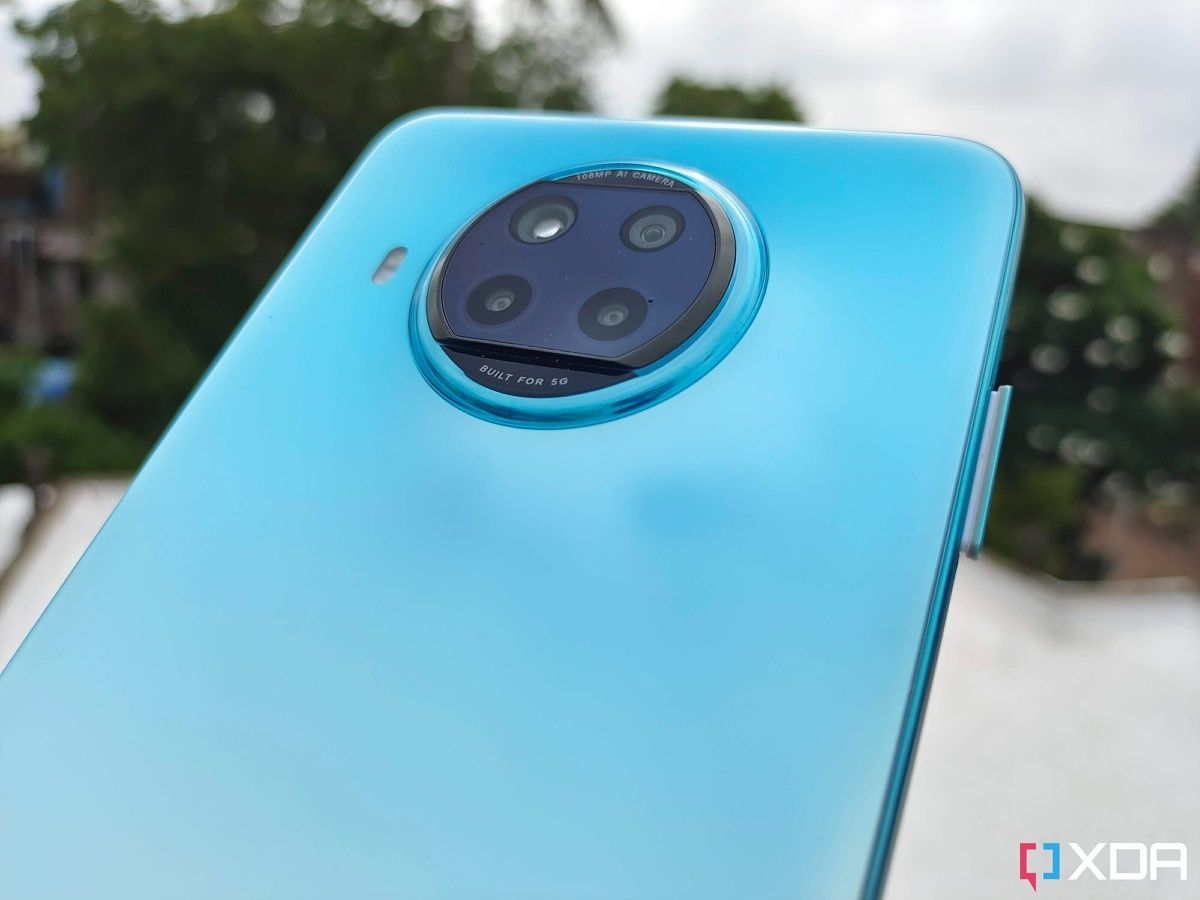
After unboxing your brand new Android smartphone, the first thing you would want to do is insert a SIM card. That way, you’ll be ready to start making calls and have a working data connection once you complete the initial setup. And if you don’t have a WiFi connection, you’d also need a SIM card and a data connection to help complete the initial setup process. Back in the day, inserting a SIM card required removing the back panel as the slot was located under the battery. Unless you have an older smartphone, you don’t usually need to do that anymore.

Almost all new smartphones nowadays come with a small dedicated SIM tray that’s placed on the side, top, or bottom of the phone. Inserting a SIM card into a smartphone is a very straightforward process, but it may feel a bit confusing to some as there are different SIM cards, and the process varies across Android OEMs. Follow these steps to properly insert a SIM into your Android smartphone. If you have an iPhone then refer to this guide on how to insert a SIM into your iPhone.

  • Switch off your smartphone.
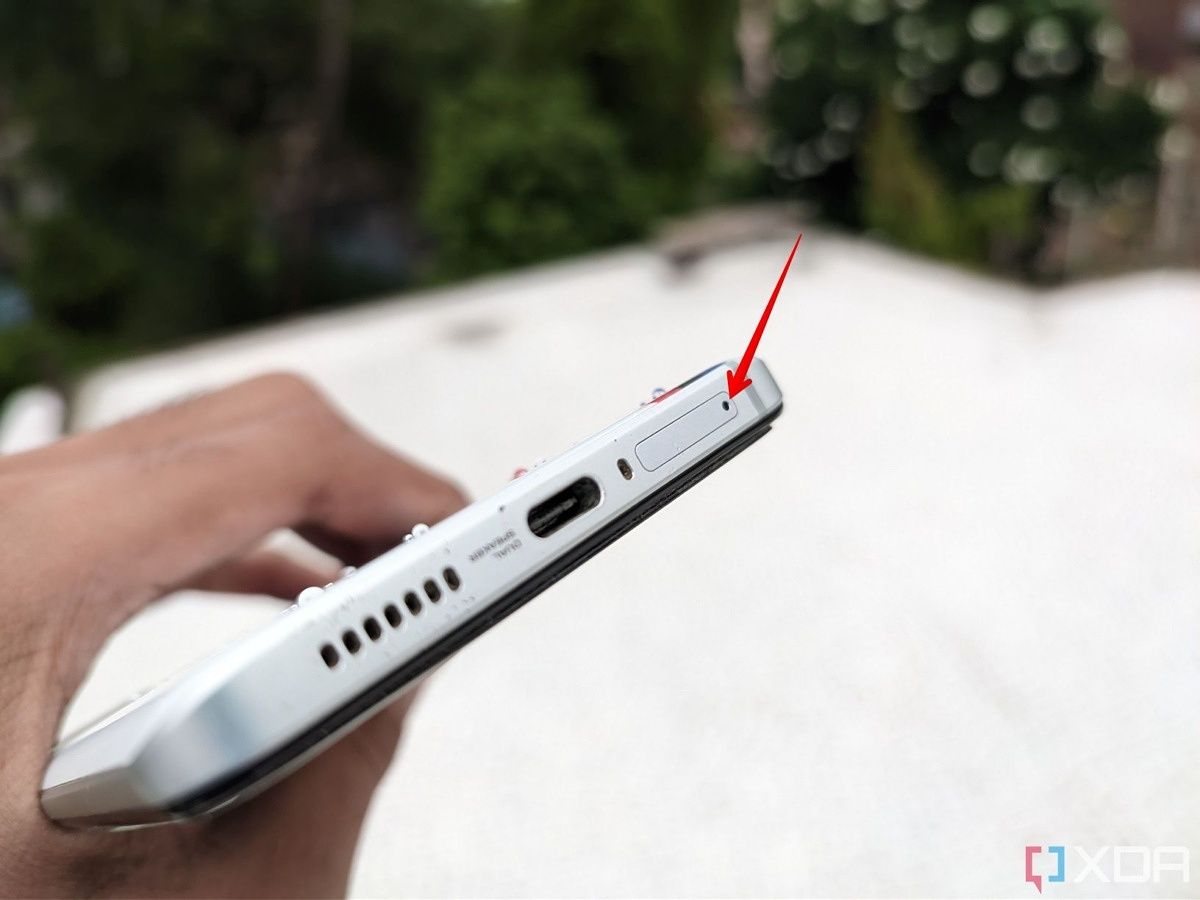
  • The next step is to locate the SIM tray. If your phone has a case, make sure it’s removed. Depending on your smartphone, it may be found on the side, at the top, or at the bottom.  You’ll see a tiny hole next to the tray, as shown in the image below.
  • Note: Most phones also have microphone holes close to the SIM tray, so ensure you aren’t misidentifying the two. If the two holes are close by, the SIM tray hole will be part of the SIM tray design.
The SIM tray on the left side of the smartphone The bottom side of the phone with the SIM tray
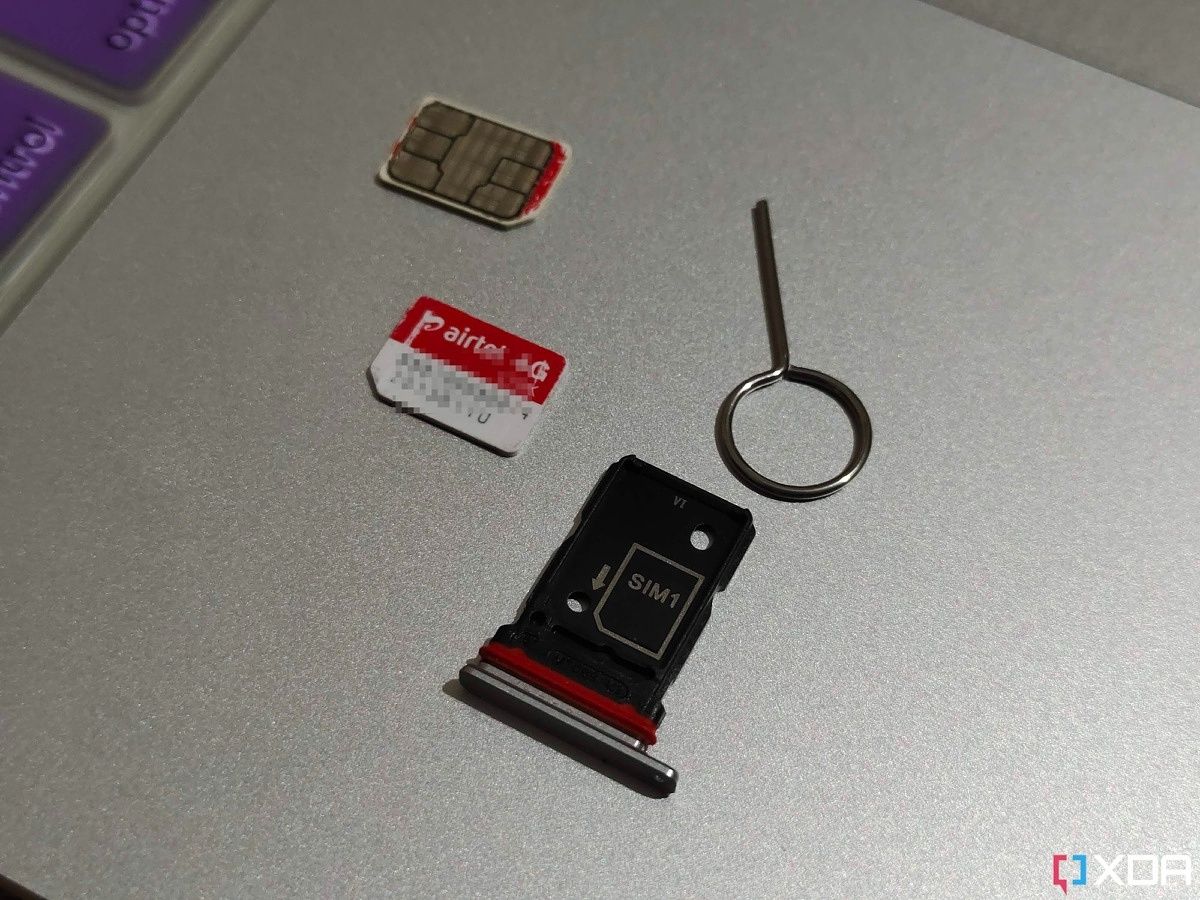
  • You’ll need the SIM ejection tool to open the tray. You can find the tool inside the smartphone box. If you don’t have it, you can use a paper clip or pin.

SIM ejection tool

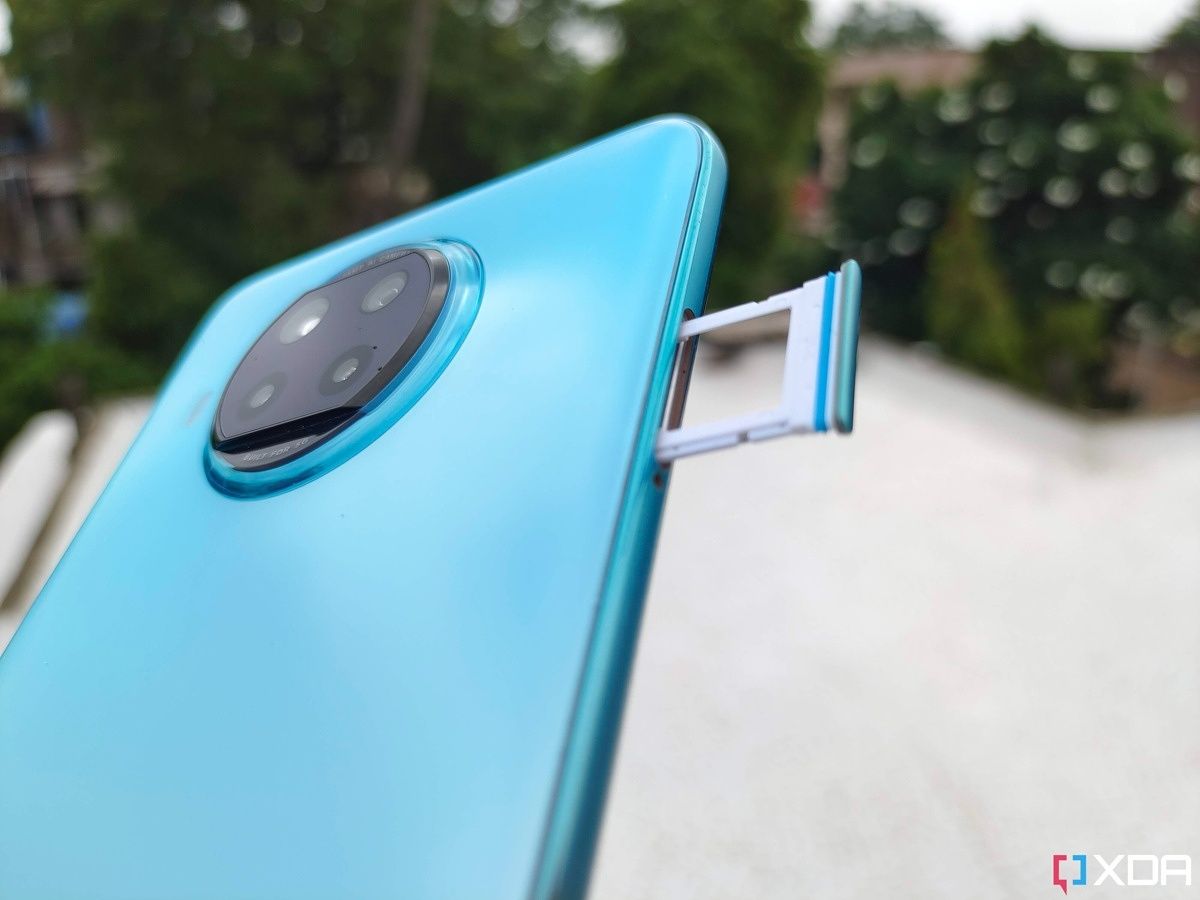
  • Insert the SIM tool or paperclip inside the hole next to the tray and press it with your index finger to pop the tray out. Don’t apply too much force. The tray should pop out easily.
SIM tray popping out of a smartphone SIM tray popped out of a smartphone
  • Pull out the SIM tray from the smartphone and place it on a clean, solid surface. Also, note down the position of the tray. This will make it easier to reinsert it.

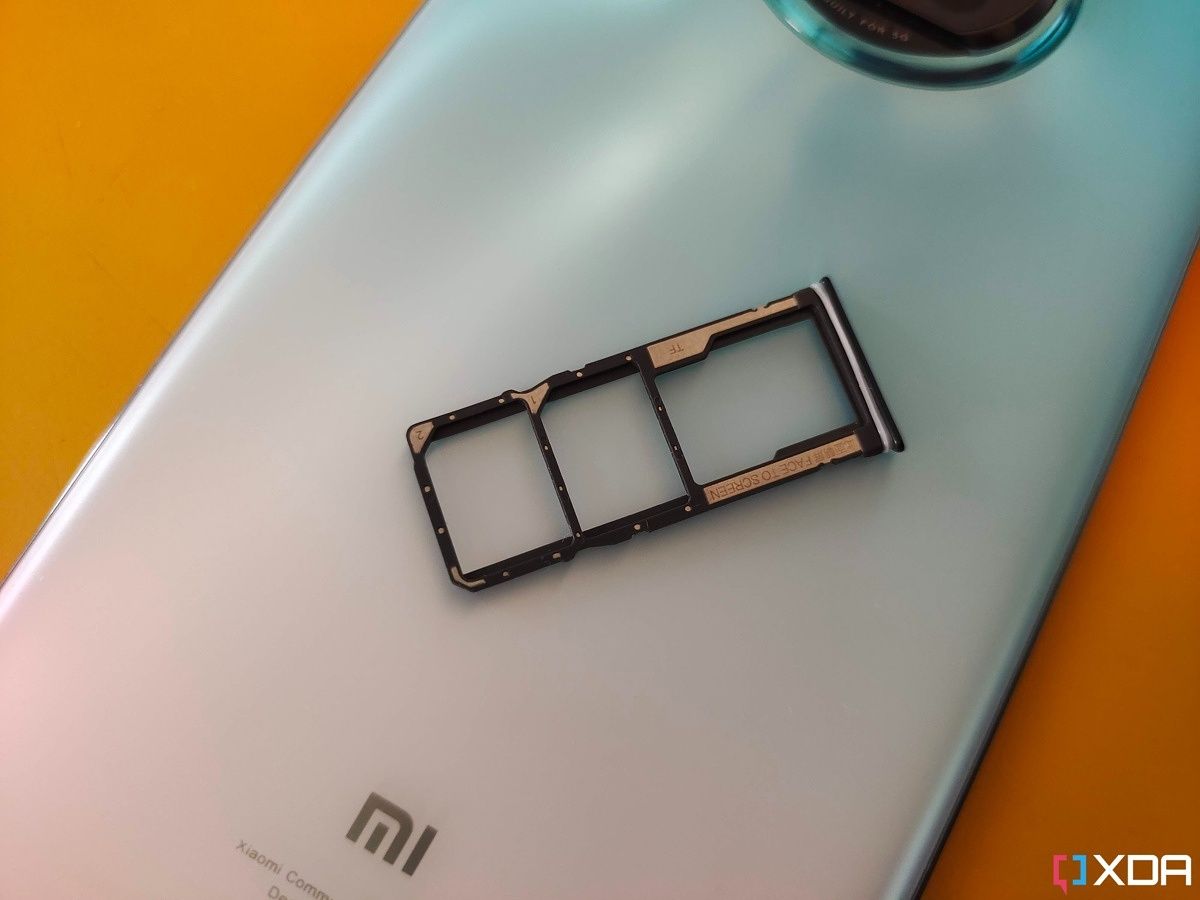
SIM tray laying on smartphone's back

  • Depending on your phone, you may need a Nano or micro SIM. Almost all modern Android smartphones use Nano SIM.
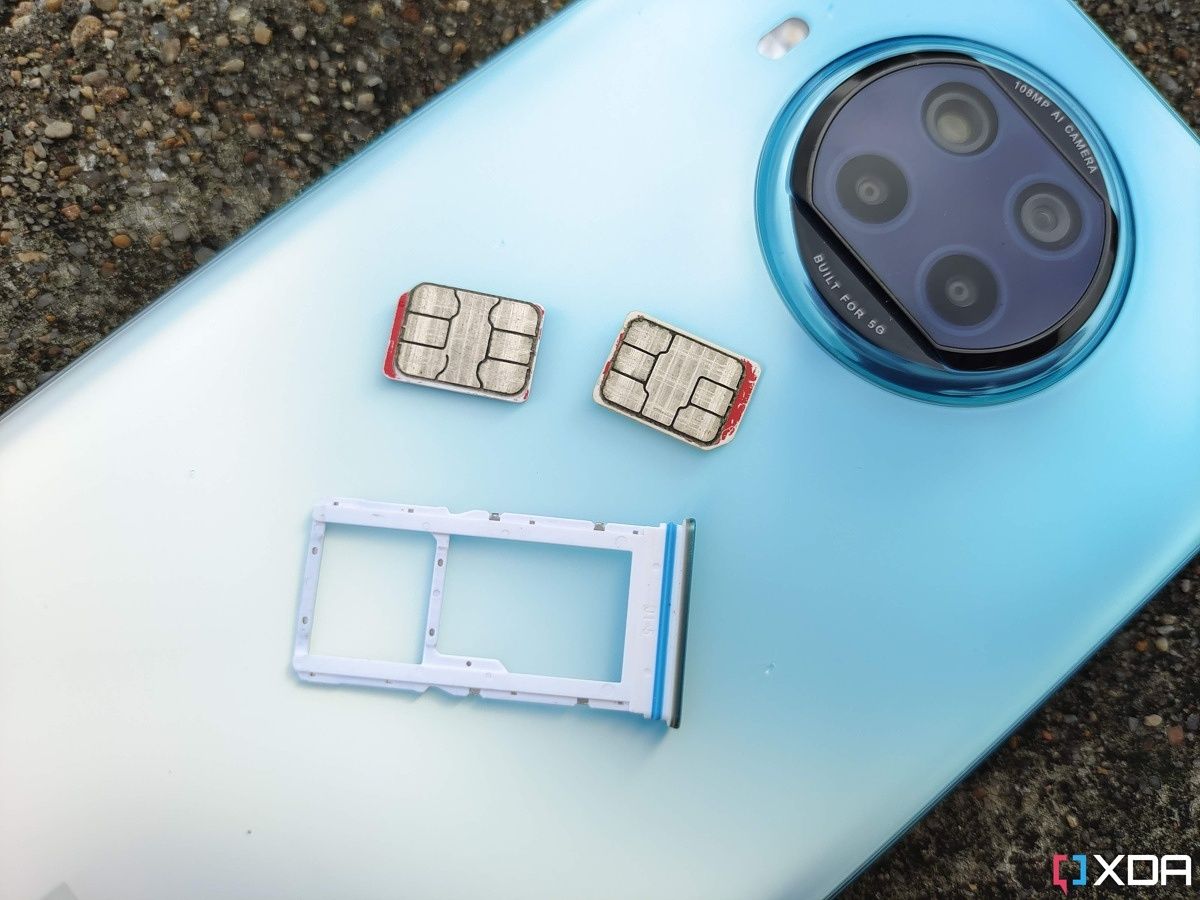
  • If your phone is dual-SIM, the SIM tray will have two slots. Some Android phones also have a hybrid SIM tray (see the first picture below), which can accommodate two SIM cards or a single SIM and a microSD card.
SIM card tray with a dedicated microSD slot laying on a phone's back Nano SIM tray sitting next to two SIM cards and a ejection tool
  • Place the SIM card in slot 1 with the logo up and gold/bronze chip side facing down. Some Android phones use a SIM tray that can hold two SIMs back to back (see the image below). In that case, place the SIM card with the gold/bronze chip side facing up and the logo down. Note that the card will only fit one way.
A streched out palm displaying a SIM tray with two cards loaded A SIM tray laying on the back on the a smartphone with two SIM cards loaded
  • Now, gently push the SIM tray back into the smartphone. The tray should slide in easily without any resistance. Don’t apply force. If it’s not going in or stuck, it’s either that you’re pushing the tray in the wrong direction or you haven’t placed the SIMs correctly. In that case, gently pull the tray out. Ensure the SIM cards are properly fit and flat to the tray.

A SIM tray popping out of a smartphone

  • After reinserting the SIM tray, power on the smartphone.

If you followed the above steps correctly, you should see the carrier information and signal bars appear on the screen. That’s it. You’re now ready to start making calls and using mobile data. Many Android smartphones nowadays come with an eSIM or embedded SIM. In that case, no physical swapping of SIM cards is required.

The post How to insert a SIM card in your Android phone appeared first on XDA.


from XDA https://ift.tt/CmfoaJd
via IFTTT

OnePlus 10 Pro vs Samsung Galaxy S22 Plus: Which flagship phone to buy in 2022?

The OnePlus 10 Pro delivers a solid package featuring the latest hardware, a beautiful 6.7-inch AMOLED display with a 120Hz refresh rate, super-fast charging speeds, and more. It undercuts a lot of flagship devices with its $899 price tag in the US and is quite capable of locking horns with many top-tier Android devices out there. The Galaxy S22 Plus is also a direct competitor to the OnePlus 10 Pro as they both are powered by the same chipset and there’s only a $100 price difference. There are some interesting differences between the two, so let’s take a look at the OnePlus 10 Pro vs Samsung Galaxy S22 Plus matchup to see which one’s better to buy in 2022.

Navigate this article:

OnePlus 10 Pro vs Samsung Galaxy S22 Plus: Specifications

Let’s take a quick look at the specifications to see what each of these phones bring to the table:

Specification OnePlus 10 Pro Samsung Galaxy S22 Plus
Build
  • Aluminum mid-frame
  • Gorilla Glass 5 back
  • Gorilla Glass Victus front
  • IP68 rating (only on T-Mobile models)
  • Armor aluminum frame
  • Corning Gorilla Glass Victus+
  • IP68 dust and water resistance
Dimensions & Weight
  • 163 x 73.9 x 8.55 mm
  • 201g
  • 157.4 x 75.8 x 7.6mm
  • 196g
Display
  • 6.7-inch QHD+ 120Hz Fluid AMOLED
  • 1,440 x 3,216 pixels
  • Variable refresh rate between 1Hz to 120Hz
  • 1300 nits peak brightness
  • HDR10+ certified
  • 6.6-inch Dynamic AMOLED 2X
  • FHD+ (1080 x 2340)
  • 10-120Hz Adaptive Refresh Rate
  • 1750 nits
SoC
  • Qualcomm Snapdragon 8 Gen 1 SoC
  • Qualcomm Snapdragon 8 Gen 1
  • Exynos 2200
RAM & Storage
  • 8GB/12GB RAM
  • 128GB/256GB/512GB UFS 3.1 storage
  • 8GB + 128GB
  • 8GB + 256GB
Battery & Charging
  • 5,000mAh
  • 65W wired fast charging (North America)
  • 80W wired fast charging (Everywhere outside of North America)
  • 50W wireless charging
  • Reverse wireless charging
  • Charger included in box
  • 4,500mAh
  • 45W wired fast charging support
  • 15W wireless charging support
  • 4.5W reverse wireless charging
  • Charger not included
Security Optical in-display fingerprint scanner Ultrasonic in-display fingerprint sensor
Rear Camera(s)
  • Primary: 48MP wide, f/1.8, 1/1.33″, OIS
  • Secondary: 50MP ultra-wide, f/2.2/150˚ FOV
  • Tertiary: 8MP telephoto, 3.3x optical zoom
  • Hasselblad color calibration
  • Primary: 50MP, 1.0µm, 85° FoV, 23mm, f/1.8, DPAF, OIS
  • Ultra-wide: 12MP, 1.4µm, 120° FoV, 13mm, f/2.2
  • Telephoto: 10MP, 1.0µm, 36° FoV, 69mm, f/2.4, OIS, 3x optical zoom
Front Camera(s) 32MP, f/2.2/0.8µm 10MP, 1.22µm, f/2.2, 80° FoV
Port(s)
  • USB Type-C
  • No headphone jack
  • No microSD card slot
  • USB Type-C
  • No headphone jack
  • No microSD card slot
Audio Stereo speakers Stereo speakers
Connectivity
  • 5G (mmWave) for almost all regions and carriers except AT&T in the US
  • Wi-Fi 6 (802.11ax) with 2×2 MIMO
  • Bluetooth 5.2
  • NFC
  • GPS, Galileo, GLONASS, BeiDou
  • 5G (mmWave/sub6)
  • 4G LTE
  • Wi-Fi 6E
  • Bluetooth 5.2
  • NFC
Software
  • China: ColorOS 12.1 based on Android 12
  • Global: OxygenOS 12.1 based on Android 12
  • One UI 4.1 based on Android 12
Other Features
  • Dual physical SIM
  • Alert slider
  • Three major Android OS updates promised
  • Four years of security patches
  • Promised four Android OS upgrades
  • Promised five years of security patches

Design and Display

Both the OnePlus 10 Pro and the Samsung Galaxy S22 Plus are two of the best Android phones you can buy right now, and we think they both have attractive designs. The OnePlus 10 Pro looks different from its predecessors mainly because of the massive camera island at the back. It’s a rectangular housing that blends seamlessly into the mid-frame, and it carries the Hasselblad branding and four circular cutouts for the camera lenses and the LED flash. There are some mixed opinions about the way this camera housing looks, but we think it looks good for the most part albeit a bit busy.

OnePlus 10 Pro

OnePlus 10 Pro’s camera island is definitely more prominent on the Forest Emerald variant of the phone due to the contrasting shades. The Volcanic Black colorway does a better job of blending it with the back panel. The Samsung Galaxy S22 Plus, on the other hand, looks very similar to its predecessor, the Galaxy S21 Plus. We get a glass back panel this time around but the overall aesthetics remains the same. It’s got flat panels with rounded edges along with the contoured camera bump that blends into the aluminum mid-frame. The Galaxy S22 Plus is available to purchase in Phantom Black, Green, Phantom White, Pink Gold, Graphite, Cream, Sky Blue, and Violet colorways. They all look and feel quite premium, so it comes down to your personal preference.

Galaxy S22 Plus in four colors

The Galaxy S22 Plus is both thinner and lighter compared to the OnePlus 10 Pro as you can see from the dimensions mentioned in the specs sheet above. The overall footprint of the Galaxy S22 Plus is also slightly smaller, so you’re better off buying it over the OnePlus 10 Pro if you happen to have smaller hands. In terms of durability, both phones use Gorilla Glass panels for both the front and the back, although the Galaxy S22 Plus uses the slightly better Gorilla Glass Victus Plus. You also get an aluminum mid-frame on both phones, so they’re equally sturdy. Only the T-Mobile variants of the OnePlus 10 Pro come with an official IP68 rating, whereas all models of the Galaxy S22 Plus have an IP68 rating for dust and water resistance.

Front of smartphone screen with camera cutout

Besides that, both phones have a USB-C port at the bottom along with the speaker grills. There’s no headphone jack on these phones, and you can’t add a microSD card to expand the storage either. The only notable addition that the OnePlus 10 Pro brings over the Galaxy S22 Plus is the alert slider, which is somewhat of a dying breed in itself as none of the new OnePlus devices seem to have it.

OnePlus 10 Pro in sandstone black case

Moving over to the front, you get a beautiful AMOLED display on both phones. It’s a 6.7-inch QHD+ 120Hz Fluid AMOLED on the OnePlus 10 Pro while the Galaxy S22 Plus gets a 6.6-inch Dynamic AMOLED 2X display. The OnePlus 10 Pro’s display is sharper as it supports a higher resolution, but the Galaxy S22 Plus display is brighter as it peaks at 1,750 nits compared to 1,300 nits. But they’re both equally good panels for day-to-day usage and media consumption with HDR10+ certification. The display on the OnePlus 10 Pro has curved edges, so you don’t notice the bezels on the sides. The Galaxy S22 Plus sports a flat panel and you get uniform bezels on four sides of the display. There’s a punch hole cutout on both panels for the selfie camera, but it’s more prominent on the Galaxy S22 Plus as it’s centrally aligned.

Internal hardware and cameras

The OnePlus 10 Pro is powered by the Snapdragon 8 Gen 1 chipset and it’s served with either 8GB or 12GB RAM and up to 256GB storage. In typical Samsung fashion, the Galaxy S22 Plus comes in two variants that are powered by different chipsets. You get the Snapdragon 8 Gen 1 chipset in the United States and some other regions, while others get an Exynos 2200 instead. Unlike, the OnePlus 10 Pro, however, the Galaxy S22 Plus tops out at 8GB RAM, so keep that in mind. Both phones will deliver flagship-level performance, and this is regardless of whether you buy the Snapdragon or the Exynos variant of the Galaxy S22 Plus.

Close up of camera on S22 Plus

You may see some difference in performance while running benchmarking applications or pushing them to their limits with other resource-intensive tasks. But you would hardly be able to tell the difference between the two while using them side-by-side for your day-to-day workloads. There are some reservations around the Exynos variants of the Galaxy S22 series phones, and you can learn more about them in our Snapdragon vs Exynos-powered Galaxy S22 Ultra comparison. As far as the batteries are concerned, the OnePlus 10 Pro packs a bigger 5,000mAh unit compared to the 4,500mAh cell found inside the Galaxy S22 Plus. It also earns brownie points with fast-charging support. The OnePlus 10 Pro supports 80W fast-charging (limited to 65W in North America), which is significantly faster than the 45W fast-charging support on the Galaxy S22 Plus. Wireless charging support is limited to just 15W on both phones, so no differences there.

oneplus 10 pro back camera array with phone on granite

Overall, we’re looking at the same level of performance on both phones for all practical purposes. However, the OnePlus 10 Pro handily beats the Galaxy S22 Plus with its fast-charging capabilities. Moving on to the optics, the OnePlus 10 Pro sports a 48MP main camera, a 50MP wide-angle camera with 100-degree FoV, and an 8MP telephoto lens with support for 3.3x optical zoom. OnePlus also has a couple of other interesting shooting modes including a special 150-degree wide-angle camera mode. The Samsung Galaxy S22 Plus, on the other hand, brings a 50MP primary camera, a 12MP ultrawide angle lens with 120-degree FoV, and a 10MP telephoto lens with 3x optical zoom.

You can get some great-looking photos from the primary sensors of both devices, but the other cameras on the OnePlus 10 Pro aren’t as consistent as the ones on the Galaxy S22 Plus. Both phones struggle to capture good shots in low-light but the Galaxy S22 Plus ends up producing more usable shots. You get a 10MP camera for selfies on the Galaxy S22 Plus while the OnePlus 10 Pro comes with a 32MP sensor. Both phones can shoot videos at up to 8K at 24fps, but the OnePlus 10 Pro can also do 4K at up to 120fps whereas the Galaxy S22 Plus tops out at 60fps for 4K videos.

OnePlus 10 Pro vs Samsung Galaxy S22 Plus: Software

Both phones in this comparison ship with Android 12 out of the box. You get OxygenOS 12.1 with the OnePlus 10 Pro while the Galaxy S22 Plus comes with OneUI 4.1. Both are based on Android 12, but we think Samsung’s OneUI is more stable. Not to mention, Samsung is also relatively quick to roll out updates for its devices, something which OnePlus has been struggling with lately. One of the best things about the Galaxy S22 Plus is Samsung’s promise of keeping the device updated for a long time. The Galaxy S22 Plus is promised to get four years of software updates and up to five years of security patches. OnePlus is only promising three major Android updates and up to four years of security patches for the OnePlus 10 Pro, meaning the Galaxy S22 Plus will last you longer.

OnePlus 10 Pro vs Samsung Galaxy S22 Plus: Which one should you buy?

The OnePlus 10 Pro, as we mentioned earlier, will cost you $899 in the US for the base variant with 8GB RAM and 128GB storage. The Galaxy S22 Plus starts at $999 in the US for the same memory and storage configuration. The OnePlus 10 Pro is arguably the better phone in this comparison if you’re looking to get the best value for your money. For $899, the OnePlus 10 Pro offers a sharp and beautiful AMOLED display, the same Snapdragon 8 Gen 1 processor, and insanely fast charging with a bigger battery. You also get a versatile camera setup for taking some decent-looking photos and videos. They can’t quite match the level of some of the other flagship smartphone cameras, but they get the job done.

For $100 more, the Galaxy S22 Plus offers a more refined experience overall. Samsung is using the tried and tested formula for this device, so you get a phone that looks and feels just as premium as some other expensive flagships on the market. The Galaxy S22 Plus also offers reliable performance and a great set of cameras, but it misses out on the battery front. It packs a relatively smaller battery and it doesn’t charge as fast as the OnePlus 10 Pro either. The Galaxy S22 Plus, however, excels in the software department, so keep that in mind.

Both phones have advantages and disadvantages of their own, so it comes down to your personal preference. The OnePlus 10 Pro offers the best value for money with its impressive performance, beautiful display, and fast-charging support. But the Galaxy S22 Plus might be the phone to buy if you want reliable and more consistent cameras and better software support.

    OnePlus 10 Pro
    The OnePlus 10 Pro is the latest and greatest flagship smartphone from OnePlus, and packs some of the best performing hardware into one package.
    Samsung Galaxy S22 Plus
    The Galaxy S22 Plus is one of the best Android phones you can buy if you don't want all the bells and whistles provided by the Ultra.

Regardless of the phone you choose to buy, be sure to check out our Galaxy S22 Plus deals and the OnePlus 10 Pro deals page to see if you can save some money on your purchase. You can always use some extra cash to splurge on a good quality case for your device. You can find some good options to consider in our best Galaxy S22 Plus cases and the best OnePlus 10 Pro cases articles.

The post OnePlus 10 Pro vs Samsung Galaxy S22 Plus: Which flagship phone to buy in 2022? appeared first on XDA.


from XDA https://ift.tt/aVCq0yO
via IFTTT

lundi 22 août 2022

How to receive geofence alerts through location-aware reminders on iOS

Modern life can be pretty overwhelming. We’ve got plenty of matters to tend to, and there are present-day pressures that didn’t exist in the olden days. One of the perks of living during these times, though, is the ability to utilize the technologies we have on hand to make our lives a tad easier. So whether you have a great iPhone, a versatile iPad, or one of the excellent Macs — you can program these devices to do some of the thinking on your brain’s behalf, so you don’t have to. Apple Reminders is a useful iPhone app that helps you keep track of tasks, shopping lists, etc. Though, sometimes setting the traditional reminder date/time is of no use. What if you want your iPhone to remind you of a certain thing when you enter or leave a certain neighborhood? Well, you can do that. Here’s how to receive geofence alerts through location-aware reminders on iOS.

Creating location-aware reminders on iOS

How to receive geofence alerts through location-aware reminders on iOS

  • Launch the built-in Reminders app on your iPhone.

How to receive geofence alerts through location-aware reminders on iOS

  • Click on New Reminder in the bottom left corner.

How to receive geofence alerts through location-aware reminders on iOS

  • Give the reminder a relevant title and optional notes.

How to receive geofence alerts through location-aware reminders on iOS

  • Click on the location arrow icon. It’s the second one from the left in the bottom toolbar.

How to receive geofence alerts through location-aware reminders on iOS

  • Choose between Arriving Home, Getting in Car, and Custom.

How to receive geofence alerts through location-aware reminders on iOS

  • By choosing Custom, you get to search for an address and decide if you receive the notification when arriving or leaving the place. You additionally get to expand or reduce the geofence radius depending on your preference.
  • Voila! After you create this reminder, when you leave/arrive at this location, you will receive a Reminders notification to alert you. Make sure you keep Location Services enabled and grant the Reminders app permission to access them.

Personally, I use location reminders when I’m heading to a special gathering or party. I set it to remind me of the gift I should take with me when I leave the house — just in case I forget and leave it behind at home.

What do you use location reminders for? Let us know in the comments section below.

The post How to receive geofence alerts through location-aware reminders on iOS appeared first on XDA.


from XDA https://ift.tt/x2imMfg
via IFTTT

OnePlus 10 Pro vs Samsung Galaxy S22 Plus: Which flagship phone to buy in 2022?

The OnePlus 10 Pro delivers a solid package featuring the latest hardware, a beautiful 6.7-inch AMOLED display with a 120Hz refresh rate, super-fast charging speeds, and more. It undercuts a lot of flagship devices with its $899 price tag in the US and is quite capable of locking horns with many top-tier Android devices out there. The Galaxy S22 Plus is also a direct competitor to the OnePlus 10 Pro as they both are powered by the same chipset and there’s only a $100 price difference. There are some interesting differences between the two, so let’s take a look at the OnePlus 10 Pro vs Samsung Galaxy S22 Plus matchup to see which one’s better to buy in 2022.

Navigate this article:

OnePlus 10 Pro vs Samsung Galaxy S22 Plus: Specifications

Let’s take a quick look at the specifications to see what each of these phones bring to the table:

Specification OnePlus 10 Pro Samsung Galaxy S22 Plus
Build
  • Aluminum mid-frame
  • Gorilla Glass 5 back
  • Gorilla Glass Victus front
  • IP68 rating (only on T-Mobile models)
  • Armor aluminum frame
  • Corning Gorilla Glass Victus+
  • IP68 dust and water resistance
Dimensions & Weight
  • 163 x 73.9 x 8.55 mm
  • 201g
  • 157.4 x 75.8 x 7.6mm
  • 196g
Display
  • 6.7-inch QHD+ 120Hz Fluid AMOLED
  • 1,440 x 3,216 pixels
  • Variable refresh rate between 1Hz to 120Hz
  • 1300 nits peak brightness
  • HDR10+ certified
  • 6.6-inch Dynamic AMOLED 2X
  • FHD+ (1080 x 2340)
  • 10-120Hz Adaptive Refresh Rate
  • 1750 nits
SoC
  • Qualcomm Snapdragon 8 Gen 1 SoC
  • Qualcomm Snapdragon 8 Gen 1
  • Exynos 2200
RAM & Storage
  • 8GB/12GB RAM
  • 128GB/256GB/512GB UFS 3.1 storage
  • 8GB + 128GB
  • 8GB + 256GB
Battery & Charging
  • 5,000mAh
  • 65W wired fast charging (North America)
  • 80W wired fast charging (Everywhere outside of North America)
  • 50W wireless charging
  • Reverse wireless charging
  • Charger included in box
  • 4,500mAh
  • 45W wired fast charging support
  • 15W wireless charging support
  • 4.5W reverse wireless charging
  • Charger not included
Security Optical in-display fingerprint scanner Ultrasonic in-display fingerprint sensor
Rear Camera(s)
  • Primary: 48MP wide, f/1.8, 1/1.33″, OIS
  • Secondary: 50MP ultra-wide, f/2.2/150˚ FOV
  • Tertiary: 8MP telephoto, 3.3x optical zoom
  • Hasselblad color calibration
  • Primary: 50MP, 1.0µm, 85° FoV, 23mm, f/1.8, DPAF, OIS
  • Ultra-wide: 12MP, 1.4µm, 120° FoV, 13mm, f/2.2
  • Telephoto: 10MP, 1.0µm, 36° FoV, 69mm, f/2.4, OIS, 3x optical zoom
Front Camera(s) 32MP, f/2.2/0.8µm 10MP, 1.22µm, f/2.2, 80° FoV
Port(s)
  • USB Type-C
  • No headphone jack
  • No microSD card slot
  • USB Type-C
  • No headphone jack
  • No microSD card slot
Audio Stereo speakers Stereo speakers
Connectivity
  • 5G (mmWave) for almost all regions and carriers except AT&T in the US
  • Wi-Fi 6 (802.11ax) with 2×2 MIMO
  • Bluetooth 5.2
  • NFC
  • GPS, Galileo, GLONASS, BeiDou
  • 5G (mmWave/sub6)
  • 4G LTE
  • Wi-Fi 6E
  • Bluetooth 5.2
  • NFC
Software
  • China: ColorOS 12.1 based on Android 12
  • Global: OxygenOS 12.1 based on Android 12
  • One UI 4.1 based on Android 12
Other Features
  • Dual physical SIM
  • Alert slider
  • Three major Android OS updates promised
  • Four years of security patches
  • Promised four Android OS upgrades
  • Promised five years of security patches

Design and Display

Both the OnePlus 10 Pro and the Samsung Galaxy S22 Plus are two of the best Android phones you can buy right now, and we think they both have attractive designs. The OnePlus 10 Pro looks different from its predecessors mainly because of the massive camera island at the back. It’s a rectangular housing that blends seamlessly into the mid-frame, and it carries the Hasselblad branding and four circular cutouts for the camera lenses and the LED flash. There are some mixed opinions about the way this camera housing looks, but we think it looks good for the most part albeit a bit busy.

OnePlus 10 Pro

OnePlus 10 Pro’s camera island is definitely more prominent on the Forest Emerald variant of the phone due to the contrasting shades. The Volcanic Black colorway does a better job of blending it with the back panel. The Samsung Galaxy S22 Plus, on the other hand, looks very similar to its predecessor, the Galaxy S21 Plus. We get a glass back panel this time around but the overall aesthetics remains the same. It’s got flat panels with rounded edges along with the contoured camera bump that blends into the aluminum mid-frame. The Galaxy S22 Plus is available to purchase in Phantom Black, Green, Phantom White, Pink Gold, Graphite, Cream, Sky Blue, and Violet colorways. They all look and feel quite premium, so it comes down to your personal preference.

Galaxy S22 Plus in four colors

The Galaxy S22 Plus is both thinner and lighter compared to the OnePlus 10 Pro as you can see from the dimensions mentioned in the specs sheet above. The overall footprint of the Galaxy S22 Plus is also slightly smaller, so you’re better off buying it over the OnePlus 10 Pro if you happen to have smaller hands. In terms of durability, both phones use Gorilla Glass panels for both the front and the back, although the Galaxy S22 Plus uses the slightly better Gorilla Glass Victus Plus. You also get an aluminum mid-frame on both phones, so they’re equally sturdy. Only the T-Mobile variants of the OnePlus 10 Pro come with an official IP68 rating, whereas all models of the Galaxy S22 Plus have an IP68 rating for dust and water resistance.

Front of smartphone screen with camera cutout

Besides that, both phones have a USB-C port at the bottom along with the speaker grills. There’s no headphone jack on these phones, and you can’t add a microSD card to expand the storage either. The only notable addition that the OnePlus 10 Pro brings over the Galaxy S22 Plus is the alert slider, which is somewhat of a dying breed in itself as none of the new OnePlus devices seem to have it.

OnePlus 10 Pro in sandstone black case

Moving over to the front, you get a beautiful AMOLED display on both phones. It’s a 6.7-inch QHD+ 120Hz Fluid AMOLED on the OnePlus 10 Pro while the Galaxy S22 Plus gets a 6.6-inch Dynamic AMOLED 2X display. The OnePlus 10 Pro’s display is sharper as it supports a higher resolution, but the Galaxy S22 Plus display is brighter as it peaks at 1,750 nits compared to 1,300 nits. But they’re both equally good panels for day-to-day usage and media consumption with HDR10+ certification. The display on the OnePlus 10 Pro has curved edges, so you don’t notice the bezels on the sides. The Galaxy S22 Plus sports a flat panel and you get uniform bezels on four sides of the display. There’s a punch hole cutout on both panels for the selfie camera, but it’s more prominent on the Galaxy S22 Plus as it’s centrally aligned.

Internal hardware and cameras

The OnePlus 10 Pro is powered by the Snapdragon 8 Gen 1 chipset and it’s served with either 8GB or 12GB RAM and up to 256GB storage. In typical Samsung fashion, the Galaxy S22 Plus comes in two variants that are powered by different chipsets. You get the Snapdragon 8 Gen 1 chipset in the United States and some other regions, while others get an Exynos 2200 instead. Unlike, the OnePlus 10 Pro, however, the Galaxy S22 Plus tops out at 8GB RAM, so keep that in mind. Both phones will deliver flagship-level performance, and this is regardless of whether you buy the Snapdragon or the Exynos variant of the Galaxy S22 Plus.

Close up of camera on S22 Plus

You may see some difference in performance while running benchmarking applications or pushing them to their limits with other resource-intensive tasks. But you would hardly be able to tell the difference between the two while using them side-by-side for your day-to-day workloads. There are some reservations around the Exynos variants of the Galaxy S22 series phones, and you can learn more about them in our Snapdragon vs Exynos-powered Galaxy S22 Ultra comparison. As far as the batteries are concerned, the OnePlus 10 Pro packs a bigger 5,000mAh unit compared to the 4,500mAh cell found inside the Galaxy S22 Plus. It also earns brownie points with fast-charging support. The OnePlus 10 Pro supports 80W fast-charging (limited to 65W in North America), which is significantly faster than the 45W fast-charging support on the Galaxy S22 Plus. Wireless charging support is limited to just 15W on both phones, so no differences there.

oneplus 10 pro back camera array with phone on granite

Overall, we’re looking at the same level of performance on both phones for all practical purposes. However, the OnePlus 10 Pro handily beats the Galaxy S22 Plus with its fast-charging capabilities. Moving on to the optics, the OnePlus 10 Pro sports a 48MP main camera, a 50MP wide-angle camera with 100-degree FoV, and an 8MP telephoto lens with support for 3.3x optical zoom. OnePlus also has a couple of other interesting shooting modes including a special 150-degree wide-angle camera mode. The Samsung Galaxy S22 Plus, on the other hand, brings a 50MP primary camera, a 12MP ultrawide angle lens with 120-degree FoV, and a 10MP telephoto lens with 3x optical zoom.

You can get some great-looking photos from the primary sensors of both devices, but the other cameras on the OnePlus 10 Pro aren’t as consistent as the ones on the Galaxy S22 Plus. Both phones struggle to capture good shots in low-light but the Galaxy S22 Plus ends up producing more usable shots. You get a 10MP camera for selfies on the Galaxy S22 Plus while the OnePlus 10 Pro comes with a 32MP sensor. Both phones can shoot videos at up to 8K at 24fps, but the OnePlus 10 Pro can also do 4K at up to 120fps whereas the Galaxy S22 Plus tops out at 60fps for 4K videos.

OnePlus 10 Pro vs Samsung Galaxy S22 Plus: Software

Both phones in this comparison ship with Android 12 out of the box. You get OxygenOS 12.1 with the OnePlus 10 Pro while the Galaxy S22 Plus comes with OneUI 4.1. Both are based on Android 12, but we think Samsung’s OneUI is more stable. Not to mention, Samsung is also relatively quick to roll out updates for its devices, something which OnePlus has been struggling with lately. One of the best things about the Galaxy S22 Plus is Samsung’s promise of keeping the device updated for a long time. The Galaxy S22 Plus is promised to get four years of software updates and up to five years of security patches. OnePlus is only promising three major Android updates and up to four years of security patches for the OnePlus 10 Pro, meaning the Galaxy S22 Plus will last you longer.

OnePlus 10 Pro vs Samsung Galaxy S22 Plus: Which one should you buy?

The OnePlus 10 Pro, as we mentioned earlier, will cost you $899 in the US for the base variant with 8GB RAM and 128GB storage. The Galaxy S22 Plus starts at $999 in the US for the same memory and storage configuration. The OnePlus 10 Pro is arguably the better phone in this comparison if you’re looking to get the best value for your money. For $899, the OnePlus 10 Pro offers a sharp and beautiful AMOLED display, the same Snapdragon 8 Gen 1 processor, and insanely fast charging with a bigger battery. You also get a versatile camera setup for taking some decent-looking photos and videos. They can’t quite match the level of some of the other flagship smartphone cameras, but they get the job done.

For $100 more, the Galaxy S22 Plus offers a more refined experience overall. Samsung is using the tried and tested formula for this device, so you get a phone that looks and feels just as premium as some other expensive flagships on the market. The Galaxy S22 Plus also offers reliable performance and a great set of cameras, but it misses out on the battery front. It packs a relatively smaller battery and it doesn’t charge as fast as the OnePlus 10 Pro either. The Galaxy S22 Plus, however, excels in the software department, so keep that in mind.

Both phones have advantages and disadvantages of their own, so it comes down to your personal preference. The OnePlus 10 Pro offers the best value for money with its impressive performance, beautiful display, and fast-charging support. But the Galaxy S22 Plus might be the phone to buy if you want reliable and more consistent cameras and better software support.

    OnePlus 10 Pro
    The OnePlus 10 Pro is the latest and greatest flagship smartphone from OnePlus, and packs some of the best performing hardware into one package.
    Samsung Galaxy S22 Plus
    The Galaxy S22 Plus is one of the best Android phones you can buy if you don't want all the bells and whistles provided by the Ultra.

Regardless of the phone you choose to buy, be sure to check out our Galaxy S22 Plus deals and the OnePlus 10 Pro deals page to see if you can save some money on your purchase. You can always use some extra cash to splurge on a good quality case for your device. You can find some good options to consider in our best Galaxy S22 Plus cases and the best OnePlus 10 Pro cases articles.

The post OnePlus 10 Pro vs Samsung Galaxy S22 Plus: Which flagship phone to buy in 2022? appeared first on XDA.


from XDA https://ift.tt/FNDf3Ye
via IFTTT