LightBlog

samedi 30 juillet 2022

Asus Zenfone 9 Review: A better small phone than the iPhone 13 Mini

Asus’ Zenfone series wasn’t always small. Just a couple of years ago, the Zenfone 7 and Zenfone 7 Pro came with the usual 6.7-inch screen that were and still are a dime a dozen in the Android space. But starting with last year’s Zenfone 8, Asus pivoted direction with one mandate: the phone must be small. The engineers and designers had hard numbers to aim for, in fact: the width of the device must be less than 70mm. The number, Asus reps say, is because it’s about the furthest the average human thumb can reach across horizontally. Asus succeeded in that goal, and the Zenfone 8 was a very easy one-hand phone, and perhaps due to utter lack of competition, it was named the best small Android phone by just about every tech publication.

But other than being small, the Zenfone 8 didn’t have any other remarkable features. It ran on the same chip as every other Android flagship, had mediocre cameras, and perhaps most damningly, it had one of the plainest and most generic designs I’ve ever seen.

XDA Best Award

All that changes with the Zenfone 9: it’s got a visually striking design that looks and feels great, an improved main camera supported by a miniature gimbal stabilization system, a brand new Snapdragon flagship chip that may be making its debut in North America, and yes, Asus still managed to keep the phone small. With a starting price of $699, the Zenfone 9 is a no-brainer recommendation for not just people looking for a small phone, but those looking for a great value flagship.

And by the way, notice I didn’t take the easy way out and say the Zenfone 9 is for those looking for a “small Android phone.” No, I think this is the best small phone, period. Apple has probably already axed its Mini line, but if it were still making Mini iPhones, it should take some notes from Asus.

Asus ZEnfone 9

Navigate this review:


Asus Zenfone 9: Pricing and Availability

The Asus Zenfone 9 will go on sale in many parts of the world, including the US, Canada, UK, Singapore, Hong Kong, and Taiwan soon. In the US, the Zenfone 9 has a suggested retail price of $699 for the base 8GB/128GB model, while that same model starts at €799 in Europe.

    Asus Zenfone 9
    The Asus Zenfone 9 is a small phone that packs a powerful flagship chip and a gimbal camera system that works.

      Features:

      Pros:

      Cons:

Asus Zenfone 9: Specifications

Specification Asus Zenfone 9
Build
  • IP68 dust and water resistance
  • Polycarbonate back
  • Gorilla Glass Victus front
Dimensions & Weight
  • 146.5 x 68.1 x 9.1 mm
  • 169g
Display
  • 5.9-inch Samsung AMOLED
  • 120Hz
  • 1080 x 2400
  • 800 nits peak brightness
SoC Qualcomm Snapdragon 8 Plus Gen 1
RAM & Storage
  • 8GB LPDDR5 RAM + 256GB UFS 3.1 storage
  • 8GB + 256GB
  • 16GB + 256GB
Battery & Charging
  • 4,300mAh
  • 30W wired fast charging support
Security Side-mounted fingerprint scanner
Rear Camera(s)
  • Primary: 50MP Sony IMX766, f/1.9, supported by gimbal system
  • Ultra-wide: 12MP IMX363, f/2.2
Front Camera(s) 12MP IMX663
Port(s) USB Type-C
Audio
  • Stereo speakers
Connectivity
  • Dual 5G
  • 4G LTE
  • Wi-Fi 6
  • Bluetooth 5.2
    • BLE Audio support
    • Snapdragon sound support
    • AAC/LDAC/LHDC/aptX Adaptive
  • Multi-functional NFC
Software ZenUI based on Android 12
Other Features
  • Headphone jack
  • 30W charger included

About this review: Asus provided my colleague Adam Conway and I with a Zenfone 9 each for testing. This review was written after nearly two weeks of testing the phone. Asus did not have any input in this review.


Asus Zenfone 9: Hardware and Design

  • 5.9-inch screen makes for a very easy-to-use one-hand phone, yet it’s not too small like an iPhone 13 Mini screen
  • A major aesthetic improvement over the Zenfone 8
  • Really, really good battery life for a small phone

Asus Zenfone 9 in the hand

One complaint I often hear from phone fans is that mobile brands save the best hardware features for large phones, leaving the smaller phones in a lower tier. Well, Asus engineers made a good point during a recent media briefing: making a small flagship in 2022 is much more difficult than a decade ago because top mobile components have drastically increased in size. According to Asus, the Qualcomm Snapdragon 8 Plus Gen 1 chip powering the Zenfone 9 is 10% larger in size than last year’s Snapdragon 888; the Zenfone 9’s improved camera system is 40% larger than the Zenfone 8’s cameras; and the Zenfone 9’s battery and thermal system are also much larger than last year.

Asus Zenfone 9

Despite that, Asus still managed to keep the Zenfone 9’s overall footprint roughly the same (and the weight exactly the same) as the Zenfone 8. Measuring 146.5 x 68.1 x 9.1 mm and weighing 169g, the Zenfone 9 is still a very small phone by 2022 standards. My thumb can indeed reach the other side of the screen easily, though it still needs to stretch a bit to reach the top corners. But that’s totally a non-issue, because Android’s UI, plus Asus’ software fine-tuning, means I never have to reach the very top of the screen to do anything. There’s no annoying “swipe from upper right corner” action that the iPhones make me do a dozen times a day. I’ll talk more about this later in the software section, but it’s absolutely baffling to me how one-hand unfriendly some other phone UIs are.

Asus Zenfone 9

Asus engineers said two things helped them keep the Zenfone 9 the same size as the 8 despite having larger components: switching to a polycarbonate (aka plastic) back plate that is lighter than the glass back used last year, and the Zenfone 9 uses a boxier form instead of the curved, tapered sides and corners of last year. This effectively frees up enough space for Asus to cram components in without increasing the height and width of the phone.
Zenfone 9 cameras ASUS ZenFone 8 held up with a plant in the background

It’s small, not tiny, and that’s great news

In the big phone vs small phone debate, I am always in camp big phone. Sure, small phones are easier to hold and shove into pockets, but we live in an age when many (most?) of us stare at our phone screens more than any other screen. And whether it’s reading a press release, watching a TikTok video, or even framing a photo, content looks way better on an iPhone 13 Pro Max than on an iPhone 13 Mini. I will sacrifice a bit of hand comfort and pocket space for a more immersive screen that doesn’t require me to squint.

iphone 13 mini and asus zenfone 9

The Asus Zenfone 9 is small, the iPhone 13 Mini is tiny.

The Asus Zenfone 9's 5.9-inch screen is about the perfect small phone size in 2022 -- anything smaller is just too small

The Asus Zenfone 9’s 5.9-inch screen is about as small as I’m willing to go. Anything smaller, like the iPhone 13 Mini’s 5.4-inch display, just feels too cramped for modern apps, particularly social media, which are all about beautiful visuals. I think the Zenfone 9’s overall shape is about the perfect “small phone” size in 2022.

A plastic back that’s actually good

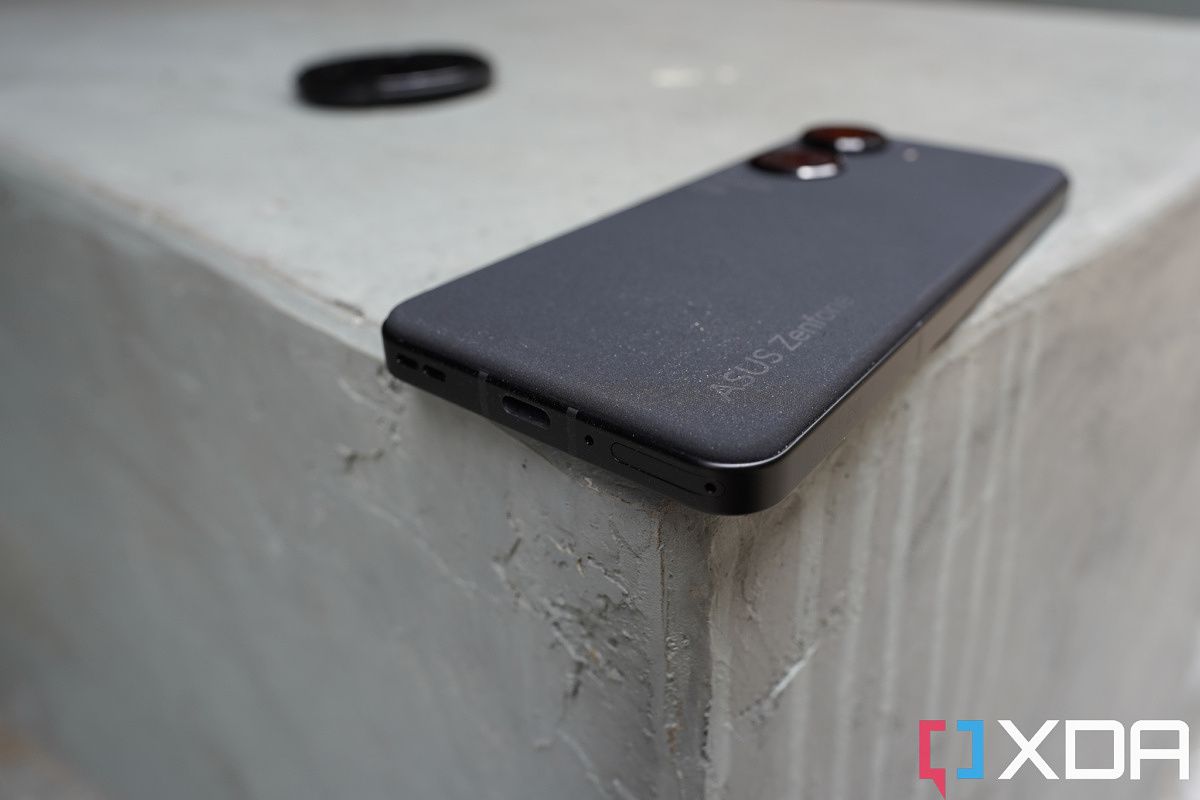
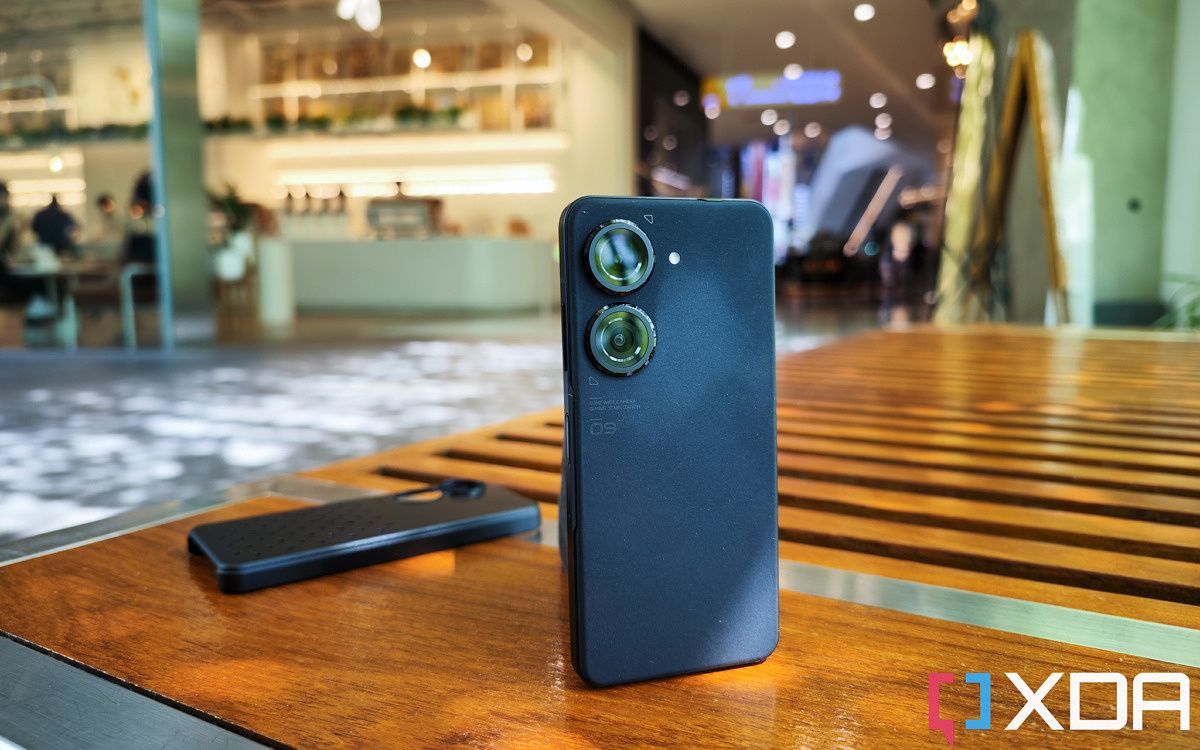
I am a fan of this polycarbonate back plate, which has a sandstone-like, grippy texture. The back side is entirely clean in three of four quadrants, with the upper left corner housing two large camera lenses and some text and odd arrow markings. I’m usually not a fan of random text and markings on phones, but they’re small enough here that I’m fine with it, and I like the strikingly large, symmetrical double camera rings. Unfortunately, my review unit is in perhaps the dullest color (black), but it’s still a major aesthetic improvement over last year’s bland, blah slab. I’d say my black model Zenfone 9 looks good, but the blue and red versions look great.

Asus Zenfone 9

The aluminum chassis has flat sides but is not as hard-angled as an iPhone 12 or 13, the edges are slightly chamfered, so the corners do not dig into my palm. The metal railings house several interesting parts. The first is a touch-sensitive panel on the right side, right underneath the power button that doubles as a fingerprint scanner. This panel allows you to assign app launches or actions to a swipe. The second cool bit is the existence of a 3.5mm headphone jack. Personally, I have moved onto Bluetooth earphones long ago, but there are people out there who still lament the loss of this port, so Asus has them covered. Finally — and this last bit is just a superficial flourish — but the SIM tray cover curves along with the phone’s corner. It’s a nice little design touch that takes a bit more engineering work than most other SIM tray covers.

DO NOT USE EMBARGO UNTIL JULY 28 DO NOT USE EMBARGO UNTIL JULY 28

Display

Technically speaking, going by spec sheet numbers, the Zenfone 9’s 5.9-inch 120Hz OLED panel isn’t at the level of other high-end flagship screens. The Zenfone 9 screen is not an LTPO panel, for example, so you must choose between 60Hz, 90Hz, or 120Hz refresh rate (or let the phone switch for you automatically); the resolution of 1080 x 2400 packs fewer pixels than WQHD+ screens, and the maximum brightness of 800 nits doesn’t get as bright as the Galaxy S22 Ultra or iPhone 13 Pro screen.

Asus Zenfone 9

But you know what, this doesn’t really matter to 99% of people, including myself. Maybe XDA’s resident display expert Dylan Raga may say otherwise, but I don’t think most people can look at this panel and say “oh yeah this isn’t as great as the Galaxy S22 Ultra panel.” The screen is sharp enough, the colors pop enough, and the only time I found the maximum brightness lacking is when I’m out under harsh open sunlight. We must also remember the Zenfone 9 costs 30-40% cheaper than all the other phones I just mentioned. This screen is perfectly good for what it is.

SoC, memory, and other hardware bits

The Asus Zenfone 9 is powered by the Qualcomm Snapdragon 8 Plus Gen 1, making for one of the first phones to reach North America with this chipset. I’ve already tested a couple of devices with this chip, and the main takeaway is that it has noticeably better energy efficiency. This, coupled with the relatively larger 4,300 mAh battery makes for surprisingly good battery life for a small phone. In fact, the Zenfone 9 may have the best battery life of any small phone I’ve used in the last few years. Phones like the iPhone 13 Mini and Pixel 4a never could last a full day out for me, the Zenfone 9 can sometimes do it. I’ll elaborate on battery life more in the performance section. The battery can be charged at a maximum of 30W speeds (charger included) but there is no wireless charging.

The Zenfone 9 starts with 8GB LPDDR5 RAM and 128GB of UFS 3.1 storage, with the next option up doubling storage to 256GB. The highest model doubles the RAM too to 16GB. The lack of an in-between 12GB option is a bit odd. My review unit is the highest 16GB version, and performance has been fast and smooth. But I think the 8GB RAM model should perform just fine.

Other hardware bits range from good to great: there’s IP68 water-and-dust resistance; stereo speakers that sound good for a small phone (but definitely lacking in the oomph that a larger phone can pump out); and a decent haptic engine.


Asus Zenfone 9: Cameras

  • 50MP main camera supported by a miniature gimbal system does indeed produce more stable videos
  • Colors can be too contrasty at times
  • The ultra-wide camera is just okay

Zenfone 9 cameras

The Zenfone 9’s dual-lens camera system comprises of a 50MP f/1.9 main (wide) camera and a 12MP ultra-wide camera. The main shooter uses a Sony IMX766 sensor, a widely used and proven sensor with a 1/1.57-inch image sensor. While the 1/1.57-inch is not going to impress a spoiled reviewer like me (because I’ve been using 1-inch sensors lately), it’s still a major size increase over last year’s Zenfone 8 or the iPhone 13 Mini’s image sensor.

But more interestingly, the main camera is supported by a miniature three-axis gimbal stabilization system that keeps the lens in a floating state. If you move the phone around, you can actually see the lens shift. This technology is not new, Vivo has been using it in its flagship phone for years, but this is the first time North American consumers will have access to this technology.

gimbal camera Asus zenfone 9

You can see the camera lens shift around as you move the phone.

Just like Vivo’s gimbal system, don’t expect Asus’ gimbal to perform miracles. It’s not going to entirely remove shakes and bobs the way a large size gimbal can do for real cameras. But this miniature gimbal does help stabilize more so than a typical OIS system. An Asus rep says the gimbal allows for an additional three-degree of movement in the the X- and Y-axis (the up and down movement), plus compensate for a bit of “yaw movement,” which is when the phone is wobbling left to right while facing the same direction. Traditional OIS systems do not compensate for yaw movements. I’ll let video samples do the talking, the below video clips show the Zenfone 9 stabilizing a yaw movement shake, followed by a bunch of handheld video samples shot in various lighting conditions, including on a rocky Hong Kong tram.

A few takeaways from the video samples, the gimbal does offset some of the shakes that came from jerking the phone’s yaw movement back and forth, and it does help produce incredibly smooth panning shots even when I was holding the phone with one hand. But walk and talk footage will still exhibit that up-and-down bobbing movement, particularly when I was climbing stairs. Night videos will also exhibit more micro-jitters than daytime footage. Overall, I am very happy with the video footage, and considering the phone is so small and lightweight, I think it will be one of my go-to travel cameras.

In fact, Asus thought of this and has designed a case attached to a retractable string that can then be clipped onto a backpack strap or a chest strap. The idea is the Asus Zenfone 9 can be an action camera that adventurers can leave strapped to their chest at all times. I didn’t get the chance to try this case accessory, but I definitely plan on getting one to use for my personal travel vlogs.

Still Photos

It’s unusual for me to focus on the video performance of a camera before still photos, but I did so here because the gimbal stabilization is unique, and the Zenfone 9’s cameras can produce photos of inconsistent quality. Sometimes, when the lighting is right and my hand is still enough, photos from the main camera can look great, with vibrant colors, excellent sharpness, and a bit of real bokeh.

But the shutter is a bit slow even during the day, and so at night when phones tend to dial down the shutter speed and resort to night mode, I have to keep perfectly still, or else shots will appear blurry. I took the Zenfone 9 for a night out with friends and snapped over 100 photos, and probably 25 of them had blurry subjects. Asus’ color science is also overly contrasty, particularly the reds.

I want to make this clear: I am nitpicking here because I’m used to testing the absolute top flagship camera phones. And if I actually consider the Zenfone 9’s significantly lower price tag, then the cameras are fine. If I compare the Asus Zenfone 9 camera against something like an iPhone 13 Mini, Asus’ cameras absolutely hold up.

The ultra-wide and selfie cameras can be evaluated the same way — it’s absolutely fine in a vacuum, or in this price range, but naturally loses to more expensive flagship phones. Ultra-wides look great during the day, but in lower light scenes, the photos start showing a lot of noise and a significant drop in sharpness. The selfie camera also suffers from the slow shutter of the main camera — if I shoot in low light conditions the subjects must stay still for well over a second and a half, or else someone’s face will be blurry.


I have added full-resolution images in the Flickr album below for those who may want to pixel peep for themselves. Ultimately, the Zenfone 9’s camera system is solid in photography and very good at videography. At the risk of beating a dead horse — at this $699 price, Asus has more than delivered. The only realistic complaint Asus should look into is fine-tuning color science and the shutter speed during the day. Otherwise, it’d be unrealistic to demand a larger image sensor or a real zoom lens.

Zenfone 9 Photo samples


Asus Zenfone 9: Software

  • Has almost every shortcut gesture I can think of
  • UI design is very one-hand friendly — even if the screen was bigger
  • Fast performance

The Zenfone 9 runs Android 12 with Asus’ ZenUI on top, and I’m a big fan. ZenUI looks simple and clean like vanilla Android, but it’s jam-packed with customization options that offer shortcuts to pull off smartphone tasks. For example, the capacitive touch bar mentioned earlier can be customized to perform different actions when swiped. The power button too, can be assigned specific tasks when long pressed or double pressed.

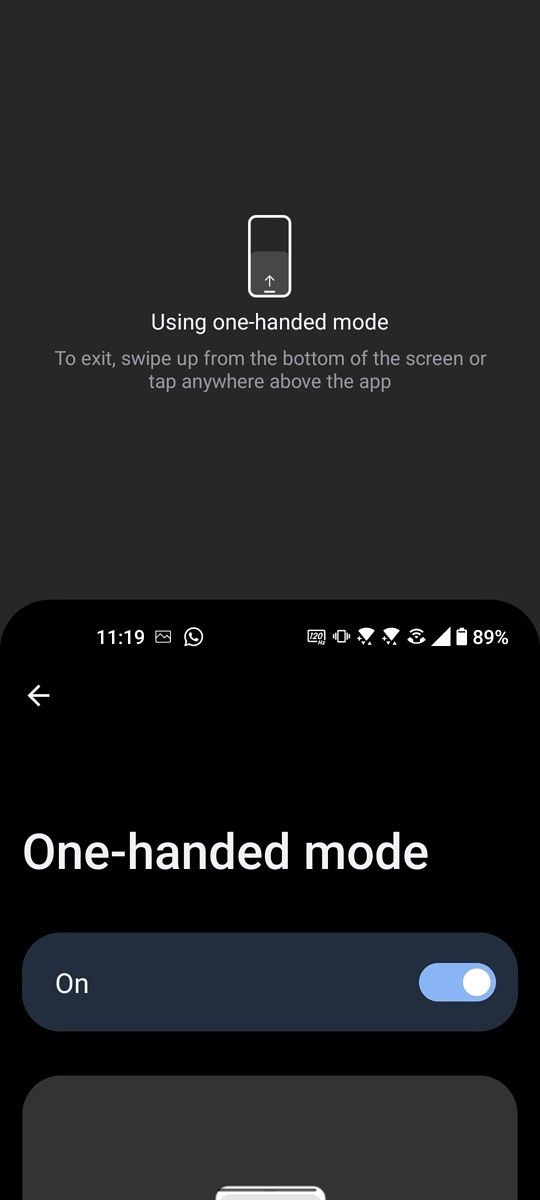
Almost every third-party shortcut gesture I can think of, like double tap to lock screen, three-finger swipe down to grab a screenshot, or draw a shape on a sleeping screen to control music playback, are all here. There’s a one-hand mode (even though you will almost never need it with this phone), and there’s the ability to make back swipe gestures less or more sensitive. There’s the ability to double tap on the back of the phone to trigger an action. It’s quite overwhelming the number of things you can do and customize here.

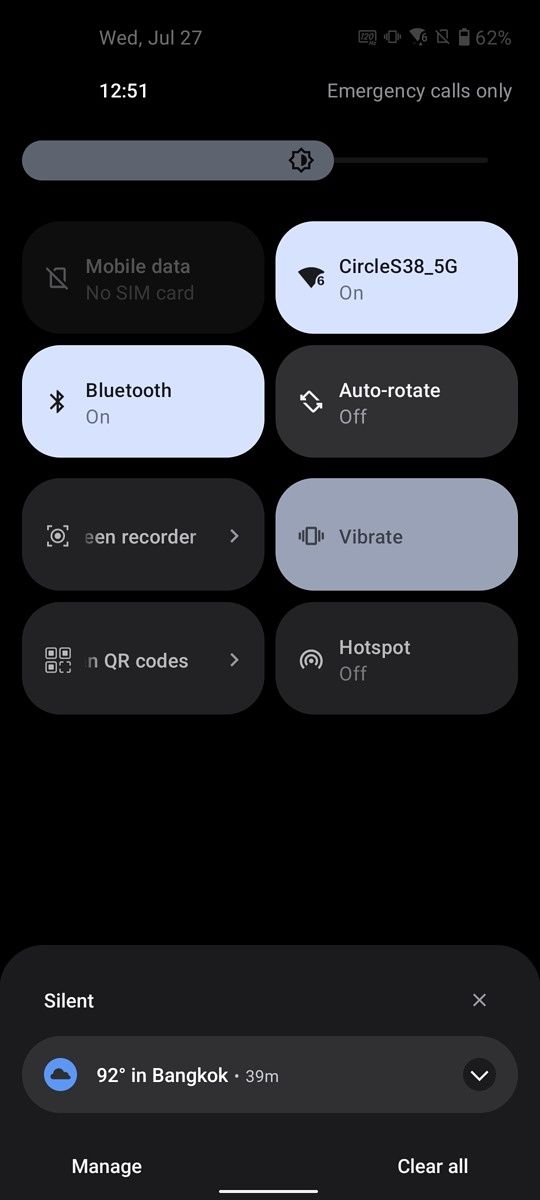
One-handed-ability

Considering the screen is just 5.9-inches, the Zenfone 9 is obviously an easy one-hand phone, but I think ZenUI is so well optimized to account for one-hand usage that even if the screen was something like 6.3-inches, it’d still be very easy to use one-handed.

Apps in a folder, for example, open in the bottom half of the screen so they can be easily reached by thumb. It’s such a logical type of design element that somehow most phone brands do not offer us. Apple’s iOS, for example, opens a folder smack dab in the middle of the screen, which is fine on the iPhone 13 Mini, but imagine this on an iPhone 13 Pro Max.
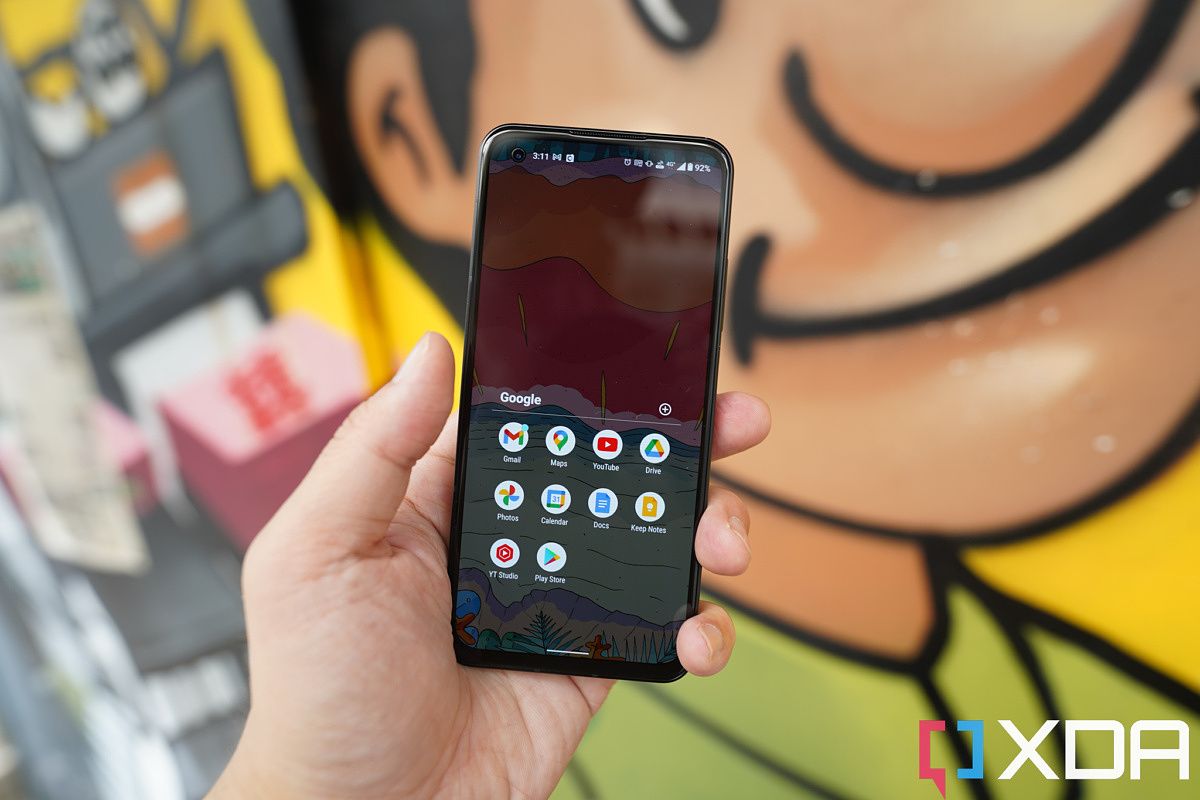
DO NOT USE EMBARGO UNTIL JULY 28 DO NOT USE EMBARGO UNTIL JULY 28

And therein lies one of my biggest gripes with the whole iPhone Mini experience: Apple had to make the phone overly small just to compensate for the fact that iOS is not one-hand friendly.

Apple had to make the phone overly small just to compensate for the fact that iOS is not one-hand friendly

On an Android phone, even if I’m using a 6.7-inch screen, I can just place all my most used apps at bottom of the home screen for easy thumb reach. That can’t be done on an iPhone, where apps must sit in top-down, left-to-right order. So either I fill my home screen entirely with apps (which I don’t like doing because I find that clunky) or deal with the fact that apps are higher up on the screen than desired. Look at the photo I snapped a year ago below, of an iPhone 12 Pro Max and an LG Wing — which phone seems easier to use with one hand?

The iPhone 12 Pro Max and the LG Wing.

iPhone fans think phone screens must drop to iPhone SE or iPhone Mini petite sizes to be easily used with one hand. That’s not the case. The Zenfone 9’s 5.9-inch screen is easier to operate one-handed than even the Mini’s 5.4-inch screen and makes the 6.1-inch iPhone 13 screen feel unwieldy.


Asus Zenfone 9: Performance and battery life

  • Snapdragon 8 Plus Gen 1 is very battery efficient
  • One of the smoothest phones we’ve ever tested

This section was written by my colleague and XDA Senior Technical Editor, Adam Conway.

The Asus Zenfone 9 is one of the first smartphones to hit the shelves with Qualcomm’s all-new Snapdragon 8 Plus Gen 1, and it’s likely going to be the first to reach the United States. While this is a “Plus” variant of the chipset, we’ve observed when testing the Asus ROG Phone 6 Pro that this particular chipset represents more of a year-on-year improvement than just a mid-cycle refresh.

The Snapdragon 8 Plus Gen 1 features an improved Qualcomm Kryo CPU, with a Cortex-X2 prime core clocked at 3.2Ghz, three Cortex A710 performance cores clocked at 2.8GHz, and four Cortex A510 efficiency cores clocked at 2.0GHz. Qualcomm claims that the upgraded CPU is 10 percent faster than the one on the Snapdragon 8 Gen 1 and offers 30 percent better CPU power efficiency. We made similar findings in our testing of the Snapdragon 8 Plus Gen 1 reference device that Asus previously shared with us.

Geekbench 5 Asus Zenfone 9 Result

CPU Throttling Test

Asus Zenfone 9 CPU Throttling Test

CPU Throttling Test is a freely available app on the Google Play Store, and it repeats a simple multithreaded test in C for as short as 15 minutes. We increased the length of time to 30 minutes. The app charts the score over time so you can see when the phone starts throttling. The score is measured in GIPS — or billion operations per second. It’s essentially a test that can measure the sustained performance of a chipset. The phone gets extremely hot when I run this test, almost burning my hand to the touch, but I’ve never experienced that in any other scenario on this device.

The Asus Zenfone 9 throttles pretty heavily after a while, but that’s because of how hot it gets. Because it’s a smaller device, there’s less surface for heat dissipation.

UI Stutter/Jank test

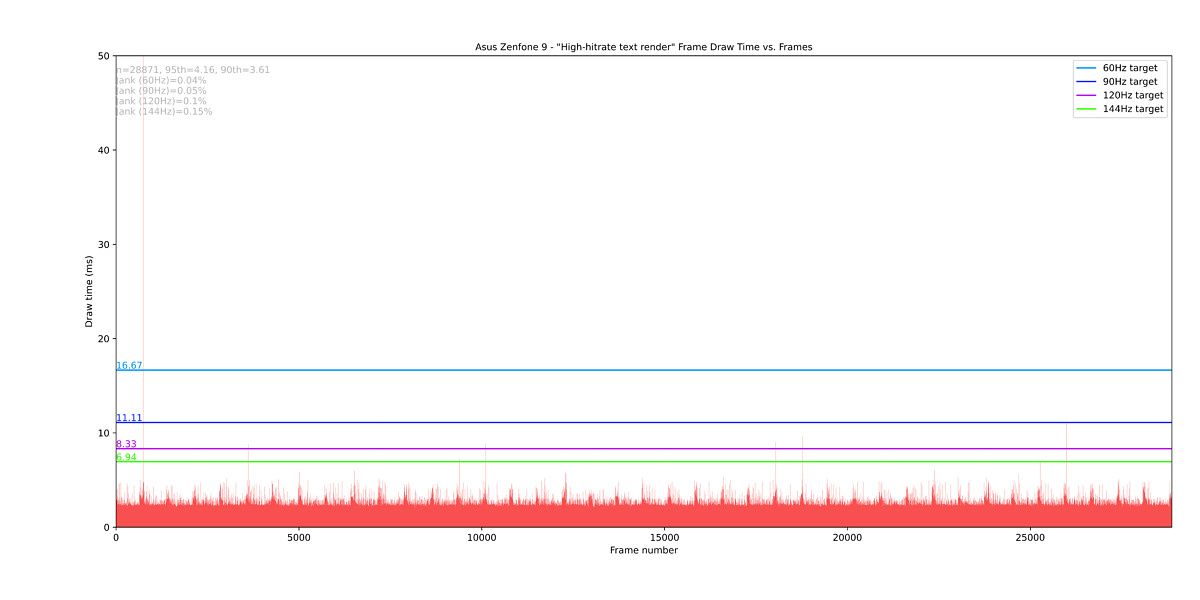
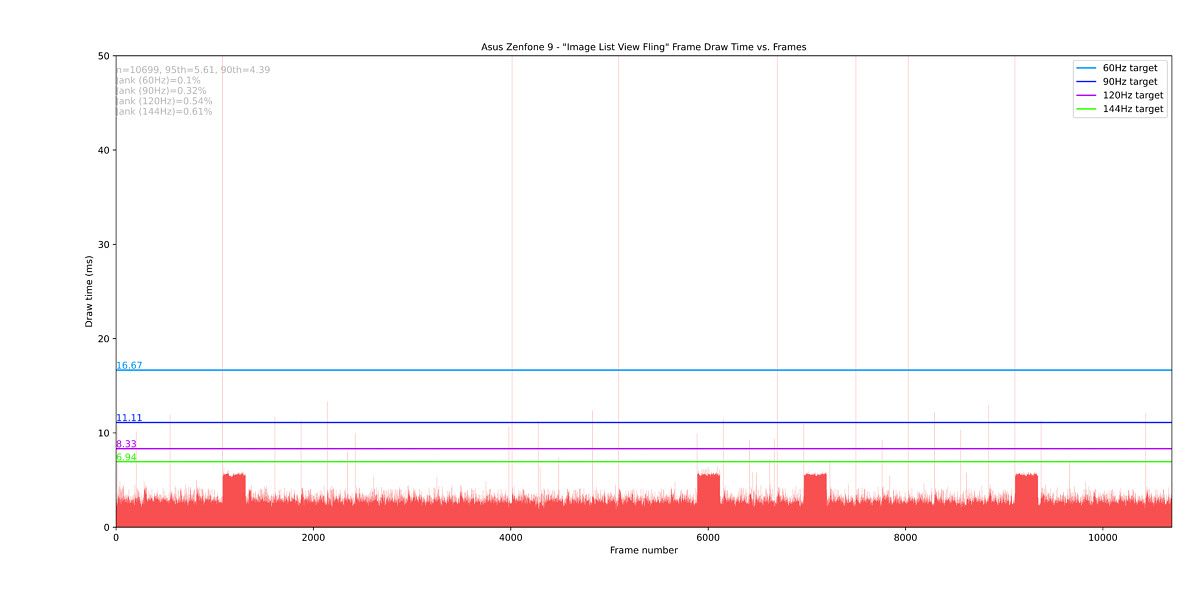
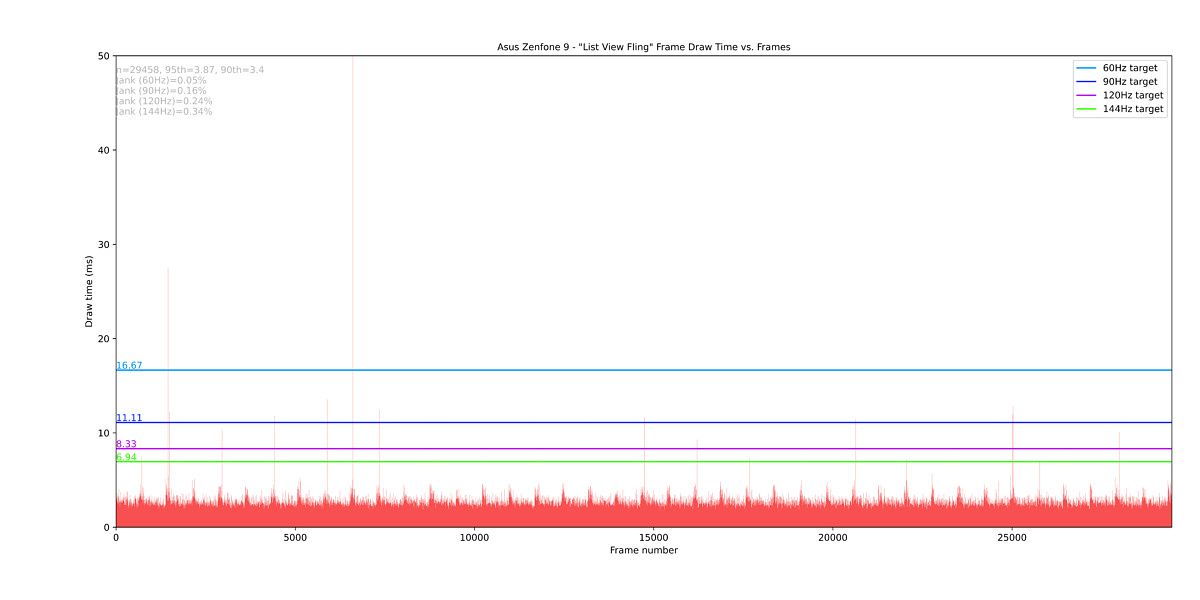
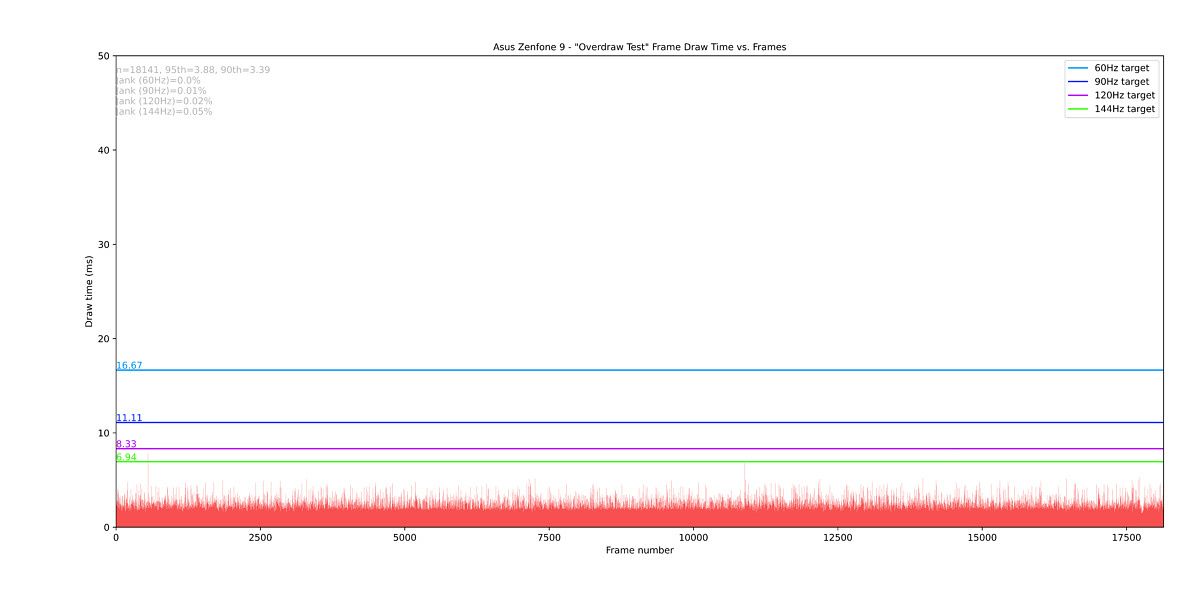
To quantify how well the Asus Zenfone 9 can maintain 120 FPS in real-world scenarios, we ran a modified version of Google’s open-source JankBench benchmark. This benchmark simulates a handful of common tasks you’ll see in everyday apps, including scrolling through a ListView with text, scrolling through a ListView with images, scrolling through a grid view with a shadow effect, scrolling through a low-hitrate text render view, scrolling through a high-hitrate text render view, inputting and editing text with the keyboard, repeating overdraws with cards, and uploading bitmaps. Our script records the draw time for each frame during the test, eventually plotting all the frames and their draw times in a plot along with several horizontal lines representing the target frame draw times for the four common display refresh rates (60Hz, 90Hz, 120Hz, and 144Hz).

The results demonstrate just how smooth the Asus Zenfone 9 is when it comes to overall usage. Pretty much all actions are capable of maintaining a consistent 120 FPS, which will be reflected in the overall usage of the phone. From these results alone, the Asus Zenfone 9 is one of the smoothest smartphones we’ve ever tested in terms of general usage.

Battery life and charging

The Asus Zenfone 9 packs a 4,300 mAh battery, which is about right for a small phone. The smaller display coupled with the more efficient chipset ensure long-lasting battery life, though, and I’ve been able to get as much as eight hours of screen on time on a single charge. Typically it’s between six and seven hours, though.

I know that from Ben’s experience, his battery life hasn’t been quite as good, though he also mentions that he takes a lot of photos and shoots a lot of video. This will put any phone’s battery under stress, and it’s still a phone that Ben says will give him five to six hours of screen on time. The phone lasts him a 12 to 13-hour work day, which is more than any other small phone could do in his experience.

Asus Zenfone 9 screen on time of 5 hours with 44% left

As for me, this phone has some of the best battery life of this generation of smartphones. The screenshot above is from a full day of usage of the phone, where I spent most of the day out and about. This is the best battery life that I’ve had in a long time on a phone.

To be honest, nearly every Snapdragon 8 Gen 1 device has given me subpar battery life, whereas the Snapdragon 8 Plus Gen 1 is looking to be an absolute success. Asus likely has some level of software optimization going on here that contributes to some of it, but it’s clear as well that this chipset is just a lot more efficient than the regular Snapdragon 8 Gen 1.

The only issue that I’ve faced with battery life and charging is an inconsistent charging time — oh, and absent wireless charging. The charging time though in particular has been awful, as at times with the official charger supplied in the box it has taken well over an hour to charge, and more like an hour and a half. I’ve also used the 65W charger that came with the Asus ROG Phone 6 Pro and I got the same results, so I’m unsure of what the cause is. Nevertheless, with such great battery life you’ll only really need to charge this device once a day anyway.


Asus Zenfone 9: Should you buy it?

Asus Zenfone 9

You should buy the Asus Zenfone 9 if:

  • You want a phone that can be used easily with one hand.
  • You shoot a lot of vlogs and want better stabilization.
  • You want a near-flagship phone without paying four-digit prices.

You should not buy the Asus Zenfone 9 if:

  • You want a camera that always performs well day or night.
  • You enjoy taking zoom photos.
  • You have bad eyesight and often struggle with smaller text, and hence, could better use a bigger phone.

The Asus Zenfone 9 is, simply put, the best small phone today. But even if the size thing doesn’t matter, the Zenfone 9 is an absolutely great value, particularly in the North American space. To get a Snapdragon 8 Plus Gen 1, a gimbal camera system that really works, a vibrant display, in a well-designed package that’s easy to hold, for just $699? Absolute no-brainer recommendation for most people.

I’m glad Asus had the foresight to pivot the Zenfone series to a smaller form factor to differentiate itself from the sea of smartphones because as much as I enjoy how every 2022 flagship is a good performer, I am starting to feel a bit of boredom as they all look and feel the same. The Zenfone 9 is a breath of fresh air.

    Asus Zenfone 9
    The Asus Zenfone 9 is a small phone that packs a powerful flagship chip and a gimbal camera system that works.

The post Asus Zenfone 9 Review: A better small phone than the iPhone 13 Mini appeared first on XDA.


from XDA https://ift.tt/bBkeFH6
via IFTTT

Valve aims to fulfill current Steam Deck orders by end of year

Back in June, Valve delivered some good news, stating that it had completed its orders that were designated for the second quarter of the year and would be moving on to fulfilling customer orders slated for delivery in Q3. Today, the news gets even better, as the company has issued a new timeline for orders, stating that it will be able to fulfill customer orders sooner than expected.

According to Valve, it will fulfill orders sooner due to supply chain issues clearing up. In addition, the company is also continually ramping up the production speed of its console. In light of this, the company has updated the Steam Deck pre-order page, allowing eager customers to see when they will get their units. Many of those that were in the “Q4 or later” category have now been bumped up to Q3, meaning they will receive their console sometime from July through September. The remaining pre-orders will be fulfilled from October through December. Thankfully, anyone currently in the reservation queue will get a Steam Deck before the end of the year.

Steam Deck Reservation page showing a Q4 delivery date

Valve has shared that those currently pre-ordering should also receive their console by year’s end, which is great news. If you’ve been curious and have yet to pre-order, now might be a perfect time. Valve does warn that once the Q4 order queue fills up, those orders will be fulfilled in 2023.

For the most part, Valve has done a wonderful job on the release of its console. The company has made parts available for repair and has also kept the console updated with new and important features. It has even managed to support the Windows community, despite initially stating that it would not offer support outside the console’s standard OS. Now the only question that remains is when the company will get around to shipping its delayed Steam Deck Docking Station.


Source: Valve

The post Valve aims to fulfill current Steam Deck orders by end of year appeared first on XDA.


from XDA https://ift.tt/afNlxRJ
via IFTTT

Valve aims to fulfill current Steam Deck orders by end of year

Back in June, Valve delivered some good news, stating that it had completed its orders that were designated for the second quarter of the year and would be moving on to fulfilling customer orders slated for delivery in Q3. Today, the news gets even better, as the company has issued a new timeline for orders, stating that it will be able to fulfill customer orders sooner than expected.

According to Valve, it will fulfill orders sooner due to supply chain issues clearing up. In addition, the company is also continually ramping up the production speed of its console. In light of this, the company has updated the Steam Deck pre-order page, allowing eager customers to see when they will get their units. Many of those that were in the “Q4 or later” category have now been bumped up to Q3, meaning they will receive their console sometime from July through September. The remaining pre-orders will be fulfilled from October through December. Thankfully, anyone currently in the reservation queue will get a Steam Deck before the end of the year.

Steam Deck Reservation page showing a Q4 delivery date

Valve has shared that those currently pre-ordering should also receive their console by year’s end, which is great news. If you’ve been curious and have yet to pre-order, now might be a perfect time. Valve does warn that once the Q4 order queue fills up, those orders will be fulfilled in 2023.

For the most part, Valve has done a wonderful job on the release of its console. The company has made parts available for repair and has also kept the console updated with new and important features. It has even managed to support the Windows community, despite initially stating that it would not offer support outside the console’s standard OS. Now the only question that remains is when the company will get around to shipping its delayed Steam Deck Docking Station.


Source: Valve

The post Valve aims to fulfill current Steam Deck orders by end of year appeared first on XDA.


from XDA https://ift.tt/ZvQAIp2
via IFTTT

How to join the PS5 Beta program: Test Sony’s newest features before anyone else

While Xbox has its Insiders program, Sony fans aren’t left out of the new feature testing thanks to the PS5 Beta program. Much like Xbox Insiders, members of the PS5 Beta get to experience the latest features before anyone else and provide valuable feedback.

Sony generally pushes out fewer builds than you would find on Xbox, but they’re more substantial. The July PS5 Beta, for example, came with 1440p display output support, new UI elements, audio features, and much more. So it’s worth the effort if you’re OK running unfinished software on your console.

But who can sign up? And how do you do it?

Who can sign up for the PS5 Beta program?

PS5 gamelist feature

The simple answer is that anyone is eligible for the PS5 Beta program with a few caveats. The biggest is location. You have to be in the U.S., Canada, Japan, the UK, Germany, or France to enroll. Other than that, you have to meet the following criteria:

  • You must be aged 18 years or older.
  • You must have a valid PSN account in good standing with a current email address.

You’re also expected to agree to provide feedback to Sony in the manner they request. It sounds a lot but it doesn’t take up much of your time and it’s important. Feedback is what helps make the PS5 experience better for everyone.

Guest accounts, child accounts, and offline accounts are not eligible.

How to join the PS5 Beta program

PS5 Beta update

If you’re eager to participate, signing up is really straightforward. Simply go to the PS5 Program Beta website and click Register now. You’ll be asked to log in with your PSN account. And that’s it. From there it’s time to play the waiting game.

It’s also worth highlighting that signing up for the PS5 Beta program doesn’t necessarily guarantee you’ll gain access. If selected you’ll be notified by email with your invitation to join. Your access to the PS5 Beta is linked to your PSN account, so there’s no way to trick your console into access. You just have to be patient and hope.

If you’re lucky enough to be selected when the email comes through all you have to do is follow the steps as detailed and you’ll be able to download the latest version onto your console. You should receive a code to redeem on your PS5 console which will unlock access.

From there you’ll navigate into the update settings on the console in order to download the software:

  1. Open Settings.
  2. Select System.
  3. Select System Software > System Software Update and Settings.
  4. You should see an option for Update System Software (beta).

You’ll only see the final option if you have successfully been accepted into the program and access has been redeemed on your console. As newer updates of the PS5 Beta release, you’ll see a notification next to Update System Software (beta) to download and install rather than the regular system update area.

Also, if you have previously been enrolled in the PS5 Beta, you don’t need to sign-up again. Simply check your inbox for a new code to download the latest build. Non-publicly disclosed parts of the PS5 Beta are under NDA, so be careful what you share online.

    Sony PlayStation 5
    The PS5 is still hard to get hold of but it's undeniably one of the best ways to game right now. Sony's library continues to impress and has some big hitters on the way.

The post How to join the PS5 Beta program: Test Sony’s newest features before anyone else appeared first on XDA.


from XDA https://ift.tt/cfxrPFm
via IFTTT

How to join the PS5 Beta program: Test Sony’s newest features before anyone else

While Xbox has its Insiders program, Sony fans aren’t left out of the new feature testing thanks to the PS5 Beta program. Much like Xbox Insiders, members of the PS5 Beta get to experience the latest features before anyone else and provide valuable feedback.

Sony generally pushes out fewer builds than you would find on Xbox, but they’re more substantial. The July PS5 Beta, for example, came with 1440p display output support, new UI elements, audio features, and much more. So it’s worth the effort if you’re OK running unfinished software on your console.

But who can sign up? And how do you do it?

Who can sign up for the PS5 Beta program?

PS5 gamelist feature

The simple answer is that anyone is eligible for the PS5 Beta program with a few caveats. The biggest is location. You have to be in the U.S., Canada, Japan, the UK, Germany, or France to enroll. Other than that, you have to meet the following criteria:

  • You must be aged 18 years or older.
  • You must have a valid PSN account in good standing with a current email address.

You’re also expected to agree to provide feedback to Sony in the manner they request. It sounds a lot but it doesn’t take up much of your time and it’s important. Feedback is what helps make the PS5 experience better for everyone.

Guest accounts, child accounts, and offline accounts are not eligible.

How to join the PS5 Beta program

PS5 Beta update

If you’re eager to participate, signing up is really straightforward. Simply go to the PS5 Program Beta website and click Register now. You’ll be asked to log in with your PSN account. And that’s it. From there it’s time to play the waiting game.

It’s also worth highlighting that signing up for the PS5 Beta program doesn’t necessarily guarantee you’ll gain access. If selected you’ll be notified by email with your invitation to join. Your access to the PS5 Beta is linked to your PSN account, so there’s no way to trick your console into access. You just have to be patient and hope.

If you’re lucky enough to be selected when the email comes through all you have to do is follow the steps as detailed and you’ll be able to download the latest version onto your console. You should receive a code to redeem on your PS5 console which will unlock access.

From there you’ll navigate into the update settings on the console in order to download the software:

  1. Open Settings.
  2. Select System.
  3. Select System Software > System Software Update and Settings.
  4. You should see an option for Update System Software (beta).

You’ll only see the final option if you have successfully been accepted into the program and access has been redeemed on your console. As newer updates of the PS5 Beta release, you’ll see a notification next to Update System Software (beta) to download and install rather than the regular system update area.

Also, if you have previously been enrolled in the PS5 Beta, you don’t need to sign-up again. Simply check your inbox for a new code to download the latest build. Non-publicly disclosed parts of the PS5 Beta are under NDA, so be careful what you share online.

    Sony PlayStation 5
    The PS5 is still hard to get hold of but it's undeniably one of the best ways to game right now. Sony's library continues to impress and has some big hitters on the way.

The post How to join the PS5 Beta program: Test Sony’s newest features before anyone else appeared first on XDA.


from XDA https://ift.tt/t2ea0xW
via IFTTT

Redmi K50i Review: Lightning-fast performance at a low price

The Redmi K50i is the latest phone in the K-series that’s titanically popular in India and beyond. This particular smartphone is a spiritual successor to the Redmi K20 Pro that debuted back in 2019. As is tradition for the K-series phones, the new Redmi K50i brings some powerful internals at an affordable price. There’s a lot to like about the Redmi K50i but its performance is the main attraction here and the phone cuts through tasks like a hot knife through butter.

The 6.6-inch 144Hz FFS LCD with a 270Hz touch sampling rate coupled with the octa-core Dimensity 8100 chipset makes the Redmi K50i a fantastic smartphone for gaming. It’s been fast and reliable with everything I’ve thrown at it, so I have no complaints with the general performance of this phone outside gaming too. The Redmi K50i also packs a massive 5080mAh battery which also charges fairly quickly thanks to the 67W charger that’s bundled with the phone. The Redmi K50i isn’t competing with high-end competitors to get everything right. Instead, it follows the basic ‘Redmi’ formula of offering a good set of specs at a low price for the masses.

If that sounds like something you’re interested in buying then I’ve got a lot more details about the phone in this Redmi K50i Review. Read on to find out if it’s worth picking up for you in 2022.

    Redmi K50i
    The Redmi K50i offers an incredible value for money with its stellar performance, a fast 144Hz LCD panel, and a long-lasting battery. Some other noteworthy features of the phone include a 3.5mm headphone jack and an IR blaster. You can check some other alternatives out there, but we think nothing comes close to matching the general performance of the Redmi K50i, at least in this price range.

      Features:

      Pros:

      Cons:

Navigate this Review:

Redmi K50i Review: Pricing and Availability

  • The Redmi K50i starts at ₹25,999 (~$325) for the base variant in India.
  • You can buy it in Phantom Blue, Quick Silver, or Stealth Black colorways.

It’s no secret that Xiaomi rebrands a lot of its smartphones with a different marketing name for different regions. Similarly, the Redmi K50i is a rebranded Redmi Note 11T Pro, featuring the same hardware. It’s indistinguishable from the Chinese model as Xiaomi hasn’t made any changes to its design either. The same phone is also being sold as the Poco X4 GT internationally, so it’s making rounds around the world with a different name. It’s not a deal-breaker, but it’s something you should be aware of in case you’re planning to buy this phone.

The Redmi K50i is a rebranded Redmi Note 11T Pro, which is also sold as the POCO X4 GT globally.

As for the pricing, the Redmi K50i starts at ₹25,999 (~$325) for the variant with 6GB RAM and 128GB storage in India. The 8GB+256GB model will cost you ₹28,999 (~$363). The phone has gone on sale starting July 23 and you can buy it in either Phantom Blue, Quick Silver, or Stealth Black colorways.


Redmi K50i Review: Specifications

Let’s take a quick look at the specifications to find out what the Redmi K50i brings to the table:

Specification Redmi K50i / Redmi Note 11T Pro / Poco X4 GT
Build
  • Polycarbonate back
  • Corning Gorilla Glass 5 front panel
Dimensions & Weight
  • 163.64 x 74.29 x 8.87mm
  • 200g
Display
  • 6.6-inch FFS LCD
  • 2460 x 1080p resolution, 440PPI
  • 144Hz refresh rate
  • 7-stage AdaptiveSync (30Hz, 48Hz, 50Hz, 60Hz, 90Hz, 120Hz, 144Hz)
  • 100% DCI-P3 coverage
  • DC dimming
  • Dolby Vision support
SoC
  • MediaTek Dimensity 8100
  • Arm Mali-G610 MC6 GPU
RAM & Storage
  • 6GB/8GB LPDDR5 RAM
  • 128GB/256GB UFS 3.1 storage
Battery & Charging
  • 5,080mAh
  • 67W wired fast charging support (charger included)
  • PD support up to 27W
Security Side-mounted fingerprint scanner
Rear Camera(s)
  • Primary: 64MP Samsung ISOCELL GW1
  • Ultra-wide: 8MP, 120-degree FoV
  • Macro: 2MP
Front Camera(s) 16MP
Port(s)
  • USB Type-C
  • 3.5mm headphone jack
Audio Dual stereo speakers
Connectivity
  • 5G dual SIM
    • Supported bands: n1/n3/n5/n7/n8/n20/n28A/n38/n40/n41/n77/n78
  • 4G LTE
  • Wi-Fi 6
  • Bluetooth 5.3
Software MIUI 13 based on Android 12
Other Features
  • VC liquid cooling
  • IR blaster
  • X-axis linear vibration motor
  • IP53 certification

About this Review: Xiaomi India sent us the Redmi K50i unit in Quick Silver colorway for testing. This review was written after spending about a week with the device. Xiaomi had no input in this review.


Redmi K50i Review: Design and Display

  • The Redmi K50i is entirely made of plastic, but it has Gorilla Glass 5 on the front.
  • It comes with a 3.5mm headphone jack and an IR blaster on the top.

The Redmi series has established its own design language, so the Redmi K50i brings a very familiar design to the market. The handset has a boxy design and is entirely made of plastic. The back panel mimics the look of frosted glass and it seems to repel smudges and fingerprints. The Quick Silver variant which I’ve been using for the last few days, however, has developed a weird-looking spot at the back. It looks more prominent in the photos, and I can’t seem to get rid of it. This issue could be exclusive to my unit, but it’s worth making a note of. The back is almost completely flat but the camera island sticks out quite a bit, and the lenses protrude even further. This makes the device wobble when placed on a flat surface.

Redmi k50i phone on a yellow color leather mat with artificial plants on both sides

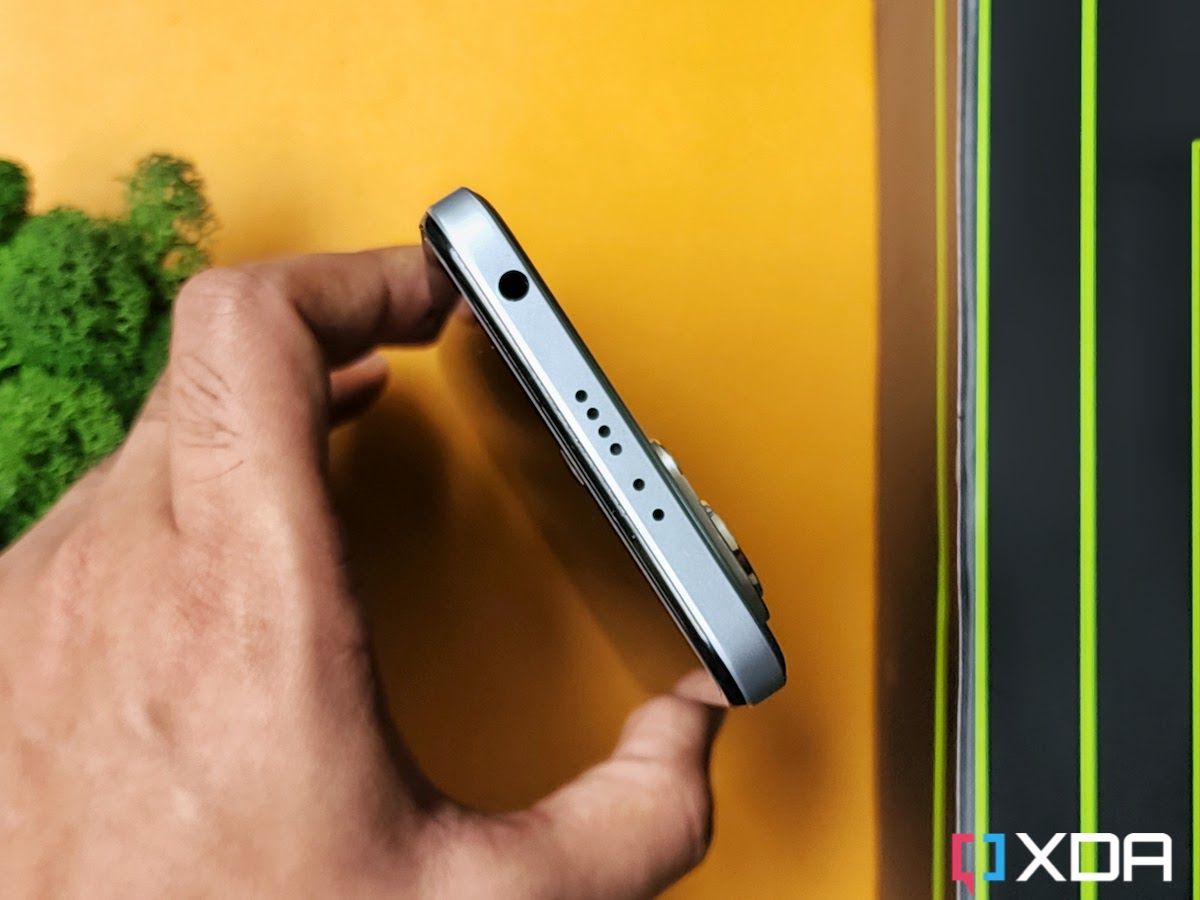
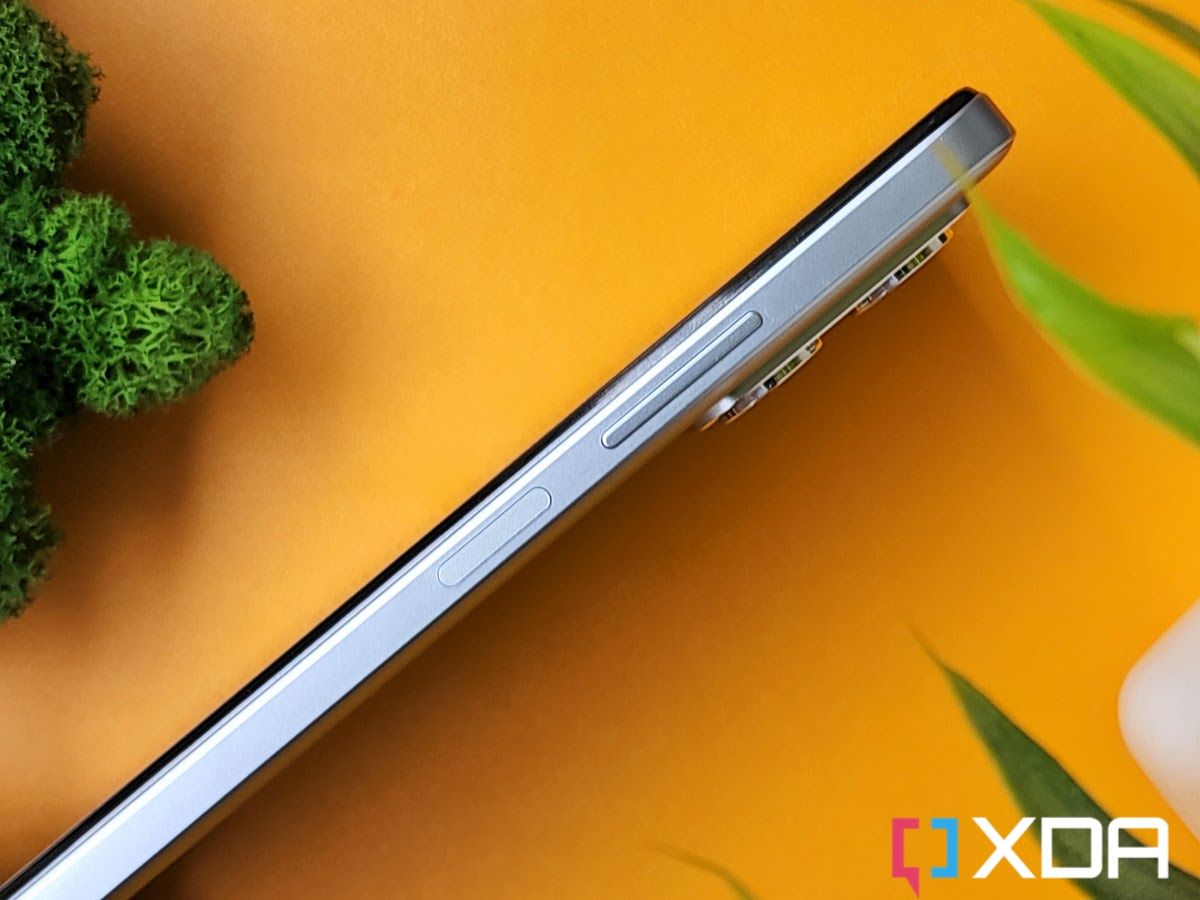
The right side of the phone has a volume rocker and a power button which doubles up as a rather reliable side-mounted fingerprint scanner. The USB-C port is at the bottom and it’s flanked by the SIM card tray and speaker grille on both sides. The top also has a bunch of grills which serve as an echo chamber for the left channel speaker. But it’s the 3.5mm headphone jack and the IR blaster that grabs the attention on the top as both of these are rarely seen on any smartphone these days.

Overall, the Redmi K50i is a fairly decent-looking phone. It’s not winning any awards with its muted design, especially when you compare it with the K20 series’ scintillating design with a gradient finish. The Redmi K50i is also not as thin or light as it appears in the press renders and images. It’s 8.87mm thick and weighs 200g, so it is a sizable phone to carry around. It comes with IP53 certification, so it should hold up pretty well against dust and occasional water sprays.

The screen is a 6.6-inch FHD+ LCD panel with a slight chin at the bottom and a punch-hole cutout for the selfie camera on the top. Not that LCD panels are bad by any means, but Xiaomi made it a point to emphasize the fact that the Redmi K50i sports a fringe-field switching (FFS) LCD which offers many benefits including low operating voltage, wide-viewing angle, and fast response times compared to other LCD types. In real life, the FFS LCD looks similar to the standard LCD panels used on many phones these days. You’re not going to see impressive contrast ratios or inky blacks as you would on an OLED panel, but there’s still a lot to like.

Redmi K50i kept on a yellow-colored leather mat

Redmi K50i's display boasts a rather exhaustive list of features

The lack of an OLED panel isn’t necessarily a pain point here because the Redmi K50i’s display boasts a rather exhaustive list of features including a 144Hz refresh rate, 270Hz touch sampling rate, support for HDR10 and Dolby Vision, and more. Notably, you also get 7-stage AdaptiveSync technology with which the display can dynamically switch the refresh rate between 30Hz, 48Hz, 50Hz, 60Hz, 90Hz, 120Hz, and 144Hz based on the content. The software offers two different settings to control the refresh rate — a default setting to adjust the refresh rate dynamically based on what’s being viewed on the screen, and a custom setting that lets you choose between 60Hz, 120Hz, and 144Hz.

Redmi K50i phone display with the refresh rate

The Redmi K50i has a good display overall but I just wish it was a little brighter. With 500 nits of peak brightness, it doesn’t get nearly as bright as some other phones out there, making it less visible outdoors, especially under direct sunlight. The phone also doesn’t support HDR playback from popular OTT platforms like Netflix too, so keep that in mind.


Redmi K50i Review: Performance and software

  • The Redmi K50i is powered by the MediaTek Dimensity 8100 chipset and it comes with LPDD5 memory and UFS 3.1 storage.
  • This is the best-performing phone in this price range with barely any competitors in sight.

The Redmi K50i is powered by MediaTek’s Dimensity 8100 chipset, and I have absolutely no complaints about its performance. The base variant of this phone comes with 6GB of LPDDR5 memory and 128GB of UFS 3.1 storage, but you can also splurge more to get the variant with 8GB of memory and 256GB of storage. The Dimensity 8100 is a reliable chipset that’s running the show behind the scenes for many devices, and the Redmi K50i takes full advantage of the CPU chops to become one of the fastest phones in its segment.

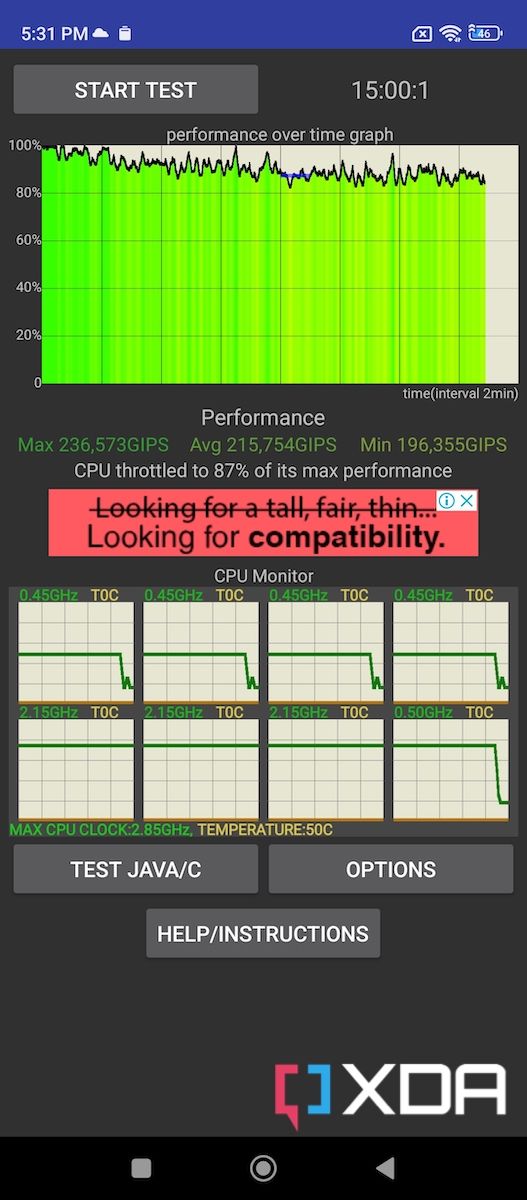
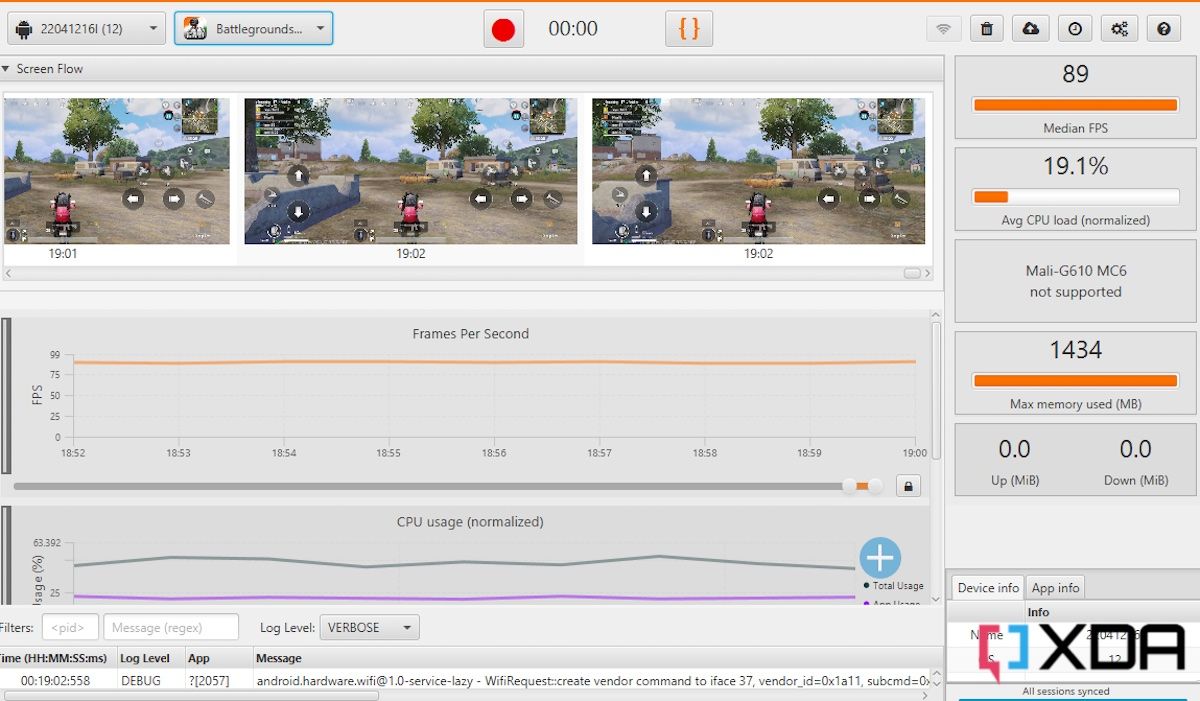
One of the best things about the Redmi K50i is that it doesn’t heat up even under sustained load thanks to the Liquidcool 2.0 technology. And because of this, the Redmi K50i performs admirably well to score good numbers in benchmarks and also delivers a fantastic gaming experience. It maintains 87% of its peak performance in the CPU throttle test and was also able to finish 3DMark’s Wild Life Extreme stress test without getting unbearably hot as some other phones do. Here’s a quick look at some benchmark numbers for those who care about a phone’s performance across benchmarking apps:

All your day-to-day apps run extremely smoothly on this phone. You can expect to see snappy animations and buttery smooth scrolling which isn’t exactly commonplace in the budget category. You can thank the hardware — and likely software too — for delivering a lightning-fast performance for all your day-to-day activities.

A person playing Dead Trigger 2 mobile game on Redmi k50i smartphone

Gaming on the Redmi K50i is also a treat thanks to the reliable performance and 144Hz display. The device is powerful enough to run even the most demanding titles at competent graphics settings with high frame rates on the board. Popular mobile games like Battlegrounds Mobile India (Indian version of PUBG Mobile) and Apex Legends Mobile can run at max graphics settings without a hitch. I also tried a bunch of games that support a 144Hz refresh rate, and it was a smooth experience through and through. Games like Dead Trigger 2, Alto’s Adventure, and Real Racing 3 run smoothly at 144Hz, and the Redmi K50i continues to run them smoothly over an extended period.

The Redmi K50i is powerful enough to run even the most demanding titles at competent graphics settings with high frame rates.

We would like to give special thanks to the team at GameBench for the tool they provided us. Their tool makes it possible for any person, whether it be a regular user, journalist, or engineer, to test a mobile game’s performance on an Android device. Check out GameBench to learn more.

Redmi K50i smartphone showing the About Phone section on the screen

As for the software, the Redmi K50i runs MIUI 13 out of the box. It’s based on Android 12 and offers a plethora of customization options. Xiaomi’s MIUI has evolved a lot over the years and it also offers some under-the-hood improvements now such as better CPU utilization, better RAM management, and more. I am not a huge fan of heavy custom skins on top of Android, but MIUI is very easy to get used to. Some features like the split between notifications shade and control center are a bit niche, but it’s a very welcoming UI otherwise. You get a bunch of pre-installed applications out of the box, but most of them can be uninstalled and they don’t hinder the performance of the phone whatsoever.


Cameras

  • The Redmi K50i sports a triple camera setup at the back which includes a 64MP Samsung GW1 primary sensor, an 8MP ultra-wide camera, and a 2MP macro shooter.
  • The phone captures decent photos during the day but starts to struggle with low-light photos and videos.

Redmi K50i camera module

The Redmi K50i sports a triple camera setup at the back which includes a 64MP Samsung GW1 primary sensor, an 8MP ultra-wide camera, and a 2MP macro shooter. Again, the Redmi K50i isn’t competing with high-end competitors, so I suggest you keep your expectations in check. I was able to capture a bunch of photos in both daytime and low-light conditions, and the results are broadly satisfying. The images, as you can see below, look sharp and have a good amount of detail provided there’s enough light in the scene.

Both the exposure and dynamic range were on point across all the daytime samples I captured with the phone. The primary sensor was also quick to focus, meaning you can rely on the Redmi K50i to capture some moving subjects. The ultra-wide images didn’t turn out as sharp as I’d like, but the overall image still looked pretty good. The secondary sensor offers a nice 120-degree FoV to capture more of the scene, so it’s nice to get a different perspective. Keep in mind that the Redmi K50i doesn’t have a telephoto camera, which means you’ll have to rely on digital zoom as opposed to optical. However, you do get a 2MP macro sensor, which works as advertised to get a quick close-up shot of a subject.

Low-light photos from the primary sensor are decent at best. The images aren’t too bad but I noticed that the phone overexposed many of the shots captured in low light. And the phone’s built-in night mode also does very little to add more details to the images. Both the ultra-wide and the macro camera also struggle to capture good-looking photos in low light, so keep that in mind.

The Redmi K50i packs a 16MP selfie camera that sits on the punch-hole cutout on the front. The selfies will turn out sharp with enough details on the subject’s face. You also get to see natural-looking skin tones, which is always a good sign. Here’s a quick look at some camera samples I was able to capture using the Redmi K50i during my time with the device.

The Redmi K50i can capture 4K videos at 30FPS using the rear camera setup. You’ll have to switch to 1080p resolution to record 60FPS footage.


Redmi K50i Review: Battery Life and Charging

  • The Redmi K50i’s 5,080mAh battery will keep the lights on for at least a day and a half with moderate usage.
  • The phone also comes with a fast-charger in the box that can quickly top up the phone.

The Redmi K50i packs a 5,080mAh battery inside which is bigger than what you get with a lot of smartphones these days. This massive battery adds to the overall thickness and the weight of the phone, but it offers reliable battery backup. The battery life was solid, lasting me about a day and a half with what I’d describe as moderate usage. If you only use your phone for basic activities like scrolling through social media apps, taking a bunch of phone calls, and watching some videos on YouTube or Instagram, then you should be able to get a similar battery backup.

Redmi K50i smartphone in Silver color next to its retail box contents

On the days with heavier usage, especially when I played a bunch of games, ran benchmarking apps, and shot a lot of camera samples for the review, the phone would still comfortably last me through the day with more than 5 hours of screen on time.

A simple line graph to show the charging speeds of the Redmi K50i using the bundled 67W charger

Redmi also bundles a 67W charging brick with the phone which I’d say is very quick to charge the device. If you ever run out of battery during the day, then you can get up to a 50-percent charge in just 30 minutes. The phone doesn’t support wireless charging, but that’s not necessarily a deal-breaker in this price range.


Should you buy the Redmi K50i?

XDA Recommended Award Badge

For a starting price of ₹25,999 in India, the Redmi K50i delivers an excellent budget Android phone experience. You get a zippy 144Hz FFS LCD panel, a MediaTek Dimensity 8100 chipset with reliable performance, a long-lasting battery with a fast charger inside the box, and more. Xiaomi has made some sensible sacrifices, so you don’t get all the bells and whistles. But there’s no denying that the Redmi K50i offers the best value for money. It’s perfect for those who are looking to buy a reliable device to get features and performance that — in many ways — is similar to many other upper mid-rangers or flagships too. You also get 5G support, which you’d need if you’re planning on keeping the phone for a few years.

The Redmi K50i delivers an excellent budget Android phone experience.

You should buy the Redmi K50i if:

  • You’re looking to buy an affordable smartphone and don’t want to compromise on performance.
  • You want to play mobile games at high frame rates.
  • You want a phone with a long-lasting battery and fast charging support.

You shouldn’t buy the Redmi K50i if:

  • You want a phone with an OLED display. The Redmi K50i comes with an FFS LCD panel which looks exactly the same as any other LCD type in the real world.
  • You want your phone to stand out from the others with its design. The Redmi K50i follows the same language as many other Redmi phones and has a fairly muted design, unlike the Redmi K20 Pro that came out in 2019.
  • You want a phone with a close-to-stock Android experience.

The Redmi K50i is arguably the best phone out there if you want the absolute best performance in this price range. But the Redmi K50i isn’t competing with the big players, and it’s not without its flaws. If you’re looking for some alternatives in India, then you can look at other options including the Moto Edge 30 with a Snapdragon 778G+ 5G or the Mi 11i Hypercharge. The POCO F4 is also a great alternative to consider for ₹27,999 if you can find it in stock.

    Redmi K50i
    The Redmi K50i offers an incredible value for money with its stellar performance, a fast 144Hz LCD panel, and a long-lasting battery. Some other noteworthy features of the phone include a 3.5mm headphone jack and an IR blaster. You can check some other alternatives out there, but we think nothing comes close to matching the general performance of the Redmi K50i, at least in this price range.

So, are you interested in buying the Redmi K50i? Let us know by dropping a line in the comments below.

The post Redmi K50i Review: Lightning-fast performance at a low price appeared first on XDA.


from XDA https://ift.tt/xVhEaRW
via IFTTT