LightBlog

samedi 30 juillet 2022

Redmi K50i Review: Lightning-fast performance at a low price

The Redmi K50i is the latest phone in the K-series that’s titanically popular in India and beyond. This particular smartphone is a spiritual successor to the Redmi K20 Pro that debuted back in 2019. As is tradition for the K-series phones, the new Redmi K50i brings some powerful internals at an affordable price. There’s a lot to like about the Redmi K50i but its performance is the main attraction here and the phone cuts through tasks like a hot knife through butter.

The 6.6-inch 144Hz FFS LCD with a 270Hz touch sampling rate coupled with the octa-core Dimensity 8100 chipset makes the Redmi K50i a fantastic smartphone for gaming. It’s been fast and reliable with everything I’ve thrown at it, so I have no complaints with the general performance of this phone outside gaming too. The Redmi K50i also packs a massive 5080mAh battery which also charges fairly quickly thanks to the 67W charger that’s bundled with the phone. The Redmi K50i isn’t competing with high-end competitors to get everything right. Instead, it follows the basic ‘Redmi’ formula of offering a good set of specs at a low price for the masses.

If that sounds like something you’re interested in buying then I’ve got a lot more details about the phone in this Redmi K50i Review. Read on to find out if it’s worth picking up for you in 2022.

    Redmi K50i
    The Redmi K50i offers an incredible value for money with its stellar performance, a fast 144Hz LCD panel, and a long-lasting battery. Some other noteworthy features of the phone include a 3.5mm headphone jack and an IR blaster. You can check some other alternatives out there, but we think nothing comes close to matching the general performance of the Redmi K50i, at least in this price range.

      Features:

      Pros:

      Cons:

Navigate this Review:

Redmi K50i Review: Pricing and Availability

  • The Redmi K50i starts at ₹25,999 (~$325) for the base variant in India.
  • You can buy it in Phantom Blue, Quick Silver, or Stealth Black colorways.

It’s no secret that Xiaomi rebrands a lot of its smartphones with a different marketing name for different regions. Similarly, the Redmi K50i is a rebranded Redmi Note 11T Pro, featuring the same hardware. It’s indistinguishable from the Chinese model as Xiaomi hasn’t made any changes to its design either. The same phone is also being sold as the Poco X4 GT internationally, so it’s making rounds around the world with a different name. It’s not a deal-breaker, but it’s something you should be aware of in case you’re planning to buy this phone.

The Redmi K50i is a rebranded Redmi Note 11T Pro, which is also sold as the POCO X4 GT globally.

As for the pricing, the Redmi K50i starts at ₹25,999 (~$325) for the variant with 6GB RAM and 128GB storage in India. The 8GB+256GB model will cost you ₹28,999 (~$363). The phone has gone on sale starting July 23 and you can buy it in either Phantom Blue, Quick Silver, or Stealth Black colorways.


Redmi K50i Review: Specifications

Let’s take a quick look at the specifications to find out what the Redmi K50i brings to the table:

Specification Redmi K50i / Redmi Note 11T Pro / Poco X4 GT
Build
  • Polycarbonate back
  • Corning Gorilla Glass 5 front panel
Dimensions & Weight
  • 163.64 x 74.29 x 8.87mm
  • 200g
Display
  • 6.6-inch FFS LCD
  • 2460 x 1080p resolution, 440PPI
  • 144Hz refresh rate
  • 7-stage AdaptiveSync (30Hz, 48Hz, 50Hz, 60Hz, 90Hz, 120Hz, 144Hz)
  • 100% DCI-P3 coverage
  • DC dimming
  • Dolby Vision support
SoC
  • MediaTek Dimensity 8100
  • Arm Mali-G610 MC6 GPU
RAM & Storage
  • 6GB/8GB LPDDR5 RAM
  • 128GB/256GB UFS 3.1 storage
Battery & Charging
  • 5,080mAh
  • 67W wired fast charging support (charger included)
  • PD support up to 27W
Security Side-mounted fingerprint scanner
Rear Camera(s)
  • Primary: 64MP Samsung ISOCELL GW1
  • Ultra-wide: 8MP, 120-degree FoV
  • Macro: 2MP
Front Camera(s) 16MP
Port(s)
  • USB Type-C
  • 3.5mm headphone jack
Audio Dual stereo speakers
Connectivity
  • 5G dual SIM
    • Supported bands: n1/n3/n5/n7/n8/n20/n28A/n38/n40/n41/n77/n78
  • 4G LTE
  • Wi-Fi 6
  • Bluetooth 5.3
Software MIUI 13 based on Android 12
Other Features
  • VC liquid cooling
  • IR blaster
  • X-axis linear vibration motor
  • IP53 certification

About this Review: Xiaomi India sent us the Redmi K50i unit in Quick Silver colorway for testing. This review was written after spending about a week with the device. Xiaomi had no input in this review.


Redmi K50i Review: Design and Display

  • The Redmi K50i is entirely made of plastic, but it has Gorilla Glass 5 on the front.
  • It comes with a 3.5mm headphone jack and an IR blaster on the top.

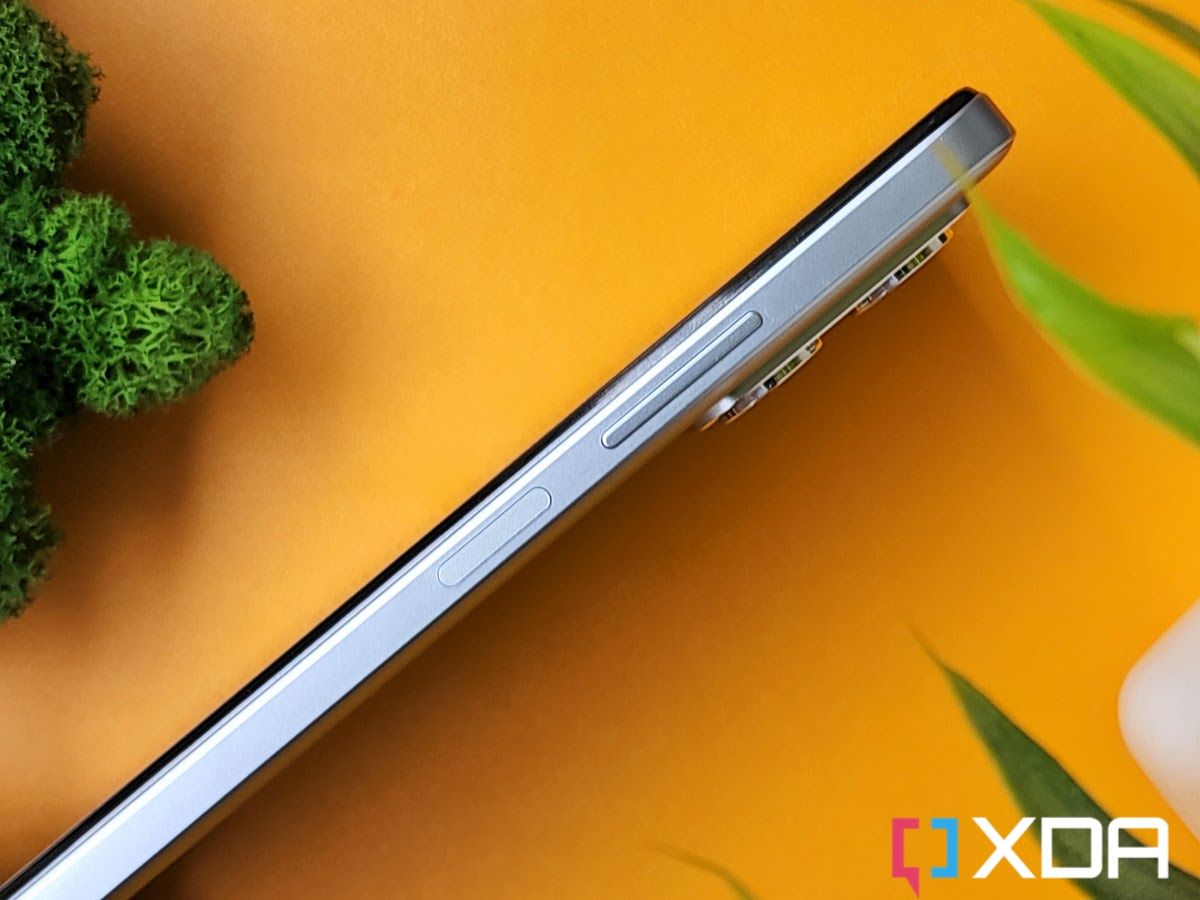
The Redmi series has established its own design language, so the Redmi K50i brings a very familiar design to the market. The handset has a boxy design and is entirely made of plastic. The back panel mimics the look of frosted glass and it seems to repel smudges and fingerprints. The Quick Silver variant which I’ve been using for the last few days, however, has developed a weird-looking spot at the back. It looks more prominent in the photos, and I can’t seem to get rid of it. This issue could be exclusive to my unit, but it’s worth making a note of. The back is almost completely flat but the camera island sticks out quite a bit, and the lenses protrude even further. This makes the device wobble when placed on a flat surface.

Redmi k50i phone on a yellow color leather mat with artificial plants on both sides

The right side of the phone has a volume rocker and a power button which doubles up as a rather reliable side-mounted fingerprint scanner. The USB-C port is at the bottom and it’s flanked by the SIM card tray and speaker grille on both sides. The top also has a bunch of grills which serve as an echo chamber for the left channel speaker. But it’s the 3.5mm headphone jack and the IR blaster that grabs the attention on the top as both of these are rarely seen on any smartphone these days.
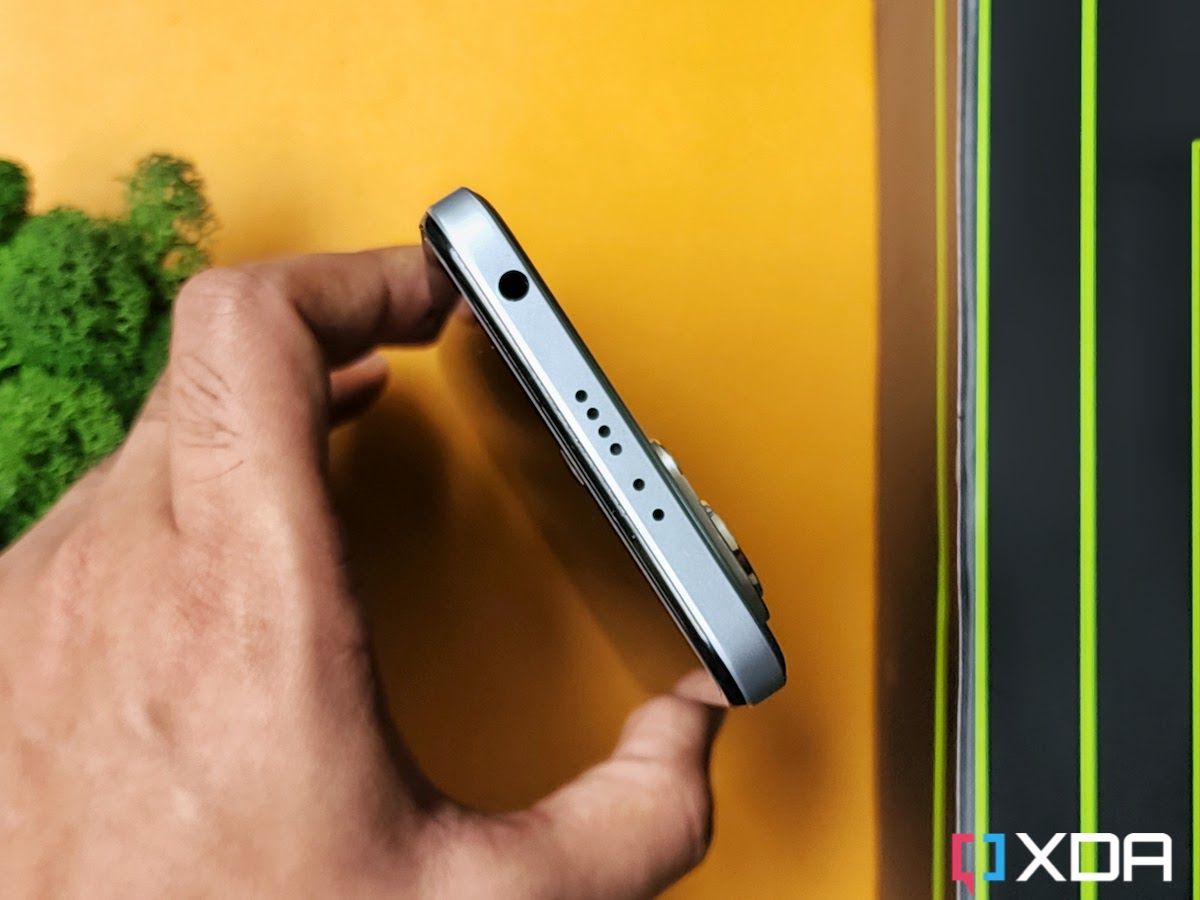
Overall, the Redmi K50i is a fairly decent-looking phone. It’s not winning any awards with its muted design, especially when you compare it with the K20 series’ scintillating design with a gradient finish. The Redmi K50i is also not as thin or light as it appears in the press renders and images. It’s 8.87mm thick and weighs 200g, so it is a sizable phone to carry around. It comes with IP53 certification, so it should hold up pretty well against dust and occasional water sprays.

The screen is a 6.6-inch FHD+ LCD panel with a slight chin at the bottom and a punch-hole cutout for the selfie camera on the top. Not that LCD panels are bad by any means, but Xiaomi made it a point to emphasize the fact that the Redmi K50i sports a fringe-field switching (FFS) LCD which offers many benefits including low operating voltage, wide-viewing angle, and fast response times compared to other LCD types. In real life, the FFS LCD looks similar to the standard LCD panels used on many phones these days. You’re not going to see impressive contrast ratios or inky blacks as you would on an OLED panel, but there’s still a lot to like.

Redmi K50i kept on a yellow-colored leather mat

Redmi K50i's display boasts a rather exhaustive list of features

The lack of an OLED panel isn’t necessarily a pain point here because the Redmi K50i’s display boasts a rather exhaustive list of features including a 144Hz refresh rate, 270Hz touch sampling rate, support for HDR10 and Dolby Vision, and more. Notably, you also get 7-stage AdaptiveSync technology with which the display can dynamically switch the refresh rate between 30Hz, 48Hz, 50Hz, 60Hz, 90Hz, 120Hz, and 144Hz based on the content. The software offers two different settings to control the refresh rate — a default setting to adjust the refresh rate dynamically based on what’s being viewed on the screen, and a custom setting that lets you choose between 60Hz, 120Hz, and 144Hz.

Redmi K50i phone display with the refresh rate

The Redmi K50i has a good display overall but I just wish it was a little brighter. With 500 nits of peak brightness, it doesn’t get nearly as bright as some other phones out there, making it less visible outdoors, especially under direct sunlight. The phone also doesn’t support HDR playback from popular OTT platforms like Netflix too, so keep that in mind.


Redmi K50i Review: Performance and software

  • The Redmi K50i is powered by the MediaTek Dimensity 8100 chipset and it comes with LPDD5 memory and UFS 3.1 storage.
  • This is the best-performing phone in this price range with barely any competitors in sight.

The Redmi K50i is powered by MediaTek’s Dimensity 8100 chipset, and I have absolutely no complaints about its performance. The base variant of this phone comes with 6GB of LPDDR5 memory and 128GB of UFS 3.1 storage, but you can also splurge more to get the variant with 8GB of memory and 256GB of storage. The Dimensity 8100 is a reliable chipset that’s running the show behind the scenes for many devices, and the Redmi K50i takes full advantage of the CPU chops to become one of the fastest phones in its segment.

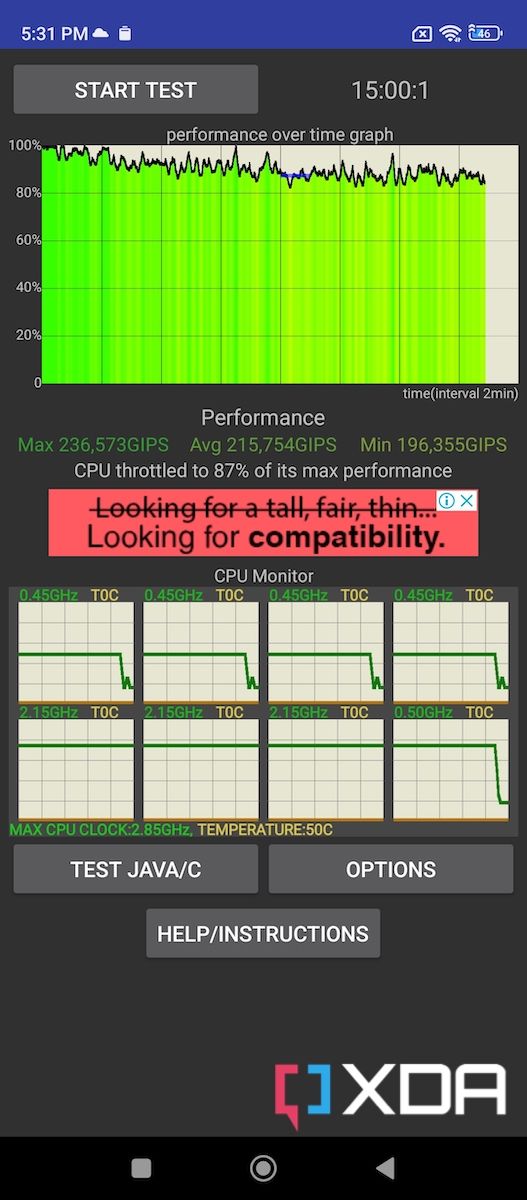
One of the best things about the Redmi K50i is that it doesn’t heat up even under sustained load thanks to the Liquidcool 2.0 technology. And because of this, the Redmi K50i performs admirably well to score good numbers in benchmarks and also delivers a fantastic gaming experience. It maintains 87% of its peak performance in the CPU throttle test and was also able to finish 3DMark’s Wild Life Extreme stress test without getting unbearably hot as some other phones do. Here’s a quick look at some benchmark numbers for those who care about a phone’s performance across benchmarking apps:

All your day-to-day apps run extremely smoothly on this phone. You can expect to see snappy animations and buttery smooth scrolling which isn’t exactly commonplace in the budget category. You can thank the hardware — and likely software too — for delivering a lightning-fast performance for all your day-to-day activities.

A person playing Dead Trigger 2 mobile game on Redmi k50i smartphone

Gaming on the Redmi K50i is also a treat thanks to the reliable performance and 144Hz display. The device is powerful enough to run even the most demanding titles at competent graphics settings with high frame rates on the board. Popular mobile games like Battlegrounds Mobile India (Indian version of PUBG Mobile) and Apex Legends Mobile can run at max graphics settings without a hitch. I also tried a bunch of games that support a 144Hz refresh rate, and it was a smooth experience through and through. Games like Dead Trigger 2, Alto’s Adventure, and Real Racing 3 run smoothly at 144Hz, and the Redmi K50i continues to run them smoothly over an extended period.

The Redmi K50i is powerful enough to run even the most demanding titles at competent graphics settings with high frame rates.
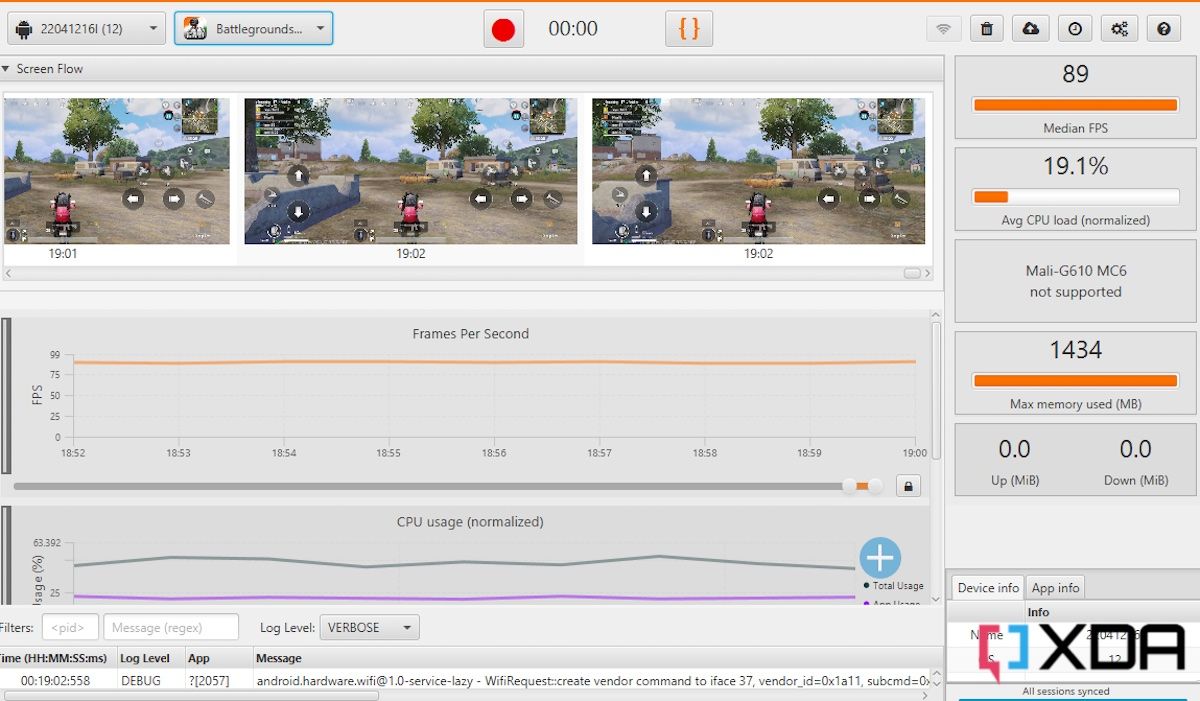
We would like to give special thanks to the team at GameBench for the tool they provided us. Their tool makes it possible for any person, whether it be a regular user, journalist, or engineer, to test a mobile game’s performance on an Android device. Check out GameBench to learn more.

Redmi K50i smartphone showing the About Phone section on the screen

As for the software, the Redmi K50i runs MIUI 13 out of the box. It’s based on Android 12 and offers a plethora of customization options. Xiaomi’s MIUI has evolved a lot over the years and it also offers some under-the-hood improvements now such as better CPU utilization, better RAM management, and more. I am not a huge fan of heavy custom skins on top of Android, but MIUI is very easy to get used to. Some features like the split between notifications shade and control center are a bit niche, but it’s a very welcoming UI otherwise. You get a bunch of pre-installed applications out of the box, but most of them can be uninstalled and they don’t hinder the performance of the phone whatsoever.


Cameras

  • The Redmi K50i sports a triple camera setup at the back which includes a 64MP Samsung GW1 primary sensor, an 8MP ultra-wide camera, and a 2MP macro shooter.
  • The phone captures decent photos during the day but starts to struggle with low-light photos and videos.

Redmi K50i camera module

The Redmi K50i sports a triple camera setup at the back which includes a 64MP Samsung GW1 primary sensor, an 8MP ultra-wide camera, and a 2MP macro shooter. Again, the Redmi K50i isn’t competing with high-end competitors, so I suggest you keep your expectations in check. I was able to capture a bunch of photos in both daytime and low-light conditions, and the results are broadly satisfying. The images, as you can see below, look sharp and have a good amount of detail provided there’s enough light in the scene.

Both the exposure and dynamic range were on point across all the daytime samples I captured with the phone. The primary sensor was also quick to focus, meaning you can rely on the Redmi K50i to capture some moving subjects. The ultra-wide images didn’t turn out as sharp as I’d like, but the overall image still looked pretty good. The secondary sensor offers a nice 120-degree FoV to capture more of the scene, so it’s nice to get a different perspective. Keep in mind that the Redmi K50i doesn’t have a telephoto camera, which means you’ll have to rely on digital zoom as opposed to optical. However, you do get a 2MP macro sensor, which works as advertised to get a quick close-up shot of a subject.

Low-light photos from the primary sensor are decent at best. The images aren’t too bad but I noticed that the phone overexposed many of the shots captured in low light. And the phone’s built-in night mode also does very little to add more details to the images. Both the ultra-wide and the macro camera also struggle to capture good-looking photos in low light, so keep that in mind.

The Redmi K50i packs a 16MP selfie camera that sits on the punch-hole cutout on the front. The selfies will turn out sharp with enough details on the subject’s face. You also get to see natural-looking skin tones, which is always a good sign. Here’s a quick look at some camera samples I was able to capture using the Redmi K50i during my time with the device.

The Redmi K50i can capture 4K videos at 30FPS using the rear camera setup. You’ll have to switch to 1080p resolution to record 60FPS footage.


Redmi K50i Review: Battery Life and Charging

  • The Redmi K50i’s 5,080mAh battery will keep the lights on for at least a day and a half with moderate usage.
  • The phone also comes with a fast-charger in the box that can quickly top up the phone.

The Redmi K50i packs a 5,080mAh battery inside which is bigger than what you get with a lot of smartphones these days. This massive battery adds to the overall thickness and the weight of the phone, but it offers reliable battery backup. The battery life was solid, lasting me about a day and a half with what I’d describe as moderate usage. If you only use your phone for basic activities like scrolling through social media apps, taking a bunch of phone calls, and watching some videos on YouTube or Instagram, then you should be able to get a similar battery backup.

Redmi K50i smartphone in Silver color next to its retail box contents

On the days with heavier usage, especially when I played a bunch of games, ran benchmarking apps, and shot a lot of camera samples for the review, the phone would still comfortably last me through the day with more than 5 hours of screen on time.

A simple line graph to show the charging speeds of the Redmi K50i using the bundled 67W charger

Redmi also bundles a 67W charging brick with the phone which I’d say is very quick to charge the device. If you ever run out of battery during the day, then you can get up to a 50-percent charge in just 30 minutes. The phone doesn’t support wireless charging, but that’s not necessarily a deal-breaker in this price range.


Should you buy the Redmi K50i?

XDA Recommended Award Badge

For a starting price of ₹25,999 in India, the Redmi K50i delivers an excellent budget Android phone experience. You get a zippy 144Hz FFS LCD panel, a MediaTek Dimensity 8100 chipset with reliable performance, a long-lasting battery with a fast charger inside the box, and more. Xiaomi has made some sensible sacrifices, so you don’t get all the bells and whistles. But there’s no denying that the Redmi K50i offers the best value for money. It’s perfect for those who are looking to buy a reliable device to get features and performance that — in many ways — is similar to many other upper mid-rangers or flagships too. You also get 5G support, which you’d need if you’re planning on keeping the phone for a few years.

The Redmi K50i delivers an excellent budget Android phone experience.

You should buy the Redmi K50i if:

  • You’re looking to buy an affordable smartphone and don’t want to compromise on performance.
  • You want to play mobile games at high frame rates.
  • You want a phone with a long-lasting battery and fast charging support.

You shouldn’t buy the Redmi K50i if:

  • You want a phone with an OLED display. The Redmi K50i comes with an FFS LCD panel which looks exactly the same as any other LCD type in the real world.
  • You want your phone to stand out from the others with its design. The Redmi K50i follows the same language as many other Redmi phones and has a fairly muted design, unlike the Redmi K20 Pro that came out in 2019.
  • You want a phone with a close-to-stock Android experience.

The Redmi K50i is arguably the best phone out there if you want the absolute best performance in this price range. But the Redmi K50i isn’t competing with the big players, and it’s not without its flaws. If you’re looking for some alternatives in India, then you can look at other options including the Moto Edge 30 with a Snapdragon 778G+ 5G or the Mi 11i Hypercharge. The POCO F4 is also a great alternative to consider for ₹27,999 if you can find it in stock.

    Redmi K50i
    The Redmi K50i offers an incredible value for money with its stellar performance, a fast 144Hz LCD panel, and a long-lasting battery. Some other noteworthy features of the phone include a 3.5mm headphone jack and an IR blaster. You can check some other alternatives out there, but we think nothing comes close to matching the general performance of the Redmi K50i, at least in this price range.

So, are you interested in buying the Redmi K50i? Let us know by dropping a line in the comments below.

The post Redmi K50i Review: Lightning-fast performance at a low price appeared first on XDA.


from XDA https://ift.tt/3H1uqRr
via IFTTT

jeudi 28 juillet 2022

Google Pixel 6a kernel source code and factory images are now available

The Google Pixel 6a is the company’s latest foray into the mid-range territory. As usual, the phone undercuts its competitors with a flagship-grade camera and the clean software experience. With both officially out today and shipments for pre-orders underway, Google has uploaded all the tools, files, and documentation needed by aftermarket developers interested in running custom software on the Pixel 6a.

Google Pixel 6a XDA Forums

Factory Images

If you’ve already bought a Pixel 6a (code-name: “bluejay”) and started experimenting with it, the stock software is now available for download, in the event you mess something up and need to go back to square one. Right now, you can download the day-one update build with June 2022 security patches, but only for the Japanese and the Verizon variants. Nonetheless, we’ll be seeing new images and OTA updates arrive each month as Google gets started with the phone’s regular security patches.

Factory Images ||| Full OTA Images

Factory images can be installed over any prior version, but you need an unlocked bootloader. The OTA packages, on the other hand, can upgrade your device from a previous official build, and the bootloader can be locked.

What about Android 13 Beta?

Unfortunately, Google has yet to declare the Pixel 6a eligible for the Android 13 beta program. You can, however, unlock the bootloader and flash an official GSI build to get an early taste of Android 13.

Kernel Source Code and Device Tree

The kernel source code and device tree sources are up for grabs, so developers can soon start building TWRP and custom kernels for the phone. If you want to build a fresh system image from scratch, or like to kickstart the porting job for AOSP-based custom ROMs, you don’t need to wait much, because Google has released the driver binaries corresponding to the factory images as well.

Pixel 6a: Kernel Source Code || Device Tree || SEPolicy || Driver Binaries

    Google Pixel 6a
    The Google Pixel 6a is a mid-range smartphone with Google Tensor and a high-end camera.

The post Google Pixel 6a kernel source code and factory images are now available appeared first on XDA.


from XDA https://ift.tt/0ce9fPt
via IFTTT

Instagram caves to pressure, will reverse course on recent changes

This week, the audience simply had enough of Instagram, demanding the platform reverse course on recent changes. The feedback was so intense that Instagram boss Adam Mosseri had to make a public statement (on Twitter, no less) to address the outcry and explain why the changes were happening. Now it looks like Instagram has finally caved to the pressure.

Speaker with Platformer, Instagram stated that they would make changes over the coming weeks, removing fullscreen photos and videos from the app. Instagram will also reduce the number of recommendations being pushed to its users. While app users had been watching more videos before the full-screen update, Instagram’s data showed that people were not fans of the new feed design. During an earnings call this week, Meta CEO Mark Zuckerburg shared that recommended posts on Instagram are currently sitting above 15 percent. He also suggested that recommendations on the platform would be close to double by the end of 2023. Looking at Instagram’s current situation, it’s hard to imagine what 2023 will be like.

Mosseri stated:

When you discover something in your field that you didn’t follow before, there should be a high bar — it should just be great. You should be delighted to see it. And I don’t think that’s happening enough right now. So I think we need to take a step back, in terms of the percentage of feed that are recommendations, get better at ranking and recommendations, and then — if and when we do — we can start to grow again.

While the reversion is undoubtedly welcome, Mosseri clarified that the changes wouldn’t be permanent, which could mean that Zuckerburg’s vision for the future is still on course. Instagram will need to continue to move forward and make changes in some manner as it tries to combat competitors like TikTok. TikTok has been aggressive in its expansion, introducing a subscription service for content creators, safety tools for users, and APIs to add more transparency. These are only a small handful of additions introduced to the platform over the past few months.

In the future, Instagram will have some deep questions to answer if it wants to try to grow its user base. While it has borrowed many ideas from other apps, it’s clear that some aren’t what users are looking for.


Source: Platformer

The post Instagram caves to pressure, will reverse course on recent changes appeared first on XDA.


from XDA https://ift.tt/dGwhzsl
via IFTTT

Instagram caves to pressure, will reverse course on recent changes

This week, the audience simply had enough of Instagram, demanding the platform reverse course on recent changes. The feedback was so intense that Instagram boss Adam Mosseri had to make a public statement (on Twitter, no less) to address the outcry and explain why the changes were happening. Now it looks like Instagram has finally caved to the pressure.

Speaker with Platformer, Instagram stated that they would make changes over the coming weeks, removing fullscreen photos and videos from the app. Instagram will also reduce the number of recommendations being pushed to its users. While app users had been watching more videos before the full-screen update, Instagram’s data showed that people were not fans of the new feed design. During an earnings call this week, Meta CEO Mark Zuckerburg shared that recommended posts on Instagram are currently sitting above 15 percent. He also suggested that recommendations on the platform would be close to double by the end of 2023. Looking at Instagram’s current situation, it’s hard to imagine what 2023 will be like.

Mosseri stated:

When you discover something in your field that you didn’t follow before, there should be a high bar — it should just be great. You should be delighted to see it. And I don’t think that’s happening enough right now. So I think we need to take a step back, in terms of the percentage of feed that are recommendations, get better at ranking and recommendations, and then — if and when we do — we can start to grow again.

While the reversion is undoubtedly welcome, Mosseri clarified that the changes wouldn’t be permanent, which could mean that Zuckerburg’s vision for the future is still on course. Instagram will need to continue to move forward and make changes in some manner as it tries to combat competitors like TikTok. TikTok has been aggressive in its expansion, introducing a subscription service for content creators, safety tools for users, and APIs to add more transparency. These are only a small handful of additions introduced to the platform over the past few months.

In the future, Instagram will have some deep questions to answer if it wants to try to grow its user base. While it has borrowed many ideas from other apps, it’s clear that some aren’t what users are looking for.


Source: Platformer

The post Instagram caves to pressure, will reverse course on recent changes appeared first on XDA.


from XDA https://ift.tt/ocq4w10
via IFTTT

The Google Pixel 6a is getting its very first OTA update

For anyone who has pre-ordered or already has a hold of the Google Pixel 6a, you should expect an update not long after you turn on the device. According to Google, both the unlocked and the carrier variants of the device are eligible for a day-one patch, but the build numbers vary across the models.

As announced by the company on its forums, the first security software update for the Pixel 6a will be gradually made available across the globe. The build number post the update should be as follows:

  • Global (Unlocked): SD2A.220601.003
  • Japan: SD2A.220601.001.A1
  • AT&T, T-Mobile: SD2A.220601.002
  • Verizon: SD2A.220601.004

As you might expect for an early patch, there’s not a lot to see here. Apart from possible stability improvements and bug fixes, the new release actually bumps the Android security patch level to June 2022. That is a little odd as the update doesn’t include the most recent July 2022 security patch (or the August one, if you consider Samsung’s early rollout). That said, we’re merely days away from the eighth month of the year, hence it could be possible that the Pixel 6A might skip the July patch altogether and directly jump to the August patchset in the coming days.

    Google Pixel 6a
    The Google Pixel 6a is a mid-range smartphone with Google Tensor and a high-end camera.

The rollout for the update may take a few days to fully complete, so there’s a chance that your unit may not be able to download the release right away. If you are expecting the device to arrive in the next couple of days, however, it will be a case of updating during the setup phase. You can also manually check for the software update on your Pixel 6a by going to Settings > System > System update > Check for update.

Google Pixel 6a XDA Forums

If you don’t want to wait for Google to push the update to your Pixel 6a, then check out our Android 12 download article for the latest OTA files and factory images.


Source: Google Pixel Help Community, Verizon

The post The Google Pixel 6a is getting its very first OTA update appeared first on XDA.


from XDA https://ift.tt/0oIMjWF
via IFTTT

New Google Maps update will benefit tourists, cyclists, friends and family

Just in time for summer, Google Maps is getting a new update that will bring aerial views of the world’s most popular destinations, improved biking directions with enhanced details about routes, and a safer way to stay connected with friends and family.

Aerial View

Google Maps will now have close to 100 aerial views of popular landmark destinations. That means you’ll be able to check out Tokyo Tower ahead of your trip to Japan or even Lady Liberty before going to New York. While this looks good, Google has plans to make it even better with “immersion view,” but still has some work to do before it can reach that goal. If you want to check out the new aerial view, be sure to head to the photo section to see the detailed landmark.

Google Maps Summer Update

Aerial view, enhanced bike routing, and location sharing notifications.

Biking directions

In addition to popular landmarks, biking directions are getting upgraded, with Google Maps set to introduce more details like elevation, car traffic, stairs, and whether you’ll be biking on an incline or decline. The new update will also show you whether you will bike on a main or local road. Google has curated this data using AI, city data, trusted partners, and feedback from Google Maps users. This seems like perfect timing considering rising gas prices have forced some to commute using bikes. But be sure to check the air quality before heading out.

Share with people who care

The final update coming to Google Maps is notification settings for friends and family. By sharing your location, friends and family will now be able to see when you’ve arrived and when you’ve left a location. This feature will only be available to those who have shared a location with a specific user. The invited user will then be able to set check-in and check-out points. Users can choose to stop sharing their location whenever they choose. This is to ensure that privacy is still maintained.


Aerial views and landmarks and location-sharing notifications are rolling out globally to Google Maps on iOS, Android, and PC. If your city currently has cycling directions, the improved cycling route update should roll out in the coming weeks.

Source: Google

The post New Google Maps update will benefit tourists, cyclists, friends and family appeared first on XDA.


from XDA https://ift.tt/cpAisDa
via IFTTT

Intel adds support for Windows 11 version 22H2 with latest graphics drivers

Windows 11 version 22H2 is going to be available in the coming months, and driver updates are starting to reflect that. AMD has already released its first driver with official support for this version of Windows, and now Intel is doing the same. The latest Intel Graphics drivers for Iris Xe processors – versions 31.0.101.3222 and 31.0.101.2111 – add official support for Windows 11 version 22H2, meaning they should now work better with this update, and any issues that arise with the drivers on that version of Windows are up to Intel to fix.

However, as you might be able to tell from the version numbers above, that’s not the only piece of news here. With this release of its Intel Graphics drivers, the company is also splitting up support for older processors, specifically products that are part of the 6th through 10th generations of Intel processors. These models will now be on a legacy support model, meaning they’ll only get critical fixes and security updates, and usually on a quarterly cadence.

Starting with this release, each driver package contains two sets of driver files. One set (in this case, version 31.0.101.2111) is aimed at these legacy products, and the other (31.0.101.3222) is meant for the more modern models. All the products being dropped predate the Iris Xe graphics architecture, which debuted with the 11th-generation of Intel mobile processors and brought along significant performance improvements for integrated graphics. Both 11th- and 12th-generation Intel processors have Intel Iris Xe graphics, and there’s also the discrete Intel Iris Xe Max GPU, all of which are still on the mainstream support cycle. As for Intel Arc A-series graphics, which are starting to slowly make their way to the market, those get updates separately, and they don’t actually have support for Windows 11 version 22H2 just yet, but presumably, a new driver update is coming soon.

Aside from that change in the support plan, the latest Intel drivers don’t include a whole lot that’s new. Both versions include a fix for a crash in Watch Dogs: Legion when starting the game, while version 31.0.101.3222 also includes a fix for an error message shown when starting up Call Of Duty: Vanguard as well as a fix for an issue where some Intel NUC models may go into a sleep state instead of shutting down.

If you’re interested, you can download the latest Intel Graphics drivers here, and read more about the legacy support model for older Intel processors here.

The post Intel adds support for Windows 11 version 22H2 with latest graphics drivers appeared first on XDA.


from XDA https://ift.tt/foOH12y
via IFTTT