LightBlog

mardi 19 juillet 2022

Fitbit Charge 5 receives ‘Find Phone’ feature with latest update

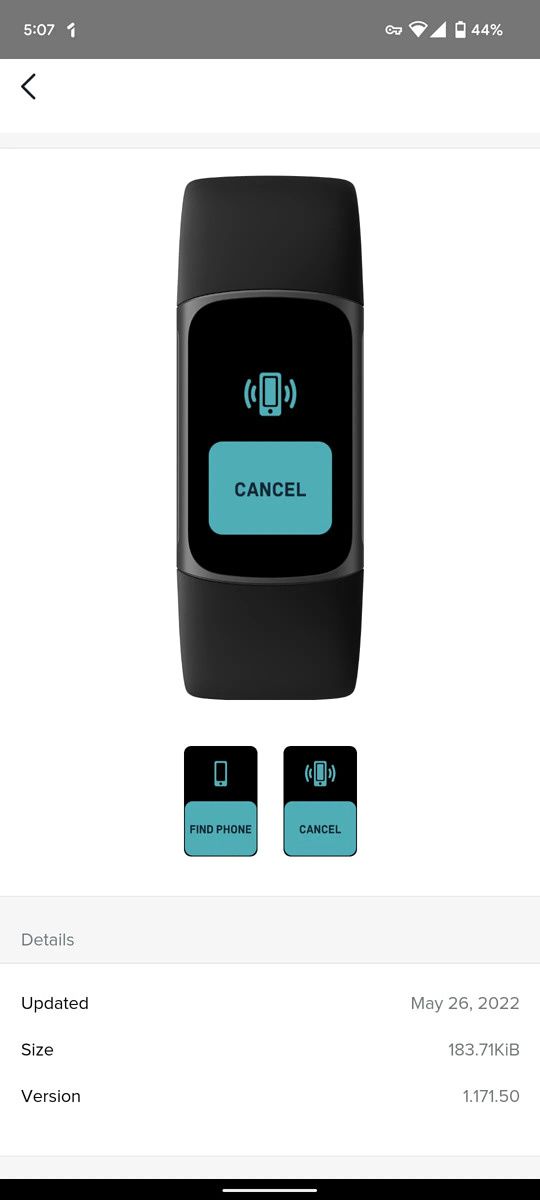
Fitbit is rolling out a new software update for its affordable fitness tracker — the Fitbit Charge 5. The update brings a new ‘Find Phone’ feature to the fitness tracker, making it easy for users to find connected phones.

According to 9to5Google, the software update (v1.171.50) has started rolling out to Charge 5 users widely. While Fitbit hasn’t published a detailed changelog for the update, the publication notes that it brings the ‘Find Phone’ feature. The feature, which was previously limited to certain premium Fitbit smartwatches, lets you locate your misplaced phone with just a tap. It appears between Screen Wake and Water Lock when you swipe down from the clock face, and it presents you with just one ‘Find Phone’ button.
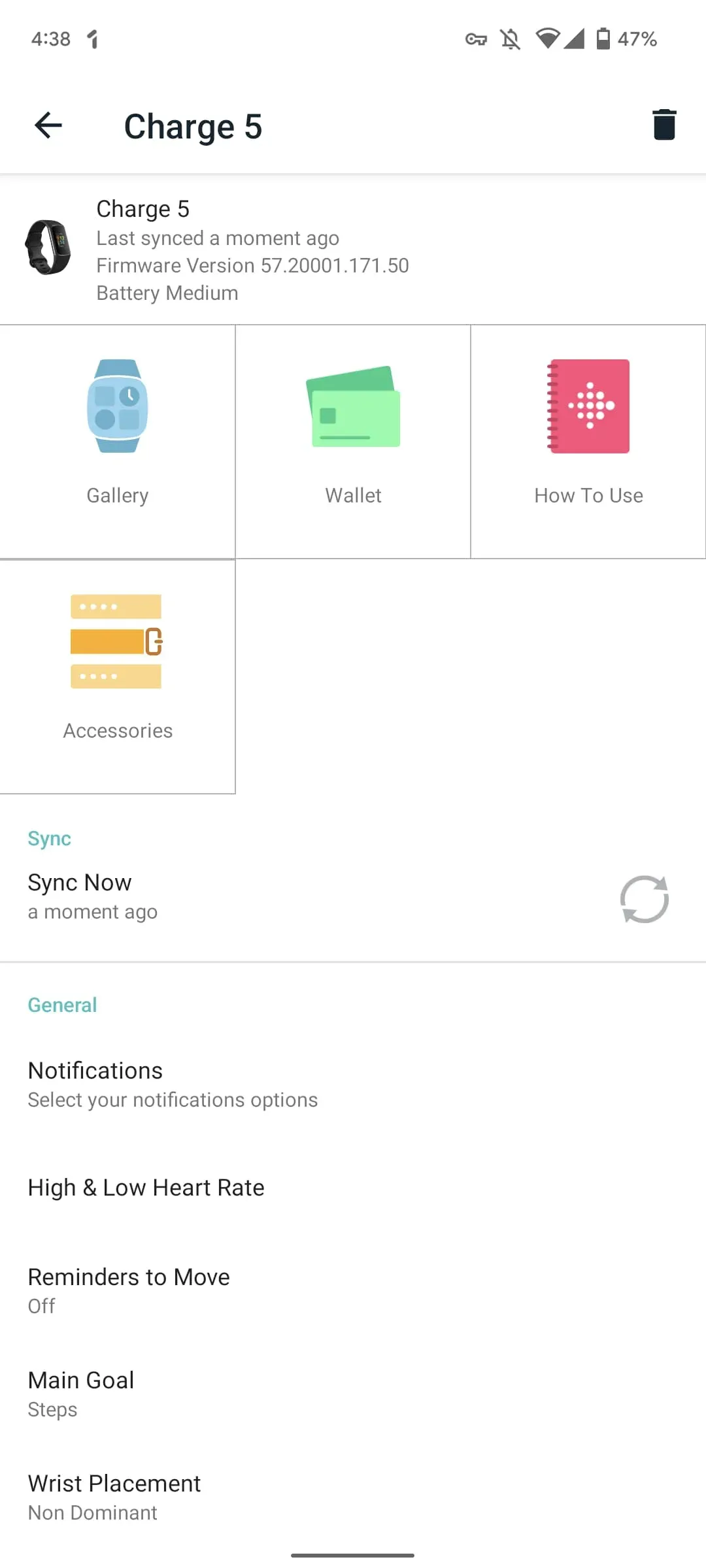
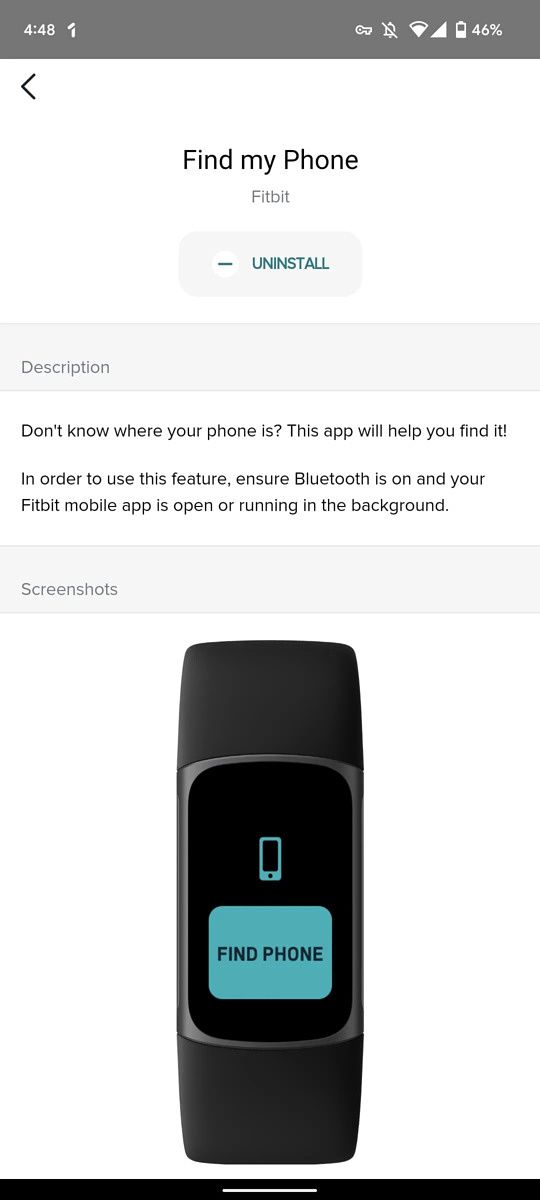
Screenshot of Fitbit Charge 5 update. Screenshot of Fitbit Charge 5 Find Phone feature. Screenshot of Fitbit Charge 5 Find Phone feature.

Screenshots via 9to5Google

When you tap on the button, your paired smartphone will play a loud tone, and the fitness tracker will replace the ‘Find Phone’ button with a ‘Cancel’ button. Once you locate your phone, you can tap on the button to stop playing the tone. Although Fitbit hasn’t specified the requirements for this feature to work as intended on the Charge 5, on the Fitbit Sense, the requirements include:

  • Your watch must be connected (“paired”) to the phone you want to locate.
  • Your phone must have Bluetooth turned on and be within 30 feet (10m) of your Fitbit device.
  • The Fitbit app must be running in the background on your phone.
  • Your phone must be turned on.

The feature comes months after Fitbit released the ECG app for the Charge 5, introduced Daily Readiness Score, and added irregular heart rhythm notifications. At the moment, we don’t have any info on the other changes included in the latest update for the Fitbit Charge 5. We’ll update this post with the detailed changelog as soon as it goes live.

Have you received the latest software update on your Fitbit Charge 5? Let us know in the comments section below.


Via: 9to5Google

The post Fitbit Charge 5 receives ‘Find Phone’ feature with latest update appeared first on XDA.


from XDA https://ift.tt/ckdQaph
via IFTTT

This Tasker project lets you easily copy YouTube video descriptions

While the YouTube app on Android gives you access to video descriptions, it doesn’t let you interact with the content in the description field. Unless the description has links, you can’t interact with it in any way. And even if it has links, you can only tap on them to open them in a WebView wrapper within the YouTube app. As a result, you can’t copy text from the video description and paste it into a different app or copy links to open them in your browser of choice. Thankfully, there’s a Tasker project that lets you copy YouTube video descriptions with a single tap.

The new Copy YouTube Video Description Tasker project does exactly what its name suggests. It presents the content from the description field for the current YouTube video as selectable text, making it easy for you to copy text and links from the description. Check out the video embedded below to see it in action.

While this might seem like a niche use case, Tasker gives you access to a bunch of such projects that could help make your life easier. Thanks to its new beginner-friendly Tasky interface, you can now try out this project and many others without going through a complex setup process. The pre-built routines range from simple “flip to shhh” options to more complex automatic parking notifications. For starters, you can import the Copy YouTube Video Description project by following the link below.

Import Copy YouTube Video Description project

For more information on Tasky and how you can use it to automate various actions, check out our previous coverage. Make sure you check out our Tasker Tips & Tricks forum for useful tips and to interact with fellow Tasker users.

Are you a new Tasker user? What are your thoughts on the beginner-friendly Tasky interface? Let us know in the comments section below.

Tasker ($3.49, Google Play) →

The post This Tasker project lets you easily copy YouTube video descriptions appeared first on XDA.


from XDA https://ift.tt/6r2OtYV
via IFTTT

This Tasker project lets you easily copy YouTube video descriptions

While the YouTube app on Android gives you access to video descriptions, it doesn’t let you interact with the content in the description field. Unless the description has links, you can’t interact with it in any way. And even if it has links, you can only tap on them to open them in a WebView wrapper within the YouTube app. As a result, you can’t copy text from the video description and paste it into a different app or copy links to open them in your browser of choice. Thankfully, there’s a Tasker project that lets you copy YouTube video descriptions with a single tap.

The new Copy YouTube Video Description Tasker project does exactly what its name suggests. It presents the content from the description field for the current YouTube video as selectable text, making it easy for you to copy text and links from the description. Check out the video embedded below to see it in action.

While this might seem like a niche use case, Tasker gives you access to a bunch of such projects that could help make your life easier. Thanks to its new beginner-friendly Tasky interface, you can now try out this project and many others without going through a complex setup process. The pre-built routines range from simple “flip to shhh” options to more complex automatic parking notifications. For starters, you can import the Copy YouTube Video Description project by following the link below.

Import Copy YouTube Video Description project

For more information on Tasky and how you can use it to automate various actions, check out our previous coverage. Make sure you check out our Tasker Tips & Tricks forum for useful tips and to interact with fellow Tasker users.

Are you a new Tasker user? What are your thoughts on the beginner-friendly Tasky interface? Let us know in the comments section below.

Tasker ($3.49, Google Play) →

The post This Tasker project lets you easily copy YouTube video descriptions appeared first on XDA.


from XDA https://ift.tt/4ATIY0i
via IFTTT

Amazon Prime Video gets a visual overhaul on several platforms

Amazon is rolling out a major update for the Prime Video app on several platforms. The update brings a much-needed visual overhaul to Google TV, Android TV, Fire TV, Roku, and Apple TV devices. In addition, the updated UI is also available on the Prime Video app for consoles.

The refreshed Prime Video UI resembles that of Netflix and Disney+, with a large preview window at the top, followed by a new top 10 list and rows of recommended movies and TV shows sorted according to various categories. The interface also has a navigation bar along the left edge, which gives you quick access to Search, Home, Store, Live TV, Free, and My Stuff sections.

Along with the interface changes, Prime Video now also has new visual cues to indicate whether a piece of content is available in your subscription or available to rent/buy. Videos that are included in your Prime Video subscription have a blue check-mark, while those available to rent/buy have a gold shopping bag icon.

Talking about the new visual cues, Helena Cerna, global director of product management for Prime Video, told Variety“We certainly wanted customers to understand the breadth of content available to them, with a clear ingress and being able to know which titles cost extra.”

The new Amazon Prime Video interface will start rolling out to users on the aforementioned platforms this week. In addition, it will roll out to the Prime Video app on Android. The web interface and iOS app, however, will receive the update “in the coming months.” At the moment, it is not clear if the new interface is rolling out to the Prime Video app for macOS. Check out the video embedded above for a quick overview of the new Prime Video interface.

Have you received the updated Prime Video interface on your device? What are your thoughts on the changes? Let us know in the comments section below.


Via: Variety

The post Amazon Prime Video gets a visual overhaul on several platforms appeared first on XDA.


from XDA https://ift.tt/POHvMrn
via IFTTT

Amazon Prime Video gets a visual overhaul on several platforms

Amazon is rolling out a major update for the Prime Video app on several platforms. The update brings a much-needed visual overhaul to Google TV, Android TV, Fire TV, Roku, and Apple TV devices. In addition, the updated UI is also available on the Prime Video app for consoles.

The refreshed Prime Video UI resembles that of Netflix and Disney+, with a large preview window at the top, followed by a new top 10 list and rows of recommended movies and TV shows sorted according to various categories. The interface also has a navigation bar along the left edge, which gives you quick access to Search, Home, Store, Live TV, Free, and My Stuff sections.

Along with the interface changes, Prime Video now also has new visual cues to indicate whether a piece of content is available in your subscription or available to rent/buy. Videos that are included in your Prime Video subscription have a blue check-mark, while those available to rent/buy have a gold shopping bag icon.

Talking about the new visual cues, Helena Cerna, global director of product management for Prime Video, told Variety“We certainly wanted customers to understand the breadth of content available to them, with a clear ingress and being able to know which titles cost extra.”

The new Amazon Prime Video interface will start rolling out to users on the aforementioned platforms this week. In addition, it will roll out to the Prime Video app on Android. The web interface and iOS app, however, will receive the update “in the coming months.” At the moment, it is not clear if the new interface is rolling out to the Prime Video app for macOS. Check out the video embedded above for a quick overview of the new Prime Video interface.

Have you received the updated Prime Video interface on your device? What are your thoughts on the changes? Let us know in the comments section below.


Via: Variety

The post Amazon Prime Video gets a visual overhaul on several platforms appeared first on XDA.


from XDA https://ift.tt/v5NnbfZ
via IFTTT

lundi 18 juillet 2022

Leaked event invite reveals the launch date for Samsung’s next-gen foldables

Over the last few weeks, we’ve seen plenty of leaks about Samsung’s next-gen foldables — the Galaxy Z Flip 4 and the Galaxy Z Fold 4. The leaks have revealed quite a few details about the devices and even given us an early look at the affordable model. While Samsung has yet to make official announcements about the two foldables, a new leak reveals that the company could launch the devices early next month.

The leak in question comes from noted leaker Evan Blass, who recently shared renders of the Galaxy Z Flip 4. It’s an image of the launch invite for the upcoming foldables, confirming that Samsung will host an event on August 10 to unveil the devices. The image includes a silhouette of the Galaxy Z Flip 4, but it doesn’t reveal anything about the Galaxy Z Fold 4. Blass notes that the image has been edited to obfuscate certain details, but we have no info on the removed details.

In case you’ve not been keeping up with our coverage of Samsung’s upcoming foldables, here’s a quick rundown of what we know so far. The Galaxy Z Flip 4 will reportedly feature the same design as its predecessor with some minor changes. It could pack Qualcomm’s Snapdragon 8 Plus Gen 1 chip, a larger external display, a side-mounted fingerprint scanner, and a bigger battery. On the other hand, the Galaxy Z Fold 4 will reportedly feature a boxier design, up to 1TB storage, a side-mounted fingerprint scanner, and the Snapdragon 8 Plus Gen 1 chip.

Samsung might unveil the new Bora Purple colorway for the Galaxy S22 series at the event as well, but the company has not shared any official information on the matter.

Are you excited about Samsung’s next Galaxy Unpacked event? Which upcoming foldable are you looking forward to? Let us know in the comments section below.

The post Leaked event invite reveals the launch date for Samsung’s next-gen foldables appeared first on XDA.


from XDA https://ift.tt/tALU8iv
via IFTTT

Apple is now transparent about the games leaving its Arcade service

Back in late 2019, Apple launched its Arcade gaming service. This addition to its rich family of subscription services caters to casual gamers who are tired of ads and in-app purchases. By paying $4.99 per month, users get access to over 200 premium games on their favorite iPhones, iPads, Macs, and Apple TVs. Expectedly, when a user cancels their subscription, they lose access to all of the Apple Arcade games they had previously played. What many players don’t know, though, is that the game catalogue sometimes shrinks.

List of Apple Arcade games leaving the service on the Mac App Store

While the Cupertino firm adds a couple of games every month or so, it also drops certain titles for unclear reasons. To be more transparent with subscribers, the Apple Arcade tab on the App Store now displays a dedicated section highlighting which games are leaving the service soon. The new section is visible on iOS and macOS alike, giving users a heads-up regarding departing releases.

At the time of writing, the Leaving Arcade Soon section lists 15 titles that the service will be dropping in the near future. It’s still unclear when or why these games are leaving. We also don’t know if the respective developers will re-release them as non-Arcade editions down the road. The current list includes the following games:

  • Projection: First Light
  • Lifeslide
  • Various Daylife
  • EarthNight
  • Atone: Heart of the Elder Tree
  • Over the Alps
  • Dread Nautical
  • Cardpocalypse
  • Towaga: Among Shadows
  • Dead End Job
  • Don’t Bug Me!
  • Spelldrifter
  • Spidersaurs
  • Explottens
  • BattleSky Brigade: Harpooner

If you play any of the titles listed above, it’s a good idea to stop investing as much time into them. Even if you have them installed on your devices, you likely won’t be able to launch them when they’re no longer available on Apple Arcade.

Are you subscribed to Apple Arcade? Why or why not? Let us know in the comments section below.


Source: Touch Arcade

The post Apple is now transparent about the games leaving its Arcade service appeared first on XDA.


from XDA https://ift.tt/zJCxndL
via IFTTT