LightBlog

samedi 9 juillet 2022

Xiaomi 12 Lite Review: Good looking compact mid-ranger that gets the job done

Earlier this week, Xiaomi introduced the Xiaomi 12S series, which as the “S” signifier suggests, is an iterative update to the Xiaomi 12 series that launched back in March. Usually in smartphone land, once a company updates a phone series, the previous line is either discontinued entirely or fades into the background. For example, when Apple released the iPhone 5S, it stopped promoting the iPhone 5. When Huawei launched the Mate XS, it stopped selling the Mate X.

XDA Recommended Award Badge

But not Xiaomi, which has a habit of releasing phones with confusing naming schemes. The latest device to come from this prolific phone maker is the Xiaomi 12 Lite, meaning this is a variant of the 12 series from March, not the 12S series that was just announced.

Confused? Most of us are. But say what you will about Xiaomi’s convoluted naming schemes, there’s no denying it makes some of the best mid-range phones. As I said in my recent Poco F4 review, Xiaomi’s mid-range phones in the $300-$500 range are generally better than anyone else’s phones in this range, including and particularly Samsung’s.

The Xiaomi 12 Lite

Xiaomi 12 Lite: Pricing and Availability

The Xiaomi 12 Lite will be available on XXX. Prices will vary from region to region, but will be about equivalent to below figures in US dollars.

  • 6GB + 128GB, $399
  • 8GB + 128GB, $449
  • 8GB + 256GB, $499
    Xiaomi 12 Lite
      The Xiaomi 12 Lite is a compact phone with a great value-to-price ratio

        Pros:

        Cons:


    Xiaomi 12 Lite: Specifications

    Specification Xiaomi 12 Lite
    Build
    • Corning Gorilla Glass 5
    • Colors: blue, purple, grey
    Dimensions & Weight
    • 159.3 x 73.7 x 7.3mm
    • 173g
    Display
    • 6.55-inch FHD+ AMOLED
    • 2400 x 1080 resolution
    • 120Hz refresh rate
    • Up to 360Hz touch sampling rate
    • 100% DCI-P3 coverage
    • HDR10+
    • Dolby Vision certification
    SoC Qualcomm Snapdragon 778G
    RAM & Storage
    • 8GB LPDDR4X RAM + 128GB UFS 2.2 storage
    • 8GB + 256GB
    Battery & Charging
    • 4,300mAh
    • 67W wired fast charging support
    • 67W charging brick included
    Security
    • In-display fingerprint scanner
    Rear Camera(s)
    • Primary: 108MP f/1.79 with OIS
    • Ultra-wide: 8MP f/2.2, 119-degree FoV
    • Macro: 2MP f/2.45
    Front Camera(s) 32MP f/2.45
    Port(s) USB Type-C
    Audio
    • Dual speakers
    • Dolby Atmos certification
    • Hi-Res Audio certification
    • Hi-Res Audio Wireless certification
    Connectivity
    • 5G (SA/NSA)
      • Bands: n1/3/5/7/8/20/28/38/40/41/77/78
    • 4G LTE
    • Wi-Fi 6
    • Bluetooth 5.2
    • NFC
    Software MIUI 13 for Poco based on Android 12
    Other Features
    • X-axis linear vibration motor

    About this review: Xiaomi sent me a Xiaomi 12 Lite for testing. This review was written after three weeks of using the device on and off, including a week as my main phone. Xiaomi did not have input in this review.


    Xiaomi 12 Lite: Hardware and Design

    Xiaomi 12 Lite

    The Xiaomi 12 Lite is a thin and lightweight phone measuring 7.29mm thick and weighing just 173g. While the 6.55-inch screen is still considered large by some, the phone feels very compact to me, someone used to carrying 6.7- or 6.8-inch flagships that weight over 200g.

    The phone’s flat front and back make for a boxier phone than the typical Android fare, and it makes the phone very easy to hold. I’m usually not a big fan of flat-screened phones (I know, I know, I’m the anomaly in the tech reviewing space) because flat screens often have pointy, slightly sharp edges (where the display meets the chassis), with the best example being the iPhone 12 and 13 series.

    The Xiaomi 12 Lite, like last year’s 11 Lite, works around this by adding a subtle chamfering to the edges of the phone, so the result is a flat panel phone that still feels slightly rounded at the edges. It certainly digs into my palm much less than the iPhone 13 Pro phones.

    xiaomi 12 lite and iphone 13 pro

    Look closely and you can see Xiaomi 12 Lite’s edges (top) don’t end in a sharp 90-degree angle like the iPhone 13 Pro Max’s (bottom).

    The 6.55-inch screen is a 2400 x 1800 OLED panel with symmetrical bezels, meaning the bottom chin bezel isn’t noticeably thicker than the top. This is a relatively recent development in the Android scene, and it’s usually reserved for flagships only. For example, Samsung and OnePlus’ flagship phones give you symmetrical bezels, but drop down a price level to the Galaxy As, the Galaxy FEs, or the OnePlus Nords, and you will see the thicker chin. It’s a cost-cutting measure by Samsung and OnePlus, as it takes more effort and technical skills to manufacture/assemble a phone without that extra chin bezel space. This is an example of Xiaomi offering flagship-like flourishes at mid-range price points when other brands do not.

    Another area where this is clear, at least to a trained reviewer like me who knows where to nitpick, is in the vibration motor. The Xiaomi 12 Lite’s haptics are excellent and flagship level. Again, with Samsung and OnePlus devices, you get great haptics only at the flagship level.

    Xiaomi 12 Lite

    Symmetrical bezels are usually reserved for flagship phones, but Xiaomi is giving you flagship-like flourishes at mid-range prices

    There’s an optical in-display scanner under the display, along with a hole-punch housing a 32MP selfie camera. Both of these (the scanner and selfie cameras) work fine. Like most recent Xiaomi phones, the speaker grilles are also located at the top and bottom of the phone for a more symmetrical sound output compared to many phones.

    Flip the phone around and you get a matte glass finish that comes in three colors. I’m a fan of the light blue, almost green, finish on my unit. The colorway also stretches over the chassis too so you get a uniform color scheme. While the front screen is protected by Gorilla Glass 5, the back glass panel is just normal glass without any specific reinforcement. Xiaomi includes a clear jelly case with the packaging though for those who may want to use a case. Overall, I think the Xiaomi 12 Lite looks and feels great in the hand, which is not something I usually say about phones that are not flagships (yeah I know, I know, I’m spoiled).

    xiaomi 12 Lite back side

    Internals

    The Xiaomi 12 Lite is powered by the Qualcomm Snapdragon 778G with either 6GB or 8GB of RAM and 128GB or 256GB of storage. This is a 6nm silicon that supports 5G connectivity. The memory standards are where we see the first signs of corner-cutting, as they’re not the latest standards: LPDDR4X and UFS 2.2. This means the phone won’t load things as fast as phones using LPDDR5 or UFS 3.1. I’ll talk a bit more about this in the performance section later.

    There’s a 4,300 mAh battery that can be charged at 67W fast charging speeds, and the charger is included with the packaging. No wireless charging support on this phone, though.

    xiaomi 12 lite laying flat


    Xiaomi 12 Lite: Cameras

    The Xiaomi 12 Lite’s rear camera system consists of a 108MP camera using Samsung’s HM2 sensor; an 8MP ultra-wide; and a 2MP macro sensor.

    The main camera uses a 1/1.52-inch sensor, which is respectable — not huge, but not too small either. With an f/1.8 aperture and Xiaomi’s proven software processing, shots can appear very nice. Maybe even flagship quality to untrained eyes. For example, look at the below samples, captured by the Xiaomi 12 Lite and the iPhone 13 Pro Max. Xiaomi’s shot is actually less noisy.

    iPhone 13 Pro Max main camera

    If you want to look at the full-size images to pixel peep yourself, I uploaded all the samples shown in this article in this Flickr album below.

    Xiaomi 12 Lite samples

    The main camera produces shots with lively colors, solid dynamic range, and a bit of bokeh if I get close enough to a subject/object. At night, the phone turns on night mode automatically and shots are still pretty good at this price point. You’ll see a lot more motion blur as the phone needs to slow down the shutter speed to pull in more light.


    The ultra-wide, like almost all mid-range phones’ ultra-wide, is best reserved for daytime use only, because it really struggles at night due to its small image sensor, producing night shots that are very soft on details.

    Xiaomi 12 Lite ultra-wide

    That 2MP macro sensor is mostly just here for decoration, producing “macro” shots that are lacking in details and not even that close to the subject. The iPhone 13 Pro phones have the best macro lens in smartphones right now, and you can see the difference between a good macro shot and a mediocre one.

    Selfies are fine; Xiaomi applies a bit of skin smoothening filters, but nowhere near as strong as Samsung’s phones. The shutter speed is a bit slow, as Xiaomi is likely using a longer exposure to help with light intake. But this does result in motion blur if anyone/anything is moving behind you.

    Xiaomi 12 Lite selfie Xiaomi 12 Lite selfie

    Video capabilities are good at this price range but obviously can’t compare to higher-priced devices. The phone can shoot at up to 4K/60, but there’s no stabilization at 4K/60 or even 4K/30. But shoot at 1080/30 and you get good electronic stabilization. I’m also a fan of Xiaomi’s “clone video” shooting mode — this isn’t a new feature, but essentially the mode lets you quickly stitch together two or three videos as one so the same person can appear in the video two or three times, simultaneously.  The video below includes day and night video samples, as well as a “clone video” clip.

    Overall the Xiaomi 12 Lite cameras are more than satisfactory for a mid-ranger.


    Xiaomi 12 Lite: Performance and Software

    The Snapdragon 778G chip is widely used by mid-range phones in 2021, and for good reason. It’s a balanced performer that offers more than enough power for daily tasks and some gaming, but also isn’t a power hog nor does it run too hot. Throughout my days of use, I encountered no issues in terms of daily tasks. Apps never froze nor stuttered, I didn’t see any major slowdown like I did with the Galaxy A53.

    Xiaomi 12 Lite

    Benchmark scores for GeekBench and PCMark are solid, but Xiaomi for some reason blocked the phone from running 3D Mark.

    Xiaomi 12 Lite GeekBench score Xiaomi 12 Lite PCMark score

    The lightweight, flat sides, and symmetrical speakers make the phone easy to hold and a good YouTube-watching machine when I’m walking around the apartment.

    Battery life

    For a thin and light phone, the Xiaomi 12 Lite battery is decent. On lighter usage days like weekdays when I’m seated at a table for chunks of the day, the 12 Lite can last a full day easily. But on weekends when I tend to be out for 12 or 13 hours and use the phone heavily (cameras, social media, streaming Spotify), the 12 Lite lasts about 11 hours, with roughly four hours of screen-on time (using 120Hz refresh rate setting), this is acceptable. The phone charges fast with the included 67W charger: 28 minutes will take it from 0-100, so a 10-minute top-up in the late afternoon or early evening is enough to ensure the phone makes it into the wee hours.

    Software

    The phone runs MIUI 13 over Android 12, it’s a fast, colorful, animation-heavy UI that does a lot of things right (animations are smooth, you can pull down the notification shade by swiping anywhere instead of needing to reach for the top of the screen, etc), but Xiaomi’s settings page continues to be unnecessarily complicated. MIUI has three different settings pages for display-related matters: there’s a general “display” setting, an “Always-on display” setting, and a “Full-screen display” setting. The last two are not sub-sections under the main display page, they’re separate pages. Every time I get a new phone, I have to change screen time out to much longer than the default (usually 30 seconds) because I need the screen to stay on when I take product shots, and it always takes me a couple of minutes of digging before I find the setting in Xiaomi phones, because it has three display pages.

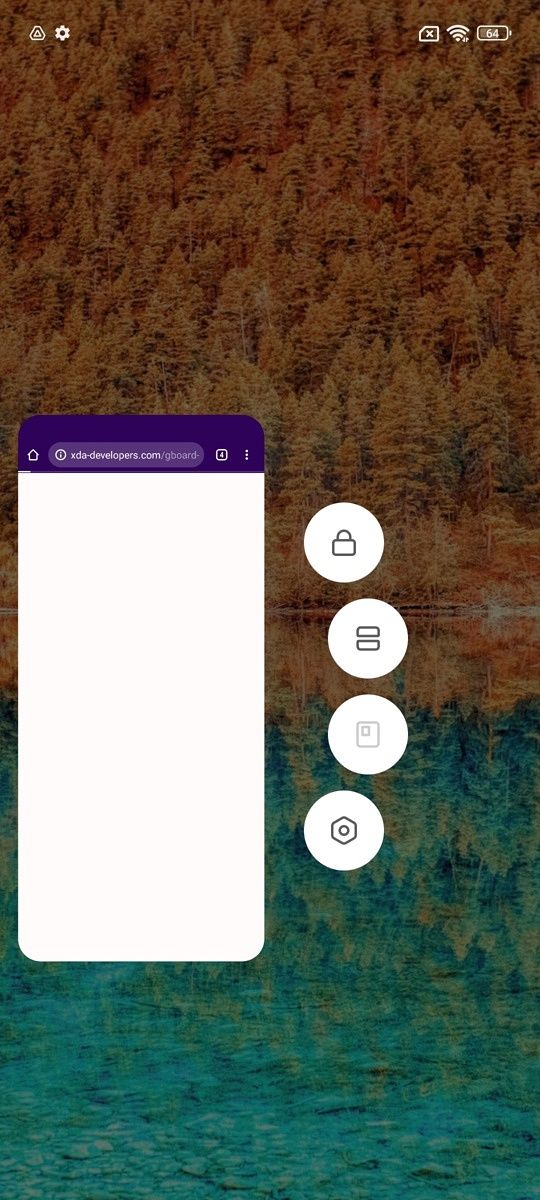
    You also cannot open apps in floating window form here. This seems to be a limitation Xiaomi is putting on mid-range phones because MIUI can definitely do this. In fact, the button to launch the floating window is still there, just grayed out as “not available.” I multi-task with my phone often, and I think floating window is a superior option to Android’s conventional split-screen method.


    Should you get the Xiaomi 12 Lite?

    Poco F4

    There are two ways to evaluate the Xiaomi 12 Lite. There’s no denying that, at $399, it’s a good value product. But how much this is a good value depends on point of view. If you’re only comparing the Xiaomi 12 Lite against other brands, then the closest competition are the $449 Galaxy A53, $429 iPhone SE 3, or something like the $450-ish iQoo Neo 6.

    The Xiaomi 12 Lite beats the Galaxy A53 in almost every way that matters — better screen, better main camera, better processor, better build quality. The only reason to choose the A53 in this scenario is if you just like Samsung or don’t like Xiaomi. The iPhone SE is a much trickier comparison because it’s a different eco-system entirely, but the iPhone SE wins in processing power and video recording but loses badly in display, design, and photography. The iQoo Neo 6 has a more powerful Snapdragon 870 chip, but inferior camera and haptics, and the phone doesn’t appear to be as widely available globally. So Xiaomi 12 Lite makes a strong case if you’re comparing it to other brands.

    But as I wrote recently in the Poco F4 review, it seems Xiaomi’s biggest competition at this price point is itself. The Xiaomi 12 Lite costs $399, the Poco F4 starts at $410, and it has a better Snapdragon processor and faster memory standards (LPDDR5 and UFS 3.1). The Xiaomi 12 Lite does offer a slightly better main camera and display design (symmetrical bezels), but everything else is about equal, down to that useless 2MP macro sensor. If both phones are available in your region, I’d say the Poco is the better option. Otherwise, the Xiaomi 12 Lite, in a vacuum, is yet another very, very good mid-tier phone.

      Xiaomi 12 Lite
      The Xiaomi 12 Lite is a great mid-ranger with lots to offer.

    The post Xiaomi 12 Lite Review: Good looking compact mid-ranger that gets the job done appeared first on XDA.


    from XDA https://ift.tt/SLcw1i8
    via IFTTT

    Xiaomi 12 Lite Review: Good looking compact mid-ranger that gets the job done

    Earlier this week, Xiaomi introduced the Xiaomi 12S series, which as the “S” signifier suggests, is an iterative update to the Xiaomi 12 series that launched back in March. Usually in smartphone land, once a company updates a phone series, the previous line is either discontinued entirely or fades into the background. For example, when Apple released the iPhone 5S, it stopped promoting the iPhone 5. When Huawei launched the Mate XS, it stopped selling the Mate X.

    XDA Recommended Award Badge

    But not Xiaomi, which has a habit of releasing phones with confusing naming schemes. The latest device to come from this prolific phone maker is the Xiaomi 12 Lite, meaning this is a variant of the 12 series from March, not the 12S series that was just announced.

    Confused? Most of us are. But say what you will about Xiaomi’s convoluted naming schemes, there’s no denying it makes some of the best mid-range phones. As I said in my recent Poco F4 review, Xiaomi’s mid-range phones in the $300-$500 range are generally better than anyone else’s phones in this range, including and particularly Samsung’s.

    The Xiaomi 12 Lite

    Xiaomi 12 Lite: Pricing and Availability

    The Xiaomi 12 Lite will be available on XXX. Prices will vary from region to region, but will be about equivalent to below figures in US dollars.

    • 6GB + 128GB, $399
    • 8GB + 128GB, $449
    • 8GB + 256GB, $499
      Xiaomi 12 Lite
        The Xiaomi 12 Lite is a compact phone with a great value-to-price ratio

          Pros:

          Cons:


      Xiaomi 12 Lite: Specifications

      Specification Xiaomi 12 Lite
      Build
      • Corning Gorilla Glass 5
      • Colors: blue, purple, grey
      Dimensions & Weight
      • 159.3 x 73.7 x 7.3mm
      • 173g
      Display
      • 6.55-inch FHD+ AMOLED
      • 2400 x 1080 resolution
      • 120Hz refresh rate
      • Up to 360Hz touch sampling rate
      • 100% DCI-P3 coverage
      • HDR10+
      • Dolby Vision certification
      SoC Qualcomm Snapdragon 778G
      RAM & Storage
      • 8GB LPDDR4X RAM + 128GB UFS 2.2 storage
      • 8GB + 256GB
      Battery & Charging
      • 4,300mAh
      • 67W wired fast charging support
      • 67W charging brick included
      Security
      • In-display fingerprint scanner
      Rear Camera(s)
      • Primary: 108MP f/1.79 with OIS
      • Ultra-wide: 8MP f/2.2, 119-degree FoV
      • Macro: 2MP f/2.45
      Front Camera(s) 32MP f/2.45
      Port(s) USB Type-C
      Audio
      • Dual speakers
      • Dolby Atmos certification
      • Hi-Res Audio certification
      • Hi-Res Audio Wireless certification
      Connectivity
      • 5G (SA/NSA)
        • Bands: n1/3/5/7/8/20/28/38/40/41/77/78
      • 4G LTE
      • Wi-Fi 6
      • Bluetooth 5.2
      • NFC
      Software MIUI 13 for Poco based on Android 12
      Other Features
      • X-axis linear vibration motor

      About this review: Xiaomi sent me a Xiaomi 12 Lite for testing. This review was written after three weeks of using the device on and off, including a week as my main phone. Xiaomi did not have input in this review.


      Xiaomi 12 Lite: Hardware and Design

      Xiaomi 12 Lite

      The Xiaomi 12 Lite is a thin and lightweight phone measuring 7.29mm thick and weighing just 173g. While the 6.55-inch screen is still considered large by some, the phone feels very compact to me, someone used to carrying 6.7- or 6.8-inch flagships that weight over 200g.

      The phone’s flat front and back make for a boxier phone than the typical Android fare, and it makes the phone very easy to hold. I’m usually not a big fan of flat-screened phones (I know, I know, I’m the anomaly in the tech reviewing space) because flat screens often have pointy, slightly sharp edges (where the display meets the chassis), with the best example being the iPhone 12 and 13 series.

      The Xiaomi 12 Lite, like last year’s 11 Lite, works around this by adding a subtle chamfering to the edges of the phone, so the result is a flat panel phone that still feels slightly rounded at the edges. It certainly digs into my palm much less than the iPhone 13 Pro phones.

      xiaomi 12 lite and iphone 13 pro

      Look closely and you can see Xiaomi 12 Lite’s edges (top) don’t end in a sharp 90-degree angle like the iPhone 13 Pro Max’s (bottom).

      The 6.55-inch screen is a 2400 x 1800 OLED panel with symmetrical bezels, meaning the bottom chin bezel isn’t noticeably thicker than the top. This is a relatively recent development in the Android scene, and it’s usually reserved for flagships only. For example, Samsung and OnePlus’ flagship phones give you symmetrical bezels, but drop down a price level to the Galaxy As, the Galaxy FEs, or the OnePlus Nords, and you will see the thicker chin. It’s a cost-cutting measure by Samsung and OnePlus, as it takes more effort and technical skills to manufacture/assemble a phone without that extra chin bezel space. This is an example of Xiaomi offering flagship-like flourishes at mid-range price points when other brands do not.

      Another area where this is clear, at least to a trained reviewer like me who knows where to nitpick, is in the vibration motor. The Xiaomi 12 Lite’s haptics are excellent and flagship level. Again, with Samsung and OnePlus devices, you get great haptics only at the flagship level.

      Xiaomi 12 Lite

      Symmetrical bezels are usually reserved for flagship phones, but Xiaomi is giving you flagship-like flourishes at mid-range prices

      There’s an optical in-display scanner under the display, along with a hole-punch housing a 32MP selfie camera. Both of these (the scanner and selfie cameras) work fine. Like most recent Xiaomi phones, the speaker grilles are also located at the top and bottom of the phone for a more symmetrical sound output compared to many phones.

      Flip the phone around and you get a matte glass finish that comes in three colors. I’m a fan of the light blue, almost green, finish on my unit. The colorway also stretches over the chassis too so you get a uniform color scheme. While the front screen is protected by Gorilla Glass 5, the back glass panel is just normal glass without any specific reinforcement. Xiaomi includes a clear jelly case with the packaging though for those who may want to use a case. Overall, I think the Xiaomi 12 Lite looks and feels great in the hand, which is not something I usually say about phones that are not flagships (yeah I know, I know, I’m spoiled).

      xiaomi 12 Lite back side

      Internals

      The Xiaomi 12 Lite is powered by the Qualcomm Snapdragon 778G with either 6GB or 8GB of RAM and 128GB or 256GB of storage. This is a 6nm silicon that supports 5G connectivity. The memory standards are where we see the first signs of corner-cutting, as they’re not the latest standards: LPDDR4X and UFS 2.2. This means the phone won’t load things as fast as phones using LPDDR5 or UFS 3.1. I’ll talk a bit more about this in the performance section later.

      There’s a 4,300 mAh battery that can be charged at 67W fast charging speeds, and the charger is included with the packaging. No wireless charging support on this phone, though.

      xiaomi 12 lite laying flat


      Xiaomi 12 Lite: Cameras

      The Xiaomi 12 Lite’s rear camera system consists of a 108MP camera using Samsung’s HM2 sensor; an 8MP ultra-wide; and a 2MP macro sensor.

      The main camera uses a 1/1.52-inch sensor, which is respectable — not huge, but not too small either. With an f/1.8 aperture and Xiaomi’s proven software processing, shots can appear very nice. Maybe even flagship quality to untrained eyes. For example, look at the below samples, captured by the Xiaomi 12 Lite and the iPhone 13 Pro Max. Xiaomi’s shot is actually less noisy.

      iPhone 13 Pro Max main camera

      If you want to look at the full-size images to pixel peep yourself, I uploaded all the samples shown in this article in this Flickr album below.

      Xiaomi 12 Lite samples

      The main camera produces shots with lively colors, solid dynamic range, and a bit of bokeh if I get close enough to a subject/object. At night, the phone turns on night mode automatically and shots are still pretty good at this price point. You’ll see a lot more motion blur as the phone needs to slow down the shutter speed to pull in more light.

      The ultra-wide, like almost all mid-range phones’ ultra-wide, is best reserved for daytime use only, because it really struggles at night due to its small image sensor, producing night shots that are very soft on details.
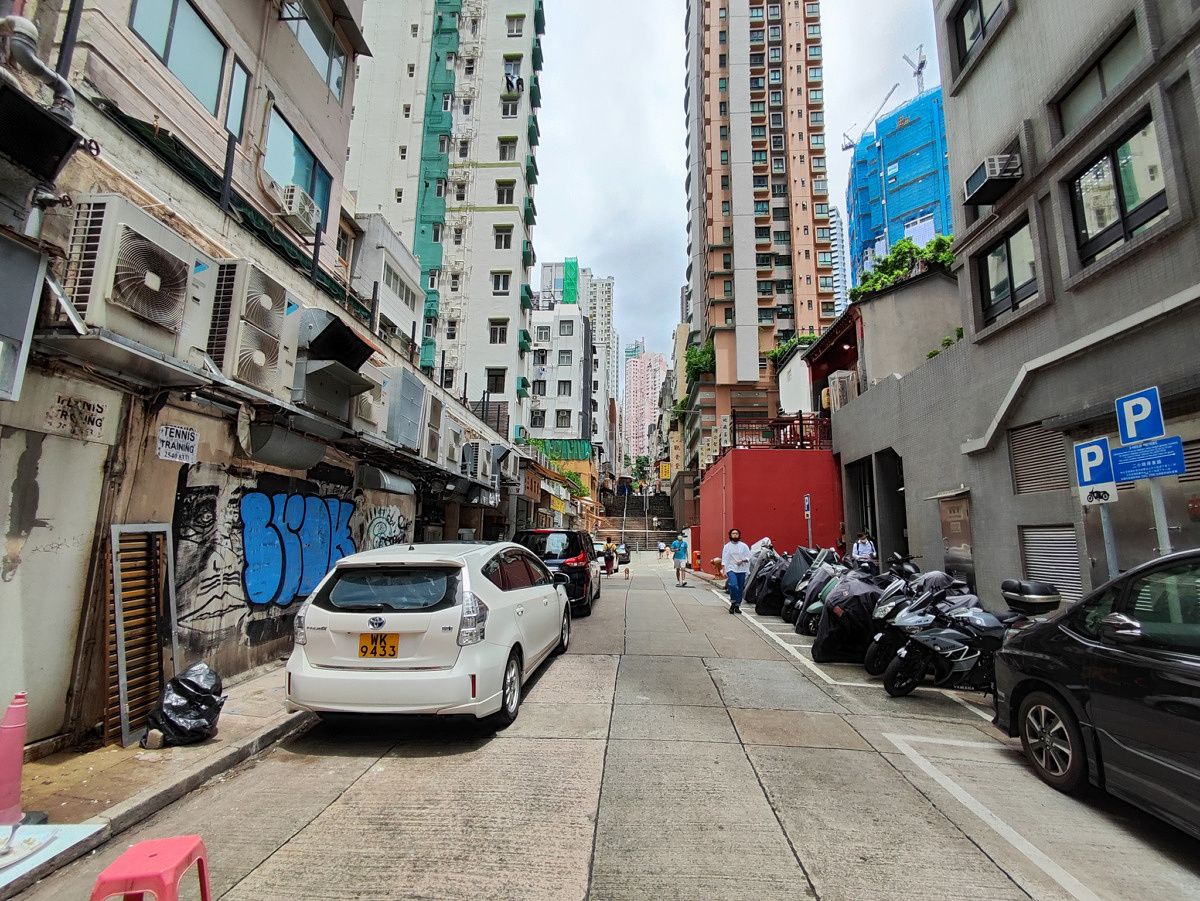

      Xiaomi 12 Lite ultra-wide

      That 2MP macro sensor is mostly just here for decoration, producing “macro” shots that are lacking in details and not even that close to the subject. The iPhone 13 Pro phones have the best macro lens in smartphones right now, and you can see the difference between a good macro shot and a mediocre one.

      Selfies are fine; Xiaomi applies a bit of skin smoothening filters, but nowhere near as strong as Samsung’s phones. The shutter speed is a bit slow, as Xiaomi is likely using a longer exposure to help with light intake. But this does result in motion blur if anyone/anything is moving behind you.


      Xiaomi 12 Lite selfie Xiaomi 12 Lite selfie

      Video capabilities are good at this price range but obviously can’t compare to higher-priced devices. The phone can shoot at up to 4K/60, but there’s no stabilization at 4K/60 or even 4K/30. But shoot at 1080/30 and you get good electronic stabilization. I’m also a fan of Xiaomi’s “clone video” shooting mode — this isn’t a new feature, but essentially the mode lets you quickly stitch together two or three videos as one so the same person can appear in the video two or three times, simultaneously.  The video below includes day and night video samples, as well as a “clone video” clip.

      Overall the Xiaomi 12 Lite cameras are more than satisfactory for a mid-ranger.


      Xiaomi 12 Lite: Performance and Software

      The Snapdragon 778G chip is widely used by mid-range phones in 2021, and for good reason. It’s a balanced performer that offers more than enough power for daily tasks and some gaming, but also isn’t a power hog nor does it run too hot. Throughout my days of use, I encountered no issues in terms of daily tasks. Apps never froze nor stuttered, I didn’t see any major slowdown like I did with the Galaxy A53.

      Xiaomi 12 Lite

      Benchmark scores for GeekBench and PCMark are solid, but Xiaomi for some reason blocked the phone from running 3D Mark.

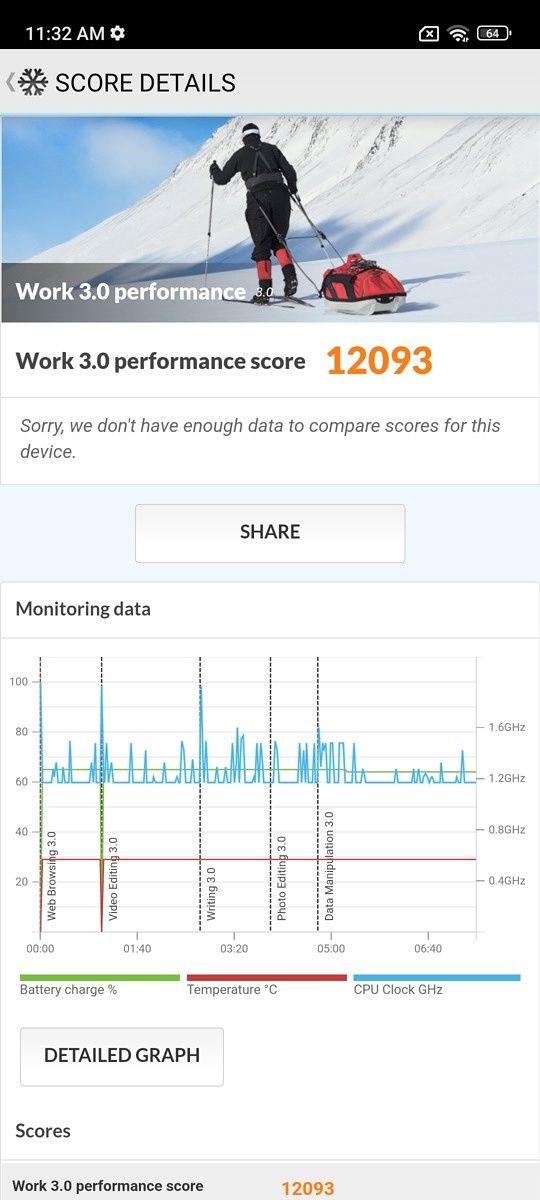
      Xiaomi 12 Lite GeekBench score Xiaomi 12 Lite PCMark score

      The lightweight, flat sides, and symmetrical speakers make the phone easy to hold and a good YouTube-watching machine when I’m walking around the apartment.

      Battery life

      For a thin and light phone, the Xiaomi 12 Lite battery is decent. On lighter usage days like weekdays when I’m seated at a table for chunks of the day, the 12 Lite can last a full day easily. But on weekends when I tend to be out for 12 or 13 hours and use the phone heavily (cameras, social media, streaming Spotify), the 12 Lite lasts about 11 hours, with roughly four hours of screen-on time (using 120Hz refresh rate setting), this is acceptable. The phone charges fast with the included 67W charger: 28 minutes will take it from 0-100, so a 10-minute top-up in the late afternoon or early evening is enough to ensure the phone makes it into the wee hours.

      Software

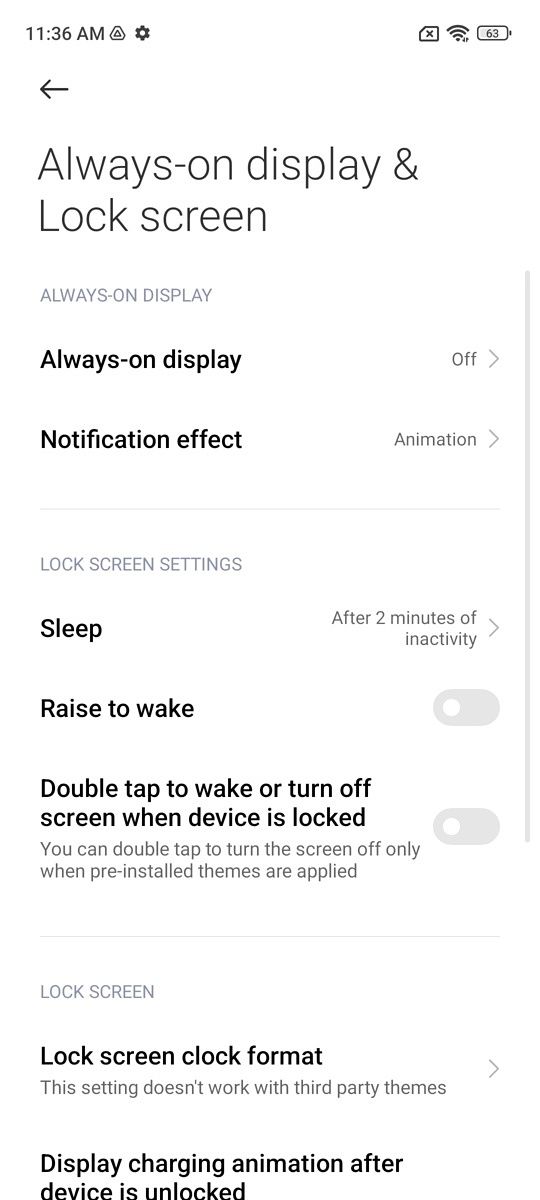
      The phone runs MIUI 13 over Android 12, it’s a fast, colorful, animation-heavy UI that does a lot of things right (animations are smooth, you can pull down the notification shade by swiping anywhere instead of needing to reach for the top of the screen, etc), but Xiaomi’s settings page continues to be unnecessarily complicated. MIUI has three different settings pages for display-related matters: there’s a general “display” setting, an “Always-on display” setting, and a “Full-screen display” setting. The last two are not sub-sections under the main display page, they’re separate pages. Every time I get a new phone, I have to change screen time out to much longer than the default (usually 30 seconds) because I need the screen to stay on when I take product shots, and it always takes me a couple of minutes of digging before I find the setting in Xiaomi phones, because it has three display pages.
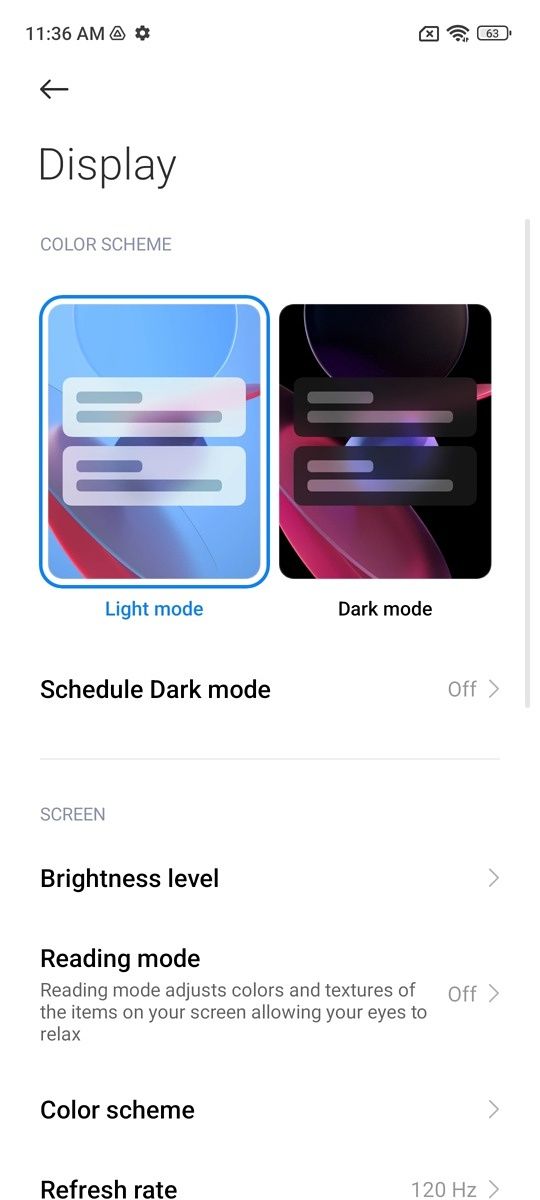
      You also cannot open apps in floating window form here. This seems to be a limitation Xiaomi is putting on mid-range phones because MIUI can definitely do this. In fact, the button to launch the floating window is still there, just grayed out as “not available.” I multi-task with my phone often, and I think floating window is a superior option to Android’s conventional split-screen method.


      Should you get the Xiaomi 12 Lite?

      Poco F4

      There are two ways to evaluate the Xiaomi 12 Lite. There’s no denying that, at $399, it’s a good value product. But how much this is a good value depends on point of view. If you’re only comparing the Xiaomi 12 Lite against other brands, then the closest competition are the $449 Galaxy A53, $429 iPhone SE 3, or something like the $450-ish iQoo Neo 6.

      The Xiaomi 12 Lite beats the Galaxy A53 in almost every way that matters — better screen, better main camera, better processor, better build quality. The only reason to choose the A53 in this scenario is if you just like Samsung or don’t like Xiaomi. The iPhone SE is a much trickier comparison because it’s a different eco-system entirely, but the iPhone SE wins in processing power and video recording but loses badly in display, design, and photography. The iQoo Neo 6 has a more powerful Snapdragon 870 chip, but inferior camera and haptics, and the phone doesn’t appear to be as widely available globally. So Xiaomi 12 Lite makes a strong case if you’re comparing it to other brands.

      But as I wrote recently in the Poco F4 review, it seems Xiaomi’s biggest competition at this price point is itself. The Xiaomi 12 Lite costs $399, the Poco F4 starts at $410, and it has a better Snapdragon processor and faster memory standards (LPDDR5 and UFS 3.1). The Xiaomi 12 Lite does offer a slightly better main camera and display design (symmetrical bezels), but everything else is about equal, down to that useless 2MP macro sensor. If both phones are available in your region, I’d say the Poco is the better option. Otherwise, the Xiaomi 12 Lite, in a vacuum, is yet another very, very good mid-tier phone.

        Xiaomi 12 Lite
        The Xiaomi 12 Lite is a great mid-ranger with lots to offer.

      The post Xiaomi 12 Lite Review: Good looking compact mid-ranger that gets the job done appeared first on XDA.


      from XDA https://ift.tt/GVSiN14
      via IFTTT

      vendredi 8 juillet 2022

      Steam Deck beta client update delivers a ton of enhancements

      If your Steam Deck is on the beta channel, a new update has arrived, introducing new external UI options, scaling features, new keyboard options, and more.

      Although the Steam Deck is known for being a handheld console, it has the ability to output to a display. With the latest update, users will now be able to scale the user interface when connected to an external display. There will also be a new toggle for the console, making it possible to enable automatic scaling of the UI when connected to a monitor or TV. While night mode has always been an option, going forward, users will no longer have to toggle it manually, and will instead have the option to set it on a schedule. Along with improvements to the adaptive brightness controls, the update also brings support for a Japanese keyboard, and also improves the Korean keyboard user interface.

      Valve has been a roll with the Steam Deck, issuing updates to improve the user experience and offer further support with hardware as well. At the end of June, the firm announced that it had completed Q2 shipments and would be doubling the shipments for Q3. The company has also been surprisingly generous in issuing software for Windows, despite its stance that it would not officially support third-party operating systems. On the hardware side, Valve had to delay its Docking Station but did successfully launch a parts store in partnership with iFixit.

      The future of Steam Deck looks bright, let’s hope that Valve keeps the momentum going.

      If you’re interested in trying out some of the options mentioned above, you can opt into the beta channel by heading into Settings > System > Steam Update Channel. Going forward, users will have the option of choosing: stable, beta, or preview channels. Of course, beta and preview will have new and experimental features, so proceed with caution as there could be issues.


      Source: Valve

      The post Steam Deck beta client update delivers a ton of enhancements appeared first on XDA.


      from XDA https://ift.tt/uSWYNf4
      via IFTTT

      Steam Deck beta client update delivers a ton of enhancements

      If your Steam Deck is on the beta channel, a new update has arrived, introducing new external UI options, scaling features, new keyboard options, and more.

      Although the Steam Deck is known for being a handheld console, it has the ability to output to a display. With the latest update, users will now be able to scale the user interface when connected to an external display. There will also be a new toggle for the console, making it possible to enable automatic scaling of the UI when connected to a monitor or TV. While night mode has always been an option, going forward, users will no longer have to toggle it manually, and will instead have the option to set it on a schedule. Along with improvements to the adaptive brightness controls, the update also brings support for a Japanese keyboard, and also improves the Korean keyboard user interface.

      Valve has been a roll with the Steam Deck, issuing updates to improve the user experience and offer further support with hardware as well. At the end of June, the firm announced that it had completed Q2 shipments and would be doubling the shipments for Q3. The company has also been surprisingly generous in issuing software for Windows, despite its stance that it would not officially support third-party operating systems. On the hardware side, Valve had to delay its Docking Station but did successfully launch a parts store in partnership with iFixit.

      The future of Steam Deck looks bright, let’s hope that Valve keeps the momentum going.

      If you’re interested in trying out some of the options mentioned above, you can opt into the beta channel by heading into Settings > System > Steam Update Channel. Going forward, users will have the option of choosing: stable, beta, or preview channels. Of course, beta and preview will have new and experimental features, so proceed with caution as there could be issues.


      Source: Valve

      The post Steam Deck beta client update delivers a ton of enhancements appeared first on XDA.


      from XDA https://ift.tt/Hdn5b92
      via IFTTT

      Pixel’s At a Glance widget will soon let you track your cab bookings and food deliveries

      Back in April, a teardown of the Google app revealed that the At a Glance widget on Pixel devices might soon get support for grocery delivery tracking. Now, Mishaal Rahman has spotted three more features that might soon show up in the At a Glance widget — cross-device timer info, ridesharing service status, and food delivery arrival status.

      In a recent tweet, Rahman shared a screenshot of the upcoming features and revealed some details about the supported services. As you can see in the attached screenshot, the At a Glance settings include three additional toggles, namely Cross device timer, Ridesharing service, and Food delivery. While these features are not live at the moment, they could make their way to users with an upcoming update for the Google app.

      Screenshot of At a Glance settings.

      Credit: Mishaal Rahman

      Once the features roll out, the Cross device timer feature will let users view timer info from all devices connected to their Google account in the At a Glance widget. In addition, users will be able to track their Uber and Lyft cab bookings in the widget, along with Doordash delivery statuses. Google might add support for more ridesharing and food delivery services in time for the rollout, but we don’t have any information regarding the same at the moment.

      The At a Glance widget on Pixel devices has received several useful features over the last few months. The widget received support for the battery and connection status for Bluetooth devices with the March 2022 Pixel Feature Drop. It previously received Nest doorbell alerts, fitness app activity, a flashlight reminder, a safety check countdown from the Personal Safety app, and bedtime alerts from the Clock app.

      What do you think of these new features for the Pixel At a Glance widget? Let us know in the comments section below.

      The post Pixel’s At a Glance widget will soon let you track your cab bookings and food deliveries appeared first on XDA.


      from XDA https://ift.tt/M0kX5qx
      via IFTTT

      Tasker’s beginner-friendly Tasky interface is now available for all users

      Tasker developer João Dias debuted a new beginner-friendly interface, called Tasky, with Tasker 6.0 beta in March this year. Designed to help new users get a grip of the powerful automation app, the Tasky interface offers hundreds of pre-built “routines” that you can use without going through a complex setup process. After a successful beta run, the new Tasky interface is now available for all users with Tasker 6.0.9.

      Tasker 6.0.9 has started rolling out through the Play Store, and it brings the new Tasky interface to the stable channel. The beginner-friendly interface makes automation configurable by giving users access to pre-built routines that they can customize as per their needs. The pre-built routines range from simple “flip to shhh” options to more complex automatic parking notifications, and we’re sure you’ll find something to kickstart your automation journey with Tasker.

      If you like the idea and want to give it a shot, you can check out the video embedded above to see how you can import and configure a routine. In case you’re a seasoned Tasker user and you’d like to share your Tasker projects to help new users, check out the following video to learn how to make your Tasker projects configurable on import.

      Along with Tasky, Tasker 6.0.9 brings a couple of other noteworthy changes. These include several new actions like Get Screen Info, Airplane Mode without Root or ADB WiFi, support for Quick Setting Tile Actions on locked devices, and more. You can check out the full Tasker 6.0.9 changelog here.

      Tasker ($3.49, Google Play) →


      Source: Reddit

      The post Tasker’s beginner-friendly Tasky interface is now available for all users appeared first on XDA.


      from XDA https://ift.tt/KbZRB9u
      via IFTTT

      Tasker’s beginner-friendly Tasky interface is now available for all users

      Tasker developer João Dias debuted a new beginner-friendly interface, called Tasky, with Tasker 6.0 beta in March this year. Designed to help new users get a grip of the powerful automation app, the Tasky interface offers hundreds of pre-built “routines” that you can use without going through a complex setup process. After a successful beta run, the new Tasky interface is now available for all users with Tasker 6.0.9.

      Tasker 6.0.9 has started rolling out through the Play Store, and it brings the new Tasky interface to the stable channel. The beginner-friendly interface makes automation configurable by giving users access to pre-built routines that they can customize as per their needs. The pre-built routines range from simple “flip to shhh” options to more complex automatic parking notifications, and we’re sure you’ll find something to kickstart your automation journey with Tasker.

      If you like the idea and want to give it a shot, you can check out the video embedded above to see how you can import and configure a routine. In case you’re a seasoned Tasker user and you’d like to share your Tasker projects to help new users, check out the following video to learn how to make your Tasker projects configurable on import.

      Along with Tasky, Tasker 6.0.9 brings a couple of other noteworthy changes. These include several new actions like Get Screen Info, Airplane Mode without Root or ADB WiFi, support for Quick Setting Tile Actions on locked devices, and more. You can check out the full Tasker 6.0.9 changelog here.

      Tasker ($3.49, Google Play) →


      Source: Reddit

      The post Tasker’s beginner-friendly Tasky interface is now available for all users appeared first on XDA.


      from XDA https://ift.tt/5ncZ3Xq
      via IFTTT