LightBlog

mardi 18 janvier 2022

Xiaomi 11T Pro with Snapdragon 888, 120W fast charging launched in India

After launching the Xiaomi 11T series in Europe back in September last year, Xiaomi is now bringing the Xiaomi 11T Pro to the Indian market. The flagship device features Qualcomm’s Snapdragon 888 chip, a large, high refresh rate AMOLED display, up to 12GB LPDDR5 RAM, and up to 256GB of UFS 3.1 storage. The phone also packs some impressive camera hardware, insane fast charging capabilities, and more. Here’s everything you need to know about the new Xiaomi 11T Pro.

Xiaomi 11T Pro: Specifications

Specification Xiaomi 11T Pro
Dimensions & Weight
  • 164.1 x 76.9 x 8.8mm
  • 204g
Display
  • 6.67-inch AMOLED
  • FHD+ (2400 x 1080)
  • 120Hz refresh rate
  • Up to 480Hz touch sampling rate
  • 20:9 aspect ratio
  • 1000nits peak brightness
  • HDR10+
  • Dolby Vision
  • Corning Gorilla Glass Victus
SoC
  • Qualcomm Snapdragon 888
    • 1x ARM Cortex-X1 @2.84GHz
    • 3x ARM Cortex-A78 @2.4GHz
    • 4x ARM Cortex-A55 @1.8GHz
    • Adreno 660
RAM & Storage
  • 8GB LPDDR5 + 128GB UFS 3.1
  • 8GB + 256GB
  • 12GB + 256GB
Battery & Charging
  • 5,000mAh
  • 120W fast charging support
  • 120W charger included
Security Side-mounted fingerprint scanner
Rear Camera(s)
  • Primary: 108MP f/1.75, 7P lens
  • Ultra-wide: 8MP f/2.2, 120° FoV
  • Macro: 5MP
Front Camera(s) 16MP
Port(s) USB Type-C
Audio Dual speakers tuned by Harman Kardon
Connectivity
  • 5G
  • 4G LTE
  • NFC
  • Wi-Fi 6
  • Bluetooth 5.2
Software MIUI 12.5 based on Android 11

The Xiaomi 11T Pro is one of the best affordable flagships launched last year and, while it’s a bit late to the Indian market, it should still be a great buy for several reasons. The device features a fantastic 6.67-inch FHD+ AMOLED display with a 120Hz peak refresh rate, up to 480Hz touch sampling rate, 1000nits of peak brightness, 10-bit color, HDR10+ support, and Dolby Vision certification.

The front of the Xiaomi 11T Pro

As mentioned earlier, the Xiaomi 11T Pro packs Qualcomm’s flagship Snapdragon 888 chip, up to 12GB LPDDR5 RAM, and up to 256GB of fast UFS 3.1 storage. Therefore, it offers impressive performance, no matter what you throw at it. As Adam mentioned in his review of the Xiaomi 11T Pro, the device can easily handle everything from emulation to games without any issues.

In the camera department, the Xiaomi 11T Pro features a 108MP primary camera, an 8MP ultra-wide camera, and a 5MP macro camera on the back. Over on the front, it has a single 16MP selfie shooter. Other noteworthy features include a dual speaker setup tuned by Harman Kardon, 5G support, Wi-Fi 6, Bluetooth 5.2, and a USB Type-C port.

Xiaomi 11T Pro back

Rounding off the hardware is a 5,000mAh battery, which supports 120W wired fast charging with the included charger. In our testing, we found that the 120W fast charger can charge the 5,000mAh battery from 1% to 71% in just 10 minutes. So, even if you’re a heavy user, you shouldn’t face any battery woes with the device.

On the software front, the Xiaomi 11T Pro runs MIUI 12.5 based on Android 11 out of the box. At the moment, Xiaomi has not shared the MIUI 13/Android 12 release timeline for the device. However, the company has promised three years of OS upgrades and four years of security updates for the device.

Pricing & Availability

The Xiaomi 11T Pro will go on sale in India starting today through Mi.com, Amazon, and other retail outlets. It will be available in three colors — Celestial Magic, Meteorite Black, and Moonlight White. The device will be available in three RAM/storage configurations, which are priced as follows:

  • 8GB + 128GB: ₹39,999 (~$535)
  • 8GB + 256GB: ₹41,999 (~$563)
  • 12GB + 256GB: ₹43,999 (~$590)

The post Xiaomi 11T Pro with Snapdragon 888, 120W fast charging launched in India appeared first on xda-developers.


from xda-developers https://ift.tt/3tGhYgE
via IFTTT

OnePlus 9RT update brings December 2021 patches and several fixes

In October last year OnePlus launched the OnePlus 9RT in China. Like its predecessor, the device offered flagship hardware at an affordable price, making it a great buy in emerging markets like India. Earlier this month, OnePlus finally launched the device in the Indian market and it just went on sale yesterday. But OnePlus has already started pushing a software update for the Indian variant, featuring the Android security patches for December 2021 and several fixes.

OnePlus 9RT A.03 update changelog

The first post-launch update (firmware version A.03) will likely reach early buyers as soon as they turn on their device for the first time. As shown in the above screenshot, the update measures 167MB and includes the following changes:

  • System
    • Fixed the issue of abnormal display on the shelf
    • Improved system stability and fixed known issues
    • Updated Android Security Patch to 2021.12
  • Camera
    • Optimized the UI display effect of Movie Mode
    • Optimized the effect of super anti-shake function
    • Fixed the issue of the wrong watermark position
  • Network
    • Optimized the VoWiFi stability

In case you’ve just got your hands on the OnePlus 9RT and haven’t received the update yet, you can download it from the link below and install it manually. Alternatively, you can wait a few days for the OTA notification to pop up on your device. OnePlus typically pushes software updates in a staged fashion, so you might not receive the OTA notification right away.

Download OxygenOS A.03 for the OnePlus 9RT

At the moment, we only have download links for the incremental update package from OxygenOS A.02 to A.03. You can download it from the link below. Note that this update is for the Indian variant of the OnePlus 9RT only.

The post OnePlus 9RT update brings December 2021 patches and several fixes appeared first on xda-developers.


from xda-developers https://ift.tt/3qAU1oL
via IFTTT

lundi 17 janvier 2022

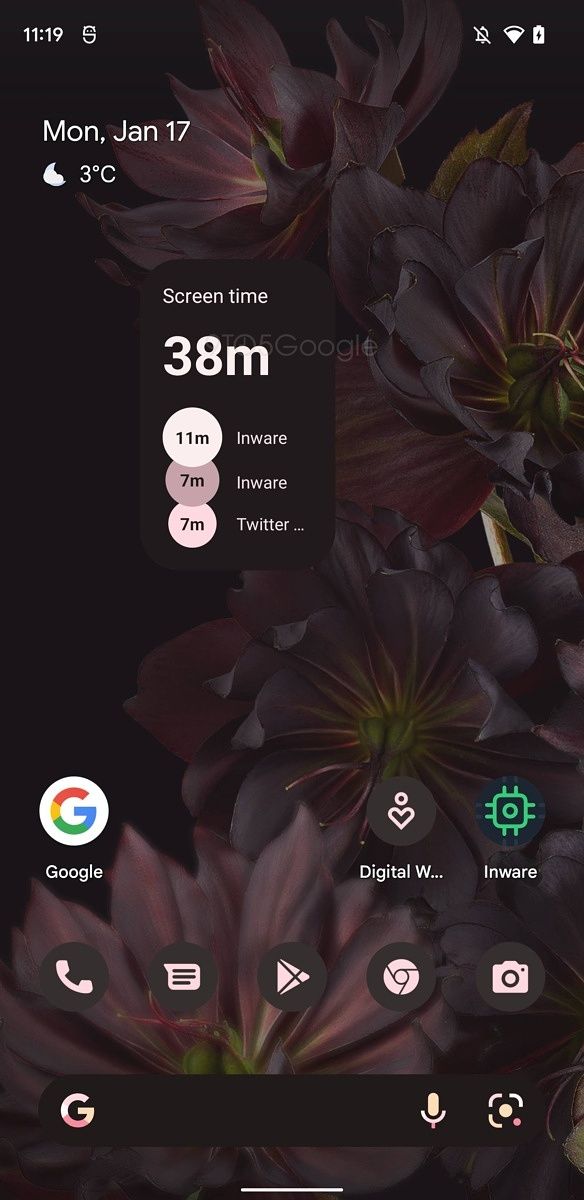
Google preps new “Your screen time” Digital Wellbeing widget

After announcing new widgets for Google Photos, Play Books, and YouTube Music last month, Google is now prepping a new Digital Wellbeing widget. The upcoming widget will let you easily keep track of your screen time on your home screen and even provide info about how much time you spent on your most frequently used apps.

A teardown of Digital Wellbeing v1.0.416751293.beta by our friends at 9to5Google has revealed key details about the upcoming “Your screen time” widget. Although the widget is not live in the latest beta release, the publication has managed to enable it manually and shared the following screenshots.

Digital Wellbeing Your Screen time widget Digital Wellbeing Your Screen time widget

Screenshots: 9to5Google

As you can see, the “Your screen time” Digital Wellbeing widget gives you easy access to your screen time on your home screen. In the 2×1 configuration, the widget only shows your total screen time. But if you go for a larger size, it also shows the time you spent on the top three apps. It’s also worth noting that the widget supports Android 12’s wallpaper-based theming engine and changes colors based on your current wallpaper. Furthermore, it supports dark and light themes.

Digital Wellbeing Your Screen time widget Digital Wellbeing Your Screen time widget Digital Wellbeing Your Screen time widget

Screenshots: 9to5Google

Mishaal Rahman notes that while the widget is not live in the current beta release, it is indeed functional. This leads us to believe that it might start rolling out to users with the next beta release. We’ll make sure to let you know as soon as the “Your screen time” widget starts rolling out with a future update.

For more information on all the new widgets that Google has released over the last few months, check out our previous coverage.

Thanks to Mishaal Rahman for the tip and additional screenshots!

The post Google preps new “Your screen time” Digital Wellbeing widget appeared first on xda-developers.


from xda-developers https://ift.tt/33JSHXG
via IFTTT

Google preps new “Your screen time” Digital Wellbeing widget

After announcing new widgets for Google Photos, Play Books, and YouTube Music last month, Google is now prepping a new Digital Wellbeing widget. The upcoming widget will let you easily keep track of your screen time on your home screen and even provide info about how much time you spent on your most frequently used apps.

A teardown of Digital Wellbeing v1.0.416751293.beta by our friends at 9to5Google has revealed key details about the upcoming “Your screen time” widget. Although the widget is not live in the latest beta release, the publication has managed to enable it manually and shared the following screenshots.

Digital Wellbeing Your Screen time widget Digital Wellbeing Your Screen time widget

Screenshots: 9to5Google

As you can see, the “Your screen time” Digital Wellbeing widget gives you easy access to your screen time on your home screen. In the 2×1 configuration, the widget only shows your total screen time. But if you go for a larger size, it also shows the time you spent on the top three apps. It’s also worth noting that the widget supports Android 12’s wallpaper-based theming engine and changes colors based on your current wallpaper. Furthermore, it supports dark and light themes.

Digital Wellbeing Your Screen time widget Digital Wellbeing Your Screen time widget Digital Wellbeing Your Screen time widget

Screenshots: 9to5Google

Mishaal Rahman notes that while the widget is not live in the current beta release, it is indeed functional. This leads us to believe that it might start rolling out to users with the next beta release. We’ll make sure to let you know as soon as the “Your screen time” widget starts rolling out with a future update.

For more information on all the new widgets that Google has released over the last few months, check out our previous coverage.

Thanks to Mishaal Rahman for the tip and additional screenshots!

The post Google preps new “Your screen time” Digital Wellbeing widget appeared first on xda-developers.


from xda-developers https://ift.tt/33JSHXG
via IFTTT

Samsung announces the new Exynos 2200 SoC with Samsung Xclipse 920 GPU

The launch of a new chip is a big event in the smartphone space. Unlike phones that can be designed, manufactured, and sold by a number of OEMs, phone SoCs are limited to a handful of players, and even fewer of them compete in the flagship space. These flagship SoCs define the very competition expected in the year, laying the groundwork for feature sets that we can expect to see in our next Android flagship. Samsung has now finally announced the new Exynos 2200 SoC with the Xclipse 920 GPU, which will give tough competition to the Qualcomm Snapdragon 8 Gen 1.

Samsung Exynos 2200: Specifications

Samsung Exynos 2200
CPU
  • 1x ARM Cortex-X2 Prime Core
  • 3x ARM Cortex-A710 Performance Cores
  • 4x ARM Cortex-A510 Efficiency Cores
GPU
  • Samsung Xclipse 920 GPU
  • Video playback: Up to 8K @60fps with 10-bit HEVC (H.265), 30fps with 10-bit VP9, AV1
Display Maximum On-Device Display Support: 4K @ 120Hz/QHD+ @ 144Hz; HDR10+
AI AI Engine with Dual-core NPU and DSP
Memory & Storage LPDDR5; UFS 3.1
ISP
  • Single camera: Up to 108MP @ 30 FPS; Up to 200MP
  • Dual camera: Up to 64+32MP @ 30 FPS
  • Video capture: 8K @ 30 fps with 10-bit HEVC (H.265), VP9
Modem
  • 5G NR Sub-6GHz: 5.1Gbps (DL)/2.55Gbps (UL)
  • 5G NR mmWave: 7.35Gbps (DL)/3.67Gbps (UL)
  • LTE: Cat.24 8CA 3Gbps (DL)/ Cat.22 4CA 422Mbps (UL)
Charging
Connectivity Location: Beidou, Galileo, GLONASS, GPS
Manufacturing Process Samsung 4nm EUV process

Samsung Exynos 2200 SoC

GPU: The new AMD RDNA 2-based Xclipse 920

The Samsung Exynos 2200 is an exciting SoC, and we’ll get to the full rundown in a bit. But to start off, it’s worth talking about the biggest highlight of this new SoC. The Exynos 2200 comes with the new Xclipse 920 GPU, a direct product of the partnership that Samsung had announced with AMD back in Jan 2021. It is expected to offer massive performance improvements over the Mali-G78MP14 on the Exynos 2100. If you have used an Exynos 2100 flagship, like the Samsung Galaxy S21 Ultra that is sold in India, you would know how terrible gaming performance on the device really is. I have personally purchased and used the Galaxy S21 Ultra as my daily driver, and it is a rather disappointing experience for my daily gaming fix with Genshin Impact. So much so that I shifted to the OnePlus 9 Pro and the Mi 11 Ultra (both with Snapdragon 888) as soon as the opportunity presented itself.

With the Exynos 2200 and Xclipse 920, Samsung is setting some lofty expectations. This is the first Samsung chipset with AMD’s RDNA 2-based GPU. RDNA is the codename for AMD’s current Radeon graphics architecture, and RDNA 2 is used in the PlayStation 5, Xbox Series X, Xbox Series S, as well as AMD’s Radeon RX 6000 graphics cards. The architecture that is used for consoles and desktop graphics is now being integrated into a mobile chip. This integration is what allows Samsung to tout “console-quality” immersive visuals with the first hardware-accelerated ray tracing (RT) solution for mobiles in the form of the Xclipse 920 GPU. There is also variable rate shading (VRS) onboard.

Ray tracing refers to tech that simulates how light physically behaves in the real world, while VRS tech allows developers to apply lower shading rates in areas that will not impact quality, thus improving frame rate. While we definitely need to wait to see how the chip and its GPU actually perform on these expectations, simply using these keywords in marketing materials instantly raises the bar of expectations so much higher than what it was with the Mali-G78MP14 on the Exynos 2100. If Samsung is bringing down console and desktop features down to mobile, surely the Xclipse GPU performs better than the Mali-G78MP14, right? One can hope.

Samsung’s press release also mentions that the Xclipse GPU is the “first result of multiple planned generations of AMD RDNA graphics in Exynos SoCs“, so we certainly hope to see great gaming performance become a default feature for Samsung’s flagship SoC in the future.

CPU: The latest from ARM

For the CPU, the Exynos 2200 follows the new Qualcomm Snapdragon 8 Gen 1 closely, in that both have made the jump to the ARMv9 architecture that was introduced in March 2021. Qualcomm’s Kryo chip in the Snapdragon 8 Gen 1 is based on the ARMv9 architecture-based CPU designs, and Samsung uses the same CPU designs on the Exynos 2200. Much like the Snapdragon 8 Gen 1, the Exynos 2200 features a Cortex-X2 prime core, three Cortex-A710 performance cores, and four Cortex-A510 efficiency cores. Samsung has not revealed the exact clock speeds, so we will have to wait on a device to release to get access to that information. Either way, we expect a much smaller delta in performance between these two flagship chips this year than it has ever been in the recent past.

Exynos 2200: NPU

Samsung’s press release isn’t too heavy on the details for the NPU, and we reckon that this could become a point of difference between Qualcomm and Samsung’s offering this year. NPU’s have grown in importance as smartphones have relied more on AI and ML for their functions, and if the Google Tensor chip on the Pixel 6 series is any indication, the results are worth watching out for.

For the Exynos 2200, Samsung claims the upgraded NPU has doubled in performance compared to its predecessor. The NPU now offers “much higher precision with FP16 (16bit floating point) support in addition to power efficient INT8 (8bit integer) and INT16.

Modem

The Exynos 2200 comes with a 3GPP Release 16 5G modem, with support for both sub-6GHz and mmWave. The claimed top speed is 7.35Gbps download on mmWave, but with the E-UTRAN New Radio – Dual Connectivity (EN-DC) feature, the modem can boost speeds to up to 10Gbps by utilizing both 4G LTE and 5G NR signals.

Security

For safekeeping, the Exynos 2200 comes with Integrated Secure Element (iSE) to store private cryptographic keys as well as to play a role as RoT (Root of Trust). Also, an inline encryption HW for UFS and DRAM has been reinforced to have user data encryption safely shared only within the secure domain. We hope to get more details on these features once the chip makes its way onto a device.

Exynos 2200: ISP

The Exynos 2200’s ISP supports camera resolutions up to 200MP, opening the door for a future Samsung device to ship with an ultra-high res camera if Samsung wanted to. At 30fps, the ISP supports up to 108MP in single camera mode, and 64+32MP in dual camera mode. Further, the ISP can connect to up to seven individual image sensors, and even drive four of them concurrently — this should open the door for more versatile camera setups as well as better and seamless switching between lenses.

With the help of the NPU, the ISP can realize a more content-aware camera experience, such as ML-based AI recognition for multiple objects, the environment, and faces within scenes.

For video recording, the ISP supports up to 4K HDR, and up to 8K resolution recording. The Multi-Format Codec (MFC) on the Exynos 2200 allows for up to 4K @120 and up to 8K @30 encoding, and up to 4K @240 and 8K @60 decoding. The MFC integrates the AV1 decoder, so you get better power efficiency and longer playback time.

Samsung Exynos 2200 Info Sheet

Exynos 2200: Release and Availability

Samsung mentions that the Exynos 2200 is in mass production. There’s no mention of any timeline or device estimates, which is rather intriguing if you have been following the leaks and news around this new SoC. The Exynos 2200 was originally supposed to launch on Jan 11, 2022. But the day went by with no announcement. Samsung had even deleted the date announcement tweets, fueling speculation that the Exynos 2200 may not materialize after all. Samsung had to clarify that the new chip will be unveiled alongside the Galaxy S22 launch. And here we are a week later with the chip being announced, but no devices being named.

Current speculation suggests that markets like Europe are still on track for receiving the Exynos 2200 in the Galaxy S22 series, while markets like the US and India are expected to get the Galaxy S22 with the Snapdragon 8 Gen 1. Samsung has not clarified either way, so it remains to be seen how the situation pans out. Nonetheless, we are excited to finally see a gaming-competent Exynos chip and Samsung flagship.

The post Samsung announces the new Exynos 2200 SoC with Samsung Xclipse 920 GPU appeared first on xda-developers.


from xda-developers https://ift.tt/3tDjfF4
via IFTTT

Samsung announces the new Exynos 2200 SoC with Samsung Xclipse 920 GPU

The launch of a new chip is a big event in the smartphone space. Unlike phones that can be designed, manufactured, and sold by a number of OEMs, phone SoCs are limited to a handful of players, and even fewer of them compete in the flagship space. These flagship SoCs define the very competition expected in the year, laying the groundwork for feature sets that we can expect to see in our next Android flagship. Samsung has now finally announced the new Exynos 2200 SoC with the Xclipse 920 GPU, which will give tough competition to the Qualcomm Snapdragon 8 Gen 1.

Samsung Exynos 2200: Specifications

Samsung Exynos 2200
CPU
  • 1x ARM Cortex-X2 Prime Core
  • 3x ARM Cortex-A710 Performance Cores
  • 4x ARM Cortex-A510 Efficiency Cores
GPU
  • Samsung Xclipse 920 GPU
  • Video playback: Up to 8K @60fps with 10-bit HEVC (H.265), 30fps with 10-bit VP9, AV1
Display Maximum On-Device Display Support: 4K @ 120Hz/QHD+ @ 144Hz; HDR10+
AI AI Engine with Dual-core NPU and DSP
Memory & Storage LPDDR5; UFS 3.1
ISP
  • Single camera: Up to 108MP @ 30 FPS; Up to 200MP
  • Dual camera: Up to 64+32MP @ 30 FPS
  • Video capture: 8K @ 30 fps with 10-bit HEVC (H.265), VP9
Modem
  • 5G NR Sub-6GHz: 5.1Gbps (DL)/2.55Gbps (UL)
  • 5G NR mmWave: 7.35Gbps (DL)/3.67Gbps (UL)
  • LTE: Cat.24 8CA 3Gbps (DL)/ Cat.22 4CA 422Mbps (UL)
Charging
Connectivity Location: Beidou, Galileo, GLONASS, GPS
Manufacturing Process Samsung 4nm EUV process

Samsung Exynos 2200 SoC

GPU: The new AMD RDNA 2-based Xclipse 920

The Samsung Exynos 2200 is an exciting SoC, and we’ll get to the full rundown in a bit. But to start off, it’s worth talking about the biggest highlight of this new SoC. The Exynos 2200 comes with the new Xclipse 920 GPU, a direct product of the partnership that Samsung had announced with AMD back in Jan 2021. It is expected to offer massive performance improvements over the Mali-G78MP14 on the Exynos 2100. If you have used an Exynos 2100 flagship, like the Samsung Galaxy S21 Ultra that is sold in India, you would know how terrible gaming performance on the device really is. I have personally purchased and used the Galaxy S21 Ultra as my daily driver, and it is a rather disappointing experience for my daily gaming fix with Genshin Impact. So much so that I shifted to the OnePlus 9 Pro and the Mi 11 Ultra (both with Snapdragon 888) as soon as the opportunity presented itself.

With the Exynos 2200 and Xclipse 920, Samsung is setting some lofty expectations. This is the first Samsung chipset with AMD’s RDNA 2-based GPU. RDNA is the codename for AMD’s current Radeon graphics architecture, and RDNA 2 is used in the PlayStation 5, Xbox Series X, Xbox Series S, as well as AMD’s Radeon RX 6000 graphics cards. The architecture that is used for consoles and desktop graphics is now being integrated into a mobile chip. This integration is what allows Samsung to tout “console-quality” immersive visuals with the first hardware-accelerated ray tracing (RT) solution for mobiles in the form of the Xclipse 920 GPU. There is also variable rate shading (VRS) onboard.

Ray tracing refers to tech that simulates how light physically behaves in the real world, while VRS tech allows developers to apply lower shading rates in areas that will not impact quality, thus improving frame rate. While we definitely need to wait to see how the chip and its GPU actually perform on these expectations, simply using these keywords in marketing materials instantly raises the bar of expectations so much higher than what it was with the Mali-G78MP14 on the Exynos 2100. If Samsung is bringing down console and desktop features down to mobile, surely the Xclipse GPU performs better than the Mali-G78MP14, right? One can hope.

Samsung’s press release also mentions that the Xclipse GPU is the “first result of multiple planned generations of AMD RDNA graphics in Exynos SoCs“, so we certainly hope to see great gaming performance become a default feature for Samsung’s flagship SoC in the future.

CPU: The latest from ARM

For the CPU, the Exynos 2200 follows the new Qualcomm Snapdragon 8 Gen 1 closely, in that both have made the jump to the ARMv9 architecture that was introduced in March 2021. Qualcomm’s Kryo chip in the Snapdragon 8 Gen 1 is based on the ARMv9 architecture-based CPU designs, and Samsung uses the same CPU designs on the Exynos 2200. Much like the Snapdragon 8 Gen 1, the Exynos 2200 features a Cortex-X2 prime core, three Cortex-A710 performance cores, and four Cortex-A510 efficiency cores. Samsung has not revealed the exact clock speeds, so we will have to wait on a device to release to get access to that information. Either way, we expect a much smaller delta in performance between these two flagship chips this year than it has ever been in the recent past.

Exynos 2200: NPU

Samsung’s press release isn’t too heavy on the details for the NPU, and we reckon that this could become a point of difference between Qualcomm and Samsung’s offering this year. NPU’s have grown in importance as smartphones have relied more on AI and ML for their functions, and if the Google Tensor chip on the Pixel 6 series is any indication, the results are worth watching out for.

For the Exynos 2200, Samsung claims the upgraded NPU has doubled in performance compared to its predecessor. The NPU now offers “much higher precision with FP16 (16bit floating point) support in addition to power efficient INT8 (8bit integer) and INT16.

Modem

The Exynos 2200 comes with a 3GPP Release 16 5G modem, with support for both sub-6GHz and mmWave. The claimed top speed is 7.35Gbps download on mmWave, but with the E-UTRAN New Radio – Dual Connectivity (EN-DC) feature, the modem can boost speeds to up to 10Gbps by utilizing both 4G LTE and 5G NR signals.

Security

For safekeeping, the Exynos 2200 comes with Integrated Secure Element (iSE) to store private cryptographic keys as well as to play a role as RoT (Root of Trust). Also, an inline encryption HW for UFS and DRAM has been reinforced to have user data encryption safely shared only within the secure domain. We hope to get more details on these features once the chip makes its way onto a device.

Exynos 2200: ISP

The Exynos 2200’s ISP supports camera resolutions up to 200MP, opening the door for a future Samsung device to ship with an ultra-high res camera if Samsung wanted to. At 30fps, the ISP supports up to 108MP in single camera mode, and 64+32MP in dual camera mode. Further, the ISP can connect to up to seven individual image sensors, and even drive four of them concurrently — this should open the door for more versatile camera setups as well as better and seamless switching between lenses.

With the help of the NPU, the ISP can realize a more content-aware camera experience, such as ML-based AI recognition for multiple objects, the environment, and faces within scenes.

For video recording, the ISP supports up to 4K HDR, and up to 8K resolution recording. The Multi-Format Codec (MFC) on the Exynos 2200 allows for up to 4K @120 and up to 8K @30 encoding, and up to 4K @240 and 8K @60 decoding. The MFC integrates the AV1 decoder, so you get better power efficiency and longer playback time.

Samsung Exynos 2200 Info Sheet

Exynos 2200: Release and Availability

Samsung mentions that the Exynos 2200 is in mass production. There’s no mention of any timeline or device estimates, which is rather intriguing if you have been following the leaks and news around this new SoC. The Exynos 2200 was originally supposed to launch on Jan 11, 2022. But the day went by with no announcement. Samsung had even deleted the date announcement tweets, fueling speculation that the Exynos 2200 may not materialize after all. Samsung had to clarify that the new chip will be unveiled alongside the Galaxy S22 launch. And here we are a week later with the chip being announced, but no devices being named.

Current speculation suggests that markets like Europe are still on track for receiving the Exynos 2200 in the Galaxy S22 series, while markets like the US and India are expected to get the Galaxy S22 with the Snapdragon 8 Gen 1. Samsung has not clarified either way, so it remains to be seen how the situation pans out. Nonetheless, we are excited to finally see a gaming-competent Exynos chip and Samsung flagship.

The post Samsung announces the new Exynos 2200 SoC with Samsung Xclipse 920 GPU appeared first on xda-developers.


from xda-developers https://ift.tt/3tDjfF4
via IFTTT

XDA Basics: How to uninstall an app on your iPhone

You may want to uninstall an app on your iPhone for several reasons. For starters, deleting apps can free some memory if you’re running low on storage and don’t want to buy a new iPhone. In other instances, you’re just no longer using an app and want to get rid of it. The good news is that uninstalling an app on iOS is an easy process, and there are multiple ways to do it. Here are all the ways to initiate app uninstallation on your iPhone.

How to uninstall an app on your iPhone

There are a few ways to uninstall apps on your iPhone:

The traditional way — Jiggle Mode

  • Click and hold on an app icon on the Home Screen until it goes into Jiggle Mode.
  • Alternatively, you can just click and hold anywhere on the Home Screen to enter that mode.

How to uninstall an app on your iPhone

  • Click on the minus (-) button on the app you want to delete.

How to uninstall an app on your iPhone

  • Tap Delete App.

How to uninstall an app on your iPhone

  • Confirm the deletion by clicking on Delete.

Through Haptic Touch on the Home Screen

  • Click and hold on an app icon on the Home Screen to bring up the Haptic Touch menu.

How to uninstall an app on your iPhone

  • Select Remove App.

How to uninstall an app on your iPhone

  • Tap Delete App.

How to uninstall an app on your iPhone

  • Confirm the deletion by clicking on Delete.

Through Haptic Touch in the App Library

  • Click and hold on an app icon in the App Library to bring up the Haptic Touch menu.

How to uninstall an app on your iPhone

  • Tap Delete App.

How to uninstall an app on your iPhone

  • Confirm the deletion by clicking on Delete.

Uninstall iPhone apps through the Settings app

How to make your iPhone read articles out loud with a single swipe

  • Launch the Settings app on your iPhone.
  • Head to General.

How to uninstall an app on your iPhone

  • Tap on iPhone Storage.

How to uninstall an app on your iPhone

  • Select the app you want to delete.

How to uninstall an app on your iPhone

  • Click on Delete App.

Uninstall iOS apps through the Apple App Store

The app you want to delete must have been recently gotten an update for this method to work.

  • Launch the App Store on your iPhone.

How to uninstall an app on your iPhone

  • Tap on your face in the top right corner.
  • Swipe left on the app you want to delete from the Updated Recently section.

How to uninstall an app on your iPhone

  • Tap on Delete.

How to uninstall an app on your iPhone

  • Confirm the deletion by clicking on Delete.

As we’ve shared, there are five different ways to uninstall an app on your iPhone. These methods works on the latest iOS 15. If you’re running an older version, some of them might not work the same way — if at all. Personally. I use Haptic Touch in the App Library to delete unwanted apps.

Which method do you use to delete an app on your iPhone? Let us know in the comments section below.

The post XDA Basics: How to uninstall an app on your iPhone appeared first on xda-developers.


from xda-developers https://ift.tt/33DvxCp
via IFTTT