LightBlog

mercredi 29 décembre 2021

OPPO Reno 5 and Reno 6 starts receiving stable ColorOS 12 update with Android 12

Back in September, OPPO officially unveiled ColorOS 12, the latest version of the company’s custom Android skin. Since then the Chinese phone maker has rolled out ColorOS 12 beta to several OPPO phones, allowing users to try out an early version of Android 12 ahead of the stable release. including the Find X3 Pro, Find X2 Pro, Reno 6 series, Reno 5 series, and more. Earlier this month, OPPO revealed that it would release stable ColorOS 12 for some of its premium phones later this month. As promised, the company has now started rolling out the stable Android 12 update to the Reno 6 and Reno 5 models.

Hands-on with ColorOS 12 based on Android 12: Here’s everything new in the latest update for OPPO smartphones

According to a series of announcements on the OPPO Community, the stable ColorOS 12 update based on Android 12 has started rolling out to the Reno 5 5G, Reno 5 Pro 5G, Reno 6 5G, and Reno 6 Pro 5G.

ColorOS 12 stable availability:

  • OPPO Reno 5 5G — Indonesia
  • OPPO Reno 5 Pro 5G — Saudi Arabia, the UAE
  • OPPO Reno 6 5G —  Indonesia, India, Vietnam
  • OPPO Reno 6 Pro 5G — Indonesia, India, Saudia Arabia, Pakistan

As you can see, the update is currently only live in select regions. However, we expect the company to expand the rollout to more markets soon. In any case, Reno 5 and Reno 6 series owners residing in the above-mentioned markets can look forward to receiving the OTA notification in the coming days. If you want to skip the wait, you can also trigger it manually. To do so, head to Settings > Software Updates > click on the gear icon in the top right corner > tap “Trial Version” and then click on the “Apply now.” You should receive the new update shortly after.

After installing the ColorOS 12 update, Reno 5 and Reno 6 owners can look forward to many exciting features, including a new wallpaper-based theming system, Canvas AOD, Screen Translate, Background Stream, Android 12’s Privacy Dashboard and privacy indicators, and much more. To learn more about ColorOS 12, check out our in-depth review of the new skin.

The post OPPO Reno 5 and Reno 6 starts receiving stable ColorOS 12 update with Android 12 appeared first on xda-developers.


from xda-developers https://ift.tt/3HjGkQS
via IFTTT

Here’s when you might get MIUI 13 on your phone

At its launch event yesterday, Xiaomi officially detailed MIUI 13, the latest iteration of the company’s Android skin. MIUI 13 packs many exciting changes and improvements such as better app fluency with up to 23% fewer dropped frames, improved multitasking capabilities, privacy enhancements like fraud protection and privacy watermark, new system font, and much more. If you own a Redmi or Mi device and wondering when your phone will get the new update, read on.

In a recent post on Mi Community, Xiaomi detailed the MIUI 13 update roadmap outlining which Redmi and Mi smartphones/tablets will be eligible for the new update. As per the roadmap, the first set of MUI 13 builds will go live on the China Closed Beta branch from December 29, with Public Beta builds to follow suit next month. Meanwhile, the stable rollout is set to kick off from Q1 2022.

Here’s the list of Xiaomi smartphones and tablets eligible for the MIUI 13 update:

MIUI 13 rollout schedule for global models

  • First batch (Q1 2022)
    • Mi 11
    • Mi 11 Ultra
    • Mi 11i
    • Mi 11X Pro
    • Mi 11X
    • Xiaomi 11T Pro
    • Xiaomi 11T
    • Mi 11 Lite
    • Mi 11 Lite 5G
    • Xiaomi 11 Lite 5G NE
    • Xiaomi 11 Lite NE
    • Xiaomi Pad 5
    • Redmi 10
    • Redmi 10 Prime
    • Redmi Note 8 (2021)
    • Redmi Note 10 Pro
    • Redmi Note 10 Pro Max
    • Redmi Note 10
    • Redmi Note 10 JE


MIUI 13 rollout schedule for Chinese models

Public Beta version — First batch (mid-January 2022)

    • Xiaomi Civi
    • Xiaomi MIX 4
    • Redmi K40 Game Enhanced Edition
    • Redmi Note 10 Pro
    • Xiaomi 11 Ultra
    • Xiaomi 11 Pro
    • Xiaomi 11
    • Xiaomi 11 Youth Edition
    • Xiaomi Pad 5
    • Xiaomi Pad 5 Pro
    • Xiaomi Pad 5 Pro 5G
    • Xiaomi 10S
    • Redmi K40 Pro
    • Redmi K40
    • Redmi K30S Extreme Edition
    • Redmi K30 Extreme Edition
    • Xiaomi 10 Extreme Edition
    • Xiaomi 10
    • Xiaomi 10 Pro
    • Redmi K30 Pro
    • Redmi Note 11 5G
    • Redmi Note 9 4G
    • Redmi Note 9, Redmi 10X Pro
    • Redmi 10X and Xiaomi CC9 Pro
  • Second batch (TBD)
    • Redmi Note 11 Pro
    • Redmi Note 11 Pro+
    • Redmi K30 5G
    • Redmi K30i 5G
    • Redmi K30
    • Xiaomi 10 Youth Edition
    • Redmi Note 9 Pro
    • Redmi Note 10
  • Stable rollout — First batch (end of January 2022) 
    • Xiaomi 11 Ultra
    • Xiaomi 11 Pro
    • Xiaomi 11
    • Xiaomi Pad 5 Pro
    • Xiaomi Pad 5 Pro 5G
    • Xiaomi Pad 5

The post Here’s when you might get MIUI 13 on your phone appeared first on xda-developers.


from xda-developers https://ift.tt/32Oz54w
via IFTTT

Android 12 stable update for the ASUS ZenFone 8 is now rolling out

With Android 12 now being officially out for a while, brands are working on updating their devices to the latest OS. Yesterday, Samsung started rolling out One UI 4.0 for its devices after the initial release was paused due to bugs. Today, ASUS has started to roll out the Android 12 stable update for the ZenFone 8 and ZenFone 8 Flip after a few beta versions.

A couple of months back, ASUS had announced its Android 12 release schedule for its smartphones with the rollout timeline for the ZenFone 8 and 8 Flip starting December 2021 onwards. We’re glad that ASUS has stuck to its schedule and has started rolling out the Android 12 stable update just before the end of the year.

ASUS announced that it has started rolling out the Android 12 update for the ZenFone 8 and ZenFone 8 Flip via a post on the ZenTalk forums. The announcement is also accompanied by download links for the update if you wish to install it manually on your device.

Horizon Silver ZenFone 8 with blue accent on power button

Download Andriod 12 Stable Update for ASUS ZenFone 8

The Android 12 stable update for the ZenFone 8 bumps the software version to 31.1004.0404.73 and measures 3.04GB in size. Note that this update can only be installed if your phone is currently on Android 11 with the firmware version 30.12.112.72. The official changelog is as follows:

  • Upgraded system to Android 12
  • Revamped Mobile Manager, Contacts, Phone, File Manager, Calculator, Clock, Gallery, Weather, Sound recorder, Settings, Data Transfer, Local backup, Setup wizard, System update apps
  • Adjusted Quick Settings panel, notification tray, and volume panel to Android 12 design
  • Added privacy dashboard, camera and microphone indicators, show clipboard access,  approximate location access, and microphone access features
  • Replaced ASUS Safeguard with Android 12 Emergency SOS
  • Introduced new widget page design in Launcher. Adjusted the position of the screenshot option and removed the hot seat app icons on the Overview page
  • Removed the Quick Settings layout option in the Display settings
  • ASUS Phone removed SIP calling support as Android 12 does not natively support SIP calling
  • Some 3rd party apps are not compatible with Android 12 yet

Download Android 12 Stable update for ZenFone 8

If you wish to switch back to Android 11 from Android 12, you can flash the downgrade package.

Download Andriod 12 Stable Update for ASUS ZenFone 8 Flip

The Android 12 stable update for the ZenFone 8 Flip bumps the software version to 31.1004.0404.61 and measures 2.89GB in size. Note that this update can only be installed if your phone is currently on Android 11 with the firmware version 30.13.35.8. The official changelog is as follows:

  • Upgraded system to Android 12
  • Revamped Mobile Manager, Contacts, Phone, File Manager, Calculator, Clock, Gallery, Weather, Sound recorder, Settings, Data Transfer, Local backup, Setup wizard, System update apps
  • Adjusted Quick Settings panel, notification tray, and volume panel to Android 12 design
  • Added privacy dashboard, camera and microphone indicators, show clipboard access,  approximate location access, and microphone access features
  • Replaced ASUS Safeguard with Android 12 Emergency SOS
  • Introduced new widget page design in Launcher. Adjusted the position of the screenshot option and removed the hot seat app icons on the Overview page
  • Removed the Quick Settings layout option in the Display settings
  • ASUS Phone removed SIP calling support as Android 12 does not natively support SIP calling
  • Some 3rd party apps are not compatible with Android 12 yet

Download Android 12 Stable update for ZenFone 8 Flip

If you wish to switch back to Android 11 from Android 12, you can install the downgrade package.

Both ZenFone 8 and ZenFone 8 Flip users should get the Android 12 OTA update in the coming days. But if you don’t want to wait, you can install the update manually. Download the update package from the links above.

The post Android 12 stable update for the ASUS ZenFone 8 is now rolling out appeared first on xda-developers.


from xda-developers https://ift.tt/3ECJXiM
via IFTTT

Samsung Galaxy S10 and Galaxy S20 FE get updated to Android 12 with One UI 4

One UI lovers, rejoice! Samsung has begun rolling out new Android 12 updates for the Galaxy S20 FE and the Galaxy S10 family of smartphones. These are the latest additions to the steadily growing list of devices from the Korean OEM that have received One UI 4. For reference, Samsung’s Android 12 update roadmap originally indicated a 2022 release for the aforementioned devices. It feels good to see that the company continues to defy expectations by releasing the much-awaited update ahead of the original schedule.

Samsung Galaxy S10 Android 12 One UI 4 OTA

Screenshot courtesy: XDA Recognized Contributor It_ler

As spotted by a number of users on our forums, the global Exynos-powered 4G variant of the Galaxy S10 (model number SM-G97xF) lineup is receiving the new update in Germany and Switzerland in the form of software version G97xFXXUEGULB. Apart from bringing in all the One UI 4-specific changes, the new build also bumps the Android security patch level (SPL) to December 2021.

XDA Forums: Galaxy S10e || Galaxy S10 || Galaxy S10 Plus

Notably, the Galaxy Note 10 used to get the One UI 4 beta builds alongside the Galaxy S10 family. However, we have yet to spot a stable Android 12 build for the former. In case you have the Galaxy Note 10 or the Note 10 Plus, you might have to wait a couple of days before the update notification pops up on your device.

Talking about the Galaxy S20 FE, the stable One UI 4 update for this model is currently rolling out for its 5G variant (model number SM-G781B) via software version G781BXXU4DUL9. The OTA is currently available in Switzerland only, although the delivery process is expected to be scaled up soon.

Samsung Galaxy S20 FE XDA Forums

We should see One UI 4 roll out in more countries over the coming days and weeks. If you want to skip the waiting queue, then you can take the route of manual installation by following our tutorial on Samsung Galaxy firmware flashing.

Samsung Android 12 Tracker: Here are all the official One UI 4.0 stable and beta builds to download and install

The post Samsung Galaxy S10 and Galaxy S20 FE get updated to Android 12 with One UI 4 appeared first on xda-developers.


from xda-developers https://ift.tt/3FEJ0I7
via IFTTT

Xiaomi Watch S1 launched alongside the True Wireless Earphones 3

At its big launch event yesterday, Xiaomi finally unveiled the highly anticipated Xiaomi 12 series and MIUI 13. In addition, the Chinese company also took the opportunity to launch two new wearable products: the Xiaomi Watch S1 and Xiaomi True Wireless Earphones 3.

Xiaomi Watch S1

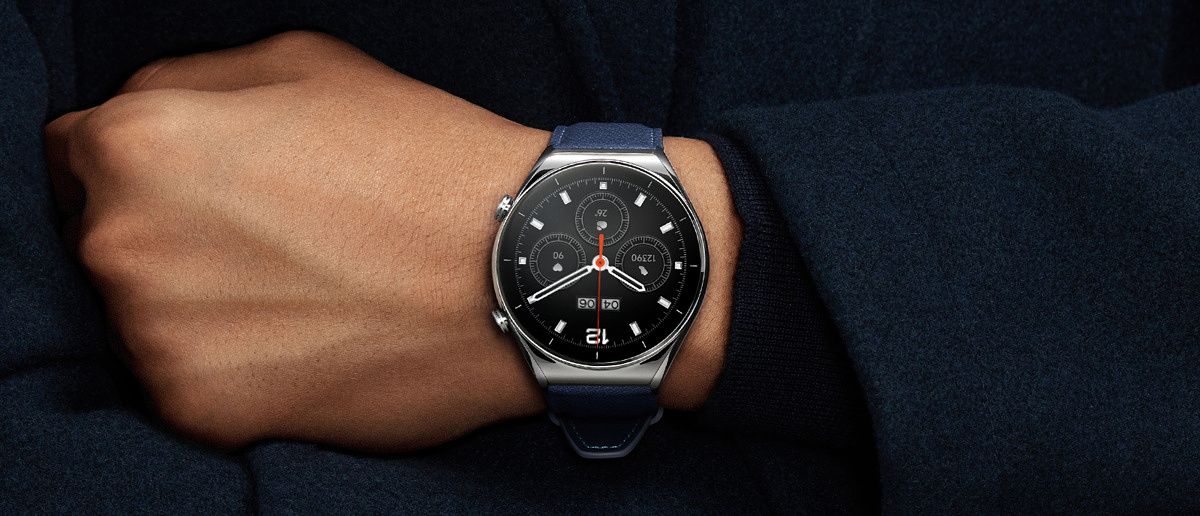
The Xiaomi Watch S1 is the company’s latest premium smartwatch, featuring a stainless steel middle frame and sapphire glass protection. You get a large 1.43-inch AMOLED display with 466 x 466 resolution, 326PPI, and a 60Hz refresh rate.

Xiaomi Watch S1 with rubber strap in black and white colorways

The Xiaomi Watch S1 supports up to 117 sports modes including 19 professional sports modes. In addition, it can automatically detect and track activities such as outdoor running, indoor running, and walking. It comes with the usual set of sensors including a heart rate sensor, blood oxygen sensor, acceleration sensor, and gyroscope.

Xiaomi Watch S1 with leather strap


The Xiaomi Watch S1 also supports third-party apps and has a built-in app store to let users explore and download additional apps.

Xiaomi Watch S1 third party apps

The smartwatch packs a 470mAh battery which Xiaomi says lasts up to 12 days on typical use. Wireless charging support is also onboard. Other notable highlights of the Xiaomi Watch S1 include GPS support, NFC, Bluetooth 5.2, a microphone, and 5ATM water resistance.

Pricing starts at CNY 1,049 (~$165) for the rubber strap model, with the leather variant coming in at CNY 1,199 (~$175)

Xiaomi True Wireless Earphones 3

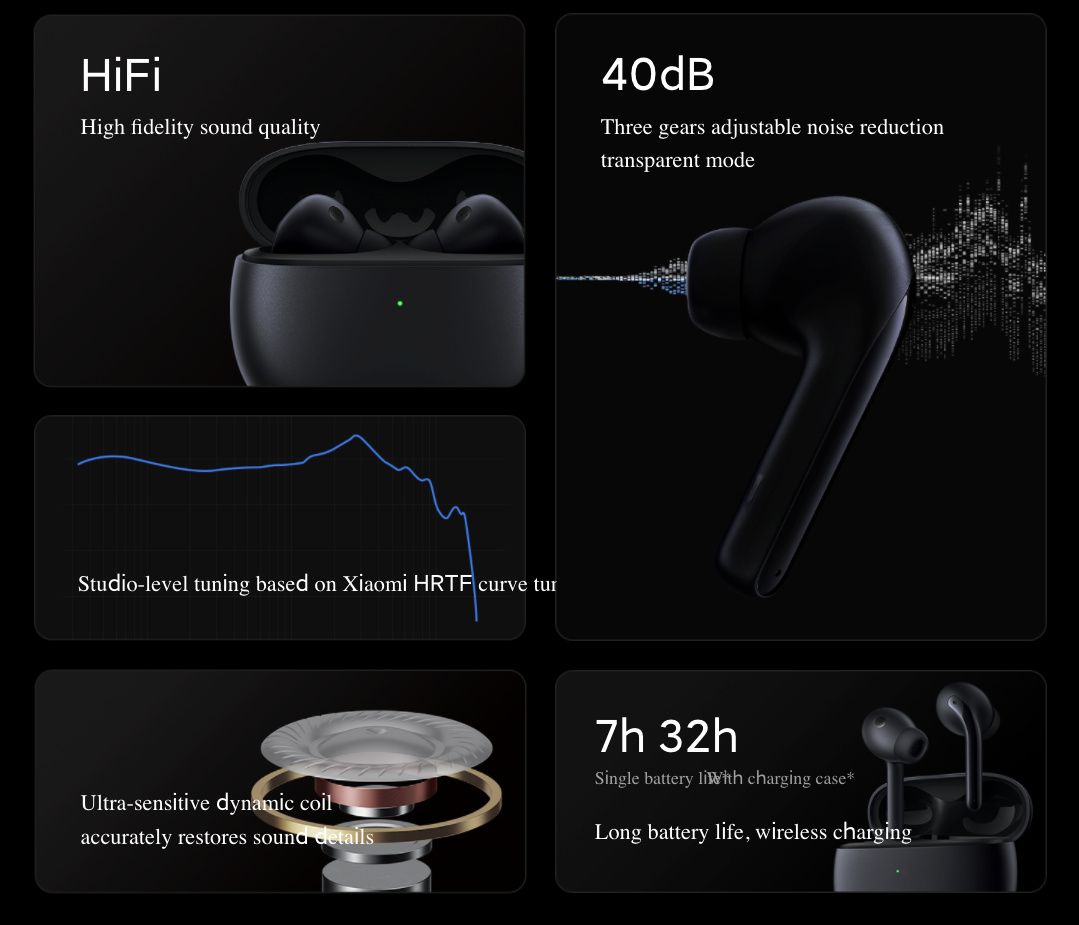
The Xiaomi True Wireless Earphones 3 is the newest addition to the company’s TWS lineup. The new earphones come equipped with an Active Noise Cancellation feature, which claims to reduce ambient noise by up to 40dB. Each earbud feature three earphones that work in unison to listen to outside noise and adjust the noise reduction intensity accordingly. The Xiaomi True Wireless Earphones 3 pack ultra-dynamic dual magnetic drivers to deliver powerful bass and detailed treble response.

Xiaomi True Wireless Earphones 3 in white colorway Xiaomi True Wireless Earphones 3 features at glance

The earphones are quite lightweight at 4.6g (each bud) and also have an IP55 rating for dust and water protection. They last up to 7 hours (ANC off) on a single charge and up to 32 hours with the charging case. The case charges via the USB Type C port and also supports wireless charging.

The Xiaomi True Wireless Earphones are priced at CNY 449 (~$70). They are currently only available in China.

The post Xiaomi Watch S1 launched alongside the True Wireless Earphones 3 appeared first on xda-developers.


from xda-developers https://ift.tt/3JnEakV
via IFTTT

mardi 28 décembre 2021

These are the Best Samsung Galaxy Z Flip 3 Cases in 2022

Samsung launched the Galaxy Z Fold 3, their best foldable phone yet, right alongside the Galaxy Z Flip 3 which is a compact, clamshell smartphone with high-end internals. If you’ve decided to get the more affordable Galaxy Z Flip 3, which by the way still isn’t cheap at almost a thousand bucks, the last thing you want to end up with is a scratched-up phone or even worse, a cracked display and back. The Galaxy Z Flip 3, like most modern-day smartphones, is made up of glass and no matter how resilient Gorilla Glass Victus is, it’s quite easy to shatter if you drop your phone on a hard surface. Samsung is portraying the Galaxy Z Flip 3 as a device that adds to your style statement and you can amplify that notion by customizing the phone with a good case.

While you can get a Samsung Care+ plan with the phone to cover accidental damage, it’s always better to prevent any damage from happening in the first place. The best way to protect your Galaxy Z Flip 3 would be to put on a case. Some cases not only provide protection but also improve the usability or the grip of your phone. Here are some of the best Galaxy Z Flip 3 cases that you can buy right now across various price segments.

    Galaxy Z Flip 3 Ring Case

    Ring on the back

    This ring case from Samsung will help you grip the Z Flip 3 better by letting you insert your finger into the ring while using the phone.
    Supcase Unicorn Beetle Pro

    Best grip and protection

    The Supcase Unicorn Beetle Pro offers top-class protection for the Galaxy Z Flip 3 while also making it easier to grip. If you drop your phone frequently, this case can be a saviour! It even comes with a belt holster.

    Promoted

    Samsung Belt Case

    Belt for grip

    This case has a belt on the back which you can slide your hands into while using the phone. It even gives the phone a cool look.
    Samsung Carbon Fiber Case

    Thin and classy

    If you're a fan of carbon fiber, you're really going to like this case. It's thin and doesn't add a lot of bulk to the device. Provides a stealthy look.
    i-Blason Cosmo Series Case

    Stylish and protective

    This case from i-Blason has a colorful design and stands out from the generic-looking cases. It also provides a good deal of protection.

    Promoted

    Sunstory Z Flip 3 Case

    Leather feel

    This case is made up of hard polycarbonate but has a soft leather feel on the outside. It's cheap and looks decent.
    Spigen Tough Armor

    Best protection

    This case from Spigen is for those who want the best protection against drops even on hard surfaces. it even looks good.
    Spigen Thin Fit

    Minimal protection

    Spigen is known to make good cases and this one for the Galaxy Z Flip 3 fits snug and provides minimal protection against scratches and drops.
    Ringke slim case

    Clear and protective

    This case from Ringke has a translucent back giving your phone a frosted look. It also provides a good deal of protection while being slim.
    Spigen Air Skin

    Another clear case

    If you want a crystal clear case from a reputed brand, this one from Spigen should be your option. It's slim and doesn't add a lot of bulk.
    VRS Design Quickstand Active

    Built-in kickstand

    The Z Flip 3 can technically be used as a kickstand in the Flex Mode but if you want more flexibility, this case has a kickstand built-in!
    Vizvera Hard Case

    Multiple color options

    The Galaxy Z Flip 3 comes in a variety of colors but if you want to switch it up, you can get a few of these cases in different colors.
    VRS Terra Guard

    Extreme protection

    This is one of the most rugged cases that you can find for the Galaxy Z Flip 3. It has a thick shell to protect the hinge too. If you drop your phone often, this one is for you.
    UAG Civilian

    Shockproof case

    If you want a slightly toned down version of a rugged case, the UAG Civilian is a good option. It does add some bulk but is surely not as thick as the VRS case we mentioned prior to this.
    Araree Canvas Diary

    Unique and convenient

    This is a fabric-style case that comes in different colors and has a lanyard attached on both sides of the hinge which lets you carry it on your shoulder like a bag.

Since the Galaxy Z Flip 3 has been launched recently and is a new device, there aren’t a lot of third-party cases you can buy at the moment. We’ve mentioned the best cases as of now which are mostly first-party cases directly from Samsung but there should be more options from case makers soon. The carbon fiber case is a thin case so if you’re looking for minimal protection with good looks, that’s the one you should opt for. If you’re looking for a case that will help you grip or hold the phone better when using it, the ring case and the belt case will serve the purpose well. If you want maximum protection, the Spigen Tough Armor is the case to pick.

    Samsung Galaxy Z Flip 3
    The Galaxy Z Flip 3 is Samsung's latest clamshell foldable that offers a bigger outer display, high refresh rate inner display, and top-of-the-line hardware.

If you’re looking to get your hands on the latest foldable from Samsung, you might want to check out the best Galaxy Z Flip 3 deals that can help you save a few extra bucks. If you’ve got the elder sibling, the Galaxy Z Fold 3, we’ve got a list of the best cases for that phone as well.

The post These are the Best Samsung Galaxy Z Flip 3 Cases in 2022 appeared first on xda-developers.


from xda-developers https://ift.tt/3yQvihS
via IFTTT

These are the Best Wear OS Apps for your Smartwatch in 2022

The Apple Watch is often regarded as one of the best smartwatches in the industry. While that’s mainly because the Apple Watch is indeed a fantastic product, it’s also partly because there’s no stiff competition on the Android side of things. Wear OS has been ignored for a long time by Google, and it was only recently they announced during Google I/O 2021 that Wear OS would receive yet another attempt of revival with the help of a partnership with Samsung. While this is certainly exciting, we’re yet to see watches with the new version of Wear OS, and existing watches (even Google is unsure of the compatibility) still haven’t received the update either.
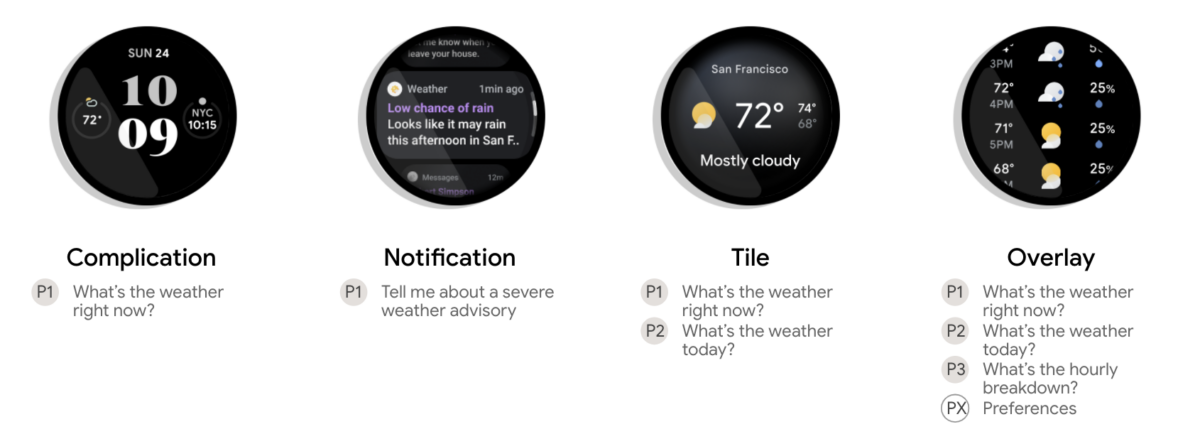
WearOS Overview

While we wait for the biggest Wear OS update in years, we decided to compile a list of some of the best Wear OS apps you must try if you have a Wear OS watch already. If you’re waiting to pick up a watch from the new batch of Wear OS smartwatches (which is a smart thing to do at this point), then bookmark this page as these are all the apps you’d need to install to get you started on Wear OS.

From productivity to utilities to entertainment, we’ve covered all the popular genres of Wear OS apps. If you’re also looking for the best apps for your smartphone along with your smartwatch, we also have a list of the best Android apps.

Navigate this article:

Essential Apps

These are the apps that form the core experience on Wear OS and the ones you must have on your smartwatch. While these Wear OS apps may not be new or unique or provide some insane functionality, they do have simple functions that make your life easier on a regular basis and improve convenience.

Messages

WearOS Messages app

One of the most important use-cases for a smartwatch, let alone one with Wear OS, is the ability to check your notifications. It eliminates the need to check your smartphone regularly while you’re working, and is a good way to avoid distractions if the notification you received isn’t important.

While you can reply to notifications by default on Wear OS, you can’t initiate chats or conversations unless you have the Messages app. Using the Messages for Wear OS app, you can send text messages to your friends and family right from your smartwatch and continue existing conversation threads from your smartphone directly on your watch. When you’re in a hurry or you’re driving, this is a convenient way to use voice input to draft a quick message.

Messages (Free, Google Play) →

Calculator

Calculator app on WearOS

The Calculator is an app you don’t realize the importance of until you’re in a situation where you need to use it. But then you realize you have to pull out your phone to perform some simple calculations. When you’re at a store trying to do a quick calculation or you’re trying to convince your friends that 87 is indeed divisible by 29, this is an app you should have on your Wear OS smartwatch at all times.

Calculator For Wear OS (Android Wear) (Free, Google Play) →

Camera Remote

Camera Remote for WearOS

If you’re in a situation where you need to click a group picture but you don’t have anyone to do it for you, this app is going to come in handy. Not just that, if you want to record selfie videos using the rear-facing camera of your smartphone but you can’t see the viewfinder since the screen is facing the opposite side, this app will help you set your frame properly.

We wonder why a camera remote isn’t a part of Wear OS by default since even some cheap fitness trackers come with one by default, but this Camera Remote app solves the problem. Note you will also need to install a companion app on your smartphone which you’ll be asked to do once you install the Wear OS app. Also, the free version has a persistent message on the app but doesn’t add any sort of watermark to your images. If you want to get rid of the message, you’ll have to buy the full version.

Camera Remote: Wear OS, Galaxy Watch, Gear S3 App (Free+, Google Play) →


Productivity Apps

Needless to say, these apps are meant to improve your productivity throughout the day by adding some value in terms of making your work easier or more convenient. These apps may also help you stay away from your smartphone for longer or prevent you from unnecessarily checking your smartphone at regular intervals since the information you need is available right on your wrist.

Google Keep

Google Keep WearOS

Google Keep is Google’s own note-taking app that you may be aware of and may even use on a regular basis on your smartphone and computer. We personally prefer Google Keep since it’s linked to your Google account and therefore syncs across all your devices with ease. It comes pre-installed on most Android smartphones so you don’t even have to install and sign up for a third-party app.

Google Keep is also available as a Wear OS app which means you can now take notes directly on your watch or refer to notes you previously took without reaching for your smartphone. This is really handy, especially when you’re in a meeting.

Google Keep - Notes and Lists (Free, Google Play) →

Todoist

Todoist WearOS app

While Google Keep helps you with taking notes on your wrist, Todoist helps you set reminders, make to-do lists, and set up tasks you need to complete. You can set your agenda for the day and as you go about your day, you can keep checking off all your completed tasks.

It’s a great way to keep track of your pending work or just a convenient way to make a shopping list before you head out. This is a great use-case since it’s annoying to keep checking your smartphone while picking up items when shopping, so taking a glance at your wrist is an easier option.

Todoist: To-Do List & Tasks (Free+, Google Play) →

Microsoft Outlook

Microsoft Outlook

Outlook is one of the most popular email clients for both PC and smartphones, and Microsoft has made the app available for Wear OS as well. This is one of the only email clients available as a Wear OS app and is also one of the best ones out there coming from a reputed developer. While your email notifications are displayed on Wear OS and you can interact with them, you don’t get full-fledged features you would expect while responding to an email or the ability to check your inbox. Outlook makes it possible and so can improve your productivity by allowing you to check your emails directly from your wrist.

Microsoft Outlook (Free, Google Play) →


Utility Apps

This set of apps can provide basic or extended functionality that improves the usability of your Wear OS smartwatch. If you were using your smartwatch just as a fitness tracker or a notification manager before, these apps will help you use your Wear OS watch to its full potential and make your watch an actual smartwatch.

Telegram

Telegram app on WearOS

Telegram is undoubtedly one of the best Instant Messaging apps out there both in terms of privacy as well as the features it has to offer. After the entire WhatsApp saga that happened recently, some users have even shifted to Telegram permanently which is great if you have a smartwatch running Wear OS.

Telegram has a Wear OS app and is one of the only messaging services to have one. You can start a new conversation from your watch or continue an existing one, something you can’t do on WhatsApp since they don’t have a dedicated app for Wear OS.

Telegram (Free, Google Play) →

Google Translate

Google Translate

If you’re traveling in a foreign country and don’t know the local language, you no longer have to take your smartphone out of your pocket or backpack. Instead, you can just use Google Translate on your Wear OS smartwatch. You get the full set of languages that you usually get on Google Translate, either on the mobile app or the website. You can even use text to speech for translation which is very useful if you want to translate what someone else is saying in their local language.

Google Translate (Free, Google Play) →

IFTTT

IFTTT applet

If you’re a power user, you’re probably already aware of the IFTTT app on Android. IFTTT stands for ‘If This Then That’ and as the name suggests, you can set particular functions that can be triggered if a certain scenario takes place.

For example, you can set a simple function that if your phone detects you’re at work using your location services, then it automatically sets the phone to silent mode. While this is a simple example, there are lots of other things you can do with IFTTT to automate a lot of functionality.

With the Wear OS app, you can control your IFTTT applets and enable or disable them. If you haven’t used it before, we suggest you first download the app on your smartphone and try it out.

IFTTT - automation & workflow (Free+, Google Play) →

Google Maps

Google Maps on WearOS

This app doesn’t need any explanation. Google Maps on your wrist is a great way to navigate if you’re driving or even riding a bike. You can take a glance at your wrist for directions instead of having to mount your phone and it makes things a lot more convenient. It’s also easier to look at your wrist while you’re checking walking directions instead of carrying your smartphone in your hand.

Google Maps (Free, Google Play) →

Easy Voice Recorder

Easy Voice Recorder

This is another of those apps that makes you wonder why Google didn’t include it by default on Wear OS. Easy Voice Recorder is a very handy tool that we’ve personally used multiple times when you want to take a quick note of something, but you don’t have the time to type it in on your smartwatch or your smartphone. You can instead just record it on your watch and then reference it later on. It can also be useful if you want to record a conversation or a meeting to take notes later on. This is a must-have Wear OS app for sure.

Easy Voice Recorder (Free+, Google Play) →


Customization Apps

Who doesn’t like some customization on their watch, right? Android is an operating system that’s meant for people who love customization and while Wear OS isn’t as customizable as its smartphone counterpart, you can still mess around with a few things, especially the watch faces.

Whether you want a futuristic matrix look or a funky dial matching your outfit for the day, here’s how you can customize your Wear OS smartwatch.

Watchmaker

Watchmaker watch faces

Watchmaker is one of the most popular Wear OS apps when it comes to customization. It offers a range of watch faces to choose from depending on what kind of designs and elements you like. Whether you’re a fan of the digital dial on a Casio or a classic analog dial from a mechanical watch, Watchmaker has it all. You can even customize watch faces made by others or completely make one from scratch if you don’t like the existing ones on the app.

The free version has limited options so we would suggest getting the Premium version if you’re going to be changing your watch faces frequently.

Watch Faces - WatchMaker 100,000 Faces (Free+, Google Play) →

Facer

Facer watch faces

The name itself has the word face in it implying this is also a watch face app meant for customization. If you don’t like the collection Watchmaker has to offer, you can try out Facer to see if you like the watch faces on their app. You can customize watch faces according to your liking and there’s a huge collection to choose from. You can have both Watchmaker and Facer installed on your smartwatch and alternate between them based on which app has your favorite watch faces.

Facer Watch Faces (Free+, Google Play) →


Fitness Apps

One of the core functionalities of any smartwatch is the ability to help you with fitness and workout tracking. While most smartwatches come with default applications included by the OEM for health and fitness tracking, we would recommend some apps that can help you track your workouts with precision as well as help you sync your fitness data across all your devices.

Google Fit

Google Fit for WearOS

Google Fit is a great way to track your health and fitness data since the service is linked to your Google account and the data syncs automatically with all your devices connected to the same Google account. You get a good set of features and workout modes to choose from, and if you have more than one fitness tracker or smartwatch, you can see the cumulative data of all devices in one place which can be very handy.

With Google’s acquisition of Fitbit, their fitness tracking algorithms are 0nly going to get better in the upcoming version of Wear OS so watch out for that.

Google Fit: Activity Tracking (Free, Google Play) →

Strava

Strava

Strava is probably one of the most popular apps among fitness enthusiasts. If you see your friends posting screenshots of their morning walk or run on Instagram, it’s probably a screenshot from Strava. You can use the app to track your walks, runs, swims, and even bicycle rides.

What makes Strava all the more fun is the community. While tracking your sessions, you can also compete against your friends and other Strava users which can motivate you to do better.

Strava: Track Running, Cycling & Swimming (Free+, Google Play) →


Media Apps

Another great use of a Wear OS smartwatch is the ability to control the media playback on your smartphone, or even stream music directly on your Wear OS smartwatch itself. If your smartwatch has eSIM functionality, you can even leave your smartphone behind at home while you head out for workouts with a pair of Bluetooth earphones connected directly to your smartwatch and stream music from your favorite services. Here are the best media apps for Wear OS.

Spotify

Spotify for WearOS

Spotify is one of the most popular music streaming services across the world and they have a native Wear OS app. As mentioned earlier, you can either use your phone’s internet connection to stream music directly from your smartwatch or if you have a cellular plan on your smartwatch itself, you don’t even need to have your smartphone with you.

You can sync all your existing playlists on the watch or create a new one for your workouts. The app works well and is a great way to enjoy your music without reaching out to your smartphone while working out.

Spotify: Music and Podcasts (Free, Google Play) →

Shazam

Shazam

Do you ever find yourself in a situation where you hear some music playing while you’re outside, and you really like how it sounds, but you don’t which song it is? Shazam has got you covered.

The Wear OS app for Shazam means you can easily identify any music that’s playing around you even quicker now since you don’t have to reach for your smartphone, unlock it and launch the Shazam app to identify the track. You can just use the app on your wrist and then download the song onto your smartphone. Another must-have Wear OS app for sure.

Shazam: Music Discovery (Free, Google Play) →


Games for Wear OS

If you thought you can’t do much on the tiny display of your Wear OS smartwatch, developers think otherwise. You can even play some lightweight, but fun games on your smartwatch, and here are two of our all-time favorite games on the platform. Note these games consume a lot of battery since the screen stays on throughout and Wear OS watches are known for their already notorious battery life. So play in moderation unless you want your watch to die in two hours.

Infinity Loop

Infinity Loop Game

Infinity Loop is a simple puzzle game for Wear OS which, as the name would suggest, is endless. You have to make links and connections between the dots and make closed loops out of them. This is a nice game to relax and calm your mind if you’ve had a stressful day. There are three game modes to choose from and the levels keep getting tougher as you keep playing.

Infinity Loop: Calm & Relaxing (Free+, Google Play) →

2048

2048 Puzzle Game

This is the classic 2048 puzzle game that all of you have probably played on your smartphone, and is now also available as a Wear OS app. If you’re not aware of how the 2048 game works, there’s a grid with numbers in individual squares that are multiples of two. You need to club two squares of the same number that then get added to form a square consisting of the sum of the two numbers. The end goal is to keep adding the squares till you attain the sum of two squares to be 2048.

If this sounds confusing, don’t worry. Just install the game and play around for a minute. We’re sure you’ll figure it out.

2048 Android Wear (Free, Google Play) →


These are some of the best Wear OS apps across different categories that can improve your smartwatch experience. They can help you to be more productive by allowing you to avoid checking your smartphone frequently or even add more utilities to your smartwatch by letting you take notes, set reminders, to-do lists, or even record audio. When you’re in a boring meeting, you can even fire up some games to kill time.

Which of these Wear OS apps do you use on a regular basis? Do you think we missed out on any app that you use and think it’s really useful on your smartwatch? Let us know in the comments below.

The post These are the Best Wear OS Apps for your Smartwatch in 2022 appeared first on xda-developers.


from xda-developers https://ift.tt/3w8Wgz7
via IFTTT