LightBlog

mardi 28 décembre 2021

These are the best optical drives you can buy in 2022

Many modern computers and laptops have ditched the good ol’ optical drives. The advent of online streaming services and the ability to download content on the go have rendered these optical drives redundant for most users. That being said, there’s still a good chunk of people who carry around a library of movies and music. It’s safe to say that the physical drives still have many takers. In this article, we’ll be taking a look at some of the best optical drives you can buy on the market right now.

From compact and affordable units to powerful and featured-packed drives, we’ve managed to put together a collection of some of the best optical drives on the market for you to use. Whether you’re an enthusiast looking for a powerful Blu-ray drive or an average Joe looking for a basic CD/DVD burner, we’ve got some solid recommendations for you. So, let’s get started:

Navigate this article:

Best overall optical drive: ASUS BW-16D1X-U Blu-ray Drive

A black-colored ASUS Blu-ray drive with a blue LED indicator light

If you’re in the market to buy an optical drive in 2022, then let it be the ASUS BW-16D1X-U Blu-ray drive. This featured-packed optical drive offers a long list of features and it manages to do so without burning a huge hold in your pockets. The ASUS BW-16D1X-U is our pick for the best overall optical drive you can buy on the market right now. One of the first things you notice about this drive is that it’s got a modern design. A lot of these optical drives tend to reflect their age-old design, but the ASUS unit we picked here is different.

The drive, as you can see, comes with a matte black and glossy surface on the top. There’s also a cool LED indicator that lights up when the drive is active. The ASUS BW-16D1X-U Blu-ray drive measures 9.5” x 6.5” x 2.2”, so it’s not the most portable option on the market. That being said, it’s still better than a lot of other drives out there. This Blu-ray burner offers a Plug and Play design. All you have to do is simply connect the drive to your computer and it starts to work. The drive also includes a copy of the software too, but it doesn’t seem to work on macOS. The drive still works with macOS, so you’ll have to rely on some other software to get the most usage out of it.

When it comes to compatibility, the ASUS BW-16D1X-U Blu-ray drive supports just about any Blu-ray, DVD, and CD format. It also supports M-discs, which are designed for long-term archiving. ASUS claims that it can last for up to 1000 years, which is quite promising, at say least. If you’re someone who’s into archiving or likes to take plenty of backups, then this might be the drive for you. There’s no support for Ultra Blu-ray discs, though. It’s not necessarily a deal-breaker, but definitely, something to make a note of.

The ASUS BW-16D1X-U is also a performant drive, meaning it offers really good read and writes speeds. The performance is also quite reliable in terms of quality. The extracted files turned out great and there were issues whatsoever. The supporting software on Windows is also very reliable in terms of functionality. That being said, there’s no shortage of supporting software on the market. You can use a bunch of them from Power2Go to NeroBackItUp to extract or backup files. A lot of this software also has an encryption function to secure your data. Additionally, ASUS also provides a free six-month subscription to their cloud storage system with the BW-16D1X-U.

All things considered, we think the ASUS BW-16D1X-U is a solid option to consider for $120. The pricing is on-par with most Blu-ray drives but this one happens to offer good value for money with all the important features on deck. Other options like the OWC Mercury Pro External USB 3.1 Gen 1 Optical Drive are also worth considering if you don’t mind spending a little more.

    ASUS BW-16D1X-U Blu-ray drive
    The ASUS BW-16D1X-U is a reliable Blu-ray optical drive that offers a good set of features at a relatively affordable price.

      Features:

      Pros:

      Cons:

Second best overall optical drive: OWC Mercury Pro

A silver colored OWC Mercury Pro optical drive

The OWC Mercury Pro External optical drive is also a solid option to consider. We think it’s just as good as the ASUS BW-16D1X-U-drive, if not better. This one, however, happens to be slightly expensive. One of the things you’ll notice about the OWC Mercury Pro External optical drive is its rugged, durable look. Unlike the ASUS BW-16D1X-U drive that we saw earlier, this one comes in a matte aluminum enclosure. We like the industrial look and feel of the drive and the build quality also appears to be quite sturdy.

In terms of the IO, the OWC Mercury Pro external drive sports a USB 3.0 slot, a DC input, a power switch, and a Kensington security slot. The OWC Mercury Pro drive is tray loading, which means the drive tray slides out for the Blu-ray discs. Tray loading drives are different from the one in which you have a center spindle onto which you have to press the Blu-ray discs. Tray loading is much easier to use and there are fewer chances of you breaking or corrupting your discs.

The OWC Mercury Pro External optical drive is compatible with almost all major formats out there. This includes M-Disc, which is essentially an archival quality disc format that lasts longer than any other standard out there. Most Blu-ray drives aren’t compatible with these long-lasting discs. The OWC Mercury Pro External optical drive supports it in a great fashion, that too right out of the box with both macOS and Windows.

The OWC Mercury drive is also second to none when it comes to the overall performance of the drive. Both extracting and copying files to the discs are blazingly fast. It tends to get a little noisy during the process, but the result is simply stunning. We think the OWC Mercury drive is the one to get if you tend to burn a lot of Blu-rays. It’s also very reliable and easy to use. All you have to do is use the USB cable to connect it to your computer, and you should be good to go. Everything works as intended with almost little to no errors.

The OWC Mercury is priced slightly higher than the ASUS BW-16D1X-U but we think it’s a good option to consider if you use Blu-ray more often, especially Blu-ray burning. The only thing we don’t quite like about the OWC Mercury drive is its plain and simple design. Sure, optical drives don’t have to be fancy, but it doesn’t hurt to make your unit look good. It’s also not the most portable drive on the market, which means it may be difficult to carry the drive with you at all times.

But if you don’t mind the issues we just highlighted about its design or the portability factor, then this is perhaps one of the best options on the market right now. It also supports USB 3.1 Gen 1, so that’s worth considering too. A great option overall for reliable performance at a great price.

    OWC Mercury Optical drive
    The OWC Mercury external drive is one of the most reliable external optical drives you can buy on the market right now.

      Features:

      Pros:

      Cons:

Best budget optical drive: LG GP65NB60 external drive

A black-colored LG optical drive

While it’s good to have the ability to work with Blu-ray discs, we understand that not everyone needs a Blu-ray disc drive. As good as the blu-ray drives are, they tend to run a little expensive than the standard ones that only support CD/DVDs. Well, if you’re somebody who doesn’t need the Blu-ray capabilities, then you might want to check out the LG GP65NB60. This particular optical drive is available for just $50 on Amazon right now, and it’s our pick for the optical drive you can buy on the market right now.

The LG GP65NB60, as you can see, has a low-profile design. Despite being an affordable drive, we think the LG GP65BN60 looks the best out of the bunch. The low-profile design makes it extremely portable, meaning you can carry it easily. The LG GP65BN60 is small enough to fit into your backpack. It only measures 0.6 x 5.4 x 5.6 inches and weighs just 0.4 pounds. This is easily our pick when it comes to portability.

The LG GP65BN60 ultra-slim optical drive is also compatible with a variety of standards. it can both read and write different types of disc formats including CD/DVD, DVD+R, RW DVD-R, RW DVD-RAM, and more. This particular drive also supports M-discs for backup and archival processes, making it a great option for those who like to collect data or media files. The M-disc uses a patent rock-like recording surface instead of organic dye to etch the data onto the disc. M-Discs are usually proven to outlast the existing DVDs/CDs on the market.

The LG GP56BN60 is also reliable when it comes to the overall performance of the drive. It can read CD ROM at 24x speeds and DVD ROM at 8x speeds. The drive, as you can see, isn’t lagging behind the competition despite the affordable price tag. The write speeds of the drive are also decent. The LG GP65BN60 can write with up to 24x in CD-R and up to 8x on DVD-R. It may not be the fastest drive on the market, but it’s still commendable and very reliable for the price. One of the best things about this particular drive from LG is that it only demands a single USB connection. This is for both the drive power as well as the data transfer needs.

It also supports Windows and Mac, making it another solid option for mac users. A lot of optical drives on the market are targeted at Windows users, but not this. And the fact that it can also burn archival-quality M-discs makes it a very good optical drive option to consider, especially at this price. It’s safe to say that the LG GP65BN60 offers almost all the importance you’d expect from a modern optical drive on the market. The only thing that’s missing here is the ability to read/write Blu-ray discs. That’s not necessarily a deal-breaker for those who don’t want a Blu-ray-compatible drive. The LG GP65BN60 is also available in black and white color options, so pick the one that suits your setup.

    LG GP65BN60 optical drive
    The OWC Mercury external drive is one of the most reliable external optical drives you can buy on the market right now.

      Features:

      Pros:

      Cons:

Alternate best budget pick: Dell DW316 USB DVD Drive

A black-colored Dell optical drive with a USB cable connected at the back

The Dell DW316 USB DVD Drive is another solid option to consider if you’re looking for a simple and easy-to-use optical drive on the market. Just like the LG GP65BN60 drive, the Dell unit doesn’t support blu-ray. That being said, it’s a great option if you only need something to handle your CD/DVD needs. The Dell DW316 measures just 0.55 x 5.41 x 5.67 inches, which means it’s also just as portable as the LG option we saw earlier. We always recommend picking up a portable drive over the chonky unit mainly due to the portability factor. You can connect and use these drives with just a USB connector, so why not pick up something that’s portable.

The Dell DW316 also weighs a hair less than 200 grams. It can easily fit into your backpack and you won’t even notice it. The Dell DW316, as we mentioned earlier, runs off of just. USB connector. That’s all you need for both powering the unit as well as for data transfer, so it really doesn’t take all that much to get this thing up and running. The Dell DW316 officially comes with support for Windows, but it’s known to work with Mac computers too. You may need a dongle or a supported adapter to use it with new MacBooks, though.

This particular drive from Dell comes pre-loaded with CyberLink Media Suite that lets you easily connect the drive and explore all the available options for the drive. You can use it to burn DVDs/CDs or even rip some data off the discs. You may have to download a third-party app to get the drive working with macOS since there’s no official support for the same.

The overall performance of the Dell DW316 is also comparable to that of a lot of other drives on the market right now. For $20, the Dell DW316 ends up scoring just as much or even better than a lot of other expensive drives on the market. The LG GP65BN60, for one, is a good alternative and solid comparison. According to Dell, the DW316 drive boasts a maximum read speed of up to 24x for CDs and 8x for DVDs. The LG GP65BN60 drive, in comparison, offers the same read speeds of up to 24x for CDs and 8x for DVDs. The write speeds for the Dell DW316 are also the same, which is once again on par with other options.

The Dell DW316 is also known for making less noise under load. This is something that’s not usually seen on many optical drives, so that’s good. Dell is offering a 1-year warranty for the DW316 drive in case something goes wrong. It’s also worth pointing out that the Dell DW316 offers tray loading for discs, which is known to be better and more reliable than the top spindle loading drives. All things considered, we think the DW316 is a pretty good option to consider if you’re in the market to buy an affordable and reliable optical drive.

    Dell DW316 optical drive
    The Dell DW316 optical drive is yet another affordable option on the market that offers reliable performance for the price.

      Features:

      Pros:

      Cons:

Best Blu-ray burner: Pioneer BDR-XS06

A silver-colored optical drive with Blu-ray logo on top

A lot of people consider buying an optical drive mainly because of the Blu-ray support. DVDs and CDs are also compatible with most of the drives, but the Blu-ray is what gets the most attention. If you’re in the market to buy a new Blu-ray compatible optical drive, then we think the Pioneer BDR-XS06 is worth considering. The Pioneer BDR-XS06 is a slot-loading Blu-ray burner that comes with the solid build quality and a long list of features.

The Pioneer BDR-XS06, as you can see, carries a shiny silver shell that looks better than a lot of these black-colored optical drives on the market. This also happens to have a solid construction that inspires confidence while handling the drive. It’s crucial for an optical drive to have solid construction, especially when you’re looking at a relatively thin form factor. The drive only measures 5.3″ X 0.7″ X 5.3″ and weighs 289 grams making it a very compact option to consider. The Pioneer BDR-XS06 sports a USB 3.0 micro-B and a port for a DC power input.

One thing that’s worth highlighting here is that the optical drive doesn’t come with a power cable. That’s right, you only get a micro USB to USB A cord to connect this thing to a computer. This isn’t necessarily a deal-breaker since you only need the micro USB cable to get it up and running. the Pioneer BDR-XS06 works well with both Windows as well as Mac computers, so it shouldn’t be an issue with working with this drive. The drive also comes with its own installation software, which is good. This particular drive offers the best plug-n-play experiences in the optical drive space. A lot of other drives don’t offer either the software files or they work with macOS natively. None of that seems to be an issue with the Pioneer BDR-XS06.

The Pioneer BDR-XS06 supports read speeds of up to 24x for CD-R and up to 8x for DVD-R. The same is the case for the write speeds too. These speeds, as you can already tell, are very similar to some drives we saw in this collection. Another thing that’s worth pointing out is the fact that the Pioneer BDR-XS06 drive slows down its read and write speeds. It does that to keep the noise level low while playing those media files. The speed picks up again when it reads data discs. This particular drive is known to get a little loud, so keep that in mind. We’re glad that it least slows down automatically while playing media files, though.

All in all, we think the Pioneer BDR-XS06 is a solid option to consider if you want a drive that supports Blu-ray. It delivers strong performance and portability, that too at an MSRP of just $120. The pricing is on par with a lot of other drives in its category, but we’d pick the Pioneer BDR-XS06 for its solid build quality and low-profile design. You can hit the link below to get the best price online for this particular drive right now.

    Pioneer BDR-XS06 optical drive
    The Pioneer BDR-XS06 optical drive is one of the options on the market for those who're looking to buy a Blu-ray drive.

      Features:

      Pros:

      Cons:

Best DVD burner: ASUS ZenDrive

A black-colored ASUS ZenDrive optical drive

The ASUS ZenDrive is yet another reliable option that pops up while discussing optical DVD/CD drives. This one, however, doesn’t support Blu-ray, so you’ll have to pick from some of the other options that we’ve mentioned in this collection. Despite that, we think the ASUS ZenDrive is a quality pick. As such, it’s our pick for the best DVD burner you can buy on the market right now.

The fact that the ASUS ZenDrive doesn’t come with support for Blu-ray makes it one of the cheapest options on the market. For under $50, you’re getting a high-quality drive with an amazing build quality and a lot of other great features. The ASUS ZenDrive, in case you’re wondering, only measures 0.55 x 5.33 x 5.61 inches. This is one of the most compact drives on the market right now. We recommend picking up a compact drive over the bigger ones mainly due to the portability, and this one fits the boat rather perfectly.

The ASUS ZenDrive, unlike a lot of other optical drives on the market, only requires a single USB connector. it’ll handle both power and data transfer for the drive. It makes the drive very easy to use without having to carry around a bunch of cables to get it up and running. The ZenDrive is only available in black color option, but we think it looks pretty good and has a very good quality.

The ZenDrive is a very reliable optical drive and we think it performs well for its size. The ASUS ZenDrive offers impressive read and write speeds of up to 24x for CDs and 8x for DVDs, respectively. These speeds, in case you’re wondering, are on par with most other optical drives on the market right now. In fact, the ZenDrive trades blows with a lot of other premium drives we’ve mentioned in this collection. Additionally, the ZenDrive can also access CD and DVD content in just 160ms.

Another thing that’s worth making mentioning is that the ZenDrive supports burning to M-Disc. This feature isn’t supported by a lot of optical drives in comparison, so that’s a good addition. Being able to burn to M-Disc makes the ZenDrive a good option for those who’re looking to create long-lasting archival data that can last up to 1000 years. Another reason why we recommend picking up the ASUS ZenDrive is that it supports both Windows and macOS. The drive comes with CyberLink software to help you get started — be it storing content on discs or extracting them.

ASUS also offers six months of free cloud storage with the ZenDrive, which is another bonus feature that’s exclusive to this optical drive. Overall, we think the ASUS ZenDrive is one of the best optical drives on the market right now. It’s a fantastic option to consider if you’re looking to burn or rip DVDs and CDs, and Blu-ray isn’t a necessity for you. You can hit the link below to find the best price for the ASUS ZenDrive on the market right now.

    ASUS ZenDrive
    The ASUS ZenDrive is one of the best optical drives on the market if you only want something to rip or burn DVDs/CDs.

      Features:

      Pros:

      Cons:

Best for storage formats: LG WP50NB40

A black-colored LG optical drive with a blu-ray disc inside

LG has some of the best optical drives on the market. We’ve already added the LG GP65NB60 optical drive to the list as our pick for the best budget drive. It’s a potent drive with a low-profile design that offers a good set of features at an affordable price. We’re also adding the LG WP50NB40 drive to the list as our pick for the drive for storage formats. This particular drive supports a variety of different storage formats. You want support for both Blu-ray as well as DVD? No problem. Want support for M-Discs? No problem either.

The LG WP50NB40, as you can see, also has a slim profile. In fact, this is one of the few optical drives on the market that’s as slim as it is and also supports a variety of different formats. This particular drive is just 2-inches thick, making it one of the most portable drives around. The overall measurements are also small enough to fit inside a small backpack. It’s only available in black-color option, but it’s we think it looks good and has a solid build quality.

The LG WP50NB40 isn’t the fastest when it comes to the write speeds, though. That being said, it makes it up by supporting a wide variety of formats, as we mentioned earlier. You can also use this Blu-ray drive to urn archival or high-capacity discs. It supports both M-Disc and BDXL discs, which is impressive by itself. M-discs, in case you don’t know, are archival media formats and BDXL discs are high-capacity Blu-ray formats. BDXL discs are capable of holding several times the data that can be stored inside a standard Blu-ray disc.

This is probably one of the very few discs on the market that supports these many storage formats. Sure, it’s going to be a little slower than a lot of other drives on the market, but we’d trade that to get support for these many formats. When it comes to speed, the LG WP50NB40 supports Blu-ray write speeds of up to 6x and Blu-ray read speeds of up to 6x. It’s not too slow by any means, but there are faster drives on the market.

Another thing that’s worth pointing out is the fact that it requires two USB connections. You’ll need one for your computer and the other one for a power supply. This isn’t necessarily a deal-breaker, but a lot of other drives only demand one connection. This could potentially make it a little tricky to work with, especially when you’re on the move. The included cables are short in length, so we suggest you pick longer cables to use with this drive.

The LG WP50NB40 works well with both Windows as well as macOS, so you shouldn’t have any issues getting it up and running. We think the LG WP50NB40 is a solid option to consider if you care about working with a variety of different data formats. You can hit the link below to find the best price for this drive on the market right now.

    LG WP50NB40 optical drive
    The LG WP50NB40 optical drive is good for those who're looking to buy a drive that supports a variety of different storage formats.

      Features:

      Pros:

      Cons:

Best optical drive for Mac: Pioneer BDR-XU03

A silver-colored optical drive from Pioneer oriented vertically on a stand

A lot of the optical drives we mentioned in the list have pretty good designs. Not a lot of manufacturers are making any new optical drives on the market, so there’s not a lot to expect in terms of the design. That being said, we do have one last recommendation for you. The Pioneer BDR-XU03 is probably one of the best-looking optical drives on the market right now. This drive also happens to be the only one in the list that’s compatible with just the Apple Mac computers. That’s right, Windows users will have to look elsewhere because this one only supports the Mac computers.

The Pioneer BDR-XU03, as you can see reflects the sleek aesthetics of Apple devices with its design. This is also a slim drive that comes with a low-profile design. The Pioneer BDR-XU03 only measures 5.2 x 0.8 x 5.2 inches and weighs about 220 grams. The Pioneer BDR-XU03 sports a magnesium body and it comes with a stand. This is the only optical drive in this collection that comes with a stand, and it can be kept in a vertical orientation. Being able to orient the drive vertically makes it even more compact.

Besides that, the Pioneer BDR-XU03 also supports a variety of different formats. The Pioneer BDR-XU03 supports BDXL disc format too, which means you can use this drive to burn or extract high-capacity data. The drive also comes with support for a few intelligent playback modes including PowerRead, PureRead2+, and Auto Quiet mode. All these features come together for a unique all-around experience.

The PowerRead and PowerRead2+ allow the drive to provide smoother playback when it comes to music and other media files such as movies. The Auto Quiet mode, as the name suggests, automatically reduces the overall noise output of the drive by lowering the read and write speeds while playing media files. The Auto Quiet mode feature is something that we also saw with the Pioneer BDR-XS06 optical drive. Pioneer is known for making some quality media playback devices on the market, and these features perfectly reflect the company’s focus in that space.

As for the read and write speeds, the Pioneer BDR-XU03 offers Blu-ray write speeds of 6x and Blu-ray read speeds of 6x. These speeds are more in-line with a lot of other drives on the market, so that’s good. All things considered, we think the Pioneer BDR-XU03 is a very good optical drive for Mac users. The fact that it’s not available for Windows users is a bummer mainly because this drive offers plenty of useful features.

It also happens to be one of the best-looking optical drives on this list. That being said, there’s no shortage of optical drives for Windows. However, that’s not the case with macOS. In fact, the selection of reliable optical drives for macOS is rather slim. Besides that, there are other drives in the collection that supports both the operating systems. You can hit the link below to find the best price for the Pioneer BDR-XU03 in the market right now.

    Pioneer BDR-XU03
    The Pioneer BDR-XU03 is the only optical drive in this list that's exclusively compatible with Mac computers.

      Features:

      Pros:

      Cons:

Best optical drives to buy: Final Thoughts

Modern computers may be ditching these optical drives, but there’s clearly a lot of them still alive and kicking. Using an optical drive is your only option if you have decades’ worth of CDs, DVDs, or Blu-rays to watch or archive. We think the ASUS BW-16D1X-U Blu-ray Drive is one of the best optical drives to consider right now. The Dell Dell DW316 USB DVD Drive is also worth considering if you don’t mind giving up support for Blu-ray for a cheaper drive. Those who want to explore different storage formats should definitely buy the LG WP50NB40.

Well, that wraps up our collection of the best optical drives you can buy right now. You’ll definitely need a PC to use these optical drives as they connect via a USB connector to the computer to work. If you’re building a new PC then consider checking out some of our collection articles including the best PC cases list that has solid PC case options from Corsair, NZXT, and more. You can also check out our other collection like the best m.2 SSD to find some good storage options to locally store the data extracted from the discs. Lastly, we also encourage you to join our XDA Computing Forums to discuss and get more product recommendations from our expert community.

The post These are the best optical drives you can buy in 2022 appeared first on xda-developers.


from xda-developers https://ift.tt/3Joxlzp
via IFTTT

How to measure your heart rate on an iPhone without a smartwatch

Apple Watches are famous for their fitness tracking and other non-health-related features. However, not everyone can justify or afford buying one. One of the prominent features on this smartwatch is the ability to measure your heart rate. This allows you to view a live graph reflecting your current BPM on the small screen. It additionally stores this data in the Health app so you can view the fluctuations on iOS. If you’re looking to buy a new one, here are the best Apple Watch options available right now. If you’d rather measure your heart rate without one, you can do so on an iPhone with the Google Fit app. Below are the detailed steps you need to follow.

How to measure your heart rate on an iPhone without a smartwatch

  • Download the Google Fit app on your iPhone through the App Store.
  • Launch it once it finishes the installation process.
  • You will be prompted to sign in with your Google account — do so.

Google Fit heart respiratory rate iPhone

  • In the main Home tab, scroll down until you see the Check your heart rate banner.
  • If you don’t see that banner, force quit the app and relaunch it.
  • Click on Get started.
  • Place your fingertip on the camera.

How to measure your heart rate on an iPhone without a smartwatch

  • Turn on the flashlight through the provided toggle if you’re in a dimly-lit area.
  • It will take about half a minute to complete the reading.

How to measure your heart rate on an iPhone without a smartwatch

  • Once done, it’ll allow you to optionally save it to the Google Fit database.
  • Voila! You’re all set. Through this app you can measure your heart rate without using any wearables.
  • It’s worth noting, though, that this feature isn’t intended for medical purposes. If you suspect that you have a certain heart condition, consult a medical doctor immediately.

How to measure your heart rate on an iPhone without a smartwatch How to measure your heart rate on an iPhone without a smartwatch

I’ve compared Google Fit’s live readings to those of the built-in heart rate sensor in the Apple Watch. The results were pretty accurate when holding my phone steadily and sitting in a well-lit place. It’s actually mind-blowing how similar they were, considering an app is only using your iPhone’s camera while the Apple Watch utilizes dedicated sensors.

Do you actively track your heart rate? If so, do you use Google Fit or a wearable? Let us know in the comments section below.

The post How to measure your heart rate on an iPhone without a smartwatch appeared first on xda-developers.


from xda-developers https://ift.tt/3FAg981
via IFTTT

Get 5% cash back on select purchases on your new Apple Card

The Apple Card comes with plenty of perks that make it stand out. Most notably, users receive 2% cash back on every purchase they make through it. And in some cases, users can get up to 3% cash back when buying from select companies using this card. The Cupertino giant’s latest offer enables new Apple Card users to take advantage of even bigger discounts on select purchases. For a limited time only, new users can get 5% cash back when buying certain Apple products directly from the company.

Apple Card 5% cash back promotion

As per a MacRumors report, new Apple Card customer can receive 5% cash back when buying select Apple products from the company. Users would have to buy them directly from an Apple Store — a physical one, the website, or the official app. This new offer only covers iPhone, iPad, Apple Watch, and Mac purchases. Additionally, payments must be made in full — monthly installment customers can’t take advantage of the extra cash back. This is a limited time offer that will remain available till January 31.

This isn’t the first time Apple offers a promotion of this kind. Back in late 2019, the company offered all Apple Card users 6% cash back when buying its products. It’s worth noting that this time around only new customers can get the 5% cash back. You can apply for an Apple Card directly on the company’s website.

Apple highlights that its Card customers get unlimited cash back on every purchase they make. So there’s no limit on how much money you can get back from the company. It’s also worth mentioning that the received cash can be sent to friends and family or transferred to a bank account. So there are no constraints on how or where you spend this money.

Will you be applying for an Apple Card to take advantage of this promotion? Let us know in the comments section below.

The post Get 5% cash back on select purchases on your new Apple Card appeared first on xda-developers.


from xda-developers https://ift.tt/3eviDsn
via IFTTT

Get 5% cash back on select purchases on your new Apple Card

The Apple Card comes with plenty of perks that make it stand out. Most notably, users receive 2% cash back on every purchase they make through it. And in some cases, users can get up to 3% cash back when buying from select companies using this card. The Cupertino giant’s latest offer enables new Apple Card users to take advantage of even bigger discounts on select purchases. For a limited time only, new users can get 5% cash back when buying certain Apple products directly from the company.

Apple Card 5% cash back promotion

As per a MacRumors report, new Apple Card customer can receive 5% cash back when buying select Apple products from the company. Users would have to buy them directly from an Apple Store — a physical one, the website, or the official app. This new offer only covers iPhone, iPad, Apple Watch, and Mac purchases. Additionally, payments must be made in full — monthly installment customers can’t take advantage of the extra cash back. This is a limited time offer that will remain available till January 31.

This isn’t the first time Apple offers a promotion of this kind. Back in late 2019, the company offered all Apple Card users 6% cash back when buying its products. It’s worth noting that this time around only new customers can get the 5% cash back. You can apply for an Apple Card directly on the company’s website.

Apple highlights that its Card customers get unlimited cash back on every purchase they make. So there’s no limit on how much money you can get back from the company. It’s also worth mentioning that the received cash can be sent to friends and family or transferred to a bank account. So there are no constraints on how or where you spend this money.

Will you be applying for an Apple Card to take advantage of this promotion? Let us know in the comments section below.

The post Get 5% cash back on select purchases on your new Apple Card appeared first on xda-developers.


from xda-developers https://ift.tt/3eviDsn
via IFTTT

lundi 27 décembre 2021

These are the best laptops with USB-C charging in 2022

Despite having a name like Universal Serial Bus, USB ports haven’t always been that universal. With different sizes and capabilities for different devices, it was only when USB Type-C came around that we started getting closer to a truly universal connector. These days, pretty much every non-Apple smartphone comes with USB Type-C port for charging, but what about your laptop? One of the big benefits of a universal port is that you can use one charger for all your devices, so it makes total sense to want a laptop that supports USB-C charging.

In this list, we’ve done exactly that. We’ve rounded up some of the best laptops you can buy that have a USB Type-C port for charging, and preferably come with a USB Type-C charger in the box already. Because your phone’s USB charger is probably not fast enough to charge your laptop, it may be easier to use a laptop charger for all your devices instead of a phone charger. Most premium laptops support USB charging by now, so you have a lot of choices here. Without further ado, here’s our list.

Navigate this article:

Best overall: Dell XPS 13 9310

The Dell XPS 13 9310 took the XDA award for the best ultrabook of 2021, and it shouldn’t come as a surprise. This is an ultra-compact, yet powerful and capable laptop with a fantastic display, design, and of course, USB-C charging.

First off, the Dell XPS 13 comes with Intel’s 11th-generation Core processors, up to a Core i7-1195G7. This is Intel’s most powerful 15W processor, featuring four cores, eight threads, and boost speeds up to 5GHz. Plus, of course, it has Intel Iris Xe graphics, so you can run some light GPU workloads on this laptop out of the box. You can complement that with up to 32GB of RAM and up to a large 2TB SSD, so it’s fair to say you’re not short on performance or storage space.

The XPS 13 also has a fantastic display, which is a 13.4-inch panel in the 16:10 aspect ratio. You have three configurations to choose from here, with the base level being a Full HD+ (1920 x 1200) panel, which is already fairly sharp for a 13-inch laptop. If you want more, though, you can upgrade to a stunning 3.5K (3456 x 2160) OLED panel, giving you both incredible sharpness, fantastic contrast ratios, and vivid colors. If you want the highest resolution and you do color-sensitive work, then there’s an Ultra HD+ (3840 x 2400) option that’s even sharper and covers 100% of Adobe RGB. Both the OLED and UHD+ options also support touch input.

The biggest downfall of the XPS 13 (and the rest of the XPS lineup) is its webcam. To keep bezels as small as possible, Dell designed a tiny 2.25mm camera with 720p resolution. That’s impressive, but it means image quality simply isn’t great, even compared to other 720p cameras. You might want to check out our list of the best webcams if that’s important to you. There’s also no Windows Hello facial recognition, though you do get a fingerprint sensor if you want an easy way to unlock your PC.

The XPS 13 also gets points for its design, which is very compact, including just 14.8mm of thickness. It’s a bit heavier than you might think, starting at 2.64lbs, but that’s not to say it’s hard to carry around. What’s really cool about the XPS 13 is that it comes in two great color options. One of them comes with a dark silver exterior (called platinum) and a black carbon fiber keyboard deck, and the other comes with a light silver exterior (called frost) and an arctic white keyboard deck made from woven glass fiber composite. The use of unique materials gives the XPS 13 a lot of character, and while both models look classy, they’re also unique enough to stick out.

Coming around to the ports, the Dell XPS 13 has two Thunderbolt 4/USB Type-C ports, both of which support charging, which means you can plug in the charger from whatever side you prefer. That’s always nice to have so you can set up in different places more easily. Aside from that, the XPS 13 has a headphone jack and a microSD card reader, so you don’t get a ton of ports, but it’s basically what you’d expect for something this compact. You can always connect a Thunderbolt dock if you need a ton of extra peripherals.

This is easily one of the best laptops around, and that’s been true of the XPS family for a while. You can’t go wrong with this one. You can buy it at Amazon below or find more configurations on Dell’s website.

    Dell XPS 13
    The Dell XPS 13 is one of the best ultrabooks on the market, featuring a compact design and high-end performance.

      Features:

      Pros:

      Cons:

Best convertible with USB-C charging: Surface Laptop Studio

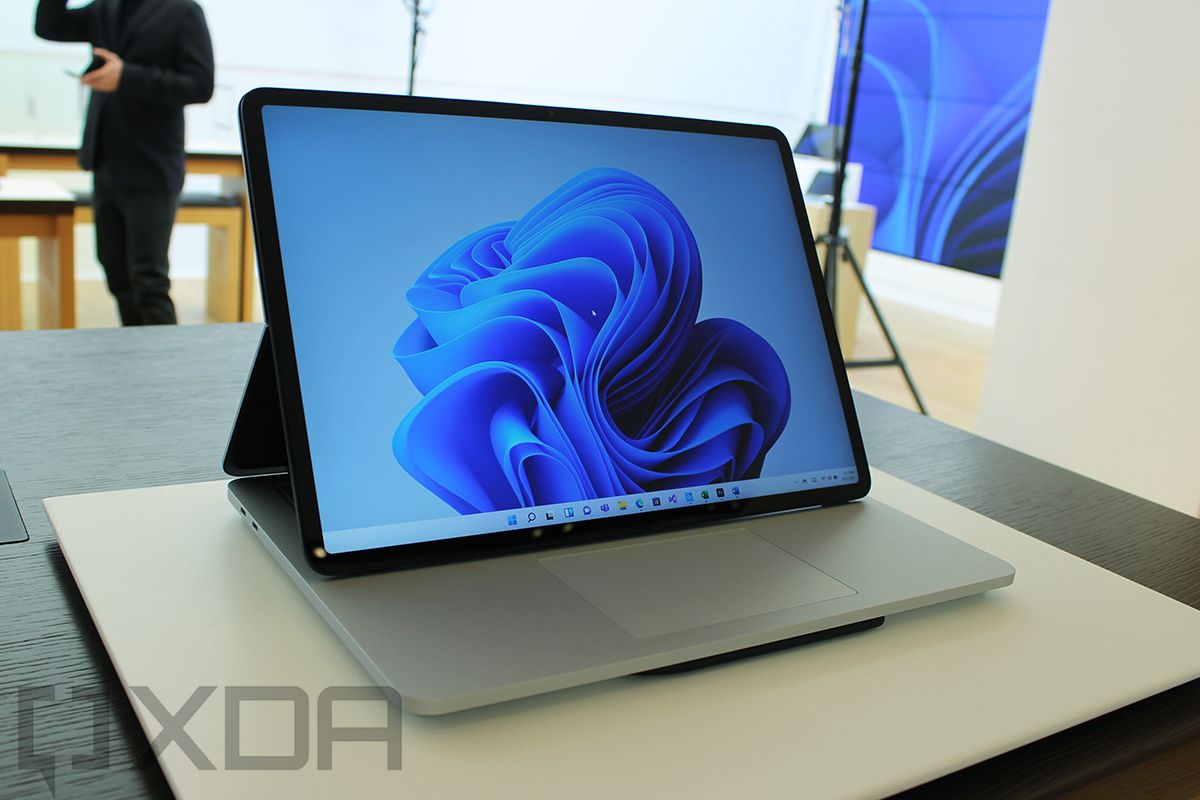
Display pulled forward on Surface Laptop Studio

The Surface Laptop Studio is a brand-new product from Microsoft this year, but it quickly jumped to the top of our favorite laptops. This is a very unique convertible with powerful specs and a form factor that’s one of the coolest things around — in my opinion, at least.

Starting with performance, the Surface Laptop Studio is the most powerful Surface yet, and it comes packing Intel’s new H35-series processors, up to a Core i7-11370H. This is a 35W processor with four cores, eight threads, and up to 4.8GHz clock speeds, and because of that higher power rating, it’s also more powerful than a typical laptop. It also includes Intel Iris Xe graphics, but if that’s not enough power for you, the Core i7 model of this laptop also includes an NVIDIA GeForce RTX 3050 Ti graphics card, so you can feasibly play some games and run more demanding tasks on it. Aside from that, you can configure the Surface Laptop Studio with up to 32GB of RAM and a 2TB SSD, making for a very powerful machine all around.

You also get a great display with the Surface Laptop Studio. This is a 14.4-inch panel, and it comes in the signature 3:2 aspect ratio of Surface devices, which is slightly taller than even 16:10 displays. This one is also very sharp, coming in a 2400 x 1600 resolution, and it supports Dolby Vision, too. One thing that makes this panel unique is that it’s one of the few non-gaming laptops that supports a 120Hz refresh rate, so animations, transitions, and other motion will look much smoother on this screen. Being a convertible, touch and pen support are obviously included, but if you have a Surface Slim Pen 2, you also get haptic feedback while drawing in certain apps, making it feel like a real pen on real paper.

The Surface Laptop Studio also has the benefit of having one of the better webcams you can find on a laptop. It’s a Full HD camera, which isn’t new to Surface devices in general, but it is new to the Surface Laptop range. That higher-resolution camera means you’ll look better during video calls and meetings, which is especially important nowadays. The camera also supports Windows Hello facial recognition, as most Surface devices do.

What truly makes the Surface Laptop Studio stand out is its design. It’s a convertible, yes, but it doesn’t rotate 360 degrees on a single hinge. Instead, it has a second hinge beyond the display, and you can use that to pull the screen closer to you (as seen above), you fold the display down over the keyboard base to turn it into a canvas for note-taking or artistic work. It’s genuinely cool, and easier to go from one stance to another than a traditional convertible. As for portability, the Surface Laptop Studio measures in at 18.94mm, and it starts at 3.87lbs of weight. It’s fairly lightweight for the specs inside, but it doesn’t stand out on that front.

Finally, in terms of ports, the Surface Laptop Studio does support USB Type-C charging, but it doesn’t come. Out of the box, it uses the Surface Connect port to charge, but it does have two Thunderbolt 4 ports you can use for charging if you want to. You might need to buy a high-power charger, though, especially if you choose the Core i7 model. Aside from those three ports, there’s a headphone jack, which means the Surface Laptop Studio doesn’t offer a ton of variety, but the inclusion of Thunderbolt support helps make up for it.

Personally speaking, the Surface Laptop Studio is my favorite device on this list, and it’s a truly great laptop, It may be lacking some ports, but between the performance, the unique form factor, and the display, this is one of the very best laptops you can buy today.

    Surface Laptop Studio
    The Surface Laptop Studio is a powerful convertible laptop with a unique form factor and a great display. You'll need your own USB-C charger, though.

      Features:

      Pros:

      Cons:

Also great: HP Spectre x360 14

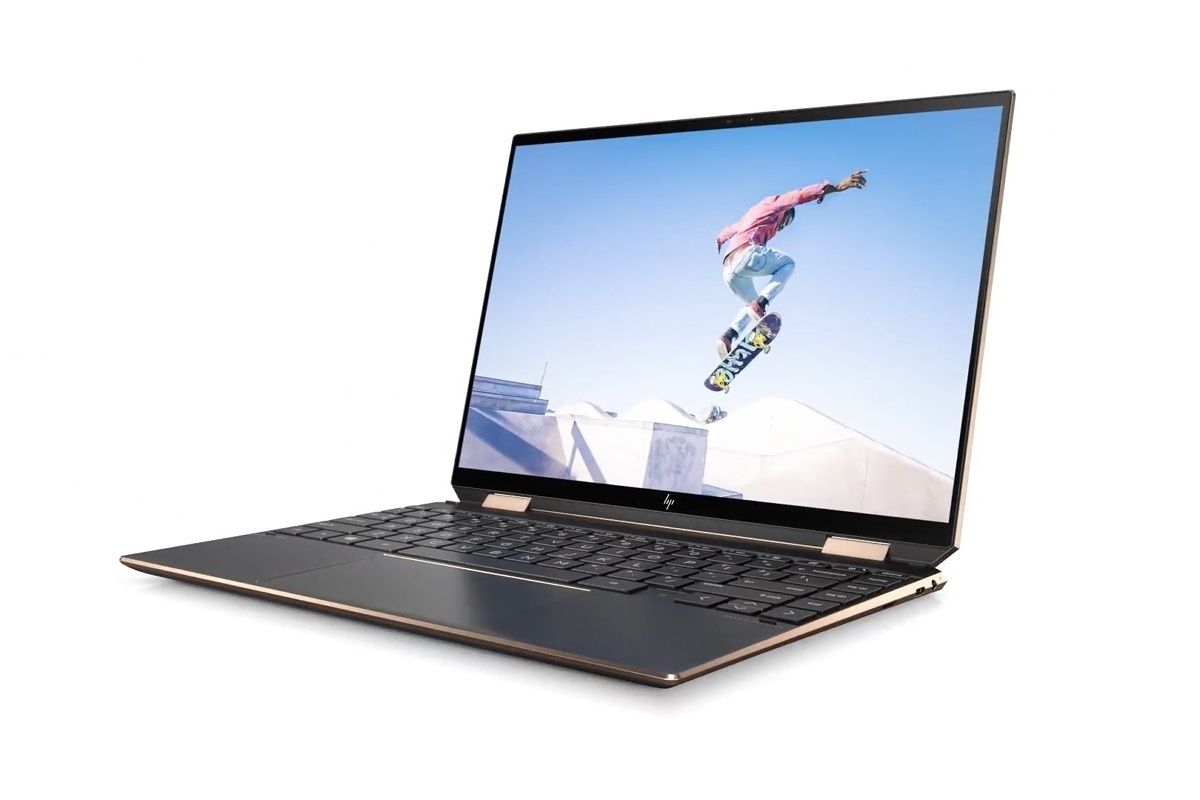
We may love the Surface Laptop Studio’s form factor, but if you’re a bigger fan of traditional convertibles, we’ve got you covered, too. The HP Spectre x360 14 is one of HP’s most recent additions to the lineup, and it gets enough right that it might just be the best one in the family.

First things first, the HP SPectre x360 is powered by Intel’s 11th-generation Core processors up to a Core i7-1165G7, which has four cores, eight threads, and boost speeds up to 4.7GHz. This is a 15W processor, on par with the Dell XPS 13 mentioned above, albeit slightly slower, and it also includes Intel Iris Xe graphics. In addition to that, you can configure the Sectre x360 14 with up to 16GB of RAM and a 2TB SSD, giving you plenty of storage and enough memory to multitask without a problem.

In terms of the display, the Spectre x360 14 comes with a 13.5-inch panel, and it’s the first (and so far, only) Spectre to use the tall 3:2 aspect ratio. This means the laptop is as wide as its 13-inch sibling but as tall as the 15-inch model. The base configuration comes with a Full HD+ (1920 x 1280) panel, which is already sharp enough for a display of this size. If you want an even better display, you can upgrade to a “3K2K” (3000 x 2000) OLED display, which is sharper and offers all the benefits of an OLED panel, like true blacks and high contrast ratios. Both panels have 400 nits of brightness, so they should be usably outdoors without a problem.

The Spectre x360’s webcam suffers from a similar problem to the Dell XPS 13. To shrink the bezels as much as possible, HP used a tiny 720p webcam that doesn’t produce very good images in video calls and meetings. At least HP found space for a Windows Hello facial recognition camera, though, and that’s in addition to a fingerprint reader, so you can use whatever method you prefer to unlock your laptop.

Design-wise, HP’s Spectre lineup is one of the most unique ones around, and that holds true with the Spectre x360 14. The “nightfall black” and “Poseidon blue” variants of this laptop use a dual-tone look. Most surfaces of the laptop are either black or dark blue, but the edges and hinges of the laptop use copper (in the black model) or gold (in the blue model) accents, giving the laptop a much more premium feel. You can also get the natural silver model if you want something more subdued, though. The laptop also has iconic angular edges and trimmed-off corners below the display, contributing to an even more unique look. As for portability, the Spectre x360 14 weighs 2.95lbs and measures just over 17mm in thickness.

As for ports, the HP Spectre x360 has two Thunderbolt 4/USB-C ports that can be used for charging, and while they’re both on the same side, one of them is in one of the cut-off corners, which makes it a bit more accessible from both sides. You also get one USB Type-A port for legacy peripherals, a headphone jack, and a microSD card reader. This covers most of the basics for a laptop of this size, and you’re only missing a traditional display output, meaning you might need an adapter to connect external monitors.

This is a stellar convertible laptop with high-end performance, a stunning design, a great display, and a decent supply of ports including USB-C charging. You can’t ask for much more than that.

    HP Spectre x360 14
    With a stunning and relatively light design, high-end specs, and a great display, the HP Spectre x360 14 is a simply fantastic convertible.

      Features:

      Pros:

      Cons:

Best business laptop with USB-C charging: Lenovo ThinkPad X1 Carbon Gen 9

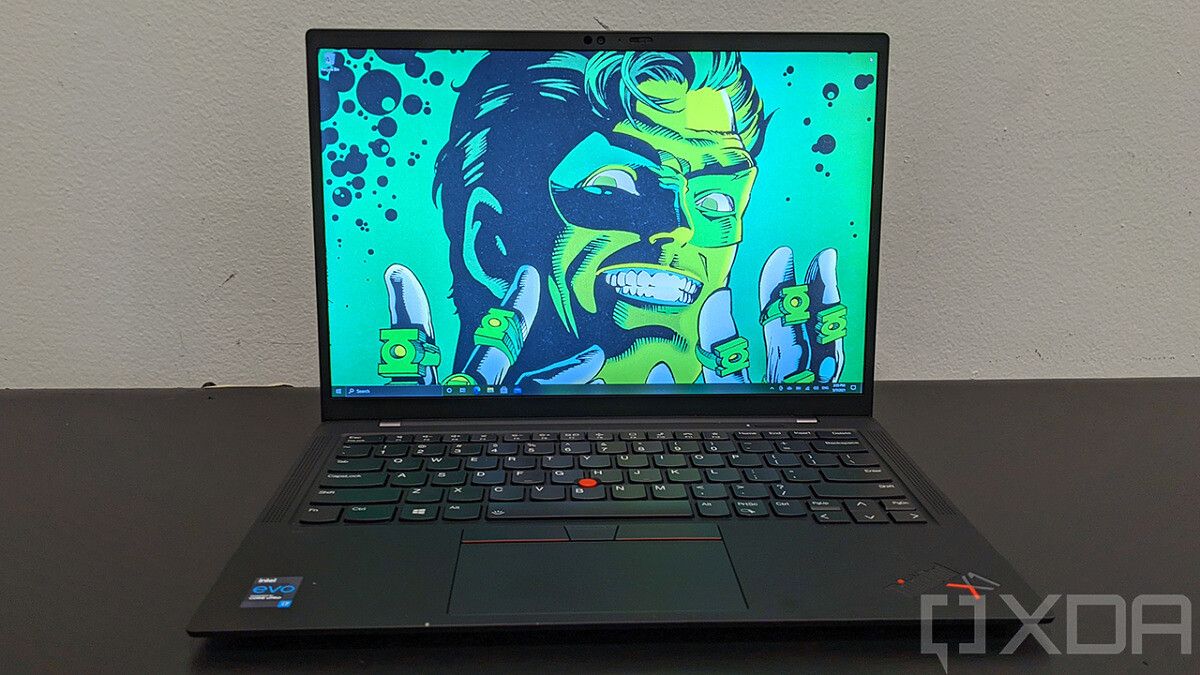
Front view of ThinkPad X1 Carbon Gen 9

Lenovo’s ThinkPad lineup is home to some of the most iconic business laptops out there, and none is more iconic than the ThinkPad X1 Carbon. It’s one of the oldest laptops in the family, but Lenovo has done a great job of modernizing it while still keeping what makes a ThinkPad so well-known.

Starting with performance, the ThinkPad X1 Carbon Gen 9 comes with 11th-generation 15W processors from Intel, maxing out with an Intel Core i7-1185G7 with vPro. Intel vPro processors include extra security features for businesses, and are generally a bit faster than the non-vPro models, too. This one is a quad-core, eight-thread model with boost speeds up to 4.8GHz, and of course, Iris Xe graphics. In addition to that, you can configure it with up to 32GB of RAM and a 1TB SSD, giving you plenty of performance and space for your files.

The latest model of the ThinkPad X1 Carbon improves the display by switching to a taller 16:10 aspect ratio from the previous 16:9 panel, which is great for productivity. The base model is a Full HD+ (1920 x 1200) IPS panel with 400 nits of brightness, but you can go all the way to an Ultra HD+ (3840 x 2400) model with HDR support and 500 nits. Some FHD+ configurations also include touch support and a privacy guard to prevent others from seeing what’s on your screen.

The webcam on the ThinkPad X1 Carbon is a 720p camera, though it’s not super small like the ones we saw above. Windows Hello facial recognition isn’t included by default in the base model, but you can add it as an option. You also get a fingerprint reader, which is included by default with the laptop.

One thing that hasn’t changed what the latest X1 Carbon is the iconic ThinkPad look. The classic black chassis with red accents is still here, as are features like the pointing stick and duplicate mouse buttons above the touchpad and the rounded keyboard keys. It’s been modernized, though, so the laptop measures just 14.9mm thick and weighs 2.49lbs in the base configuration. You get all the ThinkPad features you know in a very portable package, which is great. Also, if you get the Ultra HD+ display, the lid of the laptop comes covered in black carbon fiber for a more unique look.

For ports, you get two Thunderbolt 4/USB-C connections with support for charging (though they’re both on the same side), plus two USB Type-A ports (3.2 Gen 1), HDMI 2.0, and a headphone jack. Like many business laptops, you also get the option for LTE or 5G connectivity, and that adds a nano SIM slot to the laptop, too. Cellular network support means you can stay connected to the internet wherever you go, and that can be very useful.

The ThinkPad X1 Carbon Gen 9 nails all the basics of a business laptop, with great performance, a classic design, a tall screen, and lots of ports. You can buy it at Best Buy below, but you can find more configurations on Lenovo’s website.

    Lenovo ThinkPad X1 Carbon Gen 9
    The lnewest ThinkPad X1 Carbon has modern specs, a tall display, and a lightweight design while keeping everything you love about ThinkPads.

      Features:

      Pros:

      Cons:

Best gaming laptop with USB-C charging: ASUS ROG Flow X13

ASUS ROG Flow X13 running Forza 4

While many gaming laptops technically support USB-C charging, the amount of power they consume usually far exceeds the power that USB Power Delivery supports (until the recent announcement of 240W USB charging, at least). Because of that, most gaming laptops don’t fit on this list all that well, but the ASUS ROG Flow X13 is an exception.

That’s because, performance-wise, the ASUS ROG Flow X13 isn’t up there with other gaming laptops. But that’s not to say it’s slow by any means. It comes with AMD’s 35W Ryzen processors, up to a Ryzen 9 5980HS, which is an 8-core, 16-thread processor with boost speeds up to 4.8GHz. That’s one of the fastest laptop processors around, but it doesn’t use as much power as some others. That’s paired with up to an NVIDIA GeForce RTX 3050 Ti graphics card, also rated for 35W, giving you solid performance to play most modern games at decent frame rates, though it will obviously vary from game to game. Aside from that, you get up to 32GB of RAM (not upgradeable) and a 1TB SSD, so you have quite a bit of space for games and files.

If you want more gaming performance, you can buy this laptop alongside the ROG Xg Mobile, an external GPU enclosure containing a GeForce RTX 3080 plus more ports to expand the connectivity on the laptop. Keep in mind this uses a proprietary connector, and Thunderbolt-based external GPUs won’t work here.

For a gaming laptop, the ASUS ROG Flow X13 has an uncommon display, being a 13.4-inch panel with a 16:10 aspect ratio. The base model is a Full HD+ (1920 x 1080) panel and it has a 120Hz refresh rate for smoother gaming (and motion in general), though there’s also an option for an Ultra HD+ 60Hz panel if you prefer the higher resolution. Despite being a gaming laptop, it’s also a convertible, and that means the display supports touch and pen input, and a pen is even included in the box in some models. That makes this a very versatile laptop, though, and that’s great.

The webcam on the ROG Flow X13 is a 720p camera, as you might have expected, and it doesn’t support Windows Hello facial recognition. That’s not uncommon for gaming laptops, and thankfully, you do get a fingerprint reader built into the power button on the side of the laptop. That should make unlocking your PC a bit easier.

Coming to the design, the ROG Flow X13 is very subdued for a gaming laptop, depending on the model you get. It’s an all-black laptop with a striped pattern running through the chassis, but the ASUS ROG branding on the lid does have an RGB light in some models. The keyboard is only backlit in white, so it looks professional on that front, too. It’s also very thin and light for a gaming laptop, weighing 2.87lbs and measuring 15.8mm in thickness.

For ports, the ROG Flow X13 counts two USB Type-c (3.2 Gen 2 ports), both of which can charge the laptop, and they’re on different sides of the laptop, too. The charger goes up to 100W, so it should be able to keep the laptop charged even under load. You also get one USB Type-A port (3.2 Gen 2), HDMI 2.0b, and a headphone jack. One of the USB Type-C ports is also part of the ROG Xg mobile interface to connect the external GPU, if you choose to get it. Naturally, Thunderbolt support isn’t available because this is an AMD laptop, but this is still a solid setup.

This is a gaming laptop for those who don’t need the absolute most performance, but it’s a fantastic choice all the same. It can run just about any modern game and it’s also great for productivity and all kinds of tasks. This is the only laptop on this list I’ve personally bought and own, and I definitely recommend it.

    ASUS ROG Flow X13
    For those who want a gaming laptop that's also versatile and easy to take anywhere, the ROG Flow X13 is an absolutely fantastic laptop.

      Features:

      Pros:

      Cons:

Best 17-inch laptop with USB-C charging: LG gram 17

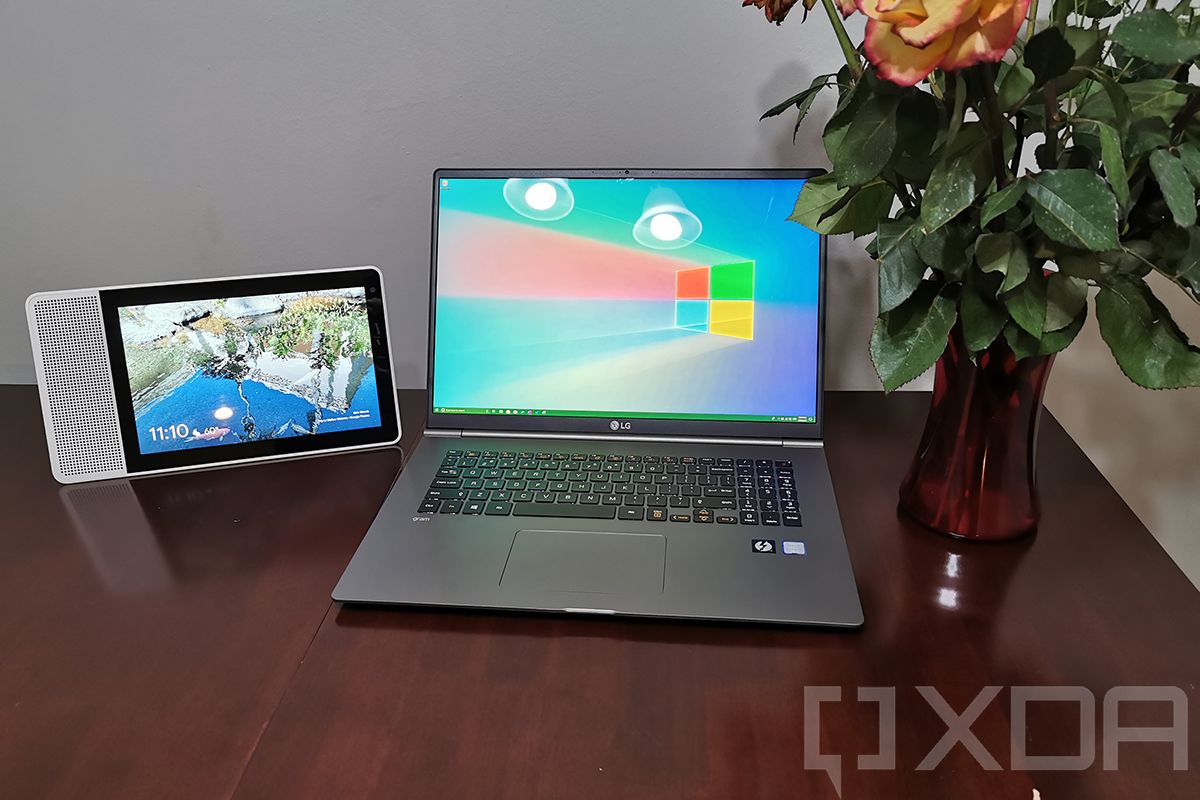
Fans of larger laptops can sometimes have it tough when it comes to finding a thin and light laptop, but the LG gram 17 is perfect for those users. It’s a capable laptop with great battery life, solid performance, and a surprisingly lightweight design.

The LG gram 17 is powered by an Intel Core i7-1165G7 processor, with four cores, eight threads, and boost speeds up to 4.7GHz, plus Intel Iris Xe graphics built-in. It’s a high-end laptop, but it’s using 15W processors, which allows it to be as light as it is. It also comes with up to 16GB of RAM and a 2TB SSD, so multi-tasking shouldn’t be a problem, and you shouldn’t have to worry about running out of space for your files.

As you’d probably expect from the name, the LG gram 17 comes with a 17-inch display, and it has a 16:10 aspect ratio. That helps the screen feel that much bigger, and with a very sharp Quad HD+ (2560 x 1600) resolution, it makes great use of the available space. The high pixel density and size mean you get a lot of space for multiple apps at once, making multitasking easier. The display also covers 99% of DCI-P3, so it’s great for creative professionals.

Perhaps unsurprisingly, the gram 17 still comes with a 720p webcam, and it doesn’t support Windows Hello facial recognition, either. Instead, there’s a fingerprint sensor built into the power button, which admittedly does make it fairly easy to unlock the PC whenever you need it.

What’s most impressive about the LG gram 17 is just how light it is, weighing under 3lbs. Sure, we’ve seen other laptops on this list be that light, but they have way smaller screens, so this is still very impressive. It’s also fairly thin, measuring 17.78mm, and overall, it’s a laptop you can take anywhere, while still giving you a big canvas to work on. This is thanks to a build that mostly uses magnesium, compared to the more typical aluminum laptops. While we’re on the topic of design, it’s worth noting the gram 17 also has a number pad, which some users might find useful.

And for ports, the LG gram packs two Thunderbolt 4/USB-C ports with support for charging (both on the same side, unfortunately), two USB Type-A (3.2 Gen 2) ports, HDMI, a headphone jack, and a microSD card reader. That covers just about any basic need you might have, and it’s a solid setup to boot. It’d be nice if the charging ports were on different sides, but that’s arguably a minor detail.

The LG gram 17 isn’t the most powerful 17-inch laptop out there, but it’s one of the most portable, and that’s its biggest focus. It still delivers a premium experience and it can go with you anywhere.

    LG gram 17
    The LG gram 17 is a 17-inch laptop for those who work on the go, featuring a lightweight design and long-lasting battery that can be charged over USB-C.

      Features:

      Pros:

      Cons:

Best tablet: Surface Pro 8

Angled view of Surface Pro 8

There aren’t a whole lot of great Windows tablets out there, but the ones that exist are very good. Still, the Surface Pro 8 stands out from the pack, not only featuring high-end specs and a great display, but also Thunderbolt support for the first time.

Performance-wise, the Surface Pro 8 is on par with other ultrabooks, starting with 11th-generation Intel Core processors up to a Core i7-1185G7. As we’ve mentioned before, this is a quad-core, eight-thread processor that can boost up to 4.8GHz as needed and also includes Iris Xe graphics for some light GPU workloads. You can also configure the Surface Pro 8 with up to 32GB of RAM and a 1TB SSD, so it definitely doesn’t fall short just because it’s a tablet.

One of the areas where the Surface Pro 8 shines is its display (no pun intended). This is a 13-inch panel in the signature 3:2 aspect ratio we know Surface devices for, and it’s a very sharp panel at 2880 x 1920 resolution, which is the standard across all configurations. Of course, it supports touch and pen input, and just like the Surface Laptop Studio, you get haptic feedback in the Surface Slim Pen 2 when you use it with this tablet. Also, this is the only Windows tablet that supports a 120Hz refresh rate for the display (though it’s set to 60Hz out of the box), and it also supports Dolby Vision.

Another strength of the Surface Pro 8 is in its cameras. The front-facing webcam on the Pro 8 is a 5MP sensor, and it supports 1080p video, making it one of the best webcams you’ll find on any laptop out there. It also supports Windows Hello facial recognition, as most Surface devices do. In addition to that, you get another camera on the back, this one being a 10MP camera with 4K video recording. If you’re taking lots of video calls, this is a fantastic device.

Being a tablet with no keyboard out of the box, the Surface Pro 8 is one of the more portable devices on this list. It weighs just 1.96lbs, and it measures 9.3mm thin, so this is a device you can truly take anywhere without much hassle. Even if you add a Surface Pro Signature Keyboard, this is still one of the most portable devices on this list.

In terms of ports, the Surface Pro 8 suffers from the same problem most Surface devices do. It does have two Thunderbolt 4/USB-C ports with charging support, but the default charging method is using the Surface Connect port and the charger that comes in the box. Those are also the only ports on this tablet aside from a 3.5mm headphone jack, so you don’t have a ton of options unless you get a dock or adapter. For a tablet, that’s not bad, but it falls a little short as a PC.

Despite its shortcomings, the Surface Pro 8 is a fantastic Windows tablet with high-end specs and a great display and cameras, making it great for everything from working to consuming media.

    Surface Pro 8
    The Surface Pro 8 is one of the best Windows tablets out there, featuring high-end specs and a modern design.

      Features:

      Pros:

      Cons:

Best budget laptop with USB-C charging: HP Pavilion Aero

Angled view of HP Pavilion Aero 13

Finally, what if you want a great affordable laptop that supports USB-C charging? The HP Pavilion Aero might be the answer, seeing as it’s one of the best budget laptops you can buy in general. It doesn’t come with a USB Type-C charger in the box, but it does support it.

Despite being affordable, the HP Pavilion Aero doesn’t lack in performance, It comes with AMD’s Ryzen 5000 series processors, starting with a Ryzen 5 5600U in the base model. That’s already a 6-core, 12-thread processor that can boost up to 4.2GHz, so performance definitely isn’t lacking here. You can upgrade to a Ryzen 7 if you can afford it though. The base model also includes 8GB of RAM and a 256GB SSD for storage, which is a solid combination for an affordable laptop, though again, you can go up to 16GB and 1TB, respectively, depending on how much you’re willing to spend.

The display is another area where HP didn’t cheap out. This is a 13.3-inch panel with a 16:10 aspect ratio — a rare sight in laptops at this price — and it comes in Full HD+ (1920 x 1200) resolution out of the box, too. If that’s not impressive enough, you can upgrade to a Quad HD+ (2560 x 1600) panel for just $30. And it’s a 400-nit panel in both variants, so outdoor visibility isn’t a problem, something you can’t say of a lot of other cheap laptops.

Corners have to be cut somewhere, though, and the camera here is a 720p sensor without Windows Hello facial recognition. That’s not to say you’re completely out of options, though, you do get a fingerprint reader built-in. While that’s not something exclusive to the Pavilion Aero, it could easily have been left out considering everything else on offer here, so it’s great to see it made the cut.

Back on a positive note, the HP Pavilion Aero is also a very lightweight and portable laptop, another area that affordable laptops tend to struggle with. It weighs less than 2.2lbs thanks to its magnesium chassis, and it’s just over 17mm thick. This is also a unique laptop in the sense that it gives you four color options to choose from. They’re all fairly subdued, but you get to choose something that fits your style, and that’s always good.

Finally, the port selection on the HP Pavilion Aero includes one USB-C port (3.2 Gen 2) with support for charging, two USB Type-A (3.2 Gen 1) ports, HDMI, a headphone jack, and a microSD card reader. The default charger uses a proprietary barrel port, but if you happen to have a powerful USB-C charging brick already, then you can use it with this laptop.

With a launch price of $750, the HP Pavilion Aero was a fantastic mainstream laptop already, but now that it’s often heavily discounted (at writing time, it costs $550), this is a steal. We definitely recommend this laptop if you’re on a tight budget and want a great experience.

    HP Pavilion Aero
    The HP Pavilion Aero is an affordable laptop that doesn't compromise on power or portability.

      Features:

      Pros:

      Cons:


And those are what we’d consider the best laptops with USB-C charging you can buy right now. Many of these come with a USB Type-C charger in the box, while others might require you to buy one separately, but they all support it to some extent. We chose the Dell XPS 13 for the top of this list because it’s simply the best ultrabook of the year, thanks to a very compact design, high-end specs, a great display, and two very distinct looks to suit your taste. Personally speaking, the Surface Laptop Studio is my favorite device on this list, though, and you’re bound to have your own preference. All of these are great laptops and you can’t go wrong with them.

If you’re looking for something else in your next laptop, you may want to check out our list of the best 5G-enabled laptops you can buy today.

The post These are the best laptops with USB-C charging in 2022 appeared first on xda-developers.


from xda-developers https://ift.tt/3pudxmm
via IFTTT