LightBlog

jeudi 16 décembre 2021

Signal now lets you add up to 40 participants to video calls

While Signal has gained immense popularity this year, the privacy-focused messenger still lags far behind its two main competitors — Telegram and WhatsApp. One of the main reasons behind this is that Signal doesn’t offer quite as many features as the other two. However, the developers behind the app have been hard at work adding new features over the last few months to attract even more users. The app recently received a new monetization feature to help users make monetary contributions to support and sustain the development. Now, it’s rolling out support for up to 40 person group video calls.

In a recent blog post (via Android Police), Signal explains that it originally used an open-source solution for end-to-end encrypted group video calls. However, since it couldn’t reliably scale the open-source solution to support more than eight participants, it developed its own open-source calling service that supports up to 40 participants. Signal has been using this new solution for video calls for the past nine months, and it’s now finally scaling the group video call limit to 40 participants.

In contrast, WhatsApp currently supports group video calls with up to eight participants and, up until last year, it only supported four participants. However, now that Signal has increased the limit to forty participants, we expect WhatsApp to follow suit. Telegram, on the other hand, allows up to 1000 participants to join the same group call, but only lets 30 participants broadcast their camera and screen to the rest of the participants.

If you’re interested in learning more about Signal’s new video calling solution, check out the original blog post by following the link above.

The post Signal now lets you add up to 40 participants to video calls appeared first on xda-developers.


from xda-developers https://ift.tt/3mc5ybM
via IFTTT

Twitter Blue: What does paying for Twitter actually get you, and should you do it?

Twitter has slowly been evolving into a richer social media service. What started as a basic tool to express ideas using 140 characters or less has now gained some advanced features. These include Spaces for Clubhouse-like audio rooms, voice note support in DMs, newsletters, and more. Eventually, the company launched what plenty of users didn’t see coming — a paid subscription. Twitter Blue brings additional features and perks for $2.99 per month. It recently expanded to some new countries, but its availability is still relatively limited. Here’s what paying for this service actually gets you.

Navigate this article:

Features

Twitter Blue is still in its early stages, and it hasn’t matured just yet. The company offers some features and perks for the time being, but plenty of users find them lacking. Additionally, most of these features aren’t available on all platforms. This only shows how the paid service is in its initial stages of development.

Ad-free Articles

Twitter Blue features Twitter Blue features

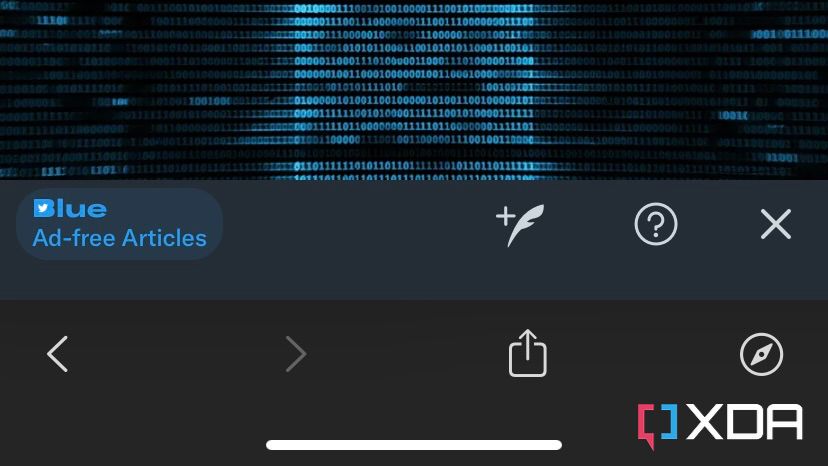
This service allows you to read some of the top US publications without advertisements. When you sign up for Blue, you unlock a new section in the app where you can view a list of all supported websites. Once you click on an article link for a supported publication, a small Twitter icon will float in the bottom left corner. When you click it, it informs you that you’re currently viewing an ad-free article, thanks to your Blue subscription.

It’s worth mentioning, though, that this doesn’t bypass paywalled websites — it only removes ads. If a supported website is using a paywall, you still have to pay for it to access the actual article. It’s also worth noting that Twitter Blue does not remove ads or sponsored posts across the app. I’ve bumped into plenty of tweets by random subscribers complaining about in-app ads. It’s a common misconception that is worth highlighting. Blue will only remove ads from articles on participating publications’ websites. Additionally, the feature is currently only available on iOS and the web. Android users can’t take advantage of it just yet.

Bookmark Folders

Twitter offers all users — free and paid — the option to bookmark tweets. The list of bookmarks is private and only accessible by you. It’s meant to be a place where you can access all of your saved tweets inside the app — instead of pasting links in your notes app for future references.

Twitter Blue features

Blue takes this feature to the next level and introduces folders. This allows paid users to categorize their bookmarked tweets based on their preferences. As a result, it makes digging into them and finding the right one easier and quicker, thanks to its respective folder. The feature is currently available on iOS, Android, and the web, and your folders will sync across the platforms.

Custom App Icons

Twitter Blue features

Blue allows users (iOS-only — for now) to change the Twitter app icon on their devices. The company currently offers eight colorful icons to choose from. Additionally, Twitter sometimes introduces limited-time icons on certain occasions, such as Halloween. Apart from the eight icons, there are currently four new, limited-time icons — featuring Christmasy graphics — that will be available until early 2022. This feature is just for cosmetic purposes and doesn’t actually add or improve any functionalities.

Themes

Twitter Blue features

Twitter has supported themes on both the mobile and desktop websites for years now. Blue reintroduces the very same feature as a paid one on the mobile apps. It’s currently only supported on iOS and allows users to choose between Blue (default), Yellow, Red, Purple, Orange, and Green. However, all users — free and paid — can take advantage of it on mobile by adding the Progressive Web App (PWA) to their home screens or using the mobile website in their favorite browser. It’s unclear why the company hadn’t supported themes on mobile apps until now. And it’s yet to be seen whether it’ll be paywalled on the website down the road.

Custom Navigation

Twitter Blue features

Custom Navigation is yet another cosmetic feature that users have to pay for. Twitter has been rolling out new Spaces and Communities tabs in the bottom navigation bar. However, plenty of users — including me — dislike having them there, considering not all of us are interested in these sections of the app. Blue allows you to reorder, add, or remove tabs from the bottom navigation bar.

Home is the only stable tab that users can’t remove — for obvious reasons. Otherwise, users can choose up to five other tabs to add to the bottom bar. These include Explore, Spaces, Notifications, Messages, Bookmarks, Lists, Profile, Top Articles, Monetization, and Communities. There’s also a Restore to default button in case you want to restore the navigation bar to its original state. The company states that the feature is available on iOS and the web, but I’ve only been able to use it on the iPhone app.

Top Articles

Twitter Blue features

This feature compiles up to 25 articles shared by the accounts you follow in the past 24 hours. This allows you to easily take a glance at or read about the topics getting shared the most in your network. The Top Articles section can be accessed through the Profile menu with a right swipe from the left edge of the screen. Alternatively, you can add a shortcut to it in the navigation bar through Twitter Blue settings. This feature is available on iOS, Android, and the web.

Reader

Twitter Blue features

Twitter acquired Threader last month and shut it down. This service allowed users to compile long Twitter threads into an easy-to-read view. Blue now offers a similar feature on iOS, Android, and the web. When you click on a thread, a new Reader button will appear, enabling you to convert it into an article-like page. This hides the tweet’s metadata and focuses on its content instead.

Undo Tweet

Twitter Blue features

This Blue feature is the one Twitter highlights the most. It allows users to view a tweet for a certain amount of seconds before it’s posted publicly. This way they can proofread it to ensure they haven’t made any typos before it goes live. The feature is not an edit button, and it doesn’t actually undo live tweets. It only adds a timer to the post button. Once a tweet goes live, you can only delete and repost it to make an edit. Free users can just proofread their tweets before they hit the post button as an alternative to this paid feature. Blue users can utilize it on iOS, Android, and the web.

Longer Video Uploads

Twitter Blue features

Twitter allows free users to post videos with a maximum length of 2 minutes and 20 seconds. Blue enables paid users to post videos that are up to 10 minutes long. However, this feature is currently only available on the desktop website of the service. Mobile Blue users still can’t post longer videos for the time being.

Pinned Conversations

Twitter Blue features

This Blue feature allows users to pin DMs to the top of their chat list. This way you can easily access your favorite conversations in the Messages tab. It’s currently only available on iOS, though. To pin, just swipe right on a conversation in the mentioned tab.


Availability

Twitter Blue is only available in four countries right now — US, Canada, Australia, and New Zealand. Users can subscribe to the service through the latest version of the app on iOS or Android. Alternatively, they can pay for it through the web version via Stripe. It costs $2.99/month in the US, and the price may vary depending on the region. Additionally, features may be added, removed, or tweaked at any given time without prior notice.

Should you subscribe to Twitter Blue?

This service is still in its early stages, as our feature breakdown has reflected above. If you actively read articles by US publications that are supported by the service and the ads are too unbearable for you, it might be worth it. Additionally, if you’re a content creator who wishes they could post longer videos on the platform, the new 10-minute limit might be worth the $2.99/month.

Twitter Blue features

However, most of the other features are for cosmetic purposes and don’t actually improve the usage experience notably. Also, some of the paid features can be replaced by certain alternatives. For example, you can take advantage of themes by using the PWA or website instead of the mobile app. And you can replicate the undo tweet feature by simply proofreading your tweets before posting them. Ultimately, only you can decide if the service is worth the monthly fee. We’ve broken down the bundled features to clear any misconceptions and help you decide accordingly.

Personal Thoughts

I’ve been using Twitter Blue for about a week now. For starters, I personally don’t believe the service is worth $2.99/month in its current form. Most of the features it offers are either useless to me or purely cosmetic. While I enjoy using the Red theme and having the black app icon on my iPhone, these features aren’t available on the Mac app. In fact, none of the Blue features are available on it, and I prefer using the Mac app over the desktop website. So when I’m using my MacBook, I can’t take advantage of any of the features I’m paying for.

Additionally, the service doesn’t remove sponsored posts from the app — which would actually make the subscription worth it for me. I use Apple News+ for ad-free reading; ad-free articles on Twitter are useless to me. As for bookmark folders, I never use the basic bookmark feature in the first place, let alone the paid folders addition. And as a careful proofreader, I don’t find myself needing to undo tweets. I don’t post videos on the platform either. However, having a custom navigation bar has been somewhat useful, as I’ve removed the Spaces tab — which I never visit.

Pinned conversations are of no use to me, considering I don’t use Twitter as an instant messaging (IM) service. I rarely chat with people on the platform or feel the need to pin conversations to the top. I have to admit, though, that the reader view makes it significantly easier to read long threads.

Twitter Blue features

Will I be paying for the service again when my subscription expires? I’m not sure yet. That completely depends on Twitter’s commitment to and development of further Blue features. Right now, it’s not worth the $2.99 subscription — in my opinion. However, I’ll keep an eye open for new, upcoming features and decide accordingly. As someone who is enthusiastic about testing beta features, having access to the latest additions the company has to offer can be tempting. I’ll make a final decision eventually — once the service is more mature.


Are you subscribed to Twitter Blue? If so, which features do you like the most? Let us know in the comments section below.

The post Twitter Blue: What does paying for Twitter actually get you, and should you do it? appeared first on xda-developers.


from xda-developers https://ift.tt/3yAikph
via IFTTT

OnePlus Nord 2 kernel sources updated, now in sync with the next build

Shortly after OnePlus launched the OnePlus Nord 2, the company published the kernel source for the device. The original release was based on OxygenOS A.07 and, while OnePlus has released several software updates to the Nord 2 since, it had not added a single public commit corresponding to the subsequent updates on its official GitHub repo. This has had a significant effect on third-party development for the device. Thankfully, OnePlus has finally taken notice and updated the kernel sources for the OnePlus Nord 2.

According to a recent update on OnePlus’ official GitHub repo, the company has synced the OnePlus Nord 2’s kernel sources to the OxygenOS A.15 build. For the unaware, OnePlus hasn’t released OxygenOS A.15 to the device. In fact, OxygenOS A.14 rolled out to the OnePlus Nord 2 earlier this month, and it may be a while before OnePlus releases OxygenOS A.15 to the device.

OnePlus’ decision to sync the kernel sources to an upcoming software update isn’t a bad thing. On the contrary, we believe it’s a good move as the kernel sources won’t become outdated when the next OxygenOS update rolls out to the device. Now that OnePlus has updated the Nord 2 kernel sources, we expect third-party development for the device to pick up steam on our forums.

OnePlus Nord 2 XDA Forums

It’s worth mentioning that OnePlus has also updated the OnePlus 9 series kernel sources from 11.2.8.8 to 11.2.10.10, but the company still hasn’t released the kernel sources for the OxygenOS 12 update for the devices. Given that OnePlus recently pulled the OxygenOS 12 update for the OnePlus 9 series due to bugs, the company might take a while to release kernel sources for the Android 12 release.

Do you own a OnePlus Nord 2? Are you looking forward to installing a custom ROM or kernel on your device? Let us know in the comments section below.

Thanks to XDA Senior Member Some_Random_Username for the tip!

The post OnePlus Nord 2 kernel sources updated, now in sync with the next build appeared first on xda-developers.


from xda-developers https://ift.tt/3s7qCUn
via IFTTT

mercredi 15 décembre 2021

New OnePlus 10 Pro leak suggests that it will offer faster fast-charging support

Over the last few weeks, we’ve seen a couple of leaks about OnePlus’ upcoming flagship — the OnePlus 10 Pro. Leaked renders of the device have showcased its updated design with the new square camera module that flows over one edge, like on the Galaxy S21 series. In addition, we’ve seen a few leaks about the phone’s specifications and expected launch date. Another leak about the OnePlus 10 Pro’s hardware has now surfaced online, revealing some more details.

The latest OnePlus 10 Pro leak comes from Digital Chat Station on Weibo and it gives us a quick rundown of its flagship hardware. As per the leak, the OnePlus 10 Pro will pack a 6.7-inch 1440p LTPO display with a peak refresh rate of 120Hz and a hole-punch cutout in the top-left corner. The phone will include a 32MP camera over on the front for selfies and video calls, along with a 48MP primary camera, a 50MP ultra-wide camera, and an 8MP 3x telephoto camera on the back.

OnePlus 10 Pro leak Digital Chat Station

As you’d expect, the OnePlus 10 Pro will come with Qualcomm’s latest flagship chipset — the Snapdragon 8 Gen 1. Although the leak doesn’t reveal the RAM and storage configurations, previous leaks suggest that the phone will pack 8GB or 12GB of LPDDR5 RAM and 128GB or 256GB of UFS 3.1 storage. Lastly, the new leak confirms that the OnePlus 10 Pro will offer 80W wired fast charging support and 50W wireless fast charging support. However, it doesn’t include the battery capacity. But, according to information we’ve seen so far, the OnePlus 10 Pro should come with a 5,000mAh battery.

On the software front, the OnePlus 10 Pro will launch with ColorOS 12 based on Android 12 in China. The international variant will launch with OxygenOS 12 (pretty much the same thing now), instead.

Although OnePlus is yet to announce any details about the OnePlus 10 Pro, previous leaks suggest that the company will launch the device earlier than usual in the Chinese market. It should make it to more regions by March or April 2022.

Featured image: Leaked OnePlus 10 Pro render via OnLeaks

The post New OnePlus 10 Pro leak suggests that it will offer faster fast-charging support appeared first on xda-developers.


from xda-developers https://ift.tt/3GMIurL
via IFTTT

New OnePlus 10 Pro leak suggests that it will offer faster fast-charging support

Over the last few weeks, we’ve seen a couple of leaks about OnePlus’ upcoming flagship — the OnePlus 10 Pro. Leaked renders of the device have showcased its updated design with the new square camera module that flows over one edge, like on the Galaxy S21 series. In addition, we’ve seen a few leaks about the phone’s specifications and expected launch date. Another leak about the OnePlus 10 Pro’s hardware has now surfaced online, revealing some more details.

The latest OnePlus 10 Pro leak comes from Digital Chat Station on Weibo and it gives us a quick rundown of its flagship hardware. As per the leak, the OnePlus 10 Pro will pack a 6.7-inch 1440p LTPO display with a peak refresh rate of 120Hz and a hole-punch cutout in the top-left corner. The phone will include a 32MP camera over on the front for selfies and video calls, along with a 48MP primary camera, a 50MP ultra-wide camera, and an 8MP 3x telephoto camera on the back.

OnePlus 10 Pro leak Digital Chat Station

As you’d expect, the OnePlus 10 Pro will come with Qualcomm’s latest flagship chipset — the Snapdragon 8 Gen 1. Although the leak doesn’t reveal the RAM and storage configurations, previous leaks suggest that the phone will pack 8GB or 12GB of LPDDR5 RAM and 128GB or 256GB of UFS 3.1 storage. Lastly, the new leak confirms that the OnePlus 10 Pro will offer 80W wired fast charging support and 50W wireless fast charging support. However, it doesn’t include the battery capacity. But, according to information we’ve seen so far, the OnePlus 10 Pro should come with a 5,000mAh battery.

On the software front, the OnePlus 10 Pro will launch with ColorOS 12 based on Android 12 in China. The international variant will launch with OxygenOS 12 (pretty much the same thing now), instead.

Although OnePlus is yet to announce any details about the OnePlus 10 Pro, previous leaks suggest that the company will launch the device earlier than usual in the Chinese market. It should make it to more regions by March or April 2022.

Featured image: Leaked OnePlus 10 Pro render via OnLeaks

The post New OnePlus 10 Pro leak suggests that it will offer faster fast-charging support appeared first on xda-developers.


from xda-developers https://ift.tt/3GMIurL
via IFTTT

mardi 14 décembre 2021

Dell shows off new concepts to reimagine working from home

After Dell introduced its Concept Luna sustainability efforts yesterday, it has a few more concepts to show off today ahead of CES. These are designed to reimagine the working from home experience, and there are three of them. Keep in mind, of course, that these are concepts and are not products for sale, although these ideas could show up in future products.

Concept Flow

Concept Flow is interesting, because it’s all about reimagining the work from anywhere experience. You could be home, on the go, at an office, and so on, and there are pain points to all of them, even if that pain point if just connecting your laptop to some monitors.

Seen in the image above is a laptop that’s wirelessly connected to a monitor, and it’s also on top of a pad that’s charging it. It’s all wireless. When you bring your laptop to the workspace, it automatically connects to the peripherals that are there, including the monitor, keyboard, and mouse.

Shutting it down is as simple as picking up your laptop and walking away. There are no cables to mess around with. It’s seamless and it just works.

Concept Pari

You might recall that two years ago, no one cared about webcams on laptops. That’s why we’re still stuck in this world where most laptops have 720p webcams while smartphone makers have been investing in front cameras for years; it’s because people actually take selfies. And until the working from home boom of 2020, people weren’t using their webcams.

While Dell was one of the first to say consumers didn’t use their webcams with it Dell XPS laptops, it’s been at the forefront of pushing FHD webcams with its Latitude business laptops. And with Concept Pari, it has a whole new idea for webcams, although this is for the desktop.

First of all, the webcam is totally removable from its dock above the display. It’s charging in that dock, and then you can take it and magnetically attach it to the monitor. The whole idea behind this is that you can talk to someone at eye level, rather than having your eyes dart between the screen and the webcam.

Since it’s removable, you can also use it to film a demonstration or just to show something off.

Privacy guards are a thing of the past with Concept Pari too, because all you have to do is put it in the dock and point it at the wall.

Concept Stanza

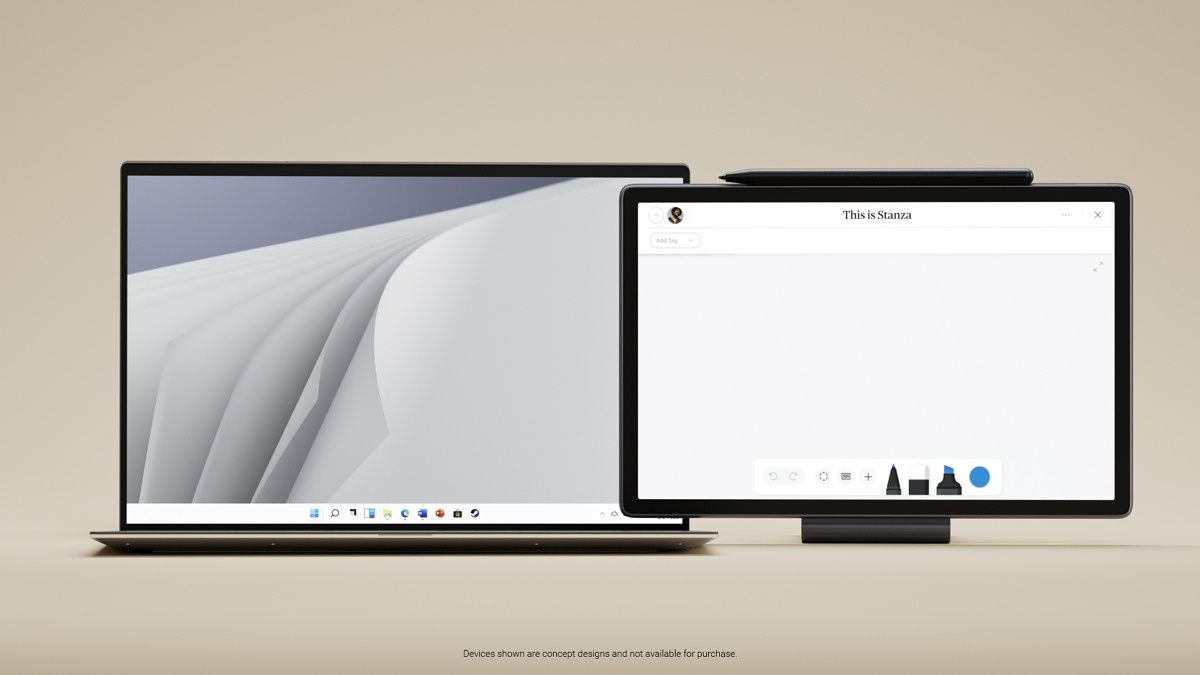
Finally, we have Concept Stanza. This is all about note-taking.

It’s a thin and light 11-inch tablet, although Dell refers to it as a companion device. It doesn’t even have any ports, as it has a specific purpose. There are no speakers and no cameras. This device is for notetaking.

It’s meant to work well between devices. So you can take your handwritten notes, and search for it from your laptop and such. The idea is to merge the world of analog and digital.


The post Dell shows off new concepts to reimagine working from home appeared first on xda-developers.


from xda-developers https://ift.tt/33lqXIK
via IFTTT

Dell shows off new concepts to reimagine working from home

After Dell introduced its Concept Luna sustainability efforts yesterday, it has a few more concepts to show off today ahead of CES. These are designed to reimagine the working from home experience, and there are three of them. Keep in mind, of course, that these are concepts and are not products for sale, although these ideas could show up in future products.

Concept Flow

Concept Flow is interesting, because it’s all about reimagining the work from anywhere experience. You could be home, on the go, at an office, and so on, and there are pain points to all of them, even if that pain point if just connecting your laptop to some monitors.

Seen in the image above is a laptop that’s wirelessly connected to a monitor, and it’s also on top of a pad that’s charging it. It’s all wireless. When you bring your laptop to the workspace, it automatically connects to the peripherals that are there, including the monitor, keyboard, and mouse.

Shutting it down is as simple as picking up your laptop and walking away. There are no cables to mess around with. It’s seamless and it just works.

Concept Pari

You might recall that two years ago, no one cared about webcams on laptops. That’s why we’re still stuck in this world where most laptops have 720p webcams while smartphone makers have been investing in front cameras for years; it’s because people actually take selfies. And until the working from home boom of 2020, people weren’t using their webcams.

While Dell was one of the first to say consumers didn’t use their webcams with it Dell XPS laptops, it’s been at the forefront of pushing FHD webcams with its Latitude business laptops. And with Concept Pari, it has a whole new idea for webcams, although this is for the desktop.

First of all, the webcam is totally removable from its dock above the display. It’s charging in that dock, and then you can take it and magnetically attach it to the monitor. The whole idea behind this is that you can talk to someone at eye level, rather than having your eyes dart between the screen and the webcam.

Since it’s removable, you can also use it to film a demonstration or just to show something off.

Privacy guards are a thing of the past with Concept Pari too, because all you have to do is put it in the dock and point it at the wall.

Concept Stanza

Finally, we have Concept Stanza. This is all about note-taking.

It’s a thin and light 11-inch tablet, although Dell refers to it as a companion device. It doesn’t even have any ports, as it has a specific purpose. There are no speakers and no cameras. This device is for notetaking.

It’s meant to work well between devices. So you can take your handwritten notes, and search for it from your laptop and such. The idea is to merge the world of analog and digital.


The post Dell shows off new concepts to reimagine working from home appeared first on xda-developers.


from xda-developers https://ift.tt/33lqXIK
via IFTTT