LightBlog

dimanche 3 octobre 2021

Apple is potentially releasing the M1X-powered MacBook Pro this month

The Apple MacBook Pro is already a worthy contender in the list of best laptops and it’s about to get even better with the upcoming Apple Silicon upgrade. The MacBook Pro 2021 is suggested to feature a new design and colors similar to the 21 inch iMac 2021, mini LED displays, a much more powerful ARM-based M1X chipset with up to 64GB of RAM, faster charging, and the return of an HDMI port, SD card reader, and a MagSafe connector for the charger. It’s shaping up to be an exciting device, and we mightn’t be too far off of a launch now.

According to industry insider Mark Gurman in his Power On newsletter (via FrontPageTech), Apple is gearing up to launch the new M1X chipset at an October event. In 2020, Apple made the long-awaited migration to its custom ARM-based eight-core M1 silicon. Unlike the x86-64 Intel chips used by Apple to power its laptops, the ARM-based silicon comes in a system-on-a-chip (SoC) format — just like on an iPhone or iPad. In addition to the 10-core CPU, the Apple M1X chip will potentially offer the choice between GPUs with 16 and 32 cores.

Gurman said the following:

The MacBook Pro wait is likely almost over: The new MacBook Pro didn’t appear at Apple’s September product unveiling, but it should still be launching in the coming weeks. Apple typically does its major new Mac introductions in October. So stay tuned.

The Apple M1X chip, the likely name for a more graphics-intense and professional-focused M1 chip, is indeed still on tap for 2021. We’ll likely see it show up first in a new range of MacBook Pros in the next month and a higher-end Mac mini at some point. The M1X has been developed in two variations: both with 10 CPU cores (eight high-performance and two high-efficiency) and either 16 or 32 graphics cores.

The chip is also slated to come with better neural processing capabilities and feature support for up to a whopping 64GB of RAM. However, a report by AppleTrack back in July suggested that the new M1X Macs may be capped at 32GB of RAM. It’s speculated this move can be seen as a result of low demand for Apple’s 64GB RAM configuration on existing Macs.

Apple recently launched the iPhone 13 series, the Apple Watch Series 7, and a set of new iPads at its September event. We’re excited to see what the new MacBook Pros have to offer, especially if the launch event is as soon as it seems. Given that some of this year’s Apple leaks have failed to materialize, make sure to take this news with a healthy dose of skepticism.

The post Apple is potentially releasing the M1X-powered MacBook Pro this month appeared first on xda-developers.


from xda-developers https://ift.tt/3a2bX2B
via IFTTT

Apple is potentially releasing the M1X-powered MacBook Pro this month

The Apple MacBook Pro is already a worthy contender in the list of best laptops and it’s about to get even better with the upcoming Apple Silicon upgrade. The MacBook Pro 2021 is suggested to feature a new design and colors similar to the 21 inch iMac 2021, mini LED displays, a much more powerful ARM-based M1X chipset with up to 64GB of RAM, faster charging, and the return of an HDMI port, SD card reader, and a MagSafe connector for the charger. It’s shaping up to be an exciting device, and we mightn’t be too far off of a launch now.

According to industry insider Mark Gurman in his Power On newsletter (via FrontPageTech), Apple is gearing up to launch the new M1X chipset at an October event. In 2020, Apple made the long-awaited migration to its custom ARM-based eight-core M1 silicon. Unlike the x86-64 Intel chips used by Apple to power its laptops, the ARM-based silicon comes in a system-on-a-chip (SoC) format — just like on an iPhone or iPad. In addition to the 10-core CPU, the Apple M1X chip will potentially offer the choice between GPUs with 16 and 32 cores.

Gurman said the following:

The MacBook Pro wait is likely almost over: The new MacBook Pro didn’t appear at Apple’s September product unveiling, but it should still be launching in the coming weeks. Apple typically does its major new Mac introductions in October. So stay tuned.

The Apple M1X chip, the likely name for a more graphics-intense and professional-focused M1 chip, is indeed still on tap for 2021. We’ll likely see it show up first in a new range of MacBook Pros in the next month and a higher-end Mac mini at some point. The M1X has been developed in two variations: both with 10 CPU cores (eight high-performance and two high-efficiency) and either 16 or 32 graphics cores.

The chip is also slated to come with better neural processing capabilities and feature support for up to a whopping 64GB of RAM. However, a report by AppleTrack back in July suggested that the new M1X Macs may be capped at 32GB of RAM. It’s speculated this move can be seen as a result of low demand for Apple’s 64GB RAM configuration on existing Macs.

Apple recently launched the iPhone 13 series, the Apple Watch Series 7, and a set of new iPads at its September event. We’re excited to see what the new MacBook Pros have to offer, especially if the launch event is as soon as it seems. Given that some of this year’s Apple leaks have failed to materialize, make sure to take this news with a healthy dose of skepticism.

The post Apple is potentially releasing the M1X-powered MacBook Pro this month appeared first on xda-developers.


from xda-developers https://ift.tt/3a2bX2B
via IFTTT
Apple Watch Series 7 real-world images surface ahead of expected launch

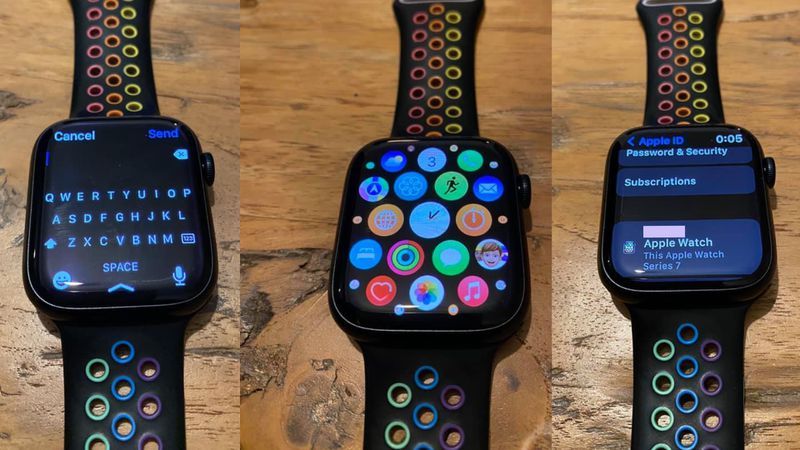
The Apple Watch 7 Series launched alongside the iPhone 13 series and the new iPads. Interestingly, Apple never gave any type of availability for the Apple Watch past stating that it would arrive in “fall”, while all of the other products announced had clear pre-order dates. This might have been as a result of production issues ahead of its launch, though when it comes to Apple, we’ll never really be sure. Now, ahead of when pre-orders are expected to open, what appears to be a first real-world look at the Apple Watch 7 Series has surfaced on Facebook.

apple watch series 7 hands on images

The images above were posted in a Facebook group for Apple Watch enthusiasts and were spotted by MacRumors. Previously, the only images that we have seen of the Apple Watch 7 Series have been in press renders and marketing materials. Furthermore, there hasn’t even been a confirmed date for pre-orders, though they’re expected to be very, very soon. The images above show the device with a larger (though not flat) display, along with rounded corners. The poster claimed that they work with a carrier and that they were testing the watch before it officially goes on sale “later this fall.”

The Apple Watch Series 7 promises up to 18 hours of battery life on a single charge and offers 33% faster charging through a new charging architecture and Magnetic Fast Charger USB-Type C Cable. Other highlights of this watch include GPS, Bluetooth, and dual-band Wi-Fi. The smartwatch runs watchOS 8 out of the box, which comes with a huge set of new software features. The Apple Watch Series 7 starts at $399, and it comes in a wide range of finishes. Those include five new colors for the aluminum variant, three colors for the stainless steel variant, and two titanium colorways. Finally, it’s backward compatible with older Apple Watch bands, too.

The post Apple Watch Series 7 real-world images surface ahead of expected launch appeared first on xda-developers.


from xda-developers https://ift.tt/2WFSLVs
via IFTTT

Apple Watch Series 7 real-world images surface ahead of expected launch

The Apple Watch 7 Series launched alongside the iPhone 13 series and the new iPads. Interestingly, Apple never gave any type of availability for the Apple Watch past stating that it would arrive in “fall”, while all of the other products announced had clear pre-order dates. This might have been as a result of production issues ahead of its launch, though when it comes to Apple, we’ll never really be sure. Now, ahead of when pre-orders are expected to open, what appears to be a first real-world look at the Apple Watch 7 Series has surfaced on Facebook.

apple watch series 7 hands on images

The images above were posted in a Facebook group for Apple Watch enthusiasts and were spotted by MacRumors. Previously, the only images that we have seen of the Apple Watch 7 Series have been in press renders and marketing materials. Furthermore, there hasn’t even been a confirmed date for pre-orders, though they’re expected to be very, very soon. The images above show the device with a larger (though not flat) display, along with rounded corners. The poster claimed that they work with a carrier and that they were testing the watch before it officially goes on sale “later this fall.”

The Apple Watch Series 7 promises up to 18 hours of battery life on a single charge and offers 33% faster charging through a new charging architecture and Magnetic Fast Charger USB-Type C Cable. Other highlights of this watch include GPS, Bluetooth, and dual-band Wi-Fi. The smartwatch runs watchOS 8 out of the box, which comes with a huge set of new software features. The Apple Watch Series 7 starts at $399, and it comes in a wide range of finishes. Those include five new colors for the aluminum variant, three colors for the stainless steel variant, and two titanium colorways. Finally, it’s backward compatible with older Apple Watch bands, too.

The post Apple Watch Series 7 real-world images surface ahead of expected launch appeared first on xda-developers.


from xda-developers https://ift.tt/2WFSLVs
via IFTTT

Bedrock syncs your Minecraft worlds between your Android devices

Minecraft may have come out over 10 years ago, but it’s still an incredibly popular game. Over the years, it’s gotten tons of (free!) updates, with new features, and even multiple versions of the game. But something that it’s arguably been missing is the ability to sync worlds across devices. Sure, you could set up a server, but what if you don’t have Internet? That’s where Bedrock comes in, at least for Android.

Bedrock is a simple app with a simple concept: It syncs your Minecraft worlds across devices. To do this, Bedrock makes use of your Google Drive account to upload your worlds to the cloud. Once you’re logged in, on any Android device, you can upload, download, and sync worlds with the touch of a button.

How to use Bedrock

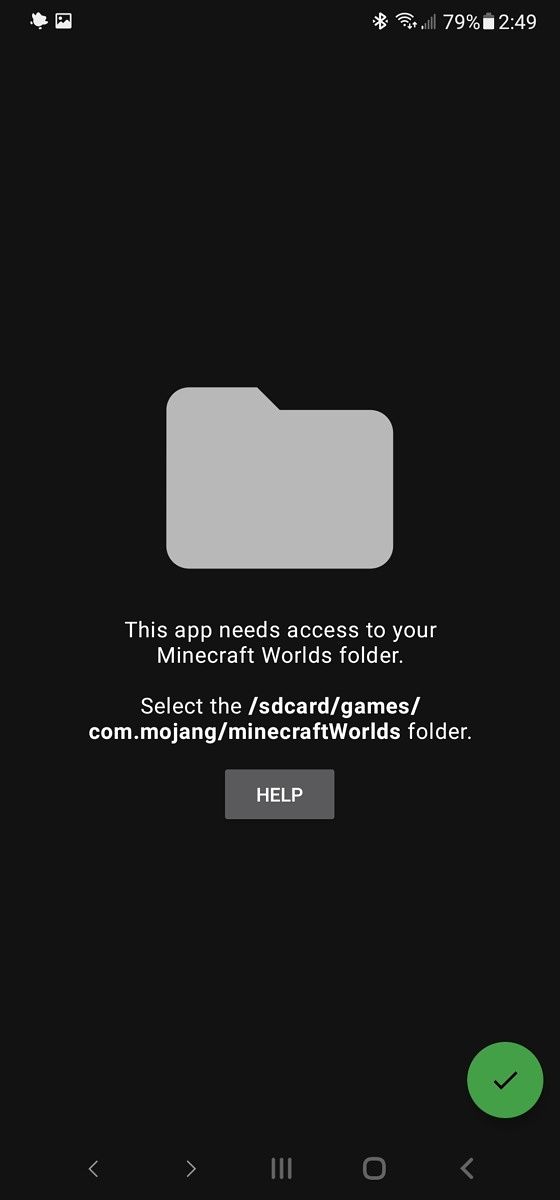
Using Bedrock is pretty easy. Open the app and you’ll be asked to sign into your Google Drive account. Next, the app will request permission to read and write to where Minecraft worlds are stored. Once all the sign-in and permissions stuff are done, you’ll be greeted with a list of Minecraft worlds, from both your device and the cloud.

You can choose to upload a local world to the cloud, download a cloud world to your device, or delete a world from either location. There’s also a menu that lets you apply an action to all your Minecraft worlds at once.

A screenshot of Bedrock asking to sign into Google A screenshot of Bedrock asking to grant access to the Minecraft worlds directory A screenshot of Bedrock showing different Minecraft worlds to sync

Download Bedrock

Bedrock was released about two months ago by XDA Recognized Developer tytydraco, but it’s still a pretty new project. The UI may see some changes, and more features will probably be added as time goes on. Personally, I’d like to see some sort of autosync feature that can run on a schedule. It would also be nice to have an indicator for which version (cloud or local) is newer.

But the core functionality is there. If you have a bunch of Minecraft worlds that you want to play on different devices, Bedrock will make it a lot easier, at least for Android.

If you’re interested in giving Bedrock a try, you can download it from Google Play $0.99. If you have any feedback for the developer, be sure to visit the XDA forum thread linked below too.

Bedrock on the XDA Forums

Bedrock — Sync Minecraft Worlds To Google Drive ($0.99, Google Play) →

Bedrock Promo Code Giveaway!

The app only costs $0.99, but if you’re the kind of person who likes to try something before contributing, then keep an eye out on the comments section below. We’ll be sharing 45 promo codes for the app, courtesy of developer tytydraco. You can redeem a code from the Play Store website or from within the mobile app.

The post Bedrock syncs your Minecraft worlds between your Android devices appeared first on xda-developers.


from xda-developers https://ift.tt/3Fc5mRF
via IFTTT

Bedrock syncs your Minecraft worlds between your Android devices

Minecraft may have come out over 10 years ago, but it’s still an incredibly popular game. Over the years, it’s gotten tons of (free!) updates, with new features, and even multiple versions of the game. But something that it’s arguably been missing is the ability to sync worlds across devices. Sure, you could set up a server, but what if you don’t have Internet? That’s where Bedrock comes in, at least for Android.

Bedrock is a simple app with a simple concept: It syncs your Minecraft worlds across devices. To do this, Bedrock makes use of your Google Drive account to upload your worlds to the cloud. Once you’re logged in, on any Android device, you can upload, download, and sync worlds with the touch of a button.

How to use Bedrock

Using Bedrock is pretty easy. Open the app and you’ll be asked to sign into your Google Drive account. Next, the app will request permission to read and write to where Minecraft worlds are stored. Once all the sign-in and permissions stuff are done, you’ll be greeted with a list of Minecraft worlds, from both your device and the cloud.

You can choose to upload a local world to the cloud, download a cloud world to your device, or delete a world from either location. There’s also a menu that lets you apply an action to all your Minecraft worlds at once.

A screenshot of Bedrock asking to sign into Google A screenshot of Bedrock asking to grant access to the Minecraft worlds directory A screenshot of Bedrock showing different Minecraft worlds to sync

Download Bedrock

Bedrock was released about two months ago by XDA Recognized Developer tytydraco, but it’s still a pretty new project. The UI may see some changes, and more features will probably be added as time goes on. Personally, I’d like to see some sort of autosync feature that can run on a schedule. It would also be nice to have an indicator for which version (cloud or local) is newer.

But the core functionality is there. If you have a bunch of Minecraft worlds that you want to play on different devices, Bedrock will make it a lot easier, at least for Android.

If you’re interested in giving Bedrock a try, you can download it from Google Play $0.99. If you have any feedback for the developer, be sure to visit the XDA forum thread linked below too.

Bedrock on the XDA Forums

Bedrock — Sync Minecraft Worlds To Google Drive ($0.99, Google Play) →

Bedrock Promo Code Giveaway!

The app only costs $0.99, but if you’re the kind of person who likes to try something before contributing, then keep an eye out on the comments section below. We’ll be sharing 45 promo codes for the app, courtesy of developer tytydraco. You can redeem a code from the Play Store website or from within the mobile app.

The post Bedrock syncs your Minecraft worlds between your Android devices appeared first on xda-developers.


from xda-developers https://ift.tt/3Fc5mRF
via IFTTT

Boxedwine can emulate Windows applications in web browsers

The Wine project has been around for years, allowing people to run (some) Windows applications on Linux, macOS, and BSD operating systems. It’s one of the best examples of open-source software development, but Wine can’t quite run on everything. Boxedwine, a newer project that builds upon Wine, aims to fix that — it can run on more operating systems, and even web browsers.

Wine isn’t an emulator — instead, it translates Windows API calls into POSIX-compatible calls. However, Boxedwine is an emulator. It uses an unmodified 32-bit version of Wine that runs in an emulated Linux environment. Boxedwine is written in C++ with an SDL interface, so it’s even more cross-platform than Wine. Mac and Linux are supported, same as regular Wine, but you can also run it on Windows. This could be helpful if you want to use older 16-bit Windows applications that won’t work in modern Windows, or if you just want an isolated environment that doesn’t involve setting up a Windows virtual machine. Boxedwine is also being ported to other platforms, including Haiku OS.

Boxedwine in Haiku OS with a list of installable programs

Boxedwine running on Haiku OS (source)

Boxedwine can also run inside of modern web browsers, thanks to WebAssembly and Emscripten. You can try out some demo Windows applications and games at boxedwine.org/demo, including Age of Empires (1997), AbiWord, and 3-D Ultra Pinball: Creep Night. Boxedwine is already at around 25% of the speed of the host system (according to the developer), and there’s likely a further decrease from running inside a browser, but basic applications like AbiWord are usable with Chromium on my PC with a Ryzen 5 1500 processor.

Even though Boxedwine in the browser isn’t practical enough yet for most situations, it’s still an impressive technical demo. The browser is running an entire Linux kernel, an unmodified copy of Wine, and the Windows application all on top — with no video streaming from a server involved.

AbiWord on Boxedwine on Chrome

AbiWord running inside Chromium 94 on a Ryzen 1500 PC

Boxedwine could become a fantastic tool for running Windows applications in the future, if performance can be improved. Since the x86 emulation is written in portable C++ code, it could be one solution to running x86 Windows applications on ARM devices, like Android tablets. Wine is already available on ARM Android, but it can only run Windows software compiled for ARM — there’s no emulation layer.

Here’s hoping the project continues to improve. If you want to give the desktop version a shot, pre-compiled Windows versions are available from the Boxedwine website.

The post Boxedwine can emulate Windows applications in web browsers appeared first on xda-developers.


from xda-developers https://ift.tt/3l5fy6n
via IFTTT