LightBlog

samedi 6 mars 2021

Here are six things iOS 15 could learn from Android 12

Apple’s iOS 14.5 beta has just recently gone live, and while it brings some incremental improvements to the iOS software that ran out of the box in the iPhone 12 series, we here at XDA feel iOS still has some ways to go before matching Android in usability (okay, fine, we may be just a bit biased…).

With the next new version of iOS (15) likely being unveiled in June and launching with the iPhone 13 series (or whatever Apple ends up calling it) in September or October, Apple software engineers have a few months to hopefully improve iOS even more. Several of us at XDA carry use both, an iPhone and Android regularly, so here are some Android features we hope iOS 15 should offer.

Better Notification Management

I often wake up to dozens of notifications from Gmail, WhatsApp, and Telegram. If my daily driver is an Android, I see just three notification cards — one for each app — because Android groups all notifications from one app together. I can expand and view each individual message if I so choose, but until I do that, my notifications remain neatly organized.

If I happen to have my main SIM in my iPhone at the time, however, then it’s anything goes. Apple’s software is supposed to group my messages together, but it still breaks from that if the messages are spread over a couple of hours apart. Take, for example, the below screenshots: Android grouped all my Telegram messages into one card, while the iPhone showed me two boxes for Telegram messages sent a minute apart. Also, notice the two cards for two Gmail notifications.
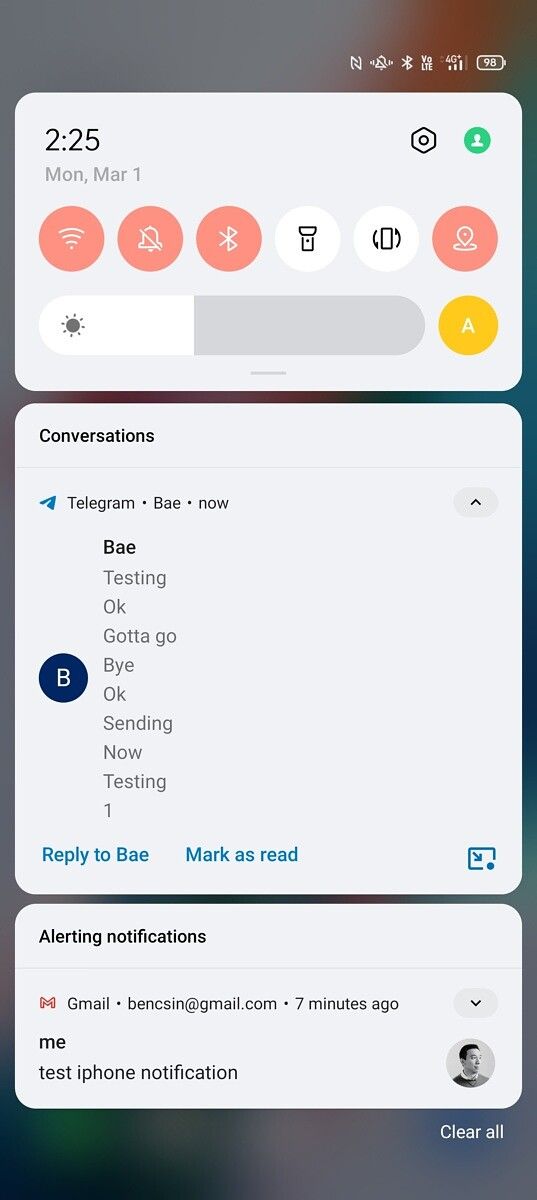
Android 12 Notification Management System iOS Notification Management System

Anyone who receives a fair bunch of notifications throughout the day would agree that the notification management is in need of a few fixes, and iOS could do well at copying Android over here.

Free Homescreen Grid

The iPhone 12 Pro Max is an unwieldy phone to use with one-hand. But while some would attribute that to the nature of using a big phone, I disagree. I can use a similarly-large Samsung Galaxy S21 Ultra or LG Wing with one hand and not struggle much, because I can customize the Android homescreen to adapt. For example, I place all my app at the bottom of the screen, and I use a grid with more horizontal spots so I can fit more than, say, four apps in a row.

iOS doesn’t let me do this: the app homescreen grid is fixed whether I’m using a 6.7-inch iPhone 12 Pro Max or a 5.4-inch iPhone 12 Mini, and apps must start at the top of the screen in left-to-right order direction. Take a look at the photo below and tell me which phone looks easier to use with one hand. Reaching Spotify on the iPhone in the photo requires me to loosen my grip so I can stretch my thumb.

Apple iPhone 12 Pro Max and Samsung Note 20 Ultra side by side

“Just use Reachability or place more widgets on the homescreen to push apps further down the screen then,” some of you may say. No! Both of these are compromises. I shouldn’t have to find workarounds just to be able to reach my apps with ease.

Rotate Suggestions

Both Android and iOS offer the ability to lock portrait orientation so apps don’t rotate automatically when a phone is tilted sideways. This comes in particularly handy when using the phone while laying in bed. However, on iOS, the lock is set in stone. This means if my portrait orientation lock is on, and I want to view a video in landscape orientation, I must jump into the control center and turn orientation off.

Android, beginning with Pie (aka version 8), offered a smart feature called “rotate suggestions,” which allows us to override portrait orientation lock when playing widescreen videos. This happens automatically — whenever I play a video or tilt my phone sideways while using an app that supports landscape mode, a small icon appears in the corner asking if I want to rotate to landscape orientation. A tap will do so; or I can ignore it and the suggestion will stay out of the way. This context-aware UI makes a phone feel “smarter,” not to mention it genuinely comes in handy for using a smartphone in bed.

Android Rotate Suggestions

iOS offers nothing of this sort. While yes, this is not a feature whose absence will ruin your smartphone experience. But I do believe this is a feature that does add that nice finishing touch that one expects to see on a mature OS.

Predictive Dialing

This may make me sound old, but I still make phone calls. On Android, as soon as I start typing a number, the dialer will begin scouring my contacts list for that string of numbers as well as lookup combinations for the names under T9 dialing. This way, by the time I’ve input just the second or third number, the dailer would have already popped up the full contact info of the person, and from there I can just tap on the name to call.

iPhones, as of now, still cannot do this. In fact, iOS will not show the name of the contact until you’ve input the phone number in its entirety. Even if you’re one number off, iOS won’t budge. See the below screenshots for an example: on an iPhone, it wouldn’t show my girlfriend’s contact until I’ve finished inputting all eight digits of her phone number; on an Android, the dialer had already identified her contact by the second number.
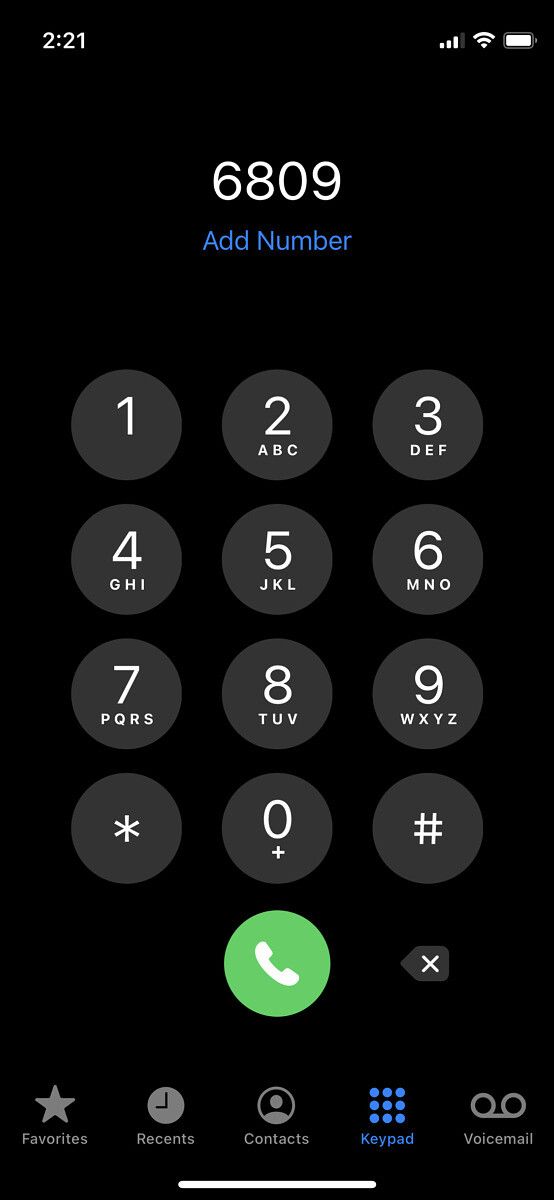
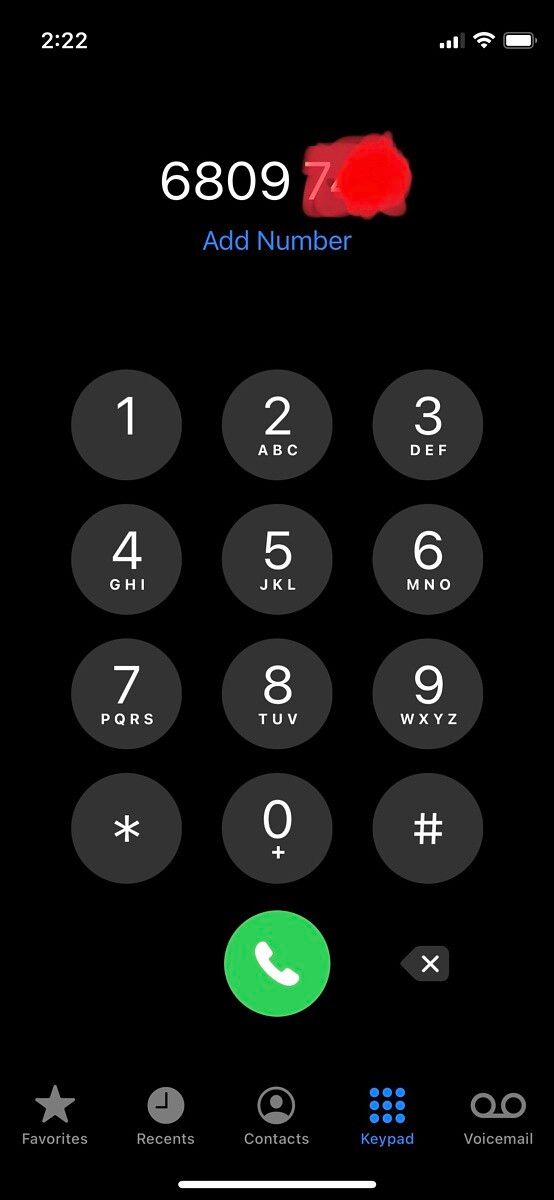
iOS Predictive Dialing iOS Predictive Dialing iOS Predictive Dialing Android Predictive Dialing

And iOS wouldn’t even search through for T9 Dialing. If you have to search a contact by their name, you need to jump into the Contacts tab and use the search bar. It’s really inconvenient, especially if you have gotten used to dialing up contacts with such a breeze on Android.

Double Tap to Wake vs Single Tap to Wake

Ever since the iPhone X removed the home button, Apple has introduced a software feature named “Touch to Wake,” which as the name implies, allows a user to wake the screen by tapping on the screen. This is good because touching a screen to wake the phone is more convenient than pressing the power button. But Android has an even superior solution: double-tap to wake.

Requiring two consecutive taps to wake a screen makes it harder to accidentally trigger. I walk around town holding my phone in my hand often (even when I’m not using it), and I dislike that the iPhone screen will occasionally light up when I didn’t intend it to because my palm had touched the screen. This doesn’t happen on my Android devices.

(Also shout out to LG for introducing “double tap to wake” years before Google, Samsung, Oppo, and Xiaomi adopted it. Another shout out to custom ROMs that have packed in this feature for years as well. We couldn’t trace who brought the feature first.)

Better File Management System

Downloading a file to your local storage for use later is a common practice in the computing space, and Android has given us the option to that since day one. iPhones, however, didn’t have a filing system at all until 2017’s introduction of iOS 11, and even now, the iOS filing system is relatively confusing.

For example, I can only download files from an email on an iPhone only if it was sent as a standalone attachment. If it was sent as part of a third party cloud storage like Google Drive, I cannot save that file to my iPhone’s internal storage without some major workarounds. On an Android, it doesn’t matter what app or service it is — if it’s a file, I can download it and have it saved in local storage.

iOS File Management System Android File Management System

We know Apple’s philosophy here, they restrict downloads so people who don’t know what they’re doing won’t stuff their phone with junk (think about how messy our parents’ computer download folders look). But for those of us who know what we’re doing, the option to download directly is far more convenient. Android does give storage apps far too much power, and there is some cut down happening with Scoped Storage, but even with those restrictions in place, Android remains the convenient OS of the two.


Of course, these are just our specific requests here from the team at XDA. There are likely many others we haven’t even touched on. What are some Android software tricks you want to see on iOS 15?

The post Here are six things iOS 15 could learn from Android 12 appeared first on xda-developers.


from xda-developers https://ift.tt/3sQRCEX
via IFTTT

Here are six things iOS 15 could learn from Android 12

Apple’s iOS 14.5 beta has just recently gone live, and while it brings some incremental improvements to the iOS software that ran out of the box in the iPhone 12 series, we here at XDA feel iOS still has some ways to go before matching Android in usability (okay, fine, we may be just a bit biased…).

With the next new version of iOS (15) likely being unveiled in June and launching with the iPhone 13 series (or whatever Apple ends up calling it) in September or October, Apple software engineers have a few months to hopefully improve iOS even more. Several of us at XDA carry use both, an iPhone and Android regularly, so here are some Android features we hope iOS 15 should offer.

Better Notification Management

I often wake up to dozens of notifications from Gmail, WhatsApp, and Telegram. If my daily driver is an Android, I see just three notification cards — one for each app — because Android groups all notifications from one app together. I can expand and view each individual message if I so choose, but until I do that, my notifications remain neatly organized.

If I happen to have my main SIM in my iPhone at the time, however, then it’s anything goes. Apple’s software is supposed to group my messages together, but it still breaks from that if the messages are spread over a couple of hours apart. Take, for example, the below screenshots: Android grouped all my Telegram messages into one card, while the iPhone showed me two boxes for Telegram messages sent a minute apart. Also, notice the two cards for two Gmail notifications.

Android 12 Notification Management System iOS Notification Management System

Anyone who receives a fair bunch of notifications throughout the day would agree that the notification management is in need of a few fixes, and iOS could do well at copying Android over here.

Free Homescreen Grid

The iPhone 12 Pro Max is an unwieldy phone to use with one-hand. But while some would attribute that to the nature of using a big phone, I disagree. I can use a similarly-large Samsung Galaxy S21 Ultra or LG Wing with one hand and not struggle much, because I can customize the Android homescreen to adapt. For example, I place all my app at the bottom of the screen, and I use a grid with more horizontal spots so I can fit more than, say, four apps in a row.

iOS doesn’t let me do this: the app homescreen grid is fixed whether I’m using a 6.7-inch iPhone 12 Pro Max or a 5.4-inch iPhone 12 Mini, and apps must start at the top of the screen in left-to-right order direction. Take a look at the photo below and tell me which phone looks easier to use with one hand. Reaching Spotify on the iPhone in the photo requires me to loosen my grip so I can stretch my thumb.

Apple iPhone 12 Pro Max and Samsung Note 20 Ultra side by side

“Just use Reachability or place more widgets on the homescreen to push apps further down the screen then,” some of you may say. No! Both of these are compromises. I shouldn’t have to find workarounds just to be able to reach my apps with ease.

Rotate Suggestions

Both Android and iOS offer the ability to lock portrait orientation so apps don’t rotate automatically when a phone is tilted sideways. This comes in particularly handy when using the phone while laying in bed. However, on iOS, the lock is set in stone. This means if my portrait orientation lock is on, and I want to view a video in landscape orientation, I must jump into the control center and turn orientation off.

Android, beginning with Pie (aka version 8), offered a smart feature called “rotate suggestions,” which allows us to override portrait orientation lock when playing widescreen videos. This happens automatically — whenever I play a video or tilt my phone sideways while using an app that supports landscape mode, a small icon appears in the corner asking if I want to rotate to landscape orientation. A tap will do so; or I can ignore it and the suggestion will stay out of the way. This context-aware UI makes a phone feel “smarter,” not to mention it genuinely comes in handy for using a smartphone in bed.

Android Rotate Suggestions

iOS offers nothing of this sort. While yes, this is not a feature whose absence will ruin your smartphone experience. But I do believe this is a feature that does add that nice finishing touch that one expects to see on a mature OS.

Predictive Dialing

This may make me sound old, but I still make phone calls. On Android, as soon as I start typing a number, the dialer will begin scouring my contacts list for that string of numbers as well as lookup combinations for the names under T9 dialing. This way, by the time I’ve input just the second or third number, the dailer would have already popped up the full contact info of the person, and from there I can just tap on the name to call.

iPhones, as of now, still cannot do this. In fact, iOS will not show the name of the contact until you’ve input the phone number in its entirety. Even if you’re one number off, iOS won’t budge. See the below screenshots for an example: on an iPhone, it wouldn’t show my girlfriend’s contact until I’ve finished inputting all eight digits of her phone number; on an Android, the dialer had already identified her contact by the second number.

iOS Predictive Dialing iOS Predictive Dialing iOS Predictive Dialing Android Predictive Dialing

And iOS wouldn’t even search through for T9 Dialing. If you have to search a contact by their name, you need to jump into the Contacts tab and use the search bar. It’s really inconvenient, especially if you have gotten used to dialing up contacts with such a breeze on Android.

Double Tap to Wake vs Single Tap to Wake

Ever since the iPhone X removed the home button, Apple has introduced a software feature named “Touch to Wake,” which as the name implies, allows a user to wake the screen by tapping on the screen. This is good because touching a screen to wake the phone is more convenient than pressing the power button. But Android has an even superior solution: double-tap to wake.

Requiring two consecutive taps to wake a screen makes it harder to accidentally trigger. I walk around town holding my phone in my hand often (even when I’m not using it), and I dislike that the iPhone screen will occasionally light up when I didn’t intend it to because my palm had touched the screen. This doesn’t happen on my Android devices.

(Also shout out to LG for introducing “double tap to wake” years before Google, Samsung, Oppo, and Xiaomi adopted it. Another shout out to custom ROMs that have packed in this feature for years as well. We couldn’t trace who brought the feature first.)

Better File Management System

Downloading a file to your local storage for use later is a common practice in the computing space, and Android has given us the option to that since day one. iPhones, however, didn’t have a filing system at all until 2017’s introduction of iOS 11, and even now, the iOS filing system is relatively confusing.

For example, I can only download files from an email on an iPhone only if it was sent as a standalone attachment. If it was sent as part of a third party cloud storage like Google Drive, I cannot save that file to my iPhone’s internal storage without some major workarounds. On an Android, it doesn’t matter what app or service it is — if it’s a file, I can download it and have it saved in local storage.

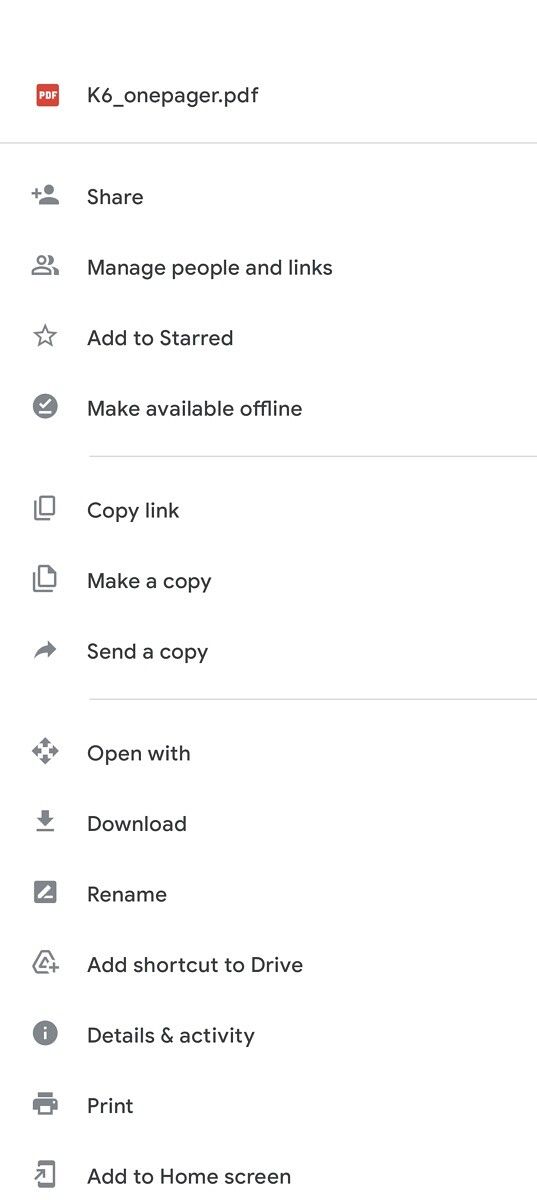
iOS File Management System Android File Management System

We know Apple’s philosophy here, they restrict downloads so people who don’t know what they’re doing won’t stuff their phone with junk (think about how messy our parents’ computer download folders look). But for those of us who know what we’re doing, the option to download directly is far more convenient. Android does give storage apps far too much power, and there is some cut down happening with Scoped Storage, but even with those restrictions in place, Android remains the convenient OS of the two.


Of course, these are just our specific requests here from the team at XDA. There are likely many others we haven’t even touched on. What are some Android software tricks you want to see on iOS 15?

The post Here are six things iOS 15 could learn from Android 12 appeared first on xda-developers.


from xda-developers https://ift.tt/3sQRCEX
via IFTTT

vendredi 5 mars 2021

Realme Narzo 20 starts receiving stable Android 11 update with Realme UI 2.0

After letting select Realme Narzo 20 owners test drive the Android 11 update through an Early Access program in November, Realme is finally rolling out a stable Realme UI 2.0 update to its last year’s budget smartphone.

In a post over at Realme Community, the company has announced it has started rolling out stable Realme UI 2.0 based on Android 11 to the Realme Narzo 20. The update carries build version RMX2193_11.C.06 and is a substantial upgrade over the Realme UI 1.0 that the phone came running out of the box. In the new update, Realme Narzo 20 owners can look forward to all the standard Android 11 features as well as Realme UI 2.0 specific changes, including Chat Bubbles, Conversation Notifications, improved dark mode, support for third-party icon packs, improvements to default launcher, new photo editing tools, and much more.

The update has started rolling out to Realme Narzo 20 users in India. Realme says it’s pushing the update in batches, so don’t worry if you aren’t seeing any OTA notification on your unit just yet; it might take several days for the update to reach all devices. You can also manually check for the update by heading Settings > Software update.

Since the Realme Narzo 20 is just a rebranded version of the European Realme 7i, the firmware should be compatible with both phones. However, we don’t recommend flashing the firmware across different variants unless you’re an expert user and know what you’re doing. Realme recently opened up a Realme UI 2.0 beta for the Reamle 7i, anyway, so it shouldn’t take too long for your device to receive a stable update.

Toggles (hides content until expanded):

Realme UI 2.0 update changelog for the Realme Narzo 20

  • Personalizations: Personalize the user interface to make it your own
    • You can now create your own wallpaper by picking colors from your photos.
    • Third-party icons for apps on the home screen are now supported.
    • Three Dark mode styles are available: Enhanced, medium, and gentle; wallpapers and icons can be adjusted to Dark mode, and the display contrast can be adjusted automatically to ambient light.
  • High Efficiency:
    • You can now drag text, images, or files out of a floating window or from one app to another app in Split-screen mode.
    • Optimized the editing page of Smart Sidebar: Two tabs are displayed and the order of items can be customized.
  • System:
    • Added “Tone tunes”: Consecutive notification tones will be linked to form a single melody.
    • Optimized the user interfaces of Notes: New visuals are provided on the list and editing pages.
    • Added weather animations to provide you with a more interesting experience.
    • Optimized vibration effects for text input and gameplay.
    • Optimized “Auto brightness”.
  • Launcher:
    • You can now remove a folder or combine it with another one.
    • Added filters for “Drawer mode”: You can now filter apps by letters, install time, or usage frequency to quickly find an app.
  • Security and Privacy:
    • You can now turn “App lock” on or off in Quick Settings.
    • Added “Low battery message”: When your phone battery is lower than 15%, you can quickly send a message to share your location with specified people.
    • More powerful SOS functions
    • Emergency info: You can quickly display your personal emergency info to first responders. The information can be shown even when your screen is locked.
    • Optimized “Permission manager”: You can now choose “Allow only once” for sensitive permissions to better protect your privacy.
  • Games:
    • Added Immersive mode which reduces disturbances while gaming so you can stay focused.
    • You can change the way to summon Game Assistant.
  • Communications:
    • You can share your personal hotspot with others via a QR code.
  • Photos:
    • Optimized the photo editing feature with upgraded algorithms and more markup effects and filters.
  • HeyTap Cloud:
    • You can back up your photos, documents, system settings, WeChat data, and more, and easily migrate to a new phone.
    • You can select the types of data to be backed up or restored.
  • Camera:
    • Added shortcuts to instantly share and edit photos or videos you just took.
    • Added the inertial zoom feature which makes zooming smoother during video shooting.
    • Added the level and grid feature to help you compose videos.
  • realme Lab:
    • Added Sleep Capsule, help you schedule downtime and secure your sleep time
  • Accessibility:
    • Added “Sound amplifier”: You can amplify faint sounds in the environment and soften loud sounds when wearing earphones.

The post Realme Narzo 20 starts receiving stable Android 11 update with Realme UI 2.0 appeared first on xda-developers.


from xda-developers https://ift.tt/2OpLO6k
via IFTTT

Realme Narzo 20 starts receiving stable Android 11 update with Realme UI 2.0

After letting select Realme Narzo 20 owners test drive the Android 11 update through an Early Access program in November, Realme is finally rolling out a stable Realme UI 2.0 update to its last year’s budget smartphone.

In a post over at Realme Community, the company has announced it has started rolling out stable Realme UI 2.0 based on Android 11 to the Realme Narzo 20. The update carries build version RMX2193_11.C.06 and is a substantial upgrade over the Realme UI 1.0 that the phone came running out of the box. In the new update, Realme Narzo 20 owners can look forward to all the standard Android 11 features as well as Realme UI 2.0 specific changes, including Chat Bubbles, Conversation Notifications, improved dark mode, support for third-party icon packs, improvements to default launcher, new photo editing tools, and much more.

The update has started rolling out to Realme Narzo 20 users in India. Realme says it’s pushing the update in batches, so don’t worry if you aren’t seeing any OTA notification on your unit just yet; it might take several days for the update to reach all devices. You can also manually check for the update by heading Settings > Software update.

Since the Realme Narzo 20 is just a rebranded version of the European Realme 7i, the firmware should be compatible with both phones. However, we don’t recommend flashing the firmware across different variants unless you’re an expert user and know what you’re doing. Realme recently opened up a Realme UI 2.0 beta for the Reamle 7i, anyway, so it shouldn’t take too long for your device to receive a stable update.

Toggles (hides content until expanded):

Realme UI 2.0 update changelog for the Realme Narzo 20

  • Personalizations: Personalize the user interface to make it your own
    • You can now create your own wallpaper by picking colors from your photos.
    • Third-party icons for apps on the home screen are now supported.
    • Three Dark mode styles are available: Enhanced, medium, and gentle; wallpapers and icons can be adjusted to Dark mode, and the display contrast can be adjusted automatically to ambient light.
  • High Efficiency:
    • You can now drag text, images, or files out of a floating window or from one app to another app in Split-screen mode.
    • Optimized the editing page of Smart Sidebar: Two tabs are displayed and the order of items can be customized.
  • System:
    • Added “Tone tunes”: Consecutive notification tones will be linked to form a single melody.
    • Optimized the user interfaces of Notes: New visuals are provided on the list and editing pages.
    • Added weather animations to provide you with a more interesting experience.
    • Optimized vibration effects for text input and gameplay.
    • Optimized “Auto brightness”.
  • Launcher:
    • You can now remove a folder or combine it with another one.
    • Added filters for “Drawer mode”: You can now filter apps by letters, install time, or usage frequency to quickly find an app.
  • Security and Privacy:
    • You can now turn “App lock” on or off in Quick Settings.
    • Added “Low battery message”: When your phone battery is lower than 15%, you can quickly send a message to share your location with specified people.
    • More powerful SOS functions
    • Emergency info: You can quickly display your personal emergency info to first responders. The information can be shown even when your screen is locked.
    • Optimized “Permission manager”: You can now choose “Allow only once” for sensitive permissions to better protect your privacy.
  • Games:
    • Added Immersive mode which reduces disturbances while gaming so you can stay focused.
    • You can change the way to summon Game Assistant.
  • Communications:
    • You can share your personal hotspot with others via a QR code.
  • Photos:
    • Optimized the photo editing feature with upgraded algorithms and more markup effects and filters.
  • HeyTap Cloud:
    • You can back up your photos, documents, system settings, WeChat data, and more, and easily migrate to a new phone.
    • You can select the types of data to be backed up or restored.
  • Camera:
    • Added shortcuts to instantly share and edit photos or videos you just took.
    • Added the inertial zoom feature which makes zooming smoother during video shooting.
    • Added the level and grid feature to help you compose videos.
  • realme Lab:
    • Added Sleep Capsule, help you schedule downtime and secure your sleep time
  • Accessibility:
    • Added “Sound amplifier”: You can amplify faint sounds in the environment and soften loud sounds when wearing earphones.

The post Realme Narzo 20 starts receiving stable Android 11 update with Realme UI 2.0 appeared first on xda-developers.


from xda-developers https://ift.tt/2OpLO6k
via IFTTT

Google Camera 8.2 makes it even easier to quickly take videos

Over the years, Google has made changes to its Camera app that have refined the experience, and the company is making yet another tweak that will improve how you use it.

In Google Camera 8.2.204, users will be able to record hands-free video with just a few swipes. The feature builds on a quick capture setting that was originally introduced in Google Camera 7.1 alongside the Pixel 4’s release. The feature lets you quickly start a video capture (without changing to the “Video” mode) by pressing and holding your finger on the shutter button.

In older versions of the Google Camera app, you would have to press and hold your finger on the shutter button – if you moved your finger away, the video recording would stop. Now, in Google Camera 8.2.204, you can move your finger to the left to enter “hands-free” mode, which continues the recording even when you lift your finger. You can also move your finger up to zoom in or move your finger down to zoom out. It’s a really easy way to quickly shoot hands-free video — and you can do it all with a few swipes.

The video above shows how easy it is to use the new feature — and I’m sure a lot of you are saying, “Finally!” This is one of those tweaks you probably always wanted, and should improve your everyday experience with the Google Camera app. This feature will come in handy when your hands are occupied but you still need to easily record a quick video.

Keeping your finger pressed down on the shutter button doesn’t sound particularly inconvenient. But quickly locking the button down means you can better focus on what you’re recording rather than focusing on whether your finger is still pressed down on the button. It’s the little things that wind up making a bigger difference in your everyday experience.

Google Camera 8.2.204 is rolling out now and should be available more widely in the coming days. The new feature follows another update that allowed Pixel owners to disable auto Night Sight.

Thanks to XDA Senior Member cstark27 for the tip!

Google Camera (Free, Google Play) →

The post Google Camera 8.2 makes it even easier to quickly take videos appeared first on xda-developers.


from xda-developers https://ift.tt/2PHteHH
via IFTTT

Google Camera 8.2 makes it even easier to quickly take videos

Over the years, Google has made changes to its Camera app that have refined the experience, and the company is making yet another tweak that will improve how you use it.

In Google Camera 8.2.204, users will be able to record hands-free video with just a few swipes. The feature builds on a quick capture setting that was originally introduced in Google Camera 7.1 alongside the Pixel 4’s release. The feature lets you quickly start a video capture (without changing to the “Video” mode) by pressing and holding your finger on the shutter button.

In older versions of the Google Camera app, you would have to press and hold your finger on the shutter button – if you moved your finger away, the video recording would stop. Now, in Google Camera 8.2.204, you can move your finger to the left to enter “hands-free” mode, which continues the recording even when you lift your finger. You can also move your finger up to zoom in or move your finger down to zoom out. It’s a really easy way to quickly shoot hands-free video — and you can do it all with a few swipes.

The video above shows how easy it is to use the new feature — and I’m sure a lot of you are saying, “Finally!” This is one of those tweaks you probably always wanted, and should improve your everyday experience with the Google Camera app. This feature will come in handy when your hands are occupied but you still need to easily record a quick video.

Keeping your finger pressed down on the shutter button doesn’t sound particularly inconvenient. But quickly locking the button down means you can better focus on what you’re recording rather than focusing on whether your finger is still pressed down on the button. It’s the little things that wind up making a bigger difference in your everyday experience.

Google Camera 8.2.204 is rolling out now and should be available more widely in the coming days. The new feature follows another update that allowed Pixel owners to disable auto Night Sight.

Thanks to XDA Senior Member cstark27 for the tip!

Google Camera (Free, Google Play) →

The post Google Camera 8.2 makes it even easier to quickly take videos appeared first on xda-developers.


from xda-developers https://ift.tt/2PHteHH
via IFTTT

OnePlus 9 series: Here’s everything we know about the next flagship series from OnePlus!

2020 was a monumental year for OnePlus. The company started it off with the launch of its first “true” flagship smartphone, the OnePlus 8 Pro, which was followed by the company’s first mid-ranger in five years — the OnePlus Nord. OnePlus then further expanded its portfolio to include a couple of budget-friendly devices in the Nord lineup, and the company even dipped its toes in the TWS earbuds space. This year, we’re expecting the company to dial things up a notch and bring some much-needed refinements to its wide range of products, starting with its flagship lineup for 2021 — the OnePlus 9 series.

OnePlus is expected to unveil the OnePlus 9 series sometime next month, and the series is rumored to feature three devices this time. Over the last few months, we’ve seen plenty of leaks about these devices, and here’s everything we know about them so far!

OnePlus 9 series: Release Date

Shortly after the launch of the OnePlus 8T last year, we saw the first leak about the OnePlus 9 series. The leak revealed that OnePlus was planning on launching its next-gen flagship devices four weeks ahead of schedule. If that is, in fact, the case, the OnePlus 9 series could be unveiled sometime next month. While OnePlus has neither confirmed nor denied this rumor, Samsung’s move to launch the Galaxy S21 series much earlier than usual gives OnePlus plenty of reason to prepone its timeline as well.

OnePlus 9 series — Regular, Pro, and Lite variants

Unlike previous years, OnePlus is expected to launch three new devices as part of the OnePlus 9 series — the regular OnePlus 9, the flagship OnePlus 9 Pro, and a more-affordable OnePlus 9 Lite/9E/9R. While we’ve already seen plenty of leaks confirming the existence of the OnePlus 9 and the OnePlus 9 Pro, details about the OnePlus 9 Lite have been scarce so far. Rumors suggest that the affordable flagship will either be called the OnePlus 9 Lite or the OnePlus 9E and that it will feature similar hardware to the OnePlus 8T. Latest leaks reveal that the affordable flagship may be called the OnePlus 9R.

It’s also worth noting that the OnePlus 9 series is, most likely, codenamed “lemonade,” according to evidence spotted in the Settings APK from Open Beta 3 for the OnePlus 8 series late last year. The lineup will include five variants, including lemonade, lemonadev, lemonadev, lemonadep, and lemonadept. Based on our understanding of OnePlus codenames, we believe that these devices would be:

  • lemonade — OnePlus 9
  • lemonadet — T-Mobile OnePlus 9
  • lemonadev — Verizon OnePlus 9
  • lemonadep — OnePlus 9 Pro
  • lemonadept — T-Mobile OnePlus 9 Pro

The existence of five variants has also been confirmed by a separate leak, which lists the model numbers of the devices. According to the leak, the OnePlus 9 will go by the model numbers LE2110, LE2117, and LE2110, and the OnePlus 9 Pro will go by the model numbers LE2120 and LE2127. As of now, we haven’t been able to confirm the codename or model number of the OnePlus 9R.

It’s worth mentioning that when information first started popping up about the OnePlus 8 series last year, we saw plenty of leaks and rumors about a third, more affordable, device in the lineup. While this device did exist, it wasn’t launched alongside the OnePlus 8 series and it debuted as the OnePlus Nord later in the year. Therefore, it’s possible that the alleged OnePlus 9R is nothing but a OnePlus Nord successor that may not launch alongside the OnePlus 9 series next month.

Along with the three devices, OnePlus will also launch its first smartwatch at the upcoming event. The OnePlus Watch has leaked extensively over the last few months, and you can read more about it by following this link.

Design

Over the last few months, we’ve seen several leaked live images and renders of the OnePlus 9 and OnePlus 9 Pro that have given us a good look at their updated design. Here’s a brief overview of everything we’ve learned from the leaked images so far:

OnePlus 9

We got our first look at the OnePlus 9 in November last year when leaked renders of the device first popped up online. The renders revealed that the OnePlus 9 would feature a new back panel design, more in line with other phones that we’ve seen in the last couple of months. As you can see in the attached image, the device features a new rectangular camera island in the top-right corner with 3 sensors and an LED flash.

Leaked CAD renders of the OnePlus 9 on black background

Over on the front, the OnePlus 9 features a flat display with a hole-punch cutout for the selfie camera in the top left corner. The leak also revealed that the OnePlus 9 would feature a 6.55-inch display that will offer a peak refresh rate of 120Hz. It’s worth noting that while a prominent OnePlus leaker had expressed his doubts about these leaked renders, the design was confirmed shortly thereafter when we first saw leaked live images of the device.

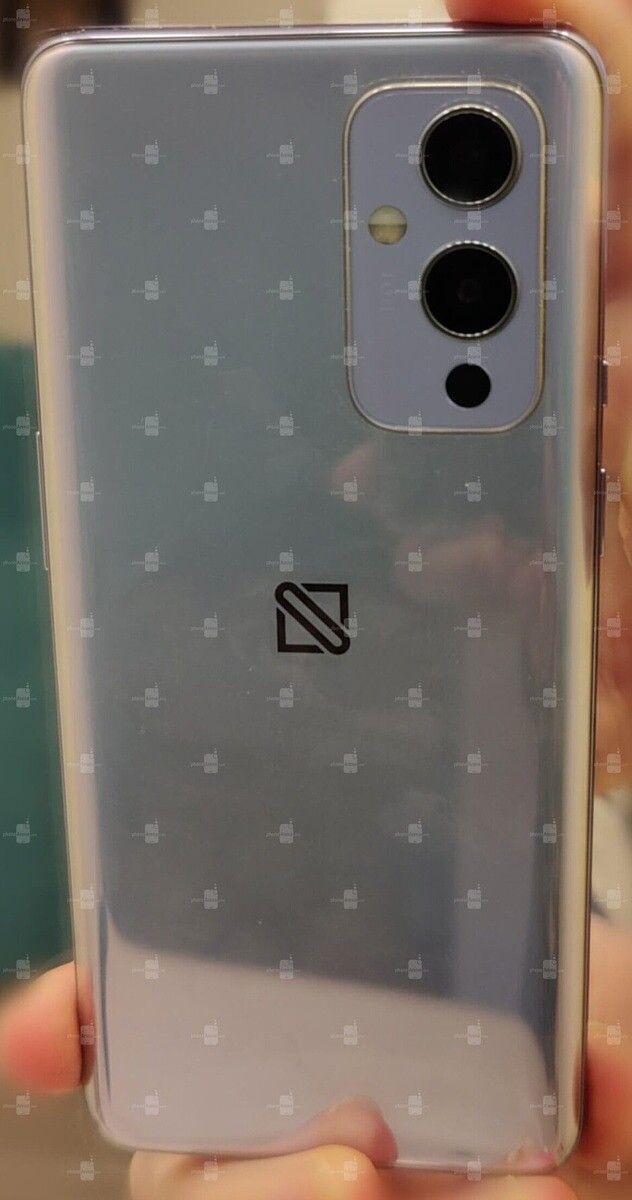
OnePlus 9 leak OnePlus 9 front OnePlus 9 back OnePlus 9 hand-on leak

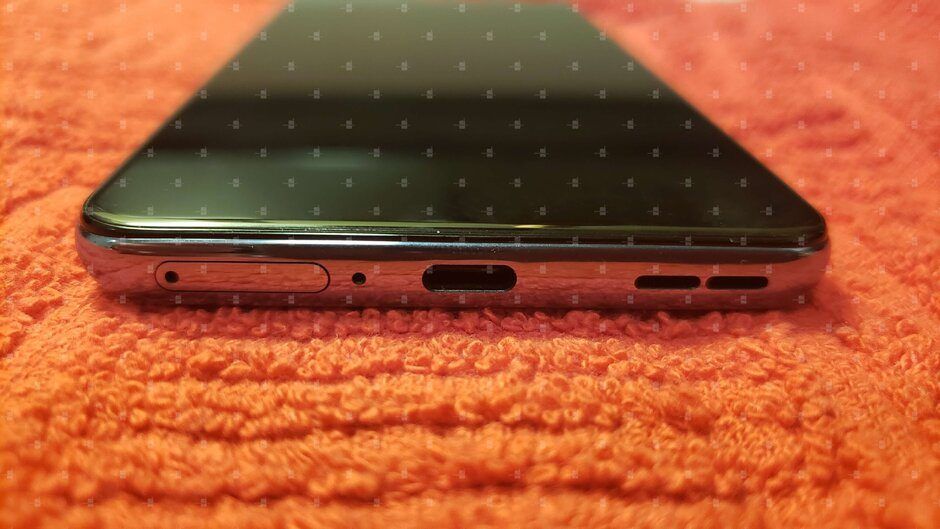
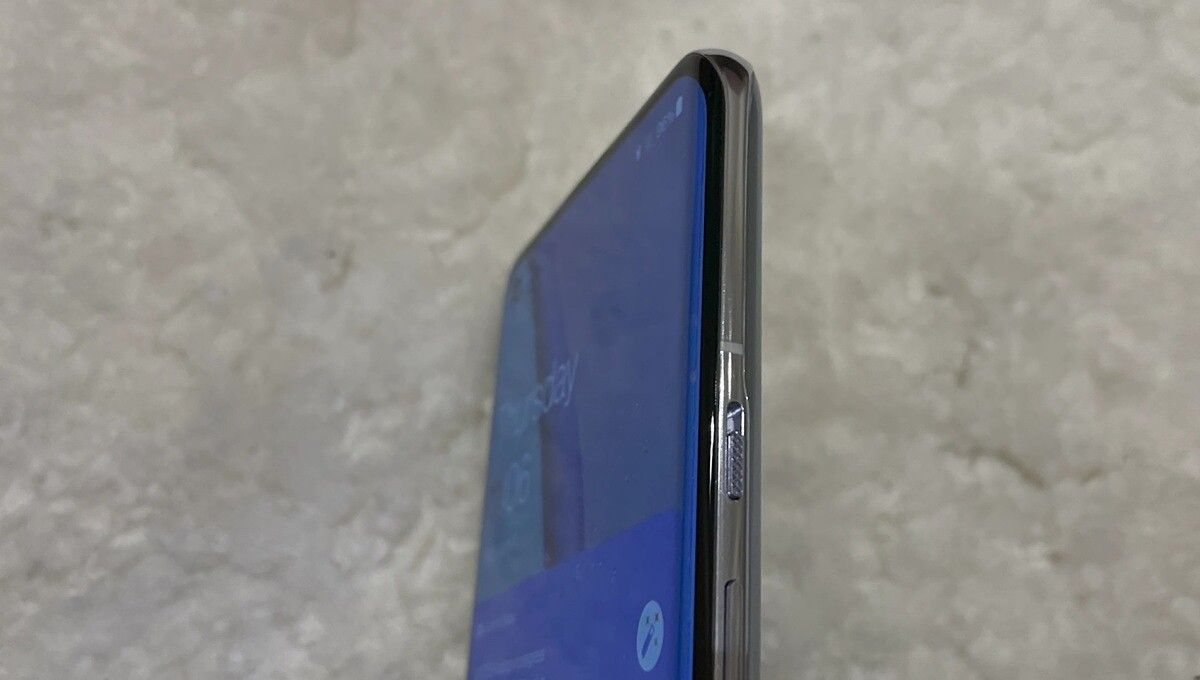
The live images shed more light on the design, showcasing the glossy back panel finish, Ultrashot branding on the camera module, and an unusual logo instead of OnePlus branding. The live images also revealed that the device would feature a secondary noise-canceling mic on the top edge, a USB Type-C port at the bottom sandwiched between the speaker grille and SIM card slot, and the usual button layout on the left and right edges.

OnePlus 9 SIM tray OnePlus 9 bottom

Furthermore, the report revealed that the device would feature a 6.5-inch hole-punch display with a peak refresh rate of 120Hz and FHD+ resolution (2400 x 1080p). It’s also worth mentioning that a prototype of the OnePlus 9 5G was sold on eBay for a whopping $6,000 late last year. The listing included a couple of live images of the device, which appear to be the same as those attached above.

OxygenUpdater recently unearthed information about all OnePlus 9 series color variants that will be available at the time of launch. According to them, the vanilla OnePlus 9 will be available in three colorways — Astral Black, Arctic Sky, and Winter Mist. The T-Mobile version of the device, on the other hand, will be available in two colorways — Astral Black and Winter Mist — and the Verizon version will be available in Gloss Black and Gloss gradient purple variants.

OnePlus 9 Pro

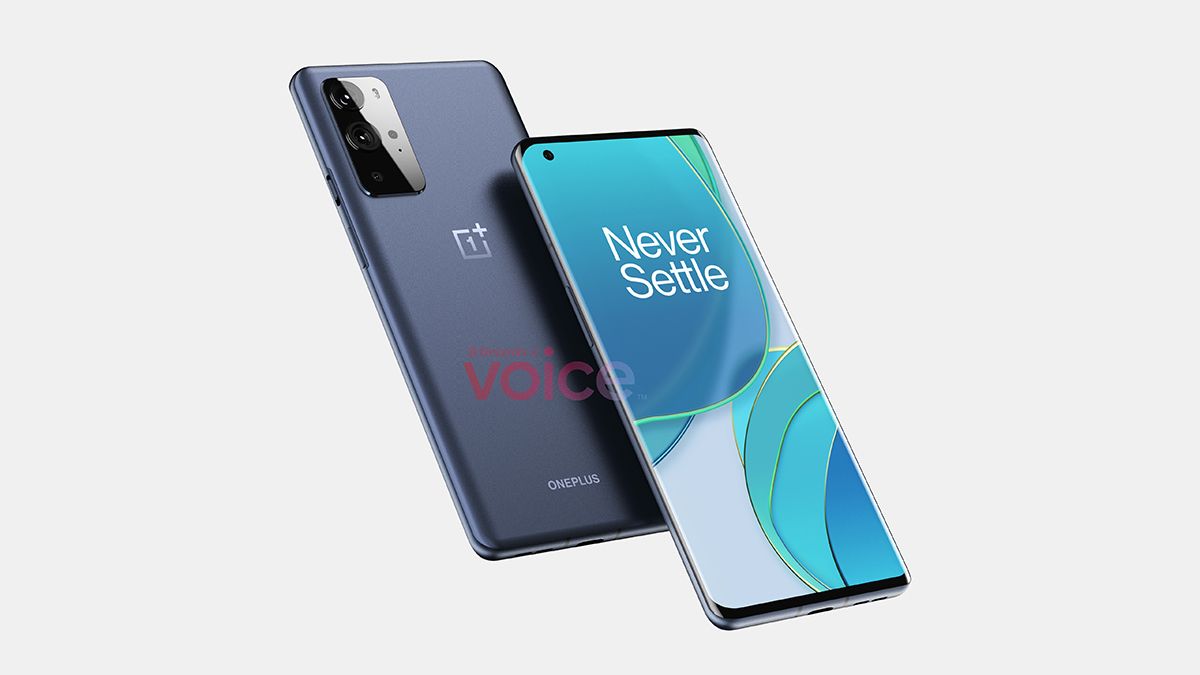
Renowned leaker OnLeaks first shared renders of the OnePlus 9 Pro back in November last year. The renders revealed that the device would feature a design similar to the OnePlus 9, albeit with a larger camera island containing an additional sensor and a rectangular LED flash. We also learned that it would feature a larger 6.7-inch curved display with a left-aligned hole-punch cutout.

OnePlus 9 Pro leaked CAD renders OnLeaks OnePlus 9 Pro leaked CAD renders OnLeaks

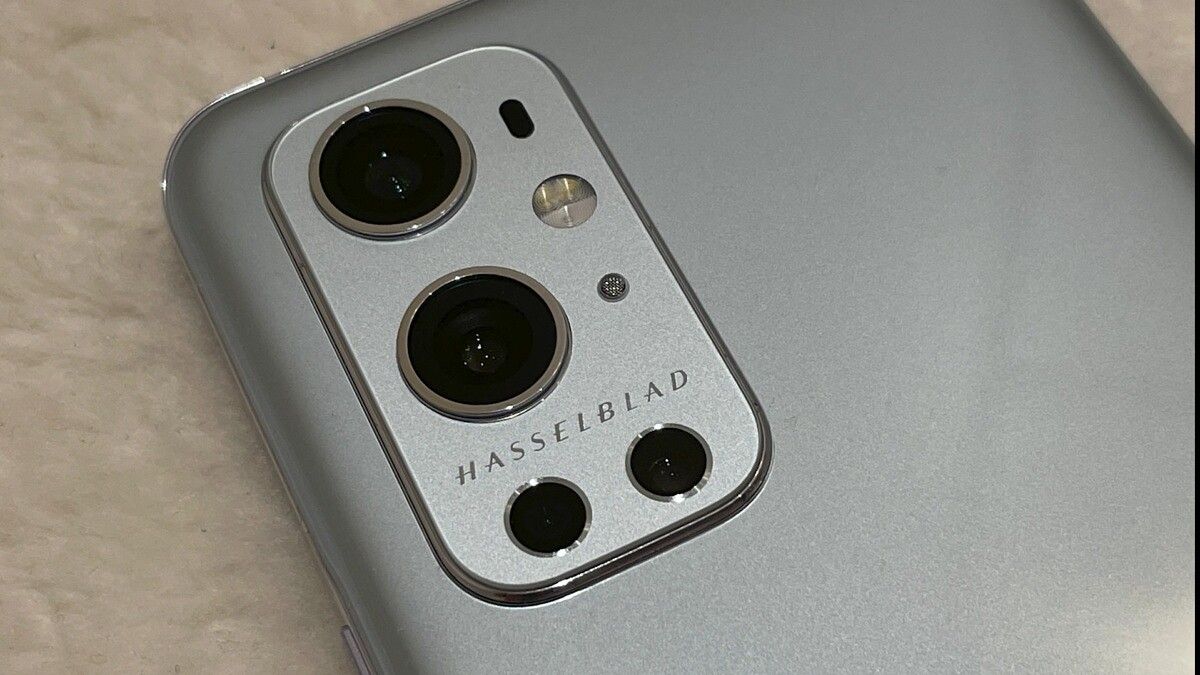
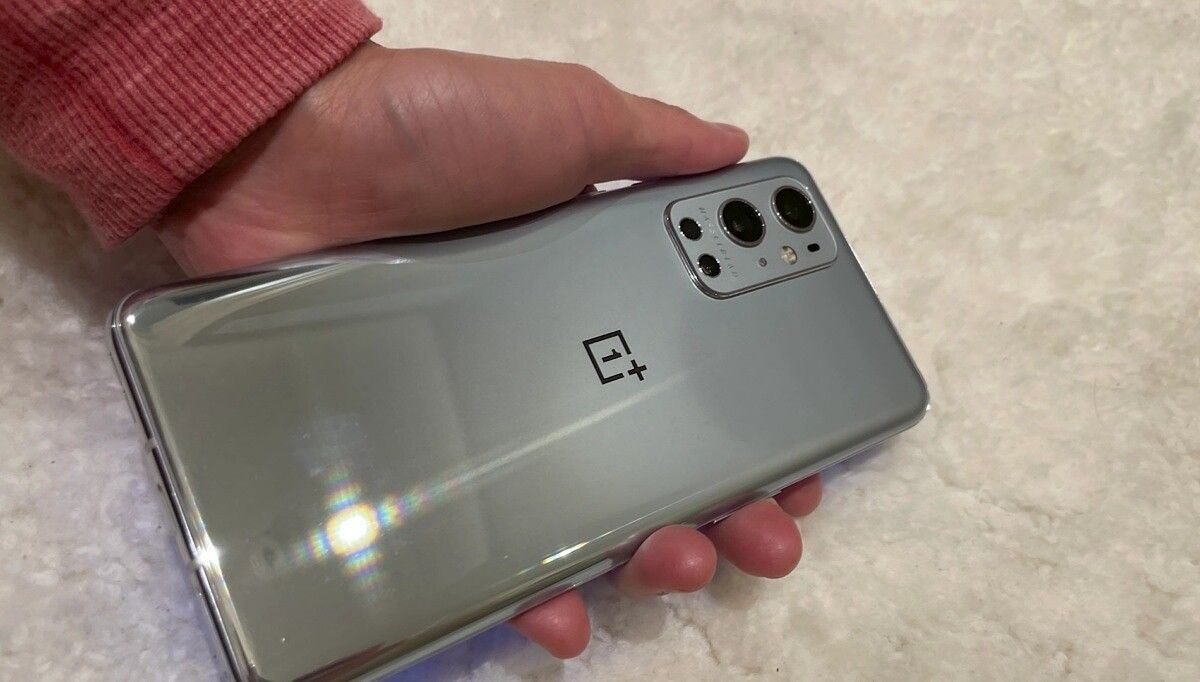
Recently, YouTuber Dave2D gave us our first look at live images of a OnePlus 9 Pro prototype with Hasselblad branding on the camera module. The video confirmed that OnePlus’ flagship model would feature a curved display with a left-aligned hole-punch cutout for the selfie camera, a quad-camera setup on the back with two large and two small sensors, a circular LED flash (unlike the rectangular one seen in the previous renders), a laser AF sensor, and a rear-facing microphone in the camera island.

OnePlus 9 Pro Hasselblad branding OnePlus 9 Pro Hasselblad branding OnePlus 9 Pro Hasselblad branding

The live images also confirmed that the device would feature a QHD+ 120Hz display, a slimmer metal frame, and the same glossy gray finish like the one we saw in the leaked OnePlus 9 live images.

The leaked information shared by OxygenUpdater suggests that the OnePlus 9 Pro will launch in three colorways — Stellar Black, Forest Green, and Morning Mist. However, the T-Mobile variant of the device will only be available in the Morning Mist colorway.

OnePlus 9R

We currently haven’t seen any leaked renders or live images of the OnePlus 9R. We’ll update this post as soon as they surface online. The only bit of information we have about the OnePlus 9R’s design is that it may feature a plastic back panel and a “more mainstream design” to differentiate itself from the OnePlus 8T.


OnePlus 9 series: Leaked Specifications

Specifications OnePlus 9 OnePlus 9 Pro OnePlus 9R
Build Plastic back
Dimensions & Weight
Display
  • 6.55″ FHD+ AMOLED
  • Left-aligned hole-punch
  • 120Hz refresh rate
  • Flat panel
  • 6.7″ QHD+ LTPO AMOLED
  • Left-aligned hole-punch
  • 120Hz refresh rate
  • Curved panel
SoC Qualcomm Snapdragon 888 Qualcomm Snapdragon 888 Qualcomm Snapdragon 870
RAM & Storage
  • 8GB LPDDR5 + 128GB UFS 3.1
  • 12GB LPDDR5 + 128GB UFS 3.1
Battery & Charging
  • 4,500mAh
  • 65W wired fast charging
  • 30W wireless charging
  • Reverse wireless charging
  • 65W charger included in the box
  • 4,500mAh
  • 65W wired fast charging
  • 45W wireless charging
  • Reverse wireless charging
  • 65W charger included in the box
Security In-Display Fingerprint Scanner In-Display Fingerprint Scanner
Rear Camera(s)
  • Primary: 48MP
  • Secondary: 48MP ultra-wide
  • Tertiary: 
Front Camera(s)
Port(s) USB Type-C USB Type-C
Audio
Connectivity
Software OxygenOS 11 based on Android 11 OxygenOS 11 based on Android 11 OxygenOS 11 based on Android 11
Other Features
Colors Astral Black, Arctic Sky, Winter Mist, Gloss Black (Verizon), Gloss gradient purple (Verizon) Stellar Black, Forest Green, Morning Most

OnePlus 9

As mentioned earlier, the OnePlus 9 allegedly features a 6.55-inch HD+ display with a peak refresh rate of 120Hz. The device will, most likely, feature Qualcomm’s flagship Snapdragon 888 chip, which will be paired with at least 8GB of RAM and 128GB of UFS 3.1 storage. A recent leak from reliable OnePlus leaker Max J. suggests that it will pack a 4,500mAh battery, with a leak from late last year revealing that it will support 65W wired fast charging, 30W wireless charging, and even reverse wireless charging. The leaker also claimed that the device will ship with a 65W charger in the box.

While information about the camera setup on the OnePlus 9 has been scarce so far, a report from 91mobiles claims that it will include a 48MP primary camera with a focal length of 6mm, a 48MP ultra-wide camera, and an unspecified third sensor. We suspect that the third camera could either be a monochrome sensor or a macro sensor. Currently, we haven’t seen any details about the selfie camera.

An APK teardown of the OnePlus Camera app has also revealed that the company may introduce several new camera features with the OnePlus 9 series. These include a Tilt-shift mode, Focus peaking, a Moon mode, and more. You can read more about these features by following this link.

A separate leak from TechDroider has shed more light on some of the key specifications of the OnePlus 9. The leak confirms that the device will feature Qualcomm’s flagship Snapdragon 888 chip, coupled with 8GB of RAM, a 6.55-inch FHD+ display that will offer a peak refresh rate of 120Hz.

The leak also reveals some details about the camera hardware, claiming that the device will sport a 12MP rear-facing camera and a 4.1MP front-facing camera. However, based on previous leaks, we suspect that these numbers signify the output resolution of these sensors and not the resolution of the sensors themselves. The OnePlus 9 will likely employ quad pixel binning to deliver the aforementioned 12MP and 4.1MP images, meaning that the device will feature a 48MP rear-facing camera and a 16MP front-facing camera.

OnePlus 9 Pro

The flagship model in the OnePlus 9 lineup will feature a larger 6.7-inch QHD+ curved display with a peak refresh rate of 120Hz. As with the OnePlus 9, the 9 Pro will most likely feature the Snapdragon 888 SoC. However, live images of the device suggest that it will come with up to 12GB of RAM. As far as the storage is concerned, OnePlus will probably include at least 128GB of UFS 3.1 storage on the device, and it may go up to 512GB on the top model.

Surprisingly, the OnePlus 9 Pro is rumored to feature the same battery capacity as the non-pro variant — 4,500mAh. If that’s the case, the device may struggle to last a full day with its QHD+ display running at 120Hz. However, the rumored 65W wired fast charging support will address this to a great extent. As with its predecessor, the OnePlus 9 Pro will also feature wireless charging support. But this time around, it’s rumored to include support for much faster 45W wireless charging.

While we don’t know much about the OnePlus 9 Pro’s camera hardware, we can expect it to be better than what the company will offer with the OnePlus 9. For now, we only know that OnePlus is working with Swedish camera manufacturer Hasselblad to develop the camera system for its upcoming flagship. OnePlus’ CEO Pete Lau has inadvertently confirmed the Hasselblad partnership via a post on the OnePlus Community forums. The post, which has since been deleted, reveals that it was posted via a “OnePlus 9 Pro co-developed with Hasselblad.”

A new leak from prominent OnePlus leaker Max Jambor reveals that the OnePlus 9 Pro may feature an LTPO display, instead of the standard LTPS AMOLED panel used on older models. For the unaware, the Galaxy Note 20 Ultra and the Galaxy S21 Ultra also feature an LTPO display, which draws less power and supports adaptive refresh rates without requiring additional hardware. Therefore, we can expect to see variable refresh rate support on the OnePlus 9 Pro.

OnePlus 9R

Back in December last year, an Android Central report revealed that the OnePlus 9R will feature similar hardware to the OnePlus 8T. The report claimed that the device will come equipped with a Snapdragon 865 chip, a 90Hz or 120Hz AMOLED panel, and 65W fast charging support. It further added that the device would feature the same camera setup as the OnePlus 8T.

Although we can’t confirm or deny the display and fast charging specifications at the moment, we have reason to believe that the OnePlus 9R will come equipped with the new Snapdragon 870 chip. The new chipset, which is merely a faster version of the Snapdragon 865, was unveiled earlier this year, and during the launch announcement, Qualcomm had revealed that it will make an appearance on a OnePlus device later this year. This, coupled with information shared in the aforementioned report, leads us to believe that the device will pack the newer Snapdragon 870 chip and not the Snapdragon 865.


OnePlus 9 series: Price & Availability

The price of OnePlus phones has crept up steadily over the years, and we expect the same to happen this year. While we haven’t seen concrete leaks about the pricing yet, OnePlus may launch the OnePlus 9 around the same price as the OnePlus 8T. The device will likely go on sale at a starting price of around $750 for the 8GB/128GB variant.

The OnePlus 9 Pro, on the other hand, might be slightly more expensive than the OnePlus 8 Pro. The device could launch around the $950 mark, given the fact that it’s expected to feature a premium camera setup. The OnePlus 9R will be priced around $600, according to a report from Android Central.

Noted leaker Evan Blass has revealed that the OnePlus 9 series will be available for pre-order starting March 23rd and those who pre-book a OnePlus 9 will get a free pair of OnePlus Buds Z with the device. Those who pre-book the OnePlus 9 Pro, on the other hand, will get a free pair of Buds Z Steve Harrington Edition with the device.

Based on the leaks and rumors that we’ve seen so far, the OnePlus 9 series is shaping up to be quite a compelling lineup. While I am looking forward to testing the new camera system on the OnePlus 9 Pro, I’m most excited about the OnePlus 9R. It’s expected to usher in a new breed of affordable flagship killers that OnePlus fans have been clamoring for over the last few years, and I can’t wait to get my hands on it.

What’s your opinion of OnePlus’ upcoming flagship lineup? Is there any particular feature or improvement that you’d want to see on the devices? Let us know in the comments section below!

The post OnePlus 9 series: Here’s everything we know about the next flagship series from OnePlus! appeared first on xda-developers.


from xda-developers https://ift.tt/3aX7vCf
via IFTTT