LightBlog

vendredi 5 mars 2021

Samsung launches Galaxy XCover 5 rugged smartphone with military-grade certification

Samsung is bringing a new rugged smartphone for its European customers. The new Galaxy XCover 5 is a successor to the XCover 4 that was launched back in 2017. The new smartphone comes with an improved design that continues to be tough, yet comfortable to use in a tough working environment. The new touchscreen offers increased sensitivity allowing users to use the smartphone even while wearing gloves, and also comes with a removable battery making it easy to swap or replace.

Measuring at 147.1×71.6×9.2mm, the Samsung Galaxy XCover 5 features a 5.3-inch TFT display with an HD+ (1600 x 720-pixels) resolution with fairly large bezels all around. The smartphone will ship with Android 11 out of the box and is powered by the Exynos 850, Samsung’s entry-level octa-core processor. The handset comes with 4GB of RAM along with 64GB of storage that can be expanded using a microSD card. For photography, there is a 16-megapixel single rear camera with an f/1.8 lens, while at the front there is a 5-megapixel sensor with an f/2.2 lens for taking selfies or video calls. Apart from the USB Type-C port, the smartphone comes with Pogo pin connectors and 15W fast charging. Other features include face recognition, a 3,000mAh battery.

Samsung Galaxy XCover 5 product image

The smartphone offers IP68 water and dust resistance as well as MIL-STD810H military certification allowing it to withstand drops of up to 1.5-meter and submersion in fresh water to up to 1.5 meters for up to 30 minutes. The XCover 5 also comes with a programmable button on the left edge of the device which can be used to perform a variety of tasks.

The Galaxy XCover 5 comes with a price tag of £329 and is expected to launch in European markets starting 12th March from the Samsung Business shop. Samsung is yet to confirm whether the smartphone will be launched in markets outside of Europe.

The post Samsung launches Galaxy XCover 5 rugged smartphone with military-grade certification appeared first on xda-developers.


from xda-developers https://ift.tt/3qh87bK
via IFTTT

Best Xbox Series X controllers to buy in 2021: Razer, PowerA, Scuf, and more!

Microsoft launched its most ambitious and powerful gaming console to date, the Xbox Series X, last year. Ever since the launch, there has been a massive demand all over the globe. If you are one of the lucky ones who has managed to get your hands on the new console, then we’ve got a list of controllers, both official and third-party, that could take your gaming experience to the next level.

Xbox Elite Controller Series 2

Xbox Elite Controller Series 2

The Elite controller was launched by Microsoft for gamers who wanted a bit more out of their controllers. The company now offers a new version that is compatible with the latest generation of consoles including the Series X and Series S. It offers adjustable-tension thumbsticks, shorter hair trigger locks, wrap-around rubberized grip, assignable buttons including paddles at the back, and re-engineered components all around making it a great option for pro-gamers. It also comes with an inbuilt battery which is said to last 40-hours and can be quickly charged using a USB Type-C cable.

    Xbox Elite Wireless Controller 2
    The Elite Wireless 2 controller offers way more customizations and options compared to the regular Xbox Wireless controller. You also get the option of replacing buttons and peddles at the back.

Scuf Prestige

Scuf Prestige for Xbox Series X

The Scuf Prestige is a great alternative to the Xbox Elite controller offering similar paddles at the back. The company has been making Xbox controllers for a while, so you can expect great compatibility. The controller is quite comfortable and offers rubberized grips, an interchangeable faceplate, and a rechargeable battery that is said to last 30 hours. Similarly, you can customize your buttons the way you want and for the paddles at the back, you need the EMR (Electro-Magnetic Remapping) key. There are also two interchangeable thumbsticks and adjustable built-in trigger stops and if that’s not enough, you can completely customize and build the controller the way you want by heading to Scuf’s website.

    Suf Prestige
    The Scuf Prestige is a receommended controller if you are looking for customizable trigger peddles and various button and color customizations.

Razer Wolverine Ultimate

Razer Wolverine Ultimate

Razer is a staple name in the gaming industry and the company’s Wolverine Ultimate is one of the best controllers for your Xbox Series X. Well, this is a wired controller, but it is one of the most feature-packed controllers that you can get today. The face buttons are said to offer a tactile feel similar to that of mouse clicks, making them more responsive. The interchangeable thumbsticks are quite smooth. The controller comes with six remappable buttons – four at the back and two near the shoulder buttons. The Wolverine Ultimate also gives you the option of swapping between different D-pads. Apart from button customizations, you can play around with the RGB lighting effects, adjust precise sensitivity for the thumbstick, and custom vibration intensity for the trigger buttons and haptic motors for an enhanced immersive experience.

    Razer Wolverine Ultimate
    The Wolverine Ultimate from Razer is a feature rich controller with two remappable multi-function bumpers, four multi-function triggers and a quick control panel.

Xbox Wireless Controller (Pulse Red)

Xbox Wireless Controller Pulse Red

The new Xbox Wireless controller is more or less the same as the one that shipped with the Xbox One series. Similarly, you get the controller in black, if you go for the Xbox Series X and a white version with the smaller Xbox Series S. But if you are looking for a second controller and are done with the monochrome color scheme, the new Pulse Red variant has become a popular choice. It is going to cost you a bit more for the paint job and it is definitely bright. It might not appeal to all, but it just looks really unique. You can also try out the Blue version which is available at an almost similar price.

    Xbox Wireless Controller Pulse Red
    If you are bored of the simple black or white finish, you should get your hands on the new Pulse Red variant of the Xbox Wireless Controller.

PowerA Enhanced Wired Controller

PowerA Enhanced Wired Controller

This is one of the more affordable options if you are looking for a third-party controller for your Xbox Series X. It is a wired controller available in a variety of colors with two mappable buttons at the back. The controller also features dual rumble motors placed in the left and right grips for an immersive gaming experience. Additionally, there is a dial to control the game audio when you connect a headset via the 3.5mm stereo headset jack.

    PowerA Enhanced Wired Controller
    The PowerA Enhanced Wired Controller works with the new Xbox Series X and Series S consoles and comes in a wide variety of colors.

Xbox Adaptive Controller

Xbox Adaptive Controller

Gaming doesn’t have any boundaries and the Adaptive Controller from Microsoft is a fine example. Made for users who have limited mobility, it is unlike any controller listed here with options to fully customize the controller according to the user’s needs. The controller is also a hub that can connect with a range of assistive devices which can then be assigned to specific controller inputs. Apart from the Xbox gaming consoles, the Adaptive Controller also works with the Nintendo Switch as well as Windows PC. There are about 20 ports that let you plug a variety of thumbsticks, switches, buttons, and other assistive devices.

    Xbox Adaptive Controller
    Meant for gamers with limited mobility, the Adaptive Controller offers a vast variety of ports to allow attaching a number of contoller inputs.

Fighting Stick α

Hori Fighting Stick Alpha

Love the charm of an old-school arcade console? Check out the Fighting Stick α (alpha) from Hori. Officially licensed from Microsoft, the controller comes with Hori’s own Hayabusa joystick made for competitive gaming. It offers easy profile switching with quick buttons right on top, along with options to change the top housing for a customized look. Other notable features include easy maintenance, audio controls for both mic and headset, and fine-tuning via a dedicated app.

    Hori Fighting Stick α
    A perfect recommendation who wants relive the days of smashing buttons and turn the joystick on old fasioned arcade controls.

As mentioned, there has been a huge demand for the Xbox Series X and also the Series S due to a global chip shortage. If you are planning to buy either of the consoles, make sure you go through our restock guide. Also, let us know about a controller you think we might have missed and is worth mentioning in the list.

The post Best Xbox Series X controllers to buy in 2021: Razer, PowerA, Scuf, and more! appeared first on xda-developers.


from xda-developers https://ift.tt/2OmZ1Ne
via IFTTT

Best Xbox Series X controllers to buy in 2021: Razer, PowerA, Scuf, and more!

Microsoft launched its most ambitious and powerful gaming console to date, the Xbox Series X, last year. Ever since the launch, there has been a massive demand all over the globe. If you are one of the lucky ones who has managed to get your hands on the new console, then we’ve got a list of controllers, both official and third-party, that could take your gaming experience to the next level.

Xbox Elite Controller Series 2

Xbox Elite Controller Series 2

The Elite controller was launched by Microsoft for gamers who wanted a bit more out of their controllers. The company now offers a new version that is compatible with the latest generation of consoles including the Series X and Series S. It offers adjustable-tension thumbsticks, shorter hair trigger locks, wrap-around rubberized grip, assignable buttons including paddles at the back, and re-engineered components all around making it a great option for pro-gamers. It also comes with an inbuilt battery which is said to last 40-hours and can be quickly charged using a USB Type-C cable.

    Xbox Elite Wireless Controller 2
    The Elite Wireless 2 controller offers way more customizations and options compared to the regular Xbox Wireless controller. You also get the option of replacing buttons and peddles at the back.

Scuf Prestige

Scuf Prestige for Xbox Series X

The Scuf Prestige is a great alternative to the Xbox Elite controller offering similar paddles at the back. The company has been making Xbox controllers for a while, so you can expect great compatibility. The controller is quite comfortable and offers rubberized grips, an interchangeable faceplate, and a rechargeable battery that is said to last 30 hours. Similarly, you can customize your buttons the way you want and for the paddles at the back, you need the EMR (Electro-Magnetic Remapping) key. There are also two interchangeable thumbsticks and adjustable built-in trigger stops and if that’s not enough, you can completely customize and build the controller the way you want by heading to Scuf’s website.

    Suf Prestige
    The Scuf Prestige is a receommended controller if you are looking for customizable trigger peddles and various button and color customizations.

Razer Wolverine Ultimate

Razer Wolverine Ultimate

Razer is a staple name in the gaming industry and the company’s Wolverine Ultimate is one of the best controllers for your Xbox Series X. Well, this is a wired controller, but it is one of the most feature-packed controllers that you can get today. The face buttons are said to offer a tactile feel similar to that of mouse clicks, making them more responsive. The interchangeable thumbsticks are quite smooth. The controller comes with six remappable buttons – four at the back and two near the shoulder buttons. The Wolverine Ultimate also gives you the option of swapping between different D-pads. Apart from button customizations, you can play around with the RGB lighting effects, adjust precise sensitivity for the thumbstick, and custom vibration intensity for the trigger buttons and haptic motors for an enhanced immersive experience.

    Razer Wolverine Ultimate
    The Wolverine Ultimate from Razer is a feature rich controller with two remappable multi-function bumpers, four multi-function triggers and a quick control panel.

Xbox Wireless Controller (Pulse Red)

Xbox Wireless Controller Pulse Red

The new Xbox Wireless controller is more or less the same as the one that shipped with the Xbox One series. Similarly, you get the controller in black, if you go for the Xbox Series X and a white version with the smaller Xbox Series S. But if you are looking for a second controller and are done with the monochrome color scheme, the new Pulse Red variant has become a popular choice. It is going to cost you a bit more for the paint job and it is definitely bright. It might not appeal to all, but it just looks really unique. You can also try out the Blue version which is available at an almost similar price.

    Xbox Wireless Controller Pulse Red
    If you are bored of the simple black or white finish, you should get your hands on the new Pulse Red variant of the Xbox Wireless Controller.

PowerA Enhanced Wired Controller

PowerA Enhanced Wired Controller

This is one of the more affordable options if you are looking for a third-party controller for your Xbox Series X. It is a wired controller available in a variety of colors with two mappable buttons at the back. The controller also features dual rumble motors placed in the left and right grips for an immersive gaming experience. Additionally, there is a dial to control the game audio when you connect a headset via the 3.5mm stereo headset jack.

    PowerA Enhanced Wired Controller
    The PowerA Enhanced Wired Controller works with the new Xbox Series X and Series S consoles and comes in a wide variety of colors.

Xbox Adaptive Controller

Xbox Adaptive Controller

Gaming doesn’t have any boundaries and the Adaptive Controller from Microsoft is a fine example. Made for users who have limited mobility, it is unlike any controller listed here with options to fully customize the controller according to the user’s needs. The controller is also a hub that can connect with a range of assistive devices which can then be assigned to specific controller inputs. Apart from the Xbox gaming consoles, the Adaptive Controller also works with the Nintendo Switch as well as Windows PC. There are about 20 ports that let you plug a variety of thumbsticks, switches, buttons, and other assistive devices.

    Xbox Adaptive Controller
    Meant for gamers with limited mobility, the Adaptive Controller offers a vast variety of ports to allow attaching a number of contoller inputs.

Fighting Stick α

Hori Fighting Stick Alpha

Love the charm of an old-school arcade console? Check out the Fighting Stick α (alpha) from Hori. Officially licensed from Microsoft, the controller comes with Hori’s own Hayabusa joystick made for competitive gaming. It offers easy profile switching with quick buttons right on top, along with options to change the top housing for a customized look. Other notable features include easy maintenance, audio controls for both mic and headset, and fine-tuning via a dedicated app.

    Hori Fighting Stick α
    A perfect recommendation who wants relive the days of smashing buttons and turn the joystick on old fasioned arcade controls.

As mentioned, there has been a huge demand for the Xbox Series X and also the Series S due to a global chip shortage. If you are planning to buy either of the consoles, make sure you go through our restock guide. Also, let us know about a controller you think we might have missed and is worth mentioning in the list.

The post Best Xbox Series X controllers to buy in 2021: Razer, PowerA, Scuf, and more! appeared first on xda-developers.


from xda-developers https://ift.tt/2OmZ1Ne
via IFTTT

Microsoft Whiteboard is now available on the Google Play Store

Microsoft Whiteboard, a handy collaboration tool for students and professionals, is now available on the Google Play Store as a Public Preview. The app offers a freeform intelligent canvas that can be used to “ideate, create, and collaborate visually via the cloud.” The tool has been available on Windows and iOS for quite a while, and it’s now finally rolling out on Android.

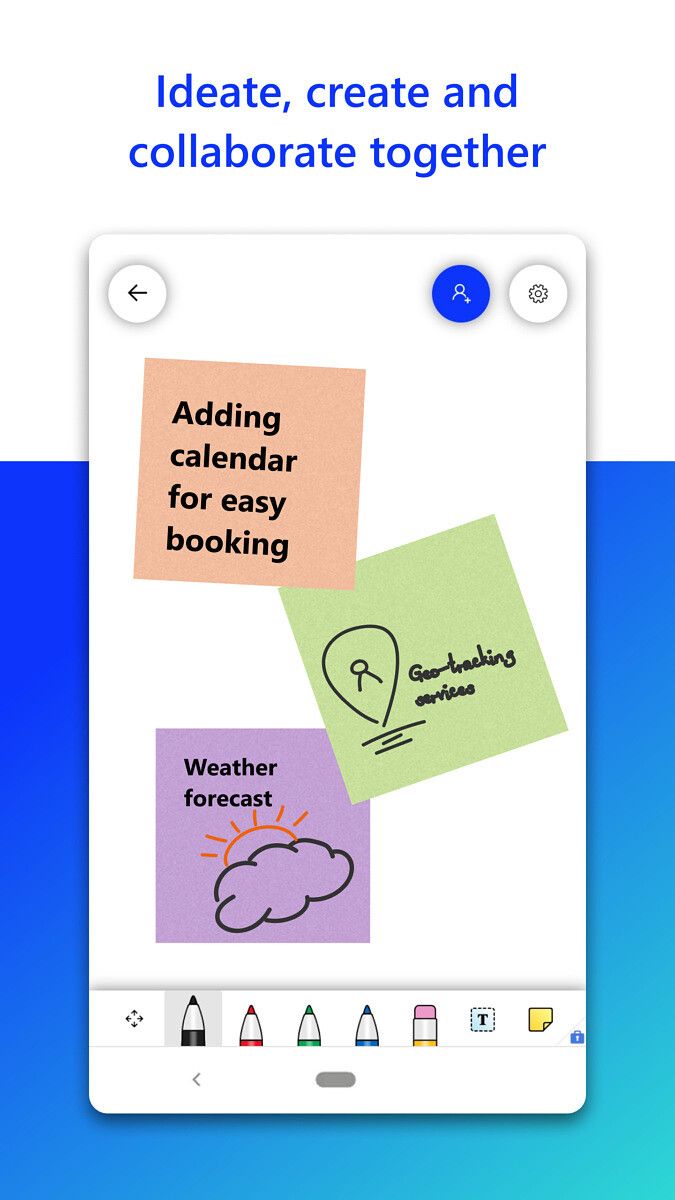
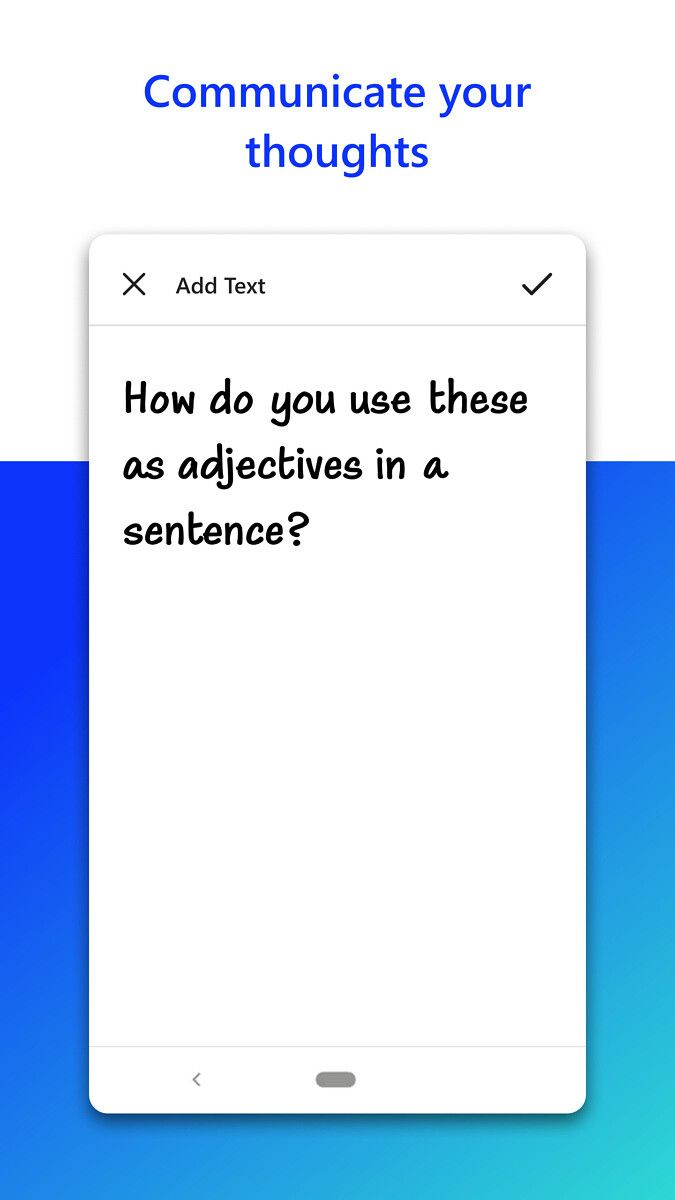
Microsoft Whiteboard’s Play Store listing reveals that the tool is designed for touch, type and pen input, and it lets you draw, enter text, or add sticky notes on a freeform canvas. The app also offers Microsoft’s Intelligent inking technology, which can transform your doodles into professional-looking tables and charts automatically.

Microsoft Whiteboard Microsoft Whiteboard Microsoft Whiteboard Microsoft Whiteboard

The canvas is updated in real-time, which helps scattered teams work together without any issues. Since this is a cloud-based solution, all your notes are liked to your Microsoft account and you can access them on any supported device, including Windows and iOS devices, at any time.

If you’re interested in trying Microsoft Whiteboard on your Android device, you can download it by following the Play Store link below. Do note that the service is not available for personal accounts at the moment, and it only supports education and enterprise accounts. Since the app is currently available as a Public Preview, you can expect to encounter unwanted bugs and other issues. As some of the early reviews point out, in its current form Microsoft Whiteboard on Android is merely a web app. But that may change by the time a stable version rolls out on the Play Store.

The Microsoft Whiteboard preview on Android comes just weeks after the company released a major update for its scanning app — Microsoft Lens. As part of the update, Microsoft not only gave the app a new name but also changed its logo and introduced a host of new features. You can read more about it here.

Microsoft Whiteboard (Free, Google Play) →

The post Microsoft Whiteboard is now available on the Google Play Store appeared first on xda-developers.


from xda-developers https://ift.tt/3uVRMMW
via IFTTT

Microsoft Whiteboard is now available on the Google Play Store

Microsoft Whiteboard, a handy collaboration tool for students and professionals, is now available on the Google Play Store as a Public Preview. The app offers a freeform intelligent canvas that can be used to “ideate, create, and collaborate visually via the cloud.” The tool has been available on Windows and iOS for quite a while, and it’s now finally rolling out on Android.

Microsoft Whiteboard’s Play Store listing reveals that the tool is designed for touch, type and pen input, and it lets you draw, enter text, or add sticky notes on a freeform canvas. The app also offers Microsoft’s Intelligent inking technology, which can transform your doodles into professional-looking tables and charts automatically.

Microsoft Whiteboard Microsoft Whiteboard Microsoft Whiteboard Microsoft Whiteboard

The canvas is updated in real-time, which helps scattered teams work together without any issues. Since this is a cloud-based solution, all your notes are liked to your Microsoft account and you can access them on any supported device, including Windows and iOS devices, at any time.

If you’re interested in trying Microsoft Whiteboard on your Android device, you can download it by following the Play Store link below. Do note that the service is not available for personal accounts at the moment, and it only supports education and enterprise accounts. Since the app is currently available as a Public Preview, you can expect to encounter unwanted bugs and other issues. As some of the early reviews point out, in its current form Microsoft Whiteboard on Android is merely a web app. But that may change by the time a stable version rolls out on the Play Store.

The Microsoft Whiteboard preview on Android comes just weeks after the company released a major update for its scanning app — Microsoft Lens. As part of the update, Microsoft not only gave the app a new name but also changed its logo and introduced a host of new features. You can read more about it here.

Microsoft Whiteboard (Free, Google Play) →

The post Microsoft Whiteboard is now available on the Google Play Store appeared first on xda-developers.


from xda-developers https://ift.tt/3uVRMMW
via IFTTT

Samsung details ISOCELL 2.0 for its next-gen camera sensors

Samsung’s ISOCELL image sensor lineup has done remarkably well in the last few years. Although it’s still behind Sony’s IMX sensors in terms of overall market share, the company’s 64MP and 108MP sensors have seen great adoption on budget and premium mid-range smartphones. The company refreshed its ISOCELL lineup last year with the introduction of five new sensors, including the showstopper 108MP ISOCELL HM2, 64MP ISOCELL GW3, and 48MP ISOCELL GM5. All sensors used a 0.7μm pixel size, but Samsung incorporated their ISOCELL Plus and Smart ISO technologies to compensate for the smaller pixel size. At the time, Samsung said they would be announcing a new pixel technology called ISOCELL 2.0 in their upcoming 0.7-micron sensors, which the company said would improve the light sensitivity by up to 12% over the ISOCELL Plus. Six months later, the company is finally detailing its new pixel technology.

Samsung promises enhanced light sensitivity and color fidelity with ISOCELL 2.0. Samsung says the current ISOCELL technology uses a metal grid to physically isolate each pixel. This is to reduce the light cross-talk between each pixel and produce images with vivid colors. But one of the cons of using metal is that it absorbs some of the incoming light, which leads to slight “optical loss”.

Samsung ISOCELL 2.0

ISOCELL 2.0 addresses this issue by replacing the upper phase of the metal grid, which acts as a physical barrier between color filters, with a “new material”. Meanwhile, the lower portion of the barrier has been replaced by more reflective material. These new upgrades help minimizes the optical loss and increases the light sensitivity, Samsung says.

All of these changes allow Samsung to get the most out of the smaller 0.7-micron pixels and deliver improved low-light performance on its high megapixel count sensors. The ISOCELL 2.0 technology is expected to debut on the next range of ISOCELL sensors, but Samsung hasn’t detailed anything on that front yet. Last month, Samsung launched the new 50MP ISOCELL GN2 sensor with faster autofocus and improved low-light performance. However, it still uses the ISOCELL Plus pixel technology.

The post Samsung details ISOCELL 2.0 for its next-gen camera sensors appeared first on xda-developers.


from xda-developers https://ift.tt/38fb0DM
via IFTTT

Samsung details ISOCELL 2.0 for its next-gen camera sensors

Samsung’s ISOCELL image sensor lineup has done remarkably well in the last few years. Although it’s still behind Sony’s IMX sensors in terms of overall market share, the company’s 64MP and 108MP sensors have seen great adoption on budget and premium mid-range smartphones. The company refreshed its ISOCELL lineup last year with the introduction of five new sensors, including the showstopper 108MP ISOCELL HM2, 64MP ISOCELL GW3, and 48MP ISOCELL GM5. All sensors used a 0.7μm pixel size, but Samsung incorporated their ISOCELL Plus and Smart ISO technologies to compensate for the smaller pixel size. At the time, Samsung said they would be announcing a new pixel technology called ISOCELL 2.0 in their upcoming 0.7-micron sensors, which the company said would improve the light sensitivity by up to 12% over the ISOCELL Plus. Six months later, the company is finally detailing its new pixel technology.

Samsung promises enhanced light sensitivity and color fidelity with ISOCELL 2.0. Samsung says the current ISOCELL technology uses a metal grid to physically isolate each pixel. This is to reduce the light cross-talk between each pixel and produce images with vivid colors. But one of the cons of using metal is that it absorbs some of the incoming light, which leads to slight “optical loss”.

Samsung ISOCELL 2.0

ISOCELL 2.0 addresses this issue by replacing the upper phase of the metal grid, which acts as a physical barrier between color filters, with a “new material”. Meanwhile, the lower portion of the barrier has been replaced by more reflective material. These new upgrades help minimizes the optical loss and increases the light sensitivity, Samsung says.

All of these changes allow Samsung to get the most out of the smaller 0.7-micron pixels and deliver improved low-light performance on its high megapixel count sensors. The ISOCELL 2.0 technology is expected to debut on the next range of ISOCELL sensors, but Samsung hasn’t detailed anything on that front yet. Last month, Samsung launched the new 50MP ISOCELL GN2 sensor with faster autofocus and improved low-light performance. However, it still uses the ISOCELL Plus pixel technology.

The post Samsung details ISOCELL 2.0 for its next-gen camera sensors appeared first on xda-developers.


from xda-developers https://ift.tt/38fb0DM
via IFTTT