LightBlog

mercredi 3 mars 2021

The Samsung Galaxy A32 is the company’s cheapest phone with a 90Hz AMOLED display

Hot on the heels of the Galaxy F62 launch last month, Samsung is bringing yet another mid-range smartphone to the Indian market. The company has just launched the Galaxy A32 in the country to take on the likes of Realme X7 and Xiaomi Mi 10i. This appears to be the Galaxy A32 4G model that Samsung detailed late last week and not the Galaxy A32 5G that was launched in Europe back in January.

Samsung Galaxy A32 4G: Specifications

Specification Samsung Galaxy A32 4G
Dimensions and Weight
  • 73.6 x 158.9 x 8.4mm
  • 184g
Display
  • 6.5-inch sAMOLED
  • Full HD+
  • 90Hz refresh rate
  • Waterdrop notch
SoC
  • MediaTek Helio G80
    • 2x ARM Cortex-A75 (up to 2.0GHz)
    • 6x ARM Cortex-A55 (up to 1.8GHz)
    • 11nm
  • Mali-G52 GPU
RAM and Storage
  • 6GB RAM
  • 128GB flash storage
  • MicroSD card support
Battery & Charging
  • 5,000 mAh battery
  • 15W charger
Rear Camera
  • Primary: 64MP f/1.8
  • Secondary: 8MP f/2.2, ultra-wide
  • Tertiary: 5MP f/2.4 macro sensor
  • Quarternary: 5MP f/2.4 depth sensor
Front Camera
  • 20MP f/2.2
Ports
  • USB Type-C port
  • 3.5mm headphone jack
Connectivity
  • 4G LTE
  • Bluetooth 5.0
  • Type-C port
  • WiFi 802.11.b/g/n/ac (2.4GHz + 5GHz)
Security
  • In-display fingerprint reader
Software
  • Android 11 with One UI 3.1

The main highlight of the Galaxy A32 is its 6.5-inch Full HD+ AMOLED display that refreshes at 90Hz, making it the cheapest Samsung phone to offer a high refresh panel to date. Powering the device is the MediaTek Helio G80 octa-core chipset, coupled with 6GB RAM and 128GB flash storage. On the back, you get a 64MP primary camera, an 8MP ultra-wide shooter, and 5MP depth and macro lenses. All of this is backed by a 5,000mAh battery that charges via a rather slow 15W charger. The phone runs Android 11 with One UI 3.1 on top and has an in-display fingerprint scanner along with the Samsung Knox security suite.

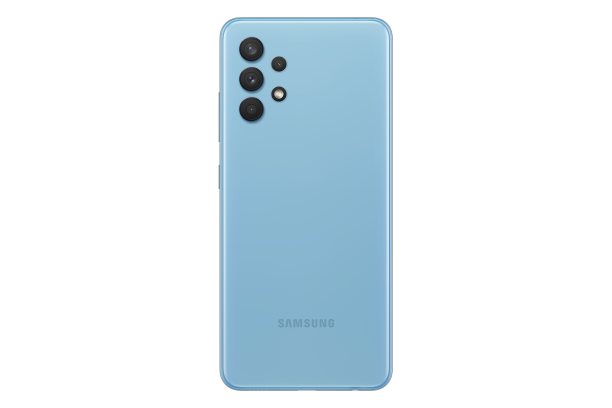
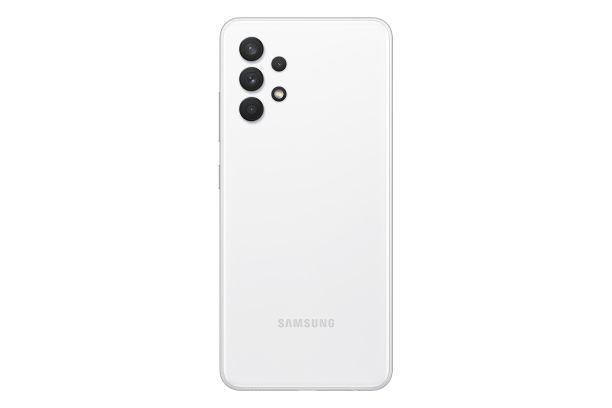
Galaxy A32 Black Galaxy A32 Blue Galaxy A32 White

Galaxy A32 Pricing & Availability

The Samsung Galaxy A32 comes in four colors: Black, White, Blue, and Violet. The phone is priced at ₹21,999 (~$302) for the sole 6GB + 128GB variant with sales kicking off starting today from Samsung.com, retail stores, and leading online portals. As an introductory offer, consumers paying with HDFC Credit or Debit card will be able to avail of up to ₹2000 cashback.

The post The Samsung Galaxy A32 is the company’s cheapest phone with a 90Hz AMOLED display appeared first on xda-developers.


from xda-developers https://ift.tt/3qdNehv
via IFTTT

Chainfire’s Holey Light app gets its biggest update yet with new Samsung and Google device support

XDA Senior Recognized Developer Chainfire‘s Holey Light app is getting its biggest update yet. The app now offers support for a bunch of new Samsung and Google devices, Android 11 compatibility, and much more. Read on to learn more about everything new in the latest Holey Light update.

For the unaware, Holey Light is a handy app that lets you turn the hole-punch cutout on your device into a notification LED. The app was initially only available for Samsung’s Galaxy S10 lineup, but its latest update (v. 1.00) brings support for the Galaxy S21 series, Galaxy S20 series, the Galaxy Z Fold 2, the Google Pixel 5, and the Pixel 4a.

Additionally, the update includes a host of new features, including new options to show app icons and the AOD clock in the Unholey Light mode, the ability to adjust the thickness of the camera notification animation, support for conversation and bubble notifications, and improved Dark Mode support. On top of that, the update brings stability and reliability improvements, optimizations for CPU and battery usage, and additional language support. Check out the section below for the complete Holey Light v1.00 changelog:

Holey Light v1.00 changelog

  • Compatibility
    • Leverage Samsung firmware-specific camera area size, position, and animation: adds basic support for all Samsung devices
    • Added support for Google Pixel devices; currently 4A and 5 tested, 4A 5G needs a tester!
    • Specific adjustments for Samsung Galaxy Fold 2
  •  Donations
    • Added In-App Purchase donations – completely optional without nags. These do not unlock any additional features, change functionality in any way, or entitle the user to anything. Note that these only work if the app installed through Google Play.
  •  Android 11
    • Updated cutout positioning
    • Updated scaling math
    • Updated targetSdk
    • Added newly required permissions
    • Fixed accessibility service token error
    • Fixed Unholey Light not working at all
    • Split several code paths into Android 9, 10 and 11 specific versions
  •  Unholey Light
    • Add option to display icons inside circle (enabled by default)
    • Add option to display clock (disabled by default)
    • Smoother transitions
    • Rework of TSP area detection
    • Improved stability/reliability
    • Improve update speed on new notification
    • Fixed several (rare) internal crashes
    • Reduce display jumping around
  •  Hide AOD
    • Improved bottom area detection for partial hide
    • Added overlay linger option to reduce AOD flashing when going from screen off to lockscreen
  •  Notifications
    • Colors: Added fast scrolling capability
    • Colors: Added (long-press) option to respect or ignore (default) notification color state
    • Colors: Added save/load functionality
    • Timeouts: Added option to track timeouts separately for screen on and off states
    • Timeouts: Seekbars: Show value in title bar to improve UX
    • Persist seen state across resolution and density changes
    • Added black fill option to hide small misalignments in camera animations
    • Added tuning option to increase camera animation thickness
    • Rework dp adjustments math
    • Disable animation during phone calls to prevent some weird behavior
    • Detect and handle “silent” conversations
    • Detect and handle bubbles correctly
    • Detect and handle groups
    • Changed default color for notifications to the app icon’s dominant color, with brightness and saturation maxed out
  •  AOD Helper
    • Complete overhaul
    • Now directly advertised and integrated into main settings rather than a hidden package deep in the XDA thread
    • Samsung: Still quirky and not fully compatible with all options – use with care!
    • Pixel: Added AOD brightness improvement; automatic AOD control not implemented (see AOD Helper source for notes)
    • Pixel: Automatically fix permissions with root, if available
  •  Translations
    • Many translations are now horribly outdated 🙁 Please help!
    • Added German
    • Added Greek
    • Updated Chinese
    • Added option to switch language
  •  Debugging
    • Added master-switch long-press to enable super-secret debug mode
    • Added overlay debugging mode
    • Added (app-only) logcat dump
    • Built state tester (devs only)
  •  Notices and popups
    • Reworked various parts of the setup wizard
    • Added notice about location detection needing to be enabled for companion device permission
    • Samsung: Added option to preload black image into AOD rather than going the theme route
    • Samsung: Added informational notices about fingerprint icon on AOD
    • Samsung: Added informational notices about battery status on AOD
    • Pixel: Added informational notice about AOD brightness
  •  Miscellaneous
    • Reduced CPU and battery usage
    • Improve AOD handling in tap-to-show mode
    • Reworked resolution and density change detection and handling
    • Several small tweaks in settings display to improve uniformity
    • Improve performance of tuning adjustments
    • Fix broken dark mode support
    • Enabled ProGuard for release builds
    • Updated AndroidX dependencies
    • Updated graphics and screenshots for Google Play

In case you have one of the aforementioned devices, you can now download the latest version of Holey Light by following the Play Store link below. The app is completely free to use, ad-free, and open source. Do check out the XDA Forum thread if you face any issues setting it up on your phone. For more detailed information about the update, check out Holey Light’s GitHub page.

Holey Light (LED emulator for Samsung/Pixel) (Free+, Google Play) →

The post Chainfire’s Holey Light app gets its biggest update yet with new Samsung and Google device support appeared first on xda-developers.


from xda-developers https://ift.tt/3bfwCBX
via IFTTT

Chainfire’s Holey Light app gets its biggest update yet with new Samsung and Google device support

XDA Senior Recognized Developer Chainfire‘s Holey Light app is getting its biggest update yet. The app now offers support for a bunch of new Samsung and Google devices, Android 11 compatibility, and much more. Read on to learn more about everything new in the latest Holey Light update.

For the unaware, Holey Light is a handy app that lets you turn the hole-punch cutout on your device into a notification LED. The app was initially only available for Samsung’s Galaxy S10 lineup, but its latest update (v. 1.00) brings support for the Galaxy S21 series, Galaxy S20 series, the Galaxy Z Fold 2, the Google Pixel 5, and the Pixel 4a.

Additionally, the update includes a host of new features, including new options to show app icons and the AOD clock in the Unholey Light mode, the ability to adjust the thickness of the camera notification animation, support for conversation and bubble notifications, and improved Dark Mode support. On top of that, the update brings stability and reliability improvements, optimizations for CPU and battery usage, and additional language support. Check out the section below for the complete Holey Light v1.00 changelog:

Holey Light v1.00 changelog

  • Compatibility
    • Leverage Samsung firmware-specific camera area size, position, and animation: adds basic support for all Samsung devices
    • Added support for Google Pixel devices; currently 4A and 5 tested, 4A 5G needs a tester!
    • Specific adjustments for Samsung Galaxy Fold 2
  •  Donations
    • Added In-App Purchase donations – completely optional without nags. These do not unlock any additional features, change functionality in any way, or entitle the user to anything. Note that these only work if the app installed through Google Play.
  •  Android 11
    • Updated cutout positioning
    • Updated scaling math
    • Updated targetSdk
    • Added newly required permissions
    • Fixed accessibility service token error
    • Fixed Unholey Light not working at all
    • Split several code paths into Android 9, 10 and 11 specific versions
  •  Unholey Light
    • Add option to display icons inside circle (enabled by default)
    • Add option to display clock (disabled by default)
    • Smoother transitions
    • Rework of TSP area detection
    • Improved stability/reliability
    • Improve update speed on new notification
    • Fixed several (rare) internal crashes
    • Reduce display jumping around
  •  Hide AOD
    • Improved bottom area detection for partial hide
    • Added overlay linger option to reduce AOD flashing when going from screen off to lockscreen
  •  Notifications
    • Colors: Added fast scrolling capability
    • Colors: Added (long-press) option to respect or ignore (default) notification color state
    • Colors: Added save/load functionality
    • Timeouts: Added option to track timeouts separately for screen on and off states
    • Timeouts: Seekbars: Show value in title bar to improve UX
    • Persist seen state across resolution and density changes
    • Added black fill option to hide small misalignments in camera animations
    • Added tuning option to increase camera animation thickness
    • Rework dp adjustments math
    • Disable animation during phone calls to prevent some weird behavior
    • Detect and handle “silent” conversations
    • Detect and handle bubbles correctly
    • Detect and handle groups
    • Changed default color for notifications to the app icon’s dominant color, with brightness and saturation maxed out
  •  AOD Helper
    • Complete overhaul
    • Now directly advertised and integrated into main settings rather than a hidden package deep in the XDA thread
    • Samsung: Still quirky and not fully compatible with all options – use with care!
    • Pixel: Added AOD brightness improvement; automatic AOD control not implemented (see AOD Helper source for notes)
    • Pixel: Automatically fix permissions with root, if available
  •  Translations
    • Many translations are now horribly outdated 🙁 Please help!
    • Added German
    • Added Greek
    • Updated Chinese
    • Added option to switch language
  •  Debugging
    • Added master-switch long-press to enable super-secret debug mode
    • Added overlay debugging mode
    • Added (app-only) logcat dump
    • Built state tester (devs only)
  •  Notices and popups
    • Reworked various parts of the setup wizard
    • Added notice about location detection needing to be enabled for companion device permission
    • Samsung: Added option to preload black image into AOD rather than going the theme route
    • Samsung: Added informational notices about fingerprint icon on AOD
    • Samsung: Added informational notices about battery status on AOD
    • Pixel: Added informational notice about AOD brightness
  •  Miscellaneous
    • Reduced CPU and battery usage
    • Improve AOD handling in tap-to-show mode
    • Reworked resolution and density change detection and handling
    • Several small tweaks in settings display to improve uniformity
    • Improve performance of tuning adjustments
    • Fix broken dark mode support
    • Enabled ProGuard for release builds
    • Updated AndroidX dependencies
    • Updated graphics and screenshots for Google Play

In case you have one of the aforementioned devices, you can now download the latest version of Holey Light by following the Play Store link below. The app is completely free to use, ad-free, and open source. Do check out the XDA Forum thread if you face any issues setting it up on your phone. For more detailed information about the update, check out Holey Light’s GitHub page.

Holey Light (LED emulator for Samsung/Pixel) (Free+, Google Play) →

The post Chainfire’s Holey Light app gets its biggest update yet with new Samsung and Google device support appeared first on xda-developers.


from xda-developers https://ift.tt/3bfwCBX
via IFTTT

mardi 2 mars 2021

MediaTek’s new MT9638 chip may power your 2021 smart TV

MediaTek may not be a market leader in the smartphone SoC space, but the Taiwanese company holds no. 1 position when it comes to making chips that power our smart TVs. The company has a wide portfolio of TV chips covering entry-level to flagship smart TVs, with the top-tier S900 (MT9950) with 8K support being the most premium offering from the company.

Today, the company is expanding its chip lineup for premium 4K smart TVs with the launch of MediaTek MT9638. The new chip comes with an integrated AI processing unit (APU) and has some impressive feature sets including support for variable refresh rate (VRR), motion estimation and motion compensation (MEMC), HDMI 2.1 standard, HDR10+ and more.

As smart home appliances become more intelligent and diversified, smart TVs are becoming the new hub for the smart home as consumers take advantage of AI-enabled multimedia features to control all their devices right from their TV. The new MT9638 continues our legacy as the No. 1 chip provider of smart TVs, bringing consumers incredible AI, multimedia, gaming, and entertainment experiences in theater-quality 4K.

Alex Chen, General Manager, TV Business Unit, MediaTek, Inc

The MT9638 uses a multi-core setup of ARM Coretex-A55 CPU cores along with ARM Mali-G52 GPU and MediaTek APU. The company didn’t detail the exact number of CPU cores but our guess is it’s a quad-core cluster. On the display side, support for HDR10+ panels is on-board along with up to 4K resolution at 60Hz and support for HEVC, VP9, and AV1 decoding.

The chipset supports Wi-Fi 6, HDMI 2.1, USB 3.0 standards as well as Dolby Atmos and DTS Virtual X surround sound support.

TV manufacturers can take advantage of AI smarts to automatically adjust parameters such as color, saturation, brightness, sharpness, and more to enhance the image quality. Meanwhile, AI super-resolution and MEMC enable OEMs to upscale low-res content to the TV’s native resolution through multi-frame blending.

The chip also boasts enhanced support for voice recognition and virtual assistants and supports up to 4 far-field microphones with ultra-low-power consumption on standby and a one-second resume for hot words.

The MediaTek MT9638 is expected to arrive in 4K smart TVs launching Q2 2021.

The post MediaTek’s new MT9638 chip may power your 2021 smart TV appeared first on xda-developers.


from xda-developers https://ift.tt/3bST3fi
via IFTTT

MediaTek’s new MT9638 chip may power your 2021 smart TV

MediaTek may not be a market leader in the smartphone SoC space, but the Taiwanese company holds no. 1 position when it comes to making chips that power our smart TVs. The company has a wide portfolio of TV chips covering entry-level to flagship smart TVs, with the top-tier S900 (MT9950) with 8K support being the most premium offering from the company.

Today, the company is expanding its chip lineup for premium 4K smart TVs with the launch of MediaTek MT9638. The new chip comes with an integrated AI processing unit (APU) and has some impressive feature sets including support for variable refresh rate (VRR), motion estimation and motion compensation (MEMC), HDMI 2.1 standard, HDR10+ and more.

As smart home appliances become more intelligent and diversified, smart TVs are becoming the new hub for the smart home as consumers take advantage of AI-enabled multimedia features to control all their devices right from their TV. The new MT9638 continues our legacy as the No. 1 chip provider of smart TVs, bringing consumers incredible AI, multimedia, gaming, and entertainment experiences in theater-quality 4K.

Alex Chen, General Manager, TV Business Unit, MediaTek, Inc

The MT9638 uses a multi-core setup of ARM Coretex-A55 CPU cores along with ARM Mali-G52 GPU and MediaTek APU. The company didn’t detail the exact number of CPU cores but our guess is it’s a quad-core cluster. On the display side, support for HDR10+ panels is on-board along with up to 4K resolution at 60Hz and support for HEVC, VP9, and AV1 decoding.

The chipset supports Wi-Fi 6, HDMI 2.1, USB 3.0 standards as well as Dolby Atmos and DTS Virtual X surround sound support.

TV manufacturers can take advantage of AI smarts to automatically adjust parameters such as color, saturation, brightness, sharpness, and more to enhance the image quality. Meanwhile, AI super-resolution and MEMC enable OEMs to upscale low-res content to the TV’s native resolution through multi-frame blending.

The chip also boasts enhanced support for voice recognition and virtual assistants and supports up to 4 far-field microphones with ultra-low-power consumption on standby and a one-second resume for hot words.

The MediaTek MT9638 is expected to arrive in 4K smart TVs launching Q2 2021.

The post MediaTek’s new MT9638 chip may power your 2021 smart TV appeared first on xda-developers.


from xda-developers https://ift.tt/3bST3fi
via IFTTT

WhatsApp is working on a new feature that will let you share self-destructing images

After rolling out Disappearing Messages last year, WhatsApp is now working on a similar feature for images. The upcoming feature will let users share self-destructing images on the platform, which will disappear for both parties after a pre-defined time period.

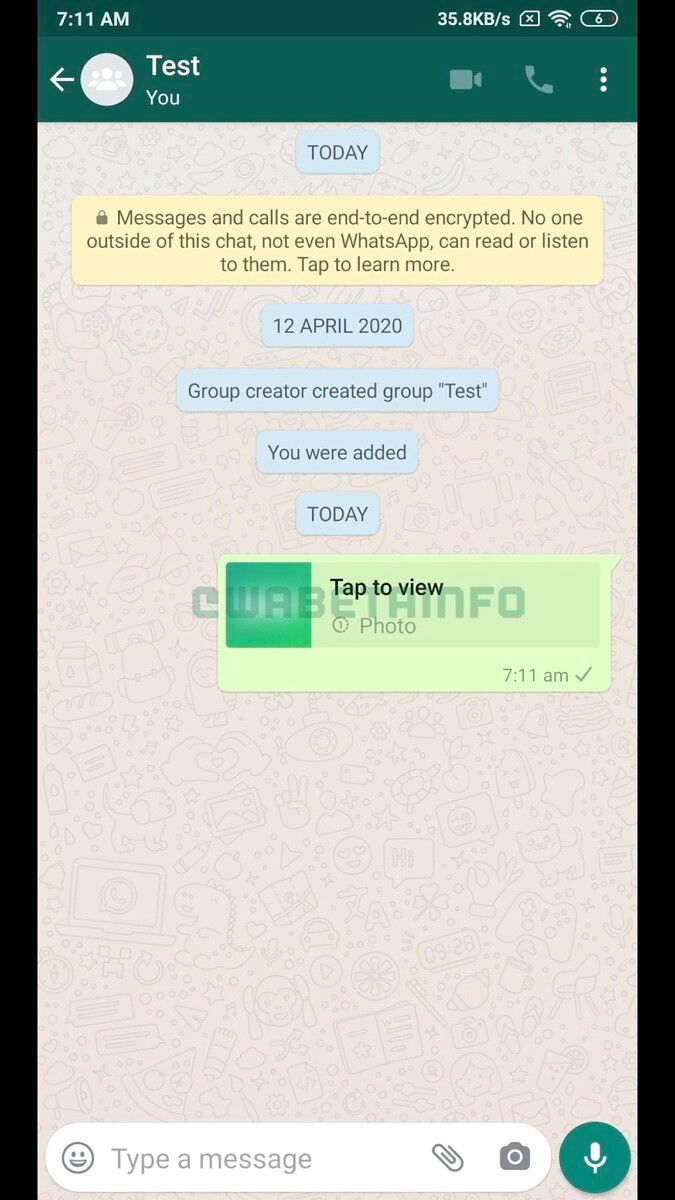
Reliable WhatsApp features tracker WABetaInfo recently spotted the upcoming feature and shared the following screenshots:

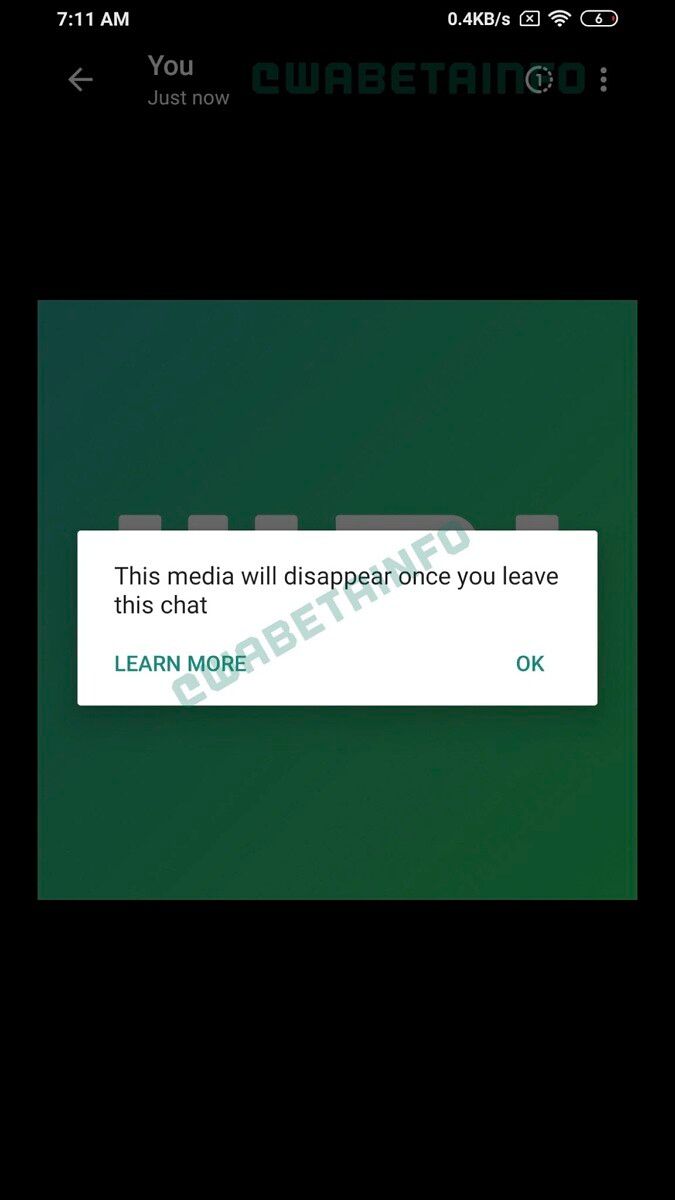
WhatsApp Self Destructing Images WhatsApp Self Destructing Images WhatsApp Self Destructing Images WhatsApp Self Destructing Images

As you can see, the feature will add a new toggle next to the text box in the image preview window. Tapping on this toggle will bring up a toast that states: “This media will disappear, once you leave this chat.” Users will then be able to share the image and it will automatically disappear as soon as they leave the chat. Those who receive a self-destructing image will also be alerted of its evanescence. Upon opening such an image, they will see a notification with the same message.

WABetaInfo further reveals that WhatsApp won’t allow users to export self-destructing images. However, the Facebook-owned messenger has not included any measures to prevent recipients from taking a screenshot of such an image. It also won’t alert the sender if the recipient takes a screenshot of the self-destructing image. This sort of half-baked implementation will render the feature completely useless.

While WhatsApp could add these security measures to deter recipients from taking a screenshot of the image before it expires, it’s quite unlikely. “Why?”, you might ask. Because the messenger still hasn’t added any such measures to prevent recipients from taking screenshots of disappearing messages. To me, it seems like WhatsApp is only adding these features to give users a false sense of privacy and stop them from migrating over to other messengers that not only offer such features but also have security measures in place to prevent recipients from saving the contents of disappearing messages and taking screenshots of self-destructing images.

The post WhatsApp is working on a new feature that will let you share self-destructing images appeared first on xda-developers.


from xda-developers https://ift.tt/309lqjD
via IFTTT

WhatsApp is working on a new feature that will let you share self-destructing images

After rolling out Disappearing Messages last year, WhatsApp is now working on a similar feature for images. The upcoming feature will let users share self-destructing images on the platform, which will disappear for both parties after a pre-defined time period.

Reliable WhatsApp features tracker WABetaInfo recently spotted the upcoming feature and shared the following screenshots:

WhatsApp Self Destructing Images WhatsApp Self Destructing Images WhatsApp Self Destructing Images WhatsApp Self Destructing Images

As you can see, the feature will add a new toggle next to the text box in the image preview window. Tapping on this toggle will bring up a toast that states: “This media will disappear, once you leave this chat.” Users will then be able to share the image and it will automatically disappear as soon as they leave the chat. Those who receive a self-destructing image will also be alerted of its evanescence. Upon opening such an image, they will see a notification with the same message.

WABetaInfo further reveals that WhatsApp won’t allow users to export self-destructing images. However, the Facebook-owned messenger has not included any measures to prevent recipients from taking a screenshot of such an image. It also won’t alert the sender if the recipient takes a screenshot of the self-destructing image. This sort of half-baked implementation will render the feature completely useless.

While WhatsApp could add these security measures to deter recipients from taking a screenshot of the image before it expires, it’s quite unlikely. “Why?”, you might ask. Because the messenger still hasn’t added any such measures to prevent recipients from taking screenshots of disappearing messages. To me, it seems like WhatsApp is only adding these features to give users a false sense of privacy and stop them from migrating over to other messengers that not only offer such features but also have security measures in place to prevent recipients from saving the contents of disappearing messages and taking screenshots of self-destructing images.

The post WhatsApp is working on a new feature that will let you share self-destructing images appeared first on xda-developers.


from xda-developers https://ift.tt/309lqjD
via IFTTT