LightBlog

lundi 8 février 2021

Google Photos gets two new gestures to help you zoom in on videos

Google Photos is inarguably one of the better performing apps in Google’s portfolio. As such, the company does a great job of keeping it fresh by adding new features with each successive update. Over the last few months alone, Google has added a bunch of new features to the app, including a new machine learning-powered feature to make your photos look 3D, a Maps timeline to help you sort your images by location, a tablet-friendly UI, and more. The company is now rolling out another useful feature to Google Photos, which will let you zoom in on videos using familiar gestures.

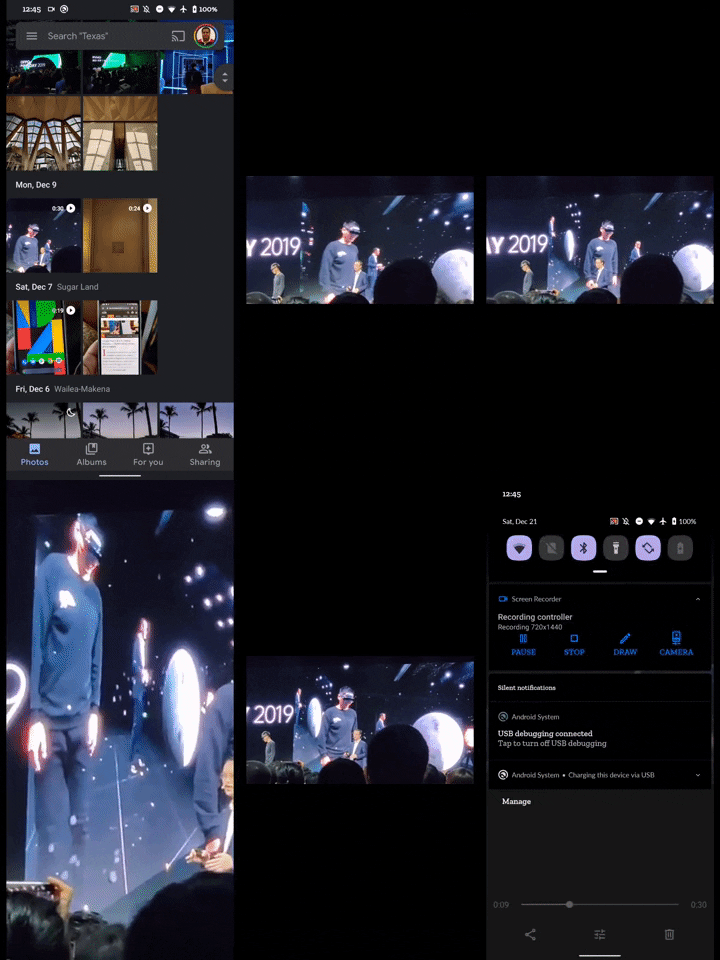
According to a recent post by u/WimpyTeenDude on Reddit, Google Photos now lets you zoom in on videos using two gestures. You can either double-tap on the video, as you would in the YouTube app, to make the video fill the screen, or you can use the pinch gesture to zoom in or out of the video. The new gestures seem to be rolling out via a server-side update, and they’re already available for some users on the latest Google Photos release. However, it isn’t live for all users at the moment. I tried the new gestures on my device with version 5.27 of the app, and they work as intended.

It’s worth noting that we first spotted these new gestures in an APK teardown of Google Photos v. 4.33 all the way back in December 2019. At the time, our Editor-in-Chief, Mishaal Rahman, had managed to enable the pinch-to-zoom gesture on the app manually. But we hadn’t spotted the new double-tap gesture back then.

In case you haven’t received the new gestures on your device so far, you can try updating to the latest Google Photos release by following the Play Store link below. If you still don’t get the gestures, you may have to wait a few days before they roll out on your device via a server-side update.

Google Photos (Free, Google Play) →

The post Google Photos gets two new gestures to help you zoom in on videos appeared first on xda-developers.


from xda-developers https://ift.tt/36QNDzF
via IFTTT

Google Photos gets two new gestures to help you zoom in on videos

Google Photos is inarguably one of the better performing apps in Google’s portfolio. As such, the company does a great job of keeping it fresh by adding new features with each successive update. Over the last few months alone, Google has added a bunch of new features to the app, including a new machine learning-powered feature to make your photos look 3D, a Maps timeline to help you sort your images by location, a tablet-friendly UI, and more. The company is now rolling out another useful feature to Google Photos, which will let you zoom in on videos using familiar gestures.

According to a recent post by u/WimpyTeenDude on Reddit, Google Photos now lets you zoom in on videos using two gestures. You can either double-tap on the video, as you would in the YouTube app, to make the video fill the screen, or you can use the pinch gesture to zoom in or out of the video. The new gestures seem to be rolling out via a server-side update, and they’re already available for some users on the latest Google Photos release. However, it isn’t live for all users at the moment. I tried the new gestures on my device with version 5.27 of the app, and they work as intended.

It’s worth noting that we first spotted these new gestures in an APK teardown of Google Photos v. 4.33 all the way back in December 2019. At the time, our Editor-in-Chief, Mishaal Rahman, had managed to enable the pinch-to-zoom gesture on the app manually. But we hadn’t spotted the new double-tap gesture back then.

In case you haven’t received the new gestures on your device so far, you can try updating to the latest Google Photos release by following the Play Store link below. If you still don’t get the gestures, you may have to wait a few days before they roll out on your device via a server-side update.

Google Photos (Free, Google Play) →

The post Google Photos gets two new gestures to help you zoom in on videos appeared first on xda-developers.


from xda-developers https://ift.tt/36QNDzF
via IFTTT

These are the best OnePlus 8T cases in February 2021

If you just ordered yourself a sweet new OnePlus 8T (and if not, check out our OnePlus 8T review), you’ll want to make sure you can prevent fingerprints, scratches, and dust. As usual, there’s a basic plastic case included with the phone–clear vinyl, flexible, snug-fitting, and emblazoned with a ‘frosted“ ‘Never Settle’ slogan running vertically up the right-hand side. It’s a nice touch that makes it more appealing than a simple clear case, but it also only offers limited protection. What if you want more? Here are some options. There are literally hundreds of phone cases on the market, but how do you know if you’re buying a delight or a dud? Allow us to help with our guide to the best OnePlus 8T cases!

    Official OnePlus 8T Sandstone Case

    Good old faithful

    The old classic is back. The sandstone is a rigid clip-on case which previous OnePlussers will probably be familiar with. The big attraction of this one is that it has a slightly rough-hewn surface which makes it easier to grip because let's face it, these smooth phones can be slippery little suckers. The Sandstone case is available in Black or Cyan.
    OnePlus 8T Karbon Bumper Case

    The best official case

    Old faithful of the OnePlus case world, the Karbon is at the top end of the official designs. The familiar hard case with subtle diagonal pin-stripes is designed to add the maximum in knock and drop protection, with the lowest profile, most sympathetic to your sexy new handset. That level of design comes at a premium of course, and the Karbon is available in black only.
    Otterbox Symmetry 8T Case

    Affordable premium protection

    Otterbox doesn’t always make the most exciting cases, but they’re tough as old boots, and we mean that in the nicest possible way. Largely, the Symmetry is similarly low-profile like the official Karbon case, but with the added bonus of slightly raised edges around the camera and touchscreen, which provides much better protection. Symmetry cases comply with DROP+, which is measured as 3x the protection of a military-grade case.
    dBrand OnePlus 8T Grip Case

    Perfect for customization

    One case. Many customizations. That’s the promise with dBrand, offering a 2mm thick case, including a design that encases the side buttons, protecting them whilst leaving more of the screen-free - an important consideration for a near bezel-less device. There are gripping edges down the sides which can be customized to your preferred color from a huge gamut and the whole thing reaches military protection ratings. dBrand also offers skins to be applied directly to the outer casing of your phone, but for full protection, the Grip Case is the way to go.
    UAG 8T Plasma Series Case

    Best for butterfingers

    Under Armor’s phone cases are among the toughest we’ve seen, combining a stiff translucent body with a rigid toughened frame. As a result, they do tend to add a bit of bulk to your phone, but even so, hardly any extra weight. As ever, it complies with Military Grade drop-protection standards and yet, thankfully, doesn't impact wireless charging or contactless payments. The translucent section is currently available in 'Ice' Blue which complements the handset perfectly. If you want big protection and don't mind making a bigger phone, this OnePlus 8T case should definitely be on your shortlist.
    Olixar OnePlus 8T Leather-Style Wallet Stand Case

    Great value with great features

    The first folio-style case to make our list, we've chosen Olixar's thanks to the company's track record for producing great value cases without compromising on quality. There are the usual carbon-fiber offerings on offer, but we've decided to shine a light on the Wallet Stand, thanks to its imitation leather, three card slots, plus one larger slot of notes or receipts, magnetic clasp, and full compatibility with wireless charging and NFC payments. The whole folio can be rejigged to create a stand for the phone - great for games and watching videos.
    Simicoo Leather Wallet Case

    Swiss Army Knife of Cases

    This cowhide leather Simicoo product can be best described as a 'handbag' (or 'manbag'). The phone is kept in a matching slimline case that tucks into a specially designed slot in the wallet section. That wallet section has 11 slots to cover everything from notes and credit cards to your earbuds. There's also a magnetic clasp, whilst the crucial pockets have zippers and there's still room for the whole thing to become a kickstand. It won't show off your phone, but if you want an all-in-one solution for your stuff, this could be perfect. It's available in a choice of Blue, Black, Brown or Red (which is actually pink).
    Tereyi OnePlus 8T Ultra-Slim Patterened Silicone Case

    Best for Style over Substance

    We chose this one purely to show you that not all cases for the OnePlus 8T are one color! These Tereyi cases are simple, transparent silicone cases, similar to the one you'll find in the box with your phone. But if you don't want to walk around for the next year with 'Never Settle' across the back of your phone, there are six decal designs to choose from - baby elephants, pandas, kittens, and of course the ubiquitous 'Live Laugh Love' slogan. Not the highest spec cases on this list, more one for the Insta-crowd.
    Qitayo Crystal Clear Case

    Show Off Your Phone

    If you like seeing the back of your phone, you'll definitely want a clear case. Qitayo's case is thin and clear, giving you a small amount of protection while still being able to see your OnePlus 8T in its full glory. It's also the cheapest in this list, so give it a go for something simple and sweet. You get a fairly decent level of protection, and you can let your phone retain most of its character. While not included, this case also might work out if you like to rock a skin but want some protection sometimes when you go out.
    Spigen Ultra Hybird Case

    Durable and Thin

    Looking for something that will protect against most normal smartphone wear-and-tear, but don't want to bulk out your phone? Get the of both worlds with the Spigen Ultra Hybrid case. This case has a nice protective bumper, but isn't so thick that it'll get in your way. The sweet spot between two worlds.
    Ringke Fusion-X Case

    You'll Never See It

    Like camo? You'll love Ringke's Fusion-X case. This durable case has a unique semi-transparent design that lets parts of your OnePlus 8T's exterior peek through the camo design. It's pretty neat when you look at it, but there are also clear versions of the case if camo isn't your thing.
    Nillkin CamShield Case

    Protect the Lenses

    Most cases don't do a very good job of protecting your camera lenses. They can get scratched too! Nillkin's CamShield case, however, has a slider on the back that will help you protect your camera when not in use. When you want to take a picture, just slide the protector away, and you're good to go!

Our favorite pick of all the cases is the OnePlus 8T Karbon Bumper case. The Karbon series has been around since the early days of OnePlus and it’s proven consistently to be reliable. If you have slippery fingers and couldn’t transport an egg in the egg-and-spoon race at school, you’ll want to pick up the Otterbox Symmetry Case. If you want something a bit more unique, check out the Simicoo Detachable Leather Wallet!

The OnePlus 8T also ships with a basic clear silicon case, which should serve most users for the initial week of use. But as is the nature with clear silicon cases, it does develop a yellow tint over time as you use it naturally in the sunlight. So it’s best that you do explore some options in case you want some protection for your phone. These cases that we recommend should hold the fort well and let you use your phone with fewer worries. So grab one and ensure that you don’t get any serious damage to your brand new phone!

The post These are the best OnePlus 8T cases in February 2021 appeared first on xda-developers.


from xda-developers https://ift.tt/3myCAAD
via IFTTT

These are the best OnePlus 8T cases in February 2021

If you just ordered yourself a sweet new OnePlus 8T (and if not, check out our OnePlus 8T review), you’ll want to make sure you can prevent fingerprints, scratches, and dust. As usual, there’s a basic plastic case included with the phone–clear vinyl, flexible, snug-fitting, and emblazoned with a ‘frosted“ ‘Never Settle’ slogan running vertically up the right-hand side. It’s a nice touch that makes it more appealing than a simple clear case, but it also only offers limited protection. What if you want more? Here are some options. There are literally hundreds of phone cases on the market, but how do you know if you’re buying a delight or a dud? Allow us to help with our guide to the best OnePlus 8T cases!

    Official OnePlus 8T Sandstone Case

    Good old faithful

    The old classic is back. The sandstone is a rigid clip-on case which previous OnePlussers will probably be familiar with. The big attraction of this one is that it has a slightly rough-hewn surface which makes it easier to grip because let's face it, these smooth phones can be slippery little suckers. The Sandstone case is available in Black or Cyan.
    OnePlus 8T Karbon Bumper Case

    The best official case

    Old faithful of the OnePlus case world, the Karbon is at the top end of the official designs. The familiar hard case with subtle diagonal pin-stripes is designed to add the maximum in knock and drop protection, with the lowest profile, most sympathetic to your sexy new handset. That level of design comes at a premium of course, and the Karbon is available in black only.
    Otterbox Symmetry 8T Case

    Affordable premium protection

    Otterbox doesn’t always make the most exciting cases, but they’re tough as old boots, and we mean that in the nicest possible way. Largely, the Symmetry is similarly low-profile like the official Karbon case, but with the added bonus of slightly raised edges around the camera and touchscreen, which provides much better protection. Symmetry cases comply with DROP+, which is measured as 3x the protection of a military-grade case.
    dBrand OnePlus 8T Grip Case

    Perfect for customization

    One case. Many customizations. That’s the promise with dBrand, offering a 2mm thick case, including a design that encases the side buttons, protecting them whilst leaving more of the screen-free - an important consideration for a near bezel-less device. There are gripping edges down the sides which can be customized to your preferred color from a huge gamut and the whole thing reaches military protection ratings. dBrand also offers skins to be applied directly to the outer casing of your phone, but for full protection, the Grip Case is the way to go.
    UAG 8T Plasma Series Case

    Best for butterfingers

    Under Armor’s phone cases are among the toughest we’ve seen, combining a stiff translucent body with a rigid toughened frame. As a result, they do tend to add a bit of bulk to your phone, but even so, hardly any extra weight. As ever, it complies with Military Grade drop-protection standards and yet, thankfully, doesn't impact wireless charging or contactless payments. The translucent section is currently available in 'Ice' Blue which complements the handset perfectly. If you want big protection and don't mind making a bigger phone, this OnePlus 8T case should definitely be on your shortlist.
    Olixar OnePlus 8T Leather-Style Wallet Stand Case

    Great value with great features

    The first folio-style case to make our list, we've chosen Olixar's thanks to the company's track record for producing great value cases without compromising on quality. There are the usual carbon-fiber offerings on offer, but we've decided to shine a light on the Wallet Stand, thanks to its imitation leather, three card slots, plus one larger slot of notes or receipts, magnetic clasp, and full compatibility with wireless charging and NFC payments. The whole folio can be rejigged to create a stand for the phone - great for games and watching videos.
    Simicoo Leather Wallet Case

    Swiss Army Knife of Cases

    This cowhide leather Simicoo product can be best described as a 'handbag' (or 'manbag'). The phone is kept in a matching slimline case that tucks into a specially designed slot in the wallet section. That wallet section has 11 slots to cover everything from notes and credit cards to your earbuds. There's also a magnetic clasp, whilst the crucial pockets have zippers and there's still room for the whole thing to become a kickstand. It won't show off your phone, but if you want an all-in-one solution for your stuff, this could be perfect. It's available in a choice of Blue, Black, Brown or Red (which is actually pink).
    Tereyi OnePlus 8T Ultra-Slim Patterened Silicone Case

    Best for Style over Substance

    We chose this one purely to show you that not all cases for the OnePlus 8T are one color! These Tereyi cases are simple, transparent silicone cases, similar to the one you'll find in the box with your phone. But if you don't want to walk around for the next year with 'Never Settle' across the back of your phone, there are six decal designs to choose from - baby elephants, pandas, kittens, and of course the ubiquitous 'Live Laugh Love' slogan. Not the highest spec cases on this list, more one for the Insta-crowd.
    Qitayo Crystal Clear Case

    Show Off Your Phone

    If you like seeing the back of your phone, you'll definitely want a clear case. Qitayo's case is thin and clear, giving you a small amount of protection while still being able to see your OnePlus 8T in its full glory. It's also the cheapest in this list, so give it a go for something simple and sweet. You get a fairly decent level of protection, and you can let your phone retain most of its character. While not included, this case also might work out if you like to rock a skin but want some protection sometimes when you go out.
    Spigen Ultra Hybird Case

    Durable and Thin

    Looking for something that will protect against most normal smartphone wear-and-tear, but don't want to bulk out your phone? Get the of both worlds with the Spigen Ultra Hybrid case. This case has a nice protective bumper, but isn't so thick that it'll get in your way. The sweet spot between two worlds.
    Ringke Fusion-X Case

    You'll Never See It

    Like camo? You'll love Ringke's Fusion-X case. This durable case has a unique semi-transparent design that lets parts of your OnePlus 8T's exterior peek through the camo design. It's pretty neat when you look at it, but there are also clear versions of the case if camo isn't your thing.
    Nillkin CamShield Case

    Protect the Lenses

    Most cases don't do a very good job of protecting your camera lenses. They can get scratched too! Nillkin's CamShield case, however, has a slider on the back that will help you protect your camera when not in use. When you want to take a picture, just slide the protector away, and you're good to go!

Our favorite pick of all the cases is the OnePlus 8T Karbon Bumper case. The Karbon series has been around since the early days of OnePlus and it’s proven consistently to be reliable. If you have slippery fingers and couldn’t transport an egg in the egg-and-spoon race at school, you’ll want to pick up the Otterbox Symmetry Case. If you want something a bit more unique, check out the Simicoo Detachable Leather Wallet!

The OnePlus 8T also ships with a basic clear silicon case, which should serve most users for the initial week of use. But as is the nature with clear silicon cases, it does develop a yellow tint over time as you use it naturally in the sunlight. So it’s best that you do explore some options in case you want some protection for your phone. These cases that we recommend should hold the fort well and let you use your phone with fewer worries. So grab one and ensure that you don’t get any serious damage to your brand new phone!

The post These are the best OnePlus 8T cases in February 2021 appeared first on xda-developers.


from xda-developers https://ift.tt/3myCAAD
via IFTTT

This may be our first look at Android 12, Google’s next Android OS

Google is set to release its next major version of Android — Android 12 — later this year, following a series of Developer Previews and Betas that will likely start rolling out later this month. Ahead of the stable release, Google shares documentation and source code with its major partners in order to give them time to prepare for the release. Today, an alleged early draft of a document that Google made to summarize changes in Android 12 leaked online, and screenshots showcasing the new UI and functional changes were extracted from the document. While we can’t fully confirm the authenticity of these screenshots, we have seen evidence that the document in question is, in fact, real, and furthermore that these screenshots indeed came from said document. With that in mind, here’s what we’re seeing right now.

One of the alleged Android 12 screenshots showcases a new notifications panel UI. The transparency is gone and replaced with an opaque light beige background, though the color likely depends on the current theme and/or whether or not Dark Mode is enabled. The separation between the “conversations” section with the rest of the notifications is still there, and the rounded corners of each notification are now more pronounced. The number of Quick Settings tiles that are shown when the notification panel is partially expanded has been reduced from 6 to 4, causing each icon to become larger. The positions of the date and clock have been swapped, while there are also new privacy indicators in the top right-hand corner.

Android 12 notification panel

Speaking of which, it seems that Google may add new privacy features in Android 12. In the new Android version, you may receive a warning in the form of status bar indicators whenever an app is using the camera or microphone. Tapping on these status bar icons may show a pop-up at the top of the screen that tells you exactly which app(s) are using the camera or microphone. Google has been testing these privacy chips for over 2 years now, so it would be nice to see them finally make an appearance in Android 12.

Related to this change is an alleged revamp to the “Privacy” settings in Android 12. The new Privacy settings may contain toggles to disable the camera and mute the microphone entirely, in addition to toggling location access. You can already disable all sensors on your device by using the “sensors off” Quick Setting tile, but this tile can only be shown once you enable Developer Options. Android 12 may make these sensor toggles more user-accessible by placing them in the Privacy settings.
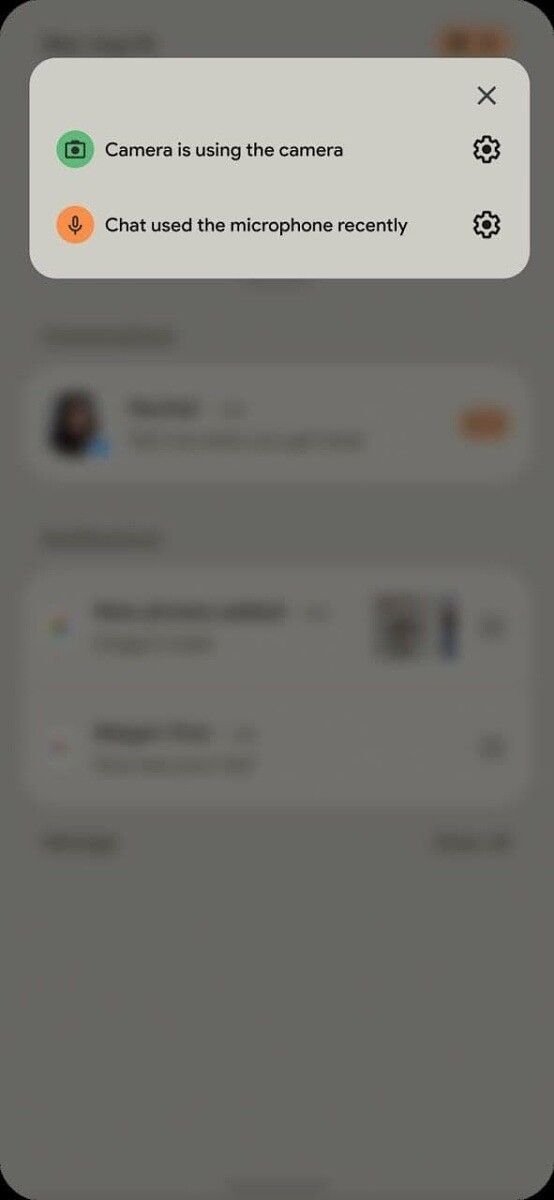
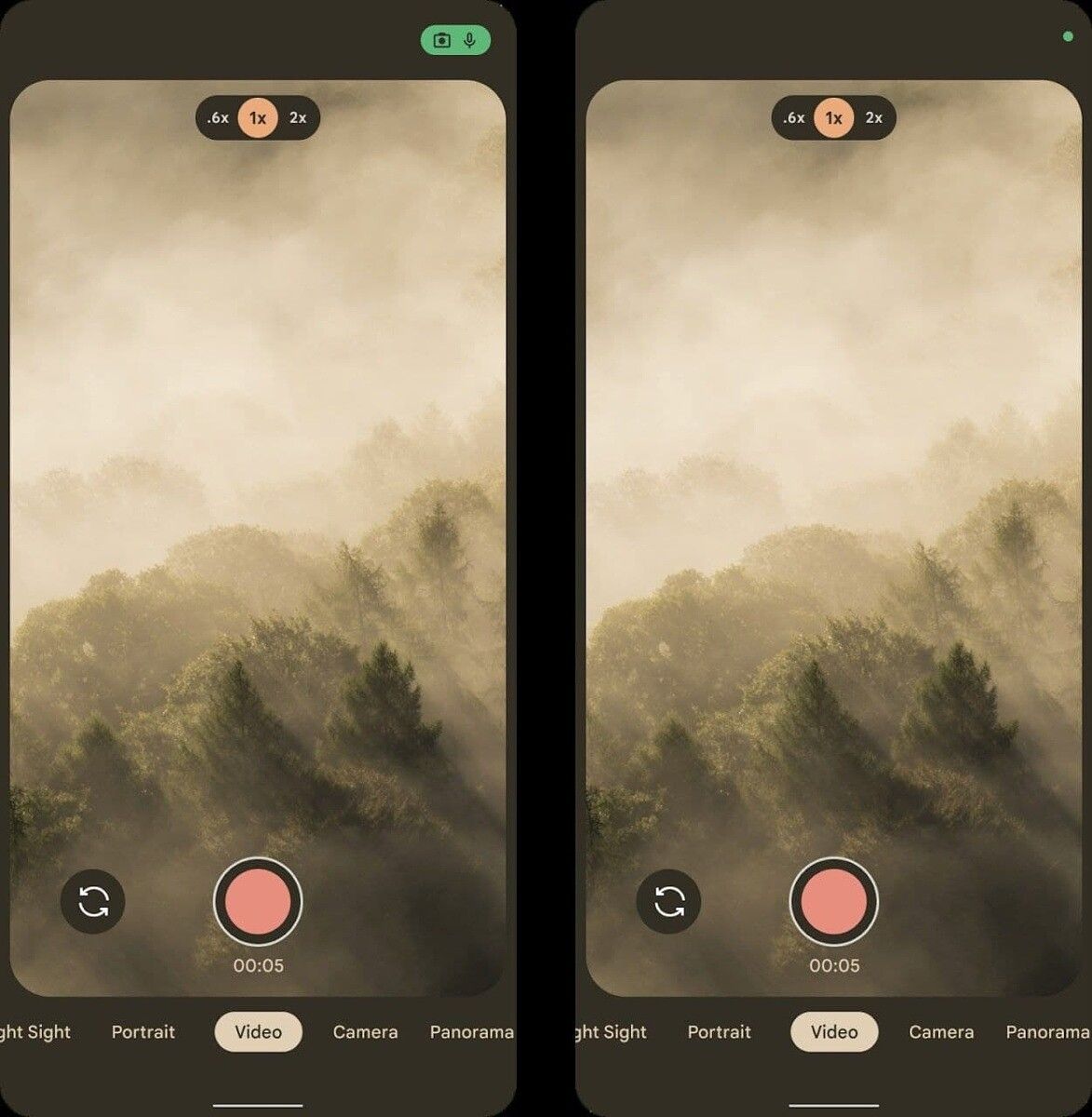
Android 12 camera and microphone indicator Android 12 privacy settings

Lastly, we have what appears to be a new addition to Android’s widget selection. When Apple recently added widgets to iOS, we argued that they’re better than Android’s implementation in some ways. While we don’t know if Google is planning a major overhaul of widgets, it does look like they at least plan to make a few changes. In a few screenshots, we can see an alleged new “Conversations” widget in Android 12 that may highlight recent messages, missed calls, or activity statuses. The widget that’s shown is small and only seems to be big enough to accommodate showing one message/call/status at a time in its smallest size.
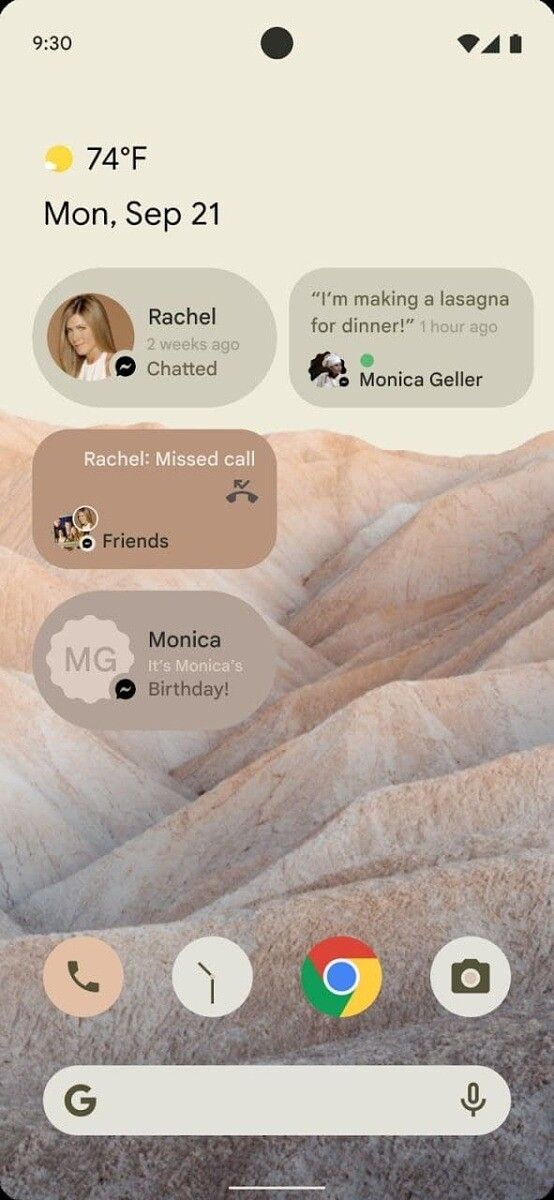
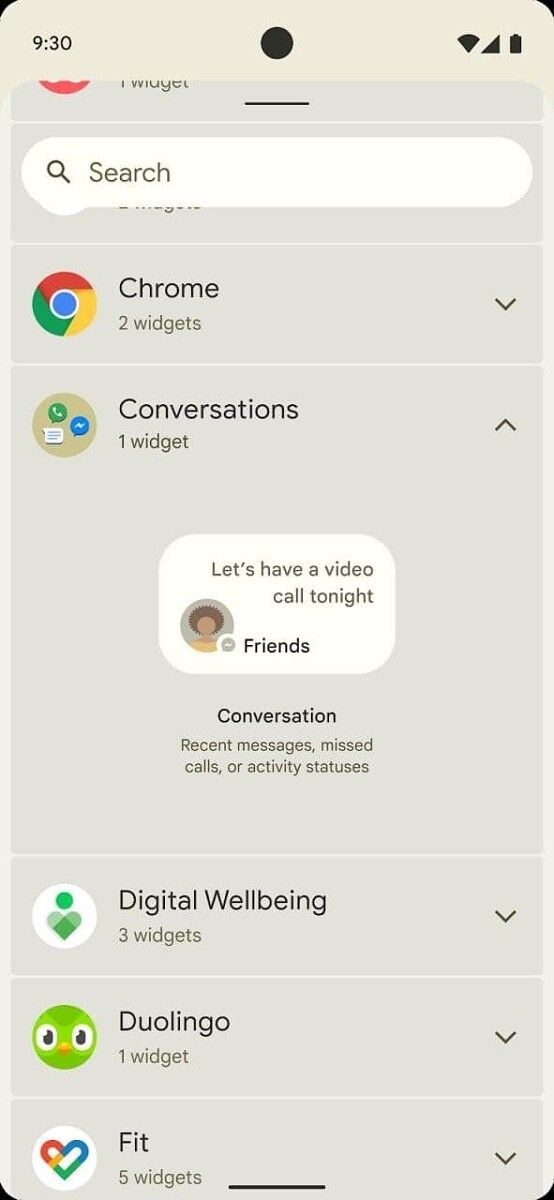
Android 12 conversation widget Android 12 conversation widget

According to a screenshot of the document we viewed, Google is planning to mandate the inclusion of camera and microphone indicators in Android 12. These indicators must be shown prominently at the top of the screen, always be visible whenever the camera or microphone is being accessed, and must have the same color across the ecosystem. We don’t know what other changes will be mandated until we get our hands on the full Compatibility Definition Document (CDD) for Android 12.

Again, since we haven’t received the full document in question, we can’t 100% verify the authenticity of these images. However, the screenshot we received of the document comes from a trusted source who has, in recent times, shared other confidential documents with us. If we receive more evidence corroborating these alleged screenshots of Android 12, we’ll follow-up in a separate post. We also asked Google to comment on this leak and will update this article if we hear back.

If you’re interested in learning more about what’s in store in the next major Android release, check out our Android 12 tag. We expect there’ll be a better theming system, decoupled emojis, an app hibernation feature, and many more features that have yet to be uncovered. When Google unveils its first Developer Preview in the next few weeks, don’t expect to see all of these changes show up. That’s because the builds that Google releases prior to its I/O developer conference tend to miss out on a lot of the more interesting user-facing features.

Thanks to XDA Senior Member RKBD for bringing these images to our attention, and thanks to our tipster (who wishes to remain anonymous) for their help in corroborating these images!

The post This may be our first look at Android 12, Google’s next Android OS appeared first on xda-developers.


from xda-developers https://ift.tt/3q3Xeuz
via IFTTT

OmniROM 11 based on Android 11 is here for the ASUS ZenFone 6 and Redmi K20 Pro/Xiaomi Mi 9T Pro

As the flood of Android 11 custom ROMs continues to flow through, more and more devices are seeing the fruits of Google’s latest and greatest version of Android. We’ve seen everything from an Android 11 GSI being made available for Project Treble-enabled devices to a device booting Android 11, which was never intended to run Android in the first place. The custom ROM ecosystem is rather large and diverse, but if you consider yourself a true flashaholic, then the name “OmniROM” should ring a bell. The team behind this popular custom ROM started rebasing the project on top of Android 11 since a while, and they are now confident enough to publish official weekly builds. The first set of OmniROM 11 builds based on Android 11 are now available for the ASUS ZenFone 6 and the Redmi K20 Pro/Xiaomi Mi 9T Pro.

ASUS ZenFone 6 XDA Forums ||| Xiaomi Mi 9T Pro/Redmi K20 Pro XDA Forums

Of the initial two additions to the OmniROM 11 build roster, the ZenFone 6 (sold as the ASUS 6Z in India) has already received its Android 11 update back in December 2020. And now that an official build of OmniROM is available for the device, other custom ROM developers can use it as a base for their own work. Hopefully, the Android 11 custom development scene starts to pick up for the device from here out. This build is maintained by XDA Senior Member micky387.

OmniROM 11 for the ASUS ZenFone 6: Download || XDA Discussion Thread

The Xiaomi Mi 9T Pro, which is also known as the Redmi K20 Pro in some regions, has also picked up an official build of OmniROM 11 thanks to XDA Senior Member scanno. Before you proceed to install the ROM, make sure your phone is bootloader unlocked and you have flashed the latest stable MIUI firmware.

OmniROM 11 for the Xiaomi Mi 9T Pro/Redmi K20 Pro: Download || XDA Discussion Thread

As it’s the case with all initial custom ROM releases, the preliminary device roster for OmniROM based on Android 11 will start out small and will expand with time as maintainers and developers complete the device bring-up process for their respective devices.

The post OmniROM 11 based on Android 11 is here for the ASUS ZenFone 6 and Redmi K20 Pro/Xiaomi Mi 9T Pro appeared first on xda-developers.


from xda-developers https://ift.tt/39ZSArW
via IFTTT

gReader is back from the dead with a new upate after nearly 4 years

gReader, a popular RSS reader app, is receiving a new update on Google Play Store as the app marks an official return after a near 4 year hiatus. The v4.0.3 was the last update to the app and that was rolled out all the way back in March 2017.

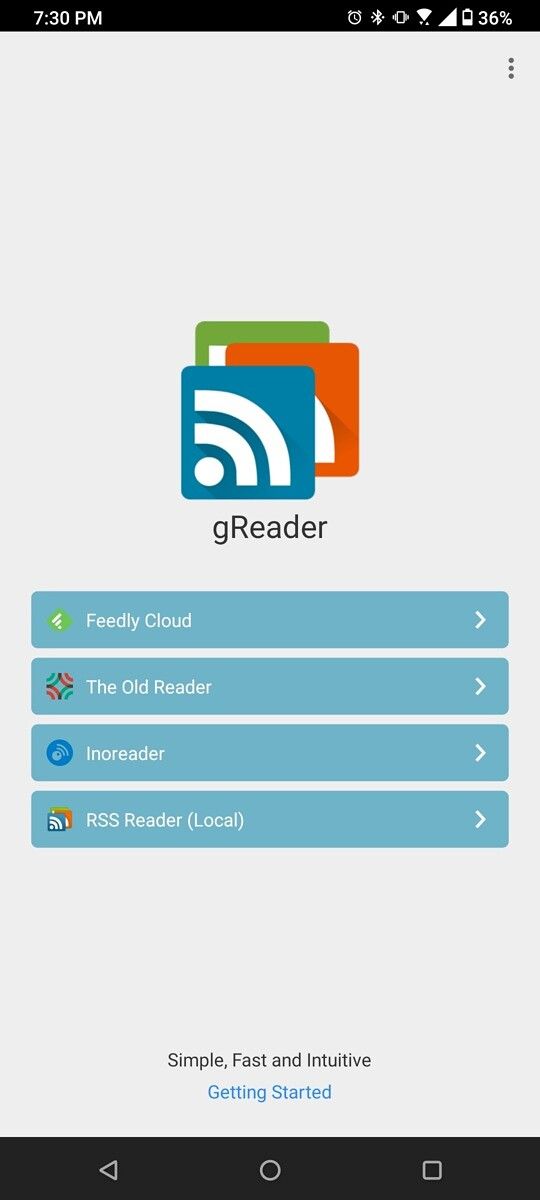
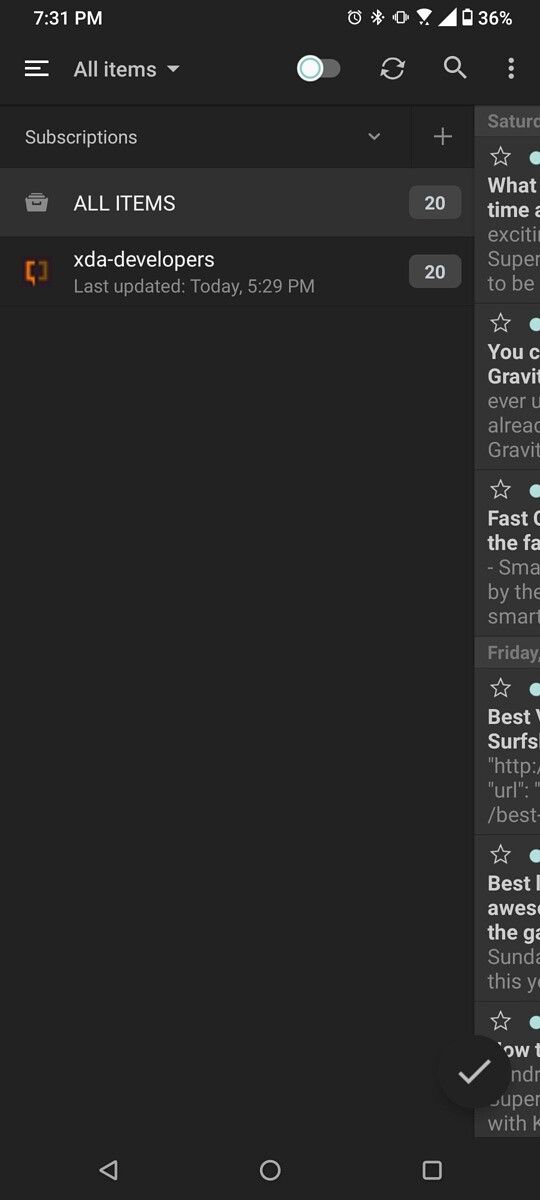
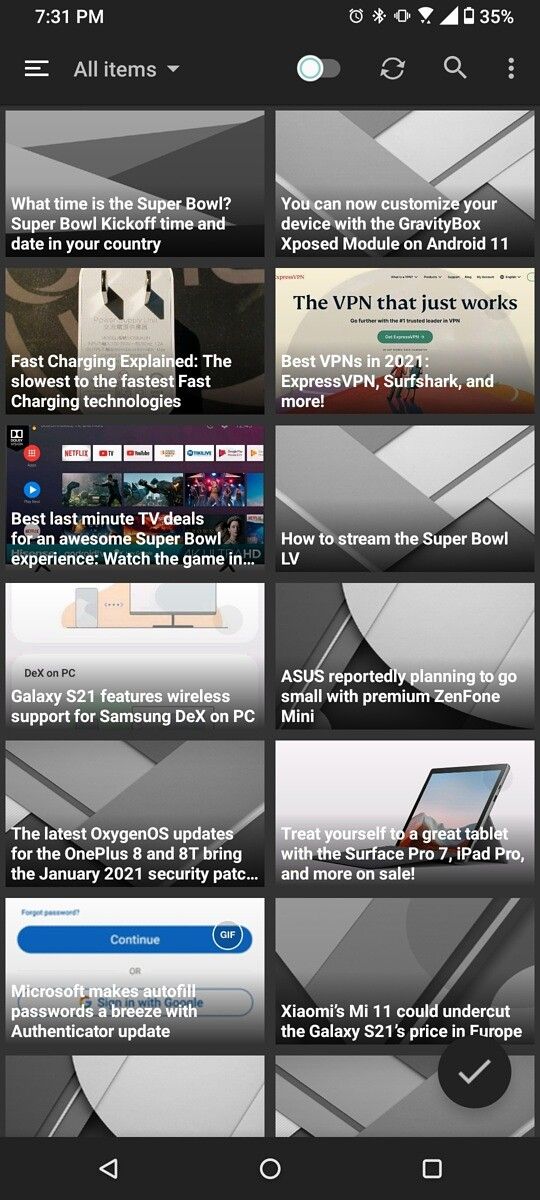
This new update (via Reddit), v5.0.1, brings much-needed features and improvements to the RSS reader, including a dark mode for article view, better video and podcast playback, and bug fixes. In case you’re not familiar, the gReader is a free RSS client that lets you organize and read all your favorite news sources in one place. You can configure it with your Feedly account, The Olde Reader, or Inoreader, with the option to organize your feed in a list, grid, or card layout.

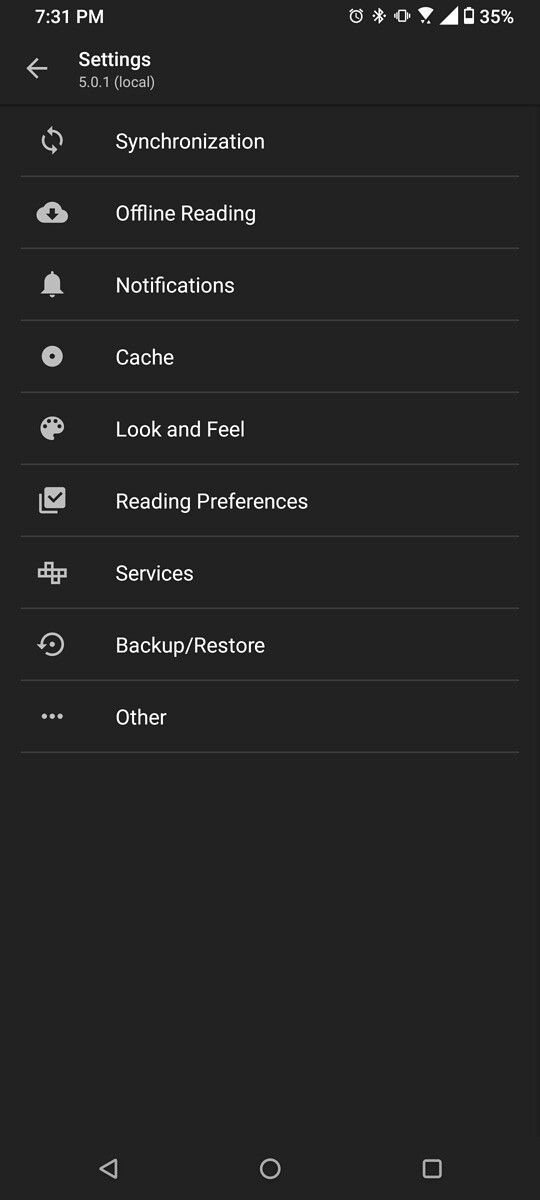
gReader start page gReader home gReader feed gReader card layout

gReader 5.0.1 changelog:

  • Newest gReader release with many improvements and bug fixes
  • Better video playback
  • Better podcast playback
  • Dark mode for article view
  • Bug fixes and improvements

At its prime, gReader was one of the most popular RSS clients out there. But over time, the lack of app development saw users migrating to alternative options such as Inoreader and Feedly. With this new update, gReader is here to remind us that it’s still alive and kicking, ready to win back users it had once lost while also aiming to make new fans down the road with its simple and intuitive design.

The gReader shot to popularity after the demise of Google Reader. To this day, it continues to remain a top choice for anyone who wants a simple, no-frills RSS client. It’s not as feature-rich or modern looking as something like Inoreader but gets the job done pretty well.

The gReader is free to use in its ad-supported version. It also has a premium version that removes ads and unlocks additional features such as support for podcasts, voice reading, and custom notifications. The new update is live on the Google Play Store and you can grab it from the link below.

gReader | Feedly | News | RSS (Free+, Google Play) →

The post gReader is back from the dead with a new upate after nearly 4 years appeared first on xda-developers.


from xda-developers https://ift.tt/3rCE67l
via IFTTT