LightBlog

jeudi 4 février 2021

The Vivo X60 Pro Plus with the Zeiss Camera yields impressive night shots

Just as 2020 was coming to a close, Vivo announced its Vivo X60 series, which at the time of its December 29 launch included only the standard X60 and X60 Pro. Ahead of the Chinese New Year, Vivo added another model to the X60 lineup: the premium Vivo X60 Pro Plus (or as Vivo styles it, Pro+).

Since the Vivo X60 Pro Plus is currently only available in China, we do not have an official review unit yet. However, Hong Kong importer Trinity Electronics was kind enough to loan us a China unit for a brief hands-on test. During my brief hands-on, I wanted to check out the new camera system using Zeiss optics on the Vivo X60 Pro Plus. I also wanted to try out Vivo’s new Android skin — OriginOS — which looks a lot like iOS.

Vivo X60 Pro Plus in tanned leather

Vivo X60 series: Specifications

Specifications Vivo X60 Vivo X60 Pro Vivo X60 Pro+
Build
  • Aluminum mid-frame
  • Gorilla Glass front and back
  • Aluminum mid-frame
  • Gorilla Glass front and back
  • Aluminum mid-frame
  • Vegan leather back or gorilla glass
  • Gorilla Glass front
Dimensions & Weight
  • 159.6mm x 75.01mm x 7.36
  • 176.2g
  • 158.6 x 73.2 x 7.59mm
  • 178 grams
  • 158.6 x 73.35 x 9.1 mm
  • 190.6 grams
Display
  • 6.56-inch FHD+ E3 AMOLED
  • 120Hz screen refresh rate
  • Flat display
  • Centered-hole punch
  • HDR10+
  • 6.56-inch FHD+ E3 AMOLED
  • 120Hz screen refresh rate
  • Curved display
  • Centered-hole punch
  • HDR10+
  • 6.56-inch FHD+ E3 AMOLED
  • 120Hz screen refresh rate
  • Curved display
  • Centered-hole punch
  • HDR10+
SoC
  • Samsung Exynos 1080
    • 1x Cortex-A78 @ 2.8GHz
    • 2x Cortex-A78 @ 2.6GHz
    • 4x Cortex-A55 @ 2.0GHz
  • Mali-G78 GPU
  • 5nm EUV-based FinFET process
  • Samsung Exynos 1080
    • 1x Cortex-A78 @ 2.8GHz
    • 2x Cortex-A78 @ 2.6GHz
    • 4x Cortex-A55 @ 2.0GHz
  • Mali-G78 GPU
  • 5nm EUV-based FinFET process
  • Qualcomm Snapdragon 888:
    • 1x Kryo 680 Prime Core @ 2.84GHz
    • 3x Kryo 680 Performance Cores @ 2.4GHz
    • 4x Kryo 680 Efficiency Cores @ 1.8GHz
RAM & Storage
  • 8GB/12GB RAM
  • 128GB/256GB flash storage
  • UFS 3.1
  • 12GB RAM
  • 256GB flash storage
  • UFS 3.1
  • 8GB + 128GB
  • 12GB + 256GB
  • UFS 3.1
Battery & Charging
  • 4,200mAh
  • 33W fast charger (inside the box)
  • 4,300mAh
  • 33W fast charger (inside the box)
  • 4,200mAh
  • 33W fast charger (inside the box)
Security Optical In-Display Fingerprint Scanner Optical In-Display Fingerprint Scanner Optical In-Display Fingerprint Scanner
Rear Camera(s)
  • Primary: 48MP Sony IMX598 custom sensor, f/1.79, four-axis OIS
  • Secondary: 13MP telephoto, f/2.46, 2x optical zoom
  • Tertiary: 13MP ultra-wide-angle, 120° FoV, f/2.2
    • Supports Macro photography
  • Zeiss optics
  • Primary: 48MP Sony IMX598 custom sensor, f/1.79, four-axis OIS
  • Secondary: 13MP telephoto, f/2.46, 2x optical zoom
  • Tertiary: 13MP ultra-wide-angle, 120° FoV, f/2.2
    • Supports Macro photography
  • Tertiary: 8MP periscope, 5x optical zoom
  • Zeiss optics
  • Primary: 50MP GN1, f/1.57, 1/1.3″ sensor, four-axis OIS
  • Secondary: 48MP gimbal ultra-wide camera
  • Tertiary: 32MP telephoto 3x optical zoom lens
  • Tertiary: 8MP periscope, 5x optical zoom
  • Zeiss optics
Front Camera(s) 32MP, f/2.45 32MP, f/2.45 32MP, f/2.45
Port(s) USB 3.2 Type-C USB 3.2 Type-C USB 3.2 Type-C
Audio Mono speaker  Mono speaker Mono speaker
Connectivity
  • 5G
  • Bluetooth 5.1
  • Dual-band Wi-Fi
  • NFC
  • Reverse wired charging
  • 5G
  • Bluetooth 5.1
  • Dual-band Wi-Fi
  • NFC
  • Reverse wired charging
  • 5G
  • Bluetooth 5.1
  • Dual-band Wi-Fi
  • NFC
  • Reverse wired charging

Vivo X60 Pro Plus: Design and hardware

For those who’ve held or seen up close a Vivo X50 Pro from last year, the Vivo’s X60 Pro Plus will look and feel familiar. Vivo’s kept mostly the same design language — curved front and back, with flat top and bottom that allows the phone to stand on its own. Just like the Vivo X50 Pro Plus last year, the X60 Pro Plus comes in a “vegan leather” back that feels nice but not quite premium. I say that because although I find the texture grippy, it feels slightly plasticky instead of the warm/soft to the touch texture of genuine leather. Still, I prefer this back to yet another gradient glowy glass slabs that Vivo has used on most devices over the past couple of years.

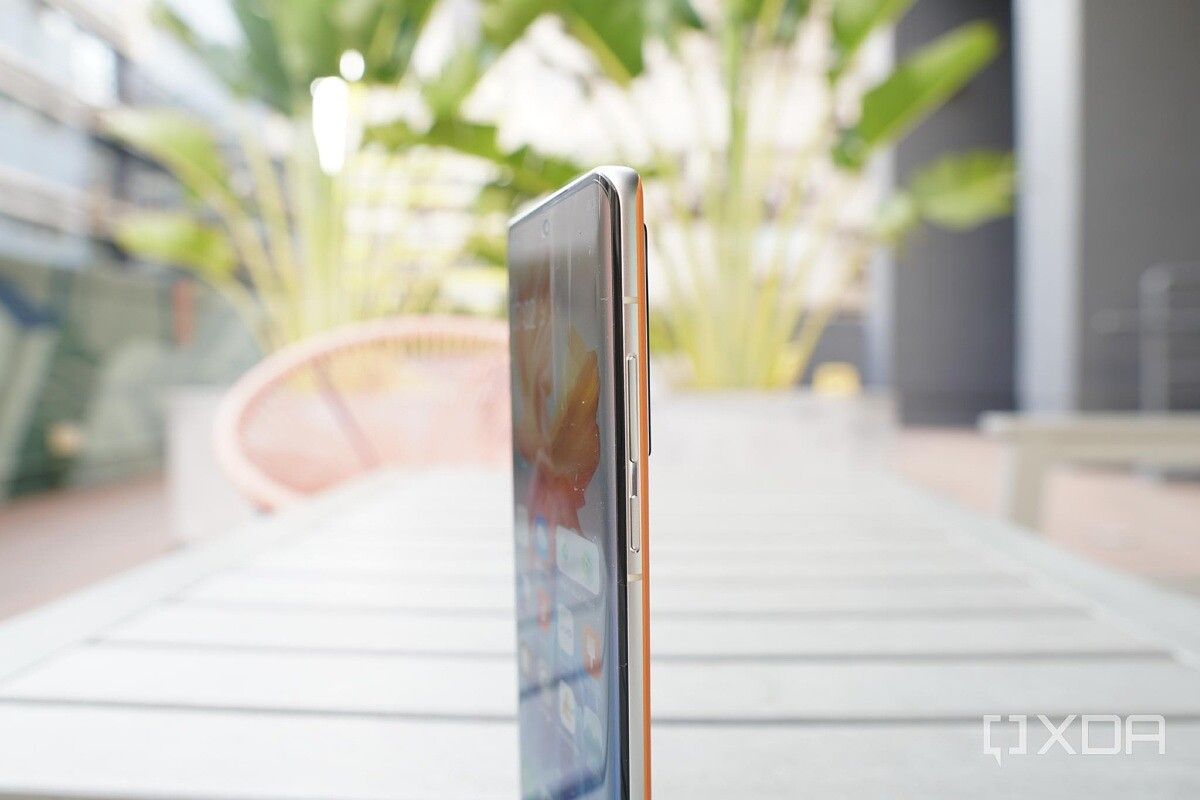
Vivo X60 Pro Plus

Vivo X60 Pro Plus in tanned leather Vivo X60 Pro Plus in tanned leather Vivo X60 Pro Plus leather back Vivo X60 Pro Plus leather back

The X60 Pro Plus stands almost as tall as the S21 Ultra, but it’s thinner and lighter, making it slightly easier to hold.

Unlike the standard X60 and X60 Pro, which run on Samsung’s Exynos 1080, the X60 Pro Plus is powered by the Qualcomm Snapdragon 888 (with either 8GB or 12GB of RAM), so it’s not going to be lacking in processing power. The phone has only one single bottom-firing speaker, however, so it lags behind virtually every Android flagship released in the last half-year.


Vivo X60 Pro Plus: The cameras

Last year’s Vivo X50 Pro grabbed plenty of headlines for its “gimbal camera system,” which essentially adds a third axis of stabilization to a typical smartphone OIS system, to compensate for the forward and the backward movement. Ironically, the technically higher-tier X50 Pro Plus did not offer the gimbal camera, because it used Samsung’s GN1 sensor which was too heavy for the gimbal.

It’s the same story here: the X60 Pro Plus I’m testing does not have that gimbal system for its main camera. However, Vivo has moved the gimbal system over to the 48MP ultra-wide sensor instead.

The camera module of the Vivo X60 Pro Plus

If I look at the back of the phone while moving slightly, I can actually see the ultra-wide lens shift side-to-side, it’s a nice visual touch. But just like last year’s X50 Pro Plus, the gimbal system brings only marginal improvements in stabilization to the already excellent EIS found in most phones.

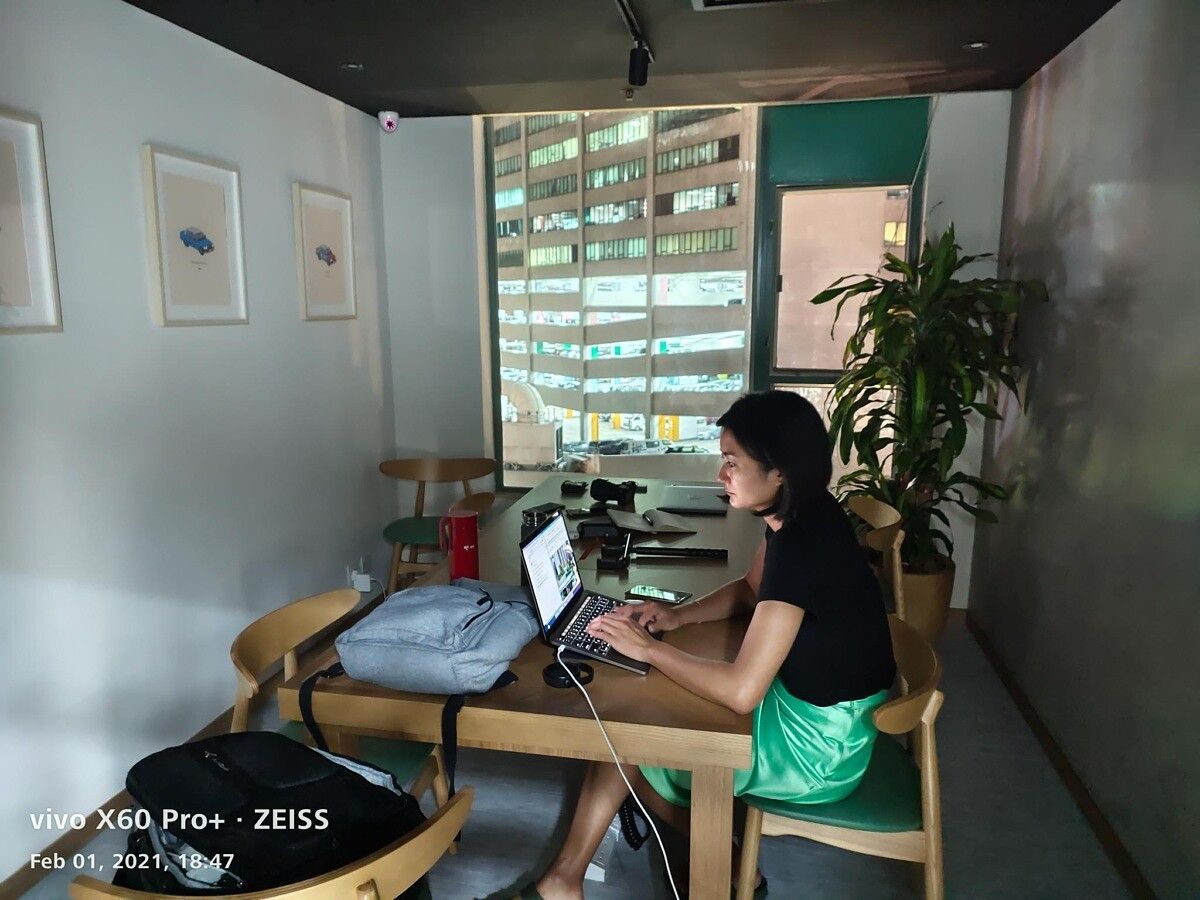
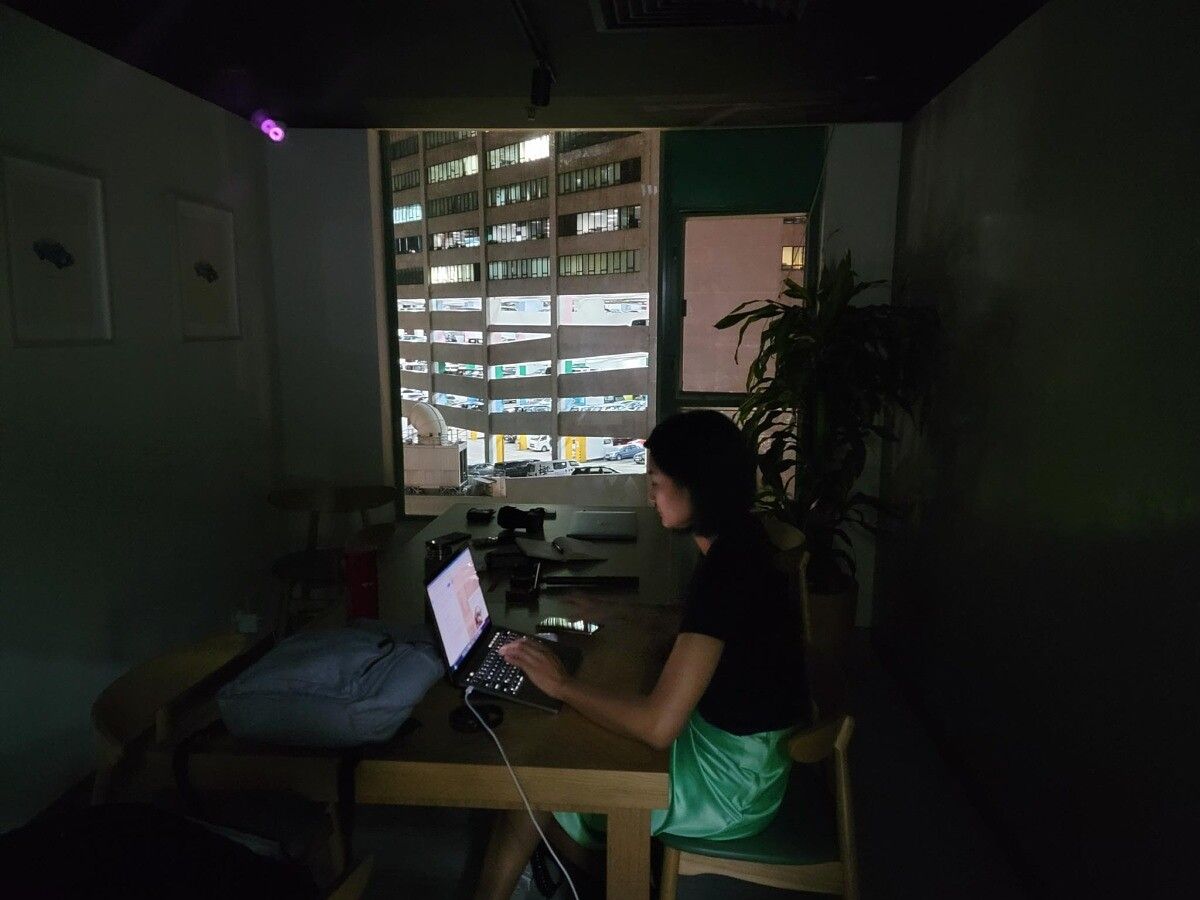
What’s more interesting is the main GN-1 sensor, which now features a huge 1/1.3″ image sensor size and f/1.57 aperture. I only had very limited time with the phone so I couldn’t test too much, but I can confirm the sensor does indeed pull in more light in dark scenes than even the Galaxy S21 Ultra, a phone that was no slouch in terms of low light photography. The below samples were taken in a dark room with the only light coming from the window without the use of night mode.

Vivo X60 Pro Plus, night shot Galaxy S21 Ultra, night shot

However, being able to pull in more light doesn’t automatically make a photo better. In the below set, the X60 Pro Plus brightened the sky so much it no longer looked like a night shot. Samsung’s image brightened the scene and dialed up contrast too, but it’s a much closer depiction of how the sky looked like at the time.

The X60 Pro Plus, like the Galaxy S21 Ultra, also has a dual-lens zooming system. It consists of an 8MP Periscope zoom lens that captures 5x optical zoom shots and a 32MP 3x optical telephoto sensor.

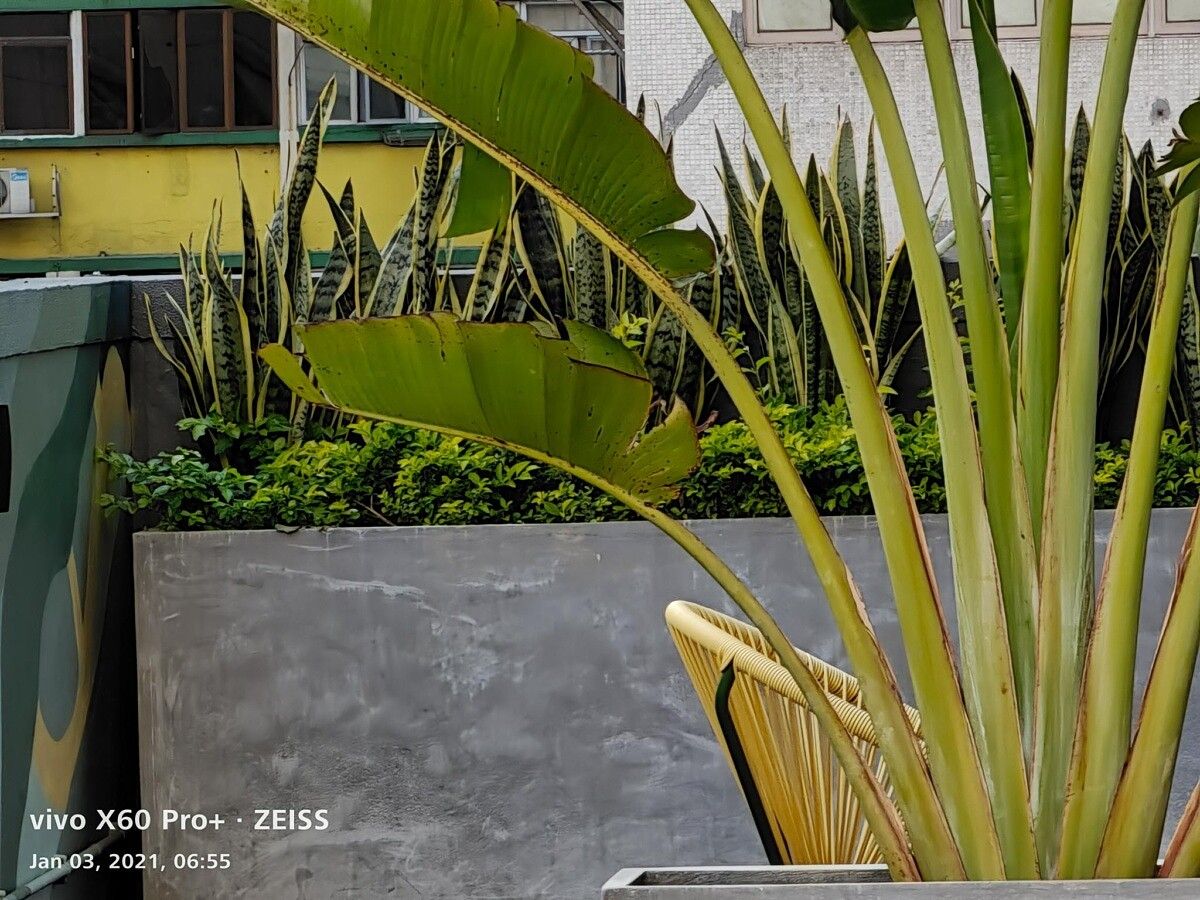
The numbers say this is a respectable zooming system, but no match for the Galaxy S21 Ultra’s 10x/3x optical zoom system, and the photos show the same story. Below are two sets of 10x zoom, and the Galaxy S21 Ultra’s shot is just sharper and cleaner.

Because I had such limited time with the phone, I wasn’t able to test the other lenses or video performance. I’ll test the cameras more if/when I get a review unit.


Vivo X60 Pro Plus: OriginOS

For years, Vivo’s Android skin was called FunTouch, and it wasn’t exactly my cup of tea — an opinion shared by many reviewers. Although Vivo improved FunTouch significantly by late last year’s V20 series, Vivo knew its software needed an overhaul from the ground up.

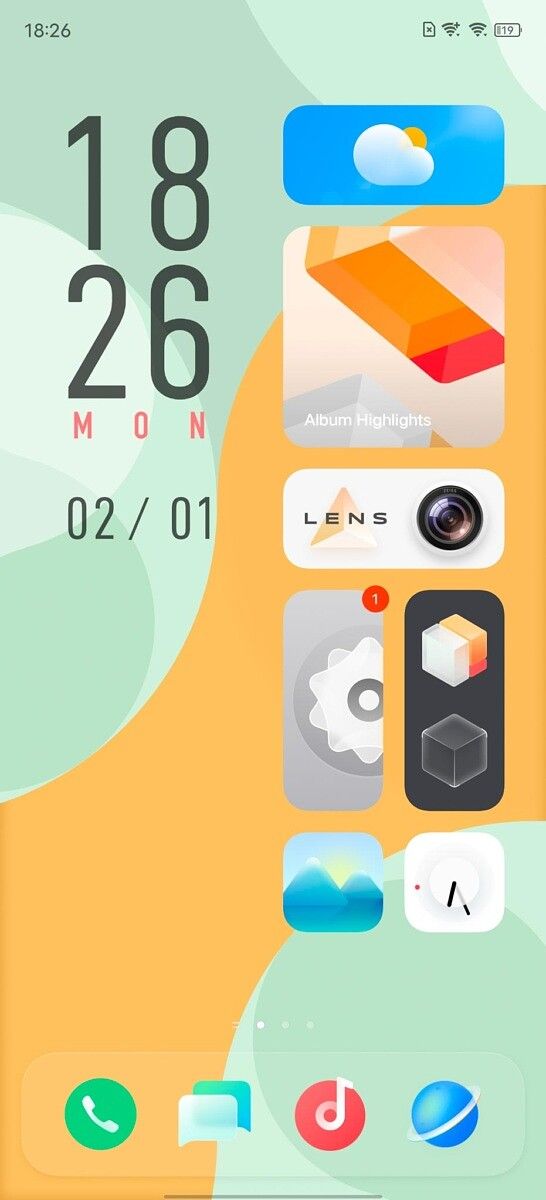
That overhaul is here, and it’s named OriginOS. Even in my brief time with it, OriginOS is quite a departure from most Android software I’ve seen. For one, the homescreen eschews standard icon shapes and sizes of Android in favor of, well, iOS. The latest version of iOS, to be exact, with widget support.

OriginOS on the X60 Pro Plus

App icons and widgets can change size and take up entire rows, but still fit into a symmetrical grid. Gone is the flat design of Android, in favor of skeuomorphism.

Although I find the UI visually striking, and I enjoy some of the shortcut gestures (for example, you can have a swipe-in gesture on one horizontal side of the screen to behave differently from the other), there’s just no getting around the fact that OriginOS takes a lot of design cues from iOS 14.

OriginOS and iOS 14 side by side

OriginOS and iOS 14 side by side


Vivo X60 Pro Plus: My early impressions

The Vivo X60 Pro Plus is selling in China for about the equivalent of $750, and for that price you get a 120Hz OLED screen, Snapdragon 888, capable main and ultra-wide cameras, and a fine-if-unspectacular zooming system.

I don’t think the X60 Pro Plus is better than the Xiaomi Mi 11 0r Galaxy S21 Ultra, but it’s different enough to have appeal. We don’t know if Vivo will release this internationally, but I’d say chances are good. If there is indeed an international release, XDA will surely have more in-depth coverage of this device.

The post The Vivo X60 Pro Plus with the Zeiss Camera yields impressive night shots appeared first on xda-developers.


from xda-developers https://ift.tt/39QZobn
via IFTTT

The Vivo X60 Pro Plus with the Zeiss Camera yields impressive night shots

Just as 2020 was coming to a close, Vivo announced its Vivo X60 series, which at the time of its December 29 launch included only the standard X60 and X60 Pro. Ahead of the Chinese New Year, Vivo added another model to the X60 lineup: the premium Vivo X60 Pro Plus (or as Vivo styles it, Pro+).

Since the Vivo X60 Pro Plus is currently only available in China, we do not have an official review unit yet. However, Hong Kong importer Trinity Electronics was kind enough to loan us a China unit for a brief hands-on test. During my brief hands-on, I wanted to check out the new camera system using Zeiss optics on the Vivo X60 Pro Plus. I also wanted to try out Vivo’s new Android skin — OriginOS — which looks a lot like iOS.

Vivo X60 Pro Plus in tanned leather

Vivo X60 series: Specifications

Specifications Vivo X60 Vivo X60 Pro Vivo X60 Pro+
Build
  • Aluminum mid-frame
  • Gorilla Glass front and back
  • Aluminum mid-frame
  • Gorilla Glass front and back
  • Aluminum mid-frame
  • Vegan leather back or gorilla glass
  • Gorilla Glass front
Dimensions & Weight
  • 159.6mm x 75.01mm x 7.36
  • 176.2g
  • 158.6 x 73.2 x 7.59mm
  • 178 grams
  • 158.6 x 73.35 x 9.1 mm
  • 190.6 grams
Display
  • 6.56-inch FHD+ E3 AMOLED
  • 120Hz screen refresh rate
  • Flat display
  • Centered-hole punch
  • HDR10+
  • 6.56-inch FHD+ E3 AMOLED
  • 120Hz screen refresh rate
  • Curved display
  • Centered-hole punch
  • HDR10+
  • 6.56-inch FHD+ E3 AMOLED
  • 120Hz screen refresh rate
  • Curved display
  • Centered-hole punch
  • HDR10+
SoC
  • Samsung Exynos 1080
    • 1x Cortex-A78 @ 2.8GHz
    • 2x Cortex-A78 @ 2.6GHz
    • 4x Cortex-A55 @ 2.0GHz
  • Mali-G78 GPU
  • 5nm EUV-based FinFET process
  • Samsung Exynos 1080
    • 1x Cortex-A78 @ 2.8GHz
    • 2x Cortex-A78 @ 2.6GHz
    • 4x Cortex-A55 @ 2.0GHz
  • Mali-G78 GPU
  • 5nm EUV-based FinFET process
  • Qualcomm Snapdragon 888:
    • 1x Kryo 680 Prime Core @ 2.84GHz
    • 3x Kryo 680 Performance Cores @ 2.4GHz
    • 4x Kryo 680 Efficiency Cores @ 1.8GHz
RAM & Storage
  • 8GB/12GB RAM
  • 128GB/256GB flash storage
  • UFS 3.1
  • 12GB RAM
  • 256GB flash storage
  • UFS 3.1
  • 8GB + 128GB
  • 12GB + 256GB
  • UFS 3.1
Battery & Charging
  • 4,200mAh
  • 33W fast charger (inside the box)
  • 4,300mAh
  • 33W fast charger (inside the box)
  • 4,200mAh
  • 33W fast charger (inside the box)
Security Optical In-Display Fingerprint Scanner Optical In-Display Fingerprint Scanner Optical In-Display Fingerprint Scanner
Rear Camera(s)
  • Primary: 48MP Sony IMX598 custom sensor, f/1.79, four-axis OIS
  • Secondary: 13MP telephoto, f/2.46, 2x optical zoom
  • Tertiary: 13MP ultra-wide-angle, 120° FoV, f/2.2
    • Supports Macro photography
  • Zeiss optics
  • Primary: 48MP Sony IMX598 custom sensor, f/1.79, four-axis OIS
  • Secondary: 13MP telephoto, f/2.46, 2x optical zoom
  • Tertiary: 13MP ultra-wide-angle, 120° FoV, f/2.2
    • Supports Macro photography
  • Tertiary: 8MP periscope, 5x optical zoom
  • Zeiss optics
  • Primary: 50MP GN1, f/1.57, 1/1.3″ sensor, four-axis OIS
  • Secondary: 48MP gimbal ultra-wide camera
  • Tertiary: 32MP telephoto 3x optical zoom lens
  • Tertiary: 8MP periscope, 5x optical zoom
  • Zeiss optics
Front Camera(s) 32MP, f/2.45 32MP, f/2.45 32MP, f/2.45
Port(s) USB 3.2 Type-C USB 3.2 Type-C USB 3.2 Type-C
Audio Mono speaker  Mono speaker Mono speaker
Connectivity
  • 5G
  • Bluetooth 5.1
  • Dual-band Wi-Fi
  • NFC
  • Reverse wired charging
  • 5G
  • Bluetooth 5.1
  • Dual-band Wi-Fi
  • NFC
  • Reverse wired charging
  • 5G
  • Bluetooth 5.1
  • Dual-band Wi-Fi
  • NFC
  • Reverse wired charging

Vivo X60 Pro Plus: Design and hardware

For those who’ve held or seen up close a Vivo X50 Pro from last year, the Vivo’s X60 Pro Plus will look and feel familiar. Vivo’s kept mostly the same design language — curved front and back, with flat top and bottom that allows the phone to stand on its own. Just like the Vivo X50 Pro Plus last year, the X60 Pro Plus comes in a “vegan leather” back that feels nice but not quite premium. I say that because although I find the texture grippy, it feels slightly plasticky instead of the warm/soft to the touch texture of genuine leather. Still, I prefer this back to yet another gradient glowy glass slabs that Vivo has used on most devices over the past couple of years.
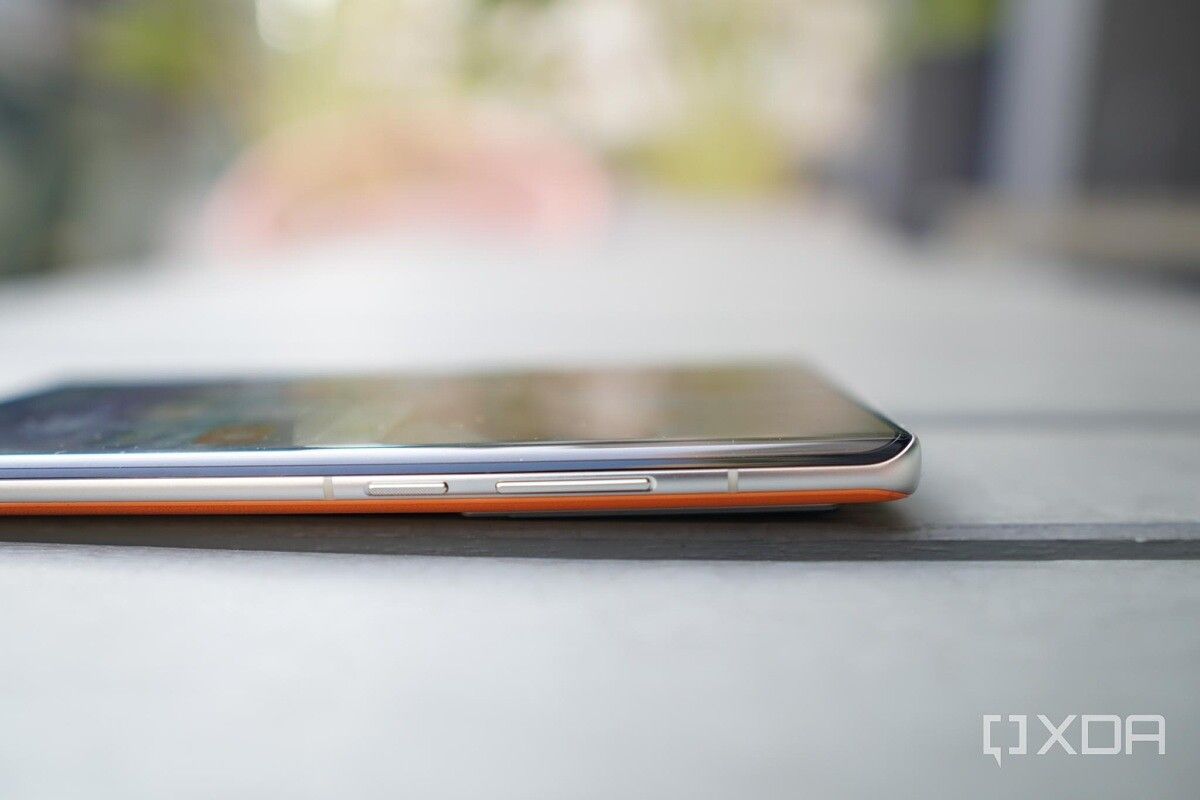
Vivo X60 Pro Plus

Vivo X60 Pro Plus in tanned leather Vivo X60 Pro Plus in tanned leather Vivo X60 Pro Plus leather back Vivo X60 Pro Plus leather back

The X60 Pro Plus stands almost as tall as the S21 Ultra, but it’s thinner and lighter, making it slightly easier to hold.

Unlike the standard X60 and X60 Pro, which run on Samsung’s Exynos 1080, the X60 Pro Plus is powered by the Qualcomm Snapdragon 888 (with either 8GB or 12GB of RAM), so it’s not going to be lacking in processing power. The phone has only one single bottom-firing speaker, however, so it lags behind virtually every Android flagship released in the last half-year.


Vivo X60 Pro Plus: The cameras

Last year’s Vivo X50 Pro grabbed plenty of headlines for its “gimbal camera system,” which essentially adds a third axis of stabilization to a typical smartphone OIS system, to compensate for the forward and the backward movement. Ironically, the technically higher-tier X50 Pro Plus did not offer the gimbal camera, because it used Samsung’s GN1 sensor which was too heavy for the gimbal.

It’s the same story here: the X60 Pro Plus I’m testing does not have that gimbal system for its main camera. However, Vivo has moved the gimbal system over to the 48MP ultra-wide sensor instead.

The camera module of the Vivo X60 Pro Plus

If I look at the back of the phone while moving slightly, I can actually see the ultra-wide lens shift side-to-side, it’s a nice visual touch. But just like last year’s X50 Pro Plus, the gimbal system brings only marginal improvements in stabilization to the already excellent EIS found in most phones.

What’s more interesting is the main GN-1 sensor, which now features a huge 1/1.3″ image sensor size and f/1.57 aperture. I only had very limited time with the phone so I couldn’t test too much, but I can confirm the sensor does indeed pull in more light in dark scenes than even the Galaxy S21 Ultra, a phone that was no slouch in terms of low light photography. The below samples were taken in a dark room with the only light coming from the window without the use of night mode.
Vivo X60 Pro Plus, night shot Galaxy S21 Ultra, night shot

However, being able to pull in more light doesn’t automatically make a photo better. In the below set, the X60 Pro Plus brightened the sky so much it no longer looked like a night shot. Samsung’s image brightened the scene and dialed up contrast too, but it’s a much closer depiction of how the sky looked like at the time.


The X60 Pro Plus, like the Galaxy S21 Ultra, also has a dual-lens zooming system. It consists of an 8MP Periscope zoom lens that captures 5x optical zoom shots and a 32MP 3x optical telephoto sensor.

The numbers say this is a respectable zooming system, but no match for the Galaxy S21 Ultra’s 10x/3x optical zoom system, and the photos show the same story. Below are two sets of 10x zoom, and the Galaxy S21 Ultra’s shot is just sharper and cleaner.
Because I had such limited time with the phone, I wasn’t able to test the other lenses or video performance. I’ll test the cameras more if/when I get a review unit.


Vivo X60 Pro Plus: OriginOS

For years, Vivo’s Android skin was called FunTouch, and it wasn’t exactly my cup of tea — an opinion shared by many reviewers. Although Vivo improved FunTouch significantly by late last year’s V20 series, Vivo knew its software needed an overhaul from the ground up.

That overhaul is here, and it’s named OriginOS. Even in my brief time with it, OriginOS is quite a departure from most Android software I’ve seen. For one, the homescreen eschews standard icon shapes and sizes of Android in favor of, well, iOS. The latest version of iOS, to be exact, with widget support.
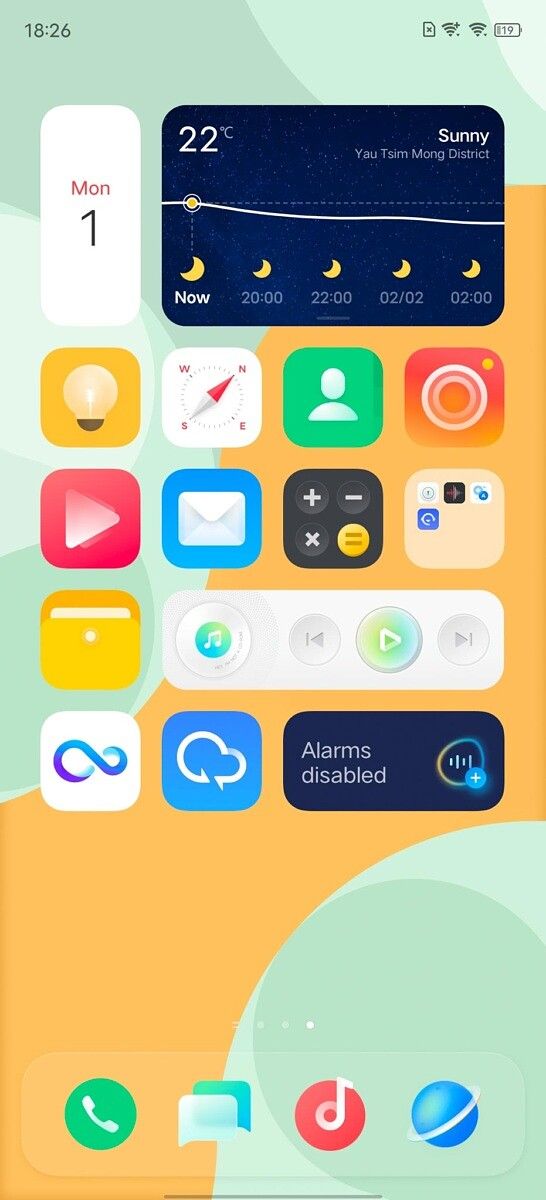
OriginOS on the X60 Pro Plus

App icons and widgets can change size and take up entire rows, but still fit into a symmetrical grid. Gone is the flat design of Android, in favor of skeuomorphism.

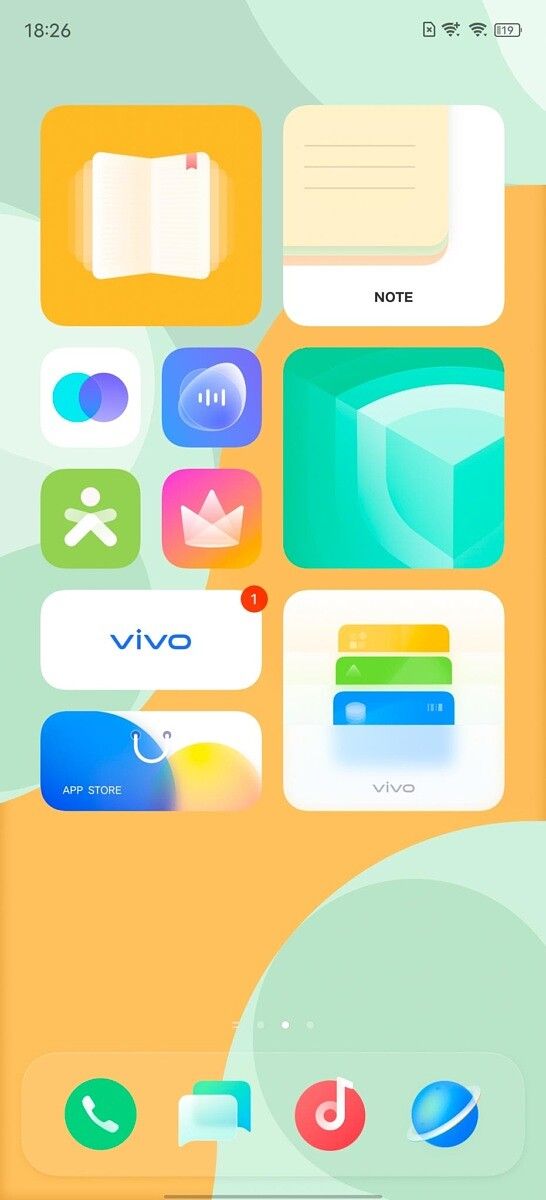
Although I find the UI visually striking, and I enjoy some of the shortcut gestures (for example, you can have a swipe-in gesture on one horizontal side of the screen to behave differently from the other), there’s just no getting around the fact that OriginOS takes a lot of design cues from iOS 14.

OriginOS and iOS 14 side by side

OriginOS and iOS 14 side by side


Vivo X60 Pro Plus: My early impressions

The Vivo X60 Pro Plus is selling in China for about the equivalent of $750, and for that price you get a 120Hz OLED screen, Snapdragon 888, capable main and ultra-wide cameras, and a fine-if-unspectacular zooming system.

I don’t think the X60 Pro Plus is better than the Xiaomi Mi 11 0r Galaxy S21 Ultra, but it’s different enough to have appeal. We don’t know if Vivo will release this internationally, but I’d say chances are good. If there is indeed an international release, XDA will surely have more in-depth coverage of this device.

The post The Vivo X60 Pro Plus with the Zeiss Camera yields impressive night shots appeared first on xda-developers.


from xda-developers https://ift.tt/39QZobn
via IFTTT

OxygenOS Open Beta 3 for the OnePlus Nord now available with camera and ambient display improvements

OnePlus started February with a treat for its users by releasing a new OxygenOS Open Beta for the OnePlus 8 series. It seems that the update train is going at full steam, cause the Chinese OEM has now started rolling out the third OxygenOS 11 beta build for the OnePlus Nord. As with the last two Android 11-based beta releases, there are a number of changes in this update.

OnePlus Nord XDA Forums

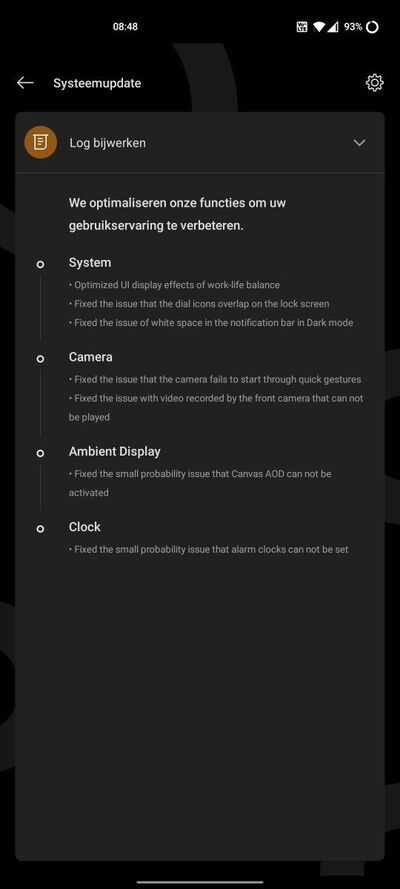
According to the changelog, the OxygenOS Open Beta 3 update addresses a video recording bug with the front camera and fixes an intermittent Canvas AOD activation issue. It also revises the display effects in the Work-Life Balance Mode. Several UI element rendering glitches have been corrected as well.

The complete changelog for the Open Beta 3 update for the OnePlus Nord is as below:

  • System
    • Optimized UI display effects of work-life balance
    • Fixed the issue that the dial icons overlap on the lock screen
    • Fixed the issue of white space in the notification bar in Dark mode
  • Camera
    • Fixed the issue that the camera fails to start through quick gestures
    • Fixed the issue with video recorded by the front camera that can not be played
  • Ambient Display
    • Fixed the small probability issue that Canvas AOD can not be activated
  • Clock
    • Fixed the small probability issue that alar clocks can not be set
OnePlus Nord OxygenOS Open Beta 3 Changelog OnePlus Nord OxygenOS Open Beta 3 About

Thanks to OnePlus Community member Audioffensive for the screenshots!

As you can see, there are a number of nice changes for the device, with many stock OnePlus applications being updated and some performance and stability optimizations too. Hopefully, we’ll see all these changes reach the stable branch of OxygenOS 11 in the coming months.


Download: OxygenOS Open Beta 3 for the OnePlus Nord

If you’re interested in updating to the latest version, but haven’t received the update notification yet, you can download the full OTA from the index below. You can sideload it in TWRP or by choosing the “Local upgrade” option in the system updater app.

Open Beta 3


Thanks to XDA Senior Member Some_Random_Username for providing the download links!

The post OxygenOS Open Beta 3 for the OnePlus Nord now available with camera and ambient display improvements appeared first on xda-developers.


from xda-developers https://ift.tt/39NC3Hk
via IFTTT

OxygenOS Open Beta 3 for the OnePlus Nord now available with camera and ambient display improvements

OnePlus started February with a treat for its users by releasing a new OxygenOS Open Beta for the OnePlus 8 series. It seems that the update train is going at full steam, cause the Chinese OEM has now started rolling out the third OxygenOS 11 beta build for the OnePlus Nord. As with the last two Android 11-based beta releases, there are a number of changes in this update.

OnePlus Nord XDA Forums

According to the changelog, the OxygenOS Open Beta 3 update addresses a video recording bug with the front camera and fixes an intermittent Canvas AOD activation issue. It also revises the display effects in the Work-Life Balance Mode. Several UI element rendering glitches have been corrected as well.

The complete changelog for the Open Beta 3 update for the OnePlus Nord is as below:

  • System
    • Optimized UI display effects of work-life balance
    • Fixed the issue that the dial icons overlap on the lock screen
    • Fixed the issue of white space in the notification bar in Dark mode
  • Camera
    • Fixed the issue that the camera fails to start through quick gestures
    • Fixed the issue with video recorded by the front camera that can not be played
  • Ambient Display
    • Fixed the small probability issue that Canvas AOD can not be activated
  • Clock
    • Fixed the small probability issue that alar clocks can not be set
OnePlus Nord OxygenOS Open Beta 3 Changelog OnePlus Nord OxygenOS Open Beta 3 About

Thanks to OnePlus Community member Audioffensive for the screenshots!

As you can see, there are a number of nice changes for the device, with many stock OnePlus applications being updated and some performance and stability optimizations too. Hopefully, we’ll see all these changes reach the stable branch of OxygenOS 11 in the coming months.


Download: OxygenOS Open Beta 3 for the OnePlus Nord

If you’re interested in updating to the latest version, but haven’t received the update notification yet, you can download the full OTA from the index below. You can sideload it in TWRP or by choosing the “Local upgrade” option in the system updater app.

Open Beta 3


Thanks to XDA Senior Member Some_Random_Username for providing the download links!

The post OxygenOS Open Beta 3 for the OnePlus Nord now available with camera and ambient display improvements appeared first on xda-developers.


from xda-developers https://ift.tt/39NC3Hk
via IFTTT

Vivaldi’s latest update on Android lets you change the look of web pages

Vivaldi, a popular Chromium-based browser, is getting a fresh update on Android. The last update added the ability to clear history and site data on exit, WebRTC leak protection, and more sorting options for notes and bookmarks. Now, the Vivaldi 3.6 introduces several new features, including customizable web pages, a built-in QR scanner, support for external download managers, and more.

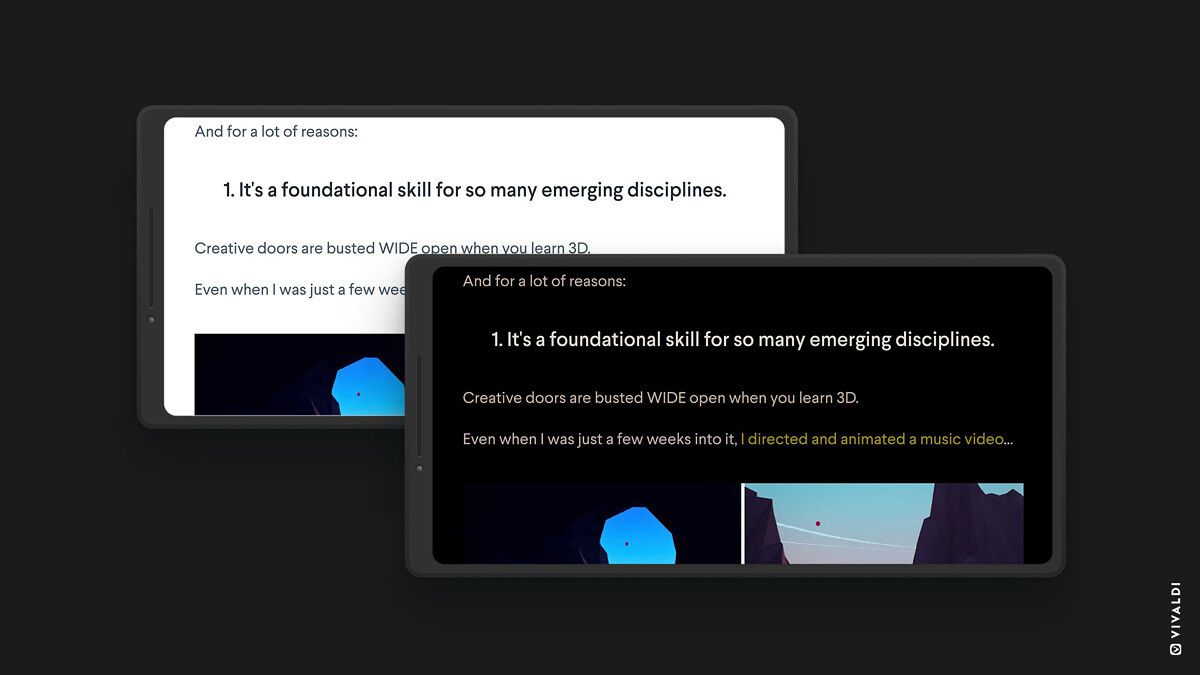
One of the biggest changes in Vivaldi 3.6 is the new Page Action feature that lets you easily customize the appearance of any web page. The Vivaldi browser already offers a host of customizations in the form of a movable Address bar, desktop-style tabs, and a Tab bar. With Page Action, users can now choose from a range of pre-defined filters and actions to invert text, change fonts, tweak background colors, apply Instagram-like filters, and much more to customize their reading experience.

The Vivaldi 3.6 also adds a built-in QR code scanner to let you easily scan, well, QR codes, and it can handle non-URL QR and barcodes, too. You can launch the feature from the URL bar or by long pressing on the app icon.

Vivaldi Browser QR Code scanner

The new update also adds more customization to Speed Dials. A previous update had added few new layouts to the Start Page with Large Speed Dials, Small Dials, and Speed Dial Lists. Those who prefer a happy medium between large and small sizes can now add Medium Speed Dials to the Start Page. Moreover, you can now also sort Speed Dials by title, address, nickname, or description.

Vivaldi Browser Speed Dials

Finally, the Vivaldi Browser 3.6 also brings support for external download managers, and users can now swap the default download manager for something like Chrome or Samsung Internet and benefit from multi-threaded downloading and queuing.

Vivaldi Browser External Download managers

The Vivaldi Browser v3.6 is out now on the Google Play Store. You can download it by clicking on the link below. Vivaldi is also available for Windows desktops and Chromebooks.

Vivaldi Browser with ad blocker: fast & private (Free, Google Play) →

The post Vivaldi’s latest update on Android lets you change the look of web pages appeared first on xda-developers.


from xda-developers https://ift.tt/2MU5nmm
via IFTTT

Vivaldi’s latest update on Android lets you change the look of web pages

Vivaldi, a popular Chromium-based browser, is getting a fresh update on Android. The last update added the ability to clear history and site data on exit, WebRTC leak protection, and more sorting options for notes and bookmarks. Now, the Vivaldi 3.6 introduces several new features, including customizable web pages, a built-in QR scanner, support for external download managers, and more.

One of the biggest changes in Vivaldi 3.6 is the new Page Action feature that lets you easily customize the appearance of any web page. The Vivaldi browser already offers a host of customizations in the form of a movable Address bar, desktop-style tabs, and a Tab bar. With Page Action, users can now choose from a range of pre-defined filters and actions to invert text, change fonts, tweak background colors, apply Instagram-like filters, and much more to customize their reading experience.

The Vivaldi 3.6 also adds a built-in QR code scanner to let you easily scan, well, QR codes, and it can handle non-URL QR and barcodes, too. You can launch the feature from the URL bar or by long pressing on the app icon.

Vivaldi Browser QR Code scanner

The new update also adds more customization to Speed Dials. A previous update had added few new layouts to the Start Page with Large Speed Dials, Small Dials, and Speed Dial Lists. Those who prefer a happy medium between large and small sizes can now add Medium Speed Dials to the Start Page. Moreover, you can now also sort Speed Dials by title, address, nickname, or description.

Vivaldi Browser Speed Dials

Finally, the Vivaldi Browser 3.6 also brings support for external download managers, and users can now swap the default download manager for something like Chrome or Samsung Internet and benefit from multi-threaded downloading and queuing.

Vivaldi Browser External Download managers

The Vivaldi Browser v3.6 is out now on the Google Play Store. You can download it by clicking on the link below. Vivaldi is also available for Windows desktops and Chromebooks.

Vivaldi Browser with ad blocker: fast & private (Free, Google Play) →

The post Vivaldi’s latest update on Android lets you change the look of web pages appeared first on xda-developers.


from xda-developers https://ift.tt/2MU5nmm
via IFTTT