LightBlog

mercredi 3 février 2021

Here’s a sneak peek at Aurora Store v4, a big update to the open source Play Store client

The Aurora Store is a popular open-source client of the Google Play Store, allowing users to search, download, and update Android apps and games on any device running Android 5.0 and above. The app’s main highlight is that it doesn’t require GApps, MicroG, or Google service of any kind. Originally a fork of the Yalp Store, the app was later rewritten from scratch to offer a modern UI with Material Design.

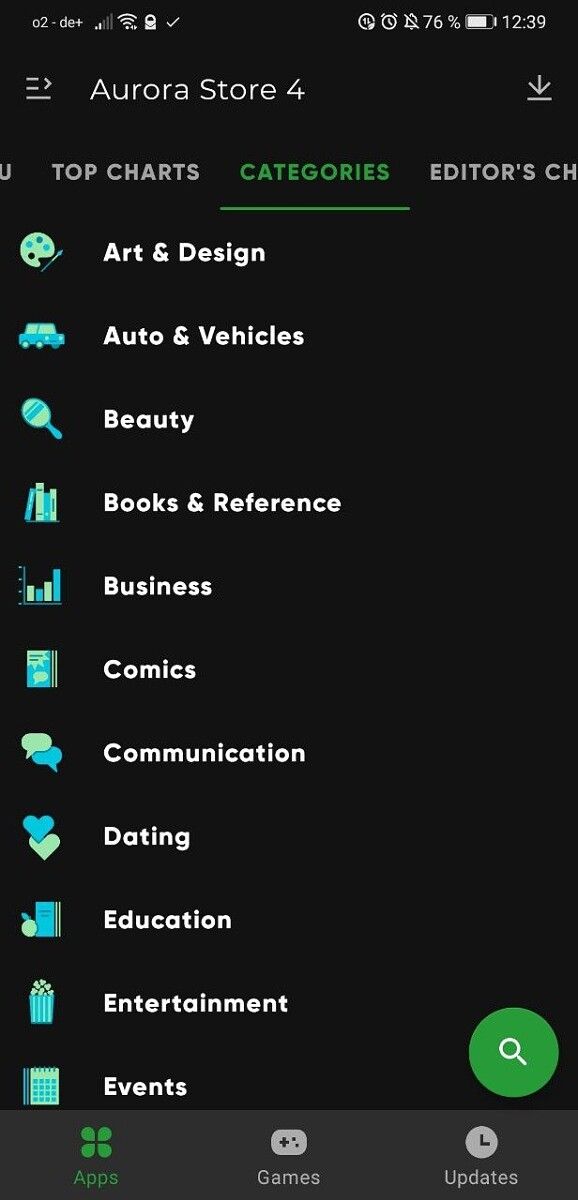
The team behind Aurora Store is working on a major update that improves the app discovery and brings the user interface a step closer to the Google Play Store. XDA Senior Member Hb20032003 has shared some images — originally posted over at Aurora Store’s official Telegram group — giving us a sneak peek at what the fresh UI will look like. As you can see in the screenshots below, the new UI is clearly inspired by the Google Play Store, focusing on making it easier to discover new apps. The old Home, Updates, Categories tabs have been replaced by the Apps, Games, and Updates, and there’s now a floating search button instead of the top search bar. We also see new columns such as “For You,” “Top Charts,” and “Editor’s Choice,” along with proper app categories.

Aurora Store v4 home Aurora Store v4 Top Apps Aurora Store v4 Top Apps Aurora Store v4 Categories

Whether you are on a mission to ditch Google services or have a phone without GMS, such as a Huawei phone, the Aurora Store lets you explore and download virtually all the apps available on the Google Play Store. Even if you don’t fall into those camps, features like the ability to spoof your device information and region are enticing enough to give the app a shot.

If you’re interested, you can download the latest stable version of the Aurora Store from the official XDA thread below. The new version of the Aurora Store is not yet available on F-Droid or GitLab, but should soon make its way over there.

Download the Aurora Store app from XDA

Be warned that using Aurora Store with your Google account may result in the deactivation or permanent ban as the app is in direct violation of Google’s Terms and Service 3.3. So proceed at your own risk or use the Anonymous account provided by the app.

The post Here’s a sneak peek at Aurora Store v4, a big update to the open source Play Store client appeared first on xda-developers.


from xda-developers https://ift.tt/3jdbKNO
via IFTTT

Here’s a sneak peek at Aurora Store v4, a big update to the open source Play Store client

The Aurora Store is a popular open-source client of the Google Play Store, allowing users to search, download, and update Android apps and games on any device running Android 5.0 and above. The app’s main highlight is that it doesn’t require GApps, MicroG, or Google service of any kind. Originally a fork of the Yalp Store, the app was later rewritten from scratch to offer a modern UI with Material Design.

The team behind Aurora Store is working on a major update that improves the app discovery and brings the user interface a step closer to the Google Play Store. XDA Senior Member Hb20032003 has shared some images — originally posted over at Aurora Store’s official Telegram group — giving us a sneak peek at what the fresh UI will look like. As you can see in the screenshots below, the new UI is clearly inspired by the Google Play Store, focusing on making it easier to discover new apps. The old Home, Updates, Categories tabs have been replaced by the Apps, Games, and Updates, and there’s now a floating search button instead of the top search bar. We also see new columns such as “For You,” “Top Charts,” and “Editor’s Choice,” along with proper app categories.
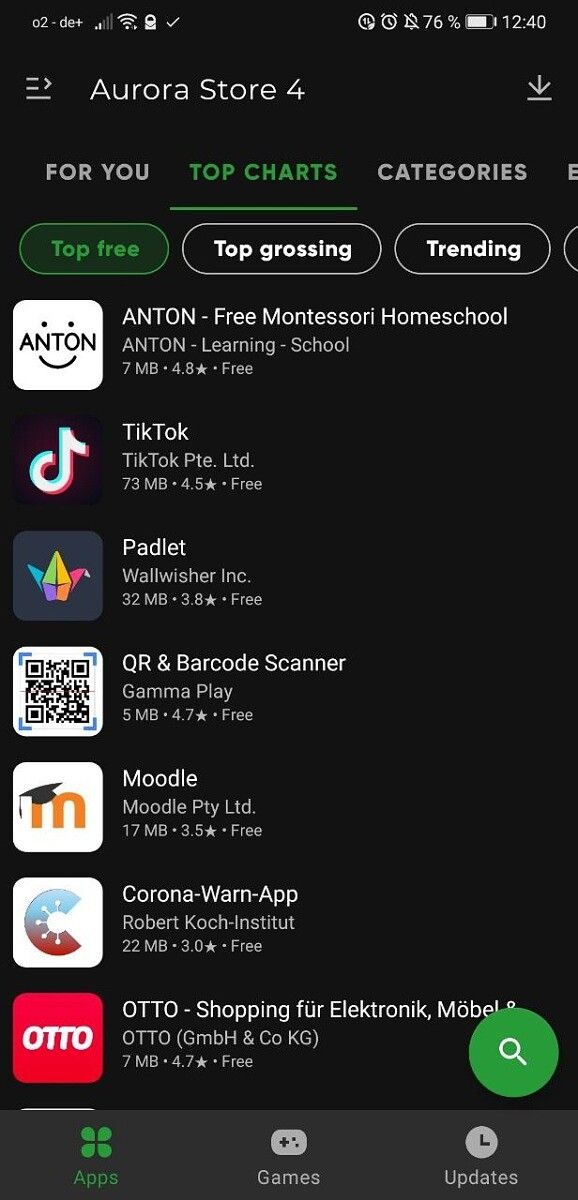
Aurora Store v4 home Aurora Store v4 Top Apps Aurora Store v4 Top Apps Aurora Store v4 Categories

Whether you are on a mission to ditch Google services or have a phone without GMS, such as a Huawei phone, the Aurora Store lets you explore and download virtually all the apps available on the Google Play Store. Even if you don’t fall into those camps, features like the ability to spoof your device information and region are enticing enough to give the app a shot.

If you’re interested, you can download the latest stable version of the Aurora Store from the official XDA thread below. The new version of the Aurora Store is not yet available on F-Droid or GitLab, but should soon make its way over there.

Download the Aurora Store app from XDA

Be warned that using Aurora Store with your Google account may result in the deactivation or permanent ban as the app is in direct violation of Google’s Terms and Service 3.3. So proceed at your own risk or use the Anonymous account provided by the app.

The post Here’s a sneak peek at Aurora Store v4, a big update to the open source Play Store client appeared first on xda-developers.


from xda-developers https://ift.tt/3jdbKNO
via IFTTT

Powder up in Google Meet’s new green room before joining a call

After rolling out live caption support in four more languages to Google Meet late last year, Google is now adding a new feature to the service that will let you preview your audio and video quality before joining a meeting. The feature adds a new ‘Check your audio and video’ button on the screen that appears right before you join a meeting to help you quickly check if your setup is working as intended.

Google announced the new feature in a recent Workspace Updates blog post, highlighting how it will help you catch audio and video issues. In the post, Google reveals that the new ‘Check your audio and video’ button will take you to a new “green room” page, where you’ll be able to preview your audio and video. This will help you catch issues like an unintentionally muted microphone, a secondary display monitor with a missing headphone or speaker connection, or other audio issues like poor sound quality before you join a video call.

Google Meet green room

As you can see in the attached screenshot, the Google Meet green room will show you a video feed from your webcam that will help you check your video quality at a glance. Beneath the video feed, you’ll find three device options that will let you choose your preferred microphone, speaker, and camera. Once you’re satisfied with the quality, you can click on the ‘Next’ button at the bottom to confirm the settings and then proceed to join the meeting.

Google Meet green room

The post further reveals that the feature has already started rolling out, and it should reach all Google Meet users in the next couple of weeks. It’s worth noting that the feature will be available to Google Workspace Essentials, Business Starter, Business Standard, Business Plus, Enterprise Essentials, Enterprise Standard, and Enterprise Plus users. Additionally, it will also be available for G Suite Basic, Business, Education, Enterprise for Education, and Nonprofits customers.

The post Powder up in Google Meet’s new green room before joining a call appeared first on xda-developers.


from xda-developers https://ift.tt/2MK6fKp
via IFTTT

Check your video call settings in advance with Google Meet’s new green room

After rolling out live caption support in four more languages to Google Meet late last year, Google is now adding a new feature to the service that will let you preview your audio and video quality before joining a meeting. The feature adds a new ‘Check your audio and video’ button on the screen that appears right before you join a meeting to help you quickly check if your setup is working as intended.

Google announced the new feature in a recent Workspace Updates blog post, highlighting how it will help you catch audio and video issues. In the post, Google reveals that the new ‘Check your audio and video’ button will take you to a new “green room” page, where you’ll be able to preview your audio and video. This will help you catch issues like an unintentionally muted microphone, a secondary display monitor with a missing headphone or speaker connection, or other audio issues like poor sound quality before you join a video call.

Google Meet green room

As you can see in the attached screenshot, the Google Meet green room will show you a video feed from your webcam that will help you check your video quality at a glance. Beneath the video feed, you’ll find three device options that will let you choose your preferred microphone, speaker, and camera. Once you’re satisfied with the quality, you can click on the ‘Next’ button at the bottom to confirm the settings and then proceed to join the meeting.

Google Meet green room

The post further reveals that the feature has already started rolling out, and it should reach all Google Meet users in the next couple of weeks. It’s worth noting that the feature will be available to Google Workspace Essentials, Business Starter, Business Standard, Business Plus, Enterprise Essentials, Enterprise Standard, and Enterprise Plus users. Additionally, it will also be available for G Suite Basic, Business, Education, Enterprise for Education, and Nonprofits customers.

The post Check your video call settings in advance with Google Meet’s new green room appeared first on xda-developers.


from xda-developers https://ift.tt/2MK6fKp
via IFTTT

Huawei’s new foldable phone launches this month, but don’t expect to get your hands on one

Huawei jumped on the foldable bandwagon with the Mate X back in February 2019. Now, two years later, the company is gearing up to launch its next foldable smartphone. The new foldable will simply be called the Huawei Mate X2, and it’s set to launch later this month in China.

The news comes from Huawei’s official Weibo account, essentially confirming rumors that have been circulating on the internet for the past few weeks. The announcement comes when we are also hearing reports about Huawei considering selling off its Mate and P series of smartphone brands to a consortium of government-backed investors. But this announcement of Huawei Mate X2 does restore some hope that the company might not go that route anytime soon — despite all the odds stacked against it.

Huawei Mate X2 teaser

The teaser shared by Huawei confirms the Mate X2 will be launched on February 22, 2021. The original Huawei Mate X never made it outside China, and that’ll most likely be the case with the Mate X2 as well. Foldables by their very nature are expensive and out of reach for many consumers. And as many of our readers are well aware, Huawei can’t ship Google apps on its new phones due to the U.S trade ban. So even if the company was to launch the device outside China, it will be a hard sell. Moreover, due to the same ban, contract chip fabricators such as TSMC and Samsung cannot manufacture HiSilicon chips, forcing the Chinese smartphone maker to use reserve Kirin 9000 or other chips they had ordered before the ban. Therefore, it’s likely that the Mate X2 will only be made in limited quantities and won’t be available outside of China.

We also don’t know which display vendor is supplying the display for the Huawei Mate X2. We recently reported that Samsung Display has begun supplying its foldable displays to Chinese OEMs, but Huawei is unlikely to be one of them. The original Huawei Mate X had a BOE panel, so it’s likely either them, or TCL’s CSOT will be providing the display. LG Display is another possibility since they supplied the panel for Lenovo’s ThinkPad X1 Fold.

As for what we can expect from the Huawei Mate X2 in terms of hardware, the recent leaks point at the device featuring an 8.01-inch internal display and a 6.45-inch outer panel. According to the well-known leakster Digital Chat Station, the Mate X2 could feature a quad-camera assembly, comprised of a 50MP primary sensor, backed by 16MP, 12MP, and 8MP sensors. The device is said to be powered by the Kirin 9000 chipset and a 4,400 mAh battery with support for 66W fast charging.


Featured image: Huaewi Mate X

The post Huawei’s new foldable phone launches this month, but don’t expect to get your hands on one appeared first on xda-developers.


from xda-developers https://ift.tt/3jdqYTd
via IFTTT

mardi 2 février 2021

Huawei’s new foldable phone launches this month, but don’t expect to get your hands on one

Huawei jumped on the foldable bandwagon with the Mate X back in February 2019. Now, two years later, the company is gearing up to launch its next foldable smartphone. The new foldable will simply be called the Huawei Mate X2, and it’s set to launch later this month in China.

The news comes from Huawei’s official Weibo account, essentially confirming rumors that have been circulating on the internet for the past few weeks. The announcement comes when we are also hearing reports about Huawei considering selling off its Mate and P series of smartphone brands to a consortium of government-backed investors. But this announcement of Huawei Mate X2 does restore some hope that the company might not go that route anytime soon — despite all the odds stacked against it.

Huawei Mate X2 teaser

The teaser shared by Huawei confirms the Mate X2 will be launched on February 22, 2021. The original Huawei Mate X never made it outside China, and that’ll most likely be the case with the Mate X2 as well. Foldables by their very nature are expensive and out of reach for many consumers. And as many of our readers are well aware, Huawei can’t ship Google apps on its new phones due to the U.S trade ban. So even if the company was to launch the device outside China, it will be a hard sell. Moreover, due to the same ban, contract chip fabricators such as TSMC and Samsung cannot manufacture HiSilicon chips, forcing the Chinese smartphone maker to use reserve Kirin 9000 or other chips they had ordered before the ban. Therefore, it’s likely that the Mate X2 will only be made in limited quantities and won’t be available outside of China.

We also don’t know which display vendor is supplying the display for the Huawei Mate X2. We recently reported that Samsung Display has begun supplying its foldable displays to Chinese OEMs, but Huawei is unlikely to be one of them. The original Huawei Mate X had a BOE panel, so it’s likely either them, or TCL’s CSOT will be providing the display. LG Display is another possibility since they supplied the panel for Lenovo’s ThinkPad X1 Fold.

As for what we can expect from the Huawei Mate X2 in terms of hardware, the recent leaks point at the device featuring an 8.01-inch internal display and a 6.45-inch outer panel. According to the well-known leakster Digital Chat Station, the Mate X2 could feature a quad-camera assembly, comprised of a 50MP primary sensor, backed by 16MP, 12MP, and 8MP sensors. The device is said to be powered by the Kirin 9000 chipset and a 4,400 mAh battery with support for 66W fast charging.


Featured image: Huaewi Mate X

The post Huawei’s new foldable phone launches this month, but don’t expect to get your hands on one appeared first on xda-developers.


from xda-developers https://ift.tt/3jdqYTd
via IFTTT

PSA: If you use NoxPlayer to play Android games on PC, you should probably reinstall it

NoxPlayer users beware. A hacker group has gained access to the Android emulator‘s server infrastructure and has pushed malware to a few users in Asia. Slovak security firm ESET recently discovered the attack, and it has advised affected NoxPlayer users to reinstall the emulator to remove the malware from their systems.

For the unaware, NoxPlayer is an Android emulator that is popular among gamers. The emulator is primarily used to run Android games on x86 PCs, and it’s developed by a Hong Kong-based company called BigNox. According to a recent report from ZDNet on the matter, a hacker group has gained access to one of the company’s official API (api.bignox.com) and file-hosting servers (res06.bignox.com). Using this access, the group has tampered with the download URL of NoxPlayer updates in the API server to deliver malware to users.

In a report regarding the attack, ESET reveals that it has identified three different malware families that are being “distributed from tailored malicious updates to select victims, with no sign of leveraging any financial gain, but rather surveillance-related capabilities.”

ESET further reveals that even though the attackers had access to BigNox servers since at least September 2020, they didn’t target all of the company’s users. Instead, the attackers focused on specific machines, suggesting that this was a highly-targeted attack looking to infect only a certain class of users. As of now, the malware-laden NoxPlayer updates have only been delivered to five victims located in Taiwan, Hong Kong, and Sri Lanka. However, ESET recommends all NoxPlayer users stay cautious. The security firm has laid out some instructions to help users figure out if their system has been compromised in its report.

In case users find an intrusion, they should reinstall NoxPlayer from clean media. Non-compromised users are advised not to download any updates until BigNox notifies that it has mitigated the threat. A BigNox spokesperson has told ZDNet that the company is working with ESET to investigate the breach further.

The post PSA: If you use NoxPlayer to play Android games on PC, you should probably reinstall it appeared first on xda-developers.


from xda-developers https://ift.tt/3oPH9Y4
via IFTTT