WhatsApp will soon add support for making voice and video calls on the web, two features that have existed for years on mobile clients. WABetaInfo tore into a recent update to the web/desktop client (version 2.2043.7) and enabled the feature while it’s still in-development.
Image credits: WABetaInfo
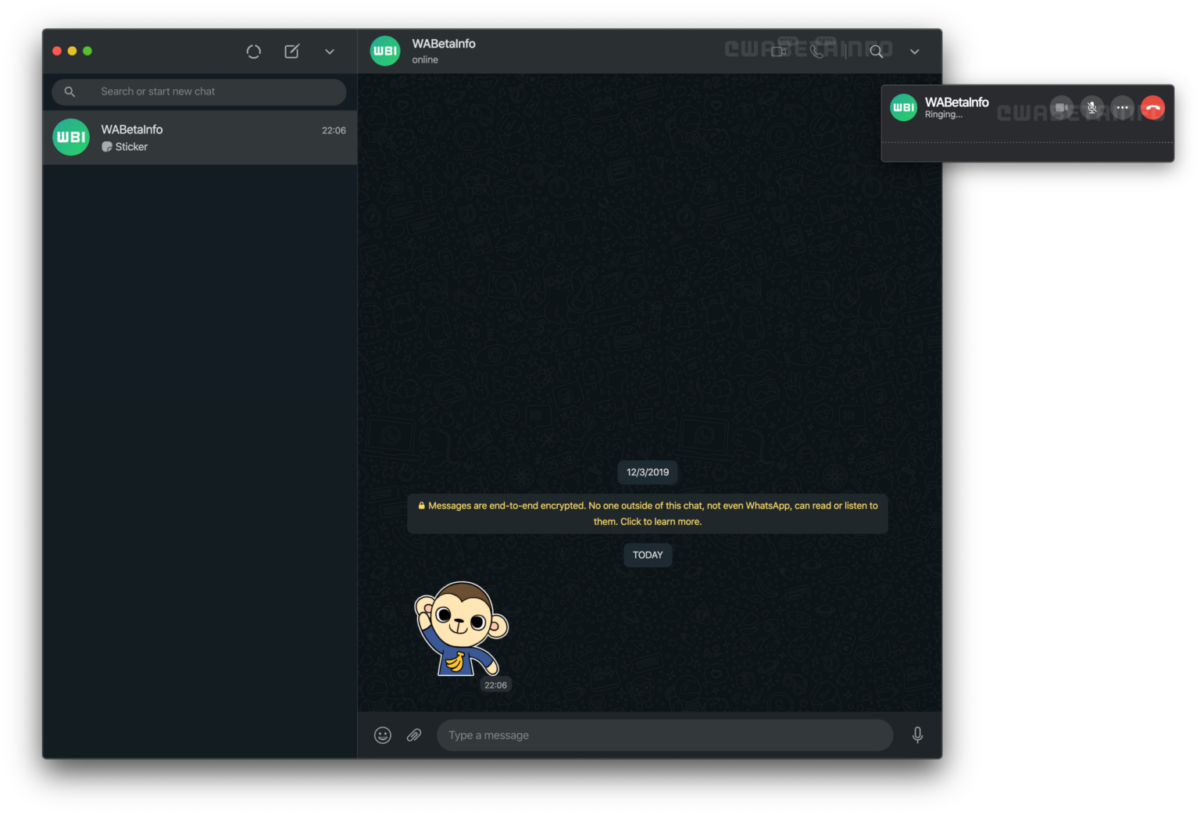
As of now, voice and videos calls on WhatsApp Web appears to be in a beta stage. Luckily, WABetaInfo still managed to get the feature working, bringing us some screenshots to demonstrate what calls will look like on the web/desktop. When users receive a call on the web, a popup window will appear, allowing users to accept or decline the call. A different window appears when you make a call; it’s smaller and features controls to mute your mic and hang up.
WABetaInfo also said that Group Voice and Video calls are being tested for WhatsApp Web, which will be a great way to communicate with friends and family.
Image credits: WABetaInfo
Of course, voice and video calls are already available on WhatsApp for Android and iOS, so bringing the features to the web would merely bring parity. It would also bring more convenience to users, especially with so many people spending more time on computers while working from home. Updating WhatsApp Web would make users less reliant on their mobile devices.
Keep in mind that WABetaInfo isn’t affiliated with WhatsApp, so the features mentioned haven’t officially been announced. However, the website regularly uncovers features coming to WhatsApp before they’re widely available, giving users an idea of what to expect. Recently, WABetaInfo uncovered that WhatsApp was testing a redesigned Storage Usage section, along with several other new features.
WhatsApp will soon add support for making voice and video calls on the web, two features that have existed for years on mobile clients. WABetaInfo tore into a recent update to the web/desktop client (version 2.2043.7) and enabled the feature while it’s still in-development.
Image credits: WABetaInfo
As of now, voice and videos calls on WhatsApp Web appears to be in a beta stage. Luckily, WABetaInfo still managed to get the feature working, bringing us some screenshots to demonstrate what calls will look like on the web/desktop. When users receive a call on the web, a popup window will appear, allowing users to accept or decline the call. A different window appears when you make a call; it’s smaller and features controls to mute your mic and hang up.
WABetaInfo also said that Group Voice and Video calls are being tested for WhatsApp Web, which will be a great way to communicate with friends and family.
Image credits: WABetaInfo
Of course, voice and video calls are already available on WhatsApp for Android and iOS, so bringing the features to the web would merely bring parity. It would also bring more convenience to users, especially with so many people spending more time on computers while working from home. Updating WhatsApp Web would make users less reliant on their mobile devices.
Keep in mind that WABetaInfo isn’t affiliated with WhatsApp, so the features mentioned haven’t officially been announced. However, the website regularly uncovers features coming to WhatsApp before they’re widely available, giving users an idea of what to expect. Recently, WABetaInfo uncovered that WhatsApp was testing a redesigned Storage Usage section, along with several other new features.
When it comes to Android tablets, Samsung is one of the few OEMs still making products that can attempt to keep up with Apple’s offerings. The Galaxy Tab S6 from last year was inarguably one of the best tablet experiences team Android had on offer. But, due to the way Android works on tablets, it had its fair share of shortcomings. While Samsung has attempted to address some of these issues with its DeX Mode, my experience was quite lackluster when I reviewed the Galaxy Tab S6. This is where the new Samsung Galaxy Tab S7 and Galaxy Tab S7 Plus come in.
Samsung launched the Galaxy Tab S7 duo alongside the Galaxy Note 20 lineup earlier this year in August. And with its latest tablets, Samsung has attempted to fix most of the issues users faced on the Galaxy Tab S6. I’ve been using the Galaxy Tab S7 for about a month, and here’s my experience with Samsung’s latest flagship tablet.
Samsung Galaxy Tab S7: Specifications
Specification
Samsung Galaxy Tab S7
Dimensions & Weight
165.3 x 253.8 x 6.3mm
Wi-Fi: 498g
LTE:500g
Display
11-inch WQXGA TFT LCD
2560 x 1600
16:10
120Hz refresh rate
HDR10+
SoC
Qualcomm Snapdragon 865 Plus
Adreno 650
RAM & Storage
6GB RAM
128GB UFS 3.0 storage
microSD card slot for expansion (up to 1TB)
Battery & Charging
8,000mAh
45W fast charging support
Security
Capacitive fingerprint sensor
Rear Camera(s)
13MP, f/2.0 primary camera
5MP, f/2.2 ultra-wide camera
Front Camera(s)
8MP, f/2.0 selfie camera
Port(s)
USB 3.2 Gen 1 Type-C
Audio
Quad speakers
Tuned by AKG
Connectivity
Bluetooth v5.0
802.11 a/b/g/n/ac/ax dual-band Wi-Fi
GPS, Glonass, Beidou, Galileo
Software
One UI 2.5 based on Android 10
Note: Samsung sent us the Galaxy Tab S7 (Wi-Fi + LTE) and the keyboard cover for this review. The company did not have any input in the contents of this review.
Thoughtful design changes
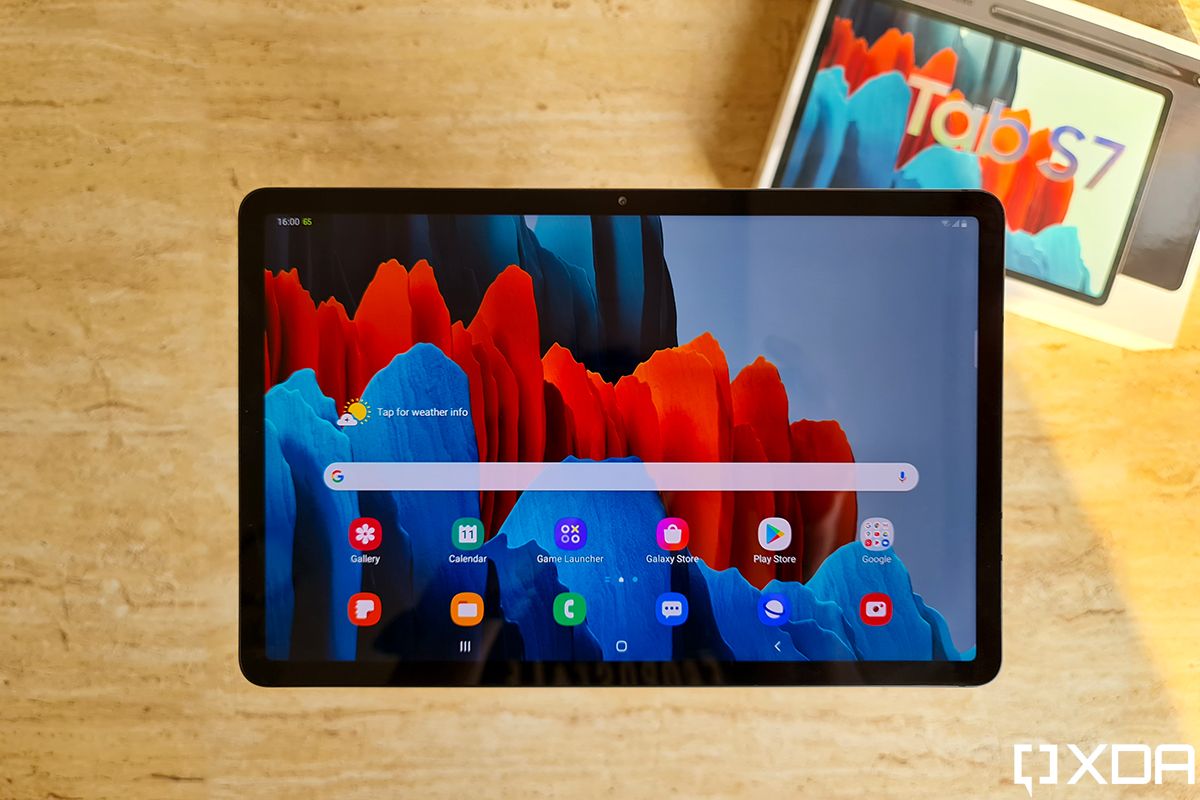
At first glance, the Galaxy Tab S7 doesn’t look all that different from its predecessor. But upon closer inspection, you can tell that Samsung has put some thought into refining the design this time around. With the Galaxy Tab S7, Samsung seems to have realized that most people will use the tablet in landscape mode, be it for media consumption or productivity.
Therefore, the company has moved the front-facing camera to a more appropriate location, and it now rests at the top of the display when you’re using the tablet in landscape mode. An example of this new approach can also be seen on the back panel, as the Samsung and AKG logos have been adjusted in a similar fashion.
The back panel now also has a slim glass section to house the S Pen which is aligned with the camera module. Since this section is easier to differentiate from the rest of the back panel by touch, placing the S Pen back to charge is a simpler process than it was on the Tab S6.
The LED flash is another handy addition, which can come in handy while scanning documents with the tablet in less than ideal lighting conditions. Lastly, the Galaxy Tab S7 features straighter edges than the Tab S6, which looks cooler but makes the tab a bit less comfortable to hold for longer durations.
Still fantastic for media consumption
The Samsung Galaxy Tab S7 features an 11-inch WQXGA (2560×1600) TFT panel that has an aspect ratio of 16:10 and a refresh rate of 120Hz. While it may seem like the display on the Galaxy Tab S7 is a step down from the AMOLED panel on the Tab S6, it’s anything but that.
Looking at the two displays side-by-side, you can easily tell that the one on the Galaxy Tab S7 is brighter and offers better color reproduction. Sure, the blacks don’t look as deep and the battery life may take a minor hit, but I’d much rather pick the faster refresh rate over deeper blacks any day. The display still offers HDR10+ support, and watching HDR content on the tablet is an absolute pleasure.
With its stunning display and exceptional audio performance, the Samsung Galaxy Tab S7 is perfect for media consumption.
Much like the Tab S6, the Galaxy Tab S7 features a quad-speaker setup tuned by AKG. The tablet has two speakers on either side and they offer great stereo separation. The audio quality is top-notch, and the speakers can get fairly loud at max volume, making the Galaxy Tab S7 the perfect choice for anyone looking to buy a tablet just for media consumption.
Performance & Productivity
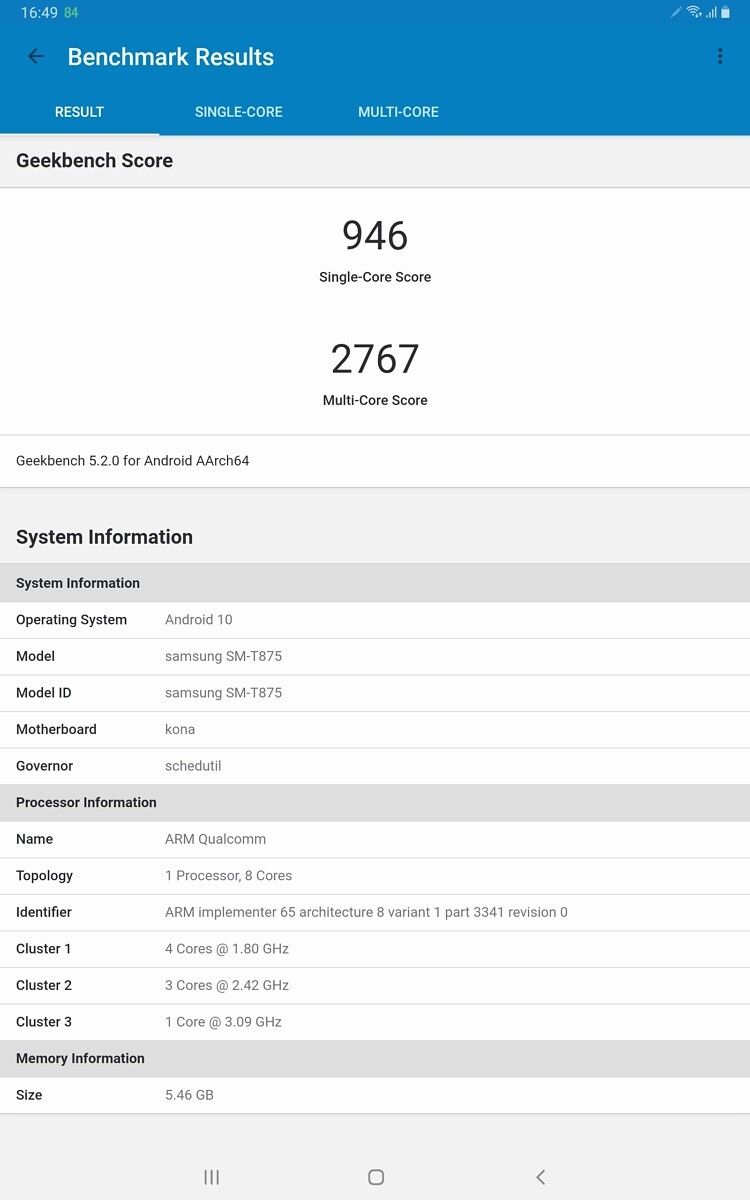
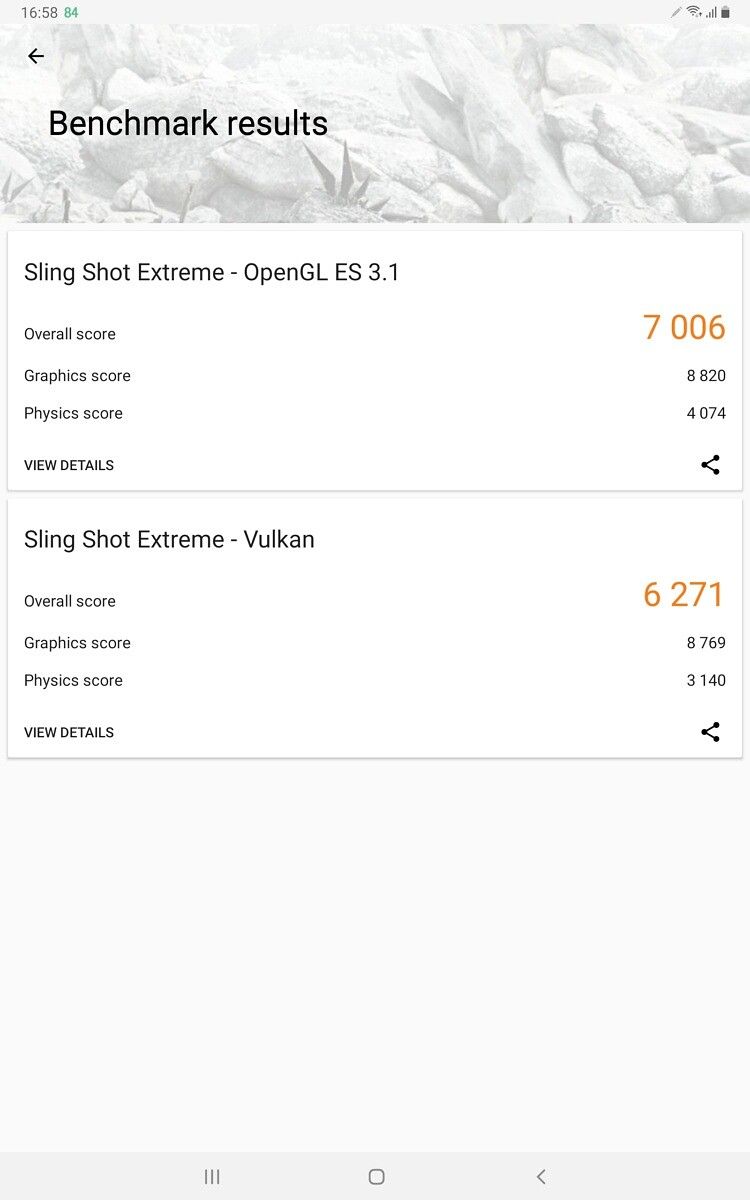
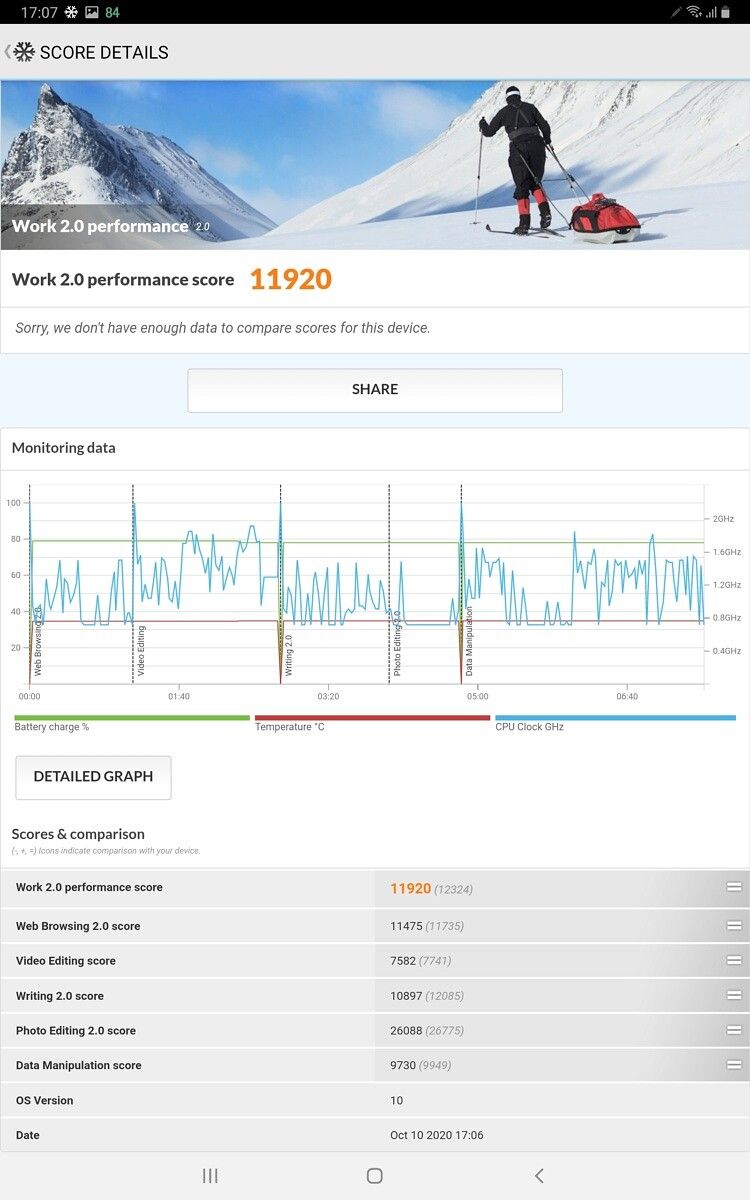
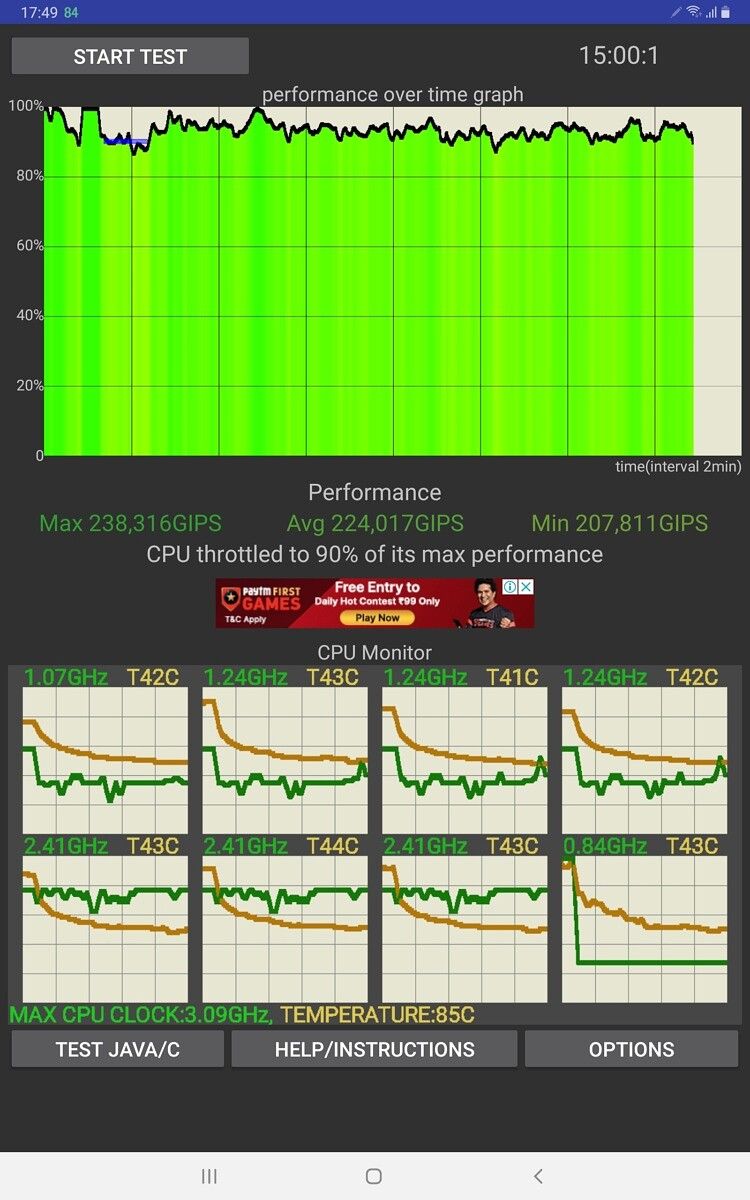
Powered by Qualcomm’s flagship Snapdragon 865 Plus chip and 6GB of RAM, the Samsung Galaxy Tab S7 is no slouch when it comes to performance. The tablet feels snappier than my Galaxy Note 20 Ultra (Exynos variant) in day to day use, and I faced absolutely no performance issues no matter what I threw at it. As expected, the tablet performs well in synthetic benchmarks too and you can check out the screenshots below for some of the results.
Multi-tasking on the tablet was also a breeze, and I faced no major issues while using it for work for a couple of days. While Android still doesn’t offer a tablet experience as polished as iPadOS, Samsung’s One UI has some cool features that go a long way in making the experience better than stock Android. Over the last year, Samsung has made some significant improvements to its software, and I didn’t experience most of the issues I faced on the Tab S6.
Samsung’s DeX Mode has also improved significantly since the last time I used it. While Chrome still doesn’t open desktop versions of websites by default and prompted me to download Android apps for some Google services, Samsung’s built-in browser opened desktop versions of Google Docs, Slides, and Sheets with no issues. One thing I still missed while using DeX Mode was the ability to split browser tabs and open them in separate windows, which would require launching another instance of the app.
DeX Mode has improved considerably over the last year, but Samsung still has some polishing left to do.
Although Samsung is taking steps in the right direction with DeX Mode, the Galaxy Tab S7 still doesn’t offer the same productivity experience that you can get on a similarly priced Chromebook. On top of that, the DeX Mode is pretty much useless without a keyboard, and the layout isn’t intuitive enough to use with just the touchscreen. So if you’re planning on using the tablet as a laptop replacement, you’ll have to invest in the optional keyboard cover.
A more comfortable typing experience
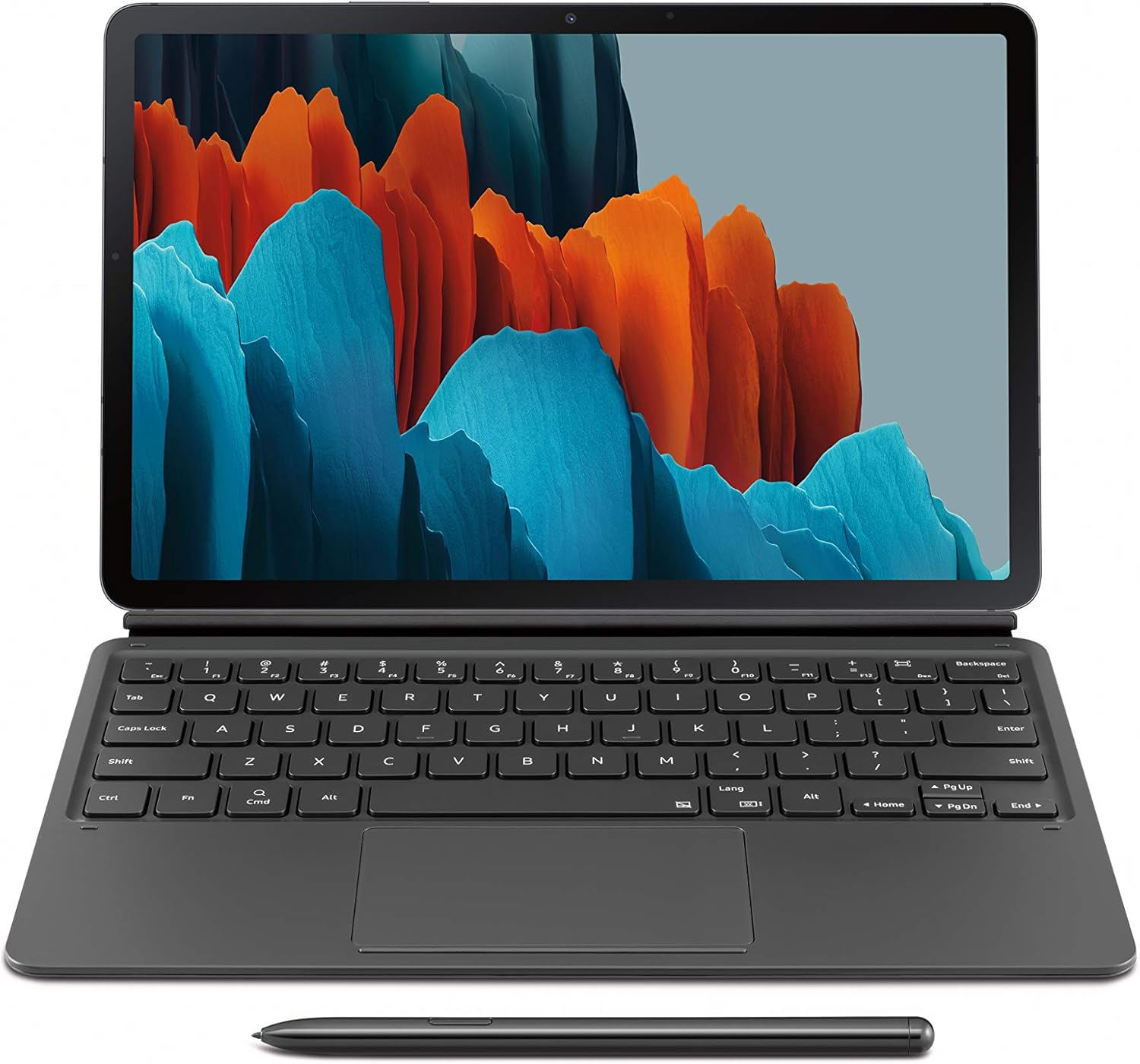
Speaking of which, Samsung has also updated the keyboard cover for the Galaxy Tab S7 and it’s remarkably better than the one for the Tab S6. First and foremost, Samsung has changed the way the keyboard cover attaches to the tablet. The company seems to have taken user feedback into consideration, and the keyboard cover now attaches to the tablet using magnets.
The keyboard itself has also received some improvements — it’s slightly bigger (thanks, in part, to the larger display on the tablet), the keys are better spaced out, the key travel is noticeably better, and the entire package feels more rigid. Using the tablet with the keyboard cover on an unstable surface still does not induce confidence, but it’s far more stable than the Tab S6 and it can get the job done in a pinch.
Samsung has also made thoughtful additions to the keyboard, and it now has a dedicated button to turn on/off DeX Mode and take screenshots (which can prove to be a bit of a hassle with the usual power button+volume down shortcut). Sadly, the keyboard for the Galaxy Tab S7 still doesn’t include a dedicated function row, but Samsung has added that on the keyboard cover for the Galaxy Tab S7 Plus.
Although I had a better experience with the keyboard this time around, the trackpad on the keyboard cover still needs some fine-tuning. While it is larger and supports multi-finger gestures, the trackpad lacks any form of accidental touch protection. This proved to be a major issue, especially due to the size constraints, and I constantly kept moving the cursor while pressing the Spacebar and Alt keys.
New and improved S Pen
Unlike Apple, Samsung bundles an S Pen with both of its flagship tablets. The S Pen that comes with the Galaxy Tab S7 is just a larger version of the S Pen that ships with the Galaxy Note 20 Series. It offers the same 9ms ultra-low latency and gives you access to the same suite of features that you’d find on the Galaxy Note 20 Ultra.
Since I’m not much of an artist, I can’t tell you how useful it will prove to be for professional use. But I definitely had fun coloring in PENUP, which comes preinstalled on the tablet. And while I did take some time to get used to writing with the S Pen, I had a great experience taking notes on the tablet during product briefings. As with the Galaxy Tab S6, the S Pen charges wirelessly when placed in its designated position on the back panel.
Decent battery life
The Samsung Galaxy Tab S7 packs in a large 8,000mAh battery which was enough to keep it going through a typical workday. On the days when I exclusively used the tablet for work, it was able to deliver an SoT of about 9.5 hours with the refresh rate set to 60Hz and the brightness set to 75%. Switching to 120Hz dropped the SoT to about 7.5 hours with the same use. A typical workday for me usually consists of writing articles, some light photo editing, and checking Slack, Asana, and Gmail for updates in between. In case you do something more performance-intensive, your mileage may vary.
PCMark Work 2.0 Battery Life
To give you a more objective measurement of the Galaxy Tab S7’s battery life, I also ran PCMark’s Work 2.o Battery Life benchmark. The benchmark was run with the refresh rate set to Adaptive and the brightness set to 75%. And the tablet consistently managed to deliver a score of around 12 hours in multiple runs. But because of the way the benchmark calculates these results, the tablet probably won’t be able to last as long in real-world use. For example, the Samsung Galaxy Note 20 Ultra manages to deliver a score of 10 hours and 35 minutes in the same test, but my unit rarely ever delivers more than 6 hours of SoT.
As far as charging is concerned, the Galaxy Tab S7 offers support for 45W fast charging. But sadly, Samsung doesn’t ship the tablet with a 45W charger in the box. Instead, the tablet comes with a 15W charger that takes about 2.5 hours to charge the tablet from 10-100%.
Should you buy the Samsung Galaxy Tab S7?
The Samsung Galaxy Tab S7 is a marked improvement over the Galaxy Tab S6, and it still is a great buy for artists and people for a portable media device. But at a starting price of $649.99 / £605 / €681 / ₹55,999 for the Wi-Fi variant, it may seem a bit too expensive for that purpose. However, that’s a premium you’ll have to pay if you want a stunning 120Hz display, flagship performance, and amazing audio. In comparison, the 11-inch iPad Pro with 128GB of storage retails for $799 / £769 / €856.80 / ₹71,900, and that doesn’t even include the Apple Pencil.
The Samsung Galaxy Tab S7 is one of the best tablets that team Android has on offer. It's the perfect choice for anyone looking for a portable media consumption device. However, Samsung still needs to work on the software to make it a great laptop replacement.
If you’re looking to purchase the Galaxy Tab S7 as a laptop replacement, then you’ll have to shell out an extra $199.99 / £189 / €199.90 / ₹13,299 for the keyboard cover. And even then, you might find working on the tablet a bit frustrating due to software limitations. Instead, you can go for a similarly priced Chromebook, like the HP Chromebook x360 14c ($499 / ₹55,999), which will offer a significantly better experience for work thanks to Chrome OS. But if you can look past these software shortcomings, the latest additions in Samsung’s Galaxy Tab lineup remain the best tablets team Android has to offer.
You can buy the Samsung Galaxy Tab S7 from Samsung.com or from Amazon in the U.S., India, the UK, Europe, and other regions. You can purchase the keyboard cover alongside the Tab S7 or independently.
Mobvoi is to release an LTE version of its well-received flagship the Ticwatch Pro 3. The Wear OS-powered device was the first to be powered by Qualcomm’s wearable SoC, the Snapdragon Wear 4100 (SDM429), and was praised for its reduced profile and improved responsiveness compared to almost every other Google-powered watch.
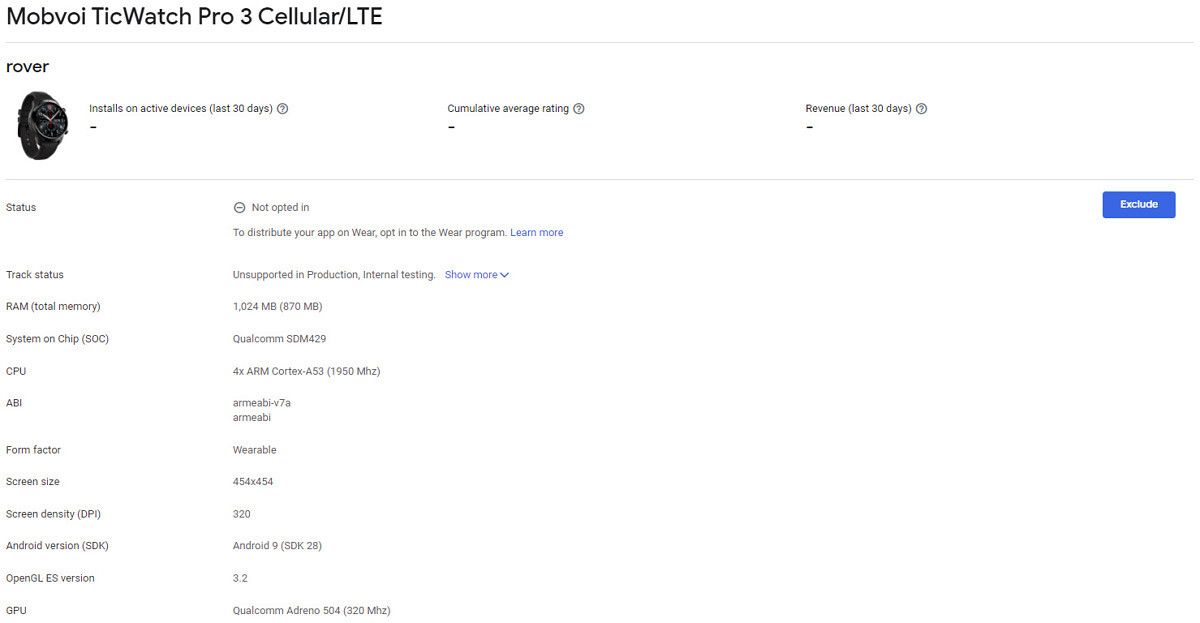
The LTE edition of the Ticwatch Pro 3, which has been spotted under the codename ‘rover’ in the Google Play Console Device Catalog, appears to boast all the same specifications as the original, but will also include eSIM functionality, making it compatible with some, but definitely not all, cellular networks without the need for a second contract. Huawei is among the manufacturers who have experimented with adding a nano-sim slot to its watches but they generally add too much weight and height to devices – eSIM is definitely the future of wearables and that’s the route Mobvoi has chosen. We’re not clear if the LTE circuit replaces the GPS chip in the original, but we’re hoping there’ll be room for both.
In case you missed our review of the original, the TicWatch Pro 3 has a 454×454 circular screen at 320DPI running Android Wear OS 9. It’s powered by a Qualcomm Snapdragon Wear 4100 SoC containing a quad-core ARM Cortex A53 array tuned to 1950Mhz, and an Adreno 504 GPU tuned at 320Mhz.
The Ticwatch Pro 3 brought us a more comprehensive range of fitness tracking options, most notably a blood oxygen saturation check, which was also one of the additions to the new Apple Watch 6.
There’s no official news from Mobvoi about release date or pricing (or indeed official confirmation it exists) but based on what we already know, we’d expect to start seeing it hit the stores sometime in November. We’d expect pricing to be somewhere between the price of the original GPS edition and the previous generation’s LTE edition. If your network supports eSIM, it’s definitely worth keeping your eye on.
Mobvoi is to release an LTE version of its well-received flagship the Ticwatch Pro 3. The Wear OS-powered device was the first to be powered by Qualcomm’s wearable SoC, the Snapdragon Wear 4100 (SDM429), and was praised for its reduced profile and improved responsiveness compared to almost every other Google-powered watch.
The LTE edition of the Ticwatch Pro 3, which has been spotted under the codename ‘rover’ in the Google Play Console Device Catalog, appears to boast all the same specifications as the original, but will also include eSIM functionality, making it compatible with some, but definitely not all, cellular networks without the need for a second contract. Huawei is among the manufacturers who have experimented with adding a nano-sim slot to its watches but they generally add too much weight and height to devices – eSIM is definitely the future of wearables and that’s the route Mobvoi has chosen. We’re not clear if the LTE circuit replaces the GPS chip in the original, but we’re hoping there’ll be room for both.
In case you missed our review of the original, the TicWatch Pro 3 has a 454×454 circular screen at 320DPI running Android Wear OS 9. It’s powered by a Qualcomm Snapdragon Wear 4100 SoC containing a quad-core ARM Cortex A53 array tuned to 1950Mhz, and an Adreno 504 GPU tuned at 320Mhz.
The Ticwatch Pro 3 brought us a more comprehensive range of fitness tracking options, most notably a blood oxygen saturation check, which was also one of the additions to the new Apple Watch 6.
There’s no official news from Mobvoi about release date or pricing (or indeed official confirmation it exists) but based on what we already know, we’d expect to start seeing it hit the stores sometime in November. We’d expect pricing to be somewhere between the price of the original GPS edition and the previous generation’s LTE edition. If your network supports eSIM, it’s definitely worth keeping your eye on.
From network engineering to cybersecurity, there are millions of well-paid jobs available in IT right now. They are open to anyone with the right skills and the certifications to prove it. With 22 courses and over 240 hours of video training,The 2021 All-In-One AWS, Cisco & CompTIA Super Certification Bundlehelps you build the perfect résumé. It’s worth over $4,000, but you canget it today for just $99at the XDA Developers Depot.
While different jobs require different skills, most technical employers are looking for people with all the fundamentals. This means you need at least to understand cloud computing, operating systems, networking, security, and so on.
This mammoth training bundle covers all bases, helping you acquire practical knowledge and work towards key exams.
Through concise video tutorials, you learn how to handle Cisco networking equipment, work with various AWS services, and deploy software with Microsoft Azure. You also get an introduction to IT troubleshooting and cybersecurity with CompTIA.
These courses work towards an array of CCNP, AWS, Microsoft, and CompTIA tests, touching on everything you need to know. The content comes from Integrity Training, a company that has created over 600 courses in the past 20 years.
All the courses have great ratings from previous students, and you get lifetime on-demand access.
I recently wrote about how Apple finally jumping on board the 5G bandwagon will make people care about 5G in ways they didn’t before, because as much as it pains me, an Android geek, to say, the reality is when Apple does something, the rest of the mobile industry usually follows.
But 5G is not the only thing the iPhone 12 will make a thing. There are several other changes Apple has made with the iPhone 12 series that I think will lead to Android brands following suit. Here are potential trends to watch for in 2021.
No charger in the box
When Apple removed the century-old headphone jack from the iPhone 7 in 2016, it led to backlash from consumers and media. Rival smartphone brands even took jabs at Apple for it. But ultimately, Apple had its way, and now virtually all Android flagships — including those from brands that initially poked fun at the idea — don’t have the 3.5mm jack.
The same thing could happen with Apple’s controversial decision to no longer ship chargers with its iPhones. Apple claims it’s an effort to reduce e-waste. Whether you believe that or not is a topic for another day; the thing to note here is that we may see Android brands follow suit.
In fact, rumors coming from South Korea indicates Samsung is already considering the move. Samsung, OnePlus, and ASUS have already posted ads mocking Apple for its decision, but how long will it be before they do the same?
Mini sized flagships
The iPhone 12 Mini is really small. Like, funny-looking if held by a large-sized adult small. Just look at Apple’s official marketing images below.
But despite its petite size (131.5 x 64.2 x 7.4mm), the iPhone 12 Mini is not lacking in power, because it runs on the same 5nm A14 Bionic SoC as its bigger brothers. Its 5.4-inch screen is still an FHD AMOLED panel, too. It’s a flagship phone in a compact size.
Judging by the responses from North American tech media, it seems like the Mini is going to be a hit, because let’s face it, modern day Android flagships have gotten a bit too big in recent years. The Samsung Galaxy Note 20 Ultra, for example, has a 6.9-inch display and measures 164.8 x 77.2 x 8.1 mm. The OnePlus 8 Pro has a 6.8-inch screen and measures 165.3 x 74.4 x 8.5 mm.
It’s okay for phones to get bigger as there is proven market interest in them, but somewhere along the line, Android phonemakers seem to have adopted a “the smaller phone should have inferior components” mantra. To its credit, Google has been pretty good throughout the years by providing a small Pixel that still packs a punch, but as much as we Android enthusiasts may love the Pixel, it’s ultimately a niche brand with little mainstream exposure. It’s the Samsungs and Huaweis that set the trends for Android.
The success of the iPhone 12 Mini would show Android brands there is a demand for a smaller form factor — without sacrificing power.
Shooting in Dolby Vision
The last few iPhones have, in the opinion of many reviewers (including myself), the best video camera in smartphones in terms of stabilization and dynamic range. The iPhone 12 brings another huge upgrade in that it is the first smartphone to shoot in Dolby Vision, which is like a superior, more technologically advanced version of HDR 10+. Considering that every recent Android manufacturer namedrops HDR 10+ in marketing copy and spec sheets, it’s likely that Dolby Vision won’t be far behind.
Sample Dolby Vision footage shot by the iPhone 12 shown off during the Apple event.
Dolby Vision beats HDR 10+ because it encodes data dynamically in real-time, and these data instructs the video to adjust color and temperature and exposure as the scene shifts. HDR 10+ receives only static metadata, meaning whatever enhancements are made to the video is a one-time application and applies for the entire video without accounting for shifts in lighting condition. There are other advantages to Dolby Vision, as RTINGS points out.
So why haven’t other phones been able to shoot in Dolby Vision? Well, for one, you need a really powerful, bleeding-edge SoC to handle all that processing in real time. Of the available Qualcomm Snapdragon SoCs, only the Snapdragon 865 currently supports video capture in Dolby Vision. More importantly, it costs money to license the encoding tech from Dolby. However, if big Android brands like Samsung and Huawei want to compete, they’ll likely have to jump on the Dolby Vision train too.
LiDAR sensor for better AR
Remember a few years ago when Android brands were pushing virtual reality (VR), while Apple pivoted to augmented reality (AR)? While neither tech has gone mainstream on mobile, it appear AR is faring a bit better on smartphones, with more practical use cases, while smartphone-based VR platforms are virtually dead.
There are AR apps in Android, but they mostly pale in comparison to what’s been available for iPhones and iPad for years. And Apple is adding to it this year by introducing the LiDAR (Light Detection and Ranging) sensor from this year’s iPad Pros, to the iPhone 12 Pro and 12 Pro Max. LiDAR is sort of like the TOF (time-of-flight) sensor that some Android phones have used, in that they both shoot beams to create a radar effect to “map” an area and objects in it.
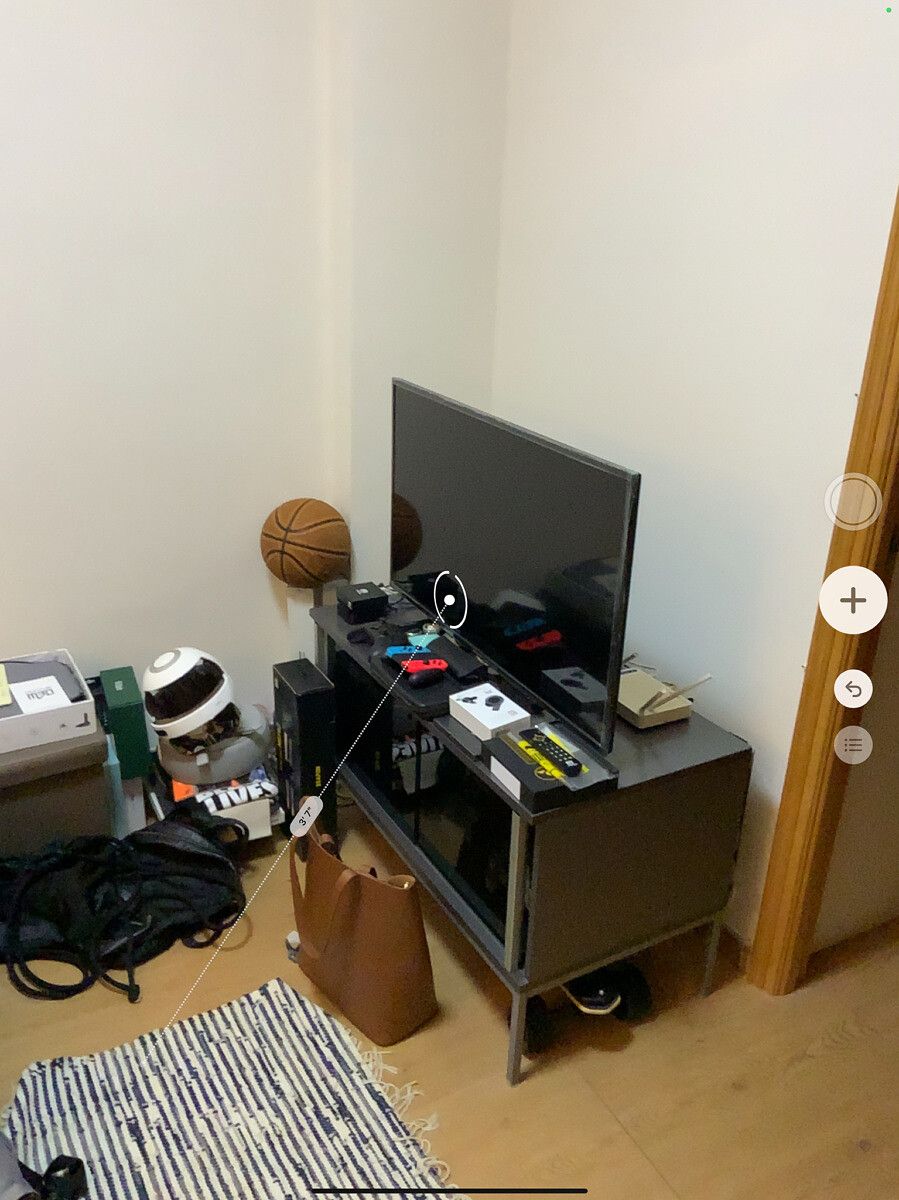
Let’s take the Measure app that comes pre-installed in all recent iOS devices, for example. It’s arguably the most practical reason to justify AR’s existence — it allows users to measure things in the real world using their smartphone or tablet. My iPad Pro with a LIDAR sensor can correctly identify surfaces including not just the floor and walls, but also my television. On Android, I tried Google’s own Measure app and a third-party-app named ARuler, and neither could correctly identify my TV.
Of course, for AR to grow, it will require third-party app makers to step up. Now that the iPhone 12 Pro and Pro Max have LIDAR scanners in them, that gives third-party app makers plenty of incentive to build AR apps. If Android phones want in, they’ll have to do a bit better than 2MP depth sensors.
Of course, these are just my predictions. There’s always the chance Android brands don’t follow any of these. It’s also worth mentioning that there’s a fair share of trends Google (or Android) started that Apple followed suit, like computational photography and widgets on the home screen. As fans of smartphones, we should want competitors to adopt what works – even if the idea came from the other side.