LightBlog

mardi 13 octobre 2020

Google Calendar on the web adds a Google Maps panel for quick access

Following the recent rollout of Google Tasks integration in Google Calendar, the web version of Google Calendar has now received an add-on for Google Maps in the side panel. As per a recent report from 9to5Google, the Google Calendar side panel now houses a new Maps icon right underneath the Keep and Tasks icons. Clicking on the icon loads up a search field, map view, and two tabs for “Recents” and “Saved.”

Google Maps icon in Google Calendar side panel

The Recents tab in the Google Maps side panel lists down queries from all your signed-in devices, while the Saved tabs lets you browse through your collections/lists. Clicking on the Search bar in the side panel brings up three suggested categories: Groceries, Takeout, and Hotel, allowing you to easily search for these things on Maps without leaving the Google Calendar interface.

Maps interface in Google Calendar side panel

The Search feature in the Google Maps side panel in Google Calendar works exactly like the full version of the app, and selecting a location opens up a small map preview right underneath. The bottom half of the side panel shows an image carousel for the searched location and several shortcuts, including Directions, Save, Send to your phone, and copy link. You can also open the full listing to see the hours, phone number, reviews, and “People also search for” below the result.

Travel directions in Google Maps on the side panel Nearby hotels shown in Google Maps side panel on Google Calendar

The directions feature in the Google Calendar side panel offers a complete Maps experience, showing all possible routes and alternate modes of travel. It also gives you the option to open the current screen in the web version of Google Maps for a bigger view. The report further adds that the new Maps side panel has appeared for several users on their personal Google Accounts, but it’s currently not available on Google Workspace accounts. As of now, Google hasn’t released any info regarding the feature or if it’ll eventually be released for Google Workspace users.


Via: 9to5Google

The post Google Calendar on the web adds a Google Maps panel for quick access appeared first on xda-developers.


from xda-developers https://ift.tt/3lISJTk
via IFTTT

Top 10 Amazon Prime Day 2020 Deals: Fire TVs, Razer Gear, and More!

The day is finally upon us–it’s time for Amazon Prime Day 2020. The 48-hour shopping event will be full of deals, deals, and even more deals, enough to make your head spin! You’ll see deep cuts on Amazon’s own products, as well as discounts from plenty of other sellers trying to get a piece of the Prime Day pie.

With lightning deals and more happening throughout October 13th and 14th, you might find yourself a little overwhelmed. Don’t be, though, as we have you covered! We have found the ten best Prime Day 2020 for you, ready for you to click and buy. Check them out below!

This list will be updated continuously throughout Prime Day. Bookmark this page and keep checking back to see what’s new!


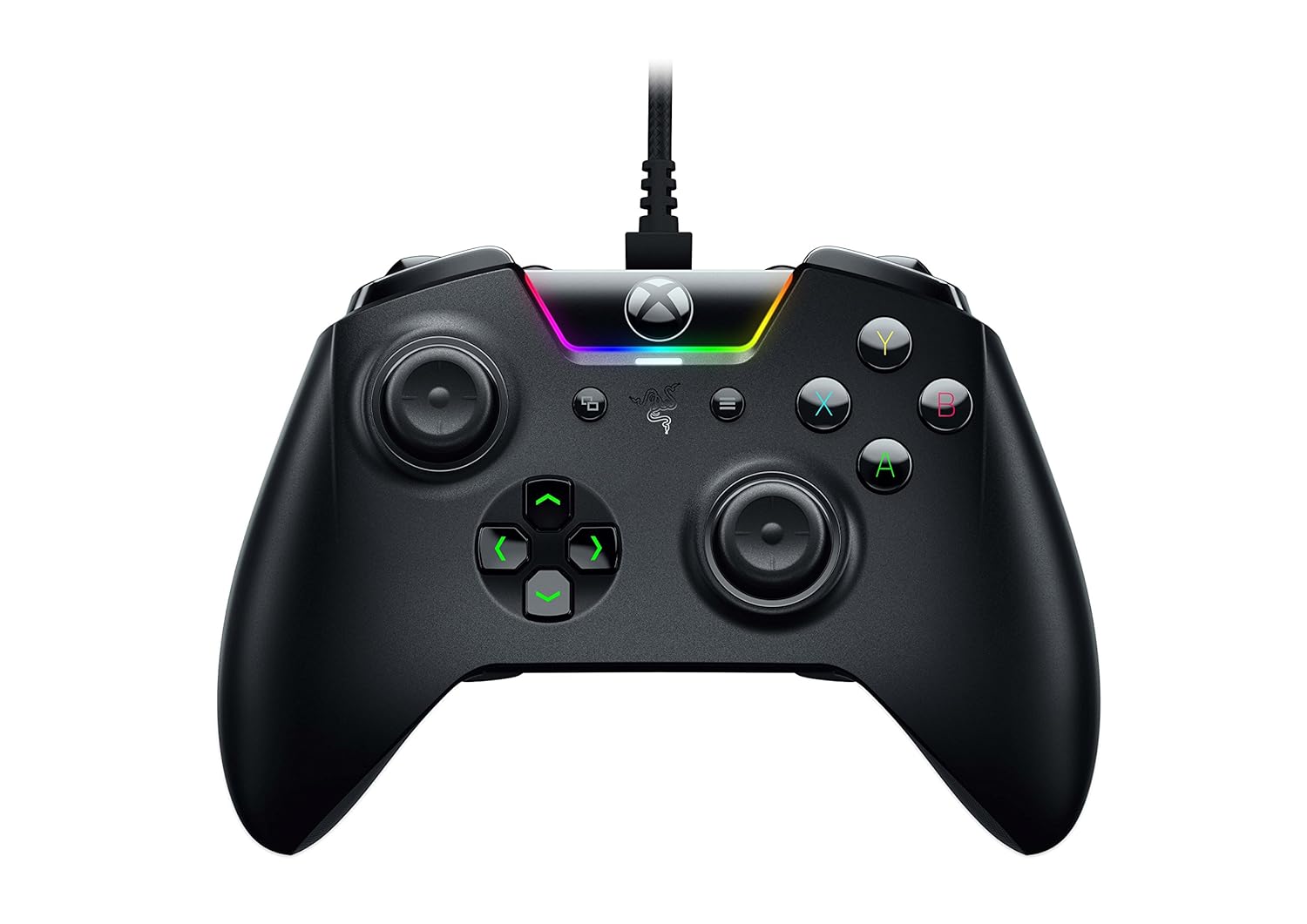
    Razer Wolverine Tournament Edition Xbox One Controller
    Get the best gaming experience around! Save $30 on the Razer Wolverine Controller, an officially licensed Xbox One controller. Active the Hair Trigger mode to stop the triggers from pushing in all the way, upping your response time!
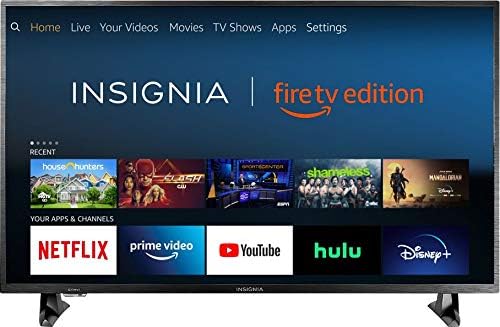
    Insignia 32-inch Smart HD Fire TV Edition TV
    You can't beat a Smart TV deal this good. The 32-inch Insignia Fire TV is only $110 during Prime Day, and this deal is sure to go quickly. Get one for yourself, or as a great gift for the Smart TV-less family member!
    Nintendo Switch Online Family Membership + SanDisk 128GB Memory Card
    If you picked up a new Nintendo Switch in one of the recent restocks, you'll know the Nintendo experience isn't complete without Switch Online. Get a 12-month Switch Online Family membership, which can accommodate up to eight accounts, and a 128 GB MicroSD for just $45. The membership is usually $35 on its own alone, so you'll essentially be getting a (much-needed) memory card for $10!
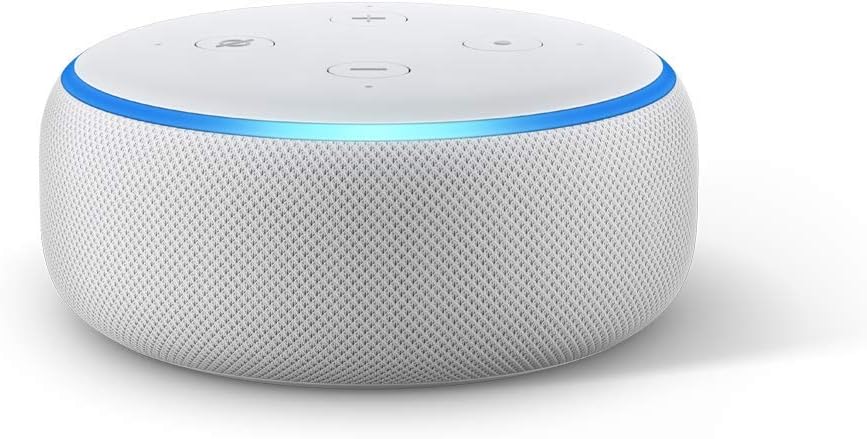
    Echo Dot (3rd Generation)
    Join the Amazon smart home ecosystem with the Echo Dot being at one of its lowest prices yet. The third-generation Echo Dot is a shockingly low $19, you can outfit your whole house with the smart speakers for cheap. This generation of Echo Dots can also be mounted on the wall, keeping them out of the way if you have limited table space.
    Dser Portable Movie Projector 1080P
    Enjoy some nice, socially distanced outdoor movie nights with Dser's portable projector! By using the code DSERPROJat checkout, you'll get this 1080p projector for just $90, so $50 off the MSRP. This projector is capable of projecting up to 160 inches, so you know it'll be great for a backyard or park get-together.
    Razer Basilisk Ultimate Wireless Gaming Mouse
    Get one of the best gaming mouses on the market for just a Benjamin. Razer's Basilisk Ultimate wireless mouse is $100, and it offers near-zero latency and eleven programmable buttons for all of your macros. If you're a hardcore PC gamer, you owe it to yourself to grab this mouse.

The post Top 10 Amazon Prime Day 2020 Deals: Fire TVs, Razer Gear, and More! appeared first on xda-developers.


from xda-developers https://ift.tt/3nMVZio
via IFTTT

Top 10 Amazon Prime Day 2020 Deals: Fire TVs, Razer Gear, and More!

The day is finally upon us–it’s time for Amazon Prime Day 2020. The 48-hour shopping event will be full of deals, deals, and even more deals, enough to make your head spin! You’ll see deep cuts on Amazon’s own products, as well as discounts from plenty of other sellers trying to get a piece of the Prime Day pie.

With lightning deals and more happening throughout October 13th and 14th, you might find yourself a little overwhelmed. Don’t be, though, as we have you covered! We have found the ten best Prime Day 2020 for you, ready for you to click and buy. Check them out below!

This list will be updated continuously throughout Prime Day. Bookmark this page and keep checking back to see what’s new!


    Razer Wolverine Tournament Edition Xbox One Controller
    Get the best gaming experience around! Save $30 on the Razer Wolverine Controller, an officially licensed Xbox One controller. Active the Hair Trigger mode to stop the triggers from pushing in all the way, upping your response time!
    Insignia 32-inch Smart HD Fire TV Edition TV
    You can't beat a Smart TV deal this good. The 32-inch Insignia Fire TV is only $110 during Prime Day, and this deal is sure to go quickly. Get one for yourself, or as a great gift for the Smart TV-less family member!
    Nintendo Switch Online Family Membership + SanDisk 128GB Memory Card
    If you picked up a new Nintendo Switch in one of the recent restocks, you'll know the Nintendo experience isn't complete without Switch Online. Get a 12-month Switch Online Family membership, which can accommodate up to eight accounts, and a 128 GB MicroSD for just $45. The membership is usually $35 on its own alone, so you'll essentially be getting a (much-needed) memory card for $10!
    Echo Dot (3rd Generation)
    Join the Amazon smart home ecosystem with the Echo Dot being at one of its lowest prices yet. The third-generation Echo Dot is a shockingly low $19, you can outfit your whole house with the smart speakers for cheap. This generation of Echo Dots can also be mounted on the wall, keeping them out of the way if you have limited table space.
    Dser Portable Movie Projector 1080P
    Enjoy some nice, socially distanced outdoor movie nights with Dser's portable projector! By using the code DSERPROJat checkout, you'll get this 1080p projector for just $90, so $50 off the MSRP. This projector is capable of projecting up to 160 inches, so you know it'll be great for a backyard or park get-together.
    Razer Basilisk Ultimate Wireless Gaming Mouse
    Get one of the best gaming mouses on the market for just a Benjamin. Razer's Basilisk Ultimate wireless mouse is $100, and it offers near-zero latency and eleven programmable buttons for all of your macros. If you're a hardcore PC gamer, you owe it to yourself to grab this mouse.

The post Top 10 Amazon Prime Day 2020 Deals: Fire TVs, Razer Gear, and More! appeared first on xda-developers.


from xda-developers https://ift.tt/3nMVZio
via IFTTT

lundi 12 octobre 2020

OnePlus co-founder Carl Pei leaves company for new hardware venture

OnePlus co-founder Carl Pei, who’s been the face of the company in the west for the last seven years, has reportedly left the company. News regarding his departure first popped up on Reddit (via AndroidPolice), when user JonSigur shared screenshots of internal memos at OnePlus. The memos listed the company’s leadership structure, but Pei’s name wasn’t included. The screenshots also mentioned that Emily Dai, who’s been in charge of the company’s operations in India, was recently appointed as the head of the Nord product line globally. Pei was previously in-charge of Nord, and he was a prominent figure in the recently released documentary about the phone’s development.

Two sources familiar with the matter have confirmed to Android Central that Pei had left his position at OnePlus in recent weeks, and no longer appears in the company’s latest organizational chart. Although OnePlus and Pei are yet to release a statement on the matter, a report from TechCrunch claims that Pei has left the company to start his own venture.

OnePlus is scheduled to launch the OnePlus 8T in just a day, and Pei’s departure in the midst of a major product launch has raised questions about the circumstances of his departure. The news comes just weeks before Pei’s latest project, the OnePlus Nord, is expected to make its way to US shores in the form of two affordable devices — the OnePlus Nord N10 and N100. The company’s other co-founder, Pete Lau, is still at the company and holds the position of CEO. However, he recently took on an additional role as Senior Vice President and Chief Product Experience Officer of OPLUS, an investment firm that oversees OnePlus, OPPO, and possibly others.

The post OnePlus co-founder Carl Pei leaves company for new hardware venture appeared first on xda-developers.


from xda-developers https://ift.tt/3lxSE54
via IFTTT

OnePlus co-founder Carl Pei leaves company for new hardware venture

OnePlus co-founder Carl Pei, who’s been the face of the company in the west for the last seven years, has reportedly left the company. News regarding his departure first popped up on Reddit (via AndroidPolice), when user JonSigur shared screenshots of internal memos at OnePlus. The memos listed the company’s leadership structure, but Pei’s name wasn’t included. The screenshots also mentioned that Emily Dai, who’s been in charge of the company’s operations in India, was recently appointed as the head of the Nord product line globally. Pei was previously in-charge of Nord, and he was a prominent figure in the recently released documentary about the phone’s development.

Two sources familiar with the matter have confirmed to Android Central that Pei had left his position at OnePlus in recent weeks, and no longer appears in the company’s latest organizational chart. Although OnePlus and Pei are yet to release a statement on the matter, a report from TechCrunch claims that Pei has left the company to start his own venture.

OnePlus is scheduled to launch the OnePlus 8T in just a day, and Pei’s departure in the midst of a major product launch has raised questions about the circumstances of his departure. The news comes just weeks before Pei’s latest project, the OnePlus Nord, is expected to make its way to US shores in the form of two affordable devices — the OnePlus Nord N10 and N100. The company’s other co-founder, Pete Lau, is still at the company and holds the position of CEO. However, he recently took on an additional role as Senior Vice President and Chief Product Experience Officer of OPLUS, an investment firm that oversees OnePlus, OPPO, and possibly others.

The post OnePlus co-founder Carl Pei leaves company for new hardware venture appeared first on xda-developers.


from xda-developers https://ift.tt/3lxSE54
via IFTTT

Download: MIUI 12 Closed Beta for Xiaomi and Redmi devices [Update: October 12 builds]

Update 55 (10/12/2020 @ 09:03 AM ET): Added download links for MIUI 12 latest beta builds, compiled on October 12, 2020.

Previous Updates

Update 54 (09/29/2020 @ 06:19 AM ET): Added download links for MIUI 12 latest beta builds, compiled on September 29, 2020.

Update 53 (09/28/2020 @ 06:36 AM ET): Added download links for MIUI 12 latest beta builds, compiled on September 28, 2020.

Update 52 (09/24/2020 @ 06:32 AM ET): Added download links for MIUI 12 latest beta builds, compiled on September 22, 2020.

Update 51 (09/23/2020 @ 07:25 AM ET): Added download links for MIUI 12 latest beta builds, compiled on September 22, 2020. Previous links have been moved to our archive page.

The latest version of Xiaomi’s custom Android skin – MIUI 12 – is finally here. The company has dropped the curtain yesterday, alongside the Mi 10 Youth Edition launch event in China. Compared to MIUI 11, the stable version of which was released less than six months ago, MIUI 12 brings in a slew of improvements, visual overhauls, and many new features. We have already extracted the new wallpapers, and now we are presenting the downloading links of the first set of MIUI 12 beta firmware packages for a bunch of Xiaomi and Redmi devices.

It is worth mentioning that these closed beta builds are meant for the Chinese variants, as Xiaomi suspended the rollout of MIUI global beta since last year. As a consequence, you have to flash these recovery ROMs using TWRP to bypass the MIUI beta account whitelisting. Do not expect Google Play Services or any pre-installed Google apps in them. Language options are likely limited to English and Chinese only, too. Xiaomi did launch MIUI 12 globally, and we are waiting for builds to appear for that too. Meanwhile, you can try out the closed betas from China.

The beta MIUI 12 builds listed below are based on either Android 10 or Android 11, depending on the device. If you are looking for MIUI 12 stable releases, you can find those here.

Download: MIUI 12

You can download the latest beta of MIUI 12 for your device from the links below. You can also visit our linked forums in case you need further assistance. While all of these download links are directly from Xiaomi, users are advised to proceed at their own risk. We warn you once again, this is not intended for the average consumer and is recommended only for users comfortable with flashing ROMs.

Sr. No. Device, Device Codename, XDA Forum Link Android Version Download Link (20.10.12)
1. Redmi 10X 5G (atom) Android 10 Download
2. Redmi Note 8 Pro (begonia) Android 10 Download
3. Redmi 10X Pro (bomb) Android 10 Download
4. Mi 10 Ultra (cas) Android 10 Download
5. Mi 9 (cepheus) Android 10 Download
6. Redmi K30 Ultra (cezanne) Android 10
7. Mi 10 Pro (cmi) Android 11 Download
8. Mi 9 Pro 5G (crux) Android 10 Download
9. Redmi K20/Mi 9T (davinci) Android 10
10. Mi 8 (dipper) Android 10
11. Mi 8 Pro (equuleus) Android 10
12. Redmi Note 8 (ginkgo) Android 10 Download
13. Mi 9 SE (grus) Android 10 Download
14. Redmi Note 7/7S (lavender) Android 10 Download
15. Mi CC9e (laurus) Android 10 Download
16. Redmi K30 Pro/POCO F2 Pro (lmi) Android 11 Download
17. Mi Max 3 (nitrogen) Android 10
18. Mi Mix 3 (perseus) Android 10
19. POCO X2/Redmi K30 4G (phoenix) Android 10
20. Redmi K30 5G (picasso) Android 10 Download
21. Mi 8 Lite (platina) Android 10
22. Mi Mix 2S (polaris) Android 10
23. Mi 9 Lite/Mi CC9 (pyxis) Android 10 Download
24. Redmi K20 Pro/Mi 9T Pro (raphael) Android 10 Download
25. Mi 8 SE (sirius) Android 10
26. Mi Note 10/Mi CC9 Pro (tucana) Android 10
27. Mi 10 (umi) Android 11 Download
28. Mi 8 Explorer Edition (ursa) Android 10
29. Mi 10 Youth Edition/Mi 10 Lite Zoom (vangogh) Android 11 Download
30. Mi CC9 Meitu Edition (vela) Android 10 Download
31. Redmi Note 7 Pro (violet) Android 10 Download

Links for the previous beta builds of MIUI 12 are preserved as well:

Sr. No. Device, Device Codename, XDA Forum Link Android Version Download Link (20.9.28)
1. Redmi 10X 5G (atom) Android 10 Download
2. Redmi Note 8 Pro (begonia) Android 10 Download
3. Redmi 10X Pro (bomb) Android 10 Download
4. Mi 10 Ultra (cas) Android 10 Download
5. Mi 9 (cepheus) Android 10 Download
6. Redmi K30 Ultra (cezanne) Android 10
7. Mi 10 Pro (cmi) Android 11
8. Mi 9 Pro 5G (crux) Android 10 Download
9. Redmi K20/Mi 9T (davinci) Android 10
10. Mi 8 (dipper) Android 10
11. Mi 8 Pro (equuleus) Android 10
12. Redmi Note 8 (ginkgo) Android 10 Download
13. Mi 9 SE (grus) Android 10 Download
14. Redmi Note 7/7S (lavender) Android 10
15. Mi CC9e (laurus) Android 10 Download
16. Redmi K30 Pro/POCO F2 Pro (lmi) Android 11
17. Mi Max 3 (nitrogen) Android 10
18. Mi Mix 3 (perseus) Android 10
19. POCO X2/Redmi K30 4G (phoenix) Android 10
20. Redmi K30 5G (picasso) Android 10 Download
21. Mi 8 Lite (platina) Android 10
22. Mi Mix 2S (polaris) Android 10
23. Mi 9 Lite/Mi CC9 (pyxis) Android 10 Download
24. Redmi K20 Pro/Mi 9T Pro (raphael) Android 10 Download
25. Mi 8 SE (sirius) Android 10
26. Mi Note 10/Mi CC9 Pro (tucana) Android 10
27. Mi 10 (umi) Android 11
28. Mi 8 Explorer Edition (ursa) Android 10
29. Mi 10 Youth Edition/Mi 10 Lite Zoom (vangogh) Android 11 Download
30. Mi CC9 Meitu Edition (vela) Android 10 Download
31. Redmi Note 7 Pro (violet) Android 10 Download

Sr. No. Device, Device Codename, XDA Forum Link Android Version Download Link (20.9.28)
1. Redmi 10X 5G (atom) Android 10 Download
2. Redmi Note 8 Pro (begonia) Android 10 Download
3. Redmi 10X Pro (bomb) Android 10 Download
4. Mi 10 Ultra (cas) Android 10
5. Mi 9 (cepheus) Android 10 Download
6. Redmi K30 Ultra (cezanne) Android 10
7. Mi 10 Pro (cmi) Android 11 Download
8. Mi 9 Pro 5G (crux) Android 10 Download
9. Redmi K20/Mi 9T (davinci) Android 10
10. Mi 8 (dipper) Android 10
11. Mi 8 Pro (equuleus) Android 10
12. Redmi Note 8 (ginkgo) Android 10 Download
13. Mi 9 SE (grus) Android 10 Download
14. Redmi Note 7/7S (lavender) Android 10
15. Mi CC9e (laurus) Android 10 Download
16. Redmi K30 Pro/POCO F2 Pro (lmi) Android 11 Download
17. Mi Max 3 (nitrogen) Android 10
18. Mi Mix 3 (perseus) Android 10
19. POCO X2/Redmi K30 4G (phoenix) Android 10
20. Redmi K30 5G (picasso) Android 10
21. Mi 8 Lite (platina) Android 10
22. Mi Mix 2S (polaris) Android 10
23. Mi 9 Lite/Mi CC9 (pyxis) Android 10 Download
24. Redmi K20 Pro/Mi 9T Pro (raphael) Android 10 Download
25. Mi 8 SE (sirius) Android 10
26. Mi Note 10/Mi CC9 Pro (tucana) Android 10
27. Mi 10 (umi) Android 11 Download
28. Mi 8 Explorer Edition (ursa) Android 10
29. Mi 10 Youth Edition/Mi 10 Lite Zoom (vangogh) Android 11 Download
30. Mi CC9 Meitu Edition (vela) Android 10 Download
31. Redmi Note 7 Pro (violet) Android 10 Download

Sr. No. Device, Device Codename, XDA Forum Link Android Version Download Link (20.9.24)
1. Redmi 10X 5G (atom) Android 10 Download
2. Redmi Note 8 Pro (begonia) Android 10 Download
3. Redmi 10X Pro (bomb) Android 10 Download
4. Mi 10 Ultra (cas) Android 10 Download
5. Mi 9 (cepheus) Android 10 Download
6. Redmi K30 Ultra (cezanne) Android 10 Download
7. Mi 10 Pro (cmi) Android 11 Download
8. Mi 9 Pro 5G (crux) Android 10 Download
9. Redmi K20/Mi 9T (davinci) Android 10
10. Mi 8 (dipper) Android 10
11. Mi 8 Pro (equuleus) Android 10
12. Redmi Note 8 (ginkgo) Android 10 Download
13. Mi 9 SE (grus) Android 10 Download
14. Redmi Note 7/7S (lavender) Android 10
15. Mi CC9e (laurus) Android 10 Download
16. Redmi K30 Pro/POCO F2 Pro (lmi) Android 11 Download
17. Mi Max 3 (nitrogen) Android 10
18. Mi Mix 3 (perseus) Android 10
19. POCO X2/Redmi K30 4G (phoenix) Android 10
20. Redmi K30 5G (picasso) Android 10 Download
21. Mi 8 Lite (platina) Android 10
22. Mi Mix 2S (polaris) Android 10
23. Mi 9 Lite/Mi CC9 (pyxis) Android 10 Download
24. Redmi K20 Pro/Mi 9T Pro (raphael) Android 10 Download
25. Mi 8 SE (sirius) Android 10
26. Mi Note 10/Mi CC9 Pro (tucana) Android 10
27. Mi 10 (umi) Android 11 Download
28. Mi 8 Explorer Edition (ursa) Android 10
29. Mi 10 Youth Edition/Mi 10 Lite Zoom (vangogh) Android 11 Download
30. Mi CC9 Meitu Edition (vela) Android 10 Download
31. Redmi Note 7 Pro (violet) Android 10 Download

Sr. No. Device, Device Codename, XDA Forum Link Android Version Download Link (20.9.23)
1. Redmi 10X 5G (atom) Android 10
2. Redmi Note 8 Pro (begonia) Android 10 Download
3. Redmi 10X Pro (bomb) Android 10 Download
4. Mi 10 Ultra (cas) Android 10
5. Mi 9 (cepheus) Android 10 Download
6. Redmi K30 Ultra (cezanne) Android 10
7. Mi 10 Pro (cmi) Android 11 Download
8. Mi 9 Pro 5G (crux) Android 10 Download
9. Redmi K20/Mi 9T (davinci) Android 10
10. Mi 8 (dipper) Android 10
11. Mi 8 Pro (equuleus) Android 10
12. Redmi Note 8 (ginkgo) Android 10 Download
13. Mi 9 SE (grus) Android 10 Download
14. Redmi Note 7/7S (lavender) Android 10 Download
15. Mi CC9e (laurus) Android 10 Download
16. Redmi K30 Pro/POCO F2 Pro (lmi) Android 11 Download
17. Mi Max 3 (nitrogen) Android 10
18. Mi Mix 3 (perseus) Android 10
19. POCO X2/Redmi K30 4G (phoenix) Android 10
20. Redmi K30 5G (picasso) Android 10 Download
21. Mi 8 Lite (platina) Android 10
22. Mi Mix 2S (polaris) Android 10
23. Mi 9 Lite/Mi CC9 (pyxis) Android 10 Download
24. Redmi K20 Pro/Mi 9T Pro (raphael) Android 10 Download
25. Mi 8 SE (sirius) Android 10
26. Mi Note 10/Mi CC9 Pro (tucana) Android 10
27. Mi 10 (umi) Android 11 Download
28. Mi 8 Explorer Edition (ursa) Android 10
29. Mi 10 Youth Edition/Mi 10 Lite Zoom (vangogh) Android 11 Download
30. Mi CC9 Meitu Edition (vela) Android 10 Download
31. Redmi Note 7 Pro (violet) Android 10 Download

Older builds archive — MIUI 12 China Closed Beta for Xiaomi and Redmi devices


Changelog

The full changelog for MIUI 12 beta, when updating from MIUI 11, is as follows:

MIUI 12 Full Changelog

  • Highlights
    • MIUI 12. Yours alone.
  • System animations
    • New: All-new physically-based animation engine with advanced architecture will refresh your device’s look.
    • New: Dynamic window technology takes switching screen orientation to a new level.
  • System visuals
    • Brand new visual design works for all types of content and languages.
    • Magazine-level layouts bring important things into the spotlight and make the content structure clear.
  • Privacy protection
    • New: MIUI 12 is the first Android-based mobile OS that went through the rigorous enhanced privacy protection testing.
    • New: Reset your device ID and control how it’s used based on virtual ID technology.
    • New: Grant permissions that will be used only while you’re using an app.
    • New: You can also grant permissions just once, and decide again next time a permission is required.
    • New: Restrict access to telephony to third party apps.
    • New: Return blank messages to the apps that require personal information.
    • New: Receive notifications whenever apps record audio, use camera, or access your location.
    • New: Use secure sharing to control what additional data is sent along with shared items.
    • New: Get comprehensive stats on how apps use permissions in app behavior history.
    • New: Visit privacy.miui.com to learn how MIUI protects your privacy.
    • Optimization: Apps aren’t allowed to launch other apps in the background now.
  • AI Call Assistant
    • New: Mi AI can answer your calls now!
    • New: You can record a customized greeting that will be played to the other person during AI calls.
    • New: Customized greetings are also supported for outgoing calls.
  • Xiaomi Health
    • New: All-new Xiaomi Health gives you more options and makes your health stats more accurate.
    • New: Put your device next to you before falling asleep to analyze your sleep cycle and record talking and snoring.
    • New: You can sync data with supported wearable and smart home devices.
    • New: Xiaomi Health can remind you to stand up and move when it detects that you’ve been sitting down for too long.
    • New: The app also analyzes your stats and gives you simple health advice.
  • Control center
    • New: Swipe down from the upper right corner of your screen to open Control center.
    • New: Animated icons are a joy to look at!
  • Accessibility
    • New: Mi Ditto combines dictation and speech output, making mobile devices more convenient for people who have difficulties using conventionally designed smartphones.
  • Trips
    • New: Traffic and suggested routes to airports and train stations.
    • New: You can track your previous trips now.
    • New: Checklists for trips.
    • New: Alarms for train arrivals.
  • Mi Carrier Services
    • New: View your SIM balance and mobile data usage stats.
    • New: Save frequently used phone numbers to top up balance and buy mobile data later.
    • New: Buy SIM cards and services.
  • Messaging
    • New: Promotional messages are grouped according to their content now.
  • Status bar, Notification shade
    • New: All-new design.
  • Weather
    • New: New animations bring the weather from outside directly to your screen.
  • Settings
    • New: Security introduces new comprehensive privacy protection mechanisms.
    • New: Lite mode simplifies your device and brings essential features up front.
  • File Manager
    • New: Use the floating shortcut to filter and sort items, as well as switch view.
  • Calendar
    • New: New layout tailored for landscape orientation is available now.
    • New: We added lots of fresh animations that will accompany your actions.
    • New: Calendar cards will remind you about important events and anniversaries.
  • Notes
    • New: You can create folders with notes now.
    • New: New dynamic backgrounds look gorgeous!
    • New: Tasks are completed with a satisfying animation now.
    • New: Checklists of subtasks make managing your agenda much simpler.
  • Security
    • New: New animations feel natural and refreshing.
    • New: Keep your home safe with smart home device alerts.
    • New: Binging your favorite shows will be more convenient with our new video toolbox.
  • Xiaomi Cloud
    • New: Shared family storage plan is available now.

Thanks to XDA Recognized Developer yshalsager and XDA Member kacskrz for providing these download links!

The post Download: MIUI 12 Closed Beta for Xiaomi and Redmi devices [Update: October 12 builds] appeared first on xda-developers.


from xda-developers https://ift.tt/3eUAaJD
via IFTTT

Xiaomi demos intuitive smart home controls with Ultra-Wide Band technology

One of the features of the Samsung Galaxy Note 20 Ultra was Ultra-Wide Band (UWB) technology. UWB is used for initiating faster device-to-device connections, taking advantage of the precise, indoor positioning features enabled by the technology. After Samsung, now Xiaomi has announced plans for UWB (ultra-wideband) technology adoption, using it to unify smart home products into a seamless experience.

In a video shared on Weibo, a Xiaomi representative demonstrated products ranging from smart displays to fans to bulbs, all of which could be controlled from your phone, just by pointing it at the device. UWB’s main advantage is its ability to offer pinpoint location accuracy, which goes even beyond being in the right home or the right room, but exactly what you’re pointing at by measuring ‘time of flight’ to a device. It’s kind of like a universal remote – but no IR blaster, no Bluetooth. The on-screen controls on the screen even change according to which device you’re pointing at, thanks to its ability to transceive on a wide part of the radio spectrum.

Xiaomi isn’t the first vendor to tout UWB as the next big thing – Samsung has incorporated it into the new Galaxy Note 20 Ultra and Galaxy Z Fold 2, and Apple is said to have added it to the forthcoming iPhone 12, after debuting in the iPhone 11 – this Xiaomi video is the best live demonstration yet of its capabilities.

At present, UWB is being sold mainly as a more reliable way of sharing between data between devices, but Samsung has already suggested that it will soon be able to unlock a compatible smart door lock, just by approaching it. Xiaomi’s demo also features automatic door locking/unlocking powered by UWB.

If more widespread adoption of the tech happens over the coming years, we can expect to see a wider offering of ‘true’ smart home – without the need to summon a personal assistant like Alexa or dig around for the right app for the right lightbulb – even where there are multiple vendors’ devices in the same environment.

Besides sharing and smart home, the adoption of UWB could bring a smarter generation of fitness trackers that can monitor vital signs accurately using doppler radar. We can always be hopeful for the future.


Source: Weibo
Story Via: AndroidAuthority

The post Xiaomi demos intuitive smart home controls with Ultra-Wide Band technology appeared first on xda-developers.


from xda-developers https://ift.tt/3iRKaUv
via IFTTT