
LightBlog

vendredi 9 octobre 2020

Google Meet for Android gets a revamped UI design

Google on Friday said it’s updating the UI for Google Meet on Android. The updated UI features conveniences like a Quick Launch Summary and a New Meeting button that will bring up three options:

  • Get meeting joining info to share with others.
  • Start a Meet call instantly.
  • Schedule a new meeting in Google Calendar.

The color scheme is also a friendlier blue color rather than the swampy green that Meet is known for.

Google Meet for Android updated UI

Google Meet has become the latest star of Google’s productivity suite, which itself got a bit of a rebranding recently. The video chat app allows companies, educators, and friends and family to connect from anywhere around the world. During this pandemic, it’s become one of the best ways to stay in contact.

The service originally got a sleek redesign when the Meet tab rolled out in Gmail, and the same design was soon brought to the dedicated mobile app for iOS. It’s nice to finally see the same experience making its way to Meet for Android.

The updated UI for Google Meet for Android should be available to all users, including Workspace customers and anyone with a personal Google account.

Google Meet - Secure Video Meetings (Free, Google Play) →

The post Google Meet for Android gets a revamped UI design appeared first on xda-developers.


from xda-developers https://ift.tt/34G2ECp
via IFTTT

Install Samsung’s One UI 3.0 apps on Galaxy devices running One UI 2.0

Samsung’s One UI is largely regarded as a user-friendly OEM skin, especially after considering its predecessors, i.e. TouchWiz and Samsung Experience. The latest iteration of this custom interface — One UI 3.0 — is based on Android 11, and it is currently available as public beta on the Galaxy S20 series. Those who don’t own the Galaxy S20 but would like to have the taste of Samsung’s latest software are in luck, though, as a whole bunch of stock apps from the beta firmware have successfully been ported to other Galaxy devices running One UI 2.0/2.1/2.5.

Released by XDA Recognized Developer AlexisXDA, the port is available as a set of two recovery-flashable ZIP files. The first one is required to remove the existing version of the target apps, while the second one pushes the ported apps to the /system partition. Below you can find the complete list of ported stock apps included in the package:

  • Clock
  • Messaging
  • Digital Wellbeing
  • Keyboard
  • Contacts
  • Gallery
  • New Bixby Routines
  • New Samsung Call Settings
  • Link Sharing
  • Finder
  • QuickBoard
  • Share Live
  • Samsung Browser

To install the modded apps, you need to unlock the bootloader of your Galaxy smartphone/tablet and replace the stock recovery image with a custom recovery like TWRP. Keep in mind that unlocking the bootloader alone is sufficient to trip KNOX, thus you will permanently lose access to Samsung Pay and security features such as Secure Folder. If that’s something that doesn’t bother you, head over to the XDA thread linked below and follow the instructions in the first post to get the apps up and running on your device.

One UI 3.0 Ported Apps — XDA Download and Discussion Thread

It is important to note the steps described above are intended for the global unlocked variants. Most of the U.S. carriers like to disallow bootloader unlocking, making it impossible to flash a custom recovery on carrier branded Samsung Galaxy devices. The restriction can be bypassed, but that’s not everyone’s cup of tea.

The post Install Samsung’s One UI 3.0 apps on Galaxy devices running One UI 2.0 appeared first on xda-developers.


from xda-developers https://ift.tt/3jLhXjt
via IFTTT

Something special is coming on October 27th…

Over the past few years, we have witnessed consumer privacy eroded in many ways, too many for us even to begin recounting them. Then, there are never-ending antitrust lawsuits between big corporations and regions like the EU and USA; Facebook’s ongoing straddling of the line between judge and jury; and this year alone, an entire saga where the privacy of Americans has resulted in the expected, then likely, and now probable, sale of TikTok’s western business. It’s right about time to reclaim your privacy back.

Something special is coming on October 27th, and trust us, this is one you won’t want to miss! If you’ve been following my cryptic tweets, you’ll know we’ve been working on something different.

What is it, we hear you ask? We can’t reveal it all just yet, but we’re delighted to announce that we’ve partnered with London-based technology company F(x)tec to bring you a special product. One that puts you back in control and helps ensure that your private life stays private, as it should.

To find out more and get a headstart for the early bird specials when the Indiegogo page launches on October 27th, enter your details in the widget below! There are limited numbers of early bird perks, so you’ll definitely want to be on this list!

We also want to have a bit of fun, so for one lucky XDA user, we’ll give away the product we’re launching. To enter, though, you’re going to need to get creative. All you have to do is think of the funniest answer you can – and we mean funny, but not dirty, nasty, or prejudiced – to the following question:

What is XDA and F(x)tec launching? 🤔

Once you’ve come up with an answer, enter it in the widget below alongside your email. You only get one chance, so get creative! 😉 This competition ends on October 26th, and we’ll announce the winner on October 27th. The XDA team will pick the winner, so get funny, get creative, and join us for a special Tuesday!
Something Special Is Coming…

The post Something special is coming on October 27th… appeared first on xda-developers.


from xda-developers https://ift.tt/2FiYGqO
via IFTTT

Install Samsung’s One UI 3.0 apps on Galaxy devices running One UI 2.0

Samsung’s One UI is largely regarded as a user-friendly OEM skin, especially after considering its predecessors, i.e. TouchWiz and Samsung Experience. The latest iteration of this custom interface — One UI 3.0 — is based on Android 11, and it is currently available as public beta on the Galaxy S20 series. Those who don’t own the Galaxy S20 but would like to have the taste of Samsung’s latest software are in luck, though, as a whole bunch of stock apps from the beta firmware have successfully been ported to other Galaxy devices running One UI 2.0/2.1/2.5.

Released by XDA Recognized Developer AlexisXDA, the port is available as a set of two recovery-flashable ZIP files. The first one is required to remove the existing version of the target apps, while the second one pushes the ported apps to the /system partition. Below you can find the complete list of ported stock apps included in the package:

  • Clock
  • Messaging
  • Digital Wellbeing
  • Keyboard
  • Contacts
  • Gallery
  • New Bixby Routines
  • New Samsung Call Settings
  • Link Sharing
  • Finder
  • QuickBoard
  • Share Live
  • Samsung Browser

To install the modded apps, you need to unlock the bootloader of your Galaxy smartphone/tablet and replace the stock recovery image with a custom recovery like TWRP. Keep in mind that unlocking the bootloader alone is sufficient to trip KNOX, thus you will permanently lose access to Samsung Pay and security features such as Secure Folder. If that’s something that doesn’t bother you, head over to the XDA thread linked below and follow the instructions in the first post to get the apps up and running on your device.

One UI 3.0 Ported Apps — XDA Download and Discussion Thread

It is important to note the steps described above are intended for the global unlocked variants. Most of the U.S. carriers like to disallow bootloader unlocking, making it impossible to flash a custom recovery on carrier branded Samsung Galaxy devices. The restriction can be bypassed, but that’s not everyone’s cup of tea.

The post Install Samsung’s One UI 3.0 apps on Galaxy devices running One UI 2.0 appeared first on xda-developers.


from xda-developers https://ift.tt/3jLhXjt
via IFTTT

Microsoft Outlook for Android now supports 2-way sync with Google Calendar and other calendars

The latest update for Microsoft Outlook on Android brings support for 2-way sync between Google Calendar and other calendars. As per a recent report from Android Police on the matter, the feature has already started rolling out to users via a Play Store update, and it supports popular calendar apps like Google Calendar and Samsung Calendar.

Microsoft Outlook’s new 2-way calendar sync feature essentially syncs all your events from various calendar apps to one place. The changelog on the Google Play Store states:

“Want to sync events between Outlook and other calendars on your Android device? Outlook for Android now supports 2-way calendar sync for Microsoft 365, Office 365, and Outlook.com accounts. Events created in other calendar apps (Samsung Calendar, Google Calendar, etc) can now be viewed/edited from Outlook mobile and vice versa!”

While the changelog only mentions Samsung Calendar and Google Calendar, the new feature in Microsoft Outlook should work with other calendar apps. Since syncing is bi-directional, the events you create on Outlook will also be saved on the other calendar app you use. Additionally, any changes you make to your saved events will be synced across all connected app, no matter which app you choose to make the edits on.

If you’re a Microsoft 365, Office 365, or Outlook.com account user, you can try out the new 2-way calendar sync feature by updating to the latest version of Microsoft Outlook from the Play Store link below. In case the update isn’t available for you yet, you can also sideload the APK from APKMirror.

Microsoft Outlook: Organize Your Email & Calendar (Free, Google Play) →


Via: Android Police

The post Microsoft Outlook for Android now supports 2-way sync with Google Calendar and other calendars appeared first on xda-developers.


from xda-developers https://ift.tt/2SLniLH
via IFTTT

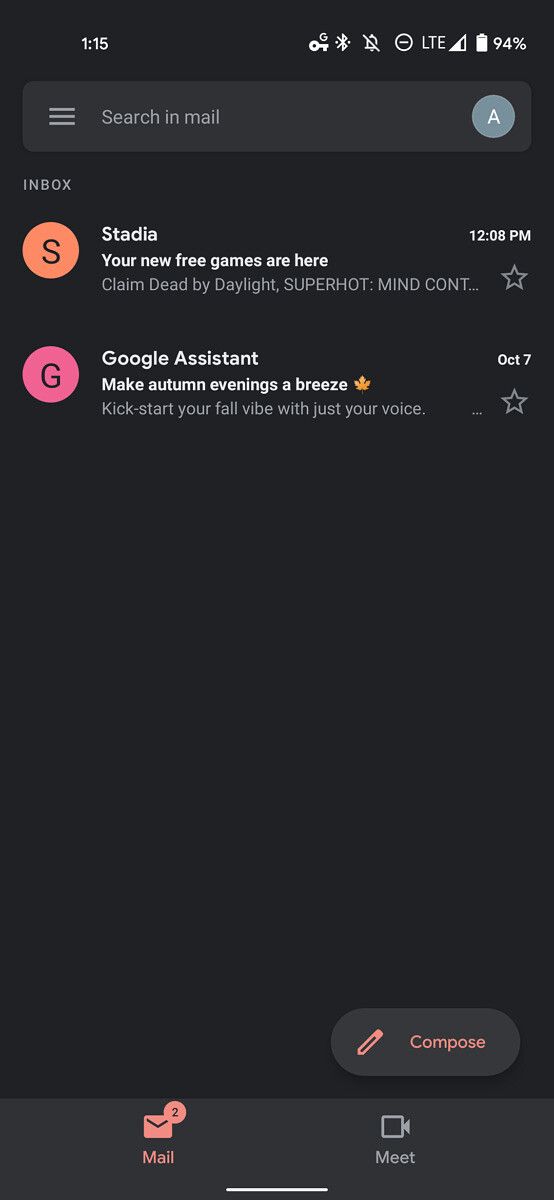
Gmail Go is a less bloated Gmail app that’s now available for all

Google offers quite a few ‘Go’ variants of its apps, which are designed for entry-level devices running Android Go. These include apps like Google Go, Google Assistant Go, Gallery Go, Google Maps Go, Google Camera Go, and many more. The company keeps adding new apps to the lineup ever so often, and it recently released a stripped-down version of the Gmail app on the Play Store. The new Gmail Go app brings a lighter Gmail experience for all devices, featuring just the essentials.

As per a recent 9to5Google report, the Gmail Go listing on the Play Store is nearly identical to that of the regular Gmail app, except for the new icon with a “Go” badge at the bottom. The listing specifies that Gmail Go offers the “Gmail you love, now lighter and just fast,” but it still features the same screenshots as the regular version. However, the app itself is quite different from the full-blown Gmail app.

Gmail Go

Gmail Go’s UI follows the same structure as the regular app, but it doesn’t include quite a few features. For instance, the app doesn’t feature a bottom bar because Google Meet has not been integrated into the app. The app’s UI elements are also flatter when compared to the regular Gmail app, with no layering or shadows. Instead, it makes use of a white outline for the search bar and Compose button to help them stand out.

Additionally, the report claims that the frame rate of the app has been capped so much so that it results in a perceptible lag when you scroll through the app. This is most likely a performance optimization that will benefit devices with low-end specifications. As mentioned earlier, the app isn’t restricted to Android Go devices and it’s available for all users. In case you’re not a fan of the regular Gmail app, you can give Gmail Go a shot by downloading it form the Play Store link below. In case the app isn’t available on your device, you can sideload it from APKMirror.

Gmail Go (Free, Google Play) →


Via: 9to5Google

The post Gmail Go is a less bloated Gmail app that’s now available for all appeared first on xda-developers.


from xda-developers https://ift.tt/2GDtbrW
via IFTTT

Microsoft Outlook for Android now supports 2-way sync with Google Calendar and other calendars

The latest update for Microsoft Outlook on Android brings support for 2-way sync between Google Calendar and other calendars. As per a recent report from Android Police on the matter, the feature has already started rolling out to users via a Play Store update, and it supports popular calendar apps like Google Calendar and Samsung Calendar.

Microsoft Outlook’s new 2-way calendar sync feature essentially syncs all your events from various calendar apps to one place. The changelog on the Google Play Store states:

“Want to sync events between Outlook and other calendars on your Android device? Outlook for Android now supports 2-way calendar sync for Microsoft 365, Office 365, and Outlook.com accounts. Events created in other calendar apps (Samsung Calendar, Google Calendar, etc) can now be viewed/edited from Outlook mobile and vice versa!”

While the changelog only mentions Samsung Calendar and Google Calendar, the new feature in Microsoft Outlook should work with other calendar apps. Since syncing is bi-directional, the events you create on Outlook will also be saved on the other calendar app you use. Additionally, any changes you make to your saved events will be synced across all connected app, no matter which app you choose to make the edits on.

If you’re a Microsoft 365, Office 365, or Outlook.com account user, you can try out the new 2-way calendar sync feature by updating to the latest version of Microsoft Outlook from the Play Store link below. In case the update isn’t available for you yet, you can also sideload the APK from APKMirror.

Microsoft Outlook: Organize Your Email & Calendar (Free, Google Play) →


Via: Android Police

The post Microsoft Outlook for Android now supports 2-way sync with Google Calendar and other calendars appeared first on xda-developers.


from xda-developers https://ift.tt/2SLniLH
via IFTTT