LightBlog

vendredi 14 août 2020

OnePlus Gallery adds support for editing 4K60fps videos

Ever since OnePlus opened up a beta program for the OnePlus Gallery app, the app has received a ton of new features with each new update. Most recently, OnePlus released update 3.12.33 of the app which introduced a new Google Cast button to help users easily beam their photos to TVs or smart displays. Now, the company is rolling out another major update, which brings 4K60fps video editing support to the app.

Over the last couple of years, OnePlus has released several devices that support 4K60fps video capture. However, the devices don’t offer native editing capabilities for the high-resolution footage, and users have to rely on third-party apps to edit their videos. With the latest update for the OnePlus Gallery app, users will now be able to edit their 4K 60fps footage within the app.

OnePlus Gallery 4k60fps video editing

As you can see in the attached screenshot, the OnePlus Gallery app now lets you trim 4K60fps video, and add filters and music to the video. Along with the new 4K60fps video editing support, the latest update for the gallery app brings support for photo projecting to OnePlus TVs and a few bug fixes. Here’s the full changelog for the latest OnePlus Gallery update:

  • Fix issues including sharing photos from gallery, red color, and photo missing
  • Fix slow-motion video editor
  • Add photo projecting to OnePlus TV
  • Add 4K60fps video editing

The update has started rolling out to supported devices via the Google Play Store. In case you haven’t received the update yet, you can head over to the OnePlus Gallery Play Store listing from the link below and tap on the update button.

OnePlus Gallery (Free, Google Play) →

The post OnePlus Gallery adds support for editing 4K60fps videos appeared first on xda-developers.


from xda-developers https://ift.tt/3fVuApq
via IFTTT

OnePlus Gallery adds support for editing 4K60fps videos

Ever since OnePlus opened up a beta program for the OnePlus Gallery app, the app has received a ton of new features with each new update. Most recently, OnePlus released update 3.12.33 of the app which introduced a new Google Cast button to help users easily beam their photos to TVs or smart displays. Now, the company is rolling out another major update, which brings 4K60fps video editing support to the app.

Over the last couple of years, OnePlus has released several devices that support 4K60fps video capture. However, the devices don’t offer native editing capabilities for the high-resolution footage, and users have to rely on third-party apps to edit their videos. With the latest update for the OnePlus Gallery app, users will now be able to edit their 4K 60fps footage within the app.

OnePlus Gallery 4k60fps video editing

As you can see in the attached screenshot, the OnePlus Gallery app now lets you trim 4K60fps video, and add filters and music to the video. Along with the new 4K60fps video editing support, the latest update for the gallery app brings support for photo projecting to OnePlus TVs and a few bug fixes. Here’s the full changelog for the latest OnePlus Gallery update:

  • Fix issues including sharing photos from gallery, red color, and photo missing
  • Fix slow-motion video editor
  • Add photo projecting to OnePlus TV
  • Add 4K60fps video editing

The update has started rolling out to supported devices via the Google Play Store. In case you haven’t received the update yet, you can head over to the OnePlus Gallery Play Store listing from the link below and tap on the update button.

OnePlus Gallery (Free, Google Play) →

The post OnePlus Gallery adds support for editing 4K60fps videos appeared first on xda-developers.


from xda-developers https://ift.tt/3fVuApq
via IFTTT

Watch Microsoft’s Panos Panay make a case for the Surface Duo

At the Surface event in October last year, Microsoft first unveiled the Surface Duo — a dual-screen Android smartphone. The company had originally planned on launching the device during the Holiday season later this year, but the launch timeline was sped up and the device was officially announced earlier this week. The device features flagship hardware from early 2019, including Qualcomm’s Snapdragon 855 chip, 6GB of RAM, up to 256GB of UFS 3.0 storage, and two 5.6-inch AMOLED displays, which have the chunkiest bezels that I’ve seen in quite a while.

On the surface, Microsoft’s first foldable Android device looks a bit dated and might turn away a lot of potential buyers. This is why Microsoft’s Chief Product Officer, Panos Panay, has released a new video making a case for the unique software experience offered with the Surface Duo and how it may change the way you use your smartphone.

In the video, Panay highlights all of the unique features that set the Surface Duo apart and how the software experience seamlessly adapts to your needs. The video addresses some of the major customizations Microsoft has made on its Android skin for the Surface Duo, like a gesture which lets you span an app across the two screens, the device’s ability to open links/other apps on the second screen to maintain the flow, app groups that let you open two apps simultaneously, keyboard customizations for different orientations, and much more. Check out the full video linked above to see how the Surface Duo aims to change the game, despite the older hardware.

In case the video manages to convince you to purchase the Microsoft Surface Duo, you can go ahead and pre-order it from the Microsoft Store, Best Buy or AT&T in the US. The device will set you back $1,399 for the 6GB/128GB base variant, and it will go on open sale starting September 10th.

The post Watch Microsoft’s Panos Panay make a case for the Surface Duo appeared first on xda-developers.


from xda-developers https://ift.tt/33ZjJIE
via IFTTT

Watch Microsoft’s Panos Panay make a case for the Surface Duo

At the Surface event in October last year, Microsoft first unveiled the Surface Duo — a dual-screen Android smartphone. The company had originally planned on launching the device during the Holiday season later this year, but the launch timeline was sped up and the device was officially announced earlier this week. The device features flagship hardware from early 2019, including Qualcomm’s Snapdragon 855 chip, 6GB of RAM, up to 256GB of UFS 3.0 storage, and two 5.6-inch AMOLED displays, which have the chunkiest bezels that I’ve seen in quite a while.

On the surface, Microsoft’s first foldable Android device looks a bit dated and might turn away a lot of potential buyers. This is why Microsoft’s Chief Product Officer, Panos Panay, has released a new video making a case for the unique software experience offered with the Surface Duo and how it may change the way you use your smartphone.

In the video, Panay highlights all of the unique features that set the Surface Duo apart and how the software experience seamlessly adapts to your needs. The video addresses some of the major customizations Microsoft has made on its Android skin for the Surface Duo, like a gesture which lets you span an app across the two screens, the device’s ability to open links/other apps on the second screen to maintain the flow, app groups that let you open two apps simultaneously, keyboard customizations for different orientations, and much more. Check out the full video linked above to see how the Surface Duo aims to change the game, despite the older hardware.

In case the video manages to convince you to purchase the Microsoft Surface Duo, you can go ahead and pre-order it from the Microsoft Store, Best Buy or AT&T in the US. The device will set you back $1,399 for the 6GB/128GB base variant, and it will go on open sale starting September 10th.

The post Watch Microsoft’s Panos Panay make a case for the Surface Duo appeared first on xda-developers.


from xda-developers https://ift.tt/33ZjJIE
via IFTTT

Civilization VI releases on Android with Gathering Storm and Rise and Fall expansions and a 60-turn free demo

Sid Meier’s Civilization VI is a very popular turn-based strategy game that is available on a wide variety of platforms, starting off with Microsoft Windows and macOS back in 2016, and then carrying over to Linux, PlayStation 4, Xbox One, Nintendo Switch, and even iOS later on. The game has now finally made its official entry onto Android through the Google Play Store. But there’s a catch — the game is not cheap if you ignore the free demo.

Civilization VI, as the name might hint, requires the player to develop a civilization from an early settlement. Winning the game can be done by achieving one of the several victory criteria, such as military domination, technological superiority, or cultural influence. Players explore for resources, establish cities, build up improvements, deploy military, research new technologies, and engage in negotiation with other AI-based leaders. At least on other platforms, the game is praised for its depth and the ability to force players to strategize on their feet.

Civilization VI’s arrival on Android comes about three years after it arrived on iOS. The iOS port was a decent touch conversion of the desktop experience, and the Android port is similar to what you can experience on iOS.

Sid Meier's Civilization VI civ 6

On Android, Civilization VI is adopting a free-to-start model. Players can try out the game for free for 60 turns, after which they can purchase the game for $19.99. Play Store suggests that the game is about 4.22GB in size, so keep that in mind if you want to experience the demo. Further, expansions and scenario packs are sold separately in-game:

  • Rise and Fall expansion – $29.99
  • Gathering Storm expansion – $39.99
  • Civilization and Scenario packs – $4.99-$8.99

If you’re keeping track of the math, the core game and two of its expansions will set you back by $90, and you’d still lack the scenario packs. That is an expensive purchase, but if you have experienced Civilization VI on other platforms, you might not find it all that unreasonable, especially since the core game is pretty fun by itself and does not necessarily need the expansions. You can easily pour in hours with just the core game. If you’re looking for something beyond the usual PUBGM, CODM, and Fortnite, this could be a decent option.


Civilization VI (Free+, Google Play) →

Story Via: IGN

The post Civilization VI releases on Android with Gathering Storm and Rise and Fall expansions and a 60-turn free demo appeared first on xda-developers.


from xda-developers https://ift.tt/3fVcOTn
via IFTTT

jeudi 13 août 2020

Civilization VI releases on Android with Gathering Storm and Rise and Fall expansions and a 60-turn free demo

Sid Meier’s Civilization VI is a very popular turn-based strategy game that is available on a wide variety of platforms, starting off with Microsoft Windows and macOS back in 2016, and then carrying over to Linux, PlayStation 4, Xbox One, Nintendo Switch, and even iOS later on. The game has now finally made its official entry onto Android through the Google Play Store. But there’s a catch — the game is not cheap if you ignore the free demo.

Civilization VI, as the name might hint, requires the player to develop a civilization from an early settlement. Winning the game can be done by achieving one of the several victory criteria, such as military domination, technological superiority, or cultural influence. Players explore for resources, establish cities, build up improvements, deploy military, research new technologies, and engage in negotiation with other AI-based leaders. At least on other platforms, the game is praised for its depth and the ability to force players to strategize on their feet.

Civilization VI’s arrival on Android comes about three years after it arrived on iOS. The iOS port was a decent touch conversion of the desktop experience, and the Android port is similar to what you can experience on iOS.

Sid Meier's Civilization VI civ 6

On Android, Civilization VI is adopting a free-to-start model. Players can try out the game for free for 60 turns, after which they can purchase the game for $19.99. Play Store suggests that the game is about 4.22GB in size, so keep that in mind if you want to experience the demo. Further, expansions and scenario packs are sold separately in-game:

  • Rise and Fall expansion – $29.99
  • Gathering Storm expansion – $39.99
  • Civilization and Scenario packs – $4.99-$8.99

If you’re keeping track of the math, the core game and two of its expansions will set you back by $90, and you’d still lack the scenario packs. That is an expensive purchase, but if you have experienced Civilization VI on other platforms, you might not find it all that unreasonable, especially since the core game is pretty fun by itself and does not necessarily need the expansions. You can easily pour in hours with just the core game. If you’re looking for something beyond the usual PUBGM, CODM, and Fortnite, this could be a decent option.


Civilization VI (Free+, Google Play) →

Story Via: IGN

The post Civilization VI releases on Android with Gathering Storm and Rise and Fall expansions and a 60-turn free demo appeared first on xda-developers.


from xda-developers https://ift.tt/3fVcOTn
via IFTTT

Google Search now makes it easier to find live TV shows and sports

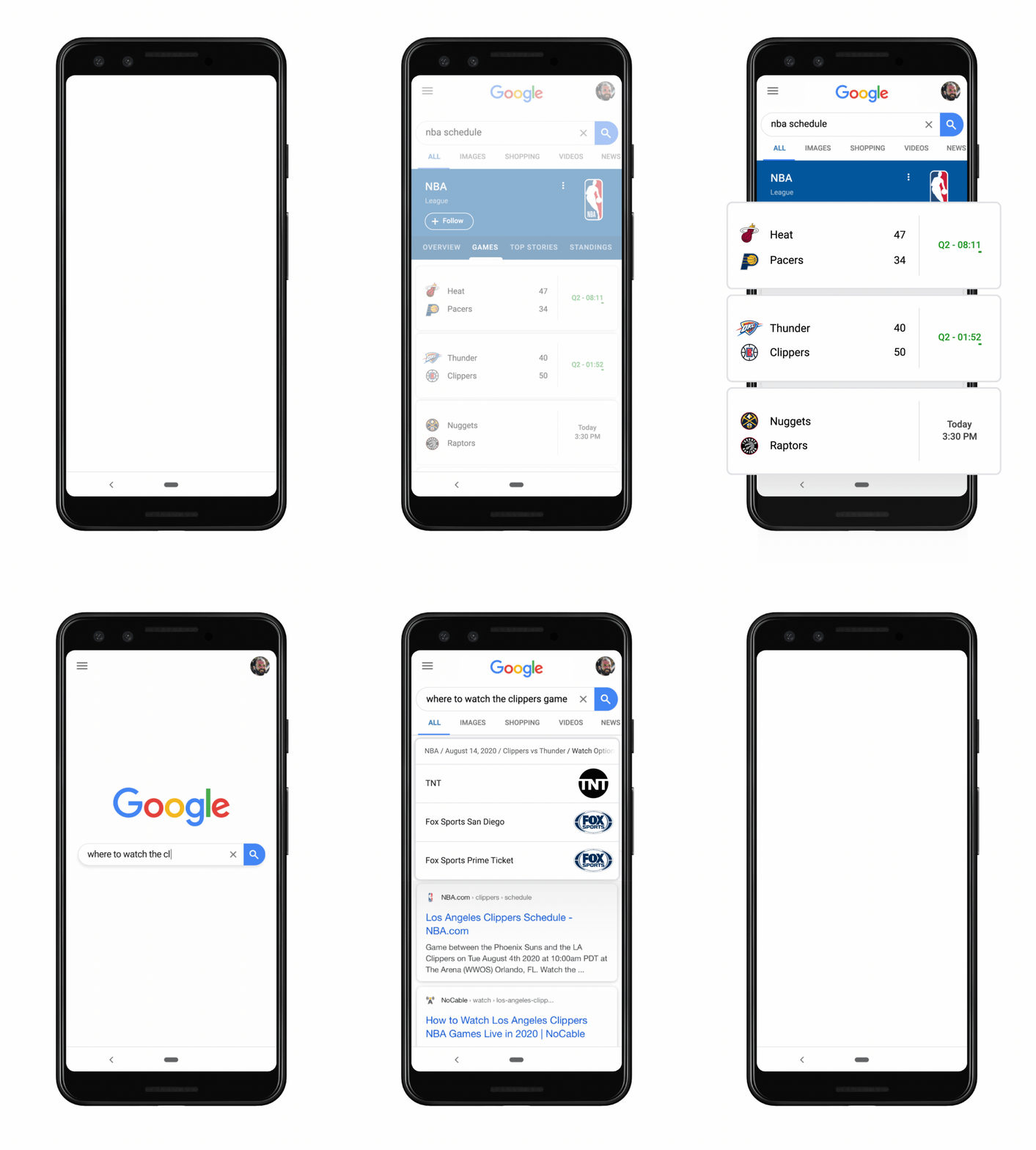
Performing a Google search can provide you with answers to almost any question, from “who was the first man on the moon?” to “when is Tenet coming out in theaters?”. Now, Google Search results for users in the U.S. can also show you what TV channel is playing NBA and MLB games, as well as where to find live TV shows or movies.

When you search for something like, “Where to watch the Lakers game,” Google Search will display live TV options. The GIF embedded below sums up the new feature pretty well.

If your search is simpler — “Lakers game,” for example — Google Search will show the usual game day features, including live scores, top stories, and standings. You’ll also see a new “Live on” button, which will show you which TV station is playing the game. As of now, Google Search will only display live TV options for NBA and MLB games, but Google said it plans to integrate more leagues in the future. Similarly, only some cable and network channels will be featured in search, but Google said it plans to expand to more digital streaming options soon.

In addition to displaying where to watch live sports, Google is also expanding TV shows and movie recommendations in Search. This week, search results will add carousels of live content from cable and broadcast providers. When you search for something like “what to watch” or “good shows to watch” on your mobile device, you’ll be able to see shows that are streaming and live on certain networks. Google’s “On TV now” carousel shows programs from multiple channels while the “On TV later” carousel shows recommendations for future programs to watch.

The new Search features are available now for users in the U.S., according to a blog post published by the company.

The post Google Search now makes it easier to find live TV shows and sports appeared first on xda-developers.


from xda-developers https://ift.tt/31PqhqD
via IFTTT