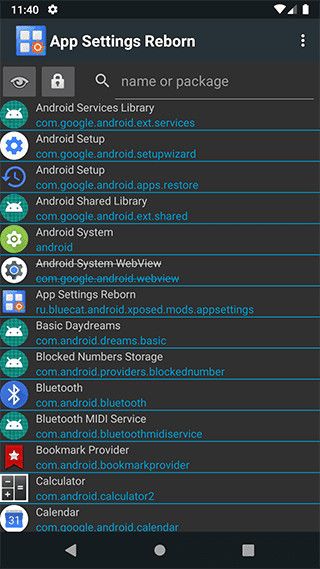
The popular Xposed App Settings module, which rolled out all the way back in 2013, has received a new lease on life thanks to XDA Member Blue cat. App Settings Reborn is an updated version of the original App Settings module for newer versions of Android, which lets you modify app settings like DPI, font scaling, fullscreen mode, locale, etc. on a per-app basis.
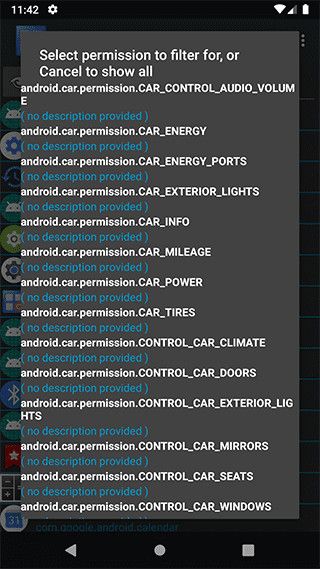
As you can see in the attached screenshots, the App Settings Reborn module gives you easy access to the settings for all the apps installed on your device. Tapping on any app on the home screen opens up the Settings page for the app, letting you modify the app’s DPI, font scaling, locale, fullscreen mode, orientation, notifications, and more with just a couple of taps.
The module also lets you check the permissions for each app and revoke all permissions with a single tap. Here’s a list of all the settings that you can control with the new App Settings Reborn Xposed module:
Screenshot control
Density/dpi
Font scale
Fake screen size for resources loading
Locale (language)
Fullscreen mode
Hide title bar
Keep screen on while app is visible
Show app above lockscreen
Disable fullscreen keyboard input
Force orientation (portrait/landscape/auto)
Mute audio (for most apps)
Insistent notifications (loop the sound/reboot required)
Force or prevent ongoing notifications (reboot required)
Mute notifications (reboot required)
Stay resident in memory (reboot required)
Force or exclude app from recent (reboot required)
Access to recent tasks (reboot required)
Revoke permissions (double reboot required)
Force using legacy (navbar) menu button (not available on Android 10.0+)
Notifications priority (not available on Android 8.0+)
Disable big (expanded) notifications (not available on Android 6.0+)
If you’re interested in trying out the App Settings Reborn Xposed module, you can download the module from the XDA Forums thread linked below. Do note that all apps on your device may not work with all of the aforementioned settings. It’s also worth noting that the module has only been tested on Android 10 (Samsung firmware), but it should work with older versions of Android.
Xiaomi launched the Redmi Note 7 Pro in India back in February 2019 with some solid specifications, such as a capable Qualcomm Snapdragon 675 SoC, a 4,000 mAh battery with 18W fast charging support, and a 48MP Sony IMX586 sensor as the primary rear camera. The factory-installed operating system on the phone was MIUI 10 on top of Android 9 Pie, but the OEM decided to keep the underlying Android layer intact in the subsequent MIUI 11 update. And now, Xiaomi has finally brought over the Android 10 update to the Redmi Note 7 Pro on the stable channel.
At the time of reporting, the stable Android 10 OTA is hitting the Indian variant of this smartphone, but there is a catch. Xiaomi initially pushed Android 10 for this phone through the closed beta builds of MIUI 12. Later on, the “beta stable” channel of MIUI 12 corresponding to the Redmi Note 7 Pro has been upgraded with Android 10-based builds as well, but those are primarily meant for a special group of testers known as Mi Pilot users. On the other hand, the stable build we are talking about is still based on MIUI 11, bearing version number V11.0.2.0.QFHINXM. It also bumps the Android security patch level (SPL) to July 2020.
Thanks to Twitter user @TechnoAnkit1 for the screenshot!
MIUI 11 Android 10 Download Link for the Redmi Note 7 Pro (violet)
You can either wait for the update to arrive on your phone, or you can sideload the update after downloading the update package linked below:
In case you face a step related to Mi Account authorization while trying to sideload the above package, you can bypass that restriction by flashing the recovery ROM using a custom recovery like TWRP.
The update distribution strategy of Xiaomi is indeed confusing to regular users. In this case, the company is probably testing the stability of the Android 10 firmware via two different sets – one is based on MIUI 12, while the other one is compiled with MIUI 11. A small part of the user base running Android Pie-based MIUI 11 will receive the Android 10 OTA initially, with the rollout gradually expanding to more users. Meanwhile, Xiaomi should be able to evaluate the Android 10-based MIUI 12 build for this phone using the inputs from Mi Pilot users. Once Xiaomi marks it to be stable enough, they are going to push MIUI 12 flavored Android 10 update to everyone.
Xiaomi launched the Redmi Note 7 Pro in India back in February 2019 with some solid specifications, such as a capable Qualcomm Snapdragon 675 SoC, a 4,000 mAh battery with 18W fast charging support, and a 48MP Sony IMX586 sensor as the primary rear camera. The factory-installed operating system on the phone was MIUI 10 on top of Android 9 Pie, but the OEM decided to keep the underlying Android layer intact in the subsequent MIUI 11 update. And now, Xiaomi has finally brought over the Android 10 update to the Redmi Note 7 Pro on the stable channel.
At the time of reporting, the stable Android 10 OTA is hitting the Indian variant of this smartphone, but there is a catch. Xiaomi initially pushed Android 10 for this phone through the closed beta builds of MIUI 12. Later on, the “beta stable” channel of MIUI 12 corresponding to the Redmi Note 7 Pro has been upgraded with Android 10-based builds as well, but those are primarily meant for a special group of testers known as Mi Pilot users. On the other hand, the stable build we are talking about is still based on MIUI 11, bearing version number V11.0.2.0.QFHINXM. It also bumps the Android security patch level (SPL) to July 2020.
Thanks to Twitter user @TechnoAnkit1 for the screenshot!
MIUI 11 Android 10 Download Link for the Redmi Note 7 Pro (violet)
You can either wait for the update to arrive on your phone, or you can sideload the update after downloading the update package linked below:
In case you face a step related to Mi Account authorization while trying to sideload the above package, you can bypass that restriction by flashing the recovery ROM using a custom recovery like TWRP.
The update distribution strategy of Xiaomi is indeed confusing to regular users. In this case, the company is probably testing the stability of the Android 10 firmware via two different sets – one is based on MIUI 12, while the other one is compiled with MIUI 11. A small part of the user base running Android Pie-based MIUI 11 will receive the Android 10 OTA initially, with the rollout gradually expanding to more users. Meanwhile, Xiaomi should be able to evaluate the Android 10-based MIUI 12 build for this phone using the inputs from Mi Pilot users. Once Xiaomi marks it to be stable enough, they are going to push MIUI 12 flavored Android 10 update to everyone.
The Samsung Galaxy Note 20 and the Galaxy Note 20 Ultra 5G smartphones have been unveiled officially. While the Galaxy Note series is typically renowned for its productivity prowess, the Galaxy Note 20 series has several new features up their sleeves that make the phablets extremely desirable. The two new Note devices get improved productivity features including a more responsive and versatile S Pen, Wireless DeX support, Xbox Game Pass Ultim[ate clouding gaming support, and best performance in the Galaxy family thanks to Qualcomm Snapdragon 865 Plus. This year, the Note 20 Ultra camera is one of the key specs that stands out.
The Galaxy Note 20 series also comes with a slew of advanced camera features to complement their fireball persona. These camera features include the hi-res 108MP camera on the Galaxy Note 20 Ultra, up to 8K video recording, Pro Video mode, and a lot more to justify the premium price. In this article, we’ll discuss the camera features that are new to the Galaxy Note lineup.
Before we get into the details of the features, here’s a quick look at the camera specifications of the all-new Samsung Galaxy Note 20 5G and the Note 20 Ultra 5G.
Samsung Galaxy Note 20 and Note 20 Ultra Camera Specifications
Specification
Samsung Galaxy Note 20
Samsung Galaxy Note 20 Ultra
Rear camera
12MP primary camera, Super Speed Dual Pixel AF, OIS
Pixel size: 1.8μm
FOV: 79°
Aperture: f/1.8
1/1.76″ image sensor size
12MP Ultra Wide Camera
Pixel size: 1.4μm
FOV: 120°
Aperture: f/2.2
64MP Telephoto Camera
Pixel size: 0.8μm
3x hybrid optical zoom, up to 30x hybrid zoom
FOV: 76°
Aperture: f/2.0
OIS, tracking autofocus
108MP primary camera, PDAF, OIS
Pixel size: 0.8μm
FOV: 79°
Aperture: f/1.8
1/1.33″ image sensor size
12MP Ultra Wide Camera
Pixel size: 1.4μm
FOV: 120°
Aperture: f/2.2
12MP Telephoto Camera
Pixel size: 1.0μm
Space Zoom — 5x Optical Zoom, up to 50x hybrid zoom
Samsung Galaxy Note 20 and Note 20 Ultra Camera Features
1. Triple cameras: 108MP wide-angle, 12MP ultra-wide-angle, and 5x telephoto
In August 2019, Samsung announced the super high-resolution 108MP Bright HMX camera sensor. Although the announcement was primarily in partnership with Xiaomi, Samsung also inducted the camera sensor in its own flagship lineup by introducing it on the Galaxy S20 Ultra 5G. It is the first camera sensor on the Galaxy Note series to breach the 100MP mark.
The 108MP camera benefits from a large 1/1.33″ sensor size that captures more light than the 1/1.7″ size of the 64MP Samsung ISOCELL Bright GW1. The 108MP sensor combines four pixels into one by pixel binning and produces 27MP images. The sensor is complemented by an f/1.8 aperture lens that captures a 79° wide field of view, same as the Galaxy S20 Ultra.
On the other hand, the regular Galaxy Note 20 comes with a 12MP camera but, with a similar lens arrangement. On paper, this camera resembles the primary camera on the Galaxy Note 10 and the Note 10+ from last year.
Additionally, both the devices feature a 12MP ultra-wide-angle camera lending a 120° field of view. The 12MP ultra-wide-angle sensors on both the Galaxy Note 20 devices shoot images with a pixel size of 1.4μm and are paired with f/2.2 lenses. This may seem a downgrade from the Galaxy Note 10 series’ 16MP cameras that offer a 123° wide field of view.
Both of the Galaxy Note 20 smartphones also feature telephoto cameras. While the standard Galaxy Note 20 features a 3x hybrid zoom setup, the Ultra sports a periscopic telephoto setup offering 5x optical and up to 50x hybrid zoom, similar to the Galaxy S20 Ultra. Both of the smartphones feature OIS to eliminate shakiness and ensure smoother image capturing at high zoom levels.
Lastly, while the Galaxy Note 20 5G feature dual-pixel autofocus, the Galaxy Note 20 Ultra leverages laser autofocus for sharper images. Samsung has skipped the time of flight sensor from both of the devices.
2. Space Zoom on Samsung Galaxy Note 20 and Note 20 Ultra 5G
Just like the Samsung Galaxy S20 Ultra, the 5X telephoto camera on the Note 20 Ultra facilitates up to 50X hybrid zooming (ie 10x digital zoom on top of the 5X optical zoom). This not only allows users to capture far off objects with higher precision but also allows capturing of celestial bodies including a close-up shot of the moon. Samsung is not vying to achieve the 100x zoom that we found to be “a marketing gimmick” in our Samsung Galaxy Note 20 Ultra 5G review.
Nonetheless, the 50X can be very useful especially if you’re fond of moon-gazing. A special Moon mode on the Galaxy Note 20 Ultra is set to eliminate the requirement of a telescope.
At the same time, the 3x hybrid zoom set up on the regular Galaxy Note 20 utilizes a 64MP camera, which has two advantages. The first advantage is that the 64MP sensor will capture more light, especially at night, as compared to another sensor with a smaller resolution — thanks to pixel binning. The second advantage of this sensor is that you can crop a small portion of the 64MP images to effectively replicate the same results as a telephoto camera with more zoom.
3. 8K video recording
The Samsung Galaxy Note 20 series leverages the processing capabilities of the Snapdragon 865 Plus mobile platform to record videos at up to 8K resolution using the rear cameras. The 8K video recording supports a maximum frame rate of 24fps.
In addition, users can choose the standard 16:9 or switch to a stretched 21:9 aspect ratio for a cinematic appeal. The 24fps recording and the 21:9 aspect ratio are not limited to only 8K and can be chosen to capture videos on all video modes.
4. Pro Video mode with 120fps recording, dynamic controls, and mic switching
The Samsung Galaxy Note 20 Ultra features a Pro Video mode that allows users to actively control parameters such as the ISO, shutter speed, white balance, and change the focal range of the video. What is better is the fact that users can tweak these parameters while recording a video. They will also be able to control the speed of zoom by swiping across the zoom scrubber slowly or quickly.
Although flagships have featured voice zoom for video recording, the Galaxy Note 20 Ultra takes it forward with in-video mic selection. The feature allows users to choose from various audio sources such as omnidirectional audio (ie using rear and front microphones), just rear or just front microphones, or external microphones connected via USB or Bluetooth. At the same time, you also get indicators signaling the gain for the left and right channels while recording.
Taking advantage of the 120Hz refresh rate of the Galaxy Note 20 Ultra’s AMOLED display, users can record videos at up to 120fps (at Full HD resolution). In post-processing, the speed of the video playback can be changed as per requirement. This feature, therefore, allows users to create both — slow-motion and timelapse videos from the same clip.
Lastly, users will be able to combine more than one videos to create something called a “Highlight reel.” This Highlight reel feature automatically picks the best parts of all the videos and combines them into a single clip. In addition, users can add different filters to change the mood of the videos.
To sum up the Pro Video features of the Samsung Galaxy Note 20 Ultra 5G, here’s a quick video:
The Galaxy Note 20 Ultra camera offers a lot more than its smaller sibling, and more importantly, it seems to fix the autofocus issues that plagued the same sensor on the Galaxy Note 20 Ultra. Clearly, Samsung means for the Ultra name to mean the very best camera it can offer, and the Galaxy Note 20 Ultra seems to deliver on that. Check out our initial Galaxy Note 20 hands-on preview for more info, and stay tuned for the full review!
Get a great camera capable of 5x optical zoom, 8K video, single take mode to use all the camera's features at once and so much with the Galaxy Note 20 Ultra.
The Samsung Galaxy Note 20 and the Galaxy Note 20 Ultra 5G smartphones have been unveiled officially. While the Galaxy Note series is typically renowned for its productivity prowess, the Galaxy Note 20 series has several new features up their sleeves that make the phablets extremely desirable. The two new Note devices get improved productivity features including a more responsive and versatile S Pen, Wireless DeX support, Xbox Game Pass Ultim[ate clouding gaming support, and best performance in the Galaxy family thanks to Qualcomm Snapdragon 865 Plus. This year, the Note 20 Ultra camera is one of the key specs that stands out.
The Galaxy Note 20 series also comes with a slew of advanced camera features to complement their fireball persona. These camera features include the hi-res 108MP camera on the Galaxy Note 20 Ultra, up to 8K video recording, Pro Video mode, and a lot more to justify the premium price. In this article, we’ll discuss the camera features that are new to the Galaxy Note lineup.
Before we get into the details of the features, here’s a quick look at the camera specifications of the all-new Samsung Galaxy Note 20 5G and the Note 20 Ultra 5G.
Samsung Galaxy Note 20 and Note 20 Ultra Camera Specifications
Specification
Samsung Galaxy Note 20
Samsung Galaxy Note 20 Ultra
Rear camera
12MP primary camera, Super Speed Dual Pixel AF, OIS
Pixel size: 1.8μm
FOV: 79°
Aperture: f/1.8
1/1.76″ image sensor size
12MP Ultra Wide Camera
Pixel size: 1.4μm
FOV: 120°
Aperture: f/2.2
64MP Telephoto Camera
Pixel size: 0.8μm
3x hybrid optical zoom, up to 30x hybrid zoom
FOV: 76°
Aperture: f/2.0
OIS, tracking autofocus
108MP primary camera, PDAF, OIS
Pixel size: 0.8μm
FOV: 79°
Aperture: f/1.8
1/1.33″ image sensor size
12MP Ultra Wide Camera
Pixel size: 1.4μm
FOV: 120°
Aperture: f/2.2
12MP Telephoto Camera
Pixel size: 1.0μm
Space Zoom — 5x Optical Zoom, up to 50x hybrid zoom
Samsung Galaxy Note 20 and Note 20 Ultra Camera Features
1. Triple cameras: 108MP wide-angle, 12MP ultra-wide-angle, and 5x telephoto
In August 2019, Samsung announced the super high-resolution 108MP Bright HMX camera sensor. Although the announcement was primarily in partnership with Xiaomi, Samsung also inducted the camera sensor in its own flagship lineup by introducing it on the Galaxy S20 Ultra 5G. It is the first camera sensor on the Galaxy Note series to breach the 100MP mark.
The 108MP camera benefits from a large 1/1.33″ sensor size that captures more light than the 1/1.7″ size of the 64MP Samsung ISOCELL Bright GW1. The 108MP sensor combines four pixels into one by pixel binning and produces 27MP images. The sensor is complemented by an f/1.8 aperture lens that captures a 79° wide field of view, same as the Galaxy S20 Ultra.
On the other hand, the regular Galaxy Note 20 comes with a 12MP camera but, with a similar lens arrangement. On paper, this camera resembles the primary camera on the Galaxy Note 10 and the Note 10+ from last year.
Additionally, both the devices feature a 12MP ultra-wide-angle camera lending a 120° field of view. The 12MP ultra-wide-angle sensors on both the Galaxy Note 20 devices shoot images with a pixel size of 1.4μm and are paired with f/2.2 lenses. This may seem a downgrade from the Galaxy Note 10 series’ 16MP cameras that offer a 123° wide field of view.
Both of the Galaxy Note 20 smartphones also feature telephoto cameras. While the standard Galaxy Note 20 features a 3x hybrid zoom setup, the Ultra sports a periscopic telephoto setup offering 5x optical and up to 50x hybrid zoom, similar to the Galaxy S20 Ultra. Both of the smartphones feature OIS to eliminate shakiness and ensure smoother image capturing at high zoom levels.
Lastly, while the Galaxy Note 20 5G feature dual-pixel autofocus, the Galaxy Note 20 Ultra leverages laser autofocus for sharper images. Samsung has skipped the time of flight sensor from both of the devices.
2. Space Zoom on Samsung Galaxy Note 20 and Note 20 Ultra 5G
Just like the Samsung Galaxy S20 Ultra, the 5X telephoto camera on the Note 20 Ultra facilitates up to 50X hybrid zooming (ie 10x digital zoom on top of the 5X optical zoom). This not only allows users to capture far off objects with higher precision but also allows capturing of celestial bodies including a close-up shot of the moon. Samsung is not vying to achieve the 100x zoom that we found to be “a marketing gimmick” in our Samsung Galaxy Note 20 Ultra 5G review.
Nonetheless, the 50X can be very useful especially if you’re fond of moon-gazing. A special Moon mode on the Galaxy Note 20 Ultra is set to eliminate the requirement of a telescope.
At the same time, the 3x hybrid zoom set up on the regular Galaxy Note 20 utilizes a 64MP camera, which has two advantages. The first advantage is that the 64MP sensor will capture more light, especially at night, as compared to another sensor with a smaller resolution — thanks to pixel binning. The second advantage of this sensor is that you can crop a small portion of the 64MP images to effectively replicate the same results as a telephoto camera with more zoom.
3. 8K video recording
The Samsung Galaxy Note 20 series leverages the processing capabilities of the Snapdragon 865 Plus mobile platform to record videos at up to 8K resolution using the rear cameras. The 8K video recording supports a maximum frame rate of 24fps.
In addition, users can choose the standard 16:9 or switch to a stretched 21:9 aspect ratio for a cinematic appeal. The 24fps recording and the 21:9 aspect ratio are not limited to only 8K and can be chosen to capture videos on all video modes.
4. Pro Video mode with 120fps recording, dynamic controls, and mic switching
The Samsung Galaxy Note 20 Ultra features a Pro Video mode that allows users to actively control parameters such as the ISO, shutter speed, white balance, and change the focal range of the video. What is better is the fact that users can tweak these parameters while recording a video. They will also be able to control the speed of zoom by swiping across the zoom scrubber slowly or quickly.
Although flagships have featured voice zoom for video recording, the Galaxy Note 20 Ultra takes it forward with in-video mic selection. The feature allows users to choose from various audio sources such as omnidirectional audio (ie using rear and front microphones), just rear or just front microphones, or external microphones connected via USB or Bluetooth. At the same time, you also get indicators signaling the gain for the left and right channels while recording.
Taking advantage of the 120Hz refresh rate of the Galaxy Note 20 Ultra’s AMOLED display, users can record videos at up to 120fps (at Full HD resolution). In post-processing, the speed of the video playback can be changed as per requirement. This feature, therefore, allows users to create both — slow-motion and timelapse videos from the same clip.
Lastly, users will be able to combine more than one videos to create something called a “Highlight reel.” This Highlight reel feature automatically picks the best parts of all the videos and combines them into a single clip. In addition, users can add different filters to change the mood of the videos.
To sum up the Pro Video features of the Samsung Galaxy Note 20 Ultra 5G, here’s a quick video:
The Galaxy Note 20 Ultra camera offers a lot more than its smaller sibling, and more importantly, it seems to fix the autofocus issues that plagued the same sensor on the Galaxy Note 20 Ultra. Clearly, Samsung means for the Ultra name to mean the very best camera it can offer, and the Galaxy Note 20 Ultra seems to deliver on that. Check out our initial Galaxy Note 20 hands-on preview for more info, and stay tuned for the full review!
Get a great camera capable of 5x optical zoom, 8K video, single take mode to use all the camera's features at once and so much with the Galaxy Note 20 Ultra.
The Moto G 5G Plus is Motorola’s cheapest 5G-enabled smartphone yet, offering a 6.7-inch 90Hz display, Snapdragon 765 SoC, quad cameras, and a 5,000 mAh battery at a starting price of just €349 (~$410). The device comes running Android 10 along with a touch of Motorola’s useful customizations on top. While most of the customizations and first-party apps are the same as what we have seen on previous Moto phones, it turns out Motorola has debuted two new apps with the Moto G 5G Plus to let users further customize the software experience to their usage patterns.
These two applications are Moto Power Touch and Multi-Volume. Moto Power Touch lets you customize the double tap power button gesture to launch an app or shortcut of your choice. Normally, the double-tap power button can only launch the default camera app on Moto phones. Now, you can also select apps, quick actions, and shortcuts that you use the most and have them pop up in a floating window when you double-tap the power button for easier, quicker access.
Multi-Volume, meanwhile, lets you automatically mute apps based on your usage pattern. You can also manage the individual volumes of multiple apps on a per-app basis.
Our tipster, @GoofyBaars on Telegram, says they use this feature to mute Pokemon Go’s audio while listening to music.
Unfortunately, neither of these apps can be sideloaded on other Motorola devices. We tried installing them on a Moto Edge, but the installation failed. It’s likely Motorola will bring both apps to other Moto phones via a software update in the future.
The Moto G 5G Plus is currently only available in the European markets. However, according to our Editor-in-Chief, Mishaal Rahman, the device should be coming to the U.S. soon and is expected to be available through AT&T.
Motorola Moto G 5G Plus (XT2075-2) is coming to AT&T in the U.S. Should be an interesting alternative to the Google Pixel 4a (5G) later this year.https://t.co/ZbpT6Hwpd1
The Moto G 5G Plus is Motorola’s cheapest 5G-enabled smartphone yet, offering a 6.7-inch 90Hz display, Snapdragon 765 SoC, quad cameras, and a 5,000 mAh battery at a starting price of just €349 (~$410). The device comes running Android 10 along with a touch of Motorola’s useful customizations on top. While most of the customizations and first-party apps are the same as what we have seen on previous Moto phones, it turns out Motorola has debuted two new apps with the Moto G 5G Plus to let users further customize the software experience to their usage patterns.
These two applications are Moto Power Touch and Multi-Volume. Moto Power Touch lets you customize the double tap power button gesture to launch an app or shortcut of your choice. Normally, the double-tap power button can only launch the default camera app on Moto phones. Now, you can also select apps, quick actions, and shortcuts that you use the most and have them pop up in a floating window when you double-tap the power button for easier, quicker access.
Multi-Volume, meanwhile, lets you automatically mute apps based on your usage pattern. You can also manage the individual volumes of multiple apps on a per-app basis.
Our tipster, @GoofyBaars on Telegram, says they use this feature to mute Pokemon Go’s audio while listening to music.
Unfortunately, neither of these apps can be sideloaded on other Motorola devices. We tried installing them on a Moto Edge, but the installation failed. It’s likely Motorola will bring both apps to other Moto phones via a software update in the future.
The Moto G 5G Plus is currently only available in the European markets. However, according to our Editor-in-Chief, Mishaal Rahman, the device should be coming to the U.S. soon and is expected to be available through AT&T.
Motorola Moto G 5G Plus (XT2075-2) is coming to AT&T in the U.S. Should be an interesting alternative to the Google Pixel 4a (5G) later this year.https://t.co/ZbpT6Hwpd1