LightBlog

mardi 11 août 2020

Galaxy A51 and Galaxy A71 get new privacy features in Samsung’s AltZLife update for India

Samsung recently rolled out an update for the Galaxy A51 and Galaxy A71, which introduced some of the headline-worthy features from the Galaxy S20 series to the mid-range devices. The update included features like the Single Take camera mode, a better Pro mode, Quick Share, Music Share, and much more. Now, the company is rolling out another noteworthy update for the two devices, which introduces two privacy features for users in India under a new ‘Make in India’ innovation called AltZLife.

Samsung Galaxy A51 and A71 Hands-on: Mid-Range Smartphone Winners

The AltZLife update has already started rolling out to users and it includes two useful privacy features — Quick Switch and Content Suggestions. The Quick Switch feature will allow users to switch between two instances of the same app in order to keep their private and public data separate from each other. For instance, users will be able to quickly switch between the normal Gallery app and a private Gallery by double-clicking the power button. This will let them easily secure sensitive data on their devices.

Samsung Galaxy A51 XDA Forum || Samsung Galaxy A71 XDA Forum

To prevent unauthorized access, users will have to provide authentication after double-clicking the power button in normal mode. Interestingly, this authentication won’t be the same as the lock screen authentication method, which adds a further layer of privacy to the feature.

The Content Suggestions feature, on the other hand, is an AI-based app inside the Secure Folder that will prompt users to move their private images to the Secure Folder. To set it up, users will first have to select specific faces or a type of image they want to tag as private and store in the private gallery of the Secure Folder. Once the initial setup is complete, the on-device AI engine will kick in and identify all relevant images that should be moved to the Secure Folder. Samsung claims that since Content Suggestions makes use of an on-device AI solution, none of the information gathered by the AI leaves the device.

In a statement regarding the new AltZLife features, Manu Sharma, Senior Director, Mobile Business at Samsung India, said, “An industry first innovation, this intelligent feature has been designed keeping in mind the inherent need of consumers, especially Gen Z, for enhanced privacy when it comes to storage and access of content on their smartphones. This helps eliminate the anxiety that consumers usually face while also sharing their smartphones with someone.”

It’s also worth noting that the two ‘Make for India’ privacy solutions have been developed by engineers from Samsung’s R&D Institutes in Bangalore and Noida. As of now, Samsung hasn’t revealed any plans to offer the new AltZLife features in other regions.


Source: Samsung Newsroom

The post Galaxy A51 and Galaxy A71 get new privacy features in Samsung’s AltZLife update for India appeared first on xda-developers.


from xda-developers https://ift.tt/30Kwnct
via IFTTT

Galaxy A51 and Galaxy A71 get new privacy features in Samsung’s AltZLife update for India

Samsung recently rolled out an update for the Galaxy A51 and Galaxy A71, which introduced some of the headline-worthy features from the Galaxy S20 series to the mid-range devices. The update included features like the Single Take camera mode, a better Pro mode, Quick Share, Music Share, and much more. Now, the company is rolling out another noteworthy update for the two devices, which introduces two privacy features for users in India under a new ‘Make in India’ innovation called AltZLife.

Samsung Galaxy A51 and A71 Hands-on: Mid-Range Smartphone Winners

The AltZLife update has already started rolling out to users and it includes two useful privacy features — Quick Switch and Content Suggestions. The Quick Switch feature will allow users to switch between two instances of the same app in order to keep their private and public data separate from each other. For instance, users will be able to quickly switch between the normal Gallery app and a private Gallery by double-clicking the power button. This will let them easily secure sensitive data on their devices.

Samsung Galaxy A51 XDA Forum || Samsung Galaxy A71 XDA Forum

To prevent unauthorized access, users will have to provide authentication after double-clicking the power button in normal mode. Interestingly, this authentication won’t be the same as the lock screen authentication method, which adds a further layer of privacy to the feature.

The Content Suggestions feature, on the other hand, is an AI-based app inside the Secure Folder that will prompt users to move their private images to the Secure Folder. To set it up, users will first have to select specific faces or a type of image they want to tag as private and store in the private gallery of the Secure Folder. Once the initial setup is complete, the on-device AI engine will kick in and identify all relevant images that should be moved to the Secure Folder. Samsung claims that since Content Suggestions makes use of an on-device AI solution, none of the information gathered by the AI leaves the device.

In a statement regarding the new AltZLife features, Manu Sharma, Senior Director, Mobile Business at Samsung India, said, “An industry first innovation, this intelligent feature has been designed keeping in mind the inherent need of consumers, especially Gen Z, for enhanced privacy when it comes to storage and access of content on their smartphones. This helps eliminate the anxiety that consumers usually face while also sharing their smartphones with someone.”

It’s also worth noting that the two ‘Make for India’ privacy solutions have been developed by engineers from Samsung’s R&D Institutes in Bangalore and Noida. As of now, Samsung hasn’t revealed any plans to offer the new AltZLife features in other regions.


Source: Samsung Newsroom

The post Galaxy A51 and Galaxy A71 get new privacy features in Samsung’s AltZLife update for India appeared first on xda-developers.


from xda-developers https://ift.tt/30Kwnct
via IFTTT

Download: New MIUI Gallery from MIUI 12 adds OCR, screenshot frames, and new Sky replacement filters

Xiaomi’s MIUI is one of the most popular custom UX present on Android, thanks to the wide popularity of Xiaomi, Redmi and POCO smartphones. MIUI makes several changes to the base Android, so much so that the features present on Xiaomi devices are dictated more so by their MIUI version instead of their Android version. MIUI’s Gallery app is now adding in several more features to this list, as it has now gained support for OCR, device frames for screenshots, and new Sky Replacement filters.

Download: MIUI 12 stable update rolling out to several Xiaomi, Redmi and POCO devices

MIUI 12 Hands-on: 12 interesting new features added in Xiaomi’s Android OS

XDA Member and frequent Xiaomi tipster kacskrz informed us that the latest MIUI Gallery app, v2.2.16.17, in the latest MIUI 12 China beta adds several new features. Here’s the translated changelog:

  1. The slide bar experience for quick preview of photos is upgraded
  2. Time album revision experience upgrade
  3. Upgraded experience of album free sorting function
  4. Add photo to text function (OCR)
  5. Add and edit night scene change
  6. Add editing filters, water green, smoke green, light summer, blue dream, water blue, mojito, quiet
  7. Optimized editing function experience
  8. Optimized photo album scanning speed
  9. Fix several bugs and improve the smooth experience of photo albums

OCR Support

There are a few things to note with this new update. One, the Gallery app now gains OCR (Optical Character Recognition) support. On images that have text previewed, you can use the OCR function to get the characters recognized as text.

Here is a quick demo of the OCR function:

The feature currently works rather slow, but that is because the image is uploaded to Xiaomi’s server for processing. The OCR function is also only supported by Xiaomi’s latest flagship smartphones running MIUI 12 China ROM.

Device Screenshot Frames

Device screenshot frames essentially add a model of a device to a screenshot, providing context and adding on to the aesthetics of the screenshot. There are plenty of external methods to add a device frame to a screenshot, and OnePlus TVs also feature similar functionality. Now, Xiaomi is baking in the functionality within the Gallery app, so you no longer have to rely on more time-consuming methods for the same.

MIUI Gallery Device Screenshot Frame 3 MIUI Gallery Device Screenshot Frame 3

Device screenshot frames have been added for:

We hope Xiaomi adds in frames for more devices in future versions.

New Sky Replacement Filters in MIUI Gallery

Sky Replacement Filters were added in last year as part of the photo editing functionality present within the MIUI Gallery app. With this feature, users can take images with a predominant sky element and swap it with a bunch of different presets depicting the sky in different scenes. The presets will not only alter the appearance of the sky but also add relevant lighting effects to the rest of the image and objects in order to better reflect the lighting condition had the sky been as it appears. A slider also lets users control this lighting effect.

In this new update to the Gallery app, Xiaomi is introducing several new sky replacement features:

MIUI 12 Gallery New Sky Replacement Filters 8 MIUI 12 Gallery New Sky Replacement Filters 8 MIUI 12 Gallery New Sky Replacement Filters 8 MIUI 12 Gallery New Sky Replacement Filters 8 MIUI 12 Gallery New Sky Replacement Filters 8

Download MIUI Gallery v2.2.16.17

If you want to check out these new features, you can sideload the latest version of MIUI Gallery onto your device. Note that some of these features may be device-specific, so they are best seen on latest Xiaomi flagships.

Download MIUI Gallery v2.2.16.17 from APKMirror


Story Via: MIUIPolska

The post Download: New MIUI Gallery from MIUI 12 adds OCR, screenshot frames, and new Sky replacement filters appeared first on xda-developers.


from xda-developers https://ift.tt/33TgKBP
via IFTTT

Download: New MIUI Gallery from MIUI 12 adds OCR, screenshot frames, and new Sky replacement filters

Xiaomi’s MIUI is one of the most popular custom UX present on Android, thanks to the wide popularity of Xiaomi, Redmi and POCO smartphones. MIUI makes several changes to the base Android, so much so that the features present on Xiaomi devices are dictated more so by their MIUI version instead of their Android version. MIUI’s Gallery app is now adding in several more features to this list, as it has now gained support for OCR, device frames for screenshots, and new Sky Replacement filters.

Download: MIUI 12 stable update rolling out to several Xiaomi, Redmi and POCO devices

MIUI 12 Hands-on: 12 interesting new features added in Xiaomi’s Android OS

XDA Member and frequent Xiaomi tipster kacskrz informed us that the latest MIUI Gallery app, v2.2.16.17, in the latest MIUI 12 China beta adds several new features. Here’s the translated changelog:

  1. The slide bar experience for quick preview of photos is upgraded
  2. Time album revision experience upgrade
  3. Upgraded experience of album free sorting function
  4. Add photo to text function (OCR)
  5. Add and edit night scene change
  6. Add editing filters, water green, smoke green, light summer, blue dream, water blue, mojito, quiet
  7. Optimized editing function experience
  8. Optimized photo album scanning speed
  9. Fix several bugs and improve the smooth experience of photo albums

OCR Support

There are a few things to note with this new update. One, the Gallery app now gains OCR (Optical Character Recognition) support. On images that have text previewed, you can use the OCR function to get the characters recognized as text.

Here is a quick demo of the OCR function:

The feature currently works rather slow, but that is because the image is uploaded to Xiaomi’s server for processing. The OCR function is also only supported by Xiaomi’s latest flagship smartphones running MIUI 12 China ROM.

Device Screenshot Frames

Device screenshot frames essentially add a model of a device to a screenshot, providing context and adding on to the aesthetics of the screenshot. There are plenty of external methods to add a device frame to a screenshot, and OnePlus TVs also feature similar functionality. Now, Xiaomi is baking in the functionality within the Gallery app, so you no longer have to rely on more time-consuming methods for the same.

MIUI Gallery Device Screenshot Frame 3 MIUI Gallery Device Screenshot Frame 3

Device screenshot frames have been added for:

We hope Xiaomi adds in frames for more devices in future versions.

New Sky Replacement Filters in MIUI Gallery

Sky Replacement Filters were added in last year as part of the photo editing functionality present within the MIUI Gallery app. With this feature, users can take images with a predominant sky element and swap it with a bunch of different presets depicting the sky in different scenes. The presets will not only alter the appearance of the sky but also add relevant lighting effects to the rest of the image and objects in order to better reflect the lighting condition had the sky been as it appears. A slider also lets users control this lighting effect.

In this new update to the Gallery app, Xiaomi is introducing several new sky replacement features:

MIUI 12 Gallery New Sky Replacement Filters 8 MIUI 12 Gallery New Sky Replacement Filters 8 MIUI 12 Gallery New Sky Replacement Filters 8 MIUI 12 Gallery New Sky Replacement Filters 8 MIUI 12 Gallery New Sky Replacement Filters 8

Download MIUI Gallery v2.2.16.17

If you want to check out these new features, you can sideload the latest version of MIUI Gallery onto your device. Note that some of these features may be device-specific, so they are best seen on latest Xiaomi flagships.

Download MIUI Gallery v2.2.16.17 from APKMirror


Story Via: MIUIPolska

The post Download: New MIUI Gallery from MIUI 12 adds OCR, screenshot frames, and new Sky replacement filters appeared first on xda-developers.


from xda-developers https://ift.tt/33TgKBP
via IFTTT

lundi 10 août 2020

Google People Cards are virtual visiting cards on Google Search

About six months after the feature was first spotted, Google is officially unveiling People Cards. Google mentions that searching for famous personalities presents familiar results, but searching for not-so-famous individuals may not showcase relevant information. So, to aid individuals who are looking to build their online presence, Google is rolling out People Cards, which are like virtual visiting cards where individuals can highlight their existing website of social profiles that they want people to visit.

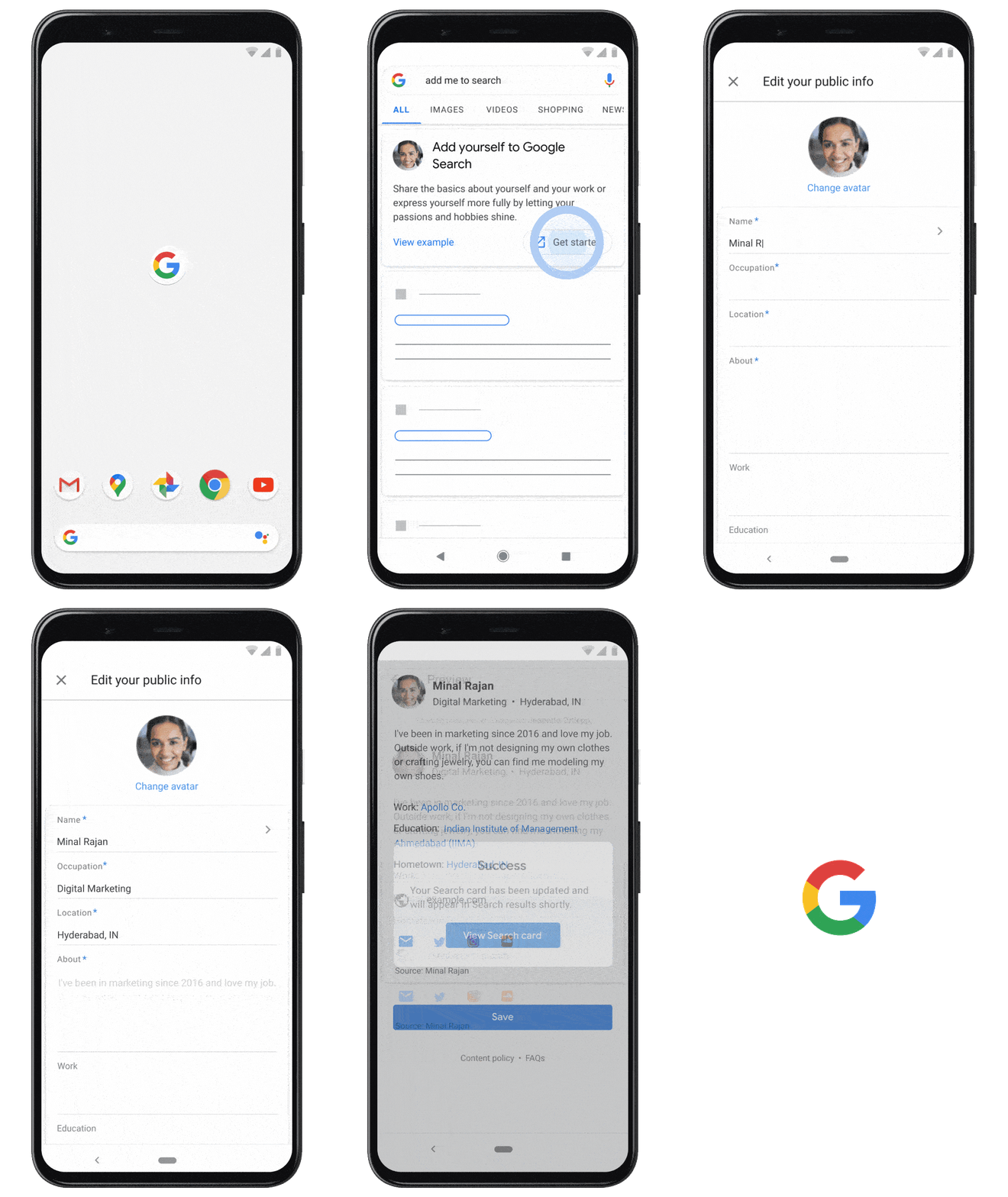
To create a People Card, sign in to your Google Account, then either search for your name or enter “Add me to Search” in Google Search and then tap the prompt that appears. You can add an image, your Google account, a description of yourself, links to websites and social profiles, and if you wish, a phone number or email address.

Google mentions that they have a bunch of protections and controls in place to maintain the quality of information on People Cards. Only one People Card is allowed per Google Account, and a phone number is required to authenticate the account. There are other undisclosed mechanisms to protect against abusive or spammy content. And users can also submit feedback if they spot low-quality information or a card that is believed to have been created by an impersonator. Google will also allow users to delete their People Card if they no longer want to appear in Search.

For end-users, these new People Cards will make it quick and easy to find the right person. When searching for someone’s name and there is a card available, Google Search will display a module with the name, profession, and location, and users can tap to see the full information within the card. For people who share the same name, there will be multiple modules, and the information can help end users distinguish between the different individuals and find who they are looking for.

This feature is rolling out to users in India on mobile and in English.

The post Google People Cards are virtual visiting cards on Google Search appeared first on xda-developers.


from xda-developers https://ift.tt/2XNAOBG
via IFTTT

Google People Cards are virtual visiting cards on Google Search

About six months after the feature was first spotted, Google is officially unveiling People Cards. Google mentions that searching for famous personalities presents familiar results, but searching for not-so-famous individuals may not showcase relevant information. So, to aid individuals who are looking to build their online presence, Google is rolling out People Cards, which are like virtual visiting cards where individuals can highlight their existing website of social profiles that they want people to visit.

To create a People Card, sign in to your Google Account, then either search for your name or enter “Add me to Search” in Google Search and then tap the prompt that appears. You can add an image, your Google account, a description of yourself, links to websites and social profiles, and if you wish, a phone number or email address.

Google mentions that they have a bunch of protections and controls in place to maintain the quality of information on People Cards. Only one People Card is allowed per Google Account, and a phone number is required to authenticate the account. There are other undisclosed mechanisms to protect against abusive or spammy content. And users can also submit feedback if they spot low-quality information or a card that is believed to have been created by an impersonator. Google will also allow users to delete their People Card if they no longer want to appear in Search.

For end-users, these new People Cards will make it quick and easy to find the right person. When searching for someone’s name and there is a card available, Google Search will display a module with the name, profession, and location, and users can tap to see the full information within the card. For people who share the same name, there will be multiple modules, and the information can help end users distinguish between the different individuals and find who they are looking for.

This feature is rolling out to users in India on mobile and in English.

The post Google People Cards are virtual visiting cards on Google Search appeared first on xda-developers.


from xda-developers https://ift.tt/2XNAOBG
via IFTTT

POCO M2 Pro gets an unofficial LineageOS 17.1 and PitchBlack Recovery builds

The POCO M2 Pro (our review) may not feature a flagship chipset like the first-gen POCO F1 or even a high refresh rate display panel like the POCO X2, but the smartphone does offer some solid specifications for a very competitive price. The Qualcomm Snapdragon 720G SoC is specifically tuned for mobile gaming on a budget, while the massive 5,000 mAh battery with 33W fast charging support is capable enough to deliver a marathon battery life. Since the first POCO-branded device was quite a big hit among aftermarket development enthusiasts and custom ROM developers, we expect that this mid-ranger will continue that legacy. In fact, development on our forums has been in high gear right from the beginning, and here’s our first custom development roundup for the POCO M2 Pro.

POCO M2 Pro XDA Forums ||| Buy the POCO M2 Pro from Flipkart

Unofficial LineageOS 17.1

LineageOS is undoubtedly one of the most popular custom ROMs out there, and an unofficial build of the ROM is already available for this phone. Based on the contributions of XDA Recognized Developer erfanoabdi and Cosmin Tanislav AKA Demon000, XDA Senior Member ChaitanayaMittal has ported LineageOS 17.1, based on Android 10, to the POCO M2 Pro. Most of the features are reportedly working fine, however, it might not be ready yet to be a daily driver. If you’re a fan of the stock Android look, then head over to the thread linked below and follow the instructions to get the ROM up and running on your device.

Unofficial LineageOS 17.1 for the POCO M2 Pro

Unofficial PitchBlack Recovery

If you wish to install the aforementioned LineageOS 17.1 build, you will first need a custom recovery on your device. Thankfully, an unofficial build of the PitchBlack Recovery (a fork of TWRP) is now available for the phone, courtesy of the same developer who compiled the LineageOS build. The recovery solution is also compatible with stock MIUI OTA packages, which means you can install incremental MIUI updates without modifying the updater script.

Unofficial PitchBlack Recovery for the POCO M2 Pro

The post POCO M2 Pro gets an unofficial LineageOS 17.1 and PitchBlack Recovery builds appeared first on xda-developers.


from xda-developers https://ift.tt/33LXtSt
via IFTTT