LightBlog

jeudi 6 août 2020

Amazon Prime Video preps a random episode button and choosing an audio language for downloads

Amazon Prime Video counts itself as one of the top streaming choices around the world, thanks in part to the bundling with Amazon Prime, and also in part to the content available. Over the past months, the service has added in new features to retain its user base and gain more subscribers. For instance, the Watch Party feature lets you watch content together with your friends, while Profiles lets multiple users use the same account and still have segregated content feeds. Now, Amazon Prime Video is preparing to let users play a random episode, and also select an audio language for download.

An APK teardown can often predict features that may arrive in a future update of an application, but it is possible that any of the features we mention here may not make it in a future release. This is because these features are currently unimplemented in the live build and may be pulled at any time by the developers in a future build.

We spotted the following strings in Amazon Prime Video v3.0.227.35447 app for Android:

<string name="AV_MOBILE_ANDROID_ACTION_BAR_SHUFFLE_EPISODES">Shuffle episodes</string>
<string name="AV_MOBILE_ANDROID_ACTION_BAR_SHUFFLE_EPISODES_TOOLTIP">Love every episode? Shuffle the entire series for a playlist of random episodes.</string>

The Shuffle Episodes feature is similar to the Random episode option that was spotted for Netflix (but that hasn’t rolled out yet). We reckon the motivation behind this feature is to emulate some of the nostalgia of cable TV wherein users can often bump into random episodes that they can watch or revisit. This works best with lighter shows that do not follow a strict timeline, so users can simply watch something without putting in the effort in selecting content. According to the string description, the Shuffle Episode button will create a shuffled playlist, which is similar in function in just selecting a string of random episodes.

Further, the app is also working on allowing users to select the audio language for downloading content:

<string name="AV_MOBILE_ANDROID_DOWNLOAD_BOTTOM_SHEET_DIALOG_ALWAYS_ASK_CHECKBOX">Always Ask</string>
<string name="AV_MOBILE_ANDROID_DOWNLOAD_BOTTOM_SHEET_DIALOG_AUDIO_LANGUAGE_TITLE">Audio Language</string>
<string name="AV_MOBILE_ANDROID_DOWNLOAD_BOTTOM_SHEET_DIALOG_CHOOSE_AUDIO_LANGUAGE_TO_DOWNLOAD">Choose an audio language to download</string>
<string name="AV_MOBILE_ANDROID_DOWNLOAD_BOTTOM_SHEET_DIALOG_PREFERRED_LANGUAGE_UNAVAILABLE">Your preferred audio language is unavailable for this video. Choose audio language to download</string>

This upcoming feature would primarily be targeting TV shows and movies that have multiple language options available, which is very common for content released in multi-lingual regions. From the descriptions, it appears that the app will show a bottom sheet asking you which audio language you want to download.

We don’t know when these features will be rolled out to all users, but we hope to see them go live soon.


Amazon Prime Video (Free+, Google Play) →

Thanks to PNF Software for providing us a license to use JEB Decompiler, a professional-grade reverse engineering tool for Android applications.

The post Amazon Prime Video preps a random episode button and choosing an audio language for downloads appeared first on xda-developers.


from xda-developers https://ift.tt/33yNG2i
via IFTTT

WhatsApp rolls out search filters for some in the latest Android beta

WhatsApp has been slowly but steadily gaining new features and quality-of-life improvements over the past months. Earlier in March, the app received Dark Mode support, followed by a bump in user limit for group voice and video calls, support for profile QR codes, and addition of animated stickers. Most recently, the app added the ability to let users quickly search Google to double-check the forwarded messages.

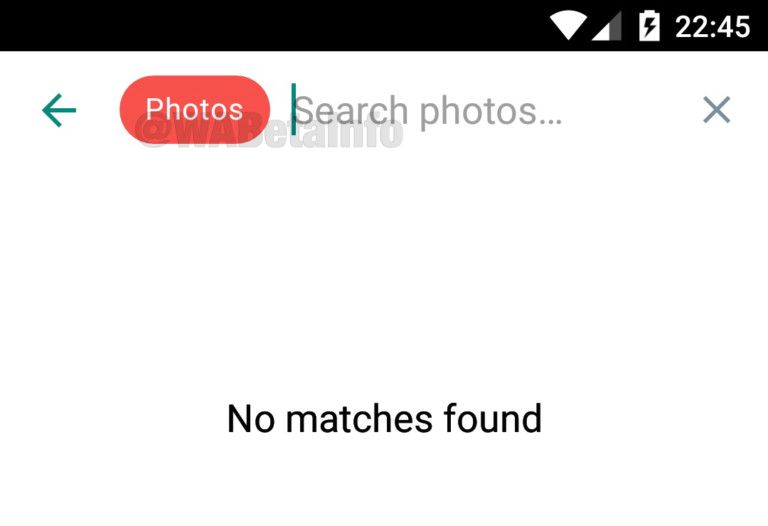
Now, the Instant Messaging app is preparing to add a new feature called Advanced Search mode. According to WABetainfo, WhatsApp has begun testing this new feature with a select few testers in the Beta channel. The function is currently being tested on the WhatsApp Beta versions 2.20.197.7 and 2.20.197.10, but it appears to be a server-side switch. We updated our app to the said version, but the feature wasn’t available for us as of writing this article.

The Advanced Search feature does exactly what its name implies. It lets you categorically search for photos, videos, links, GIFs, audio, and documents right from the search bar. The current search function offered in WhatsApp is quite limited in scope, and it’s only good at sorting through chat messages. It doesn’t let you categorically search for media files and documents that you have shared with your contacts. The Advanced Search will simplify this process by allowing you to filter out your results across different categories.

The Advanced Search feature is already available on WhatsApp for iOS since March, so it’s not particularly a novel feature. Nonetheless, it’s good to see the feature finally making its way to the Android version of the app.

As noted above, the new feature isn’t available for all users and is currently limited to a small set of beta users. It’s unclear when the feature will make its way to the stable channel, but given WhatsApp’s track record with rolling out new features, it’s safe to assume it probably won’t arrive anytime soon.

WhatsApp Messenger (Free, Google Play) →


Via: WABetainfo

The post WhatsApp rolls out search filters for some in the latest Android beta appeared first on xda-developers.


from xda-developers https://ift.tt/2DsxRiN
via IFTTT

WhatsApp rolls out search filters for some in the latest Android beta

WhatsApp has been slowly but steadily gaining new features and quality-of-life improvements over the past months. Earlier in March, the app received Dark Mode support, followed by a bump in user limit for group voice and video calls, support for profile QR codes, and addition of animated stickers. Most recently, the app added the ability to let users quickly search Google to double-check the forwarded messages.

Now, the Instant Messaging app is preparing to add a new feature called Advanced Search mode. According to WABetainfo, WhatsApp has begun testing this new feature with a select few testers in the Beta channel. The function is currently being tested on the WhatsApp Beta versions 2.20.197.7 and 2.20.197.10, but it appears to be a server-side switch. We updated our app to the said version, but the feature wasn’t available for us as of writing this article.

The Advanced Search feature does exactly what its name implies. It lets you categorically search for photos, videos, links, GIFs, audio, and documents right from the search bar. The current search function offered in WhatsApp is quite limited in scope, and it’s only good at sorting through chat messages. It doesn’t let you categorically search for media files and documents that you have shared with your contacts. The Advanced Search will simplify this process by allowing you to filter out your results across different categories.

The Advanced Search feature is already available on WhatsApp for iOS since March, so it’s not particularly a novel feature. Nonetheless, it’s good to see the feature finally making its way to the Android version of the app.

As noted above, the new feature isn’t available for all users and is currently limited to a small set of beta users. It’s unclear when the feature will make its way to the stable channel, but given WhatsApp’s track record with rolling out new features, it’s safe to assume it probably won’t arrive anytime soon.

WhatsApp Messenger (Free, Google Play) →


Via: WABetainfo

The post WhatsApp rolls out search filters for some in the latest Android beta appeared first on xda-developers.


from xda-developers https://ift.tt/2DsxRiN
via IFTTT

Samsung Galaxy Tab S7, Galaxy Z Fold 2, and Galaxy Watch 3 forums are open

During the recent Galaxy Unpacked launch event, Samsung unveiled the highly-anticipated Galaxy Note 20 series, the Galaxy Z Fold 2, Galaxy Watch 3, Galaxy Buds Live, and the Galaxy Tab S7. To promote third-party development and discussions about these devices, we recently opened subforums for the Galaxy Note 20 and the Galaxy Note 20 Ultra. Today, we are opening forums for three more Samsung devices: the Galaxy Tab S7, Galaxy Z Fold 2, and the Galaxy Watch 3.

Samsung Galaxy Tab S7

The new Galaxy Tab S7 series is Samsung’s answer to the Apple iPad Pro. The flagship Android tablets feature Qualcomm’s Snapdragon 865 Plus chip, coupled with up to 8GB of LPDDR5 RAM and up to 256GB of UFS 3.1 storage. The tablets pack in 11-inch and 12.4-inch displays, with the smaller Galaxy Tab S7 featuring a WQXGA TFT 120Hz display and the larger Galaxy Tab S7+ featuring a WQXGA+ Super AMOLED 120Hz display.

On the camera front, the tablets pack in a 13MP f/2.0 primary camera, coupled with a 5MP ultra-wide camera, and an 8MP selfie shooter. Much like their predecessor, the new Galaxy Tab S7 series features a quad-speaker setup. The tablets are powered by massive 8,000mAh and 10,090mAh batteries, which include support for 45W fast charging.

Samsung Galaxy Tab S7 XDA Forums

Samsung Galaxy Z Fold 2

The Samsung Galaxy Z Fold 2 is the company’s new-and-improved foldable device that packs in a massive 7.6-inch FHD+ 120Hz Dynamic AMOLED display on the inside and a significantly improved 6.23-inch HD+ Super AMOLED display on the outside. Much like the Galaxy Tab S7, the Galaxy Z Fold 2 packs in Qualcomm’s Snapdragon 865 Plus chip, coupled with 12GB of LPDRR5 RAM and 256GB of onboard storage.

In the camera department, the Galaxy Z Fold 2 features a 12MP f/1.8 primary sensor, a 12MP ultra-wide camera, a 12MP telephoto camera, and two 10MP selfie shooters (one on the outside and one inside). The device comes with an improved hinge mechanism, which will let you open the display at any angle, and a 4,500mAh battery with 25W fast charging support.

Samsung Galaxy Z Fold 2 XDA Forums

Samsung Galaxy Watch 3

The Galaxy Watch 3 is the latest smartwatch to come out of Samsung’s stable, and it packs in some significant improvements. The smartwatch is available in two sizes — 41mm and 45mm — with 1.2-inch and 1.4-inch Super AMOLED displays, respectively. The smartwatch is offered in both Bluetooth and LTE variants, and it comes with a ton of sensors to help you stay on top of your fitness goals.

The Galaxy Watch 3 features an ECG sensor, a PPG sensor to monitor your blood pressure, sensors to measure your blood oxygen levels, and workout tracking sensors. The smartwatch is IP68 dust and water resistance, and it runs Samsung’s proprietary Tizen-based Wearable OS 5.5.

Samsung Galaxy Watch 3 XDA Forums

The post Samsung Galaxy Tab S7, Galaxy Z Fold 2, and Galaxy Watch 3 forums are open appeared first on xda-developers.


from xda-developers https://ift.tt/31rKylR
via IFTTT

Samsung Galaxy Tab S7, Galaxy Z Fold 2, and Galaxy Watch 3 forums are open

During the recent Galaxy Unpacked launch event, Samsung unveiled the highly-anticipated Galaxy Note 20 series, the Galaxy Z Fold 2, Galaxy Watch 3, Galaxy Buds Live, and the Galaxy Tab S7. To promote third-party development and discussions about these devices, we recently opened subforums for the Galaxy Note 20 and the Galaxy Note 20 Ultra. Today, we are opening forums for three more Samsung devices: the Galaxy Tab S7, Galaxy Z Fold 2, and the Galaxy Watch 3.

Samsung Galaxy Tab S7

The new Galaxy Tab S7 series is Samsung’s answer to the Apple iPad Pro. The flagship Android tablets feature Qualcomm’s Snapdragon 865 Plus chip, coupled with up to 8GB of LPDDR5 RAM and up to 256GB of UFS 3.1 storage. The tablets pack in 11-inch and 12.4-inch displays, with the smaller Galaxy Tab S7 featuring a WQXGA TFT 120Hz display and the larger Galaxy Tab S7+ featuring a WQXGA+ Super AMOLED 120Hz display.

On the camera front, the tablets pack in a 13MP f/2.0 primary camera, coupled with a 5MP ultra-wide camera, and an 8MP selfie shooter. Much like their predecessor, the new Galaxy Tab S7 series features a quad-speaker setup. The tablets are powered by massive 8,000mAh and 10,090mAh batteries, which include support for 45W fast charging.

Samsung Galaxy Tab S7 XDA Forums

Samsung Galaxy Z Fold 2

The Samsung Galaxy Z Fold 2 is the company’s new-and-improved foldable device that packs in a massive 7.6-inch FHD+ 120Hz Dynamic AMOLED display on the inside and a significantly improved 6.23-inch HD+ Super AMOLED display on the outside. Much like the Galaxy Tab S7, the Galaxy Z Fold 2 packs in Qualcomm’s Snapdragon 865 Plus chip, coupled with 12GB of LPDRR5 RAM and 256GB of onboard storage.

In the camera department, the Galaxy Z Fold 2 features a 12MP f/1.8 primary sensor, a 12MP ultra-wide camera, a 12MP telephoto camera, and two 10MP selfie shooters (one on the outside and one inside). The device comes with an improved hinge mechanism, which will let you open the display at any angle, and a 4,500mAh battery with 25W fast charging support.

Samsung Galaxy Z Fold 2 XDA Forums

Samsung Galaxy Watch 3

The Galaxy Watch 3 is the latest smartwatch to come out of Samsung’s stable, and it packs in some significant improvements. The smartwatch is available in two sizes — 41mm and 45mm — with 1.2-inch and 1.4-inch Super AMOLED displays, respectively. The smartwatch is offered in both Bluetooth and LTE variants, and it comes with a ton of sensors to help you stay on top of your fitness goals.

The Galaxy Watch 3 features an ECG sensor, a PPG sensor to monitor your blood pressure, sensors to measure your blood oxygen levels, and workout tracking sensors. The smartwatch is IP68 dust and water resistance, and it runs Samsung’s proprietary Tizen-based Wearable OS 5.5.

Samsung Galaxy Watch 3 XDA Forums

The post Samsung Galaxy Tab S7, Galaxy Z Fold 2, and Galaxy Watch 3 forums are open appeared first on xda-developers.


from xda-developers https://ift.tt/31rKylR
via IFTTT

mercredi 5 août 2020

Gboard 9.7 prepares new Google Assistant support, smart completions, and undo auto-correct on backspace

Google’s Gboard is among the most popular keyboard apps and is constantly getting updates with new features. Over the past few weeks, we’ve seen Gboard prepare a Google Lens shortcut, system-abiding dark/light themes, and Google Assistant dictation support, add an emoji shortcut bar, image pasting, smart reply suggestions, and even add support for Android 11 emojis. Now, Gboard appears to be preparing to include an Ask Assistant button for the new Google Assistant, smart completion settings, and the ability to undo auto-correct on backspace.

An APK teardown can often predict features that may arrive in a future update of an application, but it is possible that any of the features we mention here may not make it in a future release. This is because these features are currently unimplemented in the live build and may be pulled at any time by the developers in a future build.

Gboard v9.7.03 beta

We’ve spotted the following new features in Gboard v9.7.03 beta that has just begun rolling out:

Ask Assistant Button for the new Google Assistant

<string name="nga_ask_assistant_button_description">Ask Assistant Button</string>
<string name="nga_ask_assistant_text">Ask Assistant</string>

While this string might look like the keyboard is just seemingly adding in a dedicated button for summoning Assistant, it is actually referring to the New Google Assistant (hence the “nga” in the string name), which is what the on-device, revamped Google Assistant is referred to, as found on the Google Pixel 4, Pixel 4 XL, and Pixel 4a.

Smart Completion through Gboard

<string name="setting_enable_inline_suggestion_title">Smart completions</string>

This string is likely referring to the settings for the Smart Completions feature that was previously detailed.

Undo Auto-Correct on Backspace

<string name="setting_enable_ac_revert_summary">Return to original text when backspacing after an autocorrection</string>
<string name="setting_enable_ac_revert_title">Undo auto-correct on backspace</string>

This feature would help in reverting back to an unnecessary auto-correction, by simply undoing the auto-correct with a single backspace, instead of needing to go back and retype the word. Since the string appears within the setting sub-class, it will likely be a feature that you can toggle.


Gboard - the Google Keyboard (Free, Google Play) →

Thanks to PNF Software for providing us a license to use JEB Decompiler, a professional-grade reverse engineering tool for Android applications.

The post Gboard 9.7 prepares new Google Assistant support, smart completions, and undo auto-correct on backspace appeared first on xda-developers.


from xda-developers https://ift.tt/31ppIUj
via IFTTT

Google Pixel 5a, foldable Pixel, and more Pixel phones appear in leaked document

After several delays, Google finally launched its budget-friendly Pixel 4a earlier this month. The company also teased the upcoming Pixel 4a 5G and the flagship Pixel 5, which are scheduled to launch later this year. But while Google is yet to announce a launch date for its 2020 flagships, a recent report from 9to5Google reveals that the company has already started work on the Pixel 5a, a foldable Pixel device, and more.

The publication has managed to procure an internal Android document that lists builds of Android for all publicly-launched Pixel devices since the Pixel 2. The document lists builds for the recently launched Pixel 4a, the upcoming Pixel 4a 5G, the Pixel 5, the unannounced Pixel 5a (codenamed barbette), and three other devices currently in development under the codenames “raven,” “oriole,” and “passport.”

While the document doesn’t specify anything about “raven” and “oriole”, the device codenamed “passport” has been referred to as a foldable. These three devices are labeled as “Q4 2021,” which leads us to believe that a foldable Pixel smartphone may be launched next year.

It’s worth noting that this isn’t the first time we’re hearing about a foldable Pixel smartphone. Back in May 2019, we learned that Google was working on a foldable Pixel, but the Pixel head at the time, Mario Queiroz, only confirmed that the company was “prototyping the technology.” Queiroz went on to say that Google had been doing that “for a long time” and that he didn’t think a foldable device had “a clear use case yet.”

While the document reveals no further information about these three devices, it reveals that the Pixel 4a 5G and the Pixel 5 are scheduled to launch in October, which falls in line with Google’s recent teaser. Additionally, the document notes that the Google Pixel 5a is scheduled for a “Q2 2021” launch and it’s described as a “lower end mid year device.”

Even though the internal document does give us some hints about what Google has in store for us, we’d advise that you take all this information with a grain of salt. This is due to the fact that the document primarily focuses on Android development, so it may not mirror the plans of Google’s hardware team.


Source: 9to5Google

Featured image: Google Pixel 3a

The post Google Pixel 5a, foldable Pixel, and more Pixel phones appear in leaked document appeared first on xda-developers.


from xda-developers https://ift.tt/2Dp8q1F
via IFTTT