LightBlog

mardi 26 mai 2020

Realme X3 SuperZoom launches with the Snapdragon 855+ and 120Hz display for €499

Realme has a wide range of choices across various price segments. After initially focussing on budget and mid-range phones, Realme forayed into the flagship killer segment with the launch of the Realme X2 Pro (review). The flagship killer was soon followed by the company’s first 5G phone – the X50 Pro (review) – that was powered by the Qualcomm Snapdragon 865 mobile platform. Now, Realme is launching another flagship which, as per its name, looks like the true successor to the Realme X2 Pro. The latest flagship – Realme X3 SuperZoom comes with a Snapdragon 855 Plus and a periscopic telephoto setup that we saw on phones such as the Huawei P30 Pro (review), OPPO Reno 10X (review), and more recently, the Xiaomi Mi 10 Youth Edition.

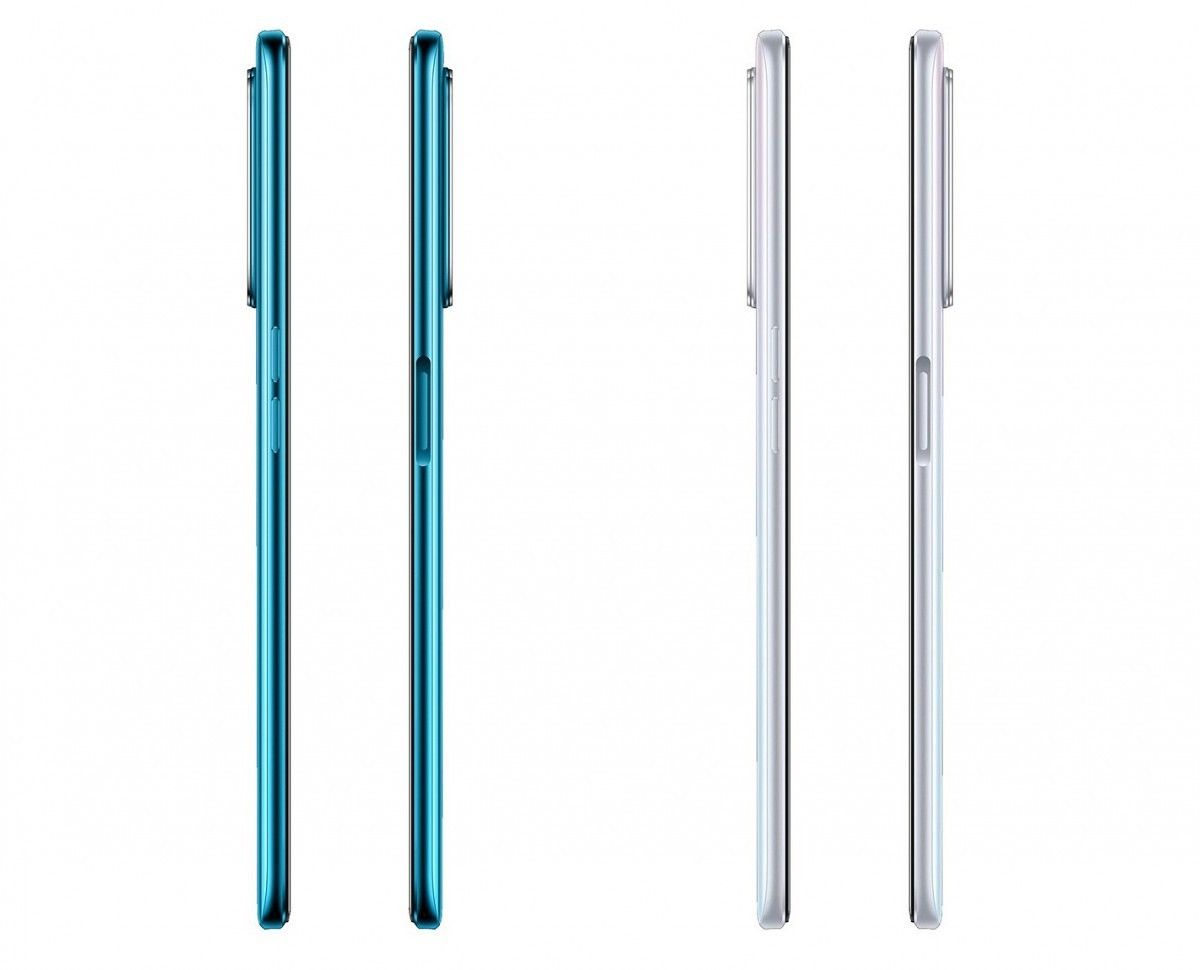
Design-wise, the Realme X3 SuperZoom looks quite similar to the X50 5G, which launched in China at the beginning of the year. It features a similar-looking 6.6-inch Full HD+ display with an LCD panel and a high 120Hz refresh rate. The display is protected under Gorilla Glass 5. Since this is an LCD and not an OLED panel, the X3 SuperZoom features a side-mounted fingerprint scanner – also seen on the X50 5G as well as the Realme 6 and 6 Pro. The phone comes in two colors – Arctic White and Glacier Blue.
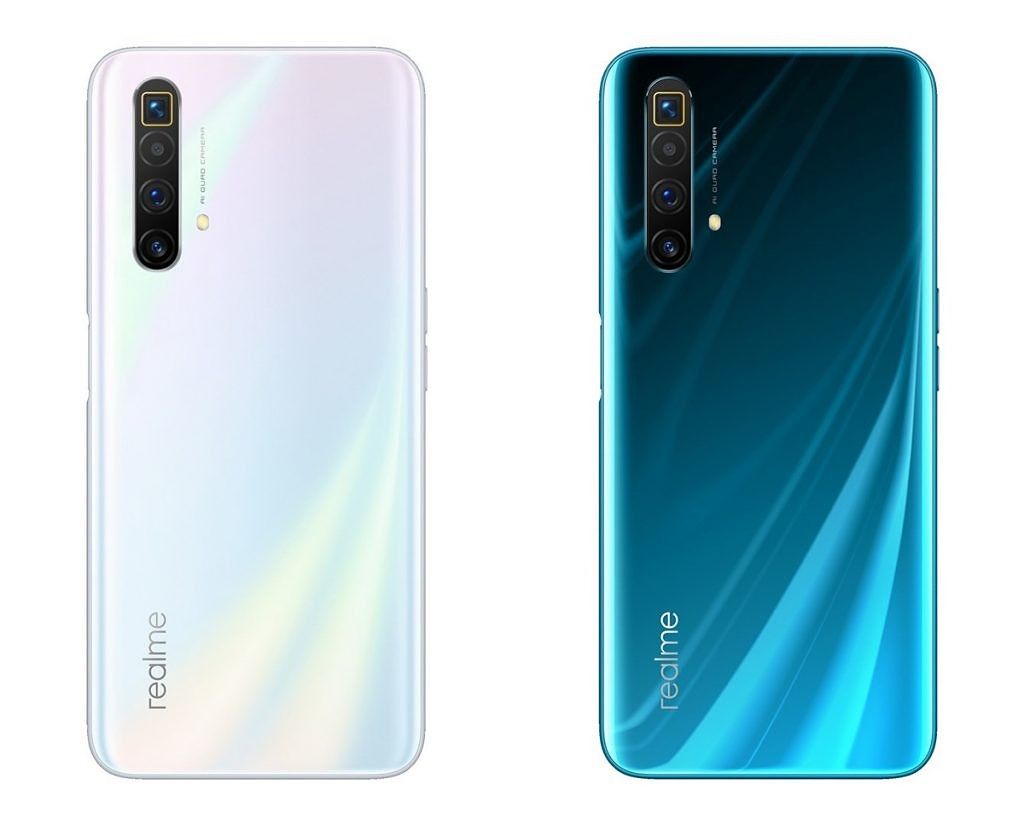
realme x3 superzoom

The biggest highlight of the smartphone is its 8MP telephoto setup that supports 5x optical zoom and up to 60x digital zoom. This is a step ahead of the 2x optical telephoto setup on the Realme X2 Pro. The telephoto sensor also comes with OIS (optical image stabilization) to ensure blur-free shots when capturing images from a distance. In addition to the telephoto camera, phone comes with a 64MP Samsung ISOCELL GW1 primary camera, and 8MP ultra-wide-angle camera, and a macro sensor with a focal length of 4cm.

On the front, the Realme X3 SuperZoom features dual selfie cameras inside a hole-punch. The primary selfie camera on the Realme X3 SuperZoom has a resolution of 32MP while the secondary is an 8MP ultra-wide-angle camera.

For the processor, Realme has gone with the Snapdragon 855 Plus instead of the more recent Snapdragon 865 and this is most likely to avoid the high cost of the 5G modem on Qualcomm’s latest mobile platform. This also means that the Realme X3 SuperZoom will not come with 5G support and is targetted at users who want great value and performance but not necessarily 5G. In terms of storage, the smartphone gets a 256GB UFS 3.0 storage along with Host Performance Booster (HPB) and Turbo Write for faster transfer rates. Thes features also allow the X3 SuperZoom to perform better than the Realme X2 Pro, which comes with the same chipset.

The Realme X3 SuperZoom comes with a 4,200mAh battery and supports 30W Dart 3.0 fast charging. The company claims that this charging technology allows the phone to charge fully in about 55 minutes.

Software-wise, the Realme X3 SuperZoom comes with Realme UI built on top of Android 10.

Price & Availability

The 12GB/256GB version of Realme X3 SuperZoom is priced at 499 euros (~$545).

It will be available for pre-ordering starting today i.e. May 26th via realme.com, Amazon, Fnac, MediaMarkt, PcComponentes, PhoneHouse while the first sale takes place on June 2nd.

Realme X3 SuperZoom Specifications

Specifications Realme X3 SuperZoom
Dimensions & Weight
  • 163.8 x 75.8 x 8.9 mm
  • 202g
Display
  • 6.57-inch dual-hole-punch FHD+ LCD
  • 1080 x 2400
  • 120Hz, 20:9 aspect ratio
  • Gorilla Glass 5
SoC
  • Qualcomm Snapdragon 855 Plus
  • Adreno 640
RAM & Storage
  • 12GB/256GB
Storage Type UFS 3.0 + Turbo Write + Host Performance Booster (HPB)
Battery
  • 4,200mAh
  • 30W Dart 3.0 fast charging
Fingerprint Sensor Side-mounted fingerprint
Rear Cameras
  • 64MP Samsung ISOCELL GW1 primary sensor, f/1.8
  • 8MP 119° wide-angle sensor, f/2.3
  • 8MP 5x periscopic telephoto, f/3.4
  • 2MP macro camera, f/2.4
Front Cameras
  • 32MP Sony IMX 616, f/2.5
  • 8MP 105° wide-angle sensor, f/2.2
Android Version Realme UI based on Android 10

The post Realme X3 SuperZoom launches with the Snapdragon 855+ and 120Hz display for €499 appeared first on xda-developers.


from xda-developers https://ift.tt/3gpqQOA
via IFTTT

Xiaomi launches Redmi Earbuds S TWS earphones in India for ₹1,799

Truly wireless (TWS) earbuds have seen a significant uptick in popularity over the last year or so. Thanks to the trend kickstarted by Apple’s AirPods, several Android manufacturers have released their own take on the hot new accessory. Following the launch of the Mi True Wireless Earphones 2 earlier this month, Xiaomi’s sub-brand Redmi has now also joined the TWS earbuds fray with its new Redmi Earbuds S launched in India today.

The Redmi Earbuds S comes in a pill-shaped case and has a low-profile compact design, unlike most other AirPods-clones out there. The earbuds ditch the stem-like design shape and instead opts for a more discrete look, one that doesn’t stick out of your ears that much.

The TWS earbuds are rated for 12 hours of music playback with the charging case and up to 4 hours with just the earbuds. The feature-packed earbuds offer IPX4 splash resistance, support for any voice assistant of your choice, a 122ms low-latency gaming mode, Bluetooth 5.0, and more.

Each earbud features a single tactile button that can be used to answer calls with a single click, reject calls with a long press, play/pause music with single clicks, and long press on both earbuds to launch the gaming mode. Much like the Mi True Wireless Earphones 2, the Earbuds S has been tuned to suit the Indian audience and offer a bass-heavy sound profile.

The Redmi Earbuds S will be available in a single matte black color variant, at a price of ₹1,799 (~$24) via mi.com, Amazon.in, Xiaomi’s Mi Home stores, and other offline retail partners starting from May 27th at 12PM.

The post Xiaomi launches Redmi Earbuds S TWS earphones in India for ₹1,799 appeared first on xda-developers.


from xda-developers https://ift.tt/2ZBOvVP
via IFTTT

Xiaomi launches Redmi Earbuds S TWS earphones in India for ₹1,799

Truly wireless (TWS) earbuds have seen a significant uptick in popularity over the last year or so. Thanks to the trend kickstarted by Apple’s AirPods, several Android manufacturers have released their own take on the hot new accessory. Following the launch of the Mi True Wireless Earphones 2 earlier this month, Xiaomi’s sub-brand Redmi has now also joined the TWS earbuds fray with its new Redmi Earbuds S launched in India today.

The Redmi Earbuds S comes in a pill-shaped case and has a low-profile compact design, unlike most other AirPods-clones out there. The earbuds ditch the stem-like design shape and instead opts for a more discrete look, one that doesn’t stick out of your ears that much.

The TWS earbuds are rated for 12 hours of music playback with the charging case and up to 4 hours with just the earbuds. The feature-packed earbuds offer IPX4 splash resistance, support for any voice assistant of your choice, a 122ms low-latency gaming mode, Bluetooth 5.0, and more.

Each earbud features a single tactile button that can be used to answer calls with a single click, reject calls with a long press, play/pause music with single clicks, and long press on both earbuds to launch the gaming mode. Much like the Mi True Wireless Earphones 2, the Earbuds S has been tuned to suit the Indian audience and offer a bass-heavy sound profile.

The Redmi Earbuds S will be available in a single matte black color variant, at a price of ₹1,799 (~$24) via mi.com, Amazon.in, Xiaomi’s Mi Home stores, and other offline retail partners starting from May 27th at 12PM.

The post Xiaomi launches Redmi Earbuds S TWS earphones in India for ₹1,799 appeared first on xda-developers.


from xda-developers https://ift.tt/2ZBOvVP
via IFTTT

lundi 25 mai 2020

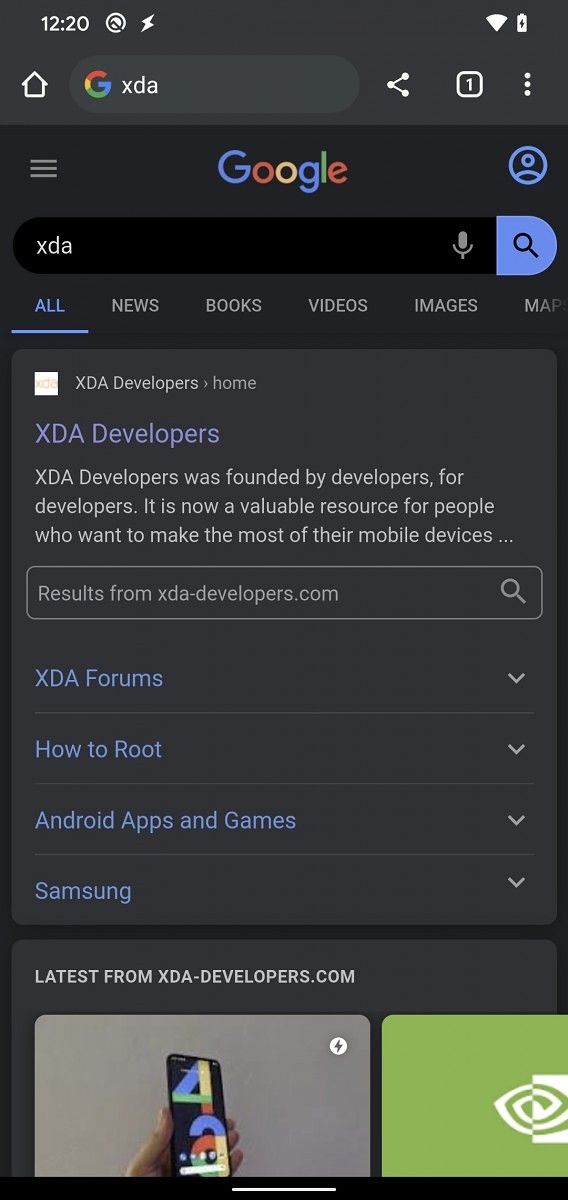
[Update: Flag Working] Google Chrome tests showing Google Search results in a dark theme that syncs with Android 10’s dark mode

Update 1 (05/26/2020 @ 01:30 AM ET): The flag that lets Google Chrome darken Google Search results is now live and working. Scroll to the bottom for more information. The article as published on May 14, 2020, is preserved below.

The introduction of a system-wide dark mode toggle in Android 10 has had a massive effect on the UI designs of many Android apps. A lot of Android apps have built-in dark themes now, and many of these apps also sync their dark theme with Android 10’s toggle. Google Chrome already does this for its toolbar and settings pages, but soon it’ll also darken Google Search results in sync with Android 10’s dark mode toggle.

Google first introduced dark mode support as a feature flag in Chrome browser version 74. They later introduced a dedicated “Themes” section in Chrome’s settings, and they also added a feature flag to render all web content using a dark theme. While it’s currently possible to display Google search results in a dark theme by using the #enable-force-dark feature flag, doing so may break the experience of many websites that haven’t been designed with darker background colors in mind. With the new #enable-android-dark-search feature flag that was just merged in the Chromium Gerrit, though, you’ll be able to show darkened search page results so long as Chrome’s dark mode is enabled. And since Chrome’s dark mode can be set to sync with the “system default” theme, that means the darkened search results can sync with Android 10’s system-wide dark mode toggle.

This feature is still a work-in-progress, though, as Google search results weren’t being darkened when I enabled the feature flag on a freshly built Chromium APK running on a Pixel 4 on Android 10. As 9to5Google pointed out last week when the commit first emerged, Google could have accomplished this goal through the “prefers-color-scheme” media CSS feature. However, that doesn’t seem to be the approach that Google is taking here.

In a related commit, Google details how the Chrome browser will show darkened search results when the user has Android 10’s dark mode enabled. The description states that “when the user is in night mode and visits Google search (homepage or results),” Google Chrome will “append an extra URL parameter to indicate that this user should get the darkened version of the website.” It seems that Chrome will append ?cs=1 to any Google Search URL if the user has dark mode enabled. Here’s an example of how this URL parameter darkens the Google Search results page:

Google Chrome light theme search results Google Chrome dark theme search results

The #enable-android-dark-search feature flag is currently available in the latest Chromium build but will eventually make its way over to Dev, Beta, and Stable releases. We’ll be tracking this feature as its development progresses.


Update: Google Chrome flag to darken Search results is now live

When we first published our article on May 14, 2020, the feature flag which darkened Google Search results within Chrome was not working, and we had to make use of a URL workaround to showcase what the feature would look like. Now, the flag is working on the latest Canary release, allowing Chrome to change the results UX in-line with Android 10’s dark mode settings synced across the system. To enable the feature on a recent Chrome Canary release, load up chrome://flags and set the “Show darkened search pages on Android” option to “enabled”.

Story Via: AndroidPolice

The post [Update: Flag Working] Google Chrome tests showing Google Search results in a dark theme that syncs with Android 10’s dark mode appeared first on xda-developers.


from xda-developers https://ift.tt/2Z4SKt2
via IFTTT

[Update: Flag Working] Google Chrome tests showing Google Search results in a dark theme that syncs with Android 10’s dark mode

Update 1 (05/26/2020 @ 01:30 AM ET): The flag that lets Google Chrome darken Google Search results is now live and working. Scroll to the bottom for more information. The article as published on May 14, 2020, is preserved below.

The introduction of a system-wide dark mode toggle in Android 10 has had a massive effect on the UI designs of many Android apps. A lot of Android apps have built-in dark themes now, and many of these apps also sync their dark theme with Android 10’s toggle. Google Chrome already does this for its toolbar and settings pages, but soon it’ll also darken Google Search results in sync with Android 10’s dark mode toggle.

Google first introduced dark mode support as a feature flag in Chrome browser version 74. They later introduced a dedicated “Themes” section in Chrome’s settings, and they also added a feature flag to render all web content using a dark theme. While it’s currently possible to display Google search results in a dark theme by using the #enable-force-dark feature flag, doing so may break the experience of many websites that haven’t been designed with darker background colors in mind. With the new #enable-android-dark-search feature flag that was just merged in the Chromium Gerrit, though, you’ll be able to show darkened search page results so long as Chrome’s dark mode is enabled. And since Chrome’s dark mode can be set to sync with the “system default” theme, that means the darkened search results can sync with Android 10’s system-wide dark mode toggle.

This feature is still a work-in-progress, though, as Google search results weren’t being darkened when I enabled the feature flag on a freshly built Chromium APK running on a Pixel 4 on Android 10. As 9to5Google pointed out last week when the commit first emerged, Google could have accomplished this goal through the “prefers-color-scheme” media CSS feature. However, that doesn’t seem to be the approach that Google is taking here.

In a related commit, Google details how the Chrome browser will show darkened search results when the user has Android 10’s dark mode enabled. The description states that “when the user is in night mode and visits Google search (homepage or results),” Google Chrome will “append an extra URL parameter to indicate that this user should get the darkened version of the website.” It seems that Chrome will append ?cs=1 to any Google Search URL if the user has dark mode enabled. Here’s an example of how this URL parameter darkens the Google Search results page:

Google Chrome light theme search results Google Chrome dark theme search results

The #enable-android-dark-search feature flag is currently available in the latest Chromium build but will eventually make its way over to Dev, Beta, and Stable releases. We’ll be tracking this feature as its development progresses.


Update: Google Chrome flag to darken Search results is now live

When we first published our article on May 14, 2020, the feature flag which darkened Google Search results within Chrome was not working, and we had to make use of a URL workaround to showcase what the feature would look like. Now, the flag is working on the latest Canary release, allowing Chrome to change the results UX in-line with Android 10’s dark mode settings synced across the system. To enable the feature on a recent Chrome Canary release, load up chrome://flags and set the “Show darkened search pages on Android” option to “enabled”.

Story Via: AndroidPolice

The post [Update: Flag Working] Google Chrome tests showing Google Search results in a dark theme that syncs with Android 10’s dark mode appeared first on xda-developers.


from xda-developers https://ift.tt/2Z4SKt2
via IFTTT

The OnePlus 5 and 5T are getting their stable Android 10 updates with OxygenOS 10

It looks like the OnePlus software team is having a productive lockdown, as they just released the stable version of Android 10-based OxygenOS 10 for OnePlus 5 and OnePlus 5T. Both of these devices are the ‘flagship killers’ from 2017. It was back in October of last year when OnePlus promised to bring Android 10 to these devices by Q2 of 2020. The first Open Beta was available just a month ago. Within the current month, we’ve seen the second and third Open Betas. Now, just under a week later since the last beta, OnePlus is releasing a stable version of OxygenOS 10.

OnePlus 5 Forums ||| OnePlus 5T Forums

If you haven’t been living under a rock, then you probably already know what’s new in Android 10. It’s almost a year old version after all. OnePlus’ commitment to staying close to stock Android is nothing new, either. OxygenOS 10 integrates one of Android 10’s biggest changes, the full-screen gestures. Some would argue that the dark theme is a bigger change, but OnePlus has had it for years.

OxygenOS 10 changelog for OnePlus 5/5T

  • System
    • Upgraded to Android 10
    • Brand new UI design
    • Enhanced location permissions for privacy
    • New customization feature in the Settings allowing you to choose icon shapes to be displayed in the Quick Settings
  • Game Space
    • New Game Space feature now add all your favorite games in one place for easier access and better gaming experience
  • Message
    • Now possible to block spam by keywords for Message (Messages – Spam – Settings – Blocking settings)
  • Full Screen Gestures
    • Removed back gesture from the bottom of the screen
    • Added back gesture on left and right side of the phone
    • Added a bottom navigation bar to allow switching left or right for recent apps
  • Camera
    • Electronic image stabilization currently under optimization and will be pushed in later stabler versions. Please stay tuned.

If you own OnePlus 5 or OnePlus 5T and want to install the OxygenOS 10 immediately, you’ll have to wait for it a little this time around. The update has just been released, so there are no download links yet for manual flashing. We could not even find the thread on OnePlus Community forums. All you can do is go to your device settings and check for updates. The update is 1.8GB in size, according to a user’s screenshot on the forum.

The post The OnePlus 5 and 5T are getting their stable Android 10 updates with OxygenOS 10 appeared first on xda-developers.


from xda-developers https://ift.tt/3ggjQDs
via IFTTT

The OnePlus 5 and 5T are getting their stable Android 10 updates with OxygenOS 10

It looks like the OnePlus software team is having a productive lockdown, as they just released the stable version of Android 10-based OxygenOS 10 for OnePlus 5 and OnePlus 5T. Both of these devices are the ‘flagship killers’ from 2017. It was back in October of last year when OnePlus promised to bring Android 10 to these devices by Q2 of 2020. The first Open Beta was available just a month ago. Within the current month, we’ve seen the second and third Open Betas. Now, just under a week later since the last beta, OnePlus is releasing a stable version of OxygenOS 10.

OnePlus 5 Forums ||| OnePlus 5T Forums

If you haven’t been living under a rock, then you probably already know what’s new in Android 10. It’s almost a year old version after all. OnePlus’ commitment to staying close to stock Android is nothing new, either. OxygenOS 10 integrates one of Android 10’s biggest changes, the full-screen gestures. Some would argue that the dark theme is a bigger change, but OnePlus has had it for years.

OxygenOS 10 changelog for OnePlus 5/5T

  • System
    • Upgraded to Android 10
    • Brand new UI design
    • Enhanced location permissions for privacy
    • New customization feature in the Settings allowing you to choose icon shapes to be displayed in the Quick Settings
  • Game Space
    • New Game Space feature now add all your favorite games in one place for easier access and better gaming experience
  • Message
    • Now possible to block spam by keywords for Message (Messages – Spam – Settings – Blocking settings)
  • Full Screen Gestures
    • Removed back gesture from the bottom of the screen
    • Added back gesture on left and right side of the phone
    • Added a bottom navigation bar to allow switching left or right for recent apps
  • Camera
    • Electronic image stabilization currently under optimization and will be pushed in later stabler versions. Please stay tuned.

If you own OnePlus 5 or OnePlus 5T and want to install the OxygenOS 10 immediately, you’ll have to wait for it a little this time around. The update has just been released, so there are no download links yet for manual flashing. We could not even find the thread on OnePlus Community forums. All you can do is go to your device settings and check for updates. The update is 1.8GB in size, according to a user’s screenshot on the forum.

The post The OnePlus 5 and 5T are getting their stable Android 10 updates with OxygenOS 10 appeared first on xda-developers.


from xda-developers https://ift.tt/3ggjQDs
via IFTTT