LightBlog

lundi 25 mai 2020

A new Motorola Razr foldable smartphone is coming this year, and here’s what we know already

Motorola captured the attention of the tech world late last year when it rebooted its iconic Razr flip phone as a foldable smartphone. Motorola banked on nostalgia for the Razr to drive interest in its new foldable, and it definitely worked. However, the Motorola Razr had rather lackluster hardware and was quickly overshadowed by the more powerful Galaxy Z Flip from Samsung. However, Motorola revealed back in December that they were working on a 5G version of the Razr, and recently a representative for Lenovo, the Chinese company that owns Motorola, revealed a possible launch date. To add to this, we can now share a lot of the hardware specifications for the upcoming Motorola Razr revamp.

The Motorola Razr was the first vertically foldable smartphone to hit the market when it went on sale in the U.S. on February 6th. It featured a main 6.20-inch pOLED foldable display made of plastic and a secondary 2.69-inch gOLED glass display on the outside. Besides the ingenuity of the foldable display and hinge mechanism, the Razr was a rather unimpressive mid-range smartphone, packing the Qualcomm Snapdragon 710, 6GB of RAM, 128GB of internal storage, a 16MP rear camera, a 5MP front camera, Android 9 Pie, and a 2,510mAh battery. The Galaxy Z Flip, on the other hand, had an arguably better display in terms of look and feel, a better processor, more RAM, more storage, a larger battery, newer software, faster charging, and better cameras.

Motorola Razr (Gen 1) Specifications

Specification Motorola Razr (Gen. 1)
Dimensions
  • Unfolded: 72 mm x 172 mm x 6.6 mm
  • Folded: 72 mm x 94 mm x 14 mm
Weight 205g
Display
  • Main “Flex View”: 6.20-inch pOLED 2142×876 (21:9)
  • Closed “Quick View”: 2.69-inch gOLED 800×600 (4:3)
Camera
  • Outer: 16MP (Sony IMX517) f/1.7, 1.22μm with EIS, Night Vision support
  • Internal: 5MP f/2.0, 1.12μm
Processor Qualcomm Snapdragon 710
RAM 6GB
Storage 128GB
Battery capacity 2510mAh with 15W TurboPower charging
Connectivity eSIM, NFC, CDMA, LTE bands 2/3/4/5/7/13/20/28/66, Bluetooth 5.0 LE, GPS/GLONASS, WiFi 802.11 a/b/g/n/ac
Security Capacitive fingerprint scanner
IP Rating None, splash-proof nano-coating
Audio Speaker at the bottom, no 3.5mm headphone jack, 4 microphones
Software Android 9 Pie (upgradeable to Android 10)
Ports & Buttons USB 3.0 Type-C port at the bottom, fingerprint scanner in the bottom bezel, power and volume buttons on the right side

Motorola Razr (Gen. 1) Forums


The new Motorola Razr, when it launches, should bridge the gap between it and the Galaxy Z Flip in terms of specifications. During the China Industrial Design Exhibition held in Wuhan, China in December, a Lenovo staff member reportedly told attendees at the exhibition that the company plans to launch a 5G version in China in 2020. A few days ago, Lenovo’s South Africa general manager Thibault Dousson told the Reframed Tech podcast (via AndroidAuthority) that there is “a new iteration [of the Razr] coming up. There’s one in September I think.” Later, Mr. Doussan reiterates that there’s a “generation two” foldable in the works.

A September launch (or even just an announcement) would be a quick turnaround from the original Motorola Razr release. The first Razr launched in February, only 8 months prior to September. The original was, however, announced 3 months before it went on sale, so it’s possible we could see a September announcement and a launch closer to the end of the year. Whatever the case may be, the second generation Motorola Razr should pack hardware that’s much more in line with our idea of an upper mid-range smartphone in 2020.

Motorola Razr (Gen. 2) – What we think we know so far

According to our source, the 5G-enabled, second-generation Motorola Razr has the code-name “smith” and model name “XT2071-4.” The foldable is powered by the Qualcomm Snapdragon 765, 8GB of RAM, 256GB of internal storage, and a 2,845mAh battery. The rear camera is also getting an upgrade to Samsung’s 48MP ISOCELL Bright GM1 sensor while the front camera is getting upgraded to a 20MP shooter. The device will run Android 10 out-of-the-box, presumably with Motorola’s many improvements to the Quick View display. The dimensions of the main “Flex View” and closed “Quick View” displays themselves, as far as we know, haven’t changed from the first-generation model, though we hope that Motorola will introduce enhancements like a layer of Ultra Thin Glass.

The second-generation model is being developed for China and North America, though we don’t know if it will also go on sale in other markets like India, Europe, or Latin America. As confirmed by Motorola’s parent company Lenovo, the second-generation Razr will support 5G connectivity, made possible with the inclusion of the Snapdragon 765 with its Snapdragon X52 modem. The device will likely only support sub-6GHz 5G networks as I’m not sure if Motorola will be able to pack mmWave antennas into the body to support mmWave 5G networks like Verizon’s Ultrawide Band network.
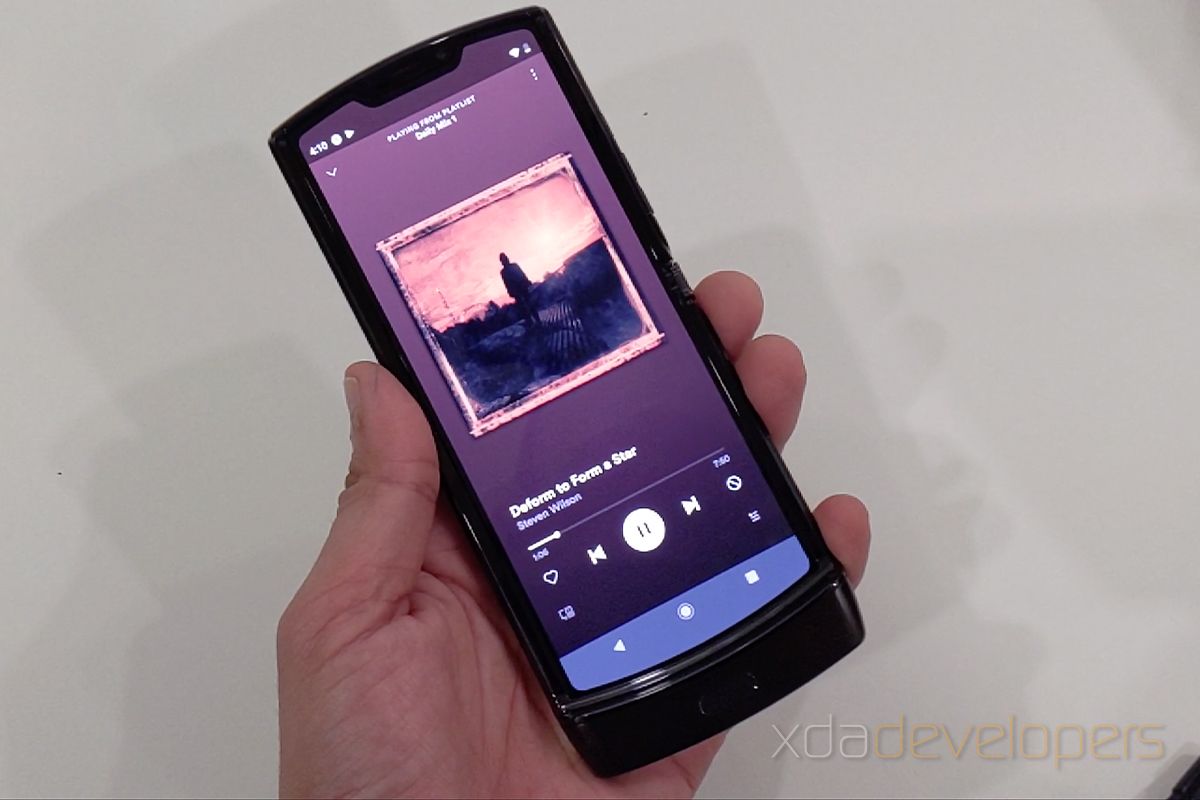
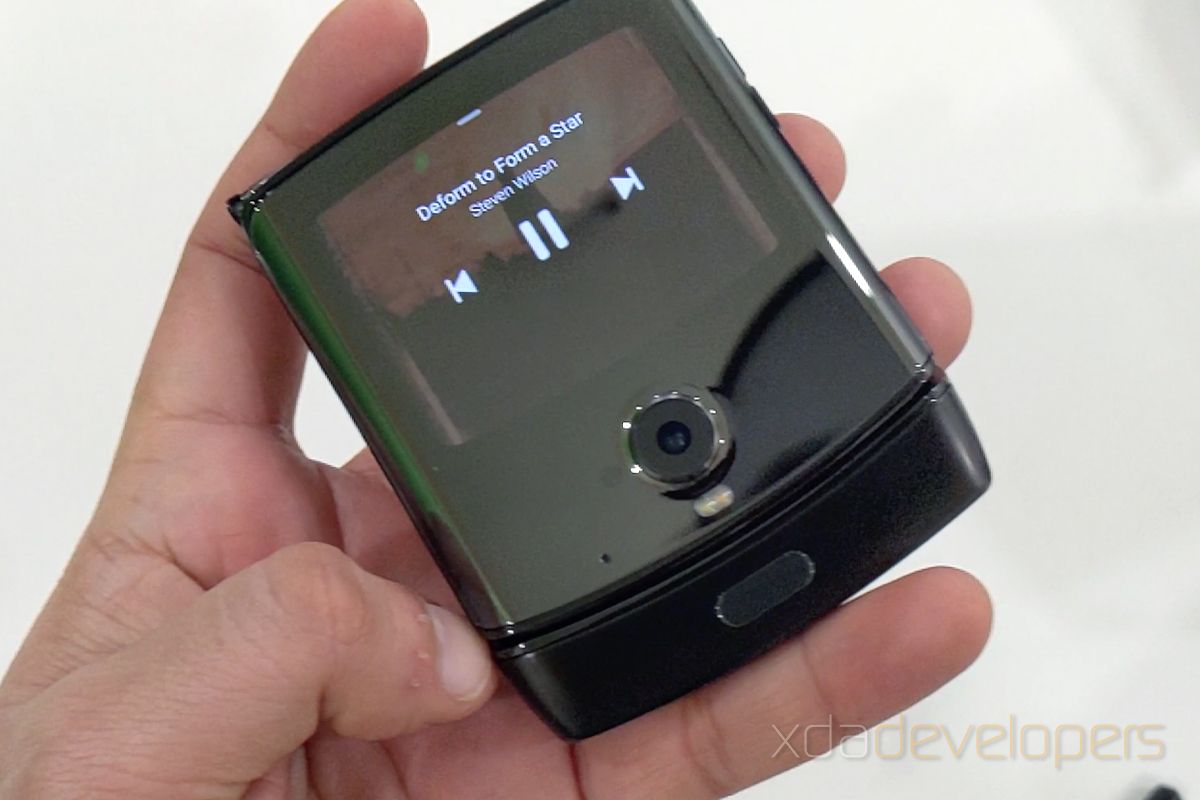
The first-generation Motorola Razr foldable smartphone. Image credits: Tushar Mehta/XDA-Developers

As with any leak, things can change before launch. Our leaks of the first-generation Motorola Razr device turned out to be accurate, though notably the battery capacity that we first revealed back in March of 2019 was changed to the lower capacity unit ended up in retail units. We anticipated that change ahead of launch and will, of course, keep an eye out for any such changes in the second-generation Razr.

Featured image credits: Tushar Mehta/XDA-Developers

The post A new Motorola Razr foldable smartphone is coming this year, and here’s what we know already appeared first on xda-developers.


from xda-developers https://ift.tt/2LTW2Y8
via IFTTT

Microsoft Edge for Android gets support for Collections

The Internet Explorer’s years of glory ended pretty soon after Google launched its Chrome browser in 2008. Since then, Microsoft’s attempt to add new features and even introducing an entirely new browser – Edge – didn’t salvage their browser. Things were quite the same until Microsoft decided to rebuild Edge using Chromium – the open-source framework for Google’s Chrome and many other browsers such as Opera, Vivaldi, and Amazon Silk. Like the desktop version, Microsoft Edge for Android is based on Chromium and is slowly gaining features to get on par with the desktop version. In the latest beta, Edge receives Collections, a feature aimed at improving your research abilities.

Collections on Microsoft Edge allows you to save useful links, images/videos, and other information in groups. You can also sync Collections across different devices if you’ve signed in with your Microsoft account. Techdows reports that Collections are now being added to the beta version of Microsoft Edge, allowing you to create Collections on the go and synchronizing with your account to review on perhaps a bigger screen later.

microsoft edge android

Image via Techdows

To use Collections, you must at least be on Microsoft Edge (beta) version 45.04.24.4994. This appears to be a server-side switch as I was unable to see the feature despite being on the same version as reported by Techdows. As per their report, you can access Collections by tapping on the horizontal three-dot button in the bottom bar. You can tap on the option in the center and then tap on the “+” icon to add a new Collection. After you give this one a name, you can start by adding links or images by tapping on “Add to Collection” button from the menu.

To be able to view Collections created on other devices, you can check Collections in the Sync settings. Remember, you’ll be required to sign up as a beta tester for Microsoft Edge to be able to use the feature. You can apply for the same by clicking this link.

Download latest Microsoft Edge beta for Android on APKMirror

Microsoft Edge (Free, Google Play) →

The post Microsoft Edge for Android gets support for Collections appeared first on xda-developers.


from xda-developers https://ift.tt/36urUvY
via IFTTT

Microsoft Edge for Android gets support for Collections

The Internet Explorer’s years of glory ended pretty soon after Google launched its Chrome browser in 2008. Since then, Microsoft’s attempt to add new features and even introducing an entirely new browser – Edge – didn’t salvage their browser. Things were quite the same until Microsoft decided to rebuild Edge using Chromium – the open-source framework for Google’s Chrome and many other browsers such as Opera, Vivaldi, and Amazon Silk. Like the desktop version, Microsoft Edge for Android is based on Chromium and is slowly gaining features to get on par with the desktop version. In the latest beta, Edge receives Collections, a feature aimed at improving your research abilities.

Collections on Microsoft Edge allows you to save useful links, images/videos, and other information in groups. You can also sync Collections across different devices if you’ve signed in with your Microsoft account. Techdows reports that Collections are now being added to the beta version of Microsoft Edge, allowing you to create Collections on the go and synchronizing with your account to review on perhaps a bigger screen later.

microsoft edge android

Image via Techdows

To use Collections, you must at least be on Microsoft Edge (beta) version 45.04.24.4994. This appears to be a server-side switch as I was unable to see the feature despite being on the same version as reported by Techdows. As per their report, you can access Collections by tapping on the horizontal three-dot button in the bottom bar. You can tap on the option in the center and then tap on the “+” icon to add a new Collection. After you give this one a name, you can start by adding links or images by tapping on “Add to Collection” button from the menu.

To be able to view Collections created on other devices, you can check Collections in the Sync settings. Remember, you’ll be required to sign up as a beta tester for Microsoft Edge to be able to use the feature. You can apply for the same by clicking this link.

Download latest Microsoft Edge beta for Android on APKMirror

Microsoft Edge (Free, Google Play) →

The post Microsoft Edge for Android gets support for Collections appeared first on xda-developers.


from xda-developers https://ift.tt/36urUvY
via IFTTT

YouTube for Android tests showing a recommended Google Search result when searching in YouTube

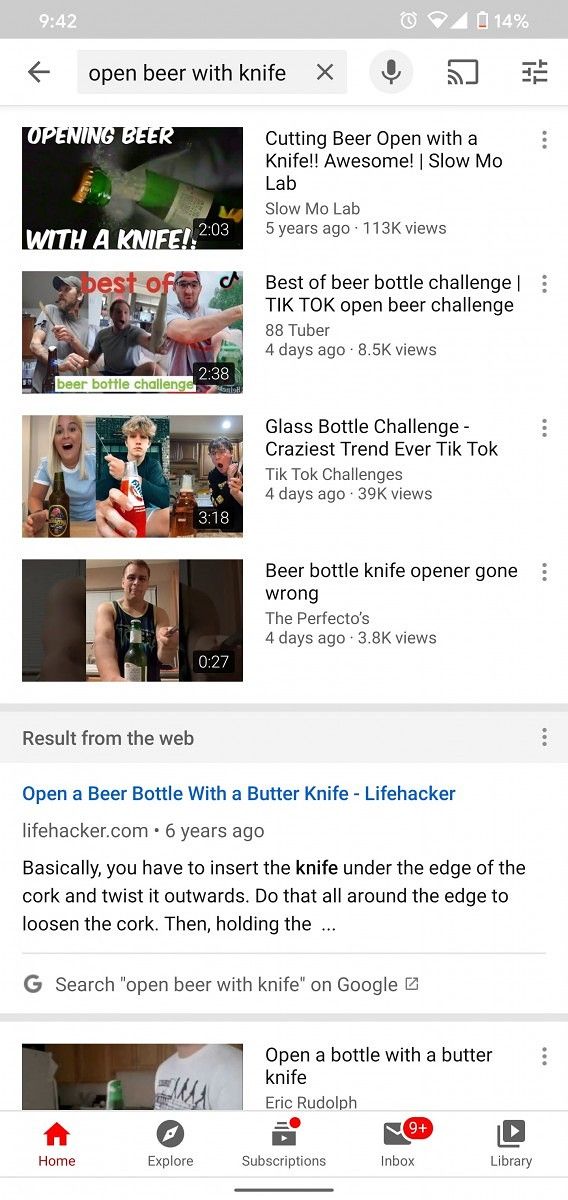
Following the recent rollout of the new Bedtime Reminders feature in YouTube for Android, Google has now started testing a new feature that will show search results from the web within the app. The feature was recently spotted by Reddit user u/TheMrIggs when he searched “open beer with knife” in the YouTube app. As you can see in the screenshots below, the results listed a couple of related videos, as usual, followed by a new “Results from the web” card featuring a recommended result from Google Search for the same query.

YouTube Android

In case you don’t find any useful results on YouTube or even in the new Search card, you also get the option to search for the same keyword on Google just by tapping on the link at the bottom of the card. As far as the utility of this new feature is concerned, we believe that Google is adding it to the YouTube app in order to help users easily find useful results from the web in case they don’t find appropriate results on YouTube.

While Google hasn’t released any information about this new feature yet, it appears to be rolling out for some users via a server-side update. We tried updating the YouTube app to the latest release and using the same keywords to trigger the feature but we weren’t able to replicate it on any of our devices. As of now, we have no information from Google regarding a broader rollout.


Source: Reddit

The post YouTube for Android tests showing a recommended Google Search result when searching in YouTube appeared first on xda-developers.


from xda-developers https://ift.tt/2zsgKvB
via IFTTT

YouTube for Android tests showing a recommended Google Search result when searching in YouTube

Following the recent rollout of the new Bedtime Reminders feature in YouTube for Android, Google has now started testing a new feature that will show search results from the web within the app. The feature was recently spotted by Reddit user u/TheMrIggs when he searched “open beer with knife” in the YouTube app. As you can see in the screenshots below, the results listed a couple of related videos, as usual, followed by a new “Results from the web” card featuring a recommended result from Google Search for the same query.

YouTube Android

In case you don’t find any useful results on YouTube or even in the new Search card, you also get the option to search for the same keyword on Google just by tapping on the link at the bottom of the card. As far as the utility of this new feature is concerned, we believe that Google is adding it to the YouTube app in order to help users easily find useful results from the web in case they don’t find appropriate results on YouTube.

While Google hasn’t released any information about this new feature yet, it appears to be rolling out for some users via a server-side update. We tried updating the YouTube app to the latest release and using the same keywords to trigger the feature but we weren’t able to replicate it on any of our devices. As of now, we have no information from Google regarding a broader rollout.


Source: Reddit

The post YouTube for Android tests showing a recommended Google Search result when searching in YouTube appeared first on xda-developers.


from xda-developers https://ift.tt/2zsgKvB
via IFTTT

Krita, a FOSS digital drawing app, is now available for Android tablets and Chromebooks

When it comes to digital drawing apps on Android, the Google Play Store offers a variety of different options to choose from. Sadly though, most of the professional-grade apps are either very expensive or offer only a few basic features for free. In order to give Android tablet and Chromebook users a feature-packed free and open-source alternative, the team behind Krita has now released its first beta on the platform.

For the unaware, Krita is a free to use, open-source digital drawing software for desktop developed by KDE —an international community of free software. The desktop version of the program maintains over 200 tools that can be installed on GNU/Linux distributions and other platforms, making it a great alternative to apps like Adobe Photoshop and Coral Painter. Thanks to the recent beta release, you can now utilize Krita’s vast library of tools on both Android tablets and Chromebooks.

Krita Android ChromeOS Chromebook

According to a recent blog post on the matter, the Krita beta release for Android and ChromeOS is based on version 4.2.9 of the desktop app. The app features the same interface as the desktop version, which is why it currently isn’t compatible with Android smartphones due to their smaller UIs. If you’re interested in trying out the app on your tablet or Chromebook, you can click on the Play Store link below and download the app.

Unlike the Steam and Windows Store version, Krita for Android and ChromeOS is completely free to use, but you can buy a supporter badge from within the app to support development for the project. Do note that since this is an early access release, you might encounter some bugs while using the app on your device.

Krita (Free+, Google Play) →

The post Krita, a FOSS digital drawing app, is now available for Android tablets and Chromebooks appeared first on xda-developers.


from xda-developers https://ift.tt/2ziJjM8
via IFTTT

Krita, a FOSS digital drawing app, is now available for Android tablets and Chromebooks

When it comes to digital drawing apps on Android, the Google Play Store offers a variety of different options to choose from. Sadly though, most of the professional-grade apps are either very expensive or offer only a few basic features for free. In order to give Android tablet and Chromebook users a feature-packed free and open-source alternative, the team behind Krita has now released its first beta on the platform.

For the unaware, Krita is a free to use, open-source digital drawing software for desktop developed by KDE —an international community of free software. The desktop version of the program maintains over 200 tools that can be installed on GNU/Linux distributions and other platforms, making it a great alternative to apps like Adobe Photoshop and Coral Painter. Thanks to the recent beta release, you can now utilize Krita’s vast library of tools on both Android tablets and Chromebooks.

Krita Android ChromeOS Chromebook

According to a recent blog post on the matter, the Krita beta release for Android and ChromeOS is based on version 4.2.9 of the desktop app. The app features the same interface as the desktop version, which is why it currently isn’t compatible with Android smartphones due to their smaller UIs. If you’re interested in trying out the app on your tablet or Chromebook, you can click on the Play Store link below and download the app.

Unlike the Steam and Windows Store version, Krita for Android and ChromeOS is completely free to use, but you can buy a supporter badge from within the app to support development for the project. Do note that since this is an early access release, you might encounter some bugs while using the app on your device.

Krita (Free+, Google Play) →

The post Krita, a FOSS digital drawing app, is now available for Android tablets and Chromebooks appeared first on xda-developers.


from xda-developers https://ift.tt/2ziJjM8
via IFTTT