LightBlog

jeudi 21 mai 2020

OPPO Find X2 Pro, Neo, and Lite are now available in Germany with free Bluetooth audio accessories as bonuses

OPPO was expected to debut its Find X2 series at the MWC 2020 trade show earlier this year. However, due to the rising COVID-19 concerns, the event was canceled and OPPO postponed the launch to a later date. The Find X2 and Find X2 Pro were then revealed early in March this year, with the OPPO Find X2 Lite joining the lineup later in April. Now, according to a recent report from GSMArena, the company has launched the Find X2 Pro and Find X2 Lite in Germany, along with the new Find X2 Neo.

OPPO Find X2 Pro

Out of the three devices, the OPPO Find X2 Pro (first impressions) is the only Snapdragon 865 powered flagship which features a 6.7-inch QHD+ AMOLED display with a 120Hz refresh rate, a triple camera setup with a 48MP Sony IMX689 primary sensor, 12GB of LPDDR5 RAM and 512GB of UFS 3.0 storage.

OPPO Find X2 Lite


The OPPO Find X2 Lite, on the other hand, is a rebranded Chinese Reno3 Vitality Edition featuring Qualcomm’s mid-range Snapdragon 765G chip, 8GB of LPDDR4x RAM, 128GB UFS 2.1 storage, and a quad-camera setup with a 48MP primary sensor. The device features a 6.4inch FHD+ AMOLED display and a 4,025mAh battery with support for 30W fast wired charging.

OPPO Find X2 Neo


The new OPPO Find X2 Neo, which is a rebranded Chinese Reno3 Pro 5G, also features the Snapdragon 765G chipset, coupled with up to 12GB of RAM and 256GB of storage. The device features a 6.5-inch FHD+ AMOLED display with a 90Hz refresh rate, a quad-camera setup with a 48MP primary sensor, and a 4,025mAh battery.

Pricing and Availability

The OPPO Find X2 Pro, Find X2 Neo, and Find X2 Lite are up for preorders across various eCommerce platforms in the country. The pricing details are as follows:

  • OPPO Find X2 Pro – €1,199 (~$1318)
  • OPPO Find X2 Neo – €699 (~$769)
  • OPPO Find X2 Lite – €499 (~$549)

In case you don’t wish to pay the full price upfront, Vodafone and Deutsche Telekon are offering on-contract deals for the three devices in the country. It’s also worth noting that if you purchase any of these three Find X2 models before June 14th, OPPO will include a pair of Bluetooth headphones with the device. OPPO Find X2 Lite buyers will be eligible for a pair of OPPO Enco W31 TWS earbuds, Find X2 Neo buyers will get a pair of OPPO Enco Free TWS earbuds, and Find X2 Pro buyers will get a Bang & Olufsen Beoplay H8i Bluetooth headphone.


Source: OPPO

Via: GSMArena

The post OPPO Find X2 Pro, Neo, and Lite are now available in Germany with free Bluetooth audio accessories as bonuses appeared first on xda-developers.


from xda-developers https://ift.tt/3cSm5ef
via IFTTT

[Update: May 21 builds] Download the MIUI 12 Closed Beta for Xiaomi and Redmi devices

Update 3 (05/21/2020 @ 07:05 AM ET): Added download links for MIUI 12 latest beta builds, compiled on May 21, 2020.

Update 2 (05/18/2020 @ 07:25 AM ET): Added download links for MIUI 12 latest beta builds, compiled on May 18, 2020.

Update 1 (05/11/2020 @ 09:30 AM ET): MIUI 12 closed beta download links refreshed with newer releases (compiled on May 11). The article as published on April 28, 2020, is preserved below.


The latest version of Xiaomi’s custom Android skin – MIUI 12 – is finally here. The company has dropped the curtain yesterday, alongside the Mi 10 Youth Edition launch event in China. Compared to MIUI 11, the stable version of which was released less than six months ago, MIUI 12 brings in a slew of improvements, visual overhauls, and many new features. We have already extracted the new wallpapers, and now we are presenting the downloading links of the first set of MIUI 12 beta firmware packages for a bunch of Xiaomi and Redmi devices.

It is worth mentioning that these closed beta builds are meant for the Chinese variants, as Xiaomi suspended the rollout of MIUI global beta since last year. As a consequence, you have to flash these recovery ROMs using TWRP to bypass the MIUI beta account whitelisting. Do not expect Google Play Services or any pre-installed Google apps in them. Language options are likely limited to English and Chinese only, too. Xiaomi did launch MIUI 12 globally, and we are waiting for builds to appear for that too. Meanwhile, you can try out the closed betas from China.

The beta MIUI 12 builds listed below are based on either Android Pie or Android 10, depending on the device.

Download: MIUI 12

You can download the latest beta (20.5.21) of MIUI 12 for your device from the links below. You can also visit our linked forums in case you need further assistance. While all of these download links are directly from Xiaomi, users are advised to proceed at their own risk. We warn you once again, this is not intended for the average consumer and is recommended only for users comfortable with flashing ROMs.

Sr. No. Device, Device Codename, XDA Forum Link Android Version Download Link (20.5.21)
1. Redmi Note 8 Pro (begonia) Android 10 Download
2. Mi 9 (cepheus) Android 10 Download
3. Mi Mix 2 (chiron) Android 9 Download
4. Mi 10 Pro (cmi) Android 10 Download
5. Mi 9 Pro 5G (crux) Android 10 Download
6. Redmi K20/Mi 9T (davinci) Android 10 Download
7. Mi 8 (dipper) Android 10 Download
8. Mi 8 Pro (equuleus) Android 10 Download
9. Mi 9 SE (grus) Android 10 Download
10. Mi Note 3 (jason) Android 9
11. Redmi Note 7/7S (lavender) Android 10 Download
12. Mi CC9e (laurus) Android 10
13. Redmi K30 Pro/POCO F2 Pro (lmi) Android 10 Download
14. Mi Max 3 (nitrogen) Android 10 Download
15. Mi Mix 3 (perseus) Android 10 Download
16. Redmi K30 5G (picasso) Android 10 Download
17. Mi 8 Lite (platina) Android 10 Download
18. POCO X2/Redmi K30 4G (phoenix) Android 10 Download
19. Mi Mix 2S (polaris) Android 10 Download
20. Mi 9 Lite/Mi CC9 (pyxis) Android 10 Download
21. Redmi K20 Pro/Mi 9T Pro (raphael) Android 10 Download
22. Mi 6 (sagit) Android 9 Download
23. Mi 8 SE (sirius) Android 10 Download
24. Mi Note 10/Mi CC9 Pro (tucana) Android 10 Download
25. Mi 10 (umi) Android 10 Download
26. Mi 8 Explorer Edition (ursa) Android 10 Download
27. Mi CC9 Meitu Edition (vela) Android 10 Download
28. Redmi Note 7 Pro (violet) Android 10 Download
29. Mi 6X (wayne) Android 9 Download
30. Redmi Note 5/Redmi Note 5 Pro (whyred) Android 9 Download

Links for the previous beta builds of MIUI 12 are preserved as well:

MIUI 12 (20.5.18) Download Links

Sr. No. Device, Device Codename, XDA Forum Link Android Version Download Link (20.5.18)
1. Redmi Note 8 Pro (begonia) Android 10 Download
2. Mi 9 (cepheus) Android 10 Download
3. Mi Mix 2 (chiron) Android 9 Download
4. Mi 10 Pro (cmi) Android 10
5. Mi 9 Pro 5G (crux) Android 10 Download
6. Redmi K20/Mi 9T (davinci) Android 10 Download
7. Mi 8 (dipper) Android 10 Download
8. Mi 8 Pro (equuleus) Android 10 Download
9. Mi 9 SE (grus) Android 10 Download
10. Mi Note 3 (jason) Android 9 Download
11. Redmi Note 7/7S (lavender) Android 10
12. Mi CC9e (laurus) Android 10
13. Redmi K30 Pro (lmi) Android 10
14. Mi Max 3 (nitrogen) Android 10
15. Mi Mix 3 (perseus) Android 10 Download
16. Redmi K30 5G (picasso) Android 10 Download
17. Mi 8 Lite (platina) Android 10 Download
18. POCO X2/Redmi K30 4G (phoenix) Android 10 Download
19. Mi Mix 2S (polaris) Android 10 Download
20. Mi 9 Lite/Mi CC9 (pyxis) Android 10 Download
21. Redmi K20 Pro/Mi 9T Pro (raphael) Android 10 Download
22. Mi 6 (sagit) Android 9 Download
23. Mi 8 SE (sirius) Android 10 Download
24. Mi Note 10/Mi CC9 Pro (tucana) Android 10 Download
25. Mi 10 (umi) Android 10
26. Mi 8 Explorer Edition (ursa) Android 10 Download
27. Mi CC9 Meitu Edition (vela) Android 10 Download
28. Redmi Note 7 Pro (violet) Android 10 Download
29. Mi 6X (wayne) Android 9 Download
30. Redmi Note 5/Redmi Note 5 Pro (whyred) Android 9 Download

MIUI 12 (20.5.11) Download Links

Sr. No. Device, Device Codename, XDA Forum Link Android Version Download Link (20.5.11)
1. Redmi Note 8 Pro (begonia) Android 10 Download
2. Mi 9 (cepheus) Android 10 Download
3. Mi Mix 2 (chiron) Android 9 Download
4. Mi 10 Pro (cmi) Android 10 Download
5. Mi 9 Pro 5G (crux) Android 10 Download
6. Redmi K20/Mi 9T (davinci) Android 10 Download
7. Mi 8 (dipper) Android 10 Download
8. Mi 8 Pro (equuleus) Android 10 Download
9. Mi 9 SE (grus) Android 10 Download
10. Mi Note 3 (jason) Android 9 Download
11. Redmi Note 7/7S (lavender) Android 10
12. Mi CC9e (laurus) Android 10
13. Redmi K30 Pro (lmi) Android 10 Download
14. Mi Max 3 (nitrogen) Android 10 Download
15. Mi Mix 3 (perseus) Android 10 Download
16. Redmi K30 5G (picasso) Android 10 Download
17. Mi 8 Lite (platina) Android 10
18. POCO X2/Redmi K30 4G (phoenix) Android 10 Download
19. Mi Mix 2S (polaris) Android 10 Download
20. Mi 9 Lite/Mi CC9 (pyxis) Android 10 Download
21. Redmi K20 Pro/Mi 9T Pro (raphael) Android 10 Download
22. Mi 6 (sagit) Android 9 Download
23. Mi 8 SE (sirius) Android 10 Download
24. Mi Note 10/Mi CC9 Pro (tucana) Android 10 Download
25. Mi 10 (umi) Android 10 Download
26. Mi 8 Explorer Edition (ursa) Android 10 Download
27. Mi CC9 Meitu Edition (vela) Android 10 Download
28. Redmi Note 7 Pro (violet) Android 10 Download
29. Mi 6X (wayne) Android 9 Download
30. Redmi Note 5/Redmi Note 5 Pro (whyred) Android 9 Download

MIUI 12 (20.4.27) Download Links

Sr. No. Device, Device Codename, XDA Forum Link Android Version Download Link (20.4.27)
1. Redmi Note 8 Pro (begonia) Android 10 Download
2. Mi 9 (cepheus) Android 10 Download
3. Mi Mix 2 (chiron) Android 9 Download
4. Mi 10 Pro (cmi) Android 10 Download
5. Mi 9 Pro 5G (crux) Android 10 Download
6. Redmi K20/Mi 9T (davinci) Android 10 Download
7. Mi 8 (dipper) Android 10 Download
8. Mi 8 Pro (equuleus) Android 10 Download
9. Mi 9 SE (grus) Android 10 Download
10. Mi Note 3 (jason) Android 9 Download
11. Redmi Note 7/7S (lavender) Android 10 Download
12. Mi Max 3 (nitrogen) Android 10 Download
13. Mi Mix 3 (perseus) Android 10 Download
14. Redmi K30 5G (picasso) Android 10 Download
15. Mi 8 Lite (platina) Android 10 Download
16. POCO X2/Redmi K30 4G (phoenix) Android 10 Download
17. Mi Mix 2S (polaris) Android 10 Download
18. Mi 9 Lite/Mi CC9 (pyxis) Android 10 Download
19. Redmi K20 Pro/Mi 9T Pro (raphael) Android 10 Download
20. Mi 6 (sagit) Android 9 Download
21. Mi 8 SE (sirius) Android 10 Download
22. Mi Note 10/Mi CC9 Pro (tucana) Android 10 Download
23. Mi 10 (umi) Android 10 Download
24. Mi 8 Explorer Edition (ursa) Android 10 Download
25. Mi CC9 Meitu Edition (vela) Android 10 Download
26. Redmi Note 7 Pro (violet) Android 10 Download
27. Mi 6X (wayne) Android 9 Download
28. Redmi Note 5/Redmi Note 5 Pro (whyred) Android 9 Download

Changelog

The full changelog for MIUI 12 beta, when updating from MIUI 11, is as follows:

  • Highlights
    • MIUI 12. Yours alone.
  • System animations
    • New: All-new physically-based animation engine with advanced architecture will refresh your device’s look.
    • New: Dynamic window technology takes switching screen orientation to a new level.
  • System visuals
    • Brand new visual design works for all types of content and languages.
    • Magazine-level layouts bring important things into the spotlight and make the content structure clear.
  • Privacy protection
    • New: MIUI 12 is the first Android-based mobile OS that went through the rigorous enhanced privacy protection testing.
    • New: Reset your device ID and control how it’s used based on virtual ID technology.
    • New: Grant permissions that will be used only while you’re using an app.
    • New: You can also grant permissions just once, and decide again next time a permission is required.
    • New: Restrict access to telephony to third party apps.
    • New: Return blank messages to the apps that require personal information.
    • New: Receive notifications whenever apps record audio, use camera, or access your location.
    • New: Use secure sharing to control what additional data is sent along with shared items.
    • New: Get comprehensive stats on how apps use permissions in app behavior history.
    • New: Visit privacy.miui.com to learn how MIUI protects your privacy.
    • Optimization: Apps aren’t allowed to launch other apps in the background now.
  • AI Call Assistant
    • New: Mi AI can answer your calls now!
    • New: You can record a customized greeting that will be played to the other person during AI calls.
    • New: Customized greetings are also supported for outgoing calls.
  • Xiaomi Health
    • New: All-new Xiaomi Health gives you more options and makes your health stats more accurate.
    • New: Put your device next to you before falling asleep to analyze your sleep cycle and record talking and snoring.
    • New: You can sync data with supported wearable and smart home devices.
    • New: Xiaomi Health can remind you to stand up and move when it detects that you’ve been sitting down for too long.
    • New: The app also analyzes your stats and gives you simple health advice.
  • Control center
    • New: Swipe down from the upper right corner of your screen to open Control center.
    • New: Animated icons are a joy to look at!
  • Accessibility
    • New: Mi Ditto combines dictation and speech output, making mobile devices more convenient for people who have difficulties using conventionally designed smartphones.
  • Trips
    • New: Traffic and suggested routes to airports and train stations.
    • New: You can track your previous trips now.
    • New: Checklists for trips.
    • New: Alarms for train arrivals.
  • Mi Carrier Services
    • New: View your SIM balance and mobile data usage stats.
    • New: Save frequently used phone numbers to top up balance and buy mobile data later.
    • New: Buy SIM cards and services.
  • Messaging
    • New: Promotional messages are grouped according to their content now.
  • Status bar, Notification shade
    • New: All-new design.
  • Weather
    • New: New animations bring the weather from outside directly to your screen.
  • Settings
    • New: Security introduces new comprehensive privacy protection mechanisms.
    • New: Lite mode simplifies your device and brings essential features up front.
  • File Manager
    • New: Use the floating shortcut to filter and sort items, as well as switch view.
  • Calendar
    • New: New layout tailored for landscape orientation is available now.
    • New: We added lots of fresh animations that will accompany your actions.
    • New: Calendar cards will remind you about important events and anniversaries.
  • Notes
    • New: You can create folders with notes now.
    • New: New dynamic backgrounds look gorgeous!
    • New: Tasks are completed with a satisfying animation now.
    • New: Checklists of subtasks make managing your agenda much simpler.
  • Security
    • New: New animations feel natural and refreshing.
    • New: Keep your home safe with smart home device alerts.
    • New: Binging your favorite shows will be more convenient with our new video toolbox.
  • Xiaomi Cloud
    • New: Shared family storage plan is available now.

Thanks to XDA Recognized Developer yshalsager and XDA Member kacskrz for providing these download links!


The post [Update: May 21 builds] Download the MIUI 12 Closed Beta for Xiaomi and Redmi devices appeared first on xda-developers.


from xda-developers https://ift.tt/3eUAaJD
via IFTTT

[Update: May 21 builds] Download the MIUI 12 Closed Beta for Xiaomi and Redmi devices

Update 3 (05/21/2020 @ 07:05 AM ET): Added download links for MIUI 12 latest beta builds, compiled on May 21, 2020.

Update 2 (05/18/2020 @ 07:25 AM ET): Added download links for MIUI 12 latest beta builds, compiled on May 18, 2020.

Update 1 (05/11/2020 @ 09:30 AM ET): MIUI 12 closed beta download links refreshed with newer releases (compiled on May 11). The article as published on April 28, 2020, is preserved below.


The latest version of Xiaomi’s custom Android skin – MIUI 12 – is finally here. The company has dropped the curtain yesterday, alongside the Mi 10 Youth Edition launch event in China. Compared to MIUI 11, the stable version of which was released less than six months ago, MIUI 12 brings in a slew of improvements, visual overhauls, and many new features. We have already extracted the new wallpapers, and now we are presenting the downloading links of the first set of MIUI 12 beta firmware packages for a bunch of Xiaomi and Redmi devices.

It is worth mentioning that these closed beta builds are meant for the Chinese variants, as Xiaomi suspended the rollout of MIUI global beta since last year. As a consequence, you have to flash these recovery ROMs using TWRP to bypass the MIUI beta account whitelisting. Do not expect Google Play Services or any pre-installed Google apps in them. Language options are likely limited to English and Chinese only, too. Xiaomi did launch MIUI 12 globally, and we are waiting for builds to appear for that too. Meanwhile, you can try out the closed betas from China.

The beta MIUI 12 builds listed below are based on either Android Pie or Android 10, depending on the device.

Download: MIUI 12

You can download the latest beta (20.5.18) of MIUI 12 for your device from the links below. You can also visit our linked forums in case you need further assistance. While all of these download links are directly from Xiaomi, users are advised to proceed at their own risk. We warn you once again, this is not intended for the average consumer and is recommended only for users comfortable with flashing ROMs.

Sr. No. Device, Device Codename, XDA Forum Link Android Version Download Link (20.5.21)
1. Redmi Note 8 Pro (begonia) Android 10 Download
2. Mi 9 (cepheus) Android 10 Download
3. Mi Mix 2 (chiron) Android 9 Download
4. Mi 10 Pro (cmi) Android 10 Download
5. Mi 9 Pro 5G (crux) Android 10 Download
6. Redmi K20/Mi 9T (davinci) Android 10 Download
7. Mi 8 (dipper) Android 10 Download
8. Mi 8 Pro (equuleus) Android 10 Download
9. Mi 9 SE (grus) Android 10 Download
10. Mi Note 3 (jason) Android 9
11. Redmi Note 7/7S (lavender) Android 10 Download
12. Mi CC9e (laurus) Android 10
13. Redmi K30 Pro/POCO F2 Pro (lmi) Android 10 Download
14. Mi Max 3 (nitrogen) Android 10 Download
15. Mi Mix 3 (perseus) Android 10 Download
16. Redmi K30 5G (picasso) Android 10 Download
17. Mi 8 Lite (platina) Android 10 Download
18. POCO X2/Redmi K30 4G (phoenix) Android 10 Download
19. Mi Mix 2S (polaris) Android 10 Download
20. Mi 9 Lite/Mi CC9 (pyxis) Android 10 Download
21. Redmi K20 Pro/Mi 9T Pro (raphael) Android 10 Download
22. Mi 6 (sagit) Android 9 Download
23. Mi 8 SE (sirius) Android 10 Download
24. Mi Note 10/Mi CC9 Pro (tucana) Android 10 Download
25. Mi 10 (umi) Android 10 Download
26. Mi 8 Explorer Edition (ursa) Android 10 Download
27. Mi CC9 Meitu Edition (vela) Android 10 Download
28. Redmi Note 7 Pro (violet) Android 10 Download
29. Mi 6X (wayne) Android 9 Download
30. Redmi Note 5/Redmi Note 5 Pro (whyred) Android 9 Download

Links for the previous beta builds of MIUI 12 are preserved as well:

MIUI 12 (20.5.18) Download Links

Sr. No. Device, Device Codename, XDA Forum Link Android Version Download Link (20.5.18)
1. Redmi Note 8 Pro (begonia) Android 10 Download
2. Mi 9 (cepheus) Android 10 Download
3. Mi Mix 2 (chiron) Android 9 Download
4. Mi 10 Pro (cmi) Android 10
5. Mi 9 Pro 5G (crux) Android 10 Download
6. Redmi K20/Mi 9T (davinci) Android 10 Download
7. Mi 8 (dipper) Android 10 Download
8. Mi 8 Pro (equuleus) Android 10 Download
9. Mi 9 SE (grus) Android 10 Download
10. Mi Note 3 (jason) Android 9 Download
11. Redmi Note 7/7S (lavender) Android 10
12. Mi CC9e (laurus) Android 10
13. Redmi K30 Pro (lmi) Android 10
14. Mi Max 3 (nitrogen) Android 10
15. Mi Mix 3 (perseus) Android 10 Download
16. Redmi K30 5G (picasso) Android 10 Download
17. Mi 8 Lite (platina) Android 10 Download
18. POCO X2/Redmi K30 4G (phoenix) Android 10 Download
19. Mi Mix 2S (polaris) Android 10 Download
20. Mi 9 Lite/Mi CC9 (pyxis) Android 10 Download
21. Redmi K20 Pro/Mi 9T Pro (raphael) Android 10 Download
22. Mi 6 (sagit) Android 9 Download
23. Mi 8 SE (sirius) Android 10 Download
24. Mi Note 10/Mi CC9 Pro (tucana) Android 10 Download
25. Mi 10 (umi) Android 10
26. Mi 8 Explorer Edition (ursa) Android 10 Download
27. Mi CC9 Meitu Edition (vela) Android 10 Download
28. Redmi Note 7 Pro (violet) Android 10 Download
29. Mi 6X (wayne) Android 9 Download
30. Redmi Note 5/Redmi Note 5 Pro (whyred) Android 9 Download

MIUI 12 (20.5.11) Download Links

Sr. No. Device, Device Codename, XDA Forum Link Android Version Download Link (20.5.11)
1. Redmi Note 8 Pro (begonia) Android 10 Download
2. Mi 9 (cepheus) Android 10 Download
3. Mi Mix 2 (chiron) Android 9 Download
4. Mi 10 Pro (cmi) Android 10 Download
5. Mi 9 Pro 5G (crux) Android 10 Download
6. Redmi K20/Mi 9T (davinci) Android 10 Download
7. Mi 8 (dipper) Android 10 Download
8. Mi 8 Pro (equuleus) Android 10 Download
9. Mi 9 SE (grus) Android 10 Download
10. Mi Note 3 (jason) Android 9 Download
11. Redmi Note 7/7S (lavender) Android 10
12. Mi CC9e (laurus) Android 10
13. Redmi K30 Pro (lmi) Android 10 Download
14. Mi Max 3 (nitrogen) Android 10 Download
15. Mi Mix 3 (perseus) Android 10 Download
16. Redmi K30 5G (picasso) Android 10 Download
17. Mi 8 Lite (platina) Android 10
18. POCO X2/Redmi K30 4G (phoenix) Android 10 Download
19. Mi Mix 2S (polaris) Android 10 Download
20. Mi 9 Lite/Mi CC9 (pyxis) Android 10 Download
21. Redmi K20 Pro/Mi 9T Pro (raphael) Android 10 Download
22. Mi 6 (sagit) Android 9 Download
23. Mi 8 SE (sirius) Android 10 Download
24. Mi Note 10/Mi CC9 Pro (tucana) Android 10 Download
25. Mi 10 (umi) Android 10 Download
26. Mi 8 Explorer Edition (ursa) Android 10 Download
27. Mi CC9 Meitu Edition (vela) Android 10 Download
28. Redmi Note 7 Pro (violet) Android 10 Download
29. Mi 6X (wayne) Android 9 Download
30. Redmi Note 5/Redmi Note 5 Pro (whyred) Android 9 Download

MIUI 12 (20.4.27) Download Links

Sr. No. Device, Device Codename, XDA Forum Link Android Version Download Link (20.4.27)
1. Redmi Note 8 Pro (begonia) Android 10 Download
2. Mi 9 (cepheus) Android 10 Download
3. Mi Mix 2 (chiron) Android 9 Download
4. Mi 10 Pro (cmi) Android 10 Download
5. Mi 9 Pro 5G (crux) Android 10 Download
6. Redmi K20/Mi 9T (davinci) Android 10 Download
7. Mi 8 (dipper) Android 10 Download
8. Mi 8 Pro (equuleus) Android 10 Download
9. Mi 9 SE (grus) Android 10 Download
10. Mi Note 3 (jason) Android 9 Download
11. Redmi Note 7/7S (lavender) Android 10 Download
12. Mi Max 3 (nitrogen) Android 10 Download
13. Mi Mix 3 (perseus) Android 10 Download
14. Redmi K30 5G (picasso) Android 10 Download
15. Mi 8 Lite (platina) Android 10 Download
16. POCO X2/Redmi K30 4G (phoenix) Android 10 Download
17. Mi Mix 2S (polaris) Android 10 Download
18. Mi 9 Lite/Mi CC9 (pyxis) Android 10 Download
19. Redmi K20 Pro/Mi 9T Pro (raphael) Android 10 Download
20. Mi 6 (sagit) Android 9 Download
21. Mi 8 SE (sirius) Android 10 Download
22. Mi Note 10/Mi CC9 Pro (tucana) Android 10 Download
23. Mi 10 (umi) Android 10 Download
24. Mi 8 Explorer Edition (ursa) Android 10 Download
25. Mi CC9 Meitu Edition (vela) Android 10 Download
26. Redmi Note 7 Pro (violet) Android 10 Download
27. Mi 6X (wayne) Android 9 Download
28. Redmi Note 5/Redmi Note 5 Pro (whyred) Android 9 Download

Changelog

The full changelog for MIUI 12 beta, when updating from MIUI 11, is as follows:

  • Highlights
    • MIUI 12. Yours alone.
  • System animations
    • New: All-new physically-based animation engine with advanced architecture will refresh your device’s look.
    • New: Dynamic window technology takes switching screen orientation to a new level.
  • System visuals
    • Brand new visual design works for all types of content and languages.
    • Magazine-level layouts bring important things into the spotlight and make the content structure clear.
  • Privacy protection
    • New: MIUI 12 is the first Android-based mobile OS that went through the rigorous enhanced privacy protection testing.
    • New: Reset your device ID and control how it’s used based on virtual ID technology.
    • New: Grant permissions that will be used only while you’re using an app.
    • New: You can also grant permissions just once, and decide again next time a permission is required.
    • New: Restrict access to telephony to third party apps.
    • New: Return blank messages to the apps that require personal information.
    • New: Receive notifications whenever apps record audio, use camera, or access your location.
    • New: Use secure sharing to control what additional data is sent along with shared items.
    • New: Get comprehensive stats on how apps use permissions in app behavior history.
    • New: Visit privacy.miui.com to learn how MIUI protects your privacy.
    • Optimization: Apps aren’t allowed to launch other apps in the background now.
  • AI Call Assistant
    • New: Mi AI can answer your calls now!
    • New: You can record a customized greeting that will be played to the other person during AI calls.
    • New: Customized greetings are also supported for outgoing calls.
  • Xiaomi Health
    • New: All-new Xiaomi Health gives you more options and makes your health stats more accurate.
    • New: Put your device next to you before falling asleep to analyze your sleep cycle and record talking and snoring.
    • New: You can sync data with supported wearable and smart home devices.
    • New: Xiaomi Health can remind you to stand up and move when it detects that you’ve been sitting down for too long.
    • New: The app also analyzes your stats and gives you simple health advice.
  • Control center
    • New: Swipe down from the upper right corner of your screen to open Control center.
    • New: Animated icons are a joy to look at!
  • Accessibility
    • New: Mi Ditto combines dictation and speech output, making mobile devices more convenient for people who have difficulties using conventionally designed smartphones.
  • Trips
    • New: Traffic and suggested routes to airports and train stations.
    • New: You can track your previous trips now.
    • New: Checklists for trips.
    • New: Alarms for train arrivals.
  • Mi Carrier Services
    • New: View your SIM balance and mobile data usage stats.
    • New: Save frequently used phone numbers to top up balance and buy mobile data later.
    • New: Buy SIM cards and services.
  • Messaging
    • New: Promotional messages are grouped according to their content now.
  • Status bar, Notification shade
    • New: All-new design.
  • Weather
    • New: New animations bring the weather from outside directly to your screen.
  • Settings
    • New: Security introduces new comprehensive privacy protection mechanisms.
    • New: Lite mode simplifies your device and brings essential features up front.
  • File Manager
    • New: Use the floating shortcut to filter and sort items, as well as switch view.
  • Calendar
    • New: New layout tailored for landscape orientation is available now.
    • New: We added lots of fresh animations that will accompany your actions.
    • New: Calendar cards will remind you about important events and anniversaries.
  • Notes
    • New: You can create folders with notes now.
    • New: New dynamic backgrounds look gorgeous!
    • New: Tasks are completed with a satisfying animation now.
    • New: Checklists of subtasks make managing your agenda much simpler.
  • Security
    • New: New animations feel natural and refreshing.
    • New: Keep your home safe with smart home device alerts.
    • New: Binging your favorite shows will be more convenient with our new video toolbox.
  • Xiaomi Cloud
    • New: Shared family storage plan is available now.

Thanks to XDA Recognized Developer yshalsager and XDA Member kacskrz for providing these download links!


The post [Update: May 21 builds] Download the MIUI 12 Closed Beta for Xiaomi and Redmi devices appeared first on xda-developers.


from xda-developers https://ift.tt/3eUAaJD
via IFTTT

YouTube Music player page adds a “Related” tab for recommended songs and playlists

Earlier this year in March, Google rolled out a redesigned player page for YouTube Music on Android. The updated UI included a new tab for static lyrics at the bottom of the music player, alongside the Up Next tab which lists all songs in the current playlist. Now, according to a couple of recent posts on Reddit, YouTube Music is getting a new “Related” tab in the same position on the player page.

YouTube Music

As its name suggests, the Related tab lists down recommended songs and playlists based on whatever you’re currently listening to. As you can see in the screenshot above, the tab includes a section called You might also like, which lists similar songs, and a Recommended playlists section, which lists similar playlists. However, another screenshot of the Related tab suggests that it will also show similar artists and other songs from the artist that you’re currently listening to. This leads us to believe that Google hasn’t finalized the design yet and might make some further changes to the tab before it’s released to more users.

At the moment, it isn’t clear whether the new Related tab has been added to the YouTube Music app as part of the latest update or if it has been enabled by a server-side switch. The feature is currently only available to a handful of users and we have no information from Google regarding a broader rollout. We’ll update this post as soon as we learn more from the company.


Via: Reddit (1,2)

Screenshots courtesy of u/ZubinB and u/uulven.

The post YouTube Music player page adds a “Related” tab for recommended songs and playlists appeared first on xda-developers.


from xda-developers https://ift.tt/2ykghLm
via IFTTT

YouTube Music player page adds a “Related” tab for recommended songs and playlists

Earlier this year in March, Google rolled out a redesigned player page for YouTube Music on Android. The updated UI included a new tab for static lyrics at the bottom of the music player, alongside the Up Next tab which lists all songs in the current playlist. Now, according to a couple of recent posts on Reddit, YouTube Music is getting a new “Related” tab in the same position on the player page.

YouTube Music

As its name suggests, the Related tab lists down recommended songs and playlists based on whatever you’re currently listening to. As you can see in the screenshot above, the tab includes a section called You might also like, which lists similar songs, and a Recommended playlists section, which lists similar playlists. However, another screenshot of the Related tab suggests that it will also show similar artists and other songs from the artist that you’re currently listening to. This leads us to believe that Google hasn’t finalized the design yet and might make some further changes to the tab before it’s released to more users.

At the moment, it isn’t clear whether the new Related tab has been added to the YouTube Music app as part of the latest update or if it has been enabled by a server-side switch. The feature is currently only available to a handful of users and we have no information from Google regarding a broader rollout. We’ll update this post as soon as we learn more from the company.


Via: Reddit (1,2)

Screenshots courtesy of u/ZubinB and u/uulven.

The post YouTube Music player page adds a “Related” tab for recommended songs and playlists appeared first on xda-developers.


from xda-developers https://ift.tt/2ykghLm
via IFTTT

OnePlus Game Space is now on Google Play and adds Game Statistics and Instant Games

In a bid to offer faster updates for its suite of stock OxygenOS apps, OnePlus has previously published several of its apps on the Google Play Store. These include the popular OnePlus Gallery app, OnePlus Launcher, its Weather app, and more. Adding on to the list, the company has now published the OnePlus Game Space app on the Play Store and has added a few new features in the latest release.

For the unaware, OnePlus Game Space is the company’s take on a game center for OxygenOS that lets users access all their installed games in one spot and provides a couple of gaming optimization features. The app comes preinstalled with OnePlus devices and offers features like notification controls, auto-brightness controls, a Fnatic mode for eSports, display enhancements, and more. With the latest update, OnePlus has added two new features to the app — Instant Games and Game Statistics.

OnePlus Game Space Instant Games OnePlus Game Space Instant Games OnePlus Game Space Instant Games OnePlus Game Space Instant Games

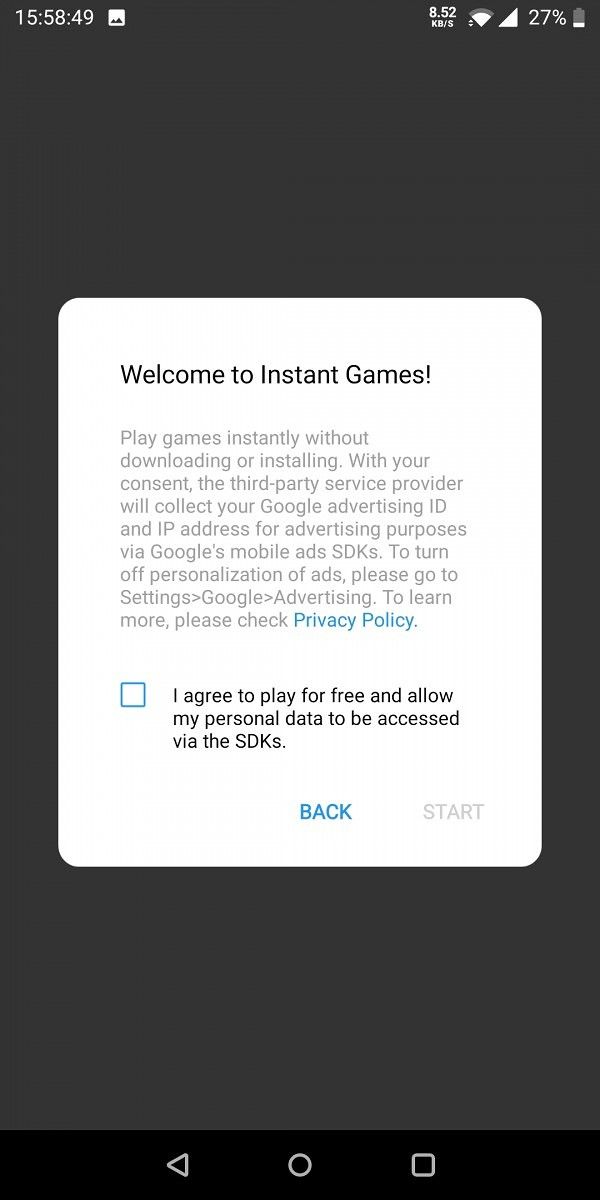
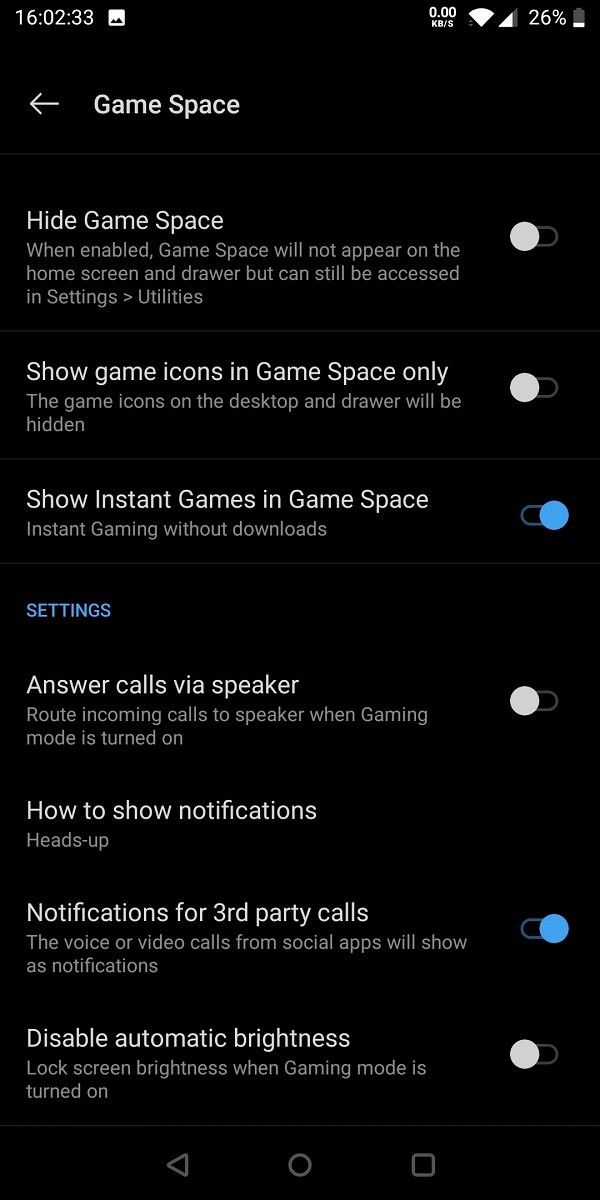
The Instant Games feature allows users to access Google Play Games’ library of Instant Games within OnePlus Game Space, including titles like Microtrip, Mazes & More, and Sea Battle. These games can be played by simply tapping on the game icon in the app and don’t require users to install the games on their device. In case you don’t wish to see Instant Games in the app, you also get the option to disable the feature from within the app settings.

Game Statistics Game Statistics Game Statistics Game Statistics

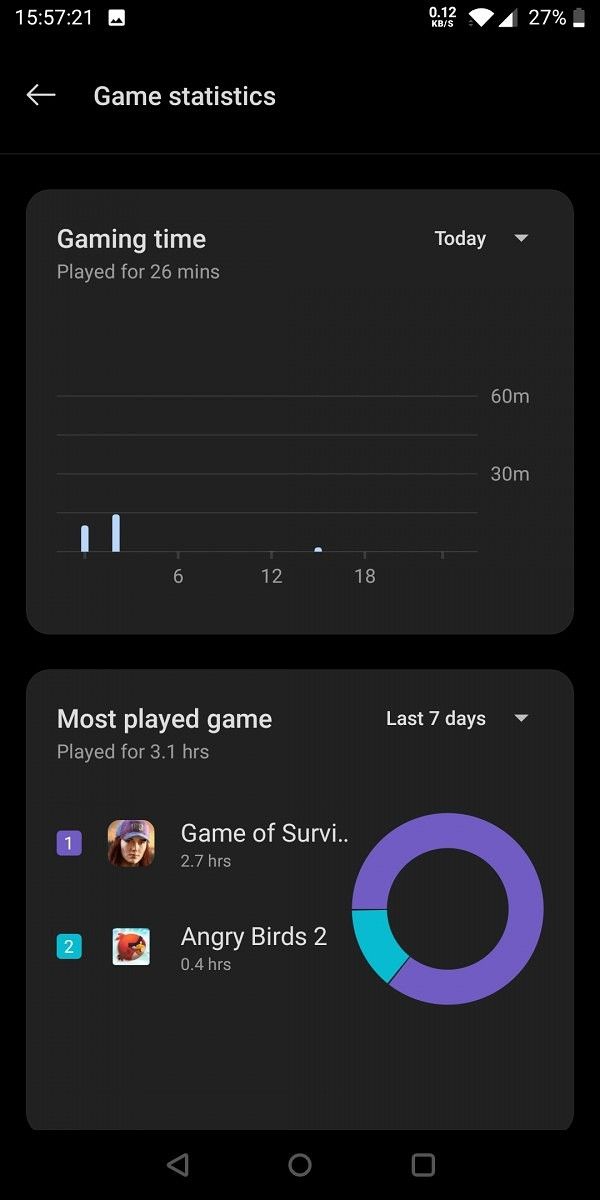
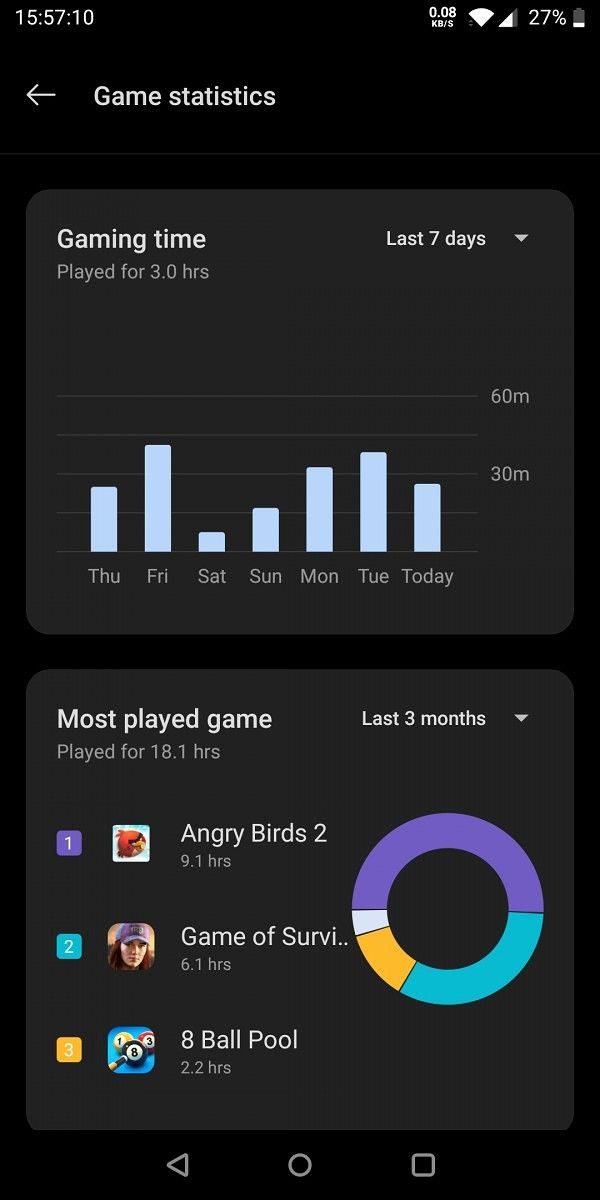
The new Game Statistics feature, as its name suggests, provides users with useful data about their gaming habits. This includes information like Gaming time, Most played game, and Battery usage for the current day and the past week. As you can see in the attached screenshots, the Game Statistics feature can be accessed by tapping on the new graph icon on the app.

OnePlus Game Space changelog

1. New Instant Games feature, Play games instantly without downloads.
2. New Game Statistics feature, view your gaming statistics in Game Space.
3. Optimized the games automatic recognition solution, now most of your installed games can be recognized by Game Space automatically!

If you wish to try out these feature on your OnePlus device, you can now install the latest OnePlus Game Space update by following the Play Store link below.

OnePlus Game Space (Free, Google Play) →


Thanks to XDA Senior Member Some_Random_Username for the screenshots!

The post OnePlus Game Space is now on Google Play and adds Game Statistics and Instant Games appeared first on xda-developers.


from xda-developers https://ift.tt/2To98ku
via IFTTT

OnePlus Game Space is now on Google Play and adds Game Statistics and Instant Games

In a bid to offer faster updates for its suite of stock OxygenOS apps, OnePlus has previously published several of its apps on the Google Play Store. These include the popular OnePlus Gallery app, OnePlus Launcher, its Weather app, and more. Adding on to the list, the company has now published the OnePlus Game Space app on the Play Store and has added a few new features in the latest release.

For the unaware, OnePlus Game Space is the company’s take on a game center for OxygenOS that lets users access all their installed games in one spot and provides a couple of gaming optimization features. The app comes preinstalled with OnePlus devices and offers features like notification controls, auto-brightness controls, a Fnatic mode for eSports, display enhancements, and more. With the latest update, OnePlus has added two new features to the app — Instant Games and Game Statistics.

OnePlus Game Space Instant Games OnePlus Game Space Instant Games OnePlus Game Space Instant Games OnePlus Game Space Instant Games

The Instant Games feature allows users to access Google Play Games’ library of Instant Games within OnePlus Game Space, including titles like Microtrip, Mazes & More, and Sea Battle. These games can be played by simply tapping on the game icon in the app and don’t require users to install the games on their device. In case you don’t wish to see Instant Games in the app, you also get the option to disable the feature from within the app settings.

Game Statistics Game Statistics Game Statistics Game Statistics

The new Game Statistics feature, as its name suggests, provides users with useful data about their gaming habits. This includes information like Gaming time, Most played game, and Battery usage for the current day and the past week. As you can see in the attached screenshots, the Game Statistics feature can be accessed by tapping on the new graph icon on the app.

OnePlus Game Space changelog

1. New Instant Games feature, Play games instantly without downloads.
2. New Game Statistics feature, view your gaming statistics in Game Space.
3. Optimized the games automatic recognition solution, now most of your installed games can be recognized by Game Space automatically!

If you wish to try out these feature on your OnePlus device, you can now install the latest OnePlus Game Space update by following the Play Store link below.

OnePlus Game Space (Free, Google Play) →


Thanks to XDA Senior Member Some_Random_Username for the screenshots!

The post OnePlus Game Space is now on Google Play and adds Game Statistics and Instant Games appeared first on xda-developers.


from xda-developers https://ift.tt/2To98ku
via IFTTT