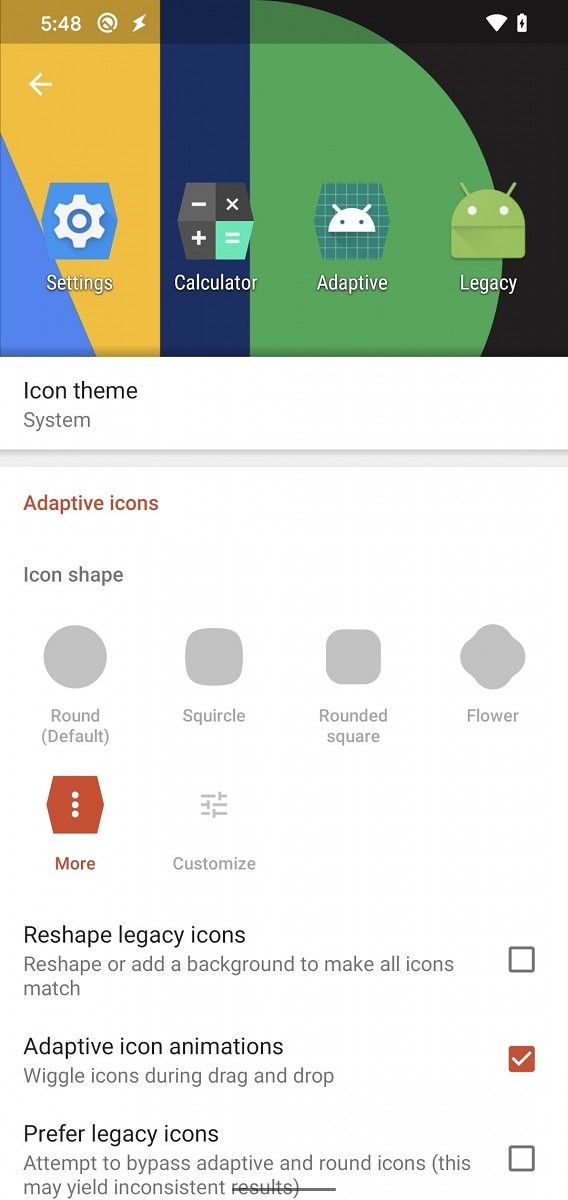
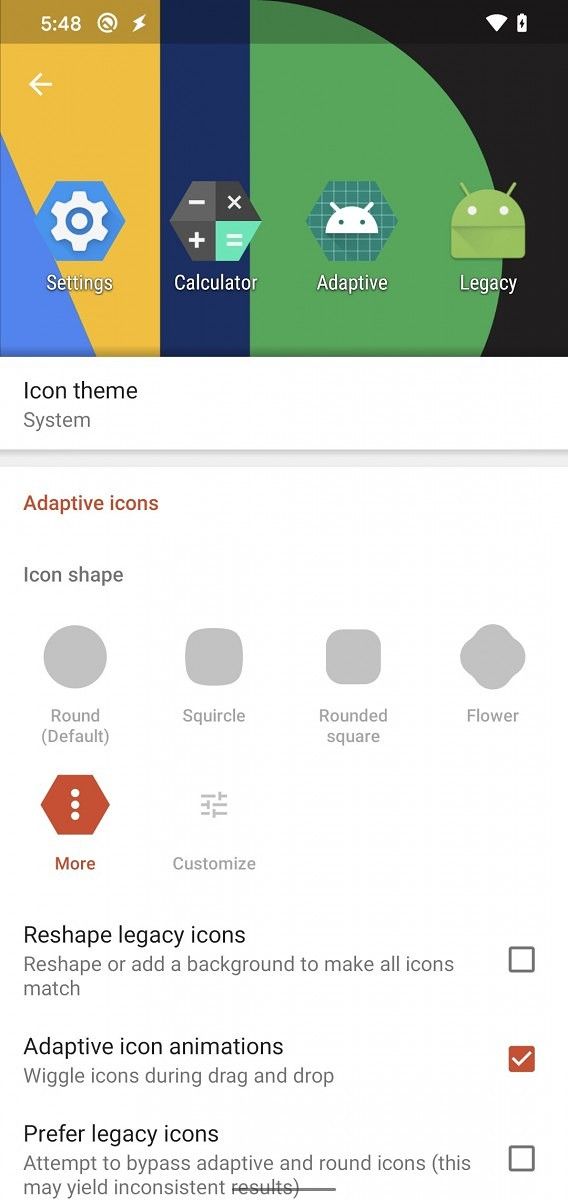
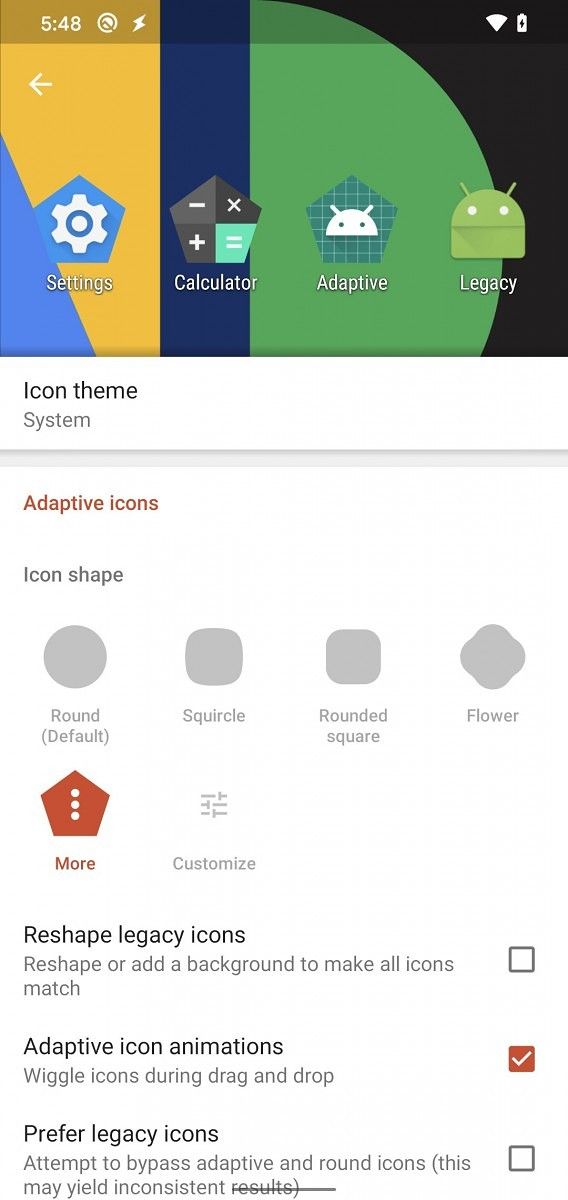
Google launched the first Android 11 Developer Preview earlier this year in February, which was followed by Preview 2, Preview 3, and recently, Preview 4. Even though the company did not highlight any developer features in the latest release, we discovered a couple of changes and new features when we tried it out on the Google Pixel 3a XL and Google Pixel 4. These included things like a new select button in the recent apps overview, resizable picture-in-picture windows, new icon shapes in Pixel Themes, and much more. While there’s still a long way to go before any of these features are officially available in a stable Android 11 release, you can now experience the new icon shapes with the latest beta release of Nova Launcher.
Nova Launcher v6.2.13 is now available for download and it brings the new adaptive Flower and Hexagon icon shapes that were introduced in the Android 11 Developer Preview 4. To try out these new adaptive icon shapes for yourself, you can download the latest beta release of Nova Launcher from the link below.
Once you have the update installed on your device, you’ll need to navigate to the Icon style option within the Look & Feel section in the Nova Launcher Settings. As you can see in the attached screenshot, Nova Launcher now offers a total of 12 icon shapes, including Round, Squircle, Rounded square, Flower, Square, Teardrop, Pentagon, Heptagon, Octagon, and three different Hexagons. Along with the new adaptive icon shapes, the update brings a couple of bug fixes and optimizations for the launcher. Here’s the complete changelog for Nova Launcher v6.2.13 beta:
Microsoft holds a conference event every year for software engineers and web developers. Called Build, or //build/, the event is a conference for developers that primarily work on Windows, Microsoft Azure, and other technologies. While Microsoft holds an event on the ground every year, as they have in the past years, but because of COVID-19, Build 2020 is an online-only announcement. On the occasion, Microsoft has announced a plethora of new features, such as Windows Terminal 1.0, Windows Package Manager, Windows Subsystem for Linux 2, all of which will be useful to a lot of developers in some form or the other.
Windows Terminal 1.0
During the last year’s Build 2019 developer conference, Microsoft had announced Windows Terminal. This is exactly what it sounds like — a new terminal app from Microsoft.
Some of the highlights of the app are the inclusion of GPU-accelerated text rendering, theming support, tabs, tear-away windows, shortcuts, full Unicode support, and more. The eventual goal of Windows Terminal is to be a good replacement to other command-line apps like PowerShell and Command Prompt.
Windows Terminal was released as a preview at Build 2019, and now, at Build 2020, the app has graduated into its full release in the form of Windows Terminal 1.0.
Windows Terminal 1.0 can be downloaded from the Microsoft Store or from GitHub. The app will be updated on a monthly basis starting from July 2020. But if you want to try out the latest features before they make their way to the stable branch, you can check out the preview channel on Microsoft Store and GitHub.
Multiple profiles supporting a variety of command-line applications
Customized color schemes and configurations
Custom key bindings
Unicode and UTF-8 character support
GPU accelerated text rendering
Background image support
Support for command-line arguments
Microsoft Windows Package Manager
If you are familiar with GNU/Linux distributions, you are very likely familiar with command-line package managers. To put it crudely, a package manager manages the process of installing, configuring, and uninstalling packages (or apps) on your computer. A command-line package manager does all of these tasks from the command line. Microsoft has never officially offered a command-line package manager, but that is now changing with the Windows Package Manager.
Windows has had a few popular third-party command-line package managers, like Chocolatey — but these are unofficial and not from Microsoft themselves. Unlike an app store like the Windows Store, a package manager supports installing apps from multiple sources, which makes it easy to set up different development environments with fewer friction points.
Windows Package Manager is now available in preview form. What’s even more exciting about this is the fact that it is open source.
Windows Package Manager offers the following features, when preceded with the winget command:
install – Installs the given application
show – Shows info about an application
source – Manage sources of applications
search – Find and show basic info of apps
hash – Helper to hash installer files
validate – Validates a manifest file
–help – Provides command line help
–info – Provides addition data, helpful for troubleshooting
–version – Provides the version of the client
To explain, if you use “winget install“, you’ll see all the command-line options to interface with Windows Package Manager. For example, if you type “winget install terminal” you’ll install the new Windows Terminal software. Windows Package Manager is pre-configured to point to the Microsoft community repository and you can search for available packages using “winget search” and display information using “winget show“. You’ll be able to add third-party repositories with “winget source” as well.
The command-line client is distributed within the App Installer package that is pre-installed on Windows. However, the client will not be made generally available during the Preview period, so you must either install a Windows 10 Insider build or sign up for the preview flight ring to receive automatic updates. Further, if you do not mind foregoing the automatic updates, you can also manually install it on any Windows 10 version since the Fall Creators Update (1709). When Windows Package Manager reaches version 1.0, it will be delivered with the Desktop App Installer.
Windows Subsystem for Linux 2 / WSL 2
At Build 2019, Microsoft had announced Windows Subsystem for Linux 2, which ships a full Linux kernel, allowing you to run Linux commands and apps. For instance, you can even go ahead and compile LineageOS using WSL on Windows.
Added support for graphics processing unit (GPU) compute workflows allows Linux tools to leverage GPUs to enable hardware acceleration for many development scenarios, such as parallel computation and training machine learning (ML) and artificial intelligence (AI) models.
Support for Linux graphical user interface (GUI) apps will enable you to open a WSL instance and run a Linux GUI app directly without the need for a third-party X server. This will help you to run your favorite apps in a Linux environment such as an integrated development environment (IDE).
WSL will soon support a simplified install experience by running the command ‘wsl.exe – install,’ which will make it easier than ever to start using Linux apps on Windows.
With these upcoming changes to WSL 2, users no longer need to run an X server to use Linux apps with GUIs. Linux apps will also now run much more seamlessly on Windows. As Mishaal points out, this might just be the tipping point for the “year of the Linux desktop” meme to finally come true, and it’s ironic that it is Microsoft that is bringing this around.
What are your thoughts on the features announced at Microsoft Build 2020? Let us know in the comments below!
Microsoft holds a conference event every year for software engineers and web developers. Called Build, or //build/, the event is a conference for developers that primarily work on Windows, Microsoft Azure, and other technologies. While Microsoft holds an event on the ground every year, as they have in the past years, but because of COVID-19, Build 2020 is an online-only announcement. On the occasion, Microsoft has announced a plethora of new features, such as Windows Terminal 1.0, Windows Package Manager, Windows Subsystem for Linux 2, all of which will be useful to a lot of developers in some form or the other.
Windows Terminal 1.0
During the last year’s Build 2019 developer conference, Microsoft had announced Windows Terminal. This is exactly what it sounds like — a new terminal app from Microsoft.
Some of the highlights of the app are the inclusion of GPU-accelerated text rendering, theming support, tabs, tear-away windows, shortcuts, full Unicode support, and more. The eventual goal of Windows Terminal is to be a good replacement to other command-line apps like PowerShell and Command Prompt.
Windows Terminal was released as a preview at Build 2019, and now, at Build 2020, the app has graduated into its full release in the form of Windows Terminal 1.0.
Windows Terminal 1.0 can be downloaded from the Microsoft Store or from GitHub. The app will be updated on a monthly basis starting from July 2020. But if you want to try out the latest features before they make their way to the stable branch, you can check out the preview channel on Microsoft Store and GitHub.
Multiple profiles supporting a variety of command-line applications
Customized color schemes and configurations
Custom key bindings
Unicode and UTF-8 character support
GPU accelerated text rendering
Background image support
Support for command-line arguments
Microsoft Windows Package Manager
If you are familiar with GNU/Linux distributions, you are very likely familiar with command-line package managers. To put it crudely, a package manager manages the process of installing, configuring, and uninstalling packages (or apps) on your computer. A command-line package manager does all of these tasks from the command line. Microsoft has never officially offered a command-line package manager, but that is now changing with the Windows Package Manager.
Windows has had a few popular third-party command-line package managers, like Chocolatey — but these are unofficial and not from Microsoft themselves. Unlike an app store like the Windows Store, a package manager supports installing apps from multiple sources, which makes it easy to set up different development environments with fewer friction points.
Windows Package Manager is now available in preview form. What’s even more exciting about this is the fact that it is open source.
Windows Package Manager offers the following features, when preceded with the winget command:
install – Installs the given application
show – Shows info about an application
source – Manage sources of applications
search – Find and show basic info of apps
hash – Helper to hash installer files
validate – Validates a manifest file
–help – Provides command line help
–info – Provides addition data, helpful for troubleshooting
–version – Provides the version of the client
To explain, if you use “winget install“, you’ll see all the command-line options to interface with Windows Package Manager. For example, if you type “winget install terminal” you’ll install the new Windows Terminal software. Windows Package Manager is pre-configured to point to the Microsoft community repository and you can search for available packages using “winget search” and display information using “winget show“. You’ll be able to add third-party repositories with “winget source” as well.
The command-line client is distributed within the App Installer package that is pre-installed on Windows. However, the client will not be made generally available during the Preview period, so you must either install a Windows 10 Insider build or sign up for the preview flight ring to receive automatic updates. Further, if you do not mind foregoing the automatic updates, you can also manually install it on any Windows 10 version since the Fall Creators Update (1709). When Windows Package Manager reaches version 1.0, it will be delivered with the Desktop App Installer.
Windows Subsystem for Linux 2 / WSL 2
At Build 2019, Microsoft had announced Windows Subsystem for Linux 2, which ships a full Linux kernel, allowing you to run Linux commands and apps. For instance, you can even go ahead and compile LineageOS using WSL on Windows.
Added support for graphics processing unit (GPU) compute workflows allows Linux tools to leverage GPUs to enable hardware acceleration for many development scenarios, such as parallel computation and training machine learning (ML) and artificial intelligence (AI) models.
Support for Linux graphical user interface (GUI) apps will enable you to open a WSL instance and run a Linux GUI app directly without the need for a third-party X server. This will help you to run your favorite apps in a Linux environment such as an integrated development environment (IDE).
WSL will soon support a simplified install experience by running the command ‘wsl.exe – install,’ which will make it easier than ever to start using Linux apps on Windows.
With these upcoming changes to WSL 2, users no longer need to run an X server to use Linux apps with GUIs. Linux apps will also now run much more seamlessly on Windows. As Mishaal points out, this might just be the tipping point for the “year of the Linux desktop” meme to finally come true, and it’s ironic that it is Microsoft that is bringing this around.
What are your thoughts on the features announced at Microsoft Build 2020? Let us know in the comments below!
Nokia Chief Product Officer, Juho Sarvikas, announced in a tweet that the company is finally rolling out the much-awaited Android 10 update to the Nokia 5.1 Plus.
The update carries version number V3.11A and, along with the usual jump to Android 10, also packs the April 2020 security patches. Nokia says the OTAs will be rolled out in a phased manner. The first 10% of the userbase will receive the update starting today, with the rollout steadily expanding to more users in the following days.
As for what’s new, the update brings along all the standard Android 10 features such as system-wide-dark mode, a new gesture navigation system, Smart Reply, revamped location and privacy controls, new Digital Wellbeing tools with Parental controls and much more.
Launched in August of 2018, the Nokia 5.1 Plus is an entry-level smartphone from HMD Global. The phone is part of Google’s Android One program and as such, it was promised to get two major Android updates and three years of monthly security updates. It packed a 5.86-inch IPS HD+ display, MediaTek Helio P60 octa-core SoC, 3GB RAM, and 32GB storage, 13MP+5MP dual cameras, and a 3,060 mAh battery. The phone came running Android 8.1 Oreo out-of-the-box and was eventually updated to Android 9 Pie in December 2018. Android 10 will probably the last Android platform update for the Nokia 5.1 Plus. However, it should continue to receive the monthly security patches for one more year.
Nokia Chief Product Officer, Juho Sarvikas, announced in a tweet that the company is finally rolling out the much-awaited Android 10 update to the Nokia 5.1 Plus.
The update carries version number V3.11A and, along with the usual jump to Android 10, also packs the April 2020 security patches. Nokia says the OTAs will be rolled out in a phased manner. The first 10% of the userbase will receive the update starting today, with the rollout steadily expanding to more users in the following days.
As for what’s new, the update brings along all the standard Android 10 features such as system-wide-dark mode, a new gesture navigation system, Smart Reply, revamped location and privacy controls, new Digital Wellbeing tools with Parental controls and much more.
Launched in August of 2018, the Nokia 5.1 Plus is an entry-level smartphone from HMD Global. The phone is part of Google’s Android One program and as such, it was promised to get two major Android updates and three years of monthly security updates. It packed a 5.86-inch IPS HD+ display, MediaTek Helio P60 octa-core SoC, 3GB RAM, and 32GB storage, 13MP+5MP dual cameras, and a 3,060 mAh battery. The phone came running Android 8.1 Oreo out-of-the-box and was eventually updated to Android 9 Pie in December 2018. Android 10 will probably the last Android platform update for the Nokia 5.1 Plus. However, it should continue to receive the monthly security patches for one more year.
Remember the Vivo APEX 2020? It’s Vivo’s 2020 concept phone, succeeding the original Vivo APEX and the APEX 2019. The APEX 2020 was supposed to be shown off during MWC 2020, but because of the cancellation of the event, it was doomed to be a footnote in history despite its impressive list of specifications. One of its interesting features was that it had gimbal-like stabilization on a 48MP primary camera. It was said to be 200% more effective than typical OIS, thus enabling longer low light image exposures and smoother video. The APEX 2020, being a concept phone, was not designed to be released publicly for the mass market. But the gimbal-style stabilization was likely going to end up on a commercial phone. For the last few days, Vivo has been teasing the launch of its new upper mid-range cum flagship phone, the Vivo X50 Pro. Not much is known about its specifications yet, but it is indicated that it slots in above the Vivo X30 series and below the Vivo NEX 3S in the company’s phone portfolio. A new set of official video teasers has shown off the camera module.
The camera module of the X50 Pro includes a periscope telephoto camera (like the Galaxy S20 Ultra, Huawei P40 Pro, and the OPPO Find X2 Pro), two normal-looking camera lenses (most likely an ultra-wide-angle camera and a normal telephoto or portrait lens), and a much larger module that is the primary camera. The lens actually rotates as the module is manipulated by a robotic gimbal. The key benefit here is image stabilization. Another video teaser shows off the camera’s low-light image-taking ability — the camera can supposedly take extremely bright and detailed photos in low light.
The APEX 2020 had a unique periscope zoom system with moving lens elements that enabled real 5x-7.5x optical zoom. On the other hand, phones with periscope telephoto cameras such as the Galaxy S20 Ultra have fixed focal lengths and use interpolation to handle digital or hybrid zoom levels such as 2x-3x and above. For now, we don’t know if the X50 Pro’s periscope camera is of the moving lens variety, but it’s highly unlikely. The camera module states 16-135mm below the lenses. This probably means it has a 16mm ultra-wide-angle camera and a 135mm periscope telephoto camera, which would enable 5x optical zoom relative to the primary camera. Thus, it is unlikely to have a moving lens system because of its nature as a commercial device.
Vivo has also posted about Samsung’s newly 50MP ISOCELL GN1 sensor on Weibo, proclaiming it as the optimal solution in smartphone photography. It has a big 1/1.3″ optical format and 1.2μm pixels — the sensor size is actually bigger than the Galaxy S20 Ultra’s 108MP sensor. The large physical size of the GN1 in combination with Vivo’s gimbal-style stabilization tech is the probable reason for the unusually big primary camera module.
Reliable-looking sketches of the X50 series have also appeared on Slashleaks. They show that the phone will have 5G connectivity and will have a total of four cameras. The design will be squared-off with sharp right angles instead of rounded curves. The enormous size of that primary camera is noteworthy enough to repeat.
Right now, not much is known about the rest of the specifications of the Vivo X50 Pro. The X30 featured the Exynos 980 SoC, so it’s possible (but unlikely) that the X50 Pro will be powered by the flagship Exynos 990 SoC. Or it could be powered by the Snapdragon 865, we don’t know for sure. As it’s an X-series phone, it’s likely to be a China-only release, which means we won’t see it in international markets as there has been no indication of a global release. That is a bit of a downer, considering that the gimbal-style stabilization technology is the first true innovation in image stabilization we have seen in several years since the inception of OIS on smartphones. The Vivo X50 Pro will be announced in China on June 1.
Remember the Vivo APEX 2020? It’s Vivo’s 2020 concept phone, succeeding the original Vivo APEX and the APEX 2019. The APEX 2020 was supposed to be shown off during MWC 2020, but because of the cancellation of the event, it was doomed to be a footnote in history despite its impressive list of specifications. One of its interesting features was that it had gimbal-like stabilization on a 48MP primary camera. It was said to be 200% more effective than typical OIS, thus enabling longer low light image exposures and smoother video. The APEX 2020, being a concept phone, was not designed to be released publicly for the mass market. But the gimbal-style stabilization was likely going to end up on a commercial phone. For the last few days, Vivo has been teasing the launch of its new upper mid-range cum flagship phone, the Vivo X50 Pro. Not much is known about its specifications yet, but it is indicated that it slots in above the Vivo X30 series and below the Vivo NEX 3S in the company’s phone portfolio. A new set of official video teasers has shown off the camera module.
The camera module of the X50 Pro includes a periscope telephoto camera (like the Galaxy S20 Ultra, Huawei P40 Pro, and the OPPO Find X2 Pro), two normal-looking camera lenses (most likely an ultra-wide-angle camera and a normal telephoto or portrait lens), and a much larger module that is the primary camera. The lens actually rotates as the module is manipulated by a robotic gimbal. The key benefit here is image stabilization. Another video teaser shows off the camera’s low-light image-taking ability — the camera can supposedly take extremely bright and detailed photos in low light.
The APEX 2020 had a unique periscope zoom system with moving lens elements that enabled real 5x-7.5x optical zoom. On the other hand, phones with periscope telephoto cameras such as the Galaxy S20 Ultra have fixed focal lengths and use interpolation to handle digital or hybrid zoom levels such as 2x-3x and above. For now, we don’t know if the X50 Pro’s periscope camera is of the moving lens variety, but it’s highly unlikely. The camera module states 16-135mm below the lenses. This probably means it has a 16mm ultra-wide-angle camera and a 135mm periscope telephoto camera, which would enable 5x optical zoom relative to the primary camera. Thus, it is unlikely to have a moving lens system because of its nature as a commercial device.
Vivo has also posted about Samsung’s newly 50MP ISOCELL GN1 sensor on Weibo, proclaiming it as the optimal solution in smartphone photography. It has a big 1/1.3″ optical format and 1.2μm pixels — the sensor size is actually bigger than the Galaxy S20 Ultra’s 108MP sensor. The large physical size of the GN1 in combination with Vivo’s gimbal-style stabilization tech is the probable reason for the unusually big primary camera module.
Reliable-looking sketches of the X50 series have also appeared on Slashleaks. They show that the phone will have 5G connectivity and will have a total of four cameras. The design will be squared-off with sharp right angles instead of rounded curves. The enormous size of that primary camera is noteworthy enough to repeat.
Right now, not much is known about the rest of the specifications of the Vivo X50 Pro. The X30 featured the Exynos 980 SoC, so it’s possible (but unlikely) that the X50 Pro will be powered by the flagship Exynos 990 SoC. Or it could be powered by the Snapdragon 865, we don’t know for sure. As it’s an X-series phone, it’s likely to be a China-only release, which means we won’t see it in international markets as there has been no indication of a global release. That is a bit of a downer, considering that the gimbal-style stabilization technology is the first true innovation in image stabilization we have seen in several years since the inception of OIS on smartphones. The Vivo X50 Pro will be announced in China on June 1.