LightBlog

mercredi 20 mai 2020

Honor X10 mid-range smartphone launches with the Kirin 820 and 90Hz display

Earlier this month, we learned that Huawei’s sub-brand Honor was prepping up to launch a new 5G capable smartphone called the Honor X10. At the time, the company had revealed that the device would be powered by Huawei’s HiSilicon Kirin 820 chip and feature a 90Hz display with a 180Hz touch response rate. The company has now finally unveiled the Honor X10 in China, revealing more about its specifications and pricing.

Honor X10 5G Specifications

Specification Honor X10 5G
Dimensions and Weight
  • 163.7 x 76.5 x 8.8 mm
  • 203g
Display
  • 6.63″ FHD+ (2400 x 1080) IPS
  • FullView Display
  • 90Hz refresh rate, 180Hz touch sampling rate
SoC
  • HiSilicon Kirin 820 5G
    • 1x ARM Cortex-A76 @2.36GHz
    • 3x ARM Cortex-A76 @2.22GHz
    • 4x ARM Cortex-A55 @1.84GHz
  • Mali-G57 MC6 GPU
RAM and Storage
  • 6GB LPDDR4x + 64GB
  • 6GB + 128GB
  • 8GB + 128GB

Storage expandable up to 256GB using Huawei’s NM card

Battery & Charging
  • 4,300 mAh battery
  • 22.5W Super FlashCharge fast charging
Rear Camera Photo:
  • Primary: 40MP, f/1.8, RYYB filter
  • Secondary: 8MP, f/2.4, wide-angle
  • Tertiary: 2MP, f/2.4, macro camera
Front Camera
  • 16MP, f/2.2
Other Features
  • 3.5mm headphone jack
  • Bluetooth 5.1
  • Side-mounted Fingerprint Scanner
Android Version MagicUI 3.1.1 based on Android 10

As mentioned earlier, the Honor X10 5G is powered by Huawei’s mid-range HiSilicon Kirin 820 5G octa-core SoC, coupled with up to 8GB of RAM and 128GB of onboard storage. The device has a 90Hz high refresh rate 6.63-inch FHD+ IPS LCD FullView display, with a resolution of 1080×2400 pixels and a 92% screen-to-body ratio. The device features no notch or hole-punch cutout on the display for the selfie camera and opts for a pop-up camera mechanism instead.

In terms of design, the Honor X10 looks a lot like the Honor 30 series which was launched earlier this year and features a similar rectangular camera module on the back.

The camera module houses a triple camera setup, with a 40MP primary camera, an 8MP wide-angle camera, and a 2MP macro camera. The 40MP primary camera on the device packs in an RYYB filter for better low-light photography. Over on the front, the device has a single 16MP selfie shooter.

Honor X10

Rounding off the hardware specifications is a 4,300mAh battery which comes with support for 22.5W fast charging. In terms of software, the Honor X10 runs MagicUI 3.1.1 based on Android 10.

Pricing and Availability

The Honor X10 will be available in three different variants priced as following:

  • 6GB + 64GB – CNY1,899 (~$267)
  • 6GB + 128GB – CNY 2,199 (~$309)
  • 8GB + 128GB – CNY 2,399 (~$337)

The device is already up for pre-booking on all major eCommerce platforms in China and prospective buyers will be able to pre-book a device until May 25th. The device will be available for purchase across all major online channels in the region starting from May 26th. Buyers will be able to pick from four different color variants — Probing Black, Racing Blue, Orange, and Lightspeed Silver.

The post Honor X10 mid-range smartphone launches with the Kirin 820 and 90Hz display appeared first on xda-developers.


from xda-developers https://ift.tt/3e7i99H
via IFTTT

Honor X10 mid-range smartphone launches with the Kirin 820 and 90Hz display

Earlier this month, we learned that Huawei’s sub-brand Honor was prepping up to launch a new 5G capable smartphone called the Honor X10. At the time, the company had revealed that the device would be powered by Huawei’s HiSilicon Kirin 820 chip and feature a 90Hz display with a 180Hz touch response rate. The company has now finally unveiled the Honor X10 in China, revealing more about its specifications and pricing.

Honor X10 5G Specifications

Specification Honor X10 5G
Dimensions and Weight
  • 163.7 x 76.5 x 8.8 mm
  • 203g
Display
  • 6.63″ FHD+ (2400 x 1080) IPS
  • FullView Display
  • 90Hz refresh rate, 180Hz touch sampling rate
SoC
  • HiSilicon Kirin 820 5G
    • 1x ARM Cortex-A76 @2.36GHz
    • 3x ARM Cortex-A76 @2.22GHz
    • 4x ARM Cortex-A55 @1.84GHz
  • Mali-G57 MC6 GPU
RAM and Storage
  • 6GB LPDDR4x + 64GB
  • 6GB + 128GB
  • 8GB + 128GB

Storage expandable up to 256GB using Huawei’s NM card

Battery & Charging
  • 4,300 mAh battery
  • 22.5W Super FlashCharge fast charging
Rear Camera Photo:
  • Primary: 40MP, f/1.8, RYYB filter
  • Secondary: 8MP, f/2.4, wide-angle
  • Tertiary: 2MP, f/2.4, macro camera
Front Camera
  • 16MP, f/2.2
Other Features
  • 3.5mm headphone jack
  • Bluetooth 5.1
  • Side-mounted Fingerprint Scanner
Android Version MagicUI 3.1.1 based on Android 10

As mentioned earlier, the Honor X10 5G is powered by Huawei’s mid-range HiSilicon Kirin 820 5G octa-core SoC, coupled with up to 8GB of RAM and 128GB of onboard storage. The device has a 90Hz high refresh rate 6.63-inch FHD+ IPS LCD FullView display, with a resolution of 1080×2400 pixels and a 92% screen-to-body ratio. The device features no notch or hole-punch cutout on the display for the selfie camera and opts for a pop-up camera mechanism instead.

In terms of design, the Honor X10 looks a lot like the Honor 30 series which was launched earlier this year and features a similar rectangular camera module on the back.

The camera module houses a triple camera setup, with a 40MP primary camera, an 8MP wide-angle camera, and a 2MP macro camera. The 40MP primary camera on the device packs in an RYYB filter for better low-light photography. Over on the front, the device has a single 16MP selfie shooter.

Honor X10

Rounding off the hardware specifications is a 4,300mAh battery which comes with support for 22.5W fast charging. In terms of software, the Honor X10 runs MagicUI 3.1.1 based on Android 10.

Pricing and Availability

The Honor X10 will be available in three different variants priced as following:

  • 6GB + 64GB – CNY1,899 (~$267)
  • 6GB + 128GB – CNY 2,199 (~$309)
  • 8GB + 128GB – CNY 2,399 (~$337)

The device is already up for pre-booking on all major eCommerce platforms in China and prospective buyers will be able to pre-book a device until May 25th. The device will be available for purchase across all major online channels in the region starting from May 26th. Buyers will be able to pick from four different color variants — Probing Black, Racing Blue, Orange, and Lightspeed Silver.

The post Honor X10 mid-range smartphone launches with the Kirin 820 and 90Hz display appeared first on xda-developers.


from xda-developers https://ift.tt/3e7i99H
via IFTTT

Honor Magic Earbuds Review – Distinctly Average Bluetooth Wireless Earbuds

The Honor Magic Earbuds were unveiled by Honor back at (the unofficially dubbed) “not MWC” at the end of February. They’re the western version of the Honor FlyPods 3 that the company announced in November alongside the Honor V30 series, though they only went on sale in China in March. A couple of weeks ago, Honor did launch the Honor Magic Earbuds in the West through the company’s own HiHonor stores in Europe. The earbuds will also go on sale in the UK on May 21st for £99. We got our hands on a pair of Robin Egg Blue earphones to test out, and I must say, I’m somewhat underwhelmed. They’re truly wireless, meaning just like AirPods, they sit inside your ears without even a neckband. AirPods they are not, though.

Design

The Honor Magic Earbuds come in a small blue carrying and charging case. The charging case can also be charged up using a USB-C cable, and it’s small enough that it’s something that you’ll just take and toss into your pocket when you’re not using them. This charging case also has a button on the back that you use to sync the earphones to your device. To do so, you leave the earphones inside the case and then open the lid and press and hold the pair button on the back for 3 seconds. This button is a little bit finicky to press as it’s high up enough on the back that you’ll start pushing the lid too.

The sync button (on the left of the charging port) can be a little bit finicky to press and hold.

Once they’re in pairing mode (which will be obvious from the white blinking light), you can just connect your phone as normal and then take the earbuds out. My set didn’t come with an instruction manual, and as a result, this took me a couple of minutes to figure out by myself. It’s admittedly not the most intuitive, but it shouldn’t be a problem if you actually have an instruction manual or have experience with the Huawei FreeBuds. I switch devices quite often, and I find the pairing process is pretty painless. Take out the earphones, put them in the case, hold the button, connect the new device. It’s simple and it works.

The white light indicates that they are in pairing mode.

The earphones themselves are small, and the standard-sized tips that came with them fit my ears perfectly. Mine are very bright blue and stand out in contrast with my red hair. I would’ve preferred the white pair if I’m honest, but the Robin Egg Blue earphones have their own identity and look like more than just AirPod clones.

The Honor Magic Earbuds sit comfortably in the ear, though the Robin Egg Blue ones are quite bright. Also, I need a haircut.

However, one thing I quickly realized as well was the lack of Qualcomm aptX HD support. I actually had to manually enable a “high-quality audio” setting on nearly all of the devices that I tested these on, except for on the Honor 20 Pro. On investigation of the logcat, the Honor 20 Pro would enable AAC (high-quality mode) automatically on connecting, whilst on other devices, it needed to be enabled manually. Keep in mind if you’re picking these up to use with a non-Honor or Huawei device that you may need to manually enable AAC, as it can be painfully obvious when it’s disabled.

Honor Magic Earbuds Audio Quality

The Honor Magic Earbuds promise high-quality audio, but I found them to be ultimately rather lackluster. I’m not expecting the world’s best audio quality for truly wireless earbuds that “only” cost 99 Euros, but I was still rather disappointed by the audio quality nonetheless.

Here’s the deal – for truly wireless, active noise canceling earphones at this price point, some things just had to give. It’s just a shame that the audio quality was one of them. There’s a weird audio trick done to achieve “powerful bass” (as the box puts it), where the low-end of the audio spectrum is boosted in volume above higher frequencies. This gives the illusion of powerful bass whilst simultaneously actually making it sound somewhat muddied and weird, technically overpowering the higher frequencies while not actually providing the powerful hardware to capitalize on it and sound good. I have a background in music production and prefer clean, flat audio anyway which may result in some bias against a boost on the low-end, but I still can’t help but feel disappointed. I tested this listening to ILLENIUM’s “God Damnit”, and on each hit of the kick, the bass sounds like it overpowers pretty much everything else going on in the mix. Those who like bass-heavy audio may enjoy it, but I definitely don’t.

That’s not to say the audio quality is necessarily bad – it’s just not my cup of tea. I use a pair of Sennheiser Momentum 2.0 headphones with my computer pretty much all day, and on my phone, I use the much more expensive OPPO Enco Q1 wireless earphones. Just like the OPPO earphones though, the Honor Magic Earbuds also have Active Noise Cancelling. To Honor’s credit, it’s really, really good.

When it comes to calls, the Honor Magic Earbuds are perfect in their audio quality. There are no real complaints here, and the aforementioned active noise canceling is insanely useful in a phone call. While I’ve not gotten to test them in any busy spaces such as a train due to the ongoing lockdown in Ireland, the ANC does a great job at filtering the more basic noises around me. I imagine these earphones will be perfect on trains and airplanes – if the battery can handle it, that is. (We’ll be covering the battery life in the next section.) The audio volume gets pretty loud, and the ANC will filter out sounds around you anyway so you can play your music at lower volumes. One thing I noticed on calls, in particular, is that the audio randomly jumps between the right and left channels every so often.

The microphone’s audio quality is very good too, which impressed me. It’s located in the right earpiece at the bottom and picks up on my voice really well. Some noises are picked up that are just as loud as a voice though, so be careful about your surroundings. For example, it picked up on my keyboard at the same volume as my voice when on a call but didn’t pick up things such as doors closing at the same volume. I believe this is because it’s singling out frequencies most likely to include human voices and boosting those above others, which would be why on a call, the sound of my keyboard was extremely obnoxious to the person on the other end of the call.

Honor Magic Earbuds Battery Life

The Honor Magic Earbuds made a second compromise, and that’s in their battery life. While it’s advertised that they can reach up to 2.5 hours of call time when in use, I believe that’s with ANC disabled. With ANC on, I only managed 1 hour and 45 minutes on a call before they died. For general listening, they’re a lot better, but I still found that the battery life was pretty short. I can’t test them on a daily commute yet again due to the lockdown, but they will definitely last me the 2-hour journey before I need to toss them into the charging case. The charging case will charge them from 0% to 100% in about an hour, while the charging case itself will charge to 100% in about 1 and a half hours.

When listening to music, the earphones last up to 3 and a half hours with ANC off, and 3 hours with it on. With ANC on, you’ll get about 2 hours of call time, and with ANC off, you’ll get about 2 and a half hours. I got 1 hour 45 minutes thereabouts on a call with ANC on, so it’s not too far off. It’s pretty poor battery life overall, though. The charging case doesn’t fast charge the earphones, either, which is disappointing, though it’s good for about 10 hours of additional playtime. These are not all day earbuds, so you’ll need to charge them pretty frequently. The ideal use case for these earbuds is that you won’t be running them down to 0%  all the time, and instead, you’ll be periodically charging them in the case throughout the day when they’re not in use.

Honor Magic Earbuds Controls

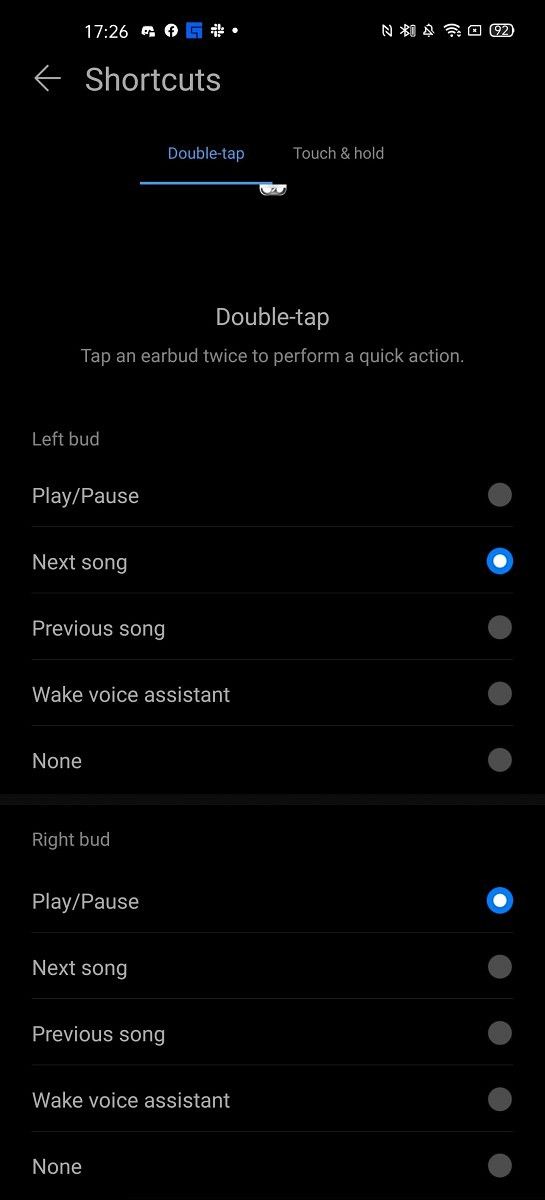
The Honor Magic Earbuds have a number of different controls, which can be activated by double-tapping or touching and holding the side. I set up the left earbud’s double-tap gesture to skip tracks, while the right earbud’s double-tap gesture will pause and play music. Being able to pause and play music by double-tapping is especially important, as these earbuds will pause the music whenever they detect that one of them has left your ears.

Often I will pull out an earbud just to hear my surroundings, which would be fine if the music played automatically when I put it back in. Honor says that this does happen when a device is running EMUI, but I don’t understand why that basic functionality can’t exist on other devices. They can already control the pause and play status of music on your smartphone, so to send a request to continue playing music when you put the earbud back in your ear should be trivial. I would also appreciate being able to switch this feature off entirely, as sometimes I listen to music with just one earbud in. I’ve taken to tossing the second one in my pocket, where it will randomly detect that it’s been placed in an ear and removed, so as a result, the music stops.

Another frustration is that the only way to disable ANC is by touching and holding the side – this can’t be made a double-tap gesture. I have found if I’m lying down on my side, I often will touch and hold the side of the earbud that I’m laying on – completely accidentally. You can turn off this control, but then you can’t turn on and off ANC.

In short, the controls are accurate and they do work, but there are a number of flaws that I’m surprised even exist.

AI Life App

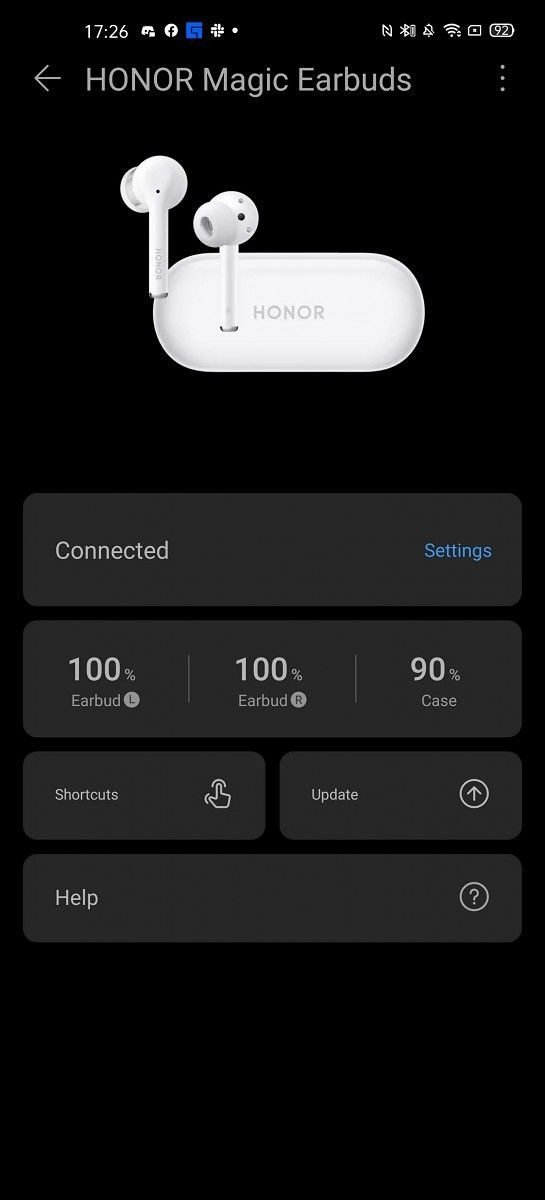
The AI Life app is the app you’ll need to grab from the Google Play Store to configure and control your earbuds. This isn’t a necessity, but it’s worth downloading anyway. The three screenshots below pretty much encapsulate all of the features included.

HUAWEI AI Life (Free, Google Play) →

Conclusion

The Honor Magic Earbuds are comfortable in the ear, produce average sound quality, and offer decent active noise canceling capabilities for the price. However, their battery life and lack of options in controls may entice you to look elsewhere. As a set of truly wireless earbuds, they certainly do the job and may be worth picking up. They’re not bad, but I would encourage those considering picking them up to weigh other options too.

Buy the Honor Magic Earbuds: HiHonor France |||  HiHonor Netherlands |||  HiHonor Germany  |||  HiHonor Italy

The post Honor Magic Earbuds Review – Distinctly Average Bluetooth Wireless Earbuds appeared first on xda-developers.


from xda-developers https://ift.tt/2To8l38
via IFTTT

Honor Magic Earbuds Review – Distinctly Average Bluetooth Wireless Earbuds

The Honor Magic Earbuds were unveiled by Honor back at (the unofficially dubbed) “not MWC” at the end of February. They’re the western version of the Honor FlyPods 3 that the company announced in November alongside the Honor V30 series, though they only went on sale in China in March. A couple of weeks ago, Honor did launch the Honor Magic Earbuds in the West through the company’s own HiHonor stores in Europe. The earbuds will also go on sale in the UK on May 21st for £99. We got our hands on a pair of Robin Egg Blue earphones to test out, and I must say, I’m somewhat underwhelmed. They’re truly wireless, meaning just like AirPods, they sit inside your ears without even a neckband. AirPods they are not, though.

Design

The Honor Magic Earbuds come in a small blue carrying and charging case. The charging case can also be charged up using a USB-C cable, and it’s small enough that it’s something that you’ll just take and toss into your pocket when you’re not using them. This charging case also has a button on the back that you use to sync the earphones to your device. To do so, you leave the earphones inside the case and then open the lid and press and hold the pair button on the back for 3 seconds. This button is a little bit finicky to press as it’s high up enough on the back that you’ll start pushing the lid too.

The sync button (on the left of the charging port) can be a little bit finicky to press and hold.

Once they’re in pairing mode (which will be obvious from the white blinking light), you can just connect your phone as normal and then take the earbuds out. My set didn’t come with an instruction manual, and as a result, this took me a couple of minutes to figure out by myself. It’s admittedly not the most intuitive, but it shouldn’t be a problem if you actually have an instruction manual or have experience with the Huawei FreeBuds. I switch devices quite often, and I find the pairing process is pretty painless. Take out the earphones, put them in the case, hold the button, connect the new device. It’s simple and it works.

The white light indicates that they are in pairing mode.

The earphones themselves are small, and the standard-sized tips that came with them fit my ears perfectly. Mine are very bright blue and stand out in contrast with my red hair. I would’ve preferred the white pair if I’m honest, but the Robin Egg Blue earphones have their own identity and look like more than just AirPod clones.

The Honor Magic Earbuds sit comfortably in the ear, though the Robin Egg Blue ones are quite bright. Also, I need a haircut.

However, one thing I quickly realized as well was the lack of Qualcomm aptX HD support. I actually had to manually enable a “high-quality audio” setting on nearly all of the devices that I tested these on, except for on the Honor 20 Pro. On investigation of the logcat, the Honor 20 Pro would enable AAC (high-quality mode) automatically on connecting, whilst on other devices, it needed to be enabled manually. Keep in mind if you’re picking these up to use with a non-Honor or Huawei device that you may need to manually enable AAC, as it can be painfully obvious when it’s disabled.

Honor Magic Earbuds Audio Quality

The Honor Magic Earbuds promise high-quality audio, but I found them to be ultimately rather lackluster. I’m not expecting the world’s best audio quality for truly wireless earbuds that “only” cost 99 Euros, but I was still rather disappointed by the audio quality nonetheless.

Here’s the deal – for truly wireless, active noise canceling earphones at this price point, some things just had to give. It’s just a shame that the audio quality was one of them. There’s a weird audio trick done to achieve “powerful bass” (as the box puts it), where the low-end of the audio spectrum is boosted in volume above higher frequencies. This gives the illusion of powerful bass whilst simultaneously actually making it sound somewhat muddied and weird, technically overpowering the higher frequencies while not actually providing the powerful hardware to capitalize on it and sound good. I have a background in music production and prefer clean, flat audio anyway which may result in some bias against a boost on the low-end, but I still can’t help but feel disappointed. I tested this listening to ILLENIUM’s “God Damnit”, and on each hit of the kick, the bass sounds like it overpowers pretty much everything else going on in the mix. Those who like bass-heavy audio may enjoy it, but I definitely don’t.

That’s not to say the audio quality is necessarily bad – it’s just not my cup of tea. I use a pair of Sennheiser Momentum 2.0 headphones with my computer pretty much all day, and on my phone, I use the much more expensive OPPO Enco Q1 wireless earphones. Just like the OPPO earphones though, the Honor Magic Earbuds also have Active Noise Cancelling. To Honor’s credit, it’s really, really good.

When it comes to calls, the Honor Magic Earbuds are perfect in their audio quality. There are no real complaints here, and the aforementioned active noise canceling is insanely useful in a phone call. While I’ve not gotten to test them in any busy spaces such as a train due to the ongoing lockdown in Ireland, the ANC does a great job at filtering the more basic noises around me. I imagine these earphones will be perfect on trains and airplanes – if the battery can handle it, that is. (We’ll be covering the battery life in the next section.) The audio volume gets pretty loud, and the ANC will filter out sounds around you anyway so you can play your music at lower volumes. One thing I noticed on calls, in particular, is that the audio randomly jumps between the right and left channels every so often.

The microphone’s audio quality is very good too, which impressed me. It’s located in the right earpiece at the bottom and picks up on my voice really well. Some noises are picked up that are just as loud as a voice though, so be careful about your surroundings. For example, it picked up on my keyboard at the same volume as my voice when on a call but didn’t pick up things such as doors closing at the same volume. I believe this is because it’s singling out frequencies most likely to include human voices and boosting those above others, which would be why on a call, the sound of my keyboard was extremely obnoxious to the person on the other end of the call.

Honor Magic Earbuds Battery Life

The Honor Magic Earbuds made a second compromise, and that’s in their battery life. While it’s advertised that they can reach up to 2.5 hours of call time when in use, I believe that’s with ANC disabled. With ANC on, I only managed 1 hour and 45 minutes on a call before they died. For general listening, they’re a lot better, but I still found that the battery life was pretty short. I can’t test them on a daily commute yet again due to the lockdown, but they will definitely last me the 2-hour journey before I need to toss them into the charging case. The charging case will charge them from 0% to 100% in about an hour, while the charging case itself will charge to 100% in about 1 and a half hours.

When listening to music, the earphones last up to 3 and a half hours with ANC off, and 3 hours with it on. With ANC on, you’ll get about 2 hours of call time, and with ANC off, you’ll get about 2 and a half hours. I got 1 hour 45 minutes thereabouts on a call with ANC on, so it’s not too far off. It’s pretty poor battery life overall, though. The charging case doesn’t fast charge the earphones, either, which is disappointing, though it’s good for about 10 hours of additional playtime. These are not all day earbuds, so you’ll need to charge them pretty frequently. The ideal use case for these earbuds is that you won’t be running them down to 0%  all the time, and instead, you’ll be periodically charging them in the case throughout the day when they’re not in use.

Honor Magic Earbuds Controls

The Honor Magic Earbuds have a number of different controls, which can be activated by double-tapping or touching and holding the side. I set up the left earbud’s double-tap gesture to skip tracks, while the right earbud’s double-tap gesture will pause and play music. Being able to pause and play music by double-tapping is especially important, as these earbuds will pause the music whenever they detect that one of them has left your ears.

Often I will pull out an earbud just to hear my surroundings, which would be fine if the music played automatically when I put it back in. Honor says that this does happen when a device is running EMUI, but I don’t understand why that basic functionality can’t exist on other devices. They can already control the pause and play status of music on your smartphone, so to send a request to continue playing music when you put the earbud back in your ear should be trivial. I would also appreciate being able to switch this feature off entirely, as sometimes I listen to music with just one earbud in. I’ve taken to tossing the second one in my pocket, where it will randomly detect that it’s been placed in an ear and removed, so as a result, the music stops.

Another frustration is that the only way to disable ANC is by touching and holding the side – this can’t be made a double-tap gesture. I have found if I’m lying down on my side, I often will touch and hold the side of the earbud that I’m laying on – completely accidentally. You can turn off this control, but then you can’t turn on and off ANC.

In short, the controls are accurate and they do work, but there are a number of flaws that I’m surprised even exist.

AI Life App

The AI Life app is the app you’ll need to grab from the Google Play Store to configure and control your earbuds. This isn’t a necessity, but it’s worth downloading anyway. The three screenshots below pretty much encapsulate all of the features included.

HUAWEI AI Life (Free, Google Play) →

Conclusion

The Honor Magic Earbuds are comfortable in the ear, produce average sound quality, and offer decent active noise canceling capabilities for the price. However, their battery life and lack of options in controls may entice you to look elsewhere. As a set of truly wireless earbuds, they certainly do the job and may be worth picking up. They’re not bad, but I would encourage those considering picking them up to weigh other options too.

Buy the Honor Magic Earbuds: HiHonor France |||  HiHonor Netherlands |||  HiHonor Germany  |||  HiHonor Italy

The post Honor Magic Earbuds Review – Distinctly Average Bluetooth Wireless Earbuds appeared first on xda-developers.


from xda-developers https://ift.tt/2To8l38
via IFTTT

OnePlus 5 and 5T get another Android 10-based OxygenOS beta with improved camera stability and optimized system icons

OnePlus has just announced the release of OxygenOS Open Beta 3 for the OnePlus 5 and OnePlus 5T. The beta update follows the OxygenOS Open Beta 2 that OnePlus rolled out to both phones at the beginning of the month. The update is based on Android 10 and improves camera stability and squashes many bugs. OnePlus notes they have also optimized start-up animations and updated system icons of call recording UI and network indicator. Notably, for Indian users, the update fixes a bug related to UPI (Unified Payment Interface) that was preventing users from sending or receiving the SMS while registering/activating their UPI account.

OnePlus 5 XDA Forums || OnePlus 5T XDA Forums

The full update changelog is as follows:

OxygenOS Open Beta 3 Changelog for OnePlus 5 / 5T

  • System
    • Optimized the system icons in UI of call recording, start-up animations, mobile signal, etc.
    • Fixed the bug with access to audio tuner after connecting the earphones
    • Fixed the issue with unwanted muting of calls in Google Duo
    • Fixed the bug with sending and receiving the messages while registering or activating UPI accounts
    • Improved system stability and fixed general bugs
  • Camera
    • Improved the stability of Camera
  • Wi-Fi & internet
    • Optimized Wi-Fi transfer speed display in Network details
    • Disabled Airtel VoWiFi

Just like the last time, OnePlus hasn’t provided incremental packages so users will have to install the full update. To update to the OxygenOS Open Beta 3, download the full OTA package for your device from the link given below. Then navigate to Settings > System > updates and select Local Upgrade from the menu button located in the top right corner and select the downloaded package. Users running on the stable channel or Android 9 Open Beta will have to flash the update from recovery, but do note doing so will wipe everything.

Download OxygenOS Open Beta 3 for OnePlus 5

Download OxygenOS Open Beta 3 for OnePlus 5T

Note 1: Those on OxygenOS Open Beta 1, please disable the lock screen security (pin/pattern/password) before updating to Open Beta 3.

Note 2: Open Beta 3 is still based on April 2020 security patch level.


Source: OnePlus Forums

The post OnePlus 5 and 5T get another Android 10-based OxygenOS beta with improved camera stability and optimized system icons appeared first on xda-developers.


from xda-developers https://ift.tt/3bKHZyr
via IFTTT

OnePlus 5 and 5T get another Android 10-based OxygenOS beta with improved camera stability and optimized system icons

OnePlus has just announced the release of OxygenOS Open Beta 3 for the OnePlus 5 and OnePlus 5T. The beta update follows the OxygenOS Open Beta 2 that OnePlus rolled out to both phones at the beginning of the month. The update is based on Android 10 and improves camera stability and squashes many bugs. OnePlus notes they have also optimized start-up animations and updated system icons of call recording UI and network indicator. Notably, for Indian users, the update fixes a bug related to UPI (Unified Payment Interface) that was preventing users from sending or receiving the SMS while registering/activating their UPI account.

OnePlus 5 XDA Forums || OnePlus 5T XDA Forums

The full update changelog is as follows:

OxygenOS Open Beta 3 Changelog for OnePlus 5 / 5T

  • System
    • Optimized the system icons in UI of call recording, start-up animations, mobile signal, etc.
    • Fixed the bug with access to audio tuner after connecting the earphones
    • Fixed the issue with unwanted muting of calls in Google Duo
    • Fixed the bug with sending and receiving the messages while registering or activating UPI accounts
    • Improved system stability and fixed general bugs
  • Camera
    • Improved the stability of Camera
  • Wi-Fi & internet
    • Optimized Wi-Fi transfer speed display in Network details
    • Disabled Airtel VoWiFi

Just like the last time, OnePlus hasn’t provided incremental packages so users will have to install the full update. To update to the OxygenOS Open Beta 3, download the full OTA package for your device from the link given below. Then navigate to Settings > System > updates and select Local Upgrade from the menu button located in the top right corner and select the downloaded package. Users running on the stable channel or Android 9 Open Beta will have to flash the update from recovery, but do note doing so will wipe everything.

Download OxygenOS Open Beta 3 for OnePlus 5

Download OxygenOS Open Beta 3 for OnePlus 5T

Note 1: Those on OxygenOS Open Beta 1, please disable the lock screen security (pin/pattern/password) before updating to Open Beta 3.

Note 2: Open Beta 3 is still based on April 2020 security patch level.


Source: OnePlus Forums

The post OnePlus 5 and 5T get another Android 10-based OxygenOS beta with improved camera stability and optimized system icons appeared first on xda-developers.


from xda-developers https://ift.tt/3bKHZyr
via IFTTT

[Update: Fully Rolling Out] Dark theme rolling out for the Google App and Google Assistant once again

Update 1 (05/20/2020 @ 03:00 AM ET): The dark theme for Google App is now fully rolling out. Scroll to the bottom for more information. The article as published on September 13, 2019, is preserved below.

With the first stable release of Android 10 for the Pixel devices last week, the dark theme graduated as an easily accessible feature. Even before that, while showcasing developer previews, Google rolled out individual dark theme toggles for many of its apps such as Google Keep, Files, Photos, Fit, and many more Google apps. Back in June, Google had also started rolling out a dark theme for the Google app for certain users but at that time, the theme appeared to be partially applied and limited to only a few screens of the Google app – and only to a few users. Now, reports of complete dark theme have started to surface, with the feature now rolling out to Google Assistant as well.

A couple of Reddit users report that the dark theme for the Google app is now available without an update from the Play Store. This is apparently a server-side update and may not be instantly available to all users, even if they run the latest version of the Google App.

google app assistant dark theme

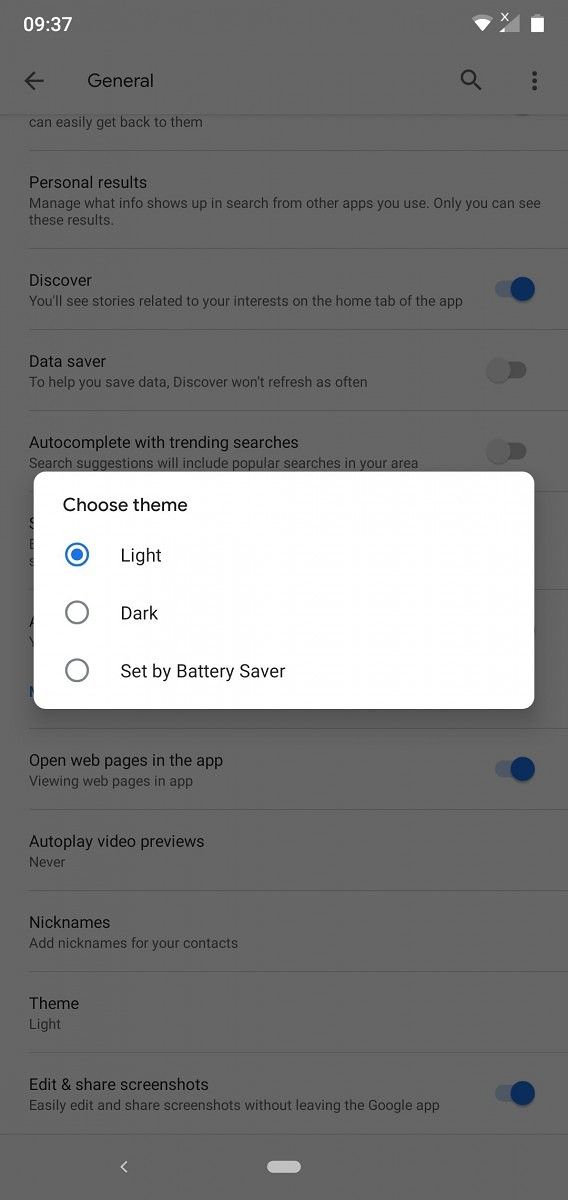
Evident from the gesture navigation, both of them are running Android 10 on their devices. However, few comments from users still running Android 9 Pie claim that the feature is available while they can also choose the between light and dark theme or set it to change automatically with the Battery Saver.

google dark theme nokia

Google app dark theme toggle on Nokia 6.1 Plus running Android 9 Pie

While the region of these users is not instantly clear, a few replies suggest that the feature may be rolling out to a batch of select users in the U.S., UK, and Australia. I don’t have the feature in India yet, and it’s safe to presume that the worldwide roll-out would be gradual and thus, take some time. Furthermore, Google Podcasts, which is a part of the Google app does not seem to have the new dark theme yet.

We’ll update this article as we learn about the availability of the dark theme on the Google app and the Google Assistant in other regions. Feel free to comment with your region if you have received it already.

Google (Free, Google Play) →

Google Assistant - Get things done, hands-free (Free, Google Play) →

Source: Reddit (1)(2)


Update: Dark theme for Google App now fully rolling out

The rollout for the dark theme for the Google App was rather random at the time of the first report, likely a result of batch-wise testing. But now, the dark theme is finally rolling out to all Google App users.

As mentioned, Dark mode will be available for the Google App on Android 10 and on iOS 12 and 13. The app will use your system settings by default, but you can also choose to override the same by changing the setting within the app.

The post [Update: Fully Rolling Out] Dark theme rolling out for the Google App and Google Assistant once again appeared first on xda-developers.


from xda-developers https://ift.tt/2NcTas6
via IFTTT