LightBlog

lundi 18 mai 2020

Redmi 10X series with MediaTek Dimensity 820 SoC launching in China on May 26

Earlier this month, we spotted an upcoming Redmi 5G smartphone on Chinese certification authority TENAA’s website. The certification listing revealed that the device will feature a 6.57-inch OLED display, a 48MP triple rear camera setup, a 4,420mAh battery, and a design similar to the Xiaomi Redmi Note 9 series. We also learned that the device will be powered by an octa-core SoC clocked at 2.6Ghz but, at the time, we had no further information about the device. Now, according to a recent post from Redmi on Chinese social media platform Weibo, the device will be launched as part of the Redmi 10X series in China on May 26.

Redmi 10X teaser

The post reveals that the device will pack in MediaTek’s new 5G-capable Dimensity 820 SoC, which was announced earlier this month. The octa-core SoC features 4 big ARM Cortex-A76 cores clocked at 2.6GHz and 4 little ARM Cortex-A55 cores clocked at 2.0GHz. For graphics processing, the SoC packs in an ARM Mali G57 GPU. In a separate post on the matter, Xiaomi’s product manager Wang Teng Thomas also revealed that Xiaomi worked closely with MediaTek to customize the Dimensity 820 chip, which helped the Redmi 10X achieve a score of over 410,000 on the AnTuTu benchmark.

While the posts don’t confirm exactly which devices will be launched as part of the Redmi 10X series, a recent report from 91Mobiles claims that Xiaomi will be launching a Redmi 10X 4G, Redmi 10X 5G, and a Redmi 10X Pro, which is currently still in the works. The post further reveals that the 4G variant will be powered by the MediaTek Helio G70 chipset and will be offered in three color variants — White, Sky Blue, and Green. On the other hand, the MediaTek Dimensity 820 powered 5G variant will be launched in four color variants — Dark Blue, Violet, Gold, and Silver. As far as the RAM and storage specifications are concerned, the Redmi 10X 4G will be available in 4GB+128GB and 6GB+128GB variants, while the Redmi 10X 5G will be available in 6GB+64GB, 6GB+128GB, 8GB+128GB, and 8GB+256GB variants.


Source: Weibo (1,2)

The post Redmi 10X series with MediaTek Dimensity 820 SoC launching in China on May 26 appeared first on xda-developers.


from xda-developers https://ift.tt/3g38D99
via IFTTT

Redmi 10X series with MediaTek Dimensity 820 SoC launching in China on May 26

Earlier this month, we spotted an upcoming Redmi 5G smartphone on Chinese certification authority TENAA’s website. The certification listing revealed that the device will feature a 6.57-inch OLED display, a 48MP triple rear camera setup, a 4,420mAh battery, and a design similar to the Xiaomi Redmi Note 9 series. We also learned that the device will be powered by an octa-core SoC clocked at 2.6Ghz but, at the time, we had no further information about the device. Now, according to a recent post from Redmi on Chinese social media platform Weibo, the device will be launched as part of the Redmi 10X series in China on May 26.

Redmi 10X teaser

The post reveals that the device will pack in MediaTek’s new 5G-capable Dimensity 820 SoC, which was announced earlier this month. The octa-core SoC features 4 big ARM Cortex-A76 cores clocked at 2.6GHz and 4 little ARM Cortex-A55 cores clocked at 2.0GHz. For graphics processing, the SoC packs in an ARM Mali G57 GPU. In a separate post on the matter, Xiaomi’s product manager Wang Teng Thomas also revealed that Xiaomi worked closely with MediaTek to customize the Dimensity 820 chip, which helped the Redmi 10X achieve a score of over 410,000 on the AnTuTu benchmark.

While the posts don’t confirm exactly which devices will be launched as part of the Redmi 10X series, a recent report from 91Mobiles claims that Xiaomi will be launching a Redmi 10X 4G, Redmi 10X 5G, and a Redmi 10X Pro, which is currently still in the works. The post further reveals that the 4G variant will be powered by the MediaTek Helio G70 chipset and will be offered in three color variants — White, Sky Blue, and Green. On the other hand, the MediaTek Dimensity 820 powered 5G variant will be launched in four color variants — Dark Blue, Violet, Gold, and Silver. As far as the RAM and storage specifications are concerned, the Redmi 10X 4G will be available in 4GB+128GB and 6GB+128GB variants, while the Redmi 10X 5G will be available in 6GB+64GB, 6GB+128GB, 8GB+128GB, and 8GB+256GB variants.


Source: Weibo (1,2)

The post Redmi 10X series with MediaTek Dimensity 820 SoC launching in China on May 26 appeared first on xda-developers.


from xda-developers https://ift.tt/3g38D99
via IFTTT

[Update: May 18 builds] Download the MIUI 12 Closed Beta for Xiaomi and Redmi devices

Update 2 (05/18/2020 @ 7:25 AM ET): Added download links for MIUI 12 latest beta builds, compiled on May 18, 2020.

Update 1 (05/11/2020 @ 9:30 AM ET): MIUI 12 closed beta download links refreshed with newer releases (compiled on May 11). The article as published on April 28, 2020, is preserved below.


The latest version of Xiaomi’s custom Android skin – MIUI 12 – is finally here. The company has dropped the curtain yesterday, alongside the Mi 10 Youth Edition launch event in China. Compared to MIUI 11, the stable version of which was released less than six months ago, MIUI 12 brings in a slew of improvements, visual overhauls, and many new features. We have already extracted the new wallpapers, and now we are presenting the downloading links of the first set of MIUI 12 beta firmware packages for a bunch of Xiaomi and Redmi devices.

It is worth mentioning that these closed beta builds are meant for the Chinese variants, as Xiaomi suspended the rollout of MIUI global beta since last year. As a consequence, you have to flash these recovery ROMs using TWRP to bypass the MIUI beta account whitelisting. Do not expect Google Play Services or any pre-installed Google apps in them. Language options are likely limited to English and Chinese only, too. The beta MIUI 12 builds listed below are based on either Android Pie or Android 10, depending on the device.

Download: MIUI 12

You can download the latest beta (20.5.18) of MIUI 12 for your device from the links below. You can also visit our linked forums in case you need further assistance. While all of these download links are directly from Xiaomi, users are advised to proceed at their own risk. We warn you once again, this is not intended for the average consumer and is recommended only for users comfortable with flashing ROMs.

Sr. No. Device, Device Codename, XDA Forum Link Android Version Download Link (20.5.18)
1. Redmi Note 8 Pro (begonia) Android 10 Download
2. Mi 9 (cepheus) Android 10 Download
3. Mi Mix 2 (chiron) Android 9 Download
4. Mi 10 Pro (cmi) Android 10
5. Mi 9 Pro 5G (crux) Android 10 Download
6. Redmi K20/Mi 9T (davinci) Android 10 Download
7. Mi 8 (dipper) Android 10 Download
8. Mi 8 Pro (equuleus) Android 10 Download
9. Mi 9 SE (grus) Android 10 Download
10. Mi Note 3 (jason) Android 9 Download
11. Redmi Note 7/7S (lavender) Android 10
12. Mi CC9e (laurus) Android 10
13. Redmi K30 Pro (lmi) Android 10
14. Mi Max 3 (nitrogen) Android 10
15. Mi Mix 3 (perseus) Android 10 Download
16. Redmi K30 5G (picasso) Android 10 Download
17. Mi 8 Lite (platina) Android 10 Download
18. POCO X2/Redmi K30 4G (phoenix) Android 10 Download
19. Mi Mix 2S (polaris) Android 10 Download
20. Mi 9 Lite/Mi CC9 (pyxis) Android 10 Download
21. Redmi K20 Pro/Mi 9T Pro (raphael) Android 10 Download
22. Mi 6 (sagit) Android 9 Download
23. Mi 8 SE (sirius) Android 10 Download
24. Mi Note 10/Mi CC9 Pro (tucana) Android 10 Download
25. Mi 10 (umi) Android 10
26. Mi 8 Explorer Edition (ursa) Android 10 Download
27. Mi CC9 Meitu Edition (vela) Android 10 Download
28. Redmi Note 7 Pro (violet) Android 10
29. Mi 6X (wayne) Android 9 Download
30. Redmi Note 5/Redmi Note 5 Pro (whyred) Android 9 Download

Links for the previous beta builds of MIUI 12 are preserved as well:

MIUI 12 (20.5.11) Download Links

Sr. No. Device, Device Codename, XDA Forum Link Android Version Download Link (20.5.11)
1. Redmi Note 8 Pro (begonia) Android 10 Download
2. Mi 9 (cepheus) Android 10 Download
3. Mi Mix 2 (chiron) Android 9 Download
4. Mi 10 Pro (cmi) Android 10 Download
5. Mi 9 Pro 5G (crux) Android 10 Download
6. Redmi K20/Mi 9T (davinci) Android 10 Download
7. Mi 8 (dipper) Android 10 Download
8. Mi 8 Pro (equuleus) Android 10 Download
9. Mi 9 SE (grus) Android 10 Download
10. Mi Note 3 (jason) Android 9 Download
11. Redmi Note 7/7S (lavender) Android 10
12. Mi CC9e (laurus) Android 10
13. Redmi K30 Pro (lmi) Android 10 Download
14. Mi Max 3 (nitrogen) Android 10 Download
15. Mi Mix 3 (perseus) Android 10 Download
16. Redmi K30 5G (picasso) Android 10 Download
17. Mi 8 Lite (platina) Android 10
18. POCO X2/Redmi K30 4G (phoenix) Android 10 Download
19. Mi Mix 2S (polaris) Android 10 Download
20. Mi 9 Lite/Mi CC9 (pyxis) Android 10 Download
21. Redmi K20 Pro/Mi 9T Pro (raphael) Android 10 Download
22. Mi 6 (sagit) Android 9 Download
23. Mi 8 SE (sirius) Android 10 Download
24. Mi Note 10/Mi CC9 Pro (tucana) Android 10 Download
25. Mi 10 (umi) Android 10 Download
26. Mi 8 Explorer Edition (ursa) Android 10 Download
27. Mi CC9 Meitu Edition (vela) Android 10 Download
28. Redmi Note 7 Pro (violet) Android 10 Download
29. Mi 6X (wayne) Android 9 Download
30. Redmi Note 5/Redmi Note 5 Pro (whyred) Android 9 Download

MIUI 12 (20.4.27) Download Links

Sr. No. Device, Device Codename, XDA Forum Link Android Version Download Link (20.4.27)
1. Redmi Note 8 Pro (begonia) Android 10 Download
2. Mi 9 (cepheus) Android 10 Download
3. Mi Mix 2 (chiron) Android 9 Download
4. Mi 10 Pro (cmi) Android 10 Download
5. Mi 9 Pro 5G (crux) Android 10 Download
6. Redmi K20/Mi 9T (davinci) Android 10 Download
7. Mi 8 (dipper) Android 10 Download
8. Mi 8 Pro (equuleus) Android 10 Download
9. Mi 9 SE (grus) Android 10 Download
10. Mi Note 3 (jason) Android 9 Download
11. Redmi Note 7/7S (lavender) Android 10 Download
12. Mi Max 3 (nitrogen) Android 10 Download
13. Mi Mix 3 (perseus) Android 10 Download
14. Redmi K30 5G (picasso) Android 10 Download
15. Mi 8 Lite (platina) Android 10 Download
16. POCO X2/Redmi K30 4G (phoenix) Android 10 Download
17. Mi Mix 2S (polaris) Android 10 Download
18. Mi 9 Lite/Mi CC9 (pyxis) Android 10 Download
19. Redmi K20 Pro/Mi 9T Pro (raphael) Android 10 Download
20. Mi 6 (sagit) Android 9 Download
21. Mi 8 SE (sirius) Android 10 Download
22. Mi Note 10/Mi CC9 Pro (tucana) Android 10 Download
23. Mi 10 (umi) Android 10 Download
24. Mi 8 Explorer Edition (ursa) Android 10 Download
25. Mi CC9 Meitu Edition (vela) Android 10 Download
26. Redmi Note 7 Pro (violet) Android 10 Download
27. Mi 6X (wayne) Android 9 Download
28. Redmi Note 5/Redmi Note 5 Pro (whyred) Android 9 Download

Changelog

The full changelog for MIUI 12 beta, when updating from MIUI 11, is as follows:

  • Highlights
    • MIUI 12. Yours alone.
  • System animations
    • New: All-new physically-based animation engine with advanced architecture will refresh your device’s look.
    • New: Dynamic window technology takes switching screen orientation to a new level.
  • System visuals
    • Brand new visual design works for all types of content and languages.
    • Magazine-level layouts bring important things into the spotlight and make the content structure clear.
  • Privacy protection
    • New: MIUI 12 is the first Android-based mobile OS that went through the rigorous enhanced privacy protection testing.
    • New: Reset your device ID and control how it’s used based on virtual ID technology.
    • New: Grant permissions that will be used only while you’re using an app.
    • New: You can also grant permissions just once, and decide again next time a permission is required.
    • New: Restrict access to telephony to third party apps.
    • New: Return blank messages to the apps that require personal information.
    • New: Receive notifications whenever apps record audio, use camera, or access your location.
    • New: Use secure sharing to control what additional data is sent along with shared items.
    • New: Get comprehensive stats on how apps use permissions in app behavior history.
    • New: Visit privacy.miui.com to learn how MIUI protects your privacy.
    • Optimization: Apps aren’t allowed to launch other apps in the background now.
  • AI Call Assistant
    • New: Mi AI can answer your calls now!
    • New: You can record a customized greeting that will be played to the other person during AI calls.
    • New: Customized greetings are also supported for outgoing calls.
  • Xiaomi Health
    • New: All-new Xiaomi Health gives you more options and makes your health stats more accurate.
    • New: Put your device next to you before falling asleep to analyze your sleep cycle and record talking and snoring.
    • New: You can sync data with supported wearable and smart home devices.
    • New: Xiaomi Health can remind you to stand up and move when it detects that you’ve been sitting down for too long.
    • New: The app also analyzes your stats and gives you simple health advice.
  • Control center
    • New: Swipe down from the upper right corner of your screen to open Control center.
    • New: Animated icons are a joy to look at!
  • Accessibility
    • New: Mi Ditto combines dictation and speech output, making mobile devices more convenient for people who have difficulties using conventionally designed smartphones.
  • Trips
    • New: Traffic and suggested routes to airports and train stations.
    • New: You can track your previous trips now.
    • New: Checklists for trips.
    • New: Alarms for train arrivals.
  • Mi Carrier Services
    • New: View your SIM balance and mobile data usage stats.
    • New: Save frequently used phone numbers to top up balance and buy mobile data later.
    • New: Buy SIM cards and services.
  • Messaging
    • New: Promotional messages are grouped according to their content now.
  • Status bar, Notification shade
    • New: All-new design.
  • Weather
    • New: New animations bring the weather from outside directly to your screen.
  • Settings
    • New: Security introduces new comprehensive privacy protection mechanisms.
    • New: Lite mode simplifies your device and brings essential features up front.
  • File Manager
    • New: Use the floating shortcut to filter and sort items, as well as switch view.
  • Calendar
    • New: New layout tailored for landscape orientation is available now.
    • New: We added lots of fresh animations that will accompany your actions.
    • New: Calendar cards will remind you about important events and anniversaries.
  • Notes
    • New: You can create folders with notes now.
    • New: New dynamic backgrounds look gorgeous!
    • New: Tasks are completed with a satisfying animation now.
    • New: Checklists of subtasks make managing your agenda much simpler.
  • Security
    • New: New animations feel natural and refreshing.
    • New: Keep your home safe with smart home device alerts.
    • New: Binging your favorite shows will be more convenient with our new video toolbox.
  • Xiaomi Cloud
    • New: Shared family storage plan is available now.

Thanks to XDA Recognized Developer yshalsager and XDA Member kacskrz for providing these download links!


The post [Update: May 18 builds] Download the MIUI 12 Closed Beta for Xiaomi and Redmi devices appeared first on xda-developers.


from xda-developers https://ift.tt/3eUAaJD
via IFTTT

[Update: May 18 builds] Download the MIUI 12 Closed Beta for Xiaomi and Redmi devices

Update 2 (05/18/2020 @ 7:25 AM ET): Added download links for MIUI 12 latest beta builds, compiled on May 18, 2020.

Update 1 (05/11/2020 @ 9:30 AM ET): MIUI 12 closed beta download links refreshed with newer releases (compiled on May 11). The article as published on April 28, 2020, is preserved below.


The latest version of Xiaomi’s custom Android skin – MIUI 12 – is finally here. The company has dropped the curtain yesterday, alongside the Mi 10 Youth Edition launch event in China. Compared to MIUI 11, the stable version of which was released less than six months ago, MIUI 12 brings in a slew of improvements, visual overhauls, and many new features. We have already extracted the new wallpapers, and now we are presenting the downloading links of the first set of MIUI 12 beta firmware packages for a bunch of Xiaomi and Redmi devices.

It is worth mentioning that these closed beta builds are meant for the Chinese variants, as Xiaomi suspended the rollout of MIUI global beta since last year. As a consequence, you have to flash these recovery ROMs using TWRP to bypass the MIUI beta account whitelisting. Do not expect Google Play Services or any pre-installed Google apps in them. Language options are likely limited to English and Chinese only, too. The beta MIUI 12 builds listed below are based on either Android Pie or Android 10, depending on the device.

Download: MIUI 12

You can download the latest beta (20.5.18) of MIUI 12 for your device from the links below. You can also visit our linked forums in case you need further assistance. While all of these download links are directly from Xiaomi, users are advised to proceed at their own risk. We warn you once again, this is not intended for the average consumer and is recommended only for users comfortable with flashing ROMs.

Sr. No. Device, Device Codename, XDA Forum Link Android Version Download Link (20.5.18)
1. Redmi Note 8 Pro (begonia) Android 10 Download
2. Mi 9 (cepheus) Android 10 Download
3. Mi Mix 2 (chiron) Android 9 Download
4. Mi 10 Pro (cmi) Android 10
5. Mi 9 Pro 5G (crux) Android 10 Download
6. Redmi K20/Mi 9T (davinci) Android 10 Download
7. Mi 8 (dipper) Android 10 Download
8. Mi 8 Pro (equuleus) Android 10 Download
9. Mi 9 SE (grus) Android 10 Download
10. Mi Note 3 (jason) Android 9 Download
11. Redmi Note 7/7S (lavender) Android 10
12. Mi CC9e (laurus) Android 10
13. Redmi K30 Pro (lmi) Android 10
14. Mi Max 3 (nitrogen) Android 10
15. Mi Mix 3 (perseus) Android 10 Download
16. Redmi K30 5G (picasso) Android 10 Download
17. Mi 8 Lite (platina) Android 10 Download
18. POCO X2/Redmi K30 4G (phoenix) Android 10 Download
19. Mi Mix 2S (polaris) Android 10 Download
20. Mi 9 Lite/Mi CC9 (pyxis) Android 10 Download
21. Redmi K20 Pro/Mi 9T Pro (raphael) Android 10 Download
22. Mi 6 (sagit) Android 9 Download
23. Mi 8 SE (sirius) Android 10 Download
24. Mi Note 10/Mi CC9 Pro (tucana) Android 10 Download
25. Mi 10 (umi) Android 10
26. Mi 8 Explorer Edition (ursa) Android 10 Download
27. Mi CC9 Meitu Edition (vela) Android 10 Download
28. Redmi Note 7 Pro (violet) Android 10
29. Mi 6X (wayne) Android 9 Download
30. Redmi Note 5/Redmi Note 5 Pro (whyred) Android 9 Download

Links for the previous beta builds of MIUI 12 are preserved as well:

MIUI 12 (20.5.11) Download Links

Sr. No. Device, Device Codename, XDA Forum Link Android Version Download Link (20.5.11)
1. Redmi Note 8 Pro (begonia) Android 10 Download
2. Mi 9 (cepheus) Android 10 Download
3. Mi Mix 2 (chiron) Android 9 Download
4. Mi 10 Pro (cmi) Android 10 Download
5. Mi 9 Pro 5G (crux) Android 10 Download
6. Redmi K20/Mi 9T (davinci) Android 10 Download
7. Mi 8 (dipper) Android 10 Download
8. Mi 8 Pro (equuleus) Android 10 Download
9. Mi 9 SE (grus) Android 10 Download
10. Mi Note 3 (jason) Android 9 Download
11. Redmi Note 7/7S (lavender) Android 10
12. Mi CC9e (laurus) Android 10
13. Redmi K30 Pro (lmi) Android 10 Download
14. Mi Max 3 (nitrogen) Android 10 Download
15. Mi Mix 3 (perseus) Android 10 Download
16. Redmi K30 5G (picasso) Android 10 Download
17. Mi 8 Lite (platina) Android 10
18. POCO X2/Redmi K30 4G (phoenix) Android 10 Download
19. Mi Mix 2S (polaris) Android 10 Download
20. Mi 9 Lite/Mi CC9 (pyxis) Android 10 Download
21. Redmi K20 Pro/Mi 9T Pro (raphael) Android 10 Download
22. Mi 6 (sagit) Android 9 Download
23. Mi 8 SE (sirius) Android 10 Download
24. Mi Note 10/Mi CC9 Pro (tucana) Android 10 Download
25. Mi 10 (umi) Android 10 Download
26. Mi 8 Explorer Edition (ursa) Android 10 Download
27. Mi CC9 Meitu Edition (vela) Android 10 Download
28. Redmi Note 7 Pro (violet) Android 10 Download
29. Mi 6X (wayne) Android 9 Download
30. Redmi Note 5/Redmi Note 5 Pro (whyred) Android 9 Download

MIUI 12 (20.4.27) Download Links

Sr. No. Device, Device Codename, XDA Forum Link Android Version Download Link (20.4.27)
1. Redmi Note 8 Pro (begonia) Android 10 Download
2. Mi 9 (cepheus) Android 10 Download
3. Mi Mix 2 (chiron) Android 9 Download
4. Mi 10 Pro (cmi) Android 10 Download
5. Mi 9 Pro 5G (crux) Android 10 Download
6. Redmi K20/Mi 9T (davinci) Android 10 Download
7. Mi 8 (dipper) Android 10 Download
8. Mi 8 Pro (equuleus) Android 10 Download
9. Mi 9 SE (grus) Android 10 Download
10. Mi Note 3 (jason) Android 9 Download
11. Redmi Note 7/7S (lavender) Android 10 Download
12. Mi Max 3 (nitrogen) Android 10 Download
13. Mi Mix 3 (perseus) Android 10 Download
14. Redmi K30 5G (picasso) Android 10 Download
15. Mi 8 Lite (platina) Android 10 Download
16. POCO X2/Redmi K30 4G (phoenix) Android 10 Download
17. Mi Mix 2S (polaris) Android 10 Download
18. Mi 9 Lite/Mi CC9 (pyxis) Android 10 Download
19. Redmi K20 Pro/Mi 9T Pro (raphael) Android 10 Download
20. Mi 6 (sagit) Android 9 Download
21. Mi 8 SE (sirius) Android 10 Download
22. Mi Note 10/Mi CC9 Pro (tucana) Android 10 Download
23. Mi 10 (umi) Android 10 Download
24. Mi 8 Explorer Edition (ursa) Android 10 Download
25. Mi CC9 Meitu Edition (vela) Android 10 Download
26. Redmi Note 7 Pro (violet) Android 10 Download
27. Mi 6X (wayne) Android 9 Download
28. Redmi Note 5/Redmi Note 5 Pro (whyred) Android 9 Download

Changelog

The full changelog for MIUI 12 beta, when updating from MIUI 11, is as follows:

  • Highlights
    • MIUI 12. Yours alone.
  • System animations
    • New: All-new physically-based animation engine with advanced architecture will refresh your device’s look.
    • New: Dynamic window technology takes switching screen orientation to a new level.
  • System visuals
    • Brand new visual design works for all types of content and languages.
    • Magazine-level layouts bring important things into the spotlight and make the content structure clear.
  • Privacy protection
    • New: MIUI 12 is the first Android-based mobile OS that went through the rigorous enhanced privacy protection testing.
    • New: Reset your device ID and control how it’s used based on virtual ID technology.
    • New: Grant permissions that will be used only while you’re using an app.
    • New: You can also grant permissions just once, and decide again next time a permission is required.
    • New: Restrict access to telephony to third party apps.
    • New: Return blank messages to the apps that require personal information.
    • New: Receive notifications whenever apps record audio, use camera, or access your location.
    • New: Use secure sharing to control what additional data is sent along with shared items.
    • New: Get comprehensive stats on how apps use permissions in app behavior history.
    • New: Visit privacy.miui.com to learn how MIUI protects your privacy.
    • Optimization: Apps aren’t allowed to launch other apps in the background now.
  • AI Call Assistant
    • New: Mi AI can answer your calls now!
    • New: You can record a customized greeting that will be played to the other person during AI calls.
    • New: Customized greetings are also supported for outgoing calls.
  • Xiaomi Health
    • New: All-new Xiaomi Health gives you more options and makes your health stats more accurate.
    • New: Put your device next to you before falling asleep to analyze your sleep cycle and record talking and snoring.
    • New: You can sync data with supported wearable and smart home devices.
    • New: Xiaomi Health can remind you to stand up and move when it detects that you’ve been sitting down for too long.
    • New: The app also analyzes your stats and gives you simple health advice.
  • Control center
    • New: Swipe down from the upper right corner of your screen to open Control center.
    • New: Animated icons are a joy to look at!
  • Accessibility
    • New: Mi Ditto combines dictation and speech output, making mobile devices more convenient for people who have difficulties using conventionally designed smartphones.
  • Trips
    • New: Traffic and suggested routes to airports and train stations.
    • New: You can track your previous trips now.
    • New: Checklists for trips.
    • New: Alarms for train arrivals.
  • Mi Carrier Services
    • New: View your SIM balance and mobile data usage stats.
    • New: Save frequently used phone numbers to top up balance and buy mobile data later.
    • New: Buy SIM cards and services.
  • Messaging
    • New: Promotional messages are grouped according to their content now.
  • Status bar, Notification shade
    • New: All-new design.
  • Weather
    • New: New animations bring the weather from outside directly to your screen.
  • Settings
    • New: Security introduces new comprehensive privacy protection mechanisms.
    • New: Lite mode simplifies your device and brings essential features up front.
  • File Manager
    • New: Use the floating shortcut to filter and sort items, as well as switch view.
  • Calendar
    • New: New layout tailored for landscape orientation is available now.
    • New: We added lots of fresh animations that will accompany your actions.
    • New: Calendar cards will remind you about important events and anniversaries.
  • Notes
    • New: You can create folders with notes now.
    • New: New dynamic backgrounds look gorgeous!
    • New: Tasks are completed with a satisfying animation now.
    • New: Checklists of subtasks make managing your agenda much simpler.
  • Security
    • New: New animations feel natural and refreshing.
    • New: Keep your home safe with smart home device alerts.
    • New: Binging your favorite shows will be more convenient with our new video toolbox.
  • Xiaomi Cloud
    • New: Shared family storage plan is available now.

Thanks to XDA Recognized Developer yshalsager and XDA Member kacskrz for providing these download links!


The post [Update: May 18 builds] Download the MIUI 12 Closed Beta for Xiaomi and Redmi devices appeared first on xda-developers.


from xda-developers https://ift.tt/3eUAaJD
via IFTTT

OPAodMod is a customizable Always on Display for rooted OnePlus phones

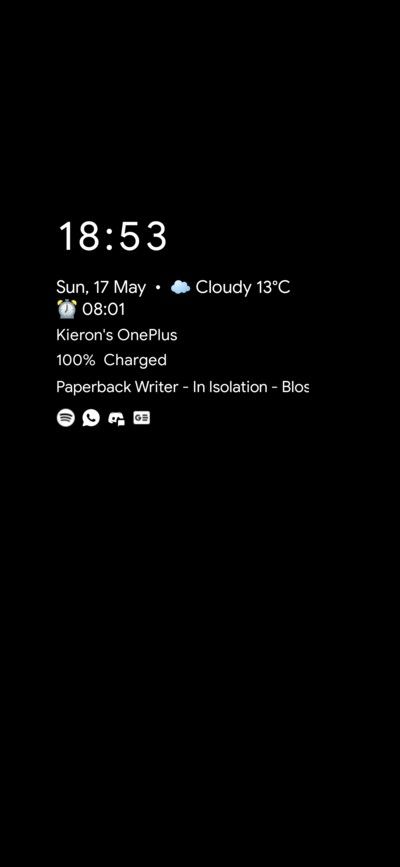
OnePlus briefly introduced an Always-on Display (AOD) feature on the initial factory firmware of the OnePlus 6, but decided to remove it later due to battery concerns. Fans have been clamoring for the feature to make a return, and the company had recently confirmed that they will finally bring back the fan-favorite Always on Display mode to OxygenOS, but gave no concrete timeline as of yet. As expected, XDA community came to the rescue, as XDA Recognized Developer Quinny899 has published OPAodMod, an Xposed Module that provides a Google Pixel-esque AOD feature to OnePlus phones.

oneplus_opaodmod_default_layout oneplus_opaodmod_flat_layout

Looks familiar? Well, we did cover the initial version of this module back in July 2019. However, it stopped receiving updates after a while as the developer dropped support. XDA Recognized Developer Quinny899 has taken up work on the mod and even managed to get access to the full source code. Since then, the entire module has been translated from Chinese to English, while a new GUI has been added to customize the UI elements. The module is also fully compatible with OnePlus devices running OxygenOS as well as HydrogenOS.

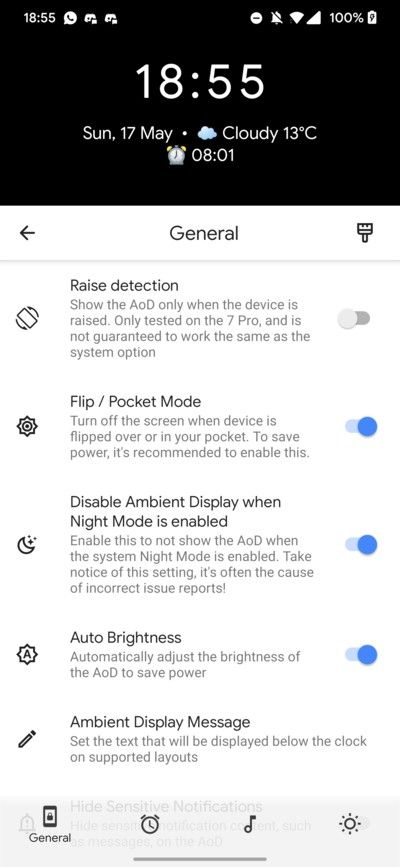
oneplus_opaodmod_settings oneplus_opaodmod_status

The complete list of features can be found below.

  • Always-on display, which runs all the time – unlike the OnePlus version
  • Customizable layout, with options including three digital clock styles, two-word clocks and a DVD screensaver (it’s exactly what you think it is)
  • Notification display, showing the text of a notification when you receive it and dropping back to just an icon after a few seconds
  • Option to only display when you ‘raise’ your phone
  • Option to hide the screen when flipped/in your pocket, disable it overnight, or after a time period (10 minutes or 15 seconds)
  • Show your next alarm, current weather, and currently playing music
  • Display a short message (like that on your lockscreen)
  • Full settings GUI for the module with a live preview of your clock

OPAodMod — XDA Download and Discussion Thread

Since OPAodMod is dependent on the Xposed framework, you need to install the module in conjunction with EdXposed with Riru Core (the latest Canary version is recommended) or using TaiChi after rooting your device using Magisk. The current version of OPAodMod (v3.0) comes with burn-in protection, i.e. it shifts the content a few pixels once in a while, and the developer is working on minimizing the battery drain. Give it a try!

The post OPAodMod is a customizable Always on Display for rooted OnePlus phones appeared first on xda-developers.


from xda-developers https://ift.tt/3cJAnh3
via IFTTT

OPAodMod is a customizable Always on Display for rooted OnePlus phones

OnePlus briefly introduced an Always-on Display (AOD) feature on the initial factory firmware of the OnePlus 6, but decided to remove it later due to battery concerns. Fans have been clamoring for the feature to make a return, and the company had recently confirmed that they will finally bring back the fan-favorite Always on Display mode to OxygenOS, but gave no concrete timeline as of yet. As expected, XDA community came to the rescue, as XDA Recognized Developer Quinny899 has published OPAodMod, an Xposed Module that provides a Google Pixel-esque AOD feature to OnePlus phones.

oneplus_opaodmod_default_layout oneplus_opaodmod_flat_layout

Looks familiar? Well, we did cover the initial version of this module back in July 2019. However, it stopped receiving updates after a while as the developer dropped support. XDA Recognized Developer Quinny899 has taken up work on the mod and even managed to get access to the full source code. Since then, the entire module has been translated from Chinese to English, while a new GUI has been added to customize the UI elements. The module is also fully compatible with OnePlus devices running OxygenOS as well as HydrogenOS.

oneplus_opaodmod_settings oneplus_opaodmod_status

The complete list of features can be found below.

  • Always-on display, which runs all the time – unlike the OnePlus version
  • Customizable layout, with options including three digital clock styles, two-word clocks and a DVD screensaver (it’s exactly what you think it is)
  • Notification display, showing the text of a notification when you receive it and dropping back to just an icon after a few seconds
  • Option to only display when you ‘raise’ your phone
  • Option to hide the screen when flipped/in your pocket, disable it overnight, or after a time period (10 minutes or 15 seconds)
  • Show your next alarm, current weather, and currently playing music
  • Display a short message (like that on your lockscreen)
  • Full settings GUI for the module with a live preview of your clock

OPAodMod — XDA Download and Discussion Thread

Since OPAodMod is dependent on the Xposed framework, you need to install the module in conjunction with EdXposed with Riru Core (the latest Canary version is recommended) or using TaiChi after rooting your device using Magisk. The current version of OPAodMod (v3.0) comes with burn-in protection, i.e. it shifts the content a few pixels once in a while, and the developer is working on minimizing the battery drain. Give it a try!

The post OPAodMod is a customizable Always on Display for rooted OnePlus phones appeared first on xda-developers.


from xda-developers https://ift.tt/3cJAnh3
via IFTTT

OPPO and Vodafone announce partnership to bring OPPO smartphones to Vodafone’s European markets

OPPO launched its proper flagship for 2020, the OPPO Find X2 Pro in March, bringing over some key technologies to customers across Europe. While the phone does cement the company’s place among the premium Android OEMs, OPPO still has a lot of room to grow in terms of sales and market reach. Now, OPPO and Vodafone have announced a new comprehensive partnership agreement, bringing a broad range of OPPO’s smartphones to Vodafone’s European markets starting this month.

OPPO’s collaboration with Vodafone is intended to accelerate 5G adoption in the European region, and further expand the availability of OPPO products to more Vodafone markets and customers. This collaboration will allow the company’s A-series, Reno series, and Find X series to be available across Vodafone’s retail and online channels. In the first phase of the cooperation, markets covered include Germany, the United Kingdom, Spain, Portugal, Romania, Turkey, and the Netherlands, with more to come in the future.

The announcement further details that most of the company’s manufacturing facilities have resumed normal operation, allowing OPPO and Vodafone to ensure business continuity. Physical retail outlets are constrained because of the advisories issued on the COVID-19 pandemic, so the companies plan to develop their online sales channels to ensure continued support for customers.

This is a big opportunity for both the companies involved. For OPPO, this partnership brings an additional surface for product discovery by tapping into Vodafone’s existing marketing channels across Europe. For Vodafone, this presents ready availability of key flagships such as the Find X2 Pro as well as other smartphones from the company for use on their network, and in furtherance of their overall 5G proliferation goals. For customers, it presents itself as a good opportunity to pick up great smartphones from familiar channels, building upon the present trust and goodwill. The press release does not mention any carrier-exclusivity in the works, but that could also be a possibility.


Source: OPPO Newsroom

The post OPPO and Vodafone announce partnership to bring OPPO smartphones to Vodafone’s European markets appeared first on xda-developers.


from xda-developers https://ift.tt/36aA9gH
via IFTTT