
LightBlog

mercredi 11 mars 2020

[Update: New Build] Download: POCO F1 gets official Android 10 with MIUI 11 update

Update 1 (03/11/2020 @ 08:32 AM ET): POCO is rolling out another MIUI 11 Android 10 build for the POCO F1. Scroll to the bottom for more information. The article as published on January 21, 2020, is preserved as below.

Google officially rolled out Android 10 back in September last year. Since then, Xiaomi has rolled out MIUI 11 based on Android 10 for a couple of devices, including the Redmi K20 Pro, Mi 9, Redmi K20, Redmi Note 7, and more. While the company did release MIUI 11 for the popular POCO F1 back in November last year, the build was based on Android 9 Pie. Late last year, Xiaomi released the kernel sources of the Android 10 update for the POCO F1, Mi MIX 2s, Mi MIX 3, and the Mi 8 series. This suggested that the company was finally prepping up the Android 10 based release for these devices. As expected, Xiaomi has now started rolling out MIUI 11 based on Android 10 for the POCO F1 and you can download it right away.

POCO F1 XDA Forums || Buy the POCO F1 from Amazon.in

This Android 10-based build of MIUI 11 for the POCO F1 is meant for beta testers only. Of course, the highlight of this release is Android 10, but the update also has some smaller improvements like fixing overlap issues in scrolling screenshots. If you’re interested in trying out the build for yourself, you can download it the ZIP file from the link below and manually flash it on your phone. However, you won’t be able to install the build using the stock MIUI recovery and you’ll first need to flash the TWRP custom recovery on your device to flash this build successfully.
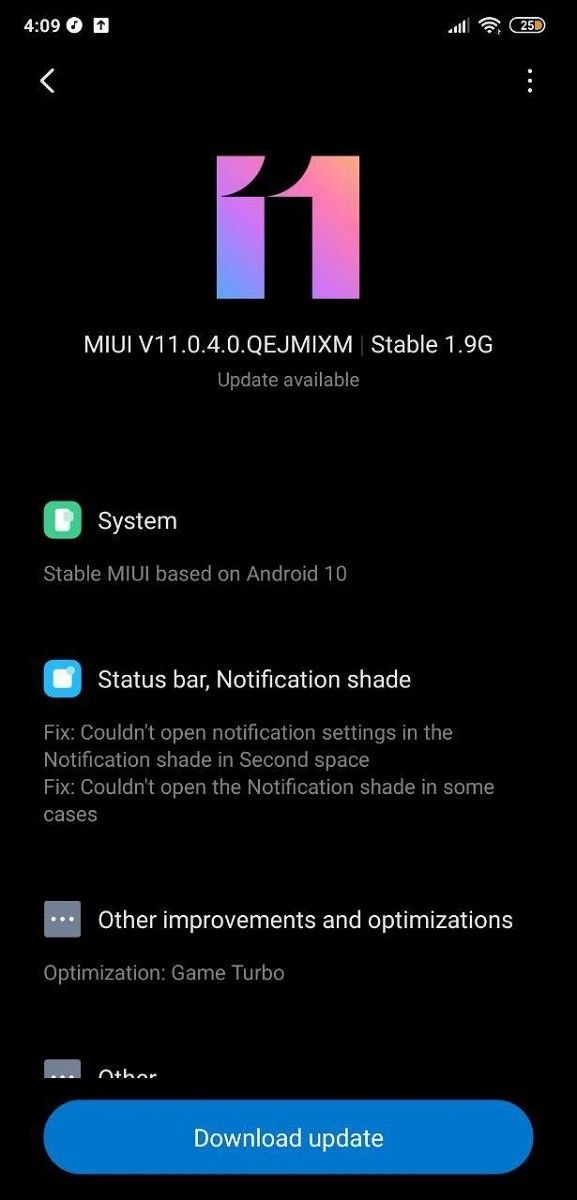
It’s also worth noting that since this is a beta build for the POCO F1, you might encounter some bugs which will hamper your experience. In case you’re using your device as a daily driver, we’d recommend waiting for the stable release which should be rolled out sometime in the near future.

Download: Android 10-based MIUI 11 beta for the POCO F1

Clarification: This build for the Xiaomi Poco F1 is not a “beta” in the regular sense. It is what Xiaomi calls a “stable beta” — a stable build that is initially limited in installation to “authorized Mi Accounts”, or you can sideload it via TWRP. Xiaomi controls rollout at this stage. The same build with the same download link then gets marked as “stable”. Xiaomi flips a switch and everyone can sideload it without an authorized Mi Account then. The article’s headline is not misleading. This is the stable rollout of Android 10 for the Poco F1. The confusion is on Xiaomi, not us. You’ll be able to sideload the same build from the same download link we provided whenever Xiaomi deems it is okay for everyone to have it. Until then, sideload it through TWRP.

Thanks to Telegram user Rohan Preet for the screenshots and XDA Recognized Contributor akhilnarang for the download link!


Update: MIUI 11 Android 10 rollout for the POCO F1 resumes with new build

Android 10 was initially available to the POCO F1 in the form of a “stable beta” build (yes, stable and beta at the same time). As mentioned in the clarification, the rollout remains firmly in control of POCO at that stage, as only authorized Mi Accounts are allowed to update. You could still sideload the update if you cannot wait. Users must have faced some issues, as POCO had subsequently halted rollout while they worked on polishing the update even better.

Now POCO has announced that the POCO F1 is receiving a fresh build of Android 10, in the form of MIUI 11.0.6.0.

We would advise users to wait for the update to reach their devices since bugs do turn up frequently and staged rollouts are meant to prevent critical issues from reaching too many users. However, if you understand the risks and want to sideload, you can use either the Recovery ROM or Fastboot ROM as linked.

Download MIUI V11.0.6.0.QEJMIXM for the POCO F1

Hopefully, this update turns out well, stable and without issues.

The post [Update: New Build] Download: POCO F1 gets official Android 10 with MIUI 11 update appeared first on xda-developers.


from xda-developers https://ift.tt/2RD1MYH
via IFTTT

[Update: New Build] Download: POCO F1 gets official Android 10 with MIUI 11 update

Update 1 (03/11/2020 @ 08:32 AM ET): POCO is rolling out another MIUI 11 Android 10 build for the POCO F1. Scroll to the bottom for more information. The article as published on January 21, 2020, is preserved as below.

Google officially rolled out Android 10 back in September last year. Since then, Xiaomi has rolled out MIUI 11 based on Android 10 for a couple of devices, including the Redmi K20 Pro, Mi 9, Redmi K20, Redmi Note 7, and more. While the company did release MIUI 11 for the popular POCO F1 back in November last year, the build was based on Android 9 Pie. Late last year, Xiaomi released the kernel sources of the Android 10 update for the POCO F1, Mi MIX 2s, Mi MIX 3, and the Mi 8 series. This suggested that the company was finally prepping up the Android 10 based release for these devices. As expected, Xiaomi has now started rolling out MIUI 11 based on Android 10 for the POCO F1 and you can download it right away.

POCO F1 XDA Forums || Buy the POCO F1 from Amazon.in

This Android 10-based build of MIUI 11 for the POCO F1 is meant for beta testers only. Of course, the highlight of this release is Android 10, but the update also has some smaller improvements like fixing overlap issues in scrolling screenshots. If you’re interested in trying out the build for yourself, you can download it the ZIP file from the link below and manually flash it on your phone. However, you won’t be able to install the build using the stock MIUI recovery and you’ll first need to flash the TWRP custom recovery on your device to flash this build successfully.

It’s also worth noting that since this is a beta build for the POCO F1, you might encounter some bugs which will hamper your experience. In case you’re using your device as a daily driver, we’d recommend waiting for the stable release which should be rolled out sometime in the near future.

Download: Android 10-based MIUI 11 beta for the POCO F1

Clarification: This build for the Xiaomi Poco F1 is not a “beta” in the regular sense. It is what Xiaomi calls a “stable beta” — a stable build that is initially limited in installation to “authorized Mi Accounts”, or you can sideload it via TWRP. Xiaomi controls rollout at this stage. The same build with the same download link then gets marked as “stable”. Xiaomi flips a switch and everyone can sideload it without an authorized Mi Account then. The article’s headline is not misleading. This is the stable rollout of Android 10 for the Poco F1. The confusion is on Xiaomi, not us. You’ll be able to sideload the same build from the same download link we provided whenever Xiaomi deems it is okay for everyone to have it. Until then, sideload it through TWRP.

Thanks to Telegram user Rohan Preet for the screenshots and XDA Recognized Contributor akhilnarang for the download link!


Update: MIUI 11 Android 10 rollout for the POCO F1 resumes with new build

Android 10 was initially available to the POCO F1 in the form of a “stable beta” build (yes, stable and beta at the same time). As mentioned in the clarification, the rollout remains firmly in control of POCO at that stage, as only authorized Mi Accounts are allowed to update. You could still sideload the update if you cannot wait. Users must have faced some issues, as POCO had subsequently halted rollout while they worked on polishing the update even better.

Now POCO has announced that the POCO F1 is receiving a fresh build of Android 10, in the form of MIUI 11.0.6.0.

We would advise users to wait for the update to reach their devices since bugs do turn up frequently and staged rollouts are meant to prevent critical issues from reaching too many users. However, if you understand the risks and want to sideload, you can use either the Recovery ROM or Fastboot ROM as linked.

Download MIUI V11.0.6.0.QEJMIXM for the POCO F1

Hopefully, this update turns out well, stable and without issues.

The post [Update: New Build] Download: POCO F1 gets official Android 10 with MIUI 11 update appeared first on xda-developers.


from xda-developers https://ift.tt/2RD1MYH
via IFTTT

NavStar module for Good Lock now supports Samsung’s One UI 2.0 based on Android 10

The user experience on Samsung devices took a turn for the better ever since the company made the jump to One UI. Samsung paid a lot of attention to all the goodness that the new UX brings to its flagships, but it left one set of rather revolutionary methods for customizations under-advertised. We’re talking about Good Lock, the app suite present on OneUI phones that offers a lot of customization options. Good Lock offers modules ranging from Always-on Display customizations, multi-window modules, edge-lighting effects, and even theme OneUI. Samsung devices are now on Android 10 through OneUI 2.0, and Good Lock has also received an update to make it compatible with the update. Individual modules within Good Lock also need to be updated to support OneUI 2.0. Consequently, NavStar module for Good Lock has been updated to support OneUI 2.0.

NavStar plugin for Good Lock primarily offers customization options for the navigation bar. All of Samsung’s launches in the past few years, barring the rugged “Active” lineup, have ditched physical buttons in favor of on-screen navigation buttons. Customization within stock OneUI has remained very limited, so the NavStar plugin within Good Lock was a welcome option for changing around the navigation bar to suit the user better, without needing to root or unlock the bootloader of the device if Good Lock is available in your region.

NavStar Good Lock module updated for OneUI 2.0

The latest update to NavStar brings support for Samsung Galaxy devices running OneUI 2.0 based on Android 10. Users on OneUI 2.0 can locate the module within Good Lock to download the latest version. Alternatively, you can also download the latest version directly from APKMirror. Try it out on your Samsung Galaxy device and let us know what you think about the customization options that the module offers over OneUI 2.0!


Story Via: /r/GalaxyNote9

The post NavStar module for Good Lock now supports Samsung’s One UI 2.0 based on Android 10 appeared first on xda-developers.


from xda-developers https://ift.tt/339GSpk
via IFTTT

NavStar module for Good Lock now supports Samsung’s One UI 2.0 based on Android 10

The user experience on Samsung devices took a turn for the better ever since the company made the jump to One UI. Samsung paid a lot of attention to all the goodness that the new UX brings to its flagships, but it left one set of rather revolutionary methods for customizations under-advertised. We’re talking about Good Lock, the app suite present on OneUI phones that offers a lot of customization options. Good Lock offers modules ranging from Always-on Display customizations, multi-window modules, edge-lighting effects, and even theme OneUI. Samsung devices are now on Android 10 through OneUI 2.0, and Good Lock has also received an update to make it compatible with the update. Individual modules within Good Lock also need to be updated to support OneUI 2.0. Consequently, NavStar module for Good Lock has been updated to support OneUI 2.0.

NavStar plugin for Good Lock primarily offers customization options for the navigation bar. All of Samsung’s launches in the past few years, barring the rugged “Active” lineup, have ditched physical buttons in favor of on-screen navigation buttons. Customization within stock OneUI has remained very limited, so the NavStar plugin within Good Lock was a welcome option for changing around the navigation bar to suit the user better, without needing to root or unlock the bootloader of the device if Good Lock is available in your region.

NavStar Good Lock module updated for OneUI 2.0

The latest update to NavStar brings support for Samsung Galaxy devices running OneUI 2.0 based on Android 10. Users on OneUI 2.0 can locate the module within Good Lock to download the latest version. Alternatively, you can also download the latest version directly from APKMirror. Try it out on your Samsung Galaxy device and let us know what you think about the customization options that the module offers over OneUI 2.0!


Story Via: /r/GalaxyNote9

The post NavStar module for Good Lock now supports Samsung’s One UI 2.0 based on Android 10 appeared first on xda-developers.


from xda-developers https://ift.tt/339GSpk
via IFTTT

Adobe Photoshop Express, Lightroom, and Camera Raw add lens correction profiles for the OnePlus 7T, Huawei Mate 30, and LG G8/V50S

Smartphone cameras have witnessed several advancements over the years. Innovations like triple, quadruple, or even quintuple/penta camera arrangements, optical zoom in smartphone cameras, resolution up to 108MP, and most importantly affordable high-resolution 48MP and 64MP camera sensors have allowed many users to renounce or limit their usage of digital point-to-shoot or SLR cameras. For those who prefer taking and editing high-quality and color-accurate images on their phones, several OEMs now allow users to capture RAW quality images from the native Camera apps. Extending support for these users, Adobe has added lens correction profiles in Photoshop, Lightroom, and the Camera Raw plug-in for several Android smartphones including the OnePlus 7T, Huawei Mate 30/30 Pro, LG G8/V50S, etc.

OnePlus 7T XDA Forums || Huawei Mate 30 Pro XDA Forums || LG G8 ThinQ XDA Forums 

When capture images using a smartphone camera, capturing in common formats such as JPEG automatically corrects geometric distortions or exposure issues in the images. However, when images are captured in RAW (and saved with a .dng extension), these lens aberrations are not cured automatically, and this is when the dedicated lens profiles are needed. Adobe added lens correction profiles for several recently released devices on February 10th, 2020. These profiles are supported in Adobe Photoshop, Lightroom, and the Camera Raw filter.

The list of newly added devices include:

  • Huawei Mate 30 Front Camera (JPEG only)
  • Huawei Mate 30 Rear Main Camera (DNG + JPEG)
  • Huawei Mate 30 Rear Telephoto Camera (DNG + JPEG)
  • Huawei Mate 30 Rear Wide Camera (DNG + JPEG)
  • Huawei Mate 30 Pro Front Camera (JPEG only)
  • Huawei Mate 30 Pro Rear Main Camera (DNG + JPEG)
  • Huawei Mate 30 Pro Rear Telephoto Camera (DNG + JPEG)
  • Huawei Mate 30 Pro Rear Wide Camera (DNG + JPEG)
  • LG G8 ThinQ Front Camera (DNG+JPEG)
  • LG G8 ThinQ Rear Main Camera (DNG+JPEG)
  • LG G8 ThinQ Rear Wide Camera (DNG+JPEG)
  • LG V50S ThinQ Front Camera (DNG+JPEG)
  • LG V50S ThinQ Rear Main Camera (DNG+JPEG)
  • LG V50S ThinQ Rear Wide Camera (DNG+JPEG)
  • OnePlus 7T Front Camera (DNG + JPEG)
  • OnePlus 7T Rear Main Camera (DNG + JPEG)
  • OnePlus 7T Rear Telephoto Camera (JPEG)
  • OnePlus 7T Rear Wide Camera (JPEG)

Apart from dedicated lens correction profiles in Adobe Photoshop, Lightroom, and the Camera Raw feature, these profiles are also supported in Adobe’s Photoshop Express and Lightroom apps on Android.

Adobe Photoshop Express:Photo Editor Collage Maker (Free, Google Play) →

Adobe Lightroom - Photo Editor & Pro Camera (Free+, Google Play) →


Source: Adobe

Via: Reddit

The post Adobe Photoshop Express, Lightroom, and Camera Raw add lens correction profiles for the OnePlus 7T, Huawei Mate 30, and LG G8/V50S appeared first on xda-developers.


from xda-developers https://ift.tt/3cOSt1H
via IFTTT

Adobe Photoshop Express, Lightroom, and Camera Raw add lens correction profiles for the OnePlus 7T, Huawei Mate 30, and LG G8/V50S

Smartphone cameras have witnessed several advancements over the years. Innovations like triple, quadruple, or even quintuple/penta camera arrangements, optical zoom in smartphone cameras, resolution up to 108MP, and most importantly affordable high-resolution 48MP and 64MP camera sensors have allowed many users to renounce or limit their usage of digital point-to-shoot or SLR cameras. For those who prefer taking and editing high-quality and color-accurate images on their phones, several OEMs now allow users to capture RAW quality images from the native Camera apps. Extending support for these users, Adobe has added lens correction profiles in Photoshop, Lightroom, and the Camera Raw plug-in for several Android smartphones including the OnePlus 7T, Huawei Mate 30/30 Pro, LG G8/V50S, etc.

OnePlus 7T XDA Forums || Huawei Mate 30 Pro XDA Forums || LG G8 ThinQ XDA Forums 

When capture images using a smartphone camera, capturing in common formats such as JPEG automatically corrects geometric distortions or exposure issues in the images. However, when images are captured in RAW (and saved with a .dng extension), these lens aberrations are not cured automatically, and this is when the dedicated lens profiles are needed. Adobe added lens correction profiles for several recently released devices on February 10th, 2020. These profiles are supported in Adobe Photoshop, Lightroom, and the Camera Raw filter.

The list of newly added devices include:

  • Huawei Mate 30 Front Camera (JPEG only)
  • Huawei Mate 30 Rear Main Camera (DNG + JPEG)
  • Huawei Mate 30 Rear Telephoto Camera (DNG + JPEG)
  • Huawei Mate 30 Rear Wide Camera (DNG + JPEG)
  • Huawei Mate 30 Pro Front Camera (JPEG only)
  • Huawei Mate 30 Pro Rear Main Camera (DNG + JPEG)
  • Huawei Mate 30 Pro Rear Telephoto Camera (DNG + JPEG)
  • Huawei Mate 30 Pro Rear Wide Camera (DNG + JPEG)
  • LG G8 ThinQ Front Camera (DNG+JPEG)
  • LG G8 ThinQ Rear Main Camera (DNG+JPEG)
  • LG G8 ThinQ Rear Wide Camera (DNG+JPEG)
  • LG V50S ThinQ Front Camera (DNG+JPEG)
  • LG V50S ThinQ Rear Main Camera (DNG+JPEG)
  • LG V50S ThinQ Rear Wide Camera (DNG+JPEG)
  • OnePlus 7T Front Camera (DNG + JPEG)
  • OnePlus 7T Rear Main Camera (DNG + JPEG)
  • OnePlus 7T Rear Telephoto Camera (JPEG)
  • OnePlus 7T Rear Wide Camera (JPEG)

Apart from dedicated lens correction profiles in Adobe Photoshop, Lightroom, and the Camera Raw feature, these profiles are also supported in Adobe’s Photoshop Express and Lightroom apps on Android.

Adobe Photoshop Express:Photo Editor Collage Maker (Free, Google Play) →

Adobe Lightroom - Photo Editor & Pro Camera (Free+, Google Play) →


Source: Adobe

Via: Reddit

The post Adobe Photoshop Express, Lightroom, and Camera Raw add lens correction profiles for the OnePlus 7T, Huawei Mate 30, and LG G8/V50S appeared first on xda-developers.


from xda-developers https://ift.tt/3cOSt1H
via IFTTT

Honor View20, Honor 20, and Honor 9X will get Magic UI 3.0 based on Android 10 globally next week

In October last year, Honor opened Magic UI‌ 3.0 beta for the Honor View 20 and Honor 20. A month later, the company began rolling out stable Android 10 updates to both devices in multiple regions before the rollout was paused for undisclosed reasons. Now it appears the company has resolved whatever issue it had been facing and is resuming the Magic UI 3.0 rollout globally for four Honor devices.

Honor View 20 Forums ||| Honor 20 Forums

Through a press release, Honor has announced it will be rolling out Magic UI‌ 3.0 (EMUI 10) with Android 10 to the Honor 20, Honor 20 Pro, Honor View 20 and Honor 9X starting 15th March 2020, globally. The update will bring all the highlight features of EMUI‌ 10 and Android 10 to the devices, including the system-wide dark mode, new navigation gestures, smoother animations, GPU‌ Turbo for improved gaming performance, security and privacy enhancements and much more. The Magic UI‌ 3.0 also updates the camera UI with a more modernized look and accessible video recording features such as the assistive grid, horizontal level, and timer.

For those wondering whether this update will have any impact on Google Mobile Services (GMS), it should be noted that these phones are already Google certified and users will continue to have access to all Google apps as well as GMS-dependent apps after installing the update.

Apart from the above-mentioned devices, Honor told us they are also planning to bring the Magic UI 3.0 update to the Honor 10 Lite, Honor 20 Lite, Honor 8X, Honor 9X Pro, Honor V10 and Honor 10. The company says the update is currently under testing — however, it did not reveal any details regarding the exact rollout date for these devices.

Honor 20 Pro Forums ||| Honor 9X Forums

If you own the Honor 20, Honor 20 Pro, Honor View 20 or Honor 9X, keep an eye out for the Magic UI 3.0 OTA notification in the coming weeks.

The post Honor View20, Honor 20, and Honor 9X will get Magic UI 3.0 based on Android 10 globally next week appeared first on xda-developers.


from xda-developers https://ift.tt/2xwuOmF
via IFTTT