LightBlog

jeudi 27 février 2020

Realme 5 Pro and Realme X start getting Android 10 with Realme UI

Realme, a BBK Electronics-owned brand, separated from OPPO in July 2018 as it started operating as an independent brand. However, the company still used OPPO’s ColorOS custom user interface based on Android for all of its phones. In 2019, it first stated that it would develop a new “RealmeOS,” but the plans for the same were shelved in November 2019. Realme shifted gears to developing a lightly customized variant of OPPO’s Android 10-based ColorOS 7, which it called Realme UI. In January, it rolled out the stable Android 10 update with Realme UI to the Realme 3 Pro and the Realme XT. It also opened beta programs for rolling out the update to the Realme X2 and the Realme X2 Pro, while clarifying that the Realme 1, Realme C1, and Realme 2 would not get the update. Now, it has rolled out the stable Android 10-based Realme UI update to the Realme 5 Pro (review) and the Realme X (review).

The Realme 5 Pro and the Realme X are the third and fourth phones by the brand to get the Android 10-based Realme UI update. Realme UI itself is very similar to OPPO’s ColorOS 7 (review) in terms of design and functionality. The only difference that Realme made to the user interface was to use rounded icons in the home screen launcher instead of the square icons that OPPO uses in ColorOS 7. The underlying functionality of both user interfaces is the same. ColorOS 7 itself brought the user interface closer to stock Android.

Realme notes that the official roll-out for both the Realme 5 Pro and the Realme X will have a staged roll-out, as expected. The update will be randomly pushed out to a limited number of users today, and will have a broader roll-out in a few days after the company makes sure there are no critical bugs. If everything is fine, the roll-out will be completed in the coming days. The manual download links haven’t been updated on Realme’s website yet.

The Realme UI update brings Android 10 to both the Realme 5 Pro and the Realme X. The new user interface is called “Real Design” by Realme. It comes with an optimized Smart Sidebar feature, two new features for Assistive Ball users (pie gestures), bubbles, optimized three-finger screenshot, Focus Mode, new wallpapers and live wallpapers, and more. Realme Share now supports sharing files with OPPO, Vivo, and Xiaomi users. The complete change-log for both phones is noted below:

  • Visuals
    • Updated UI to realme UI
    • Brand new Real Design makes visuals more attractive and operation more efficient.
  • Smart Sidebar
    • Optimized user interface and improved one-handed operation.
    • Optimized Smart Sidebar: Replaced File Console with File Manager; removed OSIE Visual Effect and No Notification Alerts.
    • Drag an app out of Smart Sidebar to open it in Split-screen Mode.
    • Added two new features: “Assistive Ball Opacity” and “Hide Assistive Ball on Fullscreen App”.
    • Optimized the Floating Window feature for more apps.
    • Added Bubbles: A bubble is displayed when you open an app in a floating window from the Smart Sidebar. Tap the bubble to collapse or open the app.
  • Screenshot
    • Optimized 3-Finger Screenshot Gesture: Use 3 fingers to touch and hold the screen, and swipe to take a screenshot of the selected part of the screen (partial screen capture). Use 3 fingers to touch and hold the screen, and swipe your fingers outwards to capture a long screenshot.
    • Added screenshot settings: You can adjust the position of the screenshot preview floating window and set the screenshot sound.
    • Optimized screenshot preview floating window: After taking a screenshot, drag it up and release it to share it, or drag it down and release it to take a long screenshot.
  • Navigation Gestures 3.0
    • Optimized: New Android 10 navigation gestures
    • Optimized gestures: All gestures are supported in landscape mode.
  • System
    • Added Focus Mode: Minimizes outside distractions when you are learning or working.
    • Added whole new charging animation.
    • Optimized the Quick Settings user interface for easier one-handed operation.
    • Added pause feature for screen recording.
    • Added a floating window and settings for screen recording.
    • New sounds added for file deletion, calculator key touches, and compass pointer.
    • Optimized system built-in ringtones.
    • Added TalkBack floating prompts for Accessibility.
    • New management feature for recent tasks: You can view the memory of recent tasks and locked apps.
  • Games
    • Optimized visual interaction for Game Space.
    • Optimized loading animation for Game Space.
  • Homescreen
    • Added new live wallpapers.
    • Added artistic wallpapers.
    • Added option to open Global Search or the notification panel when swiping down on homescreen.
    • Added option to customize the size, shape, and style of app icons on homescreen.
    • Optimized the graphic design of password unlock to facilitate one-handed operation.
    • Support for animated wallpapers on the lockscreen.
    • Added a Simple Mode for homescreen, featuring larger fonts, icons, and a clearer layout.
  • Security
    • Random MAC address Generator: When your phone is connected to Wi-Fi, network system generates a random MAC address to avoid targeted ads and protect your privacy.
  • Tools
    • In Quick Settings or Smart Sidebar, you can open Calculator in a floating window.
    • Added the trim feature in Recordings.
    • Added the Weather (dynamic) ringtone, which automatically adapts to the current weather.
    • Added weather-adaptive animations in Weather.
    • Added audio source selection for screen recording
  • Camera
    • Optimized the Camera UI for better user experience.
    • Optimized the Timer UI and sound.
  • Photos
    • Optimized the Album UI for a clearer structure and photo thumbnails.
    • Added Album Recommendations that recognize more than 80 different scenes.
  • Communication
    • realme Share now supports sharing files with OPPO, Vivo and Xiaomi devices.
    • Optimized the Contacts UI for a more efficient experience.
  • Settings
    • Search Settings now supports fuzzy match and contains a search history.
  • Music
    • Added Dual Mode Music Share in realme Lab

Source: Realme (1, 2)

The post Realme 5 Pro and Realme X start getting Android 10 with Realme UI appeared first on xda-developers.


from xda-developers https://ift.tt/2I36bzQ
via IFTTT

Google “profile cards” will let you control what people see when searching for your name

You may not want to admit it, but chances are you’ve been curious enough to Google your name. If you never have, you really should to see how much of your personal information is discoverable. You will probably find more than you’d like, and Google is preparing to roll out a tool to put some of the privacy control back in your hands.

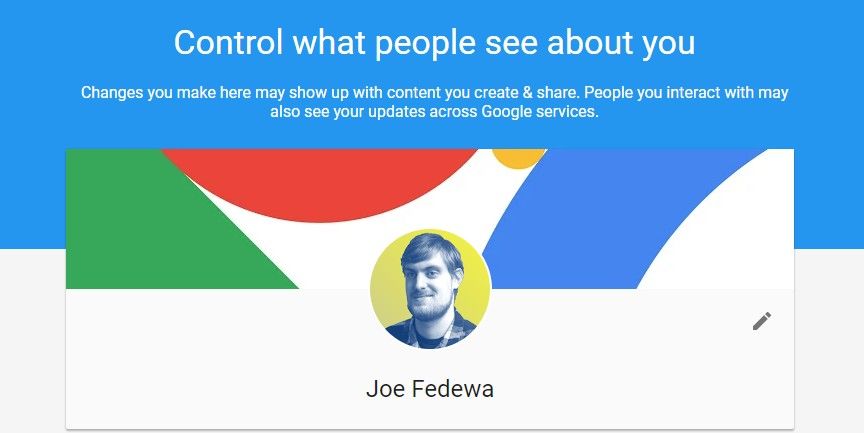
Searching for a celebrity on Google will bring up an information card. The card puts information like birth date, physical attributes, family members, social media accounts, etc in an easy to glance format. Regular folks don’t get this treatment, but a new feature called “profile cards” may change that a bit. People will be able to customize their own profile card and choose what information can be seen in Google Search.

Existing “About Me” page

Profile cards seem to be similar to Google+ profile pages and the current About Me page for Google accounts. You control what information appears on these cards, which is then discoverable when people search for your name. It doesn’t hide any of the links that will show up in a Google Search for your name, but it does put some level of control in your hands.

The information that will be required is your name, location, summary, and occupation. This is enough to distinguish you from other people, and there are more optional fields that can be filled out. Profile cards don’t appear to be live yet and we don’t know exactly what it will look like. Google mentions the feature on several newly published support pages. We’ll have to wait and see how useful the feature will be when it’s live.


Source: Google support (1, 2, 3) | Via: Android Police

The post Google “profile cards” will let you control what people see when searching for your name appeared first on xda-developers.


from xda-developers https://ift.tt/2I3Es21
via IFTTT

HTC Wildfire R70 announced with triple cameras and ancient microUSB port

HTC still makes phones. While it remains much more focused on the VR market, the company has woken up from its long slumber and announced a new phone for the Indian and Thailand markets: the HTC Wildfire X. If you want to read HTC’s recent history, read this article. After months of inactivity in the mobile space, HTC’s new CEO Yves Maitre recently stated in an interview that the company will launch a 5G phone this year. This was expected to be made in cooperation with Qualcomm. The company’s last phone launch under its own manufacturing were the HTC U19e and Desire 19+. In August 2019, it announced the HTC Wildfire X for the Indian market. However, the Wildfire X was not an HTC phone in the true sense, as HTC had made an agreement with Indian device makers Lava, Micromax, and Karbonn to use its licensed brand name for new phones, and the Wildfire X had actually been made by Lava. The new HTC Wildfire R70 is a similar phone. In India, it will be made by one of HTC’s brand partners. The Thailand / international variant may be made by HTC itself, or it may be developed by another local OEM/ODM. Here is the specifications list for the Wildfire R70:

Specifications HTC Wildfire R70
Dimensions & Weight
  • 163.2 x 77.8 x 8.9 mm
  • 186 g
Display
  • 6.53-inch HD+ IPS LCD
  • 1560×720 pixels
  • 19.5:9 aspect ratio
SoC
  • MediaTek Helio P23:
    • 8x ARM Cortex-A53 cores clocked at 2.0GHz
  • Mali-G72MP1 GPU
RAM & Storage
  • 2GB/32GB
  • microSD card slot
Battery
  • 4,000mAh
  • 5V/2A (10W) charging
Fingerprint Sensor Back-mounted fingerprint sensor
Rear Cameras
  • 16MP primary sensor, 1.4-micron, f/1.7, 6P lens
  • 2MP macro sensor, f/2.4
  • 2MP depth sensor, f/2.4
Front Camera
  • 8MP, f/2.0, 1080p video recording
Audio
  • 3.5mm headphone jack
Network Bands
  • Support Cat.6 download up to 300 Mbps, upload up to 50Mbps
  • Thailand / International variant – FDD-LTE: Band1/3/5/7/8
  • India – FDD-LTE: B1/B3/B5/B8, TDD-LTE: B40 / B41
  • 3G: 900/2100 MHz
  • 2G: 900/1800 MHz
Connectivity
  • Wi-Fi b/g/n
  • Bluetooth 4.2
  • Internal GPS antenna with Galileo, GLONASS
  • microUSB port
  • Dual nano-SIM slots with dual LTE
Android Version Android 9

HTC Wildfire R70

HTC Wildfire R70The only thing that jumps out from the HTC Wildfire R70’s specifications listing is the specifications of the primary camera. It’s using a 16MP sensor with 1.4-micron pixel size, which means the sensor is bigger than run-of-the-mill 16MP sensors out there. It also has a 6P lens, and a bright f/1.7 aperture. The 1.4-micron pixel size should lead to relatively good photos in low light, if the image processing is up to scratch.

The rest of the phone doesn’t bring anything new to the table. The MediaTek Helio P23 is a three-year-old SoC, as it was announced back in 2017. HTC or local Indian device makers could have chosen to use a much more powerful SoC such as the MediaTek Helio G70 (which is used in the Realme C3), but they chose not to. As it is, the performance won’t be anything to write home about as there are no big CPU cores, and the GPU itself is very, very weak as well.

The Wildfire R70 has a 6.53-inch HD+ display with a 19.5:9 aspect ratio. The display size is good for the Indian market; the resolution, not so much. The single RAM and storage option is absolutely miserable as the phone is only available in a 2GB RAM/32GB storage variant. There is a microSD card slot, but it’s unclear if it’s a dedicated slot in addition to the dual nano SIM slots.

In terms of connectivity, the phone has single-band Wi-Fi b/g/n, and a deprecated microUSB port that device makers, even in the budget range, are starting to move away from. In terms of software, it’s running Android 9. I am not aware how that was even possible to achieve in a phone announcement in February 2020.

HTC didn’t reveal any details regarding the Wildfire R70’s pricing and availability, but the phone will be available in India and Thailand, at least. Much as users might hope for even more competition to challenge what increasingly looks like a brilliant Xiaomi-Realme competitive duopoly, the Wildfire R70 won’t save HTC’s brand name or do it any favors, unless it’s priced at about ₹7,000 in India, which is unlikely.


Source: HTC (1, 2

The post HTC Wildfire R70 announced with triple cameras and ancient microUSB port appeared first on xda-developers.


from xda-developers https://ift.tt/2uzgvwf
via IFTTT

HTC Wildfire R70 announced with triple cameras and ancient microUSB port

HTC still makes phones. While it remains much more focused on the VR market, the company has woken up from its long slumber and announced a new phone for the Indian and Thailand markets: the HTC Wildfire X. If you want to read HTC’s recent history, read this article. After months of inactivity in the mobile space, HTC’s new CEO Yves Maitre recently stated in an interview that the company will launch a 5G phone this year. This was expected to be made in cooperation with Qualcomm. The company’s last phone launch under its own manufacturing were the HTC U19e and Desire 19+. In August 2019, it announced the HTC Wildfire X for the Indian market. However, the Wildfire X was not an HTC phone in the true sense, as HTC had made an agreement with Indian device makers Lava, Micromax, and Karbonn to use its licensed brand name for new phones, and the Wildfire X had actually been made by Lava. The new HTC Wildfire R70 is a similar phone. In India, it will be made by one of HTC’s brand partners. The Thailand / international variant may be made by HTC itself, or it may be developed by another local OEM/ODM. Here is the specifications list for the Wildfire R70:

Specifications HTC Wildfire R70
Dimensions & Weight
  • 163.2 x 77.8 x 8.9 mm
  • 186 g
Display
  • 6.53-inch HD+ IPS LCD
  • 1560×720 pixels
  • 19.5:9 aspect ratio
SoC
  • MediaTek Helio P23:
    • 8x ARM Cortex-A53 cores clocked at 2.0GHz
  • Mali-G72MP1 GPU
RAM & Storage
  • 2GB/32GB
  • microSD card slot
Battery
  • 4,000mAh
  • 5V/2A (10W) charging
Fingerprint Sensor Back-mounted fingerprint sensor
Rear Cameras
  • 16MP primary sensor, 1.4-micron, f/1.7, 6P lens
  • 2MP macro sensor, f/2.4
  • 2MP depth sensor, f/2.4
Front Camera
  • 8MP, f/2.0, 1080p video recording
Audio
  • 3.5mm headphone jack
Network Bands
  • Support Cat.6 download up to 300 Mbps, upload up to 50Mbps
  • Thailand / International variant – FDD-LTE: Band1/3/5/7/8
  • India – FDD-LTE: B1/B3/B5/B8, TDD-LTE: B40 / B41
  • 3G: 900/2100 MHz
  • 2G: 900/1800 MHz
Connectivity
  • Wi-Fi b/g/n
  • Bluetooth 4.2
  • Internal GPS antenna with Galileo, GLONASS
  • microUSB port
  • Dual nano-SIM slots with dual LTE
Android Version Android 9

HTC Wildfire R70

HTC Wildfire R70The only thing that jumps out from the HTC Wildfire R70’s specifications listing is the specifications of the primary camera. It’s using a 16MP sensor with 1.4-micron pixel size, which means the sensor is bigger than run-of-the-mill 16MP sensors out there. It also has a 6P lens, and a bright f/1.7 aperture. The 1.4-micron pixel size should lead to relatively good photos in low light, if the image processing is up to scratch.

The rest of the phone doesn’t bring anything new to the table. The MediaTek Helio P23 is a three-year-old SoC, as it was announced back in 2017. HTC or local Indian device makers could have chosen to use a much more powerful SoC such as the MediaTek Helio G70 (which is used in the Realme C3), but they chose not to. As it is, the performance won’t be anything to write home about as there are no big CPU cores, and the GPU itself is very, very weak as well.

The Wildfire R70 has a 6.53-inch HD+ display with a 19.5:9 aspect ratio. The display size is good for the Indian market; the resolution, not so much. The single RAM and storage option is absolutely miserable as the phone is only available in a 2GB RAM/32GB storage variant. There is a microSD card slot, but it’s unclear if it’s a dedicated slot in addition to the dual nano SIM slots.

In terms of connectivity, the phone has single-band Wi-Fi b/g/n, and a deprecated microUSB port that device makers, even in the budget range, are starting to move away from. In terms of software, it’s running Android 9. I am not aware how that was even possible to achieve in a phone announcement in February 2020.

HTC didn’t reveal any details regarding the Wildfire R70’s pricing and availability, but the phone will be available in India and Thailand, at least. Much as users might hope for even more competition to challenge what increasingly looks like a brilliant Xiaomi-Realme competitive duopoly, the Wildfire R70 won’t save HTC’s brand name or do it any favors, unless it’s priced at about ₹7,000 in India, which is unlikely.


Source: HTC (1, 2

The post HTC Wildfire R70 announced with triple cameras and ancient microUSB port appeared first on xda-developers.


from xda-developers https://ift.tt/2uzgvwf
via IFTTT

The Microsoft Office update for Android adds dual screen support on LG phones

Microsoft Office on mobile has had a long history. Office Mobile was first released for the deprecated Windows Mobile OS back in the late 2000s. Then, Microsoft brought it to Windows Phone, but the functionality was quite limited as it wasn’t even on par with other productivity apps. The modern Office apps’ inception was actually on iOS, and not on Windows Phone. The company separately released the Microsoft Word, Excel, and PowerPoint apps for iOS, before bringing them to Android in June 2015. The apps were launched for Windows 10 and Windows 10 Mobile later that year. Their functionality was better than Google’s Docs, Sheets, and Slides apps on Android, as they offered quite a few of the advanced features that the desktop applications offer on Windows and macOS.

In November 2019, Microsoft integrated the functionality of the three apps into a single Office app and released it as a beta for Android and iOS, complete with support for the company’s Fluent design language, which it wants third-party Android app developers to adopt. This month, the stable and all-in-one Microsoft Office app was released on the Play Store. Users no longer have to install three different apps from Microsoft, and the company is offering more convenience than Google’s productivity apps in this respect. The Office app on Android now also supports the Dual Screen attachment on recent LG phones, which include the LG V50 ThinQ, LG G8X ThinQ, and the new LG V60 ThinQ. This is shown off by a user in the videos linked here.

Microsoft Office's dual-screen support on LG phones

Source: William Richardson

The dual-screen support lets users use both displays on the device as different monitors. They can open a Word document on the primary display and edit a PowerPoint presentation on the second display, for example. It’s intended as a boost to productivity. Microsoft presumably added this feature in preparation for its own dual-screen device, the Surface Duo, which is on track to be released in Fall 2020. While we wait for the Surface Duo to come to market, users of the Dual Screen attachment on the aforementioned LG phones can benefit from dual screen support on the Office app and increase their productivity.

Thanks to William Richardson for sharing these videos with us.

Microsoft Office: Word, Excel, PowerPoint & More (Free+, Google Play) →

The post The Microsoft Office update for Android adds dual screen support on LG phones appeared first on xda-developers.


from xda-developers https://ift.tt/388Wo5H
via IFTTT

The Microsoft Office update for Android adds dual screen support on LG phones

Microsoft Office on mobile has had a long history. Office Mobile was first released for the deprecated Windows Mobile OS back in the late 2000s. Then, Microsoft brought it to Windows Phone, but the functionality was quite limited as it wasn’t even on par with other productivity apps. The modern Office apps’ inception was actually on iOS, and not on Windows Phone. The company separately released the Microsoft Word, Excel, and PowerPoint apps for iOS, before bringing them to Android in June 2015. The apps were launched for Windows 10 and Windows 10 Mobile later that year. Their functionality was better than Google’s Docs, Sheets, and Slides apps on Android, as they offered quite a few of the advanced features that the desktop applications offer on Windows and macOS.

In November 2019, Microsoft integrated the functionality of the three apps into a single Office app and released it as a beta for Android and iOS, complete with support for the company’s Fluent design language, which it wants third-party Android app developers to adopt. This month, the stable and all-in-one Microsoft Office app was released on the Play Store. Users no longer have to install three different apps from Microsoft, and the company is offering more convenience than Google’s productivity apps in this respect. The Office app on Android now also supports the Dual Screen attachment on recent LG phones, which include the LG V50 ThinQ, LG G8X ThinQ, and the new LG V60 ThinQ. This is shown off by a user in the videos linked here.

Microsoft Office's dual-screen support on LG phones

Source: William Richardson

The dual-screen support lets users use both displays on the device as different monitors. They can open a Word document on the primary display and edit a PowerPoint presentation on the second display, for example. It’s intended as a boost to productivity. Microsoft presumably added this feature in preparation for its own dual-screen device, the Surface Duo, which is on track to be released in Fall 2020. While we wait for the Surface Duo to come to market, users of the Dual Screen attachment on the aforementioned LG phones can benefit from dual screen support on the Office app and increase their productivity.

Thanks to William Richardson for sharing these videos with us.

Microsoft Office: Word, Excel, PowerPoint & More (Free+, Google Play) →

The post The Microsoft Office update for Android adds dual screen support on LG phones appeared first on xda-developers.


from xda-developers https://ift.tt/388Wo5H
via IFTTT

Get Better Sleep with the HONOR MagicWatch 2

The HONOR MagicWatch 2 is one of the best options for people looking to track their workout. But what is equally important to your fitness routine, is the quality of your sleep. That’s why HONOR made the MagicWatch 2 with advanced sleep-tracking and data analysis. These tools are put to use to help you get better quality sleep.

How to Setup Sleep Tracking on the HONOR MagicWatch2

In order to setup the sleep tracking feature on your watch, you’ll want to download the Huawei Health app from the play store. You are going to pair your watch with this app and enable the sleep tracking from Huawei Health.

Huawei Health (Free, Google Play) →

Open the app and pair your watch to your phone. Then navigate to the “Profile” section in the lower right corner of the app. Go to your watch profile and find the “Sleep Tracking” option in the settings. In the sleep tracking section, enable sleep detection.

Once you’ve done this, your HONOR MagicWatch 2 will be able to track your sleep quality while it is being worn. Once you’re ready for bed, the HONOR MagicWatch 2 will automatically detect when you’ve fallen asleep. There is no need to activate anything before you go to bed. In the morning, you’ll be able to view your sleep tracking data in detail on the Huawei Health app.

Honor MagicWatch 2 with Huawei Health App

TruSleep Sleep Quality Analysis

The HONOR MagicWatch 2 comes with a feature called TruSleep which you can enable in the Huawei Health app. The TruSleep feature will provide you with a sleep quality analysis. You can also see suggestions on what you can do to improve your quality of sleep. It’s a very powerful feature that can provide you with great tips, based on the data that your watch has gathered from your sleeping.

Some of the things your TruSleep feature will monitor are the number of times you wake up, light/deep/REM sleep, and your breathing quality. All of this data factors into how TruSleep will give you tips for better sleep.

Get the HONOR MagicWatch 2
We thank HONOR for sponsoring this post. Our sponsors help us pay for the many costs associated with running XDA, including server costs, full time developers, news writers, and much more. While you might see sponsored content (which will always be labeled as such) alongside Portal content, the Portal team is in no way responsible for these posts. Sponsored content, advertising and XDA Depot are managed by a separate team entirely. XDA will never compromise its journalistic integrity by accepting money to write favorably about a company, or alter our opinions or views in any way. Our opinion cannot be bought.

The post Get Better Sleep with the HONOR MagicWatch 2 appeared first on xda-developers.


from xda-developers https://ift.tt/2VDrRe3
via IFTTT