LightBlog

mardi 25 février 2020

First Samsung Galaxy S20 Ultra update reportedly rolls out with March 2020 patches and camera auto-focus improvements

Samsung recently launched its Galaxy S20 lineup featuring Space Zoom cameras, 120Hz displays, 5G, and much more. As part of the lineup, the company launched three new devices — the Galaxy S20, Galaxy S20+, and Galaxy S20 Ultra. As you’d expect, the Galaxy S20 Ultra is the top-of-the-line device from Samsung for 2020 and it packs in all the bells and whistles the company could possibly fit in it. In the camera department, the Galaxy S20 Ultra features a 108MP primary sensor, a 48MP periscope zoom lens, a 12MP ultra-wide sensor, and a 0.3MP ToF sensor. With this kind of hardware, you’d expect the Galaxy S20 Ultra to offer stellar imaging capabilities. But early reports from reviewers reveal that the Galaxy S20 Ultra has some focusing issues. Thankfully though, it seems like Samsung is aware of this issue and has already started rolling out a fix for the same.

As per a recent report from TizenHelp, Samsung has started rolling out the first firmware update for the Galaxy S20 Ultra. As mentioned earlier, the update packs in improvements for the device’s autofocus capabilities, along with the Android security patches for March 2020. The update (firmware version G988NKSU1ATBR) is currently rolling out to Galaxy S20 Ultra users in Samsung’s home country of South Korea and it may also be released for the other two models in the lineup sometime soon. Galaxy S20 Ultra users in other regions should also receive the update in the next couple of days.

Samsung Galaxy S20 Ultra XDA Forums

Renowned leakster Ice Universe was among the many people to have reported facing focusing issues on the Galaxy S20 Ultra. Now, in a recent post on Weibo, Ice Universe has shared a video claiming that the Korean users who have received the update report that the auto-focus has been much improved. As of now, we have no word from Samsung regarding the release timeline for the firmware update, but we’ll update this post as and when we receive more information.


Source: TizenHelp

The post First Samsung Galaxy S20 Ultra update reportedly rolls out with March 2020 patches and camera auto-focus improvements appeared first on xda-developers.


from xda-developers https://ift.tt/3a84xJ0
via IFTTT

Realme 1, 5, 5s, U1, X, and X2 get updates with February 2020 security patches

Realme certainly has a fast device release schedule. After launching the flagship Realme X50 Pro (first impressions), the brand has started teasing the upcoming Realme 6 series, and live photos of the Realme 6i have appeared via FCC certification. However, it hasn’t forgotten its older phones. It started rolling out ColorOS 7-based Realme UI, powered by Android 10, to the Realme XT, and the Realme 3 Pro, while beta programs are available for the Realme X2 Pro and the Realme X2. For the most part, the company has been diligent with monthly security patch updates as well, as its record here is actually better than OnePlus. Google released the February 2020 security patches three weeks ago. Now, Realme has started rolling them out for the Realme 1, Realme 5, Realme 5s, Realme U1, Realme X2, and the Realme X.

All of the below updates are for the Indian region. The update for the Realme X is based on ColorOS 6.0, and has a download size of 2.79GB. It can be downloaded from here, and the changelog is noted below. Notably, the update brings VoWiFi support for Jio and Airtel users for all Realme phones mentioned in the article.

Changelog for the Realme X

Changelog:
**Security**:
● Android security patch: February, 2020
**System**:
● Updated some third-party applications to the latest version
● Fixed some known bugs, and improved system stability
**Network**:
● Added Airtel and Jio VoWiFi feature
* Android version: Android 9.0

The Realme 5s’ update is running on ColorOS 6.0.1. It has a download size of 2.57GB, and it can be downloaded from here. The changelog is noted below.

Changelog for the Realme 5s

Changelog:
**Security**:
● Android security patch: February, 2020
**System**:
● Fixed camera crash issue in some scenes, and improved system stability
**Network**:
● Added Airtel and Jio VoWiFi feature

The Realme U1’s update is interesting, as it brings swipe gestures from both sides. This is actually an Android 10 feature, which Realme has back-ported to Android 9. The update is on ColorOS 6.0, and it also adds a hotspot speed limit. It has a download size of 2.06GB, and it can be downloaded from here. The changelog is noted below.

Changelog for the Realme U1

Changelog:
**Security**:
● Android security patch: February, 2020
**Network**:
● Added Airtel and Jio VoWiFi feature
**Settings**:
● Added swipe gestures from both sides
● Added hotspot speed limit
* Android version: Android 9.0

The Realme 5′ update is running on ColorOS 6.0.1. It has a download size of 2.57GB, and it can be downloaded from here. The changelog is noted below. (The update is identical to that of the Realme 5s.)

Changelog for the Realme 5

Changelog:
**Security**:
● Android security patch: February, 2020
**System**:
● Fixed camera crash issue in some scenes, and improved system stability
**Network**:
● Added Airtel and Jio VoWiFi feature

Finally, the Realme 1’s update is also running on ColorOS 6.0. It gets swipe gestures from both sides and the hotspot speed limit feature, like the Realme U1. The update has a download size of 2.15GB, and it can be downloaded from here. The changelog is noted below.

Changelog for the Realme 1

Changelog:
Security:
● Android security patch: February, 2020
Network:
● Added Airtel and Jio VoWiFi feature
Settings:
● Added swipe gestures from both sides
● Added hotspot speed limit
* Android version: Android 9.0

The Realme X2’s update is running on ColorOS 6.1. It has a download size of 2.56GB, and it can be downloaded from here. The changelog is noted below.

Changelog for the Realme X2

Changelog:
Security:
● Android security patch: February, 2020
Dark Mode:
● Added from sunset to sunrise and schedule time feature
Network:
● Added Airtel and Jio vowifi feature

The post Realme 1, 5, 5s, U1, X, and X2 get updates with February 2020 security patches appeared first on xda-developers.


from xda-developers https://ift.tt/2HSGJgr
via IFTTT

Realme 1, 5, 5s, U1, X, and X2 get updates with February 2020 security patches

Realme certainly has a fast device release schedule. After launching the flagship Realme X50 Pro (first impressions), the brand has started teasing the upcoming Realme 6 series, and live photos of the Realme 6i have appeared via FCC certification. However, it hasn’t forgotten its older phones. It started rolling out ColorOS 7-based Realme UI, powered by Android 10, to the Realme XT, and the Realme 3 Pro, while beta programs are available for the Realme X2 Pro and the Realme X2. For the most part, the company has been diligent with monthly security patch updates as well, as its record here is actually better than OnePlus. Google released the February 2020 security patches three weeks ago. Now, Realme has started rolling them out for the Realme 1, Realme 5, Realme 5s, Realme U1, Realme X2, and the Realme X.

All of the below updates are for the Indian region. The update for the Realme X is based on ColorOS 6.0, and has a download size of 2.79GB. It can be downloaded from here, and the changelog is noted below. Notably, the update brings VoWiFi support for Jio and Airtel users for all Realme phones mentioned in the article.

Changelog for the Realme X

Changelog:
**Security**:
● Android security patch: February, 2020
**System**:
● Updated some third-party applications to the latest version
● Fixed some known bugs, and improved system stability
**Network**:
● Added Airtel and Jio VoWiFi feature
* Android version: Android 9.0

The Realme 5s’ update is running on ColorOS 6.0.1. It has a download size of 2.57GB, and it can be downloaded from here. The changelog is noted below.

Changelog for the Realme 5s

Changelog:
**Security**:
● Android security patch: February, 2020
**System**:
● Fixed camera crash issue in some scenes, and improved system stability
**Network**:
● Added Airtel and Jio VoWiFi feature

The Realme U1’s update is interesting, as it brings swipe gestures from both sides. This is actually an Android 10 feature, which Realme has back-ported to Android 9. The update is on ColorOS 6.0, and it also adds a hotspot speed limit. It has a download size of 2.06GB, and it can be downloaded from here. The changelog is noted below.

Changelog for the Realme U1

Changelog:
**Security**:
● Android security patch: February, 2020
**Network**:
● Added Airtel and Jio VoWiFi feature
**Settings**:
● Added swipe gestures from both sides
● Added hotspot speed limit
* Android version: Android 9.0

The Realme 5′ update is running on ColorOS 6.0.1. It has a download size of 2.57GB, and it can be downloaded from here. The changelog is noted below. (The update is identical to that of the Realme 5s.)

Changelog for the Realme 5

Changelog:
**Security**:
● Android security patch: February, 2020
**System**:
● Fixed camera crash issue in some scenes, and improved system stability
**Network**:
● Added Airtel and Jio VoWiFi feature

Finally, the Realme 1’s update is also running on ColorOS 6.0. It gets swipe gestures from both sides and the hotspot speed limit feature, like the Realme U1. The update has a download size of 2.15GB, and it can be downloaded from here. The changelog is noted below.

Changelog for the Realme 1

Changelog:
Security:
● Android security patch: February, 2020
Network:
● Added Airtel and Jio VoWiFi feature
Settings:
● Added swipe gestures from both sides
● Added hotspot speed limit
* Android version: Android 9.0

The Realme X2’s update is running on ColorOS 6.1. It has a download size of 2.56GB, and it can be downloaded from here. The changelog is noted below.

Changelog for the Realme X2

Changelog:
Security:
● Android security patch: February, 2020
Dark Mode:
● Added from sunset to sunrise and schedule time feature
Network:
● Added Airtel and Jio vowifi feature

The post Realme 1, 5, 5s, U1, X, and X2 get updates with February 2020 security patches appeared first on xda-developers.


from xda-developers https://ift.tt/2HSGJgr
via IFTTT

Imint’s Vidhance Selfie Mode brings a Google Duo-like auto-framing feature to smartphone cameras

Imint is a Swedish company that produces video software used by smartphone brands such as OnePlus and Xiaomi. Vidhance is the company’s flagship product and today they are announcing a new feature for multi-camera devices called “Selfie Mode.”

A name like “Selfie Mode” does the feature a disservice as there’s actually quite a bit going on here. Selfie Mode is part of Vidhance, which is a video enhancement software platform that can transform smartphone cameras into professional recording devices. Put simply, Imint uses algorithms to maximize the potential of the hardware. As mentioned, manufacturers such as Xiaomi, OPPO, OnePlus, and Vivo already use Vidhance.

Vidhance Selfie Mode is all about making sure people stay in frame when on a video call, recording a selfie video, and much more. Selfie Mode uses AI and facial recognition to continuously track the user’s face and subtly reposition it within the frame. Imnit claims that this even works in low-light conditions. This is similar to a feature in Google Duo. You can watch the video below to see it in action.

Imnit has also announced “Super Stabilization,” which it claims can bring action camera performance to smartphones. It utilizes wide-angle cameras and high-resolution sensors to create a more stable video. It manipulates the original video to compensate for excessive motion. Lastly, the company talked about Vidhance MCT. This is a feature that uses an algorithm to create a smooth transition when a user switches between multiple cameras.

All three of these features will be included in the Vidhance 3.6 software release. Be on the lookout for these features in smartphone cameras in the future.


Source: Imint

The post Imint’s Vidhance Selfie Mode brings a Google Duo-like auto-framing feature to smartphone cameras appeared first on xda-developers.


from xda-developers https://ift.tt/380bvOO
via IFTTT

HONOR 9X Pro APP Guide – ALL The Ways to Get APPs You Need

If you’re thinking about getting an HONOR 9X Pro, or if you already have one, you might be wondering how to get some of the more common apps that you’d want on the Google Play store. Many of these apps have become more difficult to get, due to the ban of Google services on Huawei devices. Without the Google Play store, you’ll need to find workarounds to get some of your favorite apps. Follow this guide to find several ways that you can find these apps for your HONOR 9X Pro.

The Honor 9X Pro features a 6.59-inch display, the Kirin 810 processor, 6GB of RAM, 256GB of storage, and a 4,000mAh battery. The device features three rear cameras: 48MP, 8MP wide-angle, and 2MP depth sensor. The front 16MP camera is housed in a pop-up mechanism, creating very slim bezels on the front of the phone.

Specifications Honor 9X Pro
Dimensions and Weight
  • 163.1 x 77.2 x 8.8 mm
  • 206g
Display
  • 6.59-inches LCD
  • 2340 x 1080 resolution
SoC HiSilicon Kirin 810:
  • 2x ARM Cortex-A76 @ 2.27GHz +
  • 6x ARM Cortex-A55 @1.55GHz;
  • 7nm fabrication process
  • Mali-G52 MP6 GPU
RAM and Storage
  • 6GB + 256GB
Expandability Up to 512GB via microSD
Battery 4,000mAh
Fingerprint Sensor Yes, side-mounted
Rear Camera
  • 48MP primary sensor, f/1.8
  • 8MP, ultrawide
  • 2MP, depth sensor
Front Camera 16MP, f/2.2, pop-up
Android Version Android 9 Pie underneath EMUI 9.1

1. Huawei APP Gallery

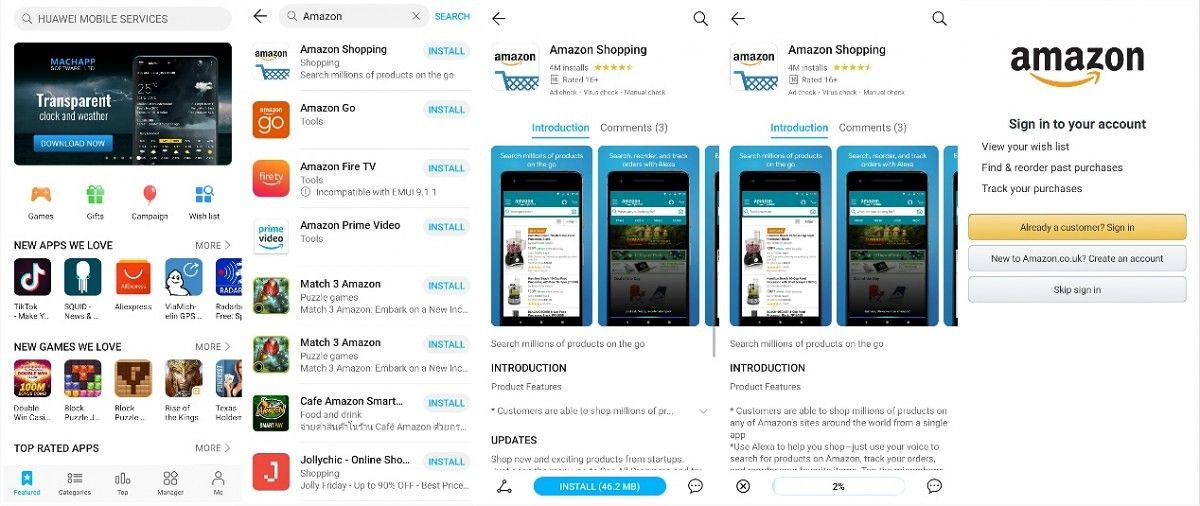
Huawei App Gallery is a massive market for apps that is expanding very quickly. You will be able to find a lot of the popular apps you’re looking for using this service. Just open the app and search for your desired app and you’ll be able to find exact or similar matches. In the screenshots below, you’ll be able to see that the Amazon app is available for download.

Amazing App on Huawei App Store

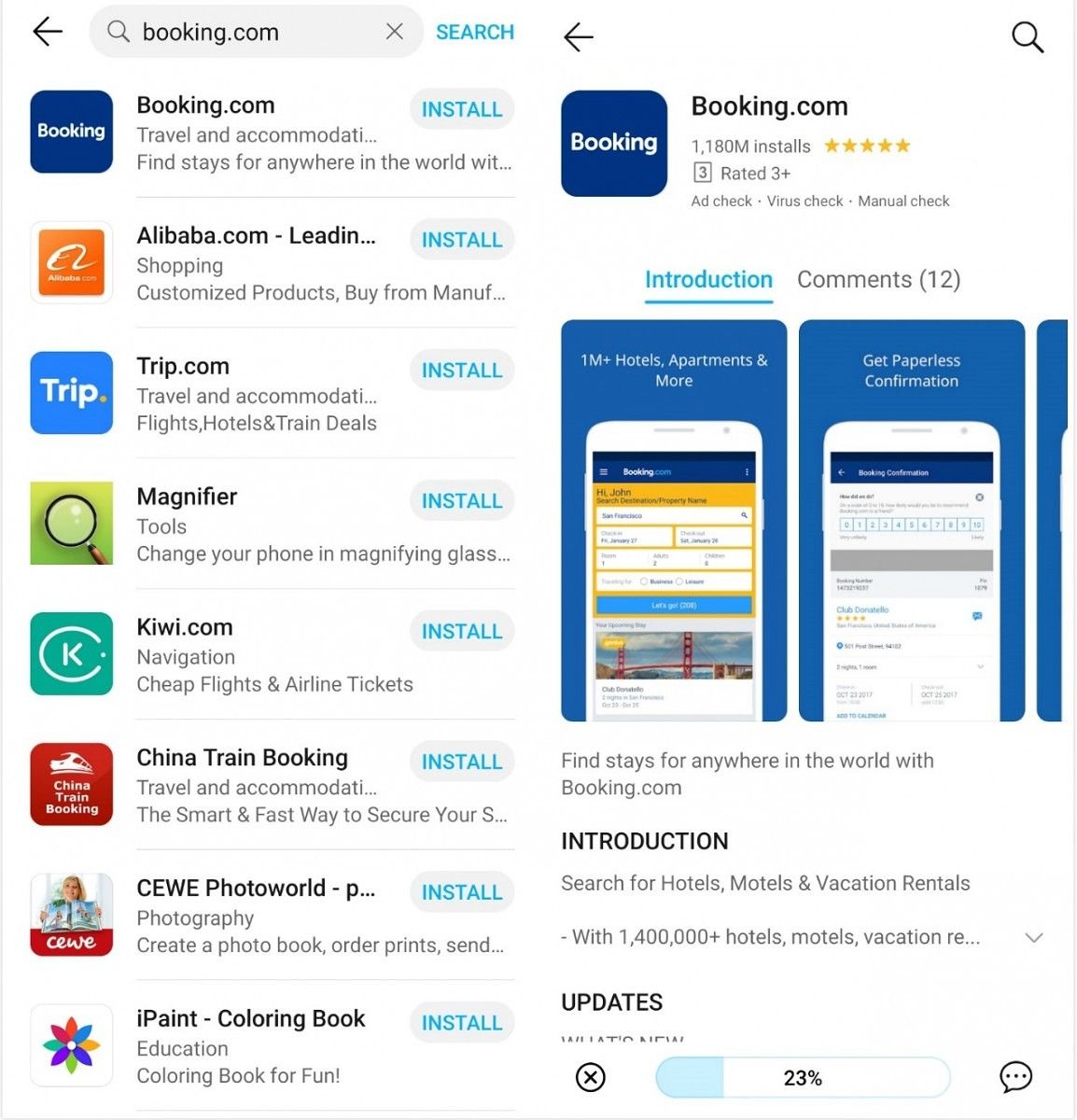
The Booking.com app is also available in the App Gallery.

Booking.com App on Huawei App Store

2. Phone Clone

Phone Clone allows you to quickly copy apps and data to an HONOR phone, no matter what your old phone is.

Before copying the apps, you need to install the Phone Clone on both phones. The app can find and copy on whatever app store you are using.

Phone Clone app

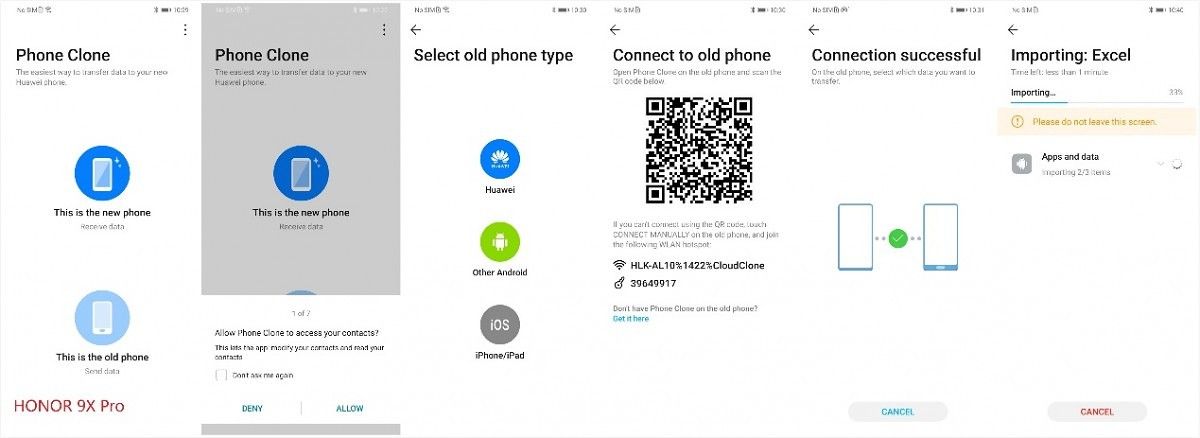
Phone Clone is a very simple app to use. In this case, you’ll choose the “This is the new phone” button on your HONOR 9X Pro, and chose the “This is the old phone” button on the phone you’re cloning from.

After following the steps, you can choose whatever data and app you need. For example, if you want Amazon, Excel, and Facebook on your HONOR 9X Pro, just selected them in Phone Clone and wait for them to transfer.

Phone Clone Transfering

Phone Clone Transfering Booking.com app

Selecting apps to Transfer on Phone Clone

3. Alternative APP Store (APKPure)

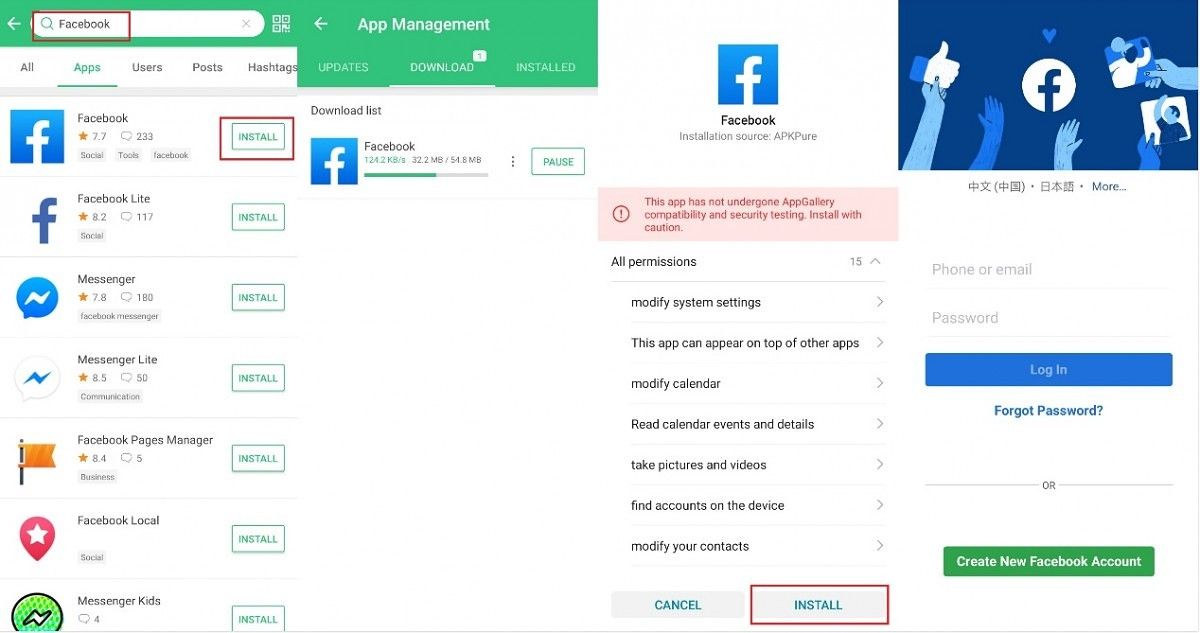
With APK Pure, you can not only download apps you need but also manage and update them. When you install the app which is downloaded from APK Pure for the first time, the HONOR 9X Pro will ask your permission to install apps from the APK Pure. This will only show up once, and it won’t bother you again.

APKPure App Store
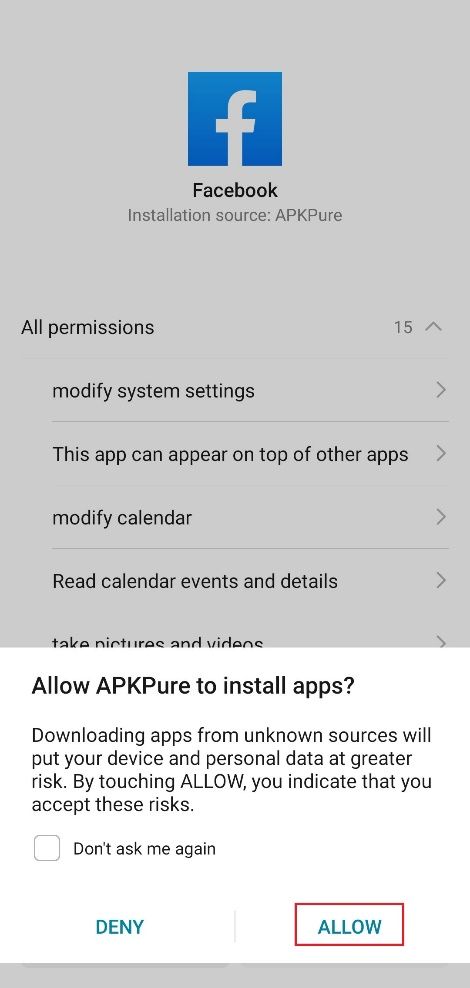
Installing Facebook from APKPure

You’ll be able to install all of your favorite social media apps and keep them updated through APKPure.

Facebook on APKPure

WhatsApp on APKPure

4. Alternative APPs

For some apps that HONOR 9X Pro doesn’t support, you can easily find alternatives on APKPure too. For example, we’ve found some good alternatives to recommend to you.

[Google Photos→ Photo Tool] [Google Drive→ File Commander] [Google Contact→ Cloze]

Google Photos→ Photo Tool

The Photo Tool app helps you backup, manage, and share your photos and videos easy and fast.

Google Drive→ File Commander

File Commander is a powerful file manager that allows you to handle any file on your Android device, cloud storage, or network location via a clean and intuitive interface. It is loaded with features – Vault security, Recycle Bin, Storage Analyzer, File Converter & also receive 5GB Free storage on MobiSystems Drive.

Google Contact→ Cloze

Cloze automatically creates one view of every person and company – all their contact details, and your complete history – your phone calls, text messages, every email back and forth, meetings, notes, files, social, and messages.

5. WAP Shortcuts

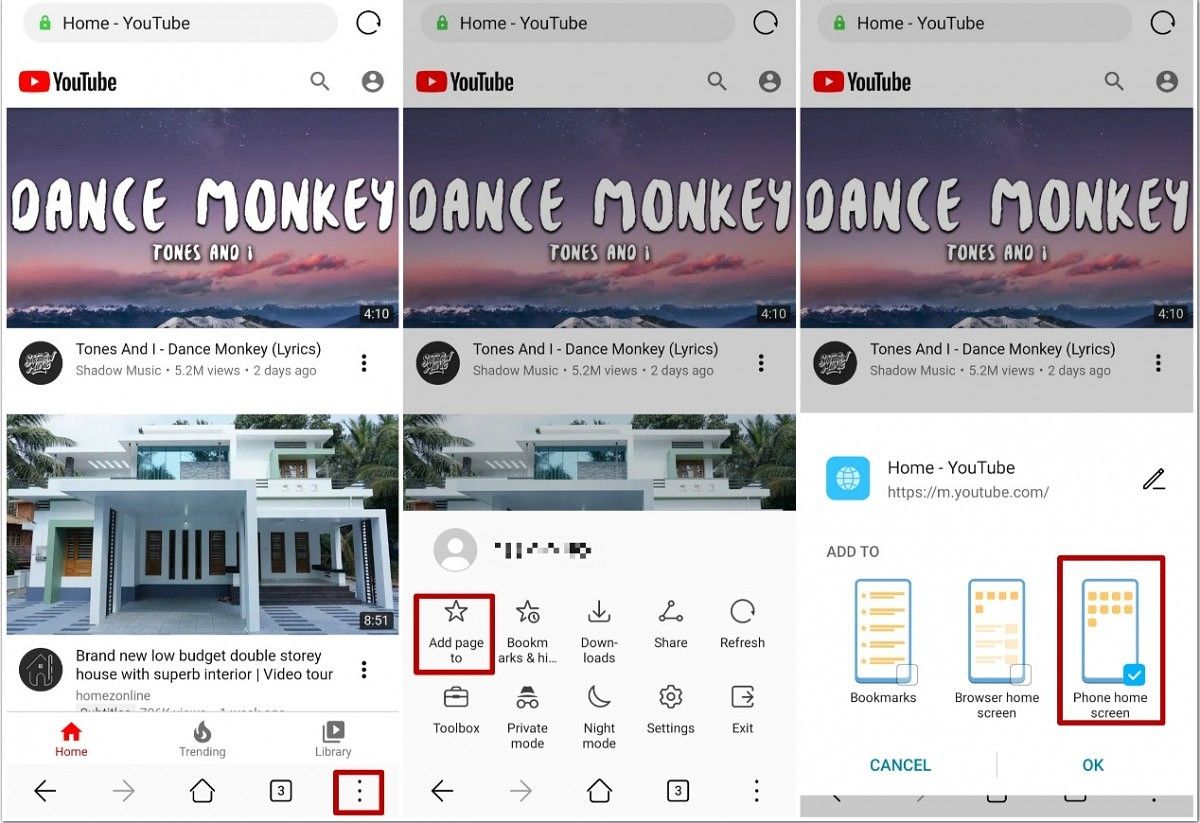
For some apps that provide good browser experience, the best alternative would be to create a shortcut on your homepage for a WAP version of the website. For example YouTube.

YouTube WAP Shortcut

Then you’ll find the shortcut on your homepage, just like the YouTube app.

These tips should help you navigate around the Google ban and still be able to get some of your favorite apps.

We thank HONOR for sponsoring this post. Our sponsors help us pay for the many costs associated with running XDA, including server costs, full time developers, news writers, and much more. While you might see sponsored content (which will always be labeled as such) alongside Portal content, the Portal team is in no way responsible for these posts. Sponsored content, advertising and XDA Depot are managed by a separate team entirely. XDA will never compromise its journalistic integrity by accepting money to write favorably about a company, or alter our opinions or views in any way. Our opinion cannot be bought.

The post HONOR 9X Pro APP Guide – ALL The Ways to Get APPs You Need appeared first on xda-developers.


from xda-developers https://ift.tt/2SYaB1a
via IFTTT

HONOR 9X Pro APP Guide – ALL The Ways to Get APPs You Need

If you’re thinking about getting an HONOR 9X Pro, or if you already have one, you might be wondering how to get some of the more common apps that you’d want on the Google Play store. Many of these apps have become more difficult to get, due to the ban of Google services on Huawei devices. Without the Google Play store, you’ll need to find workarounds to get some of your favorite apps. Follow this guide to find several ways that you can find these apps for your HONOR 9X Pro.

The Honor 9X Pro features a 6.59-inch display, the Kirin 810 processor, 6GB of RAM, 256GB of storage, and a 4,000mAh battery. The device features three rear cameras: 48MP, 8MP wide-angle, and 2MP depth sensor. The front 16MP camera is housed in a pop-up mechanism, creating very slim bezels on the front of the phone.

Specifications Honor 9X Pro
Dimensions and Weight
  • 163.1 x 77.2 x 8.8 mm
  • 206g
Display
  • 6.59-inches LCD
  • 2340 x 1080 resolution
SoC HiSilicon Kirin 810:
  • 2x ARM Cortex-A76 @ 2.27GHz +
  • 6x ARM Cortex-A55 @1.55GHz;
  • 7nm fabrication process
  • Mali-G52 MP6 GPU
RAM and Storage
  • 6GB + 256GB
Expandability Up to 512GB via microSD
Battery 4,000mAh
Fingerprint Sensor Yes, side-mounted
Rear Camera
  • 48MP primary sensor, f/1.8
  • 8MP, ultrawide
  • 2MP, depth sensor
Front Camera 16MP, f/2.2, pop-up
Android Version Android 9 Pie underneath EMUI 9.1

1. Huawei APP Gallery

Huawei App Gallery is a massive market for apps that is expanding very quickly. You will be able to find a lot of the popular apps you’re looking for using this service. Just open the app and search for your desired app and you’ll be able to find exact or similar matches. In the screenshots below, you’ll be able to see that the Amazon app is available for download.

Amazing App on Huawei App Store

The Booking.com app is also available in the App Gallery.

Booking.com App on Huawei App Store

2. Phone Clone

Phone Clone allows you to quickly copy apps and data to an HONOR phone, no matter what your old phone is.

Before copying the apps, you need to install the Phone Clone on both phones. The app can find and copy on whatever app store you are using.

Phone Clone app

Phone Clone is a very simple app to use. In this case, you’ll choose the “This is the new phone” button on your HONOR 9X Pro, and chose the “This is the old phone” button on the phone you’re cloning from.

After following the steps, you can choose whatever data and app you need. For example, if you want Amazon, Excel, and Facebook on your HONOR 9X Pro, just selected them in Phone Clone and wait for them to transfer.

Phone Clone Transfering

Phone Clone Transfering Booking.com app

Selecting apps to Transfer on Phone Clone

3. Alternative APP Store (APKPure)

With APK Pure, you can not only download apps you need but also manage and update them. When you install the app which is downloaded from APK Pure for the first time, the HONOR 9X Pro will ask your permission to install apps from the APK Pure. This will only show up once, and it won’t bother you again.

APKPure App Store

Installing Facebook from APKPure

You’ll be able to install all of your favorite social media apps and keep them updated through APKPure.

Facebook on APKPure

WhatsApp on APKPure

4. Alternative APPs

For some apps that HONOR 9X Pro doesn’t support, you can easily find alternatives on APKPure too. For example, we’ve found some good alternatives to recommend to you.

[Google Photos→ Photo Tool] [Google Drive→ File Commander] [Google Contact→ Cloze]

Google Photos→ Photo Tool

The Photo Tool app helps you backup, manage, and share your photos and videos easy and fast.

Google Drive→ File Commander

File Commander is a powerful file manager that allows you to handle any file on your Android device, cloud storage, or network location via a clean and intuitive interface. It is loaded with features – Vault security, Recycle Bin, Storage Analyzer, File Converter & also receive 5GB Free storage on MobiSystems Drive.

Google Contact→ Cloze

Cloze automatically creates one view of every person and company – all their contact details, and your complete history – your phone calls, text messages, every email back and forth, meetings, notes, files, social, and messages.

5. WAP Shortcuts

For some apps that provide good browser experience, the best alternative would be to create a shortcut on your homepage for a WAP version of the website. For example YouTube.

YouTube WAP Shortcut

Then you’ll find the shortcut on your homepage, just like the YouTube app.

These tips should help you navigate around the Google ban and still be able to get some of your favorite apps.

We thank HONOR for sponsoring this post. Our sponsors help us pay for the many costs associated with running XDA, including server costs, full time developers, news writers, and much more. While you might see sponsored content (which will always be labeled as such) alongside Portal content, the Portal team is in no way responsible for these posts. Sponsored content, advertising and XDA Depot are managed by a separate team entirely. XDA will never compromise its journalistic integrity by accepting money to write favorably about a company, or alter our opinions or views in any way. Our opinion cannot be bought.

The post HONOR 9X Pro APP Guide – ALL The Ways to Get APPs You Need appeared first on xda-developers.


from xda-developers https://ift.tt/2SYaB1a
via IFTTT

Upcoming Realme 6i appears in live photos via FCC filing

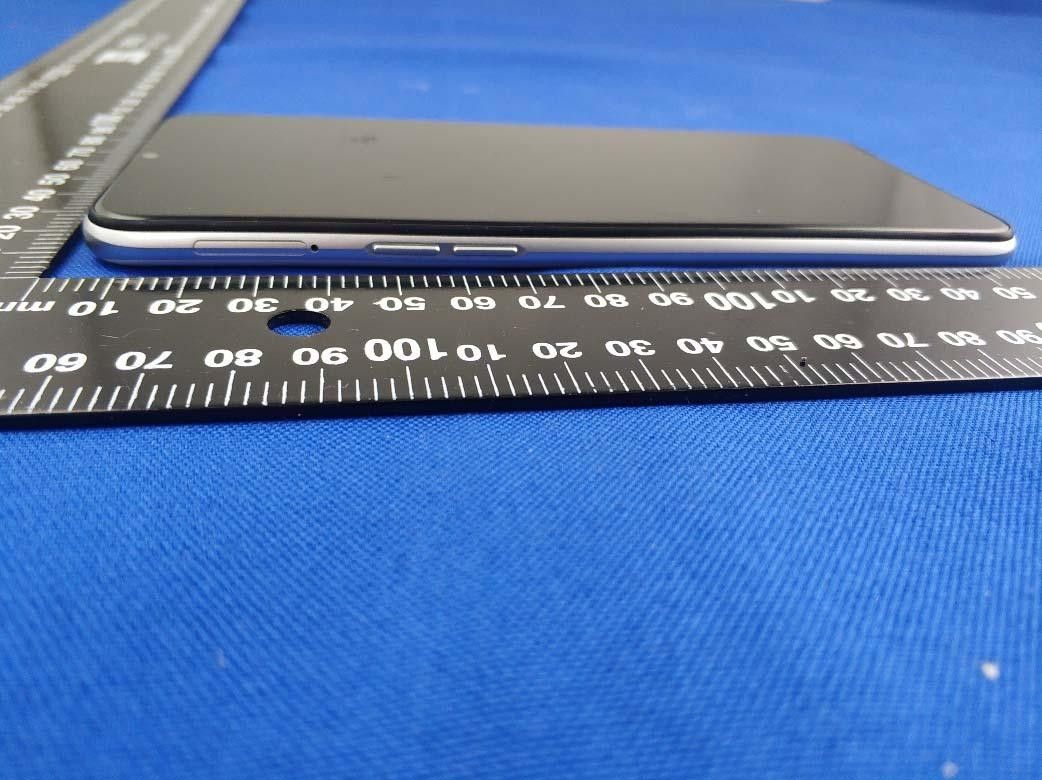
Realme’s fast smartphone release schedule shows no sign of ending. The company’s Realme 5 series are due for a refresh, as they were announced six months ago. The flagship Realme X2 Pro (review) was succeeded after only four months by the Realme X50 Pro (first impressions). Realme has now started teasing the launch of the Realme 6 series in India, making it certain that the launch event will take place soon. The Realme 6 series will consist of the Realme 6, Realme 6 Pro, and the Realme 6i. The Realme 6i will succeed the Realme 5i, which was announced on January 9—less than two months ago. The Realme 6i has now received FCC certification, revealing live photos and specifications of the device.

The phone’s model number is RMX2040. The model number matches with the Realme 6i name, as confirmed by Thailand’s NBTC certification. We can see the phone has a waterdrop notch, just like its predecessor. The list of revealed specifications includes quad cameras on the back, with the primary camera being a 48MP sensor (likely to be the Samsung GM1 or GM2). The Realme 5i had a 12MP primary camera. We are probably looking at a standard + ultra-wide angle + 2MP macro + 2MP depth sensor cameras.

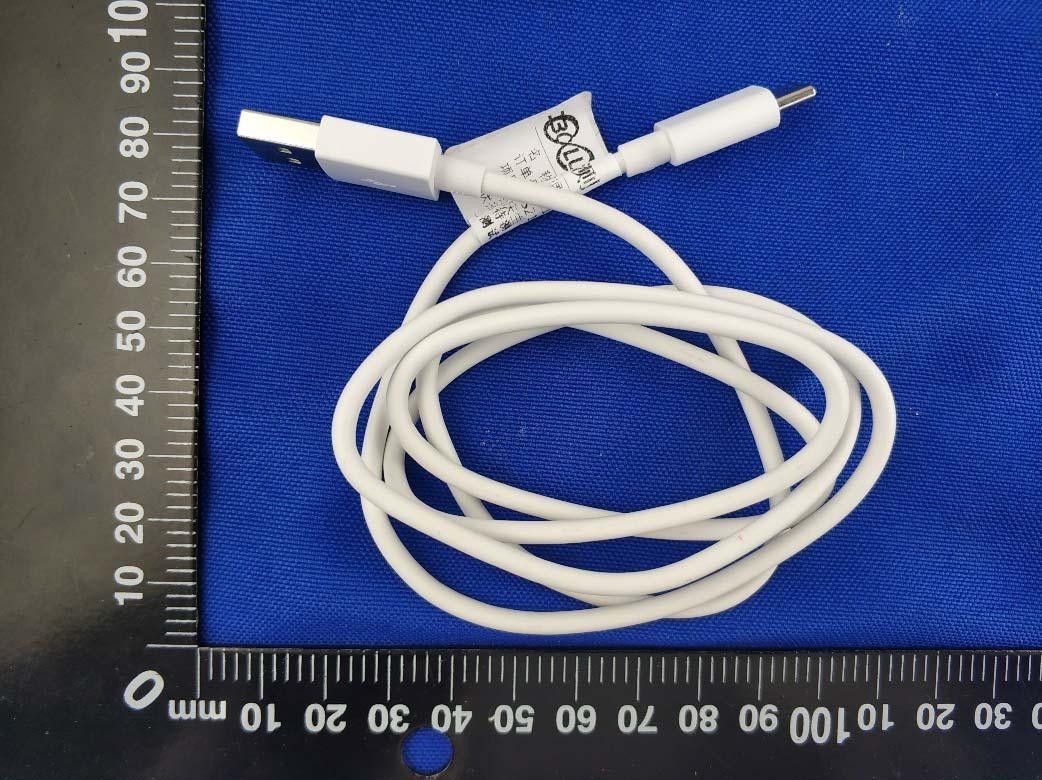
The Realme 6i has a 5,000mAh battery with support for 18W fast charging. This is another important upgrade over the Realme 5i, which featured just 10W charging. The Realme 6i also upgrades to a USB Type-C port, while retaining the 3.5mm headphone jack.

The phone is expected to be powered by ColorOS 7-based Realme UI on Android 10 out of the box. It measures 164.4 x 75 x 9.0 mm and weighs 195g. The display’s resolution is still expected to be HD+. The white color is another addition over the Realme 5i’s color options.

Finally, the phone has dual SIM slots, LTE, single-band Wi-Fi, and Bluetooth 5.0. It’s also been certified in India, Singapore, Malaysia, Thailand, and Russia, so it’s fair to expect it to be launched in all of these markets. The aspects that remain unknown are the SoC, RAM and storage, and the display specifications. The phone will slot in above the Realme C3 (performance and gaming review) in Realme’s device portfolio.


Source: FCC

The post Upcoming Realme 6i appears in live photos via FCC filing appeared first on xda-developers.


from xda-developers https://ift.tt/2w7viP2
via IFTTT