LightBlog

vendredi 21 février 2020

The new Google Assistant is starting to show up for G Suite users on the Pixel 4

The original Google Assistant was a Google Pixel-exclusive for many months from its launch in October 2016, until Google rolled it out for hundreds of millions of Android phones in 2017. Similarly, the new Google Assistant, which launched in October 2019 alongside the Google Pixel 4, remains a Pixel 4-only exclusive. It comes with new features such as continued conversations, making it feel far more like a human being. It’s integrated with the Chrome browser and can do many on-device tasks, including in third-party apps. It comes with a new minimal user interface and a trimmed size, but its availability is heavily limited as only Pixel 4 users are able to use it. What’s more, even that was limited as not all Pixel 4 users could use it. Those who used G Suite accounts didn’t have the new Assistant, as it was available only for personal Google accounts. Now, Google seems to be rolling out the Assistant for some G Suite users on the Pixel 4.

New Assistant UI.

The new Google Assistant has removed a few restrictions already. It no longer requires U.S. English, works with the Japanese language, and doesn’t require enabled gesture navigation now. The incompatibility with G Suite accounts still remains on paper as Google’s support page states that the new Assistant won’t work for users having a G Suite account for work or school. However, multiple users in the Android and Google Pixel communities have started reporting seeing the new Assistant even though they have one or more G Suite accounts on their devices. Not all users have got it yet as it seems to be another customary staged roll-out. Users that have got the new Assistant will be able to identify it thanks to its different user interface.

Google is expected to officially announce this soon. The more major piece of news would be when the company decides to expand the Assistant to more Android devices. It wouldn’t be surprising to see such an announcement at I/O 2020.


Source 1: /u/HesThePianoMan | Source 2: /r/GooglePixel | Source 3: /r/GooglePixel

The post The new Google Assistant is starting to show up for G Suite users on the Pixel 4 appeared first on xda-developers.


from xda-developers https://ift.tt/2T1tU8A
via IFTTT

Take Your Business From Startup to IPO With Insight from This Seasoned VC

There is no doubt that going to business school gives you an advantage when it comes to launching a startup. However, paying the exorbitant costs associated with attending business school isn’t feasible for everyone. Delivered by seasoned venture capitalist Chris Haroun, An Entire MBA in 1 Course gives you similar insight into the nuances of running a business but for a fraction of the cost.

https://www.youtube.com/embed/uPbc5JD3jek

Chris Haroun is an award-winning business school professor and venture capitalist who regularly gives lectures at Bay Area business schools. In this course, he offers seven hours of knowledge. 

The training is focused on the goal of launching a company from scratch. You start by learning how to analyze your chosen market and find paying customers. The course also shows you how to raise money in a hurry, working with VCs and investment banks. 

Through video lessons, you learn a range of other key business skills. The course helps you develop better presentations, create realistic financial forecasts, and file your taxes efficiently. Haroun draws on real-world experience to provide concrete examples, and you can learn at your own pace. 

This training is usually priced at $200, but you can grab it now for $13.99.

 
An Entire MBA in 1 Course: Award Winning Business School Professor – $13.99

See Deal

 
Prices subject to change.

The post Take Your Business From Startup to IPO With Insight from This Seasoned VC appeared first on xda-developers.


from xda-developers https://ift.tt/2vXy9Kn
via IFTTT

Take Your Business From Startup to IPO With Insight from This Seasoned VC

There is no doubt that going to business school gives you an advantage when it comes to launching a startup. However, paying the exorbitant costs associated with attending business school isn’t feasible for everyone. Delivered by seasoned venture capitalist Chris Haroun, An Entire MBA in 1 Course gives you similar insight into the nuances of running a business but for a fraction of the cost.

https://www.youtube.com/embed/uPbc5JD3jek

Chris Haroun is an award-winning business school professor and venture capitalist who regularly gives lectures at Bay Area business schools. In this course, he offers seven hours of knowledge. 

The training is focused on the goal of launching a company from scratch. You start by learning how to analyze your chosen market and find paying customers. The course also shows you how to raise money in a hurry, working with VCs and investment banks. 

Through video lessons, you learn a range of other key business skills. The course helps you develop better presentations, create realistic financial forecasts, and file your taxes efficiently. Haroun draws on real-world experience to provide concrete examples, and you can learn at your own pace. 

This training is usually priced at $200, but you can grab it now for $13.99.

 
An Entire MBA in 1 Course: Award Winning Business School Professor – $13.99

See Deal

 
Prices subject to change.

The post Take Your Business From Startup to IPO With Insight from This Seasoned VC appeared first on xda-developers.


from xda-developers https://ift.tt/2vXy9Kn
via IFTTT

New Gboard beta improves start-up speed, reduces keyboard latency, and more

Gboard is one of the most popular keyboards on Android, thanks to its predictive text suggestions and swipe-typing capabilities, as well as feature integration with other Google services. The app has steadily gained features over the months and years, with some noteworthy additions being Emoji Kitchen, direct copy-pasting images into social media apps, GIF suggestion and sentence completion, and Extra Tall and Extra Short keyboard heights. When apps consistently gain a lot of features, they do take a hit in its performance, especially with increased startup times to account. The newest Gboard beta takes cognizance of this creep up, as the release attempts to improve the start-up speed of the app and reduce the keyboard latency.

The latest Gboard beta also continues the trend of adding new features, as it has now introduced word prediction and spelling correction for handwriting input, although this is limited to US-English only for now. Tibetan language users now also get a layout for handwriting input. While one can debate on who would prefer handwriting input over traditional typing, it can come in handy in edge case scenarios, so it is good to see Google still focusing on this area.

The complete changelog for the new Gboard beta is as below:

  • Improvements to the keyboard latency and startup-time
  • Enables keyboard borders for tablets
  • Adds support for next word prediction and spelling correction for handwriting keyboards for faster typing. (En-US only)
  • Adds support for handwriting layout for Tibetan

This particular release has not made its way to APKMirror just yet, but it will eventually. So, for now, if you are interested in getting the beta, you would need to enroll for the same from the Google Play Store. Alternatively, you can stick with the stable release as these features will eventually make their way to the stable branch too.


Gboard - the Google Keyboard (Free, Google Play) →

Source: AndroidPolice

The post New Gboard beta improves start-up speed, reduces keyboard latency, and more appeared first on xda-developers.


from xda-developers https://ift.tt/39TmDyo
via IFTTT

New Gboard beta improves start-up speed, reduces keyboard latency, and more

Gboard is one of the most popular keyboards on Android, thanks to its predictive text suggestions and swipe-typing capabilities, as well as feature integration with other Google services. The app has steadily gained features over the months and years, with some noteworthy additions being Emoji Kitchen, direct copy-pasting images into social media apps, GIF suggestion and sentence completion, and Extra Tall and Extra Short keyboard heights. When apps consistently gain a lot of features, they do take a hit in its performance, especially with increased startup times to account. The newest Gboard beta takes cognizance of this creep up, as the release attempts to improve the start-up speed of the app and reduce the keyboard latency.

The latest Gboard beta also continues the trend of adding new features, as it has now introduced word prediction and spelling correction for handwriting input, although this is limited to US-English only for now. Tibetan language users now also get a layout for handwriting input. While one can debate on who would prefer handwriting input over traditional typing, it can come in handy in edge case scenarios, so it is good to see Google still focusing on this area.

The complete changelog for the new Gboard beta is as below:

  • Improvements to the keyboard latency and startup-time
  • Enables keyboard borders for tablets
  • Adds support for next word prediction and spelling correction for handwriting keyboards for faster typing. (En-US only)
  • Adds support for handwriting layout for Tibetan

This particular release has not made its way to APKMirror just yet, but it will eventually. So, for now, if you are interested in getting the beta, you would need to enroll for the same from the Google Play Store. Alternatively, you can stick with the stable release as these features will eventually make their way to the stable branch too.


Gboard - the Google Keyboard (Free, Google Play) →

Source: AndroidPolice

The post New Gboard beta improves start-up speed, reduces keyboard latency, and more appeared first on xda-developers.


from xda-developers https://ift.tt/39TmDyo
via IFTTT

Sony Xperia L4 is Sony’s latest attempt at the entry-level smartphone market

Sony has vacated large regions of the worldwide smartphone market, but it hasn’t given up on releasing phones. The company’s flagship Sony Xperia 1 and Sony Xperia 5 phones are due for a refresh. The rumored Xperia 1.1 and the Xperia 5 Plus will be launched via an online event after the cancellation of MWC 2020. Sony’s budget and lower mid-range phones typically don’t tend to perform well in terms of sales except in its home market of Japan. The company is keeping to its strategy, however, of making low-key announcements of budget and lower mid-range phones. The Xperia L series is Sony’s series for the entry-level market, and now, Sony has launched the Xperia L4. The Xperia L4 is the successor to last year’s Xperia L3.

Specifications Sony Xperia L4
Dimensions & Weight
  • 159 x 71 x 8.7 mm
  • 178 g
Display
  • 6.2-inch HD+ LCD
  • 1680 x 720
  • 21:9 aspect ratio
SoC
  • MediaTek Helio P22
  • PowerVR GE8320 GPU
RAM & Storage
  • 3GB/64GB
Battery
  • 3,580mAh
  • Fast charging (USB-C PD?)
Fingerprint Sensor Side-mounted fingerprint
Rear Cameras
  • 13MP primary sensor, f/2.0, 26mm
  • 5MP wide-angle sensor, f/2.2, 17mm
  • 2MP depth sensor, f/2.4
Front Camera
  • 8MP, f/2.0, 27mm
Android Version Android 9
Sony Xperia L4 Sony Xperia L4

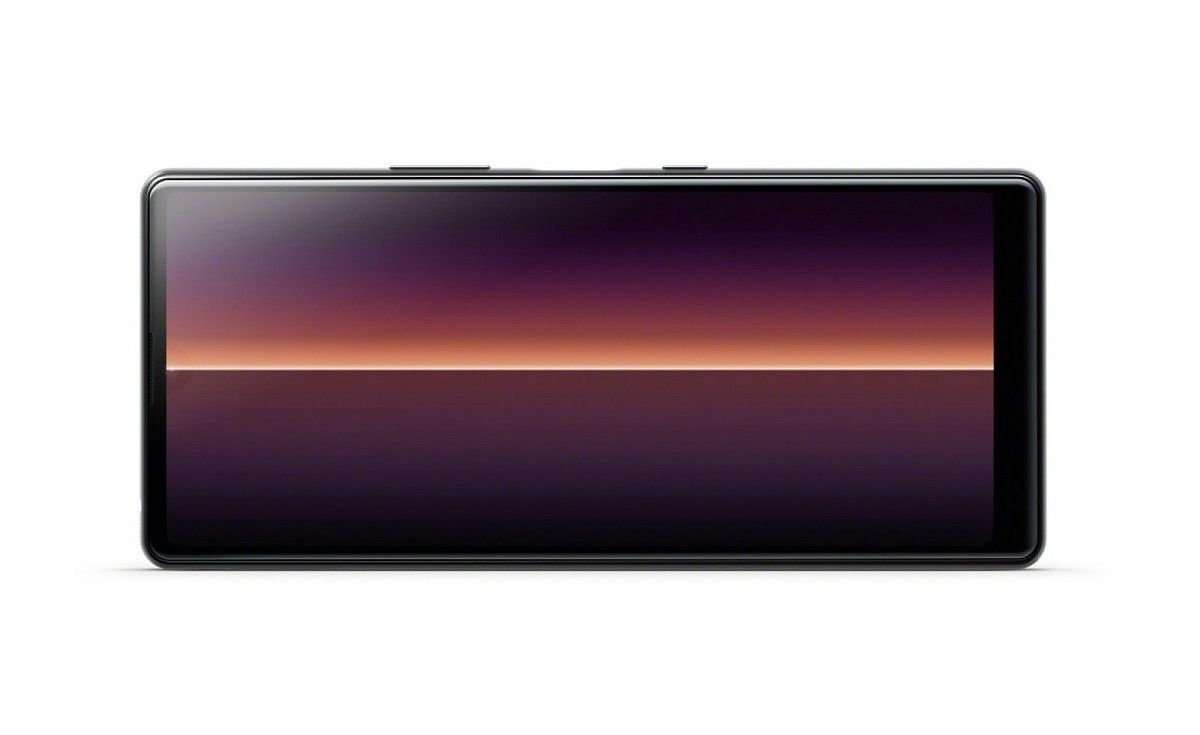
Not much is remarkable about the Xperia L4 if we consider the rest of the budget and mid-range smartphone market. In a vacuum, it does bring a few important changes. It has a 6.2-inch HD+ (1680×720) IPS LCD with a 21:9 aspect ratio. The tall-and-narrow aspect ratio matches the aspect ratio of Sony’s flagship Xperia 1, as well as a few competing phones from Motorola. The side sense and multi-window features make sense here, according to Sony, by letting users easily access their favorite apps. At the 6.2-inch diagonal, it’s arguably going to lead to a cramped experience in terms of display width, but one-handed usability may get a boost.

The Xperia L4 is powered by the MediaTek Helio P22 SoC, the same as its predecessor. Unfortunately, there is nothing impressive about this SoC anymore, even for entry-level phones. The Realme C3 is powered by the newer Helio G70 SoC, which is much, much faster. The Helio P22 was used in phones like the Xiaomi Redmi 6, and they were hardly great performers. Sony has still quite a way to go. The RAM and storage configuration is 3GB/32GB, which is the minimum for a budget phone these days.

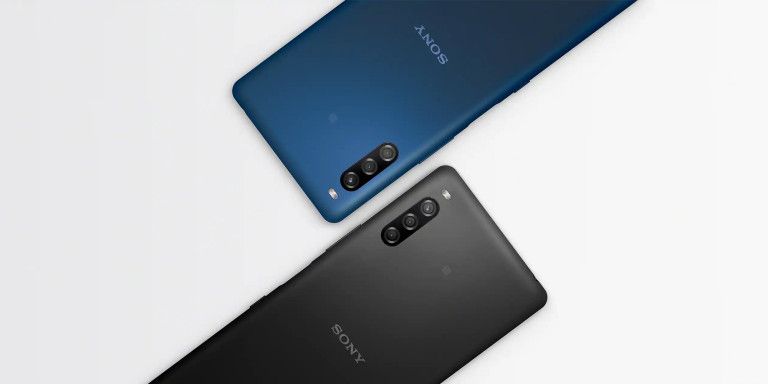
Sony’s latest attempt in the entry-level phone market comes with a triple rear camera setup, the first for the Xperia L series. It has a 13MP primary sensor, a 5MP ultra-wide angle camera, and a 2MP depth sensor. Bokeh mode is included, as expected. The front camera’s resolution is 8MP. Photos can be captured in the 21:9 aspect ratio.

The Xperia L4 has a 3,580mAh battery with support for fast charging. It’s unclear if it supports the USB-C PD fast charging protocol. Sony’s Xperia Adaptive Charging (based on Qnovo) monitors the phone as it charges and ensures that it isn’t overworked. It’s a genuinely useful feature that Sony has offered over the years.

The Xperia L4 will be available in Black and Blue colors. In terms of availability and pricing, Sony vaguely said the phone will be available in “select markets” from Spring 2020 onward. Pricing details weren’t divulged. Frankly speaking, it’s hard to get excited about phones of this caliber. It’s a harsh truth that Sony will have to get used to even if it wants to operate in only a few markets.


Source: Sony

The post Sony Xperia L4 is Sony’s latest attempt at the entry-level smartphone market appeared first on xda-developers.


from xda-developers https://ift.tt/38O0C42
via IFTTT

Sony Xperia L4 is Sony’s latest attempt at the entry-level smartphone market

Sony has vacated large regions of the worldwide smartphone market, but it hasn’t given up on releasing phones. The company’s flagship Sony Xperia 1 and Sony Xperia 5 phones are due for a refresh. The rumored Xperia 1.1 and the Xperia 5 Plus will be launched via an online event after the cancellation of MWC 2020. Sony’s budget and lower mid-range phones typically don’t tend to perform well in terms of sales except in its home market of Japan. The company is keeping to its strategy, however, of making low-key announcements of budget and lower mid-range phones. The Xperia L series is Sony’s series for the entry-level market, and now, Sony has launched the Xperia L4. The Xperia L4 is the successor to last year’s Xperia L3.

Specifications Sony Xperia L4
Dimensions & Weight
  • 159 x 71 x 8.7 mm
  • 178 g
Display
  • 6.2-inch HD+ LCD
  • 1680 x 720
  • 21:9 aspect ratio
SoC
  • MediaTek Helio P22
  • PowerVR GE8320 GPU
RAM & Storage
  • 3GB/64GB
Battery
  • 3,580mAh
  • Fast charging (USB-C PD?)
Fingerprint Sensor Side-mounted fingerprint
Rear Cameras
  • 13MP primary sensor, f/2.0, 26mm
  • 5MP wide-angle sensor, f/2.2, 17mm
  • 2MP depth sensor, f/2.4
Front Camera
  • 8MP, f/2.0, 27mm
Android Version Android 9
Sony Xperia L4 Sony Xperia L4

Not much is remarkable about the Xperia L4 if we consider the rest of the budget and mid-range smartphone market. In a vacuum, it does bring a few important changes. It has a 6.2-inch HD+ (1680×720) IPS LCD with a 21:9 aspect ratio. The tall-and-narrow aspect ratio matches the aspect ratio of Sony’s flagship Xperia 1, as well as a few competing phones from Motorola. The side sense and multi-window features make sense here, according to Sony, by letting users easily access their favorite apps. At the 6.2-inch diagonal, it’s arguably going to lead to a cramped experience in terms of display width, but one-handed usability may get a boost.

The Xperia L4 is powered by the MediaTek Helio P22 SoC, the same as its predecessor. Unfortunately, there is nothing impressive about this SoC anymore, even for entry-level phones. The Realme C3 is powered by the newer Helio G70 SoC, which is much, much faster. The Helio P22 was used in phones like the Xiaomi Redmi 6, and they were hardly great performers. Sony has still quite a way to go. The RAM and storage configuration is 3GB/32GB, which is the minimum for a budget phone these days.

Sony’s latest attempt in the entry-level phone market comes with a triple rear camera setup, the first for the Xperia L series. It has a 13MP primary sensor, a 5MP ultra-wide angle camera, and a 2MP depth sensor. Bokeh mode is included, as expected. The front camera’s resolution is 8MP. Photos can be captured in the 21:9 aspect ratio.

The Xperia L4 has a 3,580mAh battery with support for fast charging. It’s unclear if it supports the USB-C PD fast charging protocol. Sony’s Xperia Adaptive Charging (based on Qnovo) monitors the phone as it charges and ensures that it isn’t overworked. It’s a genuinely useful feature that Sony has offered over the years.

The Xperia L4 will be available in Black and Blue colors. In terms of availability and pricing, Sony vaguely said the phone will be available in “select markets” from Spring 2020 onward. Pricing details weren’t divulged. Frankly speaking, it’s hard to get excited about phones of this caliber. It’s a harsh truth that Sony will have to get used to even if it wants to operate in only a few markets.


Source: Sony

The post Sony Xperia L4 is Sony’s latest attempt at the entry-level smartphone market appeared first on xda-developers.


from xda-developers https://ift.tt/38O0C42
via IFTTT