LightBlog

jeudi 20 février 2020

Google is testing multi-colored Quick Settings icons in Android 11

Google’s first Android 11 Developer Preview was just released yesterday, but a lot of its best features are hidden away from public view. We’ve detailed some of the upcoming major UI changes already, and I’m personally a fan of all the ones we’ve seen so far. While continuing to dig into the Android 11 system dump from the Pixel 4, I discovered a new class called “QSColorController” in SystemUI. This class is responsible for overriding the color of tiles in the Quick Settings panel, and through some debug commands referenced in the code, it’s possible to individually change the colors of each Quick Setting tile.
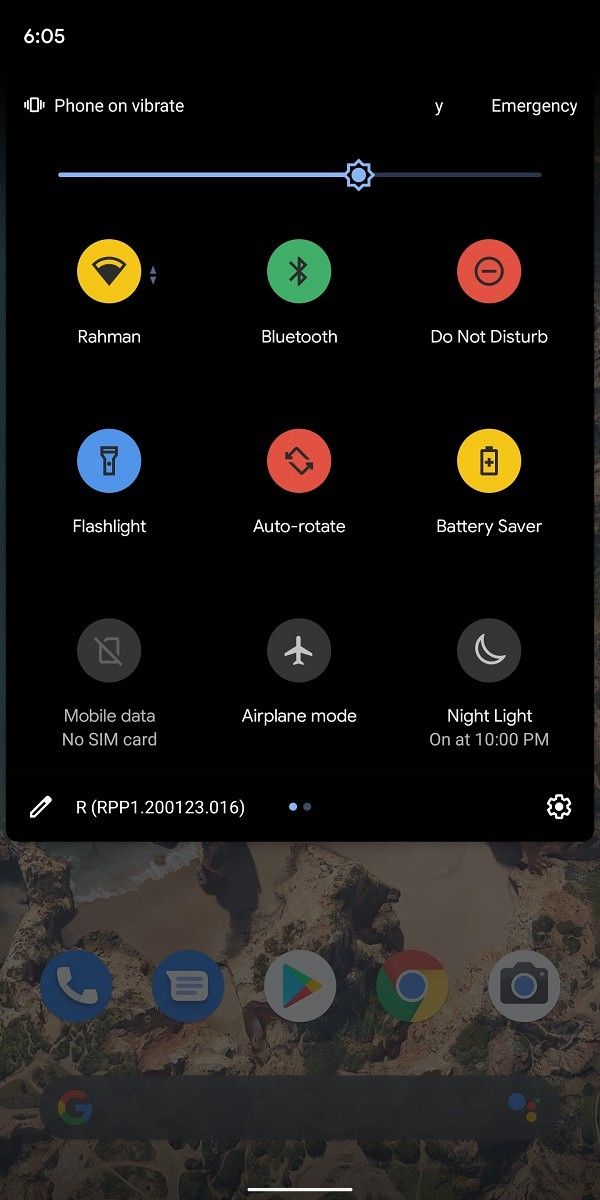
As you can see above, the Wi-Fi, Bluetooth, Do Not Disturb, Auto-rotate, and Battery Saver icons have colors that are different from the current theme on my Pixel 2 XL. My Pixel 2 XL is running the stock theme with dark mode enabled in Android 11, which means that the color of each Quick Setting tile should be blue like the Flashlight icon. However, using the debug commands, I changed the colors of some of the icons to yellow, red, and green. The colors that you can pick currently include blue along with the aforementioned yellow, red, and green, though Google may add more colors in the future. The functionality of each Quick Setting tile doesn’t change—just the icon color.

I’m not entirely sure what Google intends to do with this feature; it’s possible that Google will expand the Pixel Themes app in Android 11 with this added functionality, but it’s also possible that Google will let developers set the color of their own Quick Settings tiles. XDA’s Zachary Wander got this feature working on the Android 11 emulator in Android Studio, so it doesn’t seem like this feature will be Pixel-exclusive. I’m personally not a fan of this multi-colored Quick Settings panel, but I wouldn’t mind having the option there for people who want it. I don’t know if this feature, like the other UI tests we spotted, will be enabled in the stable release, but we’ll continue tracking this feature as Google releases more Android 11 previews.

Android 11 News on XDA

The post Google is testing multi-colored Quick Settings icons in Android 11 appeared first on xda-developers.


from xda-developers https://ift.tt/2SKsXCN
via IFTTT

Google is testing multi-colored Quick Settings icons in Android 11

Google’s first Android 11 Developer Preview was just released yesterday, but a lot of its best features are hidden away from public view. We’ve detailed some of the upcoming major UI changes already, and I’m personally a fan of all the ones we’ve seen so far. While continuing to dig into the Android 11 system dump from the Pixel 4, I discovered a new class called “QSColorController” in SystemUI. This class is responsible for overriding the color of tiles in the Quick Settings panel, and through some debug commands referenced in the code, it’s possible to individually change the colors of each Quick Setting tile.

As you can see above, the Wi-Fi, Bluetooth, Do Not Disturb, Auto-rotate, and Battery Saver icons have colors that are different from the current theme on my Pixel 2 XL. My Pixel 2 XL is running the stock theme with dark mode enabled in Android 11, which means that the color of each Quick Setting tile should be blue like the Flashlight icon. However, using the debug commands, I changed the colors of some of the icons to yellow, red, and green. The colors that you can pick currently include blue along with the aforementioned yellow, red, and green, though Google may add more colors in the future. The functionality of each Quick Setting tile doesn’t change—just the icon color.

I’m not entirely sure what Google intends to do with this feature; it’s possible that Google will expand the Pixel Themes app in Android 11 with this added functionality, but it’s also possible that Google will let developers set the color of their own Quick Settings tiles. XDA’s Zachary Wander got this feature working on the Android 11 emulator in Android Studio, so it doesn’t seem like this feature will be Pixel-exclusive. I’m personally not a fan of this multi-colored Quick Settings panel, but I wouldn’t mind having the option there for people who want it. I don’t know if this feature, like the other UI tests we spotted, will be enabled in the stable release, but we’ll continue tracking this feature as Google releases more Android 11 previews.

Android 11 News on XDA

The post Google is testing multi-colored Quick Settings icons in Android 11 appeared first on xda-developers.


from xda-developers https://ift.tt/2SKsXCN
via IFTTT

OPPO recruits beta testers for ColorOS 7 and Android 10 update for the Find X, R17 and R17 Pro

Late last year at an event in New Delhi, OPPO unveiled the latest version of its custom skin, ColorOS 7, based on Android 10. At the launch event, the company also revealed the list of devices it had planned to update to ColorOS 7. In December, we saw the company rolling out a beta version of Android 10 to the global variant of the Oppo F11 and OPPO F11 Pro. Now, the company has started recruiting beta testers for more Oppo devices in India including the Find X series and R17 series.

Here’s a list of all OPPO phones which are receiving or have already received a closed beta of ColorOS 7:

  • Reno
  • Reno 10X Zoom
  • Reno 2
  • F11
  • F11 Pro
  • R17
  • R17 Pro
  • Find X
  • Find X Automobili Lamborghini Edition
  • Find X SuperVOOC Edition

OPPO says the trial version of Android 10-based ColorOS 7 will be limited to 2000 applicants per phone on a first come first serve basis on the Find X, R17, and R17 Pro. This Beta program is inviting users in India and Indonesia for the Find X, India and Australia for R17, and India, Indonesia, and Thailand for the Oppo R17 Pro, Users willing to participate and test drive the early software can head to their device settings and apply for the beta program. To participate, head over to Settings > Software Update and tap Trial Version. From there, tap on “Apply Now” and check for system update; if there’s quota available, you should receive the update prompt.

Since this is a closed beta build, there will likely be a number of bugs and other issues in the software that needs to be worked out. Waiting for the stable release is recommended if you value stability over cutting edge features. Oppo hasn’t revealed when it plans to roll out the stable version to these smartphones. But given that beta testing is already underway, hopefully, users won’t have to wait too long.


Source: ColorOS Twitter (1, 2)

The post OPPO recruits beta testers for ColorOS 7 and Android 10 update for the Find X, R17 and R17 Pro appeared first on xda-developers.


from xda-developers https://ift.tt/2SIz0aL
via IFTTT

Pixel Launcher from Android 11 hints at showing suggested apps on the home screen dock

The first Android 11 developer preview is now available for download. If you’re a Google Pixel user, you can head on over to our guide to download the release for your device and then you can install the Android 11 developer preview with our guide for Pixel devices here. The first developer preview includes a number of changes from Android 10, a bunch of privacy and security features, and a couple of developer-focused changes. Google is scheduled to release two more developer previews and three betas before the stable Android 11 release. In the meantime, we’ll be combing through the latest release to find everything new that’s coming in the next Android release. We’ve already spotted a number of upcoming features in the current release, including a new increased touch sensitivity option for the Pixel 4 series, a new Motion Sense gesture to pause music, a redesigned Notification History page, a new screenshot preview, and more. Now, we’ve spotted new strings of code in the Pixel Launcher from Android 11 that point towards an upcoming feature called “hotseat”.

An APK teardown can often predict features that may arrive in a future update of an application, but it is possible that any of the features we mention here may not make it in a future release. This is because these features are currently unimplemented in the live build and may be pulled at any time by the developers in a future build.

The current version of the Pixel Launcher suggests apps based on your activity. These suggestions show up as a row of apps underneath the recent apps screen and in the top row within the app drawer (as seen in screenshots below). The upcoming “hotseat” feature builds upon this behavior and shows suggested apps in place of the dock on the home screen. These suggested apps are based on your usage and they replace the bottom row of apps on the home screen.

Pixel Launcher Android 11 hotseat Pixel Launcher Android 11 hotseat Pixel Launcher Android 11 hotseat

Current behavior

According to the code, Google will give users the option to opt-in for the new feature and pin apps to the hotseat — which is the bottom row of apps or the dock on the home screen. While setting up the feature, users will see a couple of prompts explaining how it works, including instructions to pin apps to the hotseat, hide suggested apps, and remove apps manually. The code also references a pin prediction feature that will, most likely, suggest apps that you should pin to the hotseat based on your usage.

<string name="hotseat_items_migrated">Your hotseat items have been moved to the last page.</string>
<string name="hotseat_migrate_accept">"I'm in"</string>
<string name="hotseat_migrate_dismiss">No thanks</string>
<string name="hotseat_migrate_message">To pin a favorite app, drag it over a suggested app. To hide a suggested app, touch &amp; hold it.</string>
<string name="hotseat_migrate_prompt_content">Tap to set up</string>
<string name="hotseat_migrate_prompt_title">Get suggested apps on the home screen</string>
<string name="hotseat_migrate_title">Suggested apps replace the bottom row of apps</string>
<string name="hotseat_no_migration">You can remove items from the hotseat manually to see suggested apps in their spot.</string>
<string name="hotseat_onboard_notification_detail">Tap here to set it up</string>
<string name="hotseat_onboard_notification_title">Your hotseat just got smarter</string>
<string name="pin_prediction">Pin Prediction</string>

Thanks to PNF Software for providing us a license to use JEB Decompiler, a professional-grade reverse engineering tool for Android applications.

The post Pixel Launcher from Android 11 hints at showing suggested apps on the home screen dock appeared first on xda-developers.


from xda-developers https://ift.tt/2SXN6UR
via IFTTT

Pixel Launcher from Android 11 hints at showing suggested apps on the home screen dock

The first Android 11 developer preview is now available for download. If you’re a Google Pixel user, you can head on over to our guide to download the release for your device and then you can install the Android 11 developer preview with our guide for Pixel devices here. The first developer preview includes a number of changes from Android 10, a bunch of privacy and security features, and a couple of developer-focused changes. Google is scheduled to release two more developer previews and three betas before the stable Android 11 release. In the meantime, we’ll be combing through the latest release to find everything new that’s coming in the next Android release. We’ve already spotted a number of upcoming features in the current release, including a new increased touch sensitivity option for the Pixel 4 series, a new Motion Sense gesture to pause music, a redesigned Notification History page, a new screenshot preview, and more. Now, we’ve spotted new strings of code in the Pixel Launcher from Android 11 that point towards an upcoming feature called “hotseat”.

An APK teardown can often predict features that may arrive in a future update of an application, but it is possible that any of the features we mention here may not make it in a future release. This is because these features are currently unimplemented in the live build and may be pulled at any time by the developers in a future build.

The current version of the Pixel Launcher suggests apps based on your activity. These suggestions show up as a row of apps underneath the recent apps screen and in the top row within the app drawer (as seen in screenshots below). The upcoming “hotseat” feature builds upon this behavior and shows suggested apps in place of the dock on the home screen. These suggested apps are based on your usage and they replace the bottom row of apps on the home screen.

Pixel Launcher Android 11 hotseat Pixel Launcher Android 11 hotseat Pixel Launcher Android 11 hotseat

Current behavior

According to the code, Google will give users the option to opt-in for the new feature and pin apps to the hotseat — which is the bottom row of apps or the dock on the home screen. While setting up the feature, users will see a couple of prompts explaining how it works, including instructions to pin apps to the hotseat, hide suggested apps, and remove apps manually. The code also references a pin prediction feature that will, most likely, suggest apps that you should pin to the hotseat based on your usage.

<string name="hotseat_items_migrated">Your hotseat items have been moved to the last page.</string>
<string name="hotseat_migrate_accept">"I'm in"</string>
<string name="hotseat_migrate_dismiss">No thanks</string>
<string name="hotseat_migrate_message">To pin a favorite app, drag it over a suggested app. To hide a suggested app, touch &amp; hold it.</string>
<string name="hotseat_migrate_prompt_content">Tap to set up</string>
<string name="hotseat_migrate_prompt_title">Get suggested apps on the home screen</string>
<string name="hotseat_migrate_title">Suggested apps replace the bottom row of apps</string>
<string name="hotseat_no_migration">You can remove items from the hotseat manually to see suggested apps in their spot.</string>
<string name="hotseat_onboard_notification_detail">Tap here to set it up</string>
<string name="hotseat_onboard_notification_title">Your hotseat just got smarter</string>
<string name="pin_prediction">Pin Prediction</string>

Thanks to PNF Software for providing us a license to use JEB Decompiler, a professional-grade reverse engineering tool for Android applications.

The post Pixel Launcher from Android 11 hints at showing suggested apps on the home screen dock appeared first on xda-developers.


from xda-developers https://ift.tt/2SXN6UR
via IFTTT

iQOO 3 5G official product video shows off 48MP Quad rear camera setup and gaming buttons

iQOO, a brand under China’s BBK Electronics Corporation, has been present in China since last year and recently announced its entry into the Indian smartphone market. iQOO is all set to launch the iQOO 3 – its first device for India on February 25th. The iQOO 3 will be a high-end gaming smartphone powered by Snapdragon 865 and will have features like UFS 3.1, 55W fast charging, and 5G connectivity. Through a series of official teasers, the company has confirmed some of the iQOO 3’s other features including a 48MP rear camera, pressure-sensitive gaming triggers, and the different color options.

iqoo 3 snapdragon 865 5g

Earlier today, iQOO shared a teaser video on Weibo, giving us the first official look of the smartphone; the same was shared on Twitter later on in the day. As seen in the video, the iQOO 3 comes with what is potentially a glass sandwich design with four cameras on the back in an L-shaped configuration. Although the purpose of each of the cameras has not been defined, the primary camera has been confirmed to be a 48MP sensor – we’ll learn whether it’s Samsung ISOCELL Bright GM1/GM2 or Sony IMX586 by the 25th of this month.

The teaser also reveals three different colors for the back panel. The exhibited options include a black option with a light gradient, an orange variant with black spots, and a third, bluish-white one. Each of these color variants also has a disctinctive design. At the same time, iQOO’s teaser video also confirms a single hole punch camera for selfies.

Meanwhile, iQOO India also teased that the phone features two press-sensitive shoulder triggers along the frame on each side. Users should be able to assign actions for the Left and the Right buttons per game. With all the branding that draws a great deal of inspiration from racing cars, the iQOO 3 is ready to take on other gaming-centric stalwarts like the ASUS ROG Phone II with the newer Qualcomm Snapdragon 865 mobile platform. iQOO has also announced that the display will have a touch response rate of 180Hz. However, there’s no mention of the display’s refresh rate.

The iQOO 3 launches in India and in China on February 25th. In India, the smartphone will be exclusively available on Flipkart.

We shall learn about the remaining details about the iQOO 3 gaming smartphone in the coming days. What are some of the features that you’re expecting on the smartphone? Let us know in the comments below.


Source 1: Weibo (1) (2)

The post iQOO 3 5G official product video shows off 48MP Quad rear camera setup and gaming buttons appeared first on xda-developers.


from xda-developers https://ift.tt/2v4jeOq
via IFTTT

iQOO 3 5G official product video shows off 48MP Quad rear camera setup and gaming buttons

iQOO, a brand under China’s BBK Electronics Corporation, has been present in China since last year and recently announced its entry into the Indian smartphone market. iQOO is all set to launch the iQOO 3 – its first device for India on February 25th. The iQOO 3 will be a high-end gaming smartphone powered by Snapdragon 865 and will have features like UFS 3.1, 55W fast charging, and 5G connectivity. Through a series of official teasers, the company has confirmed some of the iQOO 3’s other features including a 48MP rear camera, pressure-sensitive gaming triggers, and the different color options.

iqoo 3 snapdragon 865 5g

Earlier today, iQOO shared a teaser video on Weibo, giving us the first official look of the smartphone; the same was shared on Twitter later on in the day. As seen in the video, the iQOO 3 comes with what is potentially a glass sandwich design with four cameras on the back in an L-shaped configuration. Although the purpose of each of the cameras has not been defined, the primary camera has been confirmed to be a 48MP sensor – we’ll learn whether it’s Samsung ISOCELL Bright GM1/GM2 or Sony IMX586 by the 25th of this month.

The teaser also reveals three different colors for the back panel. The exhibited options include a black option with a light gradient, an orange variant with black spots, and a third, bluish-white one. Each of these color variants also has a disctinctive design. At the same time, iQOO’s teaser video also confirms a single hole punch camera for selfies.

Meanwhile, iQOO India also teased that the phone features two press-sensitive shoulder triggers along the frame on each side. Users should be able to assign actions for the Left and the Right buttons per game. With all the branding that draws a great deal of inspiration from racing cars, the iQOO 3 is ready to take on other gaming-centric stalwarts like the ASUS ROG Phone II with the newer Qualcomm Snapdragon 865 mobile platform. iQOO has also announced that the display will have a touch response rate of 180Hz. However, there’s no mention of the display’s refresh rate.

The iQOO 3 launches in India and in China on February 25th. In India, the smartphone will be exclusively available on Flipkart.

We shall learn about the remaining details about the iQOO 3 gaming smartphone in the coming days. What are some of the features that you’re expecting on the smartphone? Let us know in the comments below.


Source 1: Weibo (1) (2)

The post iQOO 3 5G official product video shows off 48MP Quad rear camera setup and gaming buttons appeared first on xda-developers.


from xda-developers https://ift.tt/2v4jeOq
via IFTTT