LightBlog

jeudi 20 février 2020

Samsung sends out weird “1” Find My Mobile notification to Galaxy users worldwide

Back in July last year, OnePlus sent out suspicious-looking notifications to OnePlus 7 Pro users, leading them to believe that OnePlus may have been hacked. The company quickly clarified that the notifications were just part of internal testing for the Android 10 update and were accidentally sent out to all users. In a statement regarding the matter, OnePlus also said that they were implementing a new process to ensure such an incident didn’t happen again. It seems like Samsung didn’t take a leaf from OnePlus’ notebook, as the company has inadvertently sent out a similar notification to its users worldwide.

As per several reports from users across the world, Galaxy users have received a weird notification from the company’s Find My Mobile app. The notification, as reported by several users on Reddit, just reads “1” with another “1” right below it. Tapping on the notification doesn’t seem to do anything beyond closing the notification shade.

For the unaware, the Find My Mobile app is designed to help users remotely locate their devices, lock them, back up data to Samsung Cloud, delete local data, and block access to Samsung Pay. In order to perform these actions, the app has access to almost all of the device permissions, which is why Samsung users have been freaking out after receiving the unusual notification.

In a statement regarding the mishap, a Samsung Care Ambassador told a user on Twitter that, “this is some test on Samsung’s end to assure services are working…Samsung will make an official statement explaining [the notification].

Following that, the company released an official statement through the Samsung Help UK Twitter handle which states, “Recently, a notification about “Find My Mobile 1” occurred on a limited number of Galaxy devices. This was sent unintentionally during an internal test and there is no effect on your device. We apologize for any inconvenience this may have caused our customers.


Source: /r/Samsung, /r/GalaxyS10, /r/GalaxyS9, /r/GalaxyS8, /r/GalaxyNote10, /r/GalaxyNote9
Via: The Verge
Image: Reddit u/KungPaoChikon

The post Samsung sends out weird “1” Find My Mobile notification to Galaxy users worldwide appeared first on xda-developers.


from xda-developers https://ift.tt/2PaJ5es
via IFTTT

Personal Safety app from Android 11 on the Pixel 4 can be sideloaded to enable car crash detection on older Pixel phones

Android 11 is officially here and the first Developer Preview is now live for the Google Pixel phones. While Google hasn’t made many drastic changes to the UI (yet), there’s still a lot to look forward to in the latest version of Android. We have been busy taking a deep dive at all the new Android 11 features such as scheduled dark mode, Bubbles notifications, Screen Recording toggle and much more. However, there are also some changes that require deeper digging and tinkering to uncover them. One such change we found in Andriod 11 is the new Personal Safety app.

The Personal Safety app version 1.1.286909525 comes preinstalled within Android 11 Developer Preview 1 for the Google Pixel 4. We extracted the APK from the Google Pixel 4 and sideloaded it on some older Pixel phones that we had on our hand — namely, the Pixel 2XL and Pixel 3Xl — and were able to enable car crash detection feature.

Download Personal Safety v1.1.286909525 from APKMirror

Car crash detection was previously only available for the Pixel 4 and Pixel 4 XL in the Personal Safety app. We first learned about this feature back in May of 2019 through an APK teardown that hinted Google was planning to add crash detection to the Pixel phones. Our speculation was confirmed a few months later when Google rebranded the Emergency app to the “Personal Safety” app and the updated app revealed that car crash detection would be made available to Pixel users in the USA.

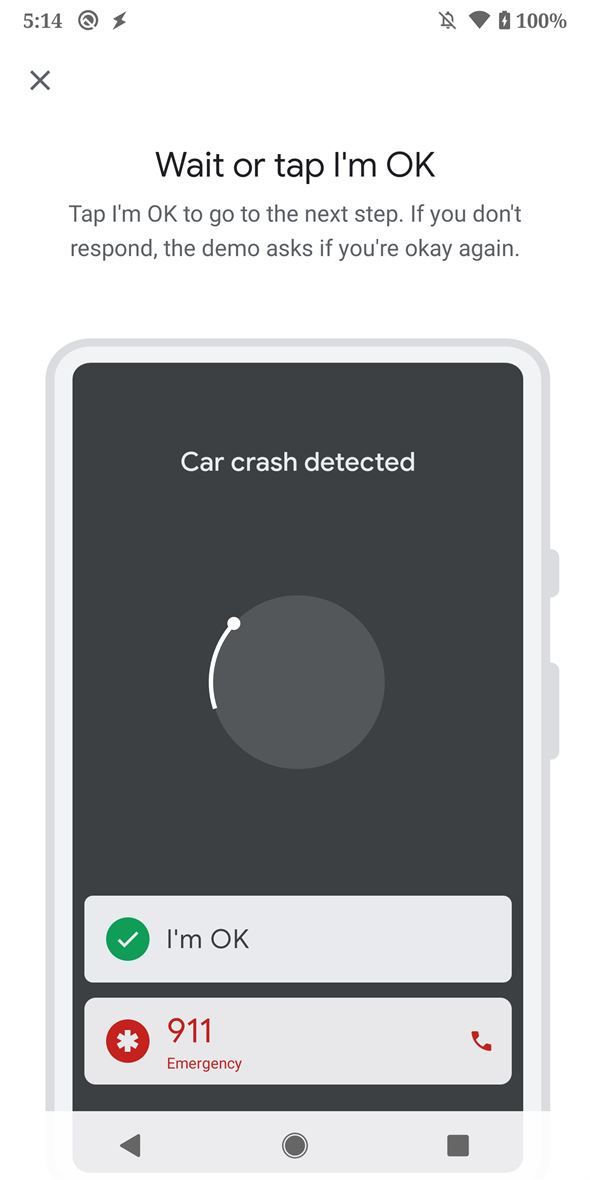
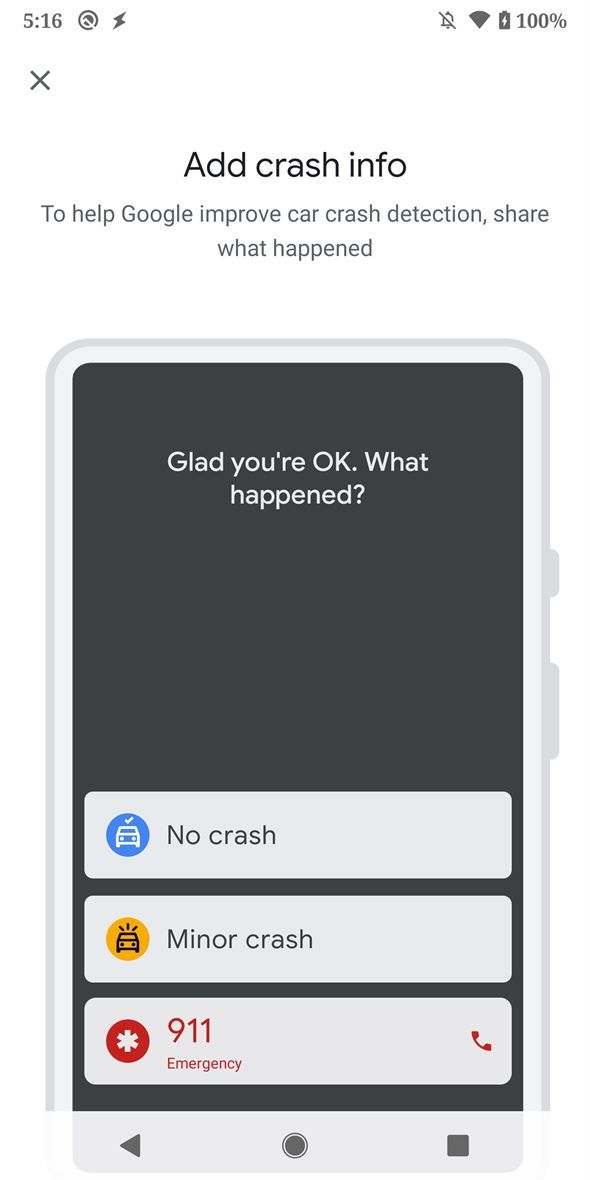
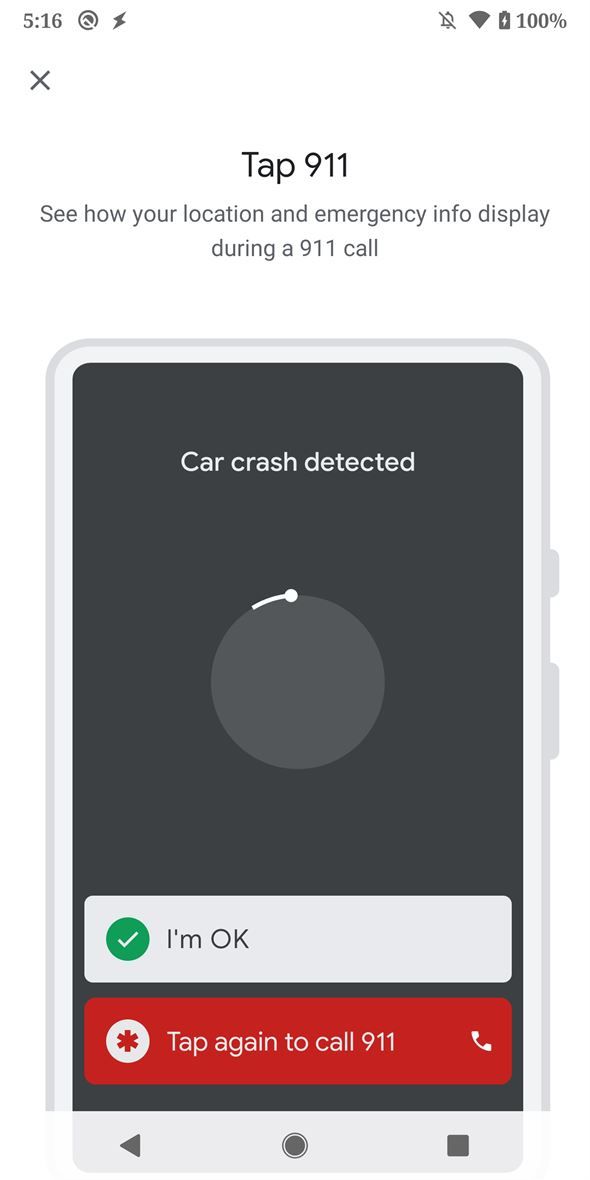
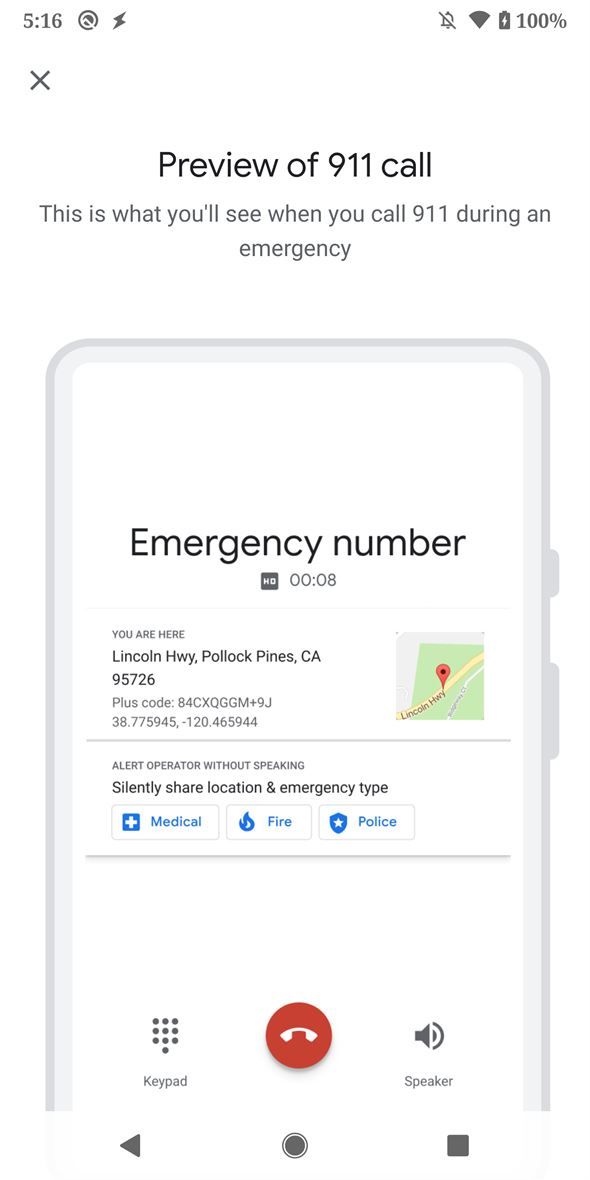
The car crash detection feature uses your phone’s location, accelerometer sensor, and microphone to automatically detect a car crash. If it thinks you’ve been in a car crash, it will play a loud sound and ask if you need any help. In case of no response, it automatically dials 911 and shares your phone’s location.

Android 11 sideload Android 11 sideload Android 11 sideload Android 11 sideload

Interested Pixel owners can sideload the latest Personal Safety app from the Android 11 to enable car crash detection. However, keep mind that the app won’t work on non-Pixel devices. If you install it on your Pixel and have issues getting past the emergency contact part, make sure to grant the app all the permissions it needs in Settings.

Android 11 News on XDA

The post Personal Safety app from Android 11 on the Pixel 4 can be sideloaded to enable car crash detection on older Pixel phones appeared first on xda-developers.


from xda-developers https://ift.tt/2vMWdja
via IFTTT

Samsung sends out weird “1” Find My Mobile notification to Galaxy users worldwide

Back in July last year, OnePlus sent out suspicious-looking notifications to OnePlus 7 Pro users, leading them to believe that OnePlus may have been hacked. The company quickly clarified that the notifications were just part of internal testing for the Android 10 update and were accidentally sent out to all users. In a statement regarding the matter, OnePlus also said that they were implementing a new process to ensure such an incident didn’t happen again. It seems like Samsung didn’t take a leaf from OnePlus’ notebook, as the company has inadvertently sent out a similar notification to its users worldwide.

As per several reports from users across the world, Galaxy users have received a weird notification from the company’s Find My Mobile app. The notification, as reported by several users on Reddit, just reads “1” with another “1” right below it. Tapping on the notification doesn’t seem to do anything beyond closing the notification shade.

For the unaware, the Find My Mobile app is designed to help users remotely locate their devices, lock them, back up data to Samsung Cloud, delete local data, and block access to Samsung Pay. In order to perform these actions, the app has access to almost all of the device permissions, which is why Samsung users have been freaking out after receiving the unusual notification.

In a statement regarding the mishap, a Samsung Care Ambassador told a user on Twitter that, “this is some test on Samsung’s end to assure services are working…Samsung will make an official statement explaining [the notification].

Following that, the company released an official statement through the Samsung Help UK Twitter handle which states, “Recently, a notification about “Find My Mobile 1” occurred on a limited number of Galaxy devices. This was sent unintentionally during an internal test and there is no effect on your device. We apologize for any inconvenience this may have caused our customers.


Source: /r/Samsung, /r/GalaxyS10, /r/GalaxyS9, /r/GalaxyS8, /r/GalaxyNote10, /r/GalaxyNote9
Via: The Verge
Image: Reddit u/KungPaoChikon

The post Samsung sends out weird “1” Find My Mobile notification to Galaxy users worldwide appeared first on xda-developers.


from xda-developers https://ift.tt/2PaJ5es
via IFTTT

Personal Safety app from Android 11 on the Pixel 4 can be sideloaded to enable car crash detection on older Pixel phones

Android 11 is officially here and the first Developer Preview is now live for the Google Pixel phones. While Google hasn’t made many drastic changes to the UI (yet), there’s still a lot to look forward to in the latest version of Android. We have been busy taking a deep dive at all the new Android 11 features such as scheduled dark mode, Bubbles notifications, Screen Recording toggle and much more. However, there are also some changes that require deeper digging and tinkering to uncover them. One such change we found in Andriod 11 is the new Personal Safety app.

The Personal Safety app version 1.1.286909525 comes preinstalled within Android 11 Developer Preview 1 for the Google Pixel 4. We extracted the APK from the Google Pixel 4 and sideloaded it on some older Pixel phones that we had on our hand — namely, the Pixel 2XL and Pixel 3Xl — and were able to enable car crash detection feature.

Download Personal Safety v1.1.286909525 from APKMirror

Car crash detection was previously only available for the Pixel 4 and Pixel 4 XL in the Personal Safety app. We first learned about this feature back in May of 2019 through an APK teardown that hinted Google was planning to add crash detection to the Pixel phones. Our speculation was confirmed a few months later when Google rebranded the Emergency app to the “Personal Safety” app and the updated app revealed that car crash detection would be made available to Pixel users in the USA.

The car crash detection feature uses your phone’s location, accelerometer sensor, and microphone to automatically detect a car crash. If it thinks you’ve been in a car crash, it will play a loud sound and ask if you need any help. In case of no response, it automatically dials 911 and shares your phone’s location.

Android 11 sideload Android 11 sideload Android 11 sideload Android 11 sideload

Interested Pixel owners can sideload the latest Personal Safety app from the Android 11 to enable car crash detection. However, keep mind that the app won’t work on non-Pixel devices. If you install it on your Pixel and have issues getting past the emergency contact part, make sure to grant the app all the permissions it needs in Settings.

Android 11 News on XDA

The post Personal Safety app from Android 11 on the Pixel 4 can be sideloaded to enable car crash detection on older Pixel phones appeared first on xda-developers.


from xda-developers https://ift.tt/2vMWdja
via IFTTT

[Update: India availability] Samsung Galaxy Z Flip announced with 6.7-inch foldable display, Snapdragon 855+, and more

Update 1 (02/20/2020 @ 05:45 AM ET): Samsung has announced availability related details for the Galaxy Z Flip for India. Scroll to the bottom for more information. The article as published on February 11, 2020, is preserved as below.

In 2019, Samsung, Huawei, and Motorola kicked off the foldable phone craze with the Galaxy Fold, Huawei Mate X, and Motorola Razr, respectively. Each of these 3 phones approached foldable smartphone design in different ways, with Razr’s arguably being the most intuitive as it’s a throwback to the iconic clamshell design. The Motorola Razr’s uniqueness will be shortlived, however, as Samsung has officially announced the Galaxy Z Flip. Samsung, like Motorola, is taking the vertical flip phone design of days past and modernizing it with a foldable display and more modern internals and software. We’ve seen tons of leaks and heard a lot of rumors about the device leading up to this point, so let’s see how much was correct.

Galaxy Z Flip XDA Forums

Samsung Galaxy Z Flip: Design

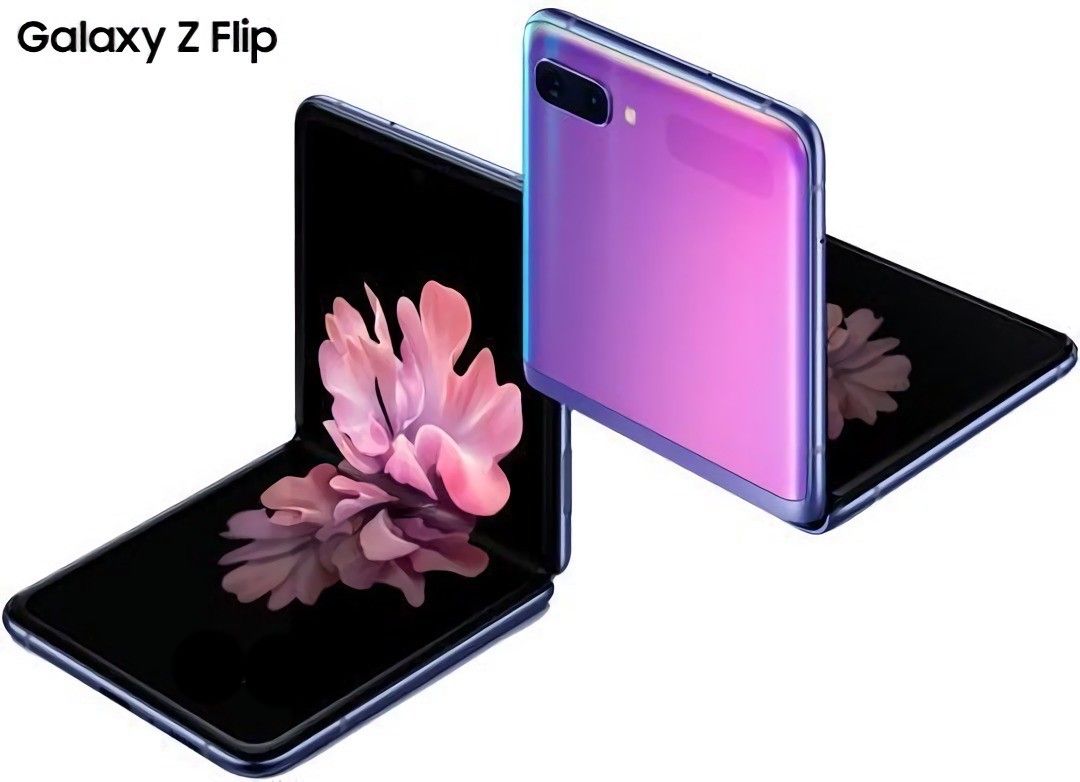
The design of the Galaxy Z Flip is one of the more intuitive foldable designs. It is a tall smartphone that simply folds vertically in half, just like flip phones of years past and the more recent Motorola Razr. While unfolded, the Galaxy Z Flip will have a 6.7-inch display at a 22:9 aspect ratio. It is tall and long but works out well for a foldable phone.

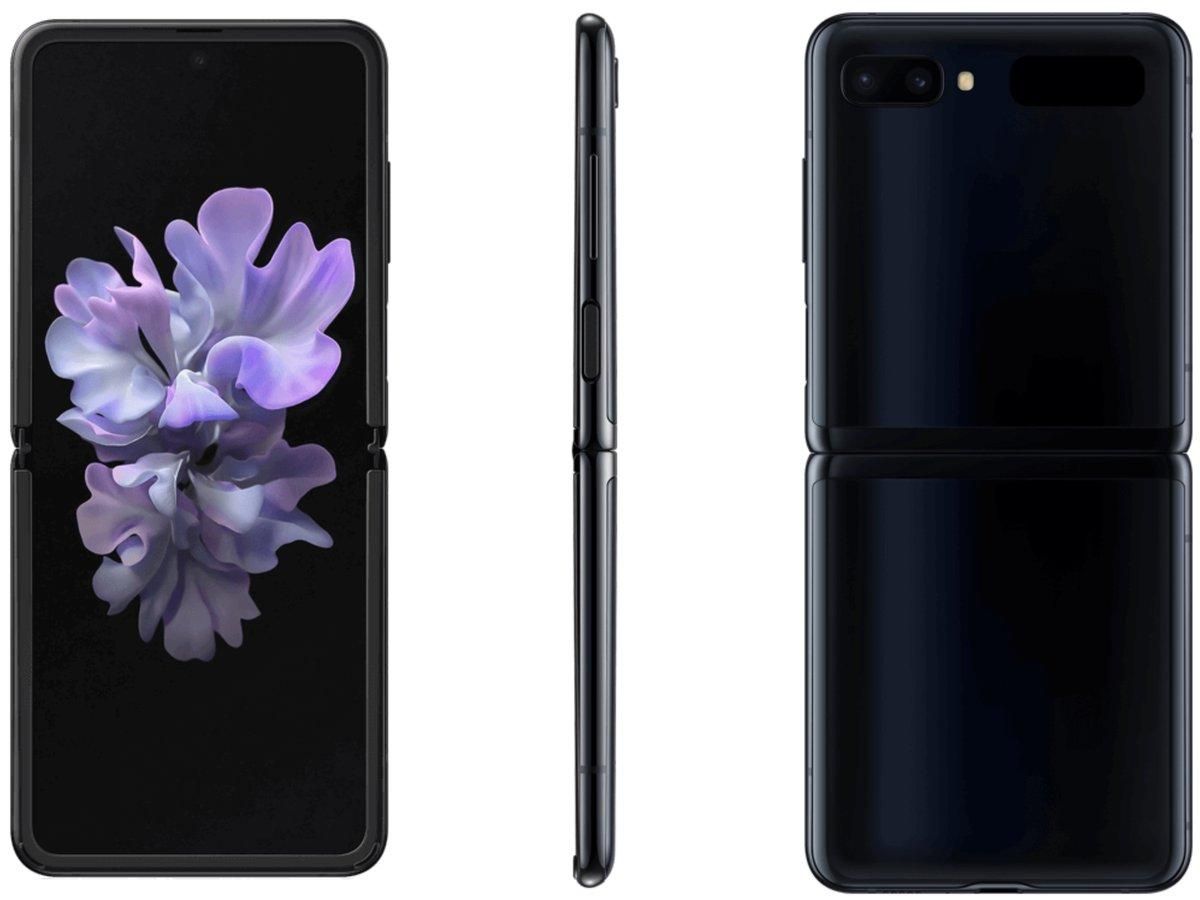
On the front, there are two important areas. The smaller 1.06-inch sAMOLED display and the dual camera. We’ll get to cameras in a moment. The smaller 1.06-inch display is made to match the color on the Mirror Purple and Mirror Black models, so while it’s off you shouldn’t be able to see the display. All you will see is the time, date, battery info, incoming calls, and more.

Samsung Galaxy Z Flip in Mirror Black Samsung Galaxy Z Flip in Mirror Purple

Just like the current Galaxy Fold, the Galaxy Z Flip will have a bit of a gap when folded. This isn’t a bad thing, though. This gap is needed for Samsung’s new “Ultra Thin Glass” to fold over without breaking. The gap also makes the phone easier to open. If it were closed fully flush, it would be much harder to open than most flip phones. On the outside of the phone is the aluminum hinge and glass front and back.

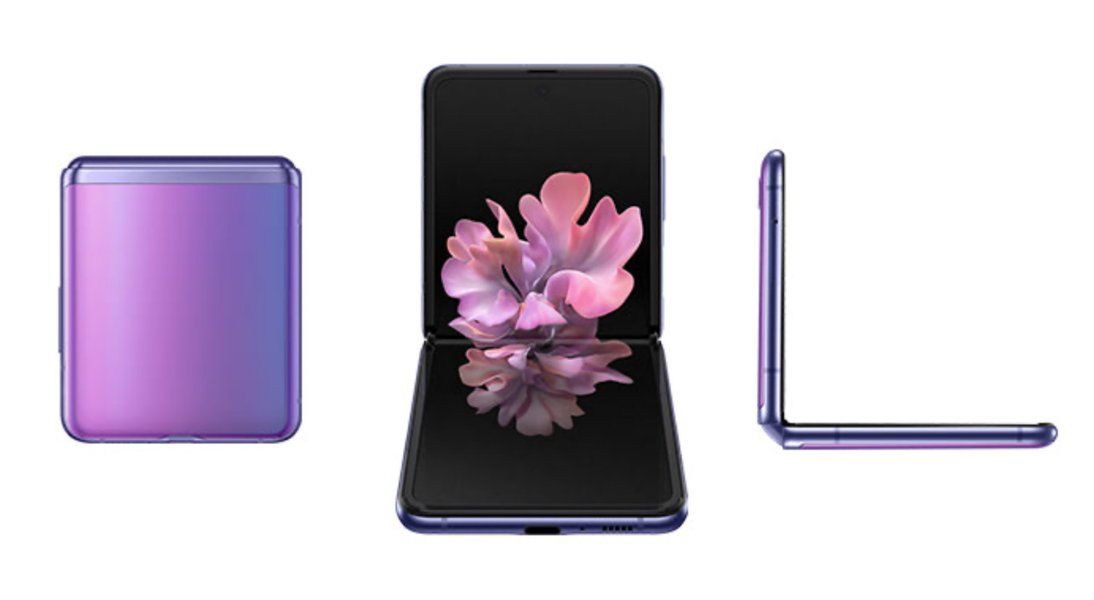
The hinge of the phone won’t work like the Galaxy Fold or Moto Razr, instead, it will actually lock into different positions using the double pivot hinge. You will be able to free lock it into any angle between around 90 and 180 degrees. This becomes super useful for video calls or vlogging because the phone is essentially its own kickstand. It will also, of course, fold flat and into its smaller size.

The Galaxy Z Flip will come in two main colors: Mirror Purple and Mirror Black. There will also be a limited edition Thom Browne edition. Thom Browne, a fashion designer based out of New York City, partnered with Samsung to design a Galaxy Z Flip and a set of accessories specifically for a limited edition bundle. This bundle will come with a limited edition case, limited edition pair of Galaxy Buds+, and a limited-edition Galaxy Watch Active 2.

Samsung Galaxy Z Flip Thom Browne Edition

This device will have a fingerprint scanner, though it will not be under the Infinity Flex Display. There will be a capacitive fingerprint scanner on the top right side of the phone. The fingerprint scanner will double as a power button.  Above that will be the volume rockers.

Samsung Galaxy Z Flip: Display

The display on the Galaxy Z Flip is very different from the Galaxy Fold in terms of actual size, aspect ratio, the axis of the fold, and the layer over the OLED. The display, as previously mentioned, has a 22:9 aspect ratio. The display resolution is 2636 x 1080 pixels. Samsung is employing a Dynamic AMOLED display with support for HDR10+. This is a folding Infinity-O display in that it has a hole-punch for a single camera.

Unfortunately, Samsung will not be employing a high refresh rate display in the Galaxy Z Flip. This is likely due to the Infinity Flex display. The display panel used in the Galaxy Z Flip is a flexible display which means it’s much thinner than a normal display panel. It’s likely Samsung just couldn’t get above 60Hz running on the device.

Samsung Galaxy Z Flip folding Samsung Galaxy Z Flip folding

The display will be layered in Samsung’s “Ultra Thin Glass.” This is basically very thin glass that will actually be able to bend. The Galaxy Z Flip will be the first device with Ultra Thin Glass. This glass will be layered in a layer of a flexible polymer, just like the Galaxy Fold. This extra layer of plastic is included for the protection of both the Infinity Flex Display and the glass. There is also a very small front display on this device that measures 1.06-inches and comes in at a resolution of 300×116 pixels. As I mentioned, it’s only useful for checking the time, calls, date, and battery status.

Camera

The Galaxy Z Flip camera setup is pretty decent, though it doesn’t have a 108MP sensor as some have speculated. It has a dual-camera setup on the rear/folded front. There are two 12MP cameras consisting of a main wide and a secondary ultra-wide camera. The main and ultra-wide cameras on the Galaxy Z Flip will be the same cameras as the Galaxy S20.

The main sensor is, as previously mentioned, a 12MP sensor. Samsung has chosen to use the Sony IMX 555. It will have an aperture of f/1.8 and a pixel size of 1.8 microns. The ultra-wide will be 12MP as well and have an aperture of f/2.2.

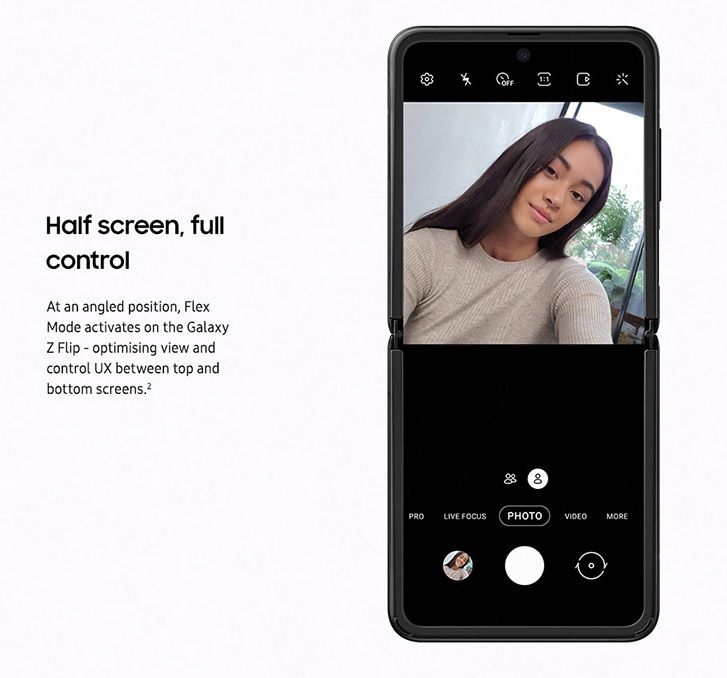
The front camera is a 10MP Sony IMX 374. This is the same 10MP sensor from the Galaxy S20, Galaxy S10, Galaxy Note 10, and Galaxy Fold. Unlike the Galaxy S20, this won’t support 4K 60fps video recording. It will be limited to 4K 30fps video recording but it does have autofocus, though. Something else Samsung is doing with the cameras is on the software side. It will be able to move the viewfinder of the camera to match the position of the hinge. Basically, you can fold the phone to around 100° and use it as a kickstand on a table to record video and the phone will match it. This will also work in apps like Google Duo.

Specifications

So as with every phone, the specifications are important. The Galaxy Z Flip is no exception. The SoC in the phone is the Qualcomm Snapdragon 855+. It might be one generation old, but it helps bring the price down and will likely help with battery life. That’s because there isn’t going to be a massive battery in this phone. Samsung is throwing in a 3300mAh battery. Samsung is actually going with a dual battery setup as they did with the Galaxy Fold. One of the batteries will be 900mAh while the other will be 2400mAh. Both will support wireless charging, reverse wireless charging, and 15W wired charging.

The phone comes with 8GB of LPDDR4X RAM. This isn’t as much memory capacity as the Galaxy S20 series or the Galaxy Fold, but once again, this is likely a cost-cutting measure to be able to get the phone out to more people. Another place where Samsung has possibly cut costs is storage. It has 256GB of UFS 3.0 storage, down from the 512GB capacity in the Galaxy Fold.

The phone, when unfolded, isn’t going to be small. It has a 6.7-inch 22:9 display. This is very tall, but luckily, it won’t be unfolded in your pocket. While unfolded, it will be between 6.9mm and 7.2mm in thickness. While folded, it will be between 15.4mm and 17.3mm in thickness. Unlike other foldables, the Galaxy Z Flip will not fold perfectly flat. There will be a gap, and it might actually be useful for this fold. The gap is a perfect place to put your finger to open the foldable display.

Something else Samsung has done is add a new sensor to track the angle the phone is folded at. Since it can free lock into any angle between 90 and 180, the phone needs to know which angle it’s at to be able to adapt the software to fit. Developers will be able to use a Samsung SDK to use this in their own apps.

Galaxy Z Flip
Display Main Display 6.7“ FHD+ Dynamic AMOLED Display(21.9:9) Infinity Flex Display
2636 x 1080
425ppi
*Screen measured diagonally as a full rectangle without accounting for the rounded corners. The actual viewable area is smaller due to the rounded corners and camera hole.
Cover Display 1.1“ Super AMOLED Display
300 x 112
303ppi
Dimension & Weight Folded 73.6 x 87.4 x 17.3mm (Hinge) – 15.4mm (Sagging)
Unfolded 73.6 x 167.3 x 7.2mm – 6.9mm (Screen)
Weight 183 g
Camera Front Camera 10MP Selfie Camera: F2.4
Pixel size: 1.22μm
FOV: 80 ˚
Rear Dual Camera 12MP Ultra Wide Camera: F2.2
Pixel size: 1.12μm
FOV: 123 ˚
12MP Wide-angle Camera: Super Speed Dual Pixel AF, OIS, F1.8
Pixel size: 1.4μm
FOV: 78 ˚
OIS for Rear Wide-angle Camera (Optical Image Stabilization)
Up to 8x digital zoom
HDR10+ recording
Tracking AF
AP 7 ㎚ 64-bit Octa-Core Processor
※ 2.95 ㎓ (Maximum Clock Speed) + 2.41 ㎓ + 1.78 ㎓
Memory 8GB RAM with 256GB internal storage
Battery 3,300 mAh (typical) dual battery
Charging Fast Charging compatible via power cord and wireless
Wireless PowerShare
OS Android 10
Network Enhanced 2X2 MIMO, 5CA, LTE Cat.16 Up to 1.0Gbps Download
LTE Cat.13 Up to 150Mbps Upload
Up to 1.0Gbps Download / Up to 150Mbps Upload
Connectivity Wi-Fi 802.11 a/b/g/n/ac (2.4/5GHz),VHT80 MU-MIMO,256QAM
Bluetooth® v 5.0 (LE up to 2Mbps), ANT+, USB Type-C, NFC, Location (GPS, Galileo, Glonass, BeiDou)
Payment Samsung Pay (Link)
Credit & debit cards: supports MST or/and NFC, Prepaid card, Global remittance, Transit, Memberships, Gift cards, Rewards
Sensors Capacitive Fingerprint sensor (side), Accelerometer, Barometer, Gyro sensor, Geomagnetic sensor, Hall sensor (digital, analog), Proximity sensor, RGB Light sensor
Authentication Lock type: pattern, PIN, password
Biometric lock type: Fingerprint sensor, Face recognition
Audio Mono speaker
Surround sound for Bluetooth and earphones with Dolby Atmos technology (Dolby Digital, Dolby Digital Plus included.)
UHQ 32-bit &DSD64/128 support
PCM: Up to 32 bits, DSD*: DSD64/128
Audio playback format: MP3, M4A, 3GA, AAC, OGG, OGA, WAV, WMA, AMR, AWB, FLAC, MID, MIDI, XMF, MXMF, IMY, RTTTL, RTX, OTA, APE, DSF, DFF
Bluetooth
Dual Audio: connect two Bluetooth devices to the Galaxy Z Flip to play audio through the two devices simultaneously.
Scalable Codec: Enhanced Bluetooth connection under ambient radio frequency interference.
Recording
Recording quality is improved with the High AOP Mic that minimizes distortion in noisy environments.
Video Video playback format
MP4, M4V, 3GP, 3G2, WMV, ASF, AVI, FLV, MKV, WEBM
TV connection
Wireless: Smart View (screen mirroring 1080p at 30fps)
Security Knox platform: real-time monitoring and protection.
Virus, malware prevention. (Powered by McAfee)
Secure Folder: a secure space on the device to isolate and protect content such as apps, photos, movies, and private files.
In the Box Galaxy Z Flip, Data Cable, Travel Adapter, Ejection Pin, USB Connector (OTG), Quick Start Guide, Clear Cover, Earphones (USB Type-C) with sound by AKG

Software

The software on the Galaxy Z Flip will be basically stock One UI 2.1 based on Android 10. It will have all the same software features as on the Galaxy S20 in One UI 2.1, but some features might be a bit more limited due to the different SoCs. One new feature Samsung is including is the new Quick Share service, which is basically AirDrop for Galaxy phones.

A few of the fun software features Samsung is working on are based around the flip phone design. The first was actually teased at SDC back in October 2019 then just a few days ago in an ad during the Oscars. This will work in the camera app and apps like Google Duo in unison with the double pivot hinge. Another hinge feature is a classic from the old flip phone days. If you are on a phone call and close the phone, it will end the call. I know this isn’t a groundbreaking feature, but I thought it would be worth mentioning.

Galaxy Z Flip Flex Mode

Samsung Galaxy Z Flip: Pricing & Availability

The Galaxy Z Flip will be available (in limited quantities) starting on Friday, February 14th. It will be available in stores and online through AT&T, Best Buy, Sprint, Samsung Experience Stores and Samsung.com. The Galaxy Z Flip is priced at $1,380. Black and Purple will be offered first, followed later by Mirror Gold.

Indian Pricing and Availability

Samsung has announced pre-bookings for the Galaxy Z Flip in India, beginning from February 21, 2020, across Samsung e-shop and select retail stores. The Samsung galaxy Z Flip will cost consumers in India a cool ₹1,09,999 ($1535). The device is expensive, yes, but a lot of us were predicting an even higher price tag. Deliveries for pre-orders will begin from February 26, 2020, and buyers from Samsung e-shop will be offered premium white glove delivery in 10 Indian cities.

Curiously, the Galaxy Z Flip in India will retain the Qualcomm Snapdragon 855+ and not swap over to an Exynos processor.

The post [Update: India availability] Samsung Galaxy Z Flip announced with 6.7-inch foldable display, Snapdragon 855+, and more appeared first on xda-developers.


from xda-developers https://ift.tt/2SAdV17
via IFTTT

[Update: India availability] Samsung Galaxy Z Flip announced with 6.7-inch foldable display, Snapdragon 855+, and more

Update 1 (02/20/2020 @ 05:45 AM ET): Samsung has announced availability related details for the Galaxy Z Flip for India. Scroll to the bottom for more information. The article as published on February 11, 2020, is preserved as below.

In 2019, Samsung, Huawei, and Motorola kicked off the foldable phone craze with the Galaxy Fold, Huawei Mate X, and Motorola Razr, respectively. Each of these 3 phones approached foldable smartphone design in different ways, with Razr’s arguably being the most intuitive as it’s a throwback to the iconic clamshell design. The Motorola Razr’s uniqueness will be shortlived, however, as Samsung has officially announced the Galaxy Z Flip. Samsung, like Motorola, is taking the vertical flip phone design of days past and modernizing it with a foldable display and more modern internals and software. We’ve seen tons of leaks and heard a lot of rumors about the device leading up to this point, so let’s see how much was correct.

Galaxy Z Flip XDA Forums

Samsung Galaxy Z Flip: Design

The design of the Galaxy Z Flip is one of the more intuitive foldable designs. It is a tall smartphone that simply folds vertically in half, just like flip phones of years past and the more recent Motorola Razr. While unfolded, the Galaxy Z Flip will have a 6.7-inch display at a 22:9 aspect ratio. It is tall and long but works out well for a foldable phone.

On the front, there are two important areas. The smaller 1.06-inch sAMOLED display and the dual camera. We’ll get to cameras in a moment. The smaller 1.06-inch display is made to match the color on the Mirror Purple and Mirror Black models, so while it’s off you shouldn’t be able to see the display. All you will see is the time, date, battery info, incoming calls, and more.

Samsung Galaxy Z Flip in Mirror Black Samsung Galaxy Z Flip in Mirror Purple

Just like the current Galaxy Fold, the Galaxy Z Flip will have a bit of a gap when folded. This isn’t a bad thing, though. This gap is needed for Samsung’s new “Ultra Thin Glass” to fold over without breaking. The gap also makes the phone easier to open. If it were closed fully flush, it would be much harder to open than most flip phones. On the outside of the phone is the aluminum hinge and glass front and back.

The hinge of the phone won’t work like the Galaxy Fold or Moto Razr, instead, it will actually lock into different positions using the double pivot hinge. You will be able to free lock it into any angle between around 90 and 180 degrees. This becomes super useful for video calls or vlogging because the phone is essentially its own kickstand. It will also, of course, fold flat and into its smaller size.

The Galaxy Z Flip will come in two main colors: Mirror Purple and Mirror Black. There will also be a limited edition Thom Browne edition. Thom Browne, a fashion designer based out of New York City, partnered with Samsung to design a Galaxy Z Flip and a set of accessories specifically for a limited edition bundle. This bundle will come with a limited edition case, limited edition pair of Galaxy Buds+, and a limited-edition Galaxy Watch Active 2.

Samsung Galaxy Z Flip Thom Browne Edition

This device will have a fingerprint scanner, though it will not be under the Infinity Flex Display. There will be a capacitive fingerprint scanner on the top right side of the phone. The fingerprint scanner will double as a power button.  Above that will be the volume rockers.

Samsung Galaxy Z Flip: Display

The display on the Galaxy Z Flip is very different from the Galaxy Fold in terms of actual size, aspect ratio, the axis of the fold, and the layer over the OLED. The display, as previously mentioned, has a 22:9 aspect ratio. The display resolution is 2636 x 1080 pixels. Samsung is employing a Dynamic AMOLED display with support for HDR10+. This is a folding Infinity-O display in that it has a hole-punch for a single camera.

Unfortunately, Samsung will not be employing a high refresh rate display in the Galaxy Z Flip. This is likely due to the Infinity Flex display. The display panel used in the Galaxy Z Flip is a flexible display which means it’s much thinner than a normal display panel. It’s likely Samsung just couldn’t get above 60Hz running on the device.

Samsung Galaxy Z Flip folding Samsung Galaxy Z Flip folding

The display will be layered in Samsung’s “Ultra Thin Glass.” This is basically very thin glass that will actually be able to bend. The Galaxy Z Flip will be the first device with Ultra Thin Glass. This glass will be layered in a layer of a flexible polymer, just like the Galaxy Fold. This extra layer of plastic is included for the protection of both the Infinity Flex Display and the glass. There is also a very small front display on this device that measures 1.06-inches and comes in at a resolution of 300×116 pixels. As I mentioned, it’s only useful for checking the time, calls, date, and battery status.

Camera

The Galaxy Z Flip camera setup is pretty decent, though it doesn’t have a 108MP sensor as some have speculated. It has a dual-camera setup on the rear/folded front. There are two 12MP cameras consisting of a main wide and a secondary ultra-wide camera. The main and ultra-wide cameras on the Galaxy Z Flip will be the same cameras as the Galaxy S20.

The main sensor is, as previously mentioned, a 12MP sensor. Samsung has chosen to use the Sony IMX 555. It will have an aperture of f/1.8 and a pixel size of 1.8 microns. The ultra-wide will be 12MP as well and have an aperture of f/2.2.

The front camera is a 10MP Sony IMX 374. This is the same 10MP sensor from the Galaxy S20, Galaxy S10, Galaxy Note 10, and Galaxy Fold. Unlike the Galaxy S20, this won’t support 4K 60fps video recording. It will be limited to 4K 30fps video recording but it does have autofocus, though. Something else Samsung is doing with the cameras is on the software side. It will be able to move the viewfinder of the camera to match the position of the hinge. Basically, you can fold the phone to around 100° and use it as a kickstand on a table to record video and the phone will match it. This will also work in apps like Google Duo.

Specifications

So as with every phone, the specifications are important. The Galaxy Z Flip is no exception. The SoC in the phone is the Qualcomm Snapdragon 855+. It might be one generation old, but it helps bring the price down and will likely help with battery life. That’s because there isn’t going to be a massive battery in this phone. Samsung is throwing in a 3300mAh battery. Samsung is actually going with a dual battery setup as they did with the Galaxy Fold. One of the batteries will be 900mAh while the other will be 2400mAh. Both will support wireless charging, reverse wireless charging, and 15W wired charging.

The phone comes with 8GB of LPDDR4X RAM. This isn’t as much memory capacity as the Galaxy S20 series or the Galaxy Fold, but once again, this is likely a cost-cutting measure to be able to get the phone out to more people. Another place where Samsung has possibly cut costs is storage. It has 256GB of UFS 3.0 storage, down from the 512GB capacity in the Galaxy Fold.

The phone, when unfolded, isn’t going to be small. It has a 6.7-inch 22:9 display. This is very tall, but luckily, it won’t be unfolded in your pocket. While unfolded, it will be between 6.9mm and 7.2mm in thickness. While folded, it will be between 15.4mm and 17.3mm in thickness. Unlike other foldables, the Galaxy Z Flip will not fold perfectly flat. There will be a gap, and it might actually be useful for this fold. The gap is a perfect place to put your finger to open the foldable display.

Something else Samsung has done is add a new sensor to track the angle the phone is folded at. Since it can free lock into any angle between 90 and 180, the phone needs to know which angle it’s at to be able to adapt the software to fit. Developers will be able to use a Samsung SDK to use this in their own apps.

Galaxy Z Flip
Display Main Display 6.7“ FHD+ Dynamic AMOLED Display(21.9:9) Infinity Flex Display
2636 x 1080
425ppi
*Screen measured diagonally as a full rectangle without accounting for the rounded corners. The actual viewable area is smaller due to the rounded corners and camera hole.
Cover Display 1.1“ Super AMOLED Display
300 x 112
303ppi
Dimension & Weight Folded 73.6 x 87.4 x 17.3mm (Hinge) – 15.4mm (Sagging)
Unfolded 73.6 x 167.3 x 7.2mm – 6.9mm (Screen)
Weight 183 g
Camera Front Camera 10MP Selfie Camera: F2.4
Pixel size: 1.22μm
FOV: 80 ˚
Rear Dual Camera 12MP Ultra Wide Camera: F2.2
Pixel size: 1.12μm
FOV: 123 ˚
12MP Wide-angle Camera: Super Speed Dual Pixel AF, OIS, F1.8
Pixel size: 1.4μm
FOV: 78 ˚
OIS for Rear Wide-angle Camera (Optical Image Stabilization)
Up to 8x digital zoom
HDR10+ recording
Tracking AF
AP 7 ㎚ 64-bit Octa-Core Processor
※ 2.95 ㎓ (Maximum Clock Speed) + 2.41 ㎓ + 1.78 ㎓
Memory 8GB RAM with 256GB internal storage
Battery 3,300 mAh (typical) dual battery
Charging Fast Charging compatible via power cord and wireless
Wireless PowerShare
OS Android 10
Network Enhanced 2X2 MIMO, 5CA, LTE Cat.16 Up to 1.0Gbps Download
LTE Cat.13 Up to 150Mbps Upload
Up to 1.0Gbps Download / Up to 150Mbps Upload
Connectivity Wi-Fi 802.11 a/b/g/n/ac (2.4/5GHz),VHT80 MU-MIMO,256QAM
Bluetooth® v 5.0 (LE up to 2Mbps), ANT+, USB Type-C, NFC, Location (GPS, Galileo, Glonass, BeiDou)
Payment Samsung Pay (Link)
Credit & debit cards: supports MST or/and NFC, Prepaid card, Global remittance, Transit, Memberships, Gift cards, Rewards
Sensors Capacitive Fingerprint sensor (side), Accelerometer, Barometer, Gyro sensor, Geomagnetic sensor, Hall sensor (digital, analog), Proximity sensor, RGB Light sensor
Authentication Lock type: pattern, PIN, password
Biometric lock type: Fingerprint sensor, Face recognition
Audio Mono speaker
Surround sound for Bluetooth and earphones with Dolby Atmos technology (Dolby Digital, Dolby Digital Plus included.)
UHQ 32-bit &DSD64/128 support
PCM: Up to 32 bits, DSD*: DSD64/128
Audio playback format: MP3, M4A, 3GA, AAC, OGG, OGA, WAV, WMA, AMR, AWB, FLAC, MID, MIDI, XMF, MXMF, IMY, RTTTL, RTX, OTA, APE, DSF, DFF
Bluetooth
Dual Audio: connect two Bluetooth devices to the Galaxy Z Flip to play audio through the two devices simultaneously.
Scalable Codec: Enhanced Bluetooth connection under ambient radio frequency interference.
Recording
Recording quality is improved with the High AOP Mic that minimizes distortion in noisy environments.
Video Video playback format
MP4, M4V, 3GP, 3G2, WMV, ASF, AVI, FLV, MKV, WEBM
TV connection
Wireless: Smart View (screen mirroring 1080p at 30fps)
Security Knox platform: real-time monitoring and protection.
Virus, malware prevention. (Powered by McAfee)
Secure Folder: a secure space on the device to isolate and protect content such as apps, photos, movies, and private files.
In the Box Galaxy Z Flip, Data Cable, Travel Adapter, Ejection Pin, USB Connector (OTG), Quick Start Guide, Clear Cover, Earphones (USB Type-C) with sound by AKG

Software

The software on the Galaxy Z Flip will be basically stock One UI 2.1 based on Android 10. It will have all the same software features as on the Galaxy S20 in One UI 2.1, but some features might be a bit more limited due to the different SoCs. One new feature Samsung is including is the new Quick Share service, which is basically AirDrop for Galaxy phones.

A few of the fun software features Samsung is working on are based around the flip phone design. The first was actually teased at SDC back in October 2019 then just a few days ago in an ad during the Oscars. This will work in the camera app and apps like Google Duo in unison with the double pivot hinge. Another hinge feature is a classic from the old flip phone days. If you are on a phone call and close the phone, it will end the call. I know this isn’t a groundbreaking feature, but I thought it would be worth mentioning.
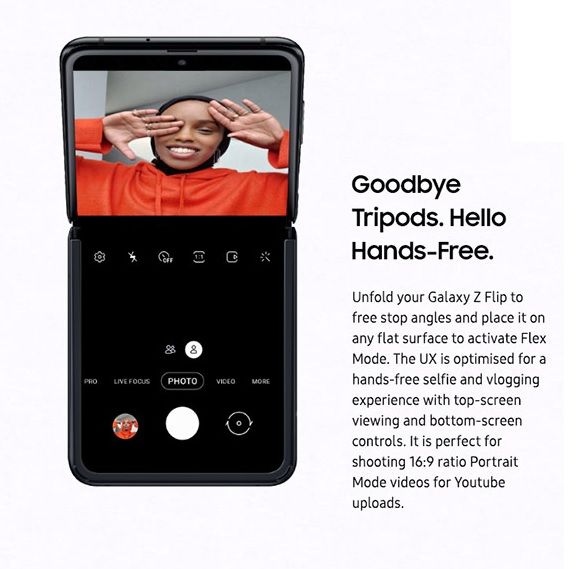
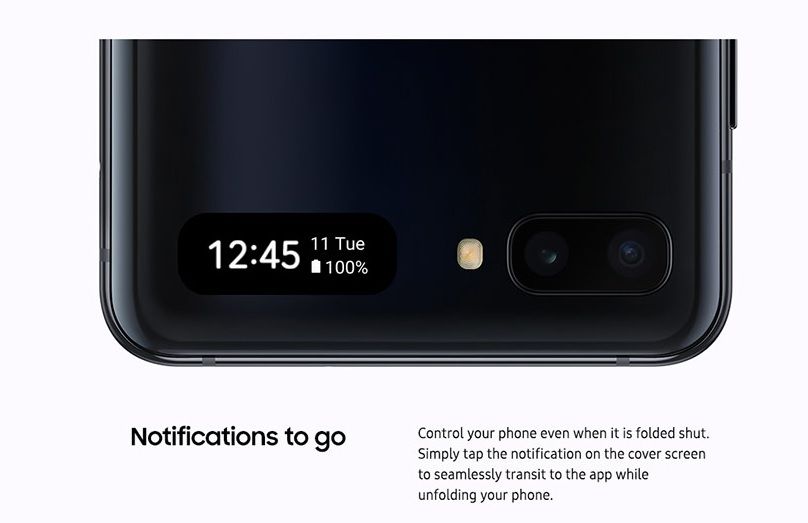
Galaxy Z Flip Flex Mode

Samsung Galaxy Z Flip: Pricing & Availability

The Galaxy Z Flip will be available (in limited quantities) starting on Friday, February 14th. It will be available in stores and online through AT&T, Best Buy, Sprint, Samsung Experience Stores and Samsung.com. The Galaxy Z Flip is priced at $1,380. Black and Purple will be offered first, followed later by Mirror Gold.

Indian Pricing and Availability

Samsung has announced pre-bookings for the Galaxy Z Flip in India, beginning from February 21, 2020, across Samsung e-shop and select retail stores. The Samsung galaxy Z Flip will cost consumers in India a cool ₹1,09,999 ($1535). The device is expensive, yes, but a lot of us were predicting an even higher price tag. Deliveries for pre-orders will begin from February 26, 2020, and buyers from Samsung e-shop will be offered premium white glove delivery in 10 Indian cities.

Curiously, the Galaxy Z Flip in India will retain the Qualcomm Snapdragon 855+ and not swap over to an Exynos processor.

The post [Update: India availability] Samsung Galaxy Z Flip announced with 6.7-inch foldable display, Snapdragon 855+, and more appeared first on xda-developers.


from xda-developers https://ift.tt/2SAdV17
via IFTTT

Android 10’s hidden Quick Access Wallet for Google Pay is now a generic feature in Android 11

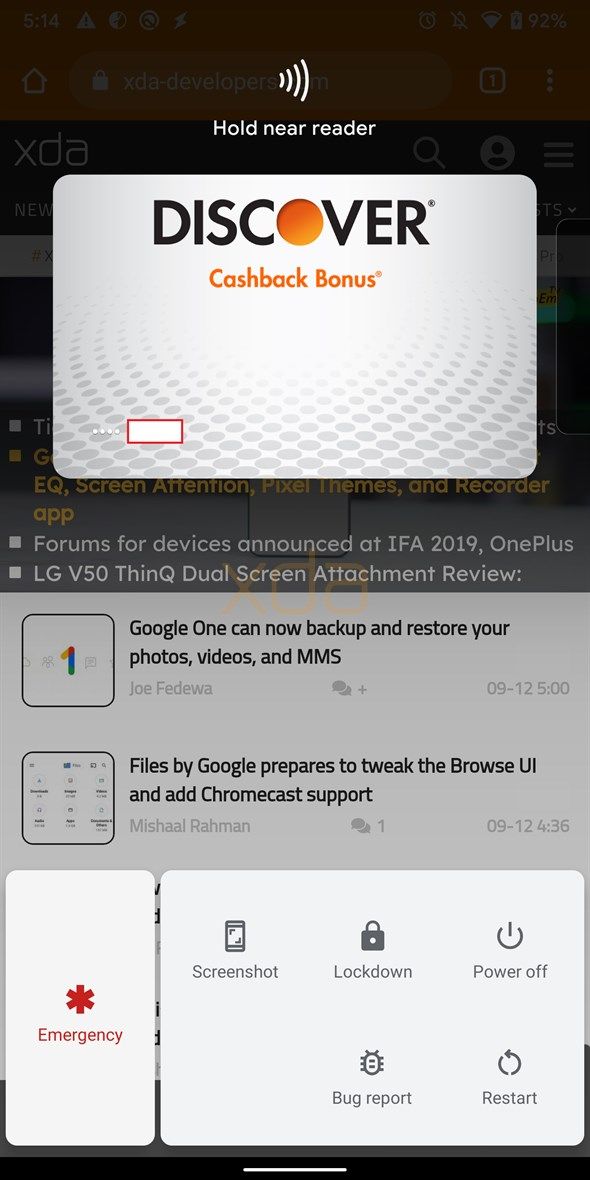
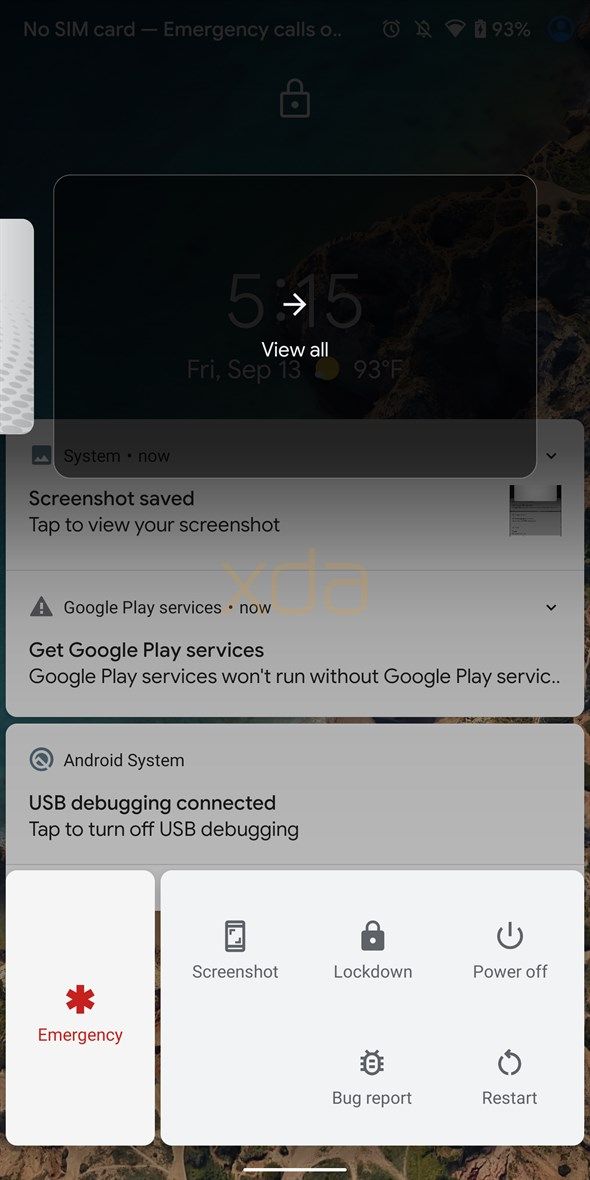
Google just released the Android 11 Developer Preview with a focus on improving the security and usability features in the OS. Besides the variety of new developer options and changes over Android 10, a few other features that were teased in previous versions of Android but not released are now present in the Android 11 Developer Preview. One such addition is the Quick Access Wallet feature, which lets you pull up cards saved in Google Pay directly from the power menu.

Quick Access Wallet first surfaced in the fourth Android Q beta version as “Show cards & passes“. It wasn’t working at the time and even while Google listed it as “Quick wallet access” among the Android 10 features after the stable release, the feature was still surprisingly absent. XDA’s Editor-in-Chief, Mishaal Rahman, later managed to activate the feature wherein he was able to add his cards or access the ones that were already saved in Google Pay by simply opening the power menu (i.e. long-pressing the power button).

Android 10 Quick Wallet Access

Quick Access Wallet preview in Android 10

In Android 10, the Quick Access Wallet feature was evidently limited to the Google Pixel devices and only worked with payments using Google Pay. For several months, Google didn’t share any further detail about the feature. But with Android 11, Google is expectedly making a move to improve it by extending support beyond Google Pay. Any payment app will now be able to implement the QuickAccessWalletService API so that users can access cards, coupons, or tickets saved in that specific app directly from the power menu.

To implement the feature, the payment app will be required to add the required permission, i.e. android.permission.BIND_QUICK_ACCESS_WALLET_SERVICE, in its Manifest. This will allow the system to bind the service and not kill the app even when it is not used for long enough. To be able to use Quick Access Wallet with other apps in Android 11, users will be required to enable the feature from Settings > System > Gestures. Users will also have to select their default payment app in the Tap & Pay option in Settings.

If you have a Pixel device and want to try out the new Developer Preview, you can click on the links below and flash the system packages for your specific device. Do note that you’ll require an unlocked bootloader and you’ll have to back up your data before starting the process.

How to download Android 11 Developer Preview for Google Pixel and other devices

How to install the Android 11 Developer Preview on your Google Pixel smartphone

Android 11 News on XDA

The post Android 10’s hidden Quick Access Wallet for Google Pay is now a generic feature in Android 11 appeared first on xda-developers.


from xda-developers https://ift.tt/2P7yCR0
via IFTTT