LightBlog

mercredi 19 février 2020

Custom ROM throwback: Android 11 tests separating the Quick Settings panel from the notification shade

The first builds of Android 11 were released a few hours ago, coming to us in the form of Developer Preview 1. This new release of Android brings along a lot of new privacy and security-focused changes, several developer-oriented updates, and a whole bunch of changes that were not part of the announcement post from Google. While we were looking around for more new, unannounced changes in the newest version of Android, we stumbled upon something that surprised us…but not really. With Android 11, Google is testing a separation of the Quick Settings panel from the Notification Shade — a feature that used to exist in several older custom ROMs.

As Mishaal demonstrates on his Google Pixel 2 Xl running Android 11 Developer Preview 1, Android 11 is testing a feature that separates the Quick Settings dropdown from the Notification Panel dropdown, allowing you to quickly jump into either depending on which side of the status bar you pull down from. In the video, you can spot a white line on the status bar indicating the point of separation — swiping down from the left of this line will pull down the notification shade, while swiping down from the right of this line will pull down the Quick Settings panel. If your intent is to access the Quick Settings panel, this will streamline your experience by eliminating the double swipe that is currently needed to access them.

As is evident from the video, this feature is still very much a Work-in-Progress. The notifications do not align themselves properly to the top of the notification shade, and the Quick Settings panel has an odd line where the notifications would normally appear. This feature is thus not available for toggling by default and needs to be manually activated.

One theory with this UI test is that Google could be trying it out alongside other UI tests on the Quick Settings panel and Notification Shade, such as integrating music controls in the Quick Settings panel instead of the Notification panel. It could also be tied to the dedicated Conversation view in the Notification Shade, and coupled with the aforementioned music controls change, can be seen as an attempt to declutter the Notification Shade and improve the overall experience.

If you have been around the custom ROM scenes in the era of Gingerbread and Ice Cream Sandwich, you would realize that this isn’t exactly a new feature. I personally recall having used this feature on Touchwiz-based custom ROMs based on Android 2.3.4 Gingerbread as well as on heavily modified CyanogenMod builds that were based on Android 4.0 Ice Cream Sandwich. It appears that Google has now taken inspiration from custom ROMs for this UI test, though at this stage, there’s no guarantee that this feature will make its way to the final release of Android 11.

Android 11 News on XDA

The post Custom ROM throwback: Android 11 tests separating the Quick Settings panel from the notification shade appeared first on xda-developers.


from xda-developers https://ift.tt/2SHVx7P
via IFTTT

Wild Android 11 test puts a music player in the Quick Settings panel

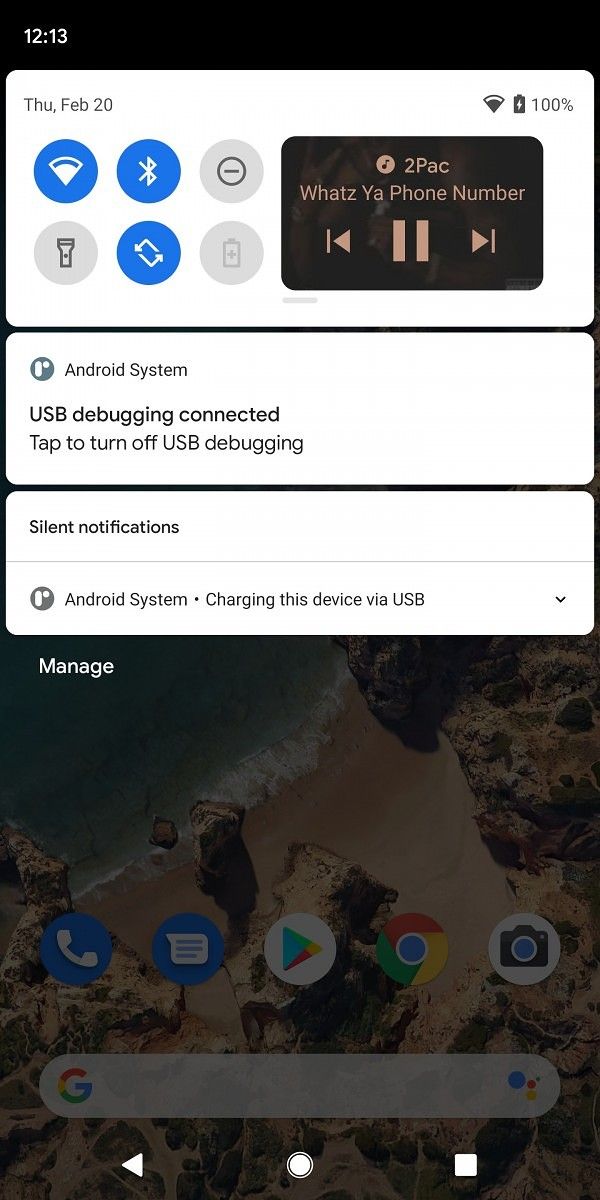
The first Android 11 developer preview is out and we’ve already covered some of the changes we found from Android 10 so far. The latest iteration of Android also comes with some new privacy and security features, along with a few new features for developers. But that’s not all. Google is scheduled to roll out two more developer previews and three betas before the final stable release and while the company won’t be announcing any of the new features till Google I/O 2020, we’ll continue to tinker with the latest build to find upcoming features in Android 11. We’ve already uncovered several such features, including a new increased touch sensitivity option for the Pixel 4, a Motion Sense gesture for controlling music playback on the device, new screenshot previews, and even a fully redesigned Notification History page. And now, our Editor-in-Chief Mishaal Rahman has managed to manually enable a new feature that puts a music player in the Quick Settings in the notification shade.

In current builds of Android, whenever you’re listening to music on your phone a music player appears in the notifications shade. Sometimes, when you receive too many notifications, the music player is moved to the bottom and you have to open the notification shade all the way in order to access it. This could prove to be a bit of an annoyance, especially if you’re someone who receives a ton of notifications.

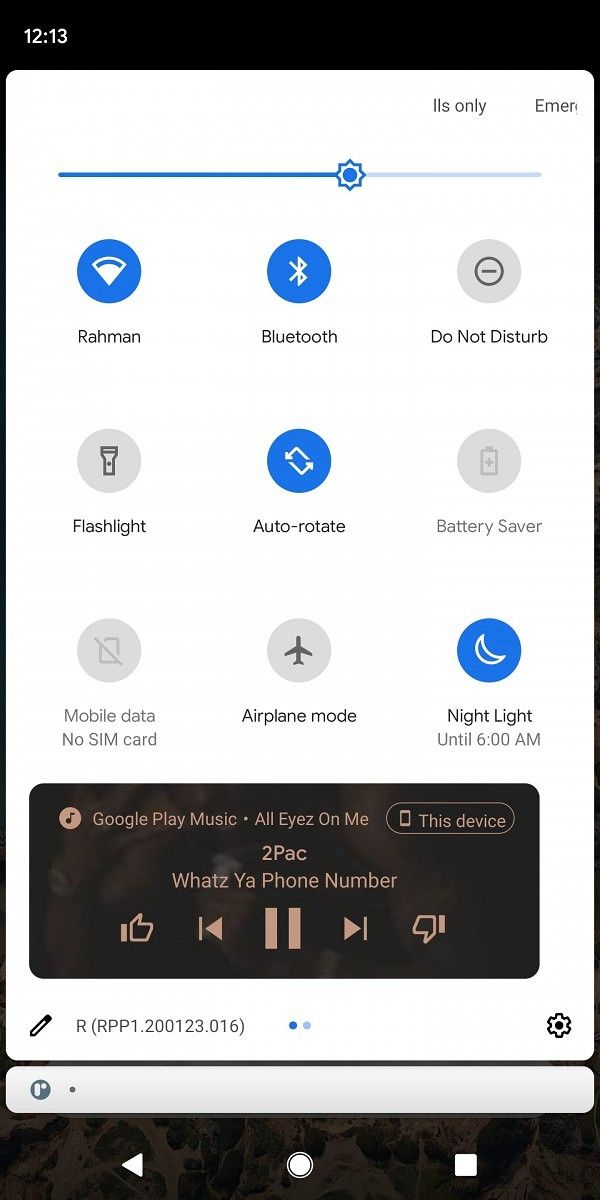
It seems like Google is aware of this issue and will be addressing it in a future build of Android 11 by putting the music player in the Quick Settings panel. As you can see in the screenshots above, the music player will appear as a part of the Quick Settings panel right next to the other toggles. In order to accommodate the music player, the Quick Settings panel will expand from one to two rows and will display the Quick Settings toggles on one side, while the music player will take up the other side.

Opening the Quick Settings panel completely by swiping down once again will move the music player to the bottom of the panel, with all the toggles right above it. In a bid to accommodate the music player, the Quick Settings panel will take up more space than it does currently but, on the positive side, the music player will always be accessible right at the top. As of now, this feature is not accessible by default on the first Android 11 developer preview and we had to manually enable it in order to take these screenshots. It’s also worth mentioning that Google might make some changes to the feature before it’s officially released in an upcoming build of Android 11.

The post Wild Android 11 test puts a music player in the Quick Settings panel appeared first on xda-developers.


from xda-developers https://ift.tt/3bPdY1L
via IFTTT

Android 11 will have 2 more developer previews and 3 betas before stable

Google just released the first Android 11 developer preview and you can now install it on your Google Pixel or Project Treble supported Android device. While this is just the first developer preview of the next iteration of Android, we’ve already managed to uncover a few new security and developer-facing features in the software. There’s a new screenshot preview with scrolling screenshot support, an increased touch sensitivity option for the Pixel 4, a new Motion Sense gesture to pause music, and a fully redesigned Notification History page. But that’s not all that will be new in Android 11. We expect to see even more new features in the months leading up to Google I/O 2020, as Google will be rolling out 2 more developer previews and 3 betas before the stable release.

In a recent post on the Android Developer website, Google has shared a detailed timeline for the Android 11 rollout, along with some information about what will be included in each developer preview/beta release. As per the timeline, the Android 11 Developer Preview program will run till the final public release in Q3 2020 and Google will be releasing two more developer previews and three betas before the final release. The second developer preview will be rolled out in March and it will be an incremental update with additional features, APIs and behavior changes. This will be followed by the third developer preview in April, which will be another incremental update for stability and performance.

Android 11 release timeliene

The first Android 11 beta will be released over-the-air in May to early adopters who’ve enrolled in the Android Beta program. With the first beta, Google will continue compatibility testing, collect feedback from beta users, and start early testing with targeting Android 11. The second beta, which will be a Platform Stability milestone for Google, will be rolled out in June and will bring final APIs and behaviors. It will also open Play publishing and developers will be urged to start final compatibility testing for apps, SDKs, and libraries. The third, and final, beta will be a release candidate build and is expected to be rolled out in Q3 2020. Following its release, developers will be required to release compatible updates for apps, SDKs, and libraries. The final release to AOSP and the ecosystem will follow soon thereafter.

This time around, Google is introducing a new Platform Stability milestone (as mentioned above) which is expected to help developers plan and test their final releases. The milestone signifies that Android 11 will reach its final internal and external APIs, final app-facing behaviors, and final non-SDK graylists by the second beta release, following which there will be no further changes that will affect third-party apps. Google has urged developers to target the milestone for final planning, compatibility testing, and public release of their Android 11 compatible apps.


Source: Android Developers

The post Android 11 will have 2 more developer previews and 3 betas before stable appeared first on xda-developers.


from xda-developers https://ift.tt/3bRkzZJ
via IFTTT

Android 11 will have 2 more developer previews and 3 betas before stable

Google just released the first Android 11 developer preview and you can now install it on your Google Pixel or Project Treble supported Android device. While this is just the first developer preview of the next iteration of Android, we’ve already managed to uncover a few new security and developer-facing features in the software. There’s a new screenshot preview with scrolling screenshot support, an increased touch sensitivity option for the Pixel 4, a new Motion Sense gesture to pause music, and a fully redesigned Notification History page. But that’s not all that will be new in Android 11. We expect to see even more new features in the months leading up to Google I/O 2020, as Google will be rolling out 2 more developer previews and 3 betas before the stable release.

In a recent post on the Android Developer website, Google has shared a detailed timeline for the Android 11 rollout, along with some information about what will be included in each developer preview/beta release. As per the timeline, the Android 11 Developer Preview program will run till the final public release in Q3 2020 and Google will be releasing two more developer previews and three betas before the final release. The second developer preview will be rolled out in March and it will be an incremental update with additional features, APIs and behavior changes. This will be followed by the third developer preview in April, which will be another incremental update for stability and performance.

Android 11 release timeliene


The first Android 11 beta will be released over-the-air in May to early adopters who’ve enrolled in the Android Beta program. With the first beta, Google will continue compatibility testing, collect feedback from beta users, and start early testing with targeting Android 11. The second beta, which will be a Platform Stability milestone for Google, will be rolled out in June and will bring final APIs and behaviors. It will also open Play publishing and developers will be urged to start final compatibility testing for apps, SDKs, and libraries. The third, and final, beta will be a release candidate build and is expected to be rolled out in Q3 2020. Following its release, developers will be required to release compatible updates for apps, SDKs, and libraries. The final release to AOSP and the ecosystem will follow soon thereafter.

This time around, Google is introducing a new Platform Stability milestone (as mentioned above) which is expected to help developers plan and test their final releases. The milestone signifies that Android 11 will reach its final internal and external APIs, final app-facing behaviors, and final non-SDK graylists by the second beta release, following which there will be no further changes that will affect third-party apps. Google has urged developers to target the milestone for final planning, compatibility testing, and public release of their Android 11 compatible apps.


Source: Android Developers

The post Android 11 will have 2 more developer previews and 3 betas before stable appeared first on xda-developers.


from xda-developers https://ift.tt/3bRkzZJ
via IFTTT

Android 11 Developer Preview 1 is now available for Google Pixel smartphones, Android Studio emulator, and Project Treble devices

Today, Google officially released the first Android 11 Developer Preview for Pixel smartphones. Although the release is still internally referred to as Android R, Android 11 won’t be getting a dessert name as Google changed Android’s branding with Android 10 last year. Like previous beta releases, this first Android 11 Developer Preview is aimed at helping developers test the latest Android OS release ahead of the stable launch in August. In fact, Google has released this build a few weeks earlier than expected, just so they could give developers more time to prepare. Google will continue to release new previews until stable, but don’t expect the main features and APIs to be revealed until Google I/O 2020 in May.

The first Developer Preview is available now for manual flashing on the Pixel 2, Pixel 2 XL, Pixel 3, Pixel 3 XL, Pixel 3a, Pixel 3a XL, Pixel 4, and Pixel 4 XL. Sadly, the Essential Phone won’t be joining the list now or in the future as the company has ceased all operations. However, smartphones from other manufacturers could be supported in future preview releases as we’ve seen with Android 9 and Android 10 betas. Google typically shares the source code of the latest Android release with its biggest partners so that they can prepare for the new Android update, after all. Expect to see more Android 11 Developer Preview releases in the coming months followed by a stable update for Pixel phones in August.

For developers interested in reading up on the new APIs and behavioral changes, you can get started at the preview site that Google set up.

Android 11 Developer Preview Site

To get started with the latest release on one of the aforementioned Pixel devices, you can download the latest system image from the link below. This release is only intended for developers to test their apps against the latest behavioral changes and platform features, which is why Google hasn’t opened up sign-ups on the Android Beta site and why this first release is called a Developer Preview rather than an Android Beta. If you have a Project Treble-compatible device with an unlocked bootloader that launched with Android 9 Pie or Android 10, you can flash an Android 11 Generic System Image using fastboot. For developers who don’t have a supported Pixel or Project Treble-enabled device, you can download the latest system image from the SDK Manager in Android Studio.

Download Android 11 Developer Preview 1 System Images for Pixel Phones

Download Android 11 Developer Preview 1 OTA Images for Pixel Phones

Download Android 11 Developer Preview 1 GSI Images for Project Treble devices

Stay tuned to XDA for our extensive coverage on the new Android OS Developer Previews and Betas. We’ll be flashing it on several of our own Pixel devices and will dive into the firmware to detail everything that’s new on the surface and under-the-hood. Be sure to follow our Android 11 tag to catch up on all the news we’re going to be posting soon.

Android 11 News on XDA

The post Android 11 Developer Preview 1 is now available for Google Pixel smartphones, Android Studio emulator, and Project Treble devices appeared first on xda-developers.


from xda-developers https://ift.tt/2SKjpI1
via IFTTT

[Update 2: Settlement Checks Sent] Google will pay up to $500 to Pixel owners with defective microphones

Update 2 (2/19/20 @ 12:35 PM ET): Checks for the Pixel settlement are now being sent out and owners are beginning to receive them.

Update (8/13/19 @ 9:15 AM ET): The claim period for Google Pixel owners with defective microphones has opened.

The Google Pixel and the Pixel XL were, for the most part, exceptional devices when they launched back in 2016. They were the first devices to mark the death of the Nexus legacy, and also signified a big change of direction for Google in several aspects. Nowadays, they’re still receiving love—they even have Android Q! However, as good as they were, they also had certain flaws going on. One of them being a microphone-related issue—certain Pixel and Pixel XL devices came with defective microphones.

Google acknowledged there was an issue with defective microphones in early 2017, when the company admitted that a number of devices had a “hairline crack in the solder connection on the audio codec” which, of course, caused issues with calling and Google Assistant functionality. The company first offered to address the issue with a software update but continued to knowingly sell these defective devices, a course of action which, expectedly, earned them a lawsuit from angered customers.

Pixel XDA Forum Pixel XL XDA Forum

Now, the lawsuit has allegedly been settled for $7.25 million pending court approval, and Google Pixel device owners affected by this issue could get up to $500. If your device was manufactured before January 4th, 2017, it means that your device is covered by the lawsuit and, therefore, is eligible. According to the proposed settlement, if you returned your defective Pixel/Pixel XL device only to get another defective phone from Google, then you may be eligible to the highest compensation, which is $500. If you only had a single defective device, then you may be eligible for up to $350. Even eligible Pixel owners who didn’t experience any issues at all could get up to $20 from this settlement.

The court hasn’t approved this yet, so you can’t submit a claim just yet. However, you should keep an eye on the case if you want to receive compensation for your defective device.

Via: The Verge


Update 1: Settlements Open

The settlement website for the class action lawsuit regarding Google Pixel phones with defective microphones has opened. Owners of the 2016 Pixel and Pixel XL can file a claim and get anywhere from $350-500 in return, depending on the number of defective units they had. People who paid an insurance deductible to replace a phone will get a refund, and even if you had no issues with your Pixel, you can get $20. File a claim at the link below.

Via: Android Police


Update 2: Settlement Checks Sent

Pixel owners who filed a claim for the class action lawsuit are starting to receive their settlement checks. Users have reported receiving $20 – $500, depending on the severity of their claim. If you filed a claim and met the qualifications, you should be getting something in the mail soon.

Source: Reddit

The post [Update 2: Settlement Checks Sent] Google will pay up to $500 to Pixel owners with defective microphones appeared first on xda-developers.


from xda-developers https://ift.tt/2YMAFRl
via IFTTT

[Update 2: Settlement Checks Sent] Google will pay up to $500 to Pixel owners with defective microphones

Update 2 (2/19/20 @ 12:35 PM ET): Checks for the Pixel settlement are now being sent out and owners are beginning to receive them.

Update (8/13/19 @ 9:15 AM ET): The claim period for Google Pixel owners with defective microphones has opened.

The Google Pixel and the Pixel XL were, for the most part, exceptional devices when they launched back in 2016. They were the first devices to mark the death of the Nexus legacy, and also signified a big change of direction for Google in several aspects. Nowadays, they’re still receiving love—they even have Android Q! However, as good as they were, they also had certain flaws going on. One of them being a microphone-related issue—certain Pixel and Pixel XL devices came with defective microphones.

Google acknowledged there was an issue with defective microphones in early 2017, when the company admitted that a number of devices had a “hairline crack in the solder connection on the audio codec” which, of course, caused issues with calling and Google Assistant functionality. The company first offered to address the issue with a software update but continued to knowingly sell these defective devices, a course of action which, expectedly, earned them a lawsuit from angered customers.

Pixel XDA Forum Pixel XL XDA Forum

Now, the lawsuit has allegedly been settled for $7.25 million pending court approval, and Google Pixel device owners affected by this issue could get up to $500. If your device was manufactured before January 4th, 2017, it means that your device is covered by the lawsuit and, therefore, is eligible. According to the proposed settlement, if you returned your defective Pixel/Pixel XL device only to get another defective phone from Google, then you may be eligible to the highest compensation, which is $500. If you only had a single defective device, then you may be eligible for up to $350. Even eligible Pixel owners who didn’t experience any issues at all could get up to $20 from this settlement.

The court hasn’t approved this yet, so you can’t submit a claim just yet. However, you should keep an eye on the case if you want to receive compensation for your defective device.

Via: The Verge


Update 1: Settlements Open

The settlement website for the class action lawsuit regarding Google Pixel phones with defective microphones has opened. Owners of the 2016 Pixel and Pixel XL can file a claim and get anywhere from $350-500 in return, depending on the number of defective units they had. People who paid an insurance deductible to replace a phone will get a refund, and even if you had no issues with your Pixel, you can get $20. File a claim at the link below.

Via: Android Police


Update 2: Settlement Checks Sent

Pixel owners who filed a claim for the class action lawsuit are starting to receive their settlement checks. Users have reported receiving $20 – $500, depending on the severity of their claim. If you filed a claim and met the qualifications, you should be getting something in the mail soon.

Source: Reddit

The post [Update 2: Settlement Checks Sent] Google will pay up to $500 to Pixel owners with defective microphones appeared first on xda-developers.


from xda-developers https://ift.tt/2YMAFRl
via IFTTT