
LightBlog

jeudi 13 février 2020

Telegram 5.15 revamps Profiles, adds Fast Media Viewer and People Nearby 2.0

Despite the increasing popularity of WhatsApp around the world, the Telegram messenger remains the top choice for users who are big on privacy. But ensuring user privacy isn’t the only factor behind Telegram’s rise to success. The app also offers a ton of useful features that make it a better alternative to WhatsApp and it keeps getting even more new features with each successive update. Earlier this year, the app received a major update that introduced a new Theme Editor, a “Send when online” feature, verifiable builds, and much more. Following that, the developers behind the app released an update with new kinds of Telegram polls, an option to tweak the appearance of message bubbles and download progress counters on Android. Now, the app is receiving another update which introduces even more new features. Here’s everything that’s new in Telegram v5.15:

Updated profile pages
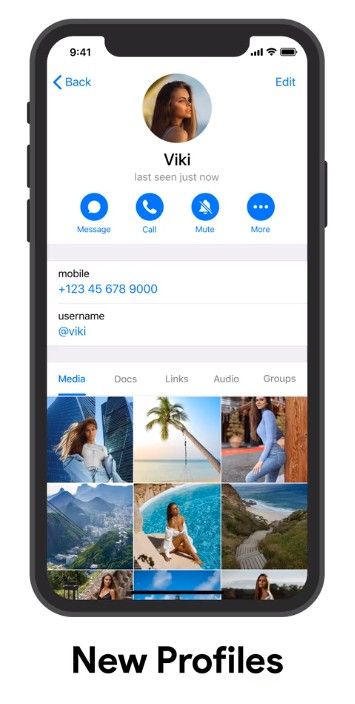
Telegram updated profiles Telegram updated profiles

The latest update for Telegram brings a complete redesign for profile pages on the app. As per a blog post from the company, profiles on Telegram are now more functional than ever and make it easy for users to see photos, videos, and links they’ve shared with anyone on the app. The update also allows users to browse through the profile pictures of their contacts with ease.

Fast media viewer

Browsing through media on the app is much more intuitive following the update, allowing users to just tap on the right or left edges to go to the next or previous media file. The feature works while you’re browsing through media in any section of the app, including the aforementioned updated profile pages and the new People Nearby 2.0 section.

People Nearby 2.0

Back in June last year, Telegram introduced a new People Nearby feature to allow users to easily exchange contact info. With the latest update, the feature is also getting a major overhaul and it will now allow you to meet new people. To use the new feature, you can head over to the Contacts section and then tap on Add People Nearby. Here you’ll be able to see all the Telegram users nearby who’ve enabled the new feature. You can also make your own profile visible by tapping on Make Myself Visible and let other people find you using the feature.

Finally, the update also introduces new animated emoji to the app, with 17 animated emoji to choose from. Here’s the official changelog for the Telegram v5.15 update:

  • Access shared media directly from the redesigned profile pages.
  • Pull down to enlarge profile pictures.
  • Flip through photos by tapping on their left or right edge.
  • Tap on your chat partner’s profile picture to immediately expand it.
  • Make your profile visible to others in your area from ‘Contacts’ > ‘Add People Nearby’  and make new friends.

Telegram (Free, Google Play) →


Source: Telegram blog

The post Telegram 5.15 revamps Profiles, adds Fast Media Viewer and People Nearby 2.0 appeared first on xda-developers.


from xda-developers https://ift.tt/2SIRqHl
via IFTTT

Telegram 5.15 revamps Profiles, adds Fast Media Viewer and People Nearby 2.0

Despite the increasing popularity of WhatsApp around the world, the Telegram messenger remains the top choice for users who are big on privacy. But ensuring user privacy isn’t the only factor behind Telegram’s rise to success. The app also offers a ton of useful features that make it a better alternative to WhatsApp and it keeps getting even more new features with each successive update. Earlier this year, the app received a major update that introduced a new Theme Editor, a “Send when online” feature, verifiable builds, and much more. Following that, the developers behind the app released an update with new kinds of Telegram polls, an option to tweak the appearance of message bubbles and download progress counters on Android. Now, the app is receiving another update which introduces even more new features. Here’s everything that’s new in Telegram v5.15:

Updated profile pages

Telegram updated profiles Telegram updated profiles

The latest update for Telegram brings a complete redesign for profile pages on the app. As per a blog post from the company, profiles on Telegram are now more functional than ever and make it easy for users to see photos, videos, and links they’ve shared with anyone on the app. The update also allows users to browse through the profile pictures of their contacts with ease.

Fast media viewer

Browsing through media on the app is much more intuitive following the update, allowing users to just tap on the right or left edges to go to the next or previous media file. The feature works while you’re browsing through media in any section of the app, including the aforementioned updated profile pages and the new People Nearby 2.0 section.

People Nearby 2.0
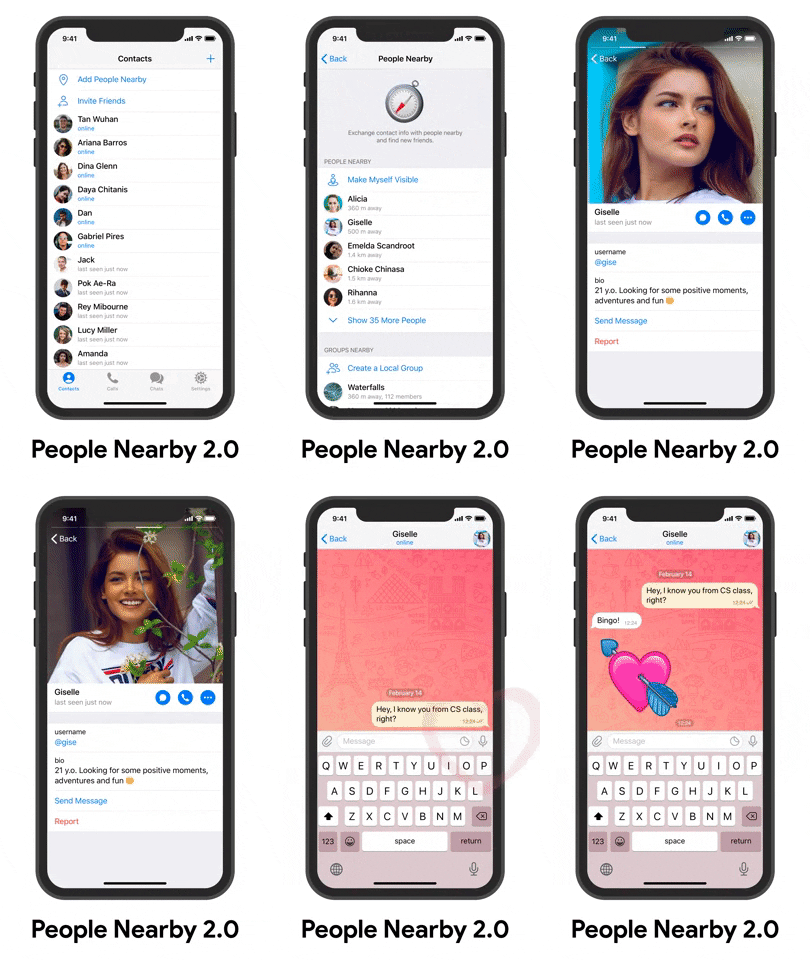
Back in June last year, Telegram introduced a new People Nearby feature to allow users to easily exchange contact info. With the latest update, the feature is also getting a major overhaul and it will now allow you to meet new people. To use the new feature, you can head over to the Contacts section and then tap on Add People Nearby. Here you’ll be able to see all the Telegram users nearby who’ve enabled the new feature. You can also make your own profile visible by tapping on Make Myself Visible and let other people find you using the feature.

Finally, the update also introduces new animated emoji to the app, with 17 animated emoji to choose from. Here’s the official changelog for the Telegram v5.15 update:

  • Access shared media directly from the redesigned profile pages.
  • Pull down to enlarge profile pictures.
  • Flip through photos by tapping on their left or right edge.
  • Tap on your chat partner’s profile picture to immediately expand it.
  • Make your profile visible to others in your area from ‘Contacts’ > ‘Add People Nearby’  and make new friends.

Telegram (Free, Google Play) →


Source: Telegram blog

The post Telegram 5.15 revamps Profiles, adds Fast Media Viewer and People Nearby 2.0 appeared first on xda-developers.


from xda-developers https://ift.tt/2SIRqHl
via IFTTT

Realme X50 Pro will come with a 65W “SuperDart” GaN charger for fast wired charging

Xiaomi recently launched its flagship Mi 10 series at a launch event in China. Along with the new smartphones, the company launched a boatload of new accessories, including two wireless chargers, a smartphone cooler, and two 65-watt wired chargers. Among the two 65-watt chargers was a new GaN charger, which uses Gallium Nitride (GaN) semiconductors that are more efficient than silicon, can sustain higher voltages, run current faster, and help give the charger a smaller form factor. Now, it seems like Xiaomi’s competitor Realme is also planning to launch a similar GaN charger at the company’s upcoming Realme X50 Pro launch event.

Realme is scheduled to host an event on February 24th in Madrid, during which the company will launch the Realme X50 Pro 5G — a Snapdragon 865 powered flagship device with up to 12GB of RAM. Just a week ahead of the launch, Realme India’s CMO Francis Wang took to Twitter to announce that the upcoming device will feature “Leading Charging Technology”. In a follow-up tweet, Realme India’s CEO Madhav Sheth revealed that the upcoming device will feature support for 65-watt fast charging, thanks to the company’s new SuperDart Charge Technology. Sheth further claims that the new fast charging technology will ensure that the device doesn’t heat up while charging, allow users to enjoy gaming while charging and provide enhanced battery life.

Realme DART Charger

Realme’s CMO Xu Qi Chase revealed additional information about the new charging technology over on Weibo, stating that the Realme X50 Pro will use a GaN charger which is more compact, efficient, and generates less heat. He further added that the new 65-watt charger will be included in the box with the Realme X50 Pro and buyers won’t have to purchase it separately. While the company has released no further information about the charger, we believe that the new SuperDart Charge Technology is, most likely, a rebrand of OPPO’s 65-watt SuperVOOC 2.0 which also makes use of GaN semiconductors. It’s also worth noting that Realme currently offers a 50-watt SuperVOOC fast charger with its first flagship, the Realme X2 Pro (review), which is capable of charging the device’s 4,000 mAh battery from 5-100% in just 30 minutes.


Source: Weibo, Twitter

The post Realme X50 Pro will come with a 65W “SuperDart” GaN charger for fast wired charging appeared first on xda-developers.


from xda-developers https://ift.tt/31TYXr0
via IFTTT

Realme X50 Pro will come with a 65W “SuperDart” GaN charger for fast wired charging

Xiaomi recently launched its flagship Mi 10 series at a launch event in China. Along with the new smartphones, the company launched a boatload of new accessories, including two wireless chargers, a smartphone cooler, and two 65-watt wired chargers. Among the two 65-watt chargers was a new GaN charger, which uses Gallium Nitride (GaN) semiconductors that are more efficient than silicon, can sustain higher voltages, run current faster, and help give the charger a smaller form factor. Now, it seems like Xiaomi’s competitor Realme is also planning to launch a similar GaN charger at the company’s upcoming Realme X50 Pro launch event.

Realme is scheduled to host an event on February 24th in Madrid, during which the company will launch the Realme X50 Pro 5G — a Snapdragon 865 powered flagship device with up to 12GB of RAM. Just a week ahead of the launch, Realme India’s CMO Francis Wang took to Twitter to announce that the upcoming device will feature “Leading Charging Technology”. In a follow-up tweet, Realme India’s CEO Madhav Sheth revealed that the upcoming device will feature support for 65-watt fast charging, thanks to the company’s new SuperDart Charge Technology. Sheth further claims that the new fast charging technology will ensure that the device doesn’t heat up while charging, allow users to enjoy gaming while charging and provide enhanced battery life.

Realme DART Charger

Realme’s CMO Xu Qi Chase revealed additional information about the new charging technology over on Weibo, stating that the Realme X50 Pro will use a GaN charger which is more compact, efficient, and generates less heat. He further added that the new 65-watt charger will be included in the box with the Realme X50 Pro and buyers won’t have to purchase it separately. While the company has released no further information about the charger, we believe that the new SuperDart Charge Technology is, most likely, a rebrand of OPPO’s 65-watt SuperVOOC 2.0 which also makes use of GaN semiconductors. It’s also worth noting that Realme currently offers a 50-watt SuperVOOC fast charger with its first flagship, the Realme X2 Pro (review), which is capable of charging the device’s 4,000 mAh battery from 5-100% in just 30 minutes.


Source: Weibo, Twitter

The post Realme X50 Pro will come with a 65W “SuperDart” GaN charger for fast wired charging appeared first on xda-developers.


from xda-developers https://ift.tt/31TYXr0
via IFTTT

Samsung rolls out Android 10 with One UI 2.0 to the Galaxy A30 and A50s

After updating its flagship lineup to the latest Android version, Samsung is now extending the Android 10 rollout to its mid-range smartphones. The Samsung Galaxy A30 in India and Galaxy A50s in Vietnam are now receiving the stable Android 10 update along with One UI 2.0. Both devices were promised to get the One UI 2.0 based update and were part of Samsung’s 2020 update roadmap, and today the company is finally making good on its promise. 

The Galaxy A30 update carries build number A305FDDU4BTB3 and is 1.4GB in size. On the other hand, the Android 10 update for the Galaxy A50s carries software version A507FNXXU3BTB. The update includes all the standard Android features such as a system-wide dark mode, new navigation gestures, improved Digital Wellbeing tools with parental controls, and more. On top of that, users can also look forward to One UI 2.0 specific additions like a built-in screen recorder, a new Quick Settings panel layout, improved system icons, improved system colors, a redesigned camera app, and a whole lot more. 

Samsung Galaxy A30 Android 10/One UI 2.0 update

Stable Android 10 for Galaxy A30

Since this is a staged software rollout, the update may take some time to reach all devices, so don’t worry if you’re not seeing any update notification just yet. Other notable Samsung phones scheduled to receive the Android 10 update in the next few months include the Galaxy M40, Galaxy A50, Galaxy A70, Galaxy A70s, Galaxy Fold, Galaxy M30s, and Galaxy Tab S6, just to name only a few. To check whether your Galaxy phone is slated to receive Android 10, refer to this list

Launched back in February of 2019, the Galaxy A30 is a lower mid-range smartphone from Samsung, featuring a 6.4-inch AMOLED display, Exynos 7904 SoC, dual cameras, and a 4,000 mAh battery. The Galaxy A50s, on the other hand, belongs to Samsung’s upper mid-range lineup. It was announced in September last year and packs a 6.4-inch full HD+ display, Exynos 9611 SoC, triple rear cameras, and a 4,000 mAh battery with fast charging support. Both devices were launched with Android 9 Pie out of the box.

Samsung Galaxy A30 Forums ||| Samsung Galaxy A50s Forums


Source 1: SamMobile Source 2: SamMobile

The post Samsung rolls out Android 10 with One UI 2.0 to the Galaxy A30 and A50s appeared first on xda-developers.


from xda-developers https://ift.tt/2SMePHZ
via IFTTT

Samsung rolls out Android 10 with One UI 2.0 to the Galaxy A30 and A50s

After updating its flagship lineup to the latest Android version, Samsung is now extending the Android 10 rollout to its mid-range smartphones. The Samsung Galaxy A30 in India and Galaxy A50s in Vietnam are now receiving the stable Android 10 update along with One UI 2.0. Both devices were promised to get the One UI 2.0 based update and were part of Samsung’s 2020 update roadmap, and today the company is finally making good on its promise. 

The Galaxy A30 update carries build number A305FDDU4BTB3 and is 1.4GB in size. On the other hand, the Android 10 update for the Galaxy A50s carries software version A507FNXXU3BTB. The update includes all the standard Android features such as a system-wide dark mode, new navigation gestures, improved Digital Wellbeing tools with parental controls, and more. On top of that, users can also look forward to One UI 2.0 specific additions like a built-in screen recorder, a new Quick Settings panel layout, improved system icons, improved system colors, a redesigned camera app, and a whole lot more. 

Samsung Galaxy A30 Android 10/One UI 2.0 update

Stable Android 10 for Galaxy A30

Since this is a staged software rollout, the update may take some time to reach all devices, so don’t worry if you’re not seeing any update notification just yet. Other notable Samsung phones scheduled to receive the Android 10 update in the next few months include the Galaxy M40, Galaxy A50, Galaxy A70, Galaxy A70s, Galaxy Fold, Galaxy M30s, and Galaxy Tab S6, just to name only a few. To check whether your Galaxy phone is slated to receive Android 10, refer to this list

Launched back in February of 2019, the Galaxy A30 is a lower mid-range smartphone from Samsung, featuring a 6.4-inch AMOLED display, Exynos 7904 SoC, dual cameras, and a 4,000 mAh battery. The Galaxy A50s, on the other hand, belongs to Samsung’s upper mid-range lineup. It was announced in September last year and packs a 6.4-inch full HD+ display, Exynos 9611 SoC, triple rear cameras, and a 4,000 mAh battery with fast charging support. Both devices were launched with Android 9 Pie out of the box.

Samsung Galaxy A30 Forums ||| Samsung Galaxy A50s Forums


Source 1: SamMobile Source 2: SamMobile

The post Samsung rolls out Android 10 with One UI 2.0 to the Galaxy A30 and A50s appeared first on xda-developers.


from xda-developers https://ift.tt/2SMePHZ
via IFTTT

Bootloader unlock method has been found for the Sprint OnePlus 7 Pro 5G

In August 2019, OnePlus launched the Sprint OnePlus 7 Pro 5G for $840. The phone is a 5G variant of the OnePlus 7 Pro, which was released four months before in May. It has the same internal specifications, and differs only with respect to the modem. The Sprint OnePlus 7 Pro 5G used the first-generation Qualcomm Snapdragon X50 modem to provide sub-6GHz 5G connectivity on Sprint’s mid-band 5G network. The other major difference between the unlocked 4G OnePlus 7 Pro and the Sprint OnePlus 7 Pro 5G is the software. The Sprint variant doesn’t have an officially unlockable bootloader unlike the 4G unlocked variant. The T-Mobile 4G variant lets users unlock the bootloader as soon as they have paid off their device, but the Sprint variant doesn’t. However, an unofficial bootloader unlock method has now been found for the Sprint OnePlus 7 Pro 5G phone.

The team behind the unofficial bootloader unlock used to operate a mail-in service for unofficially unlocking the bootloader of Sprint OnePlus 7 Pro devices via approval of user requests. However, that method has now been discontinued due to a recent development, as the team has now acquired an MSM tool to allow unlocking the bootloader on the Sprint model without needing to mail the device or do anything remotely.

Users are advised to treat this unofficial bootloader method with discretion, as there is no guarantee that things won’t go wrong. Once their device has been bootloader unlocked, they will not be able to use OTA updates, as expected. They will either have to flash updates via fastboot or reset their device to stock and lock the bootloader to update via OTA once more.

The procedure to unofficially unlock the bootloader on the Sprint OnePlus 7 Pro 5G is noted below.

  1. Download the unlocking MSMDownloadTool from here.
  2. Reboot to EDL mode (Volume Up + Volume Down + USB).
  3. Allow the MSMTool to run to completion while staying alert.
  4. As soon as the MSMTool finishes, it will reboot the phone. The important step here is don’t allow it to boot to system. Users must interrupt the boot by entering fastboot.
  5. Immediately run “fastboot flashing unlock”.
  6. Users should now have an unlocked bootloader.

This is an unofficial bootloader unlock exploit and it’s possible OnePlus will patch this in the future. For further information, users should refer to the forum thread.


XDA Forum thread for unofficial bootloader unlock for the Sprint OnePlus 7 Pro 5G

The post Bootloader unlock method has been found for the Sprint OnePlus 7 Pro 5G appeared first on xda-developers.


from xda-developers https://ift.tt/2uH6GfK
via IFTTT