LightBlog

jeudi 13 février 2020

Google’s Messages app prepares to add message reactions, drawing on images

Google Messages with RCS and Chat is Google’s latest attempt at getting a slice of the messaging market. After multiple failed attempts with Google Talk, Hangouts, and Allo, Google shifted gears in April 2018 to kill off Allo in favor of a standardized form of messaging. The company incorporated RCS with the Universal Profile (Chat) in Google Messages and rolled out the functionality first to users in the UK and France. A few months later, it started rolling out RCS to all users in the US regardless of carriers. The US is the most important market for RCS, as iPhone users in the country primarily use iMessage as an IP-based messaging service instead of a cross-platform service such as WhatsApp, which means Android users have no option but to fall back to SMS. Now that RCS is finally available for US users, Google is trying to catch up to iMessage in terms of functionality, which is no small task as iMessage is a feature-rich messaging service.

Now, an APK teardown done by 9to5Google of the latest version of Google Messages beta, version 5.7, shows that Google is preparing to add two features to Messages (which was first called Google Messenger, then renamed to Android Messages, before finally being renamed to just Messages). The first feature is the capability of sending reactions to a message. The second one is the ability to draw on messages.

The reactions feature was added on iMessage in 2016, and its reception has been very popular. Android users in group chats with iMessages users can’t see such reactions, though. Instead, they get text messages such as “[Username] laughed at an image.” When this functionality added to Google Messages, users will be able to send emoji reactions to other Messages users such as thumbs up, thumbs down, angry face, face with tears of joy, smiling face with heart eyes, crying face, and face with open mouth. Google Messages 5.7 also includes some animations to go with a few of the reactions.

The other new feature is drawing on images. Google Messages 5.7 beta is developing a way for users to draw on images they are preparing to send. Google Duo has similar doodling features. In Messages, users will be able to enter a draw mode, and the tools include calligraphy, highlighter, and marker. They will be choose from colors such as black, blue, green, pink, orange, purple, red, white and yellow.

Users can download the latest Messages beta from enrolling in the app’s beta program in the Play Store. These features don’t appear to have gone live yet, but it’s probable they will be announced in the next few weeks.

Messages (Free, Google Play) →


Via: 9to5Google

The post Google’s Messages app prepares to add message reactions, drawing on images appeared first on xda-developers.


from xda-developers https://ift.tt/2vwY8rS
via IFTTT

[Update: LockStar, Clockface] Samsung Good Lock 2020 with One UI 2.0 support is now available

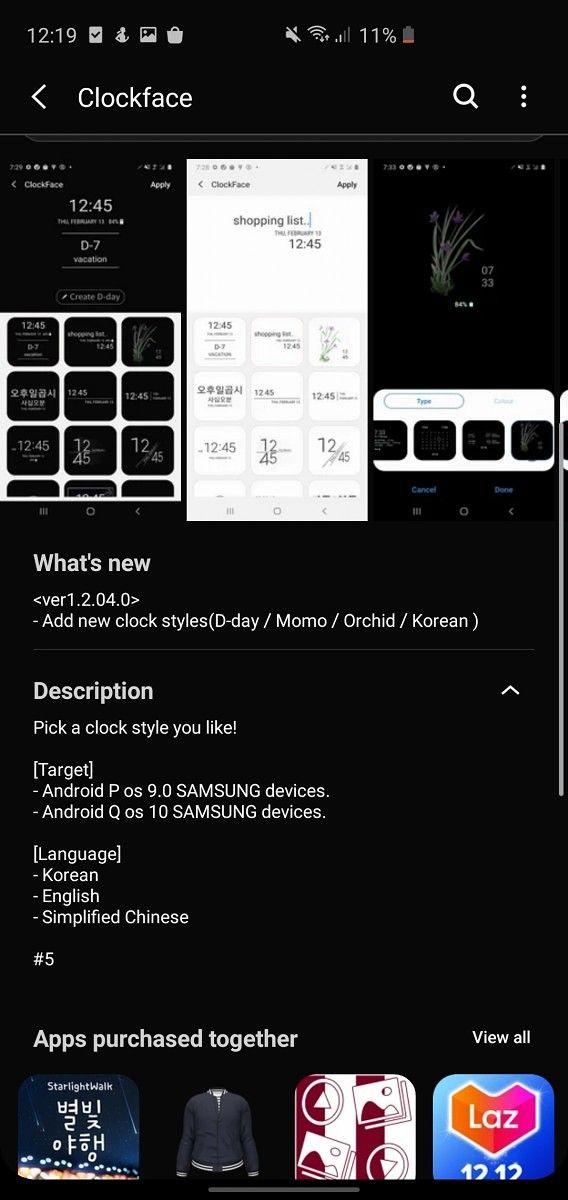
Update (2/13/20 @ 10:20 AM ET): Good Lock 2020 has been updated and it now includes LockStar and Clockface.

Samsung’s Good Lock suite is arguably the best set of tools you can get to customize your Galaxy device. It features a ton of different modules that can help you personalize everything from the lock screen to the device theme. Late last month, Samsung revealed that it was working to update Good Lock modules for One UI 2.0 based on Android 10. The company released a changelog detailing all the new features coming to the customization tool and you download the updated modules on your device right away.

Good Lock 2020 changelog

As you’d expect, the updated Good Lock modules work with all devices running Samsung’s latest One UI 2.0 update based on Android 10. You can download the latest version of the app from the Galaxy Store by following this link. Once you have the app downloaded and installed on your device, you can download all the updated modules, including QuickStar, Task Changes, Routines, etc. from within the app. As per a recent report from Sammobile, Samsung recommends uninstalling and reinstalling all Good Lock modules from within the app for those of you who have been using the app on Android Pie. You can also download the Good Lock app and modules from the APK Mirror links below. The second link includes all the modules currently available on APK Mirror, including MultiStar, NotiStar, One Hand Operation+, QuickStar, Theme Park, and more.

Download Good Lock 2020 from APK Mirror

Download Good Lock 2020 modules from APK Mirror

Source: Sammobile


Update: LockStar, Clockface

Good Lock 2020 was released earlier this month with support for Android 10 and One UI 2.0. Several modules were included in this release, but not all of them. LockStar and Clockface have finally been added to the bunch with a bevy of new features.

LockStar, which is the module for customizing the lock screen experience, is now at version 2.0.00.0. It’s basically the same LockStar that has been available, but now it supports Android 10. Clockface, the module for creating custom clocks, is available now too and it has some new clock styles to go with it.

Some of the modules that were already available for Good Lock 2020 have seen updates as well. NotiStar, Edge Touch, Task Changer, and One Hand Operation + all received minor updates. Download the APKs for LockStar and Clockface below.

Download LockStar APK | Download Clockface APK

Via: Android Police

The post [Update: LockStar, Clockface] Samsung Good Lock 2020 with One UI 2.0 support is now available appeared first on xda-developers.


from xda-developers https://ift.tt/2RU9z5C
via IFTTT

[Update: LockStar, Clockface] Samsung Good Lock 2020 with One UI 2.0 support is now available

Update (2/13/20 @ 10:20 AM ET): Good Lock 2020 has been updated and it now includes LockStar and Clockface.

Samsung’s Good Lock suite is arguably the best set of tools you can get to customize your Galaxy device. It features a ton of different modules that can help you personalize everything from the lock screen to the device theme. Late last month, Samsung revealed that it was working to update Good Lock modules for One UI 2.0 based on Android 10. The company released a changelog detailing all the new features coming to the customization tool and you download the updated modules on your device right away.

Good Lock 2020 changelog

As you’d expect, the updated Good Lock modules work with all devices running Samsung’s latest One UI 2.0 update based on Android 10. You can download the latest version of the app from the Galaxy Store by following this link. Once you have the app downloaded and installed on your device, you can download all the updated modules, including QuickStar, Task Changes, Routines, etc. from within the app. As per a recent report from Sammobile, Samsung recommends uninstalling and reinstalling all Good Lock modules from within the app for those of you who have been using the app on Android Pie. You can also download the Good Lock app and modules from the APK Mirror links below. The second link includes all the modules currently available on APK Mirror, including MultiStar, NotiStar, One Hand Operation+, QuickStar, Theme Park, and more.

Download Good Lock 2020 from APK Mirror

Download Good Lock 2020 modules from APK Mirror

Source: Sammobile


Update: LockStar, Clockface

Good Lock 2020 was released earlier this month with support for Android 10 and One UI 2.0. Several modules were included in this release, but not all of them. LockStar and Clockface have finally been added to the bunch with a bevy of new features.

LockStar, which is the module for customizing the lock screen experience, is now at version 2.0.00.0. It’s basically the same LockStar that has been available, but now it supports Android 10. Clockface, the module for creating custom clocks, is available now too and it has some new clock styles to go with it.

Some of the modules that were already available for Good Lock 2020 have seen updates as well. NotiStar, Edge Touch, Task Changer, and One Hand Operation + all received minor updates. Download the APKs for LockStar and Clockface below.

Download LockStar APK | Download Clockface APK

Via: Android Police

The post [Update: LockStar, Clockface] Samsung Good Lock 2020 with One UI 2.0 support is now available appeared first on xda-developers.


from xda-developers https://ift.tt/2RU9z5C
via IFTTT

OpenMTP is an open source alternative to Android File Transfer for macOS

Transferring files between Android and Windows is pretty straightforward. But for Mac owners, it’s a bit of a different story. Unlike Windows, Mac doesn’t let you access the file system of your Android phone when you connect it over USB. Google’s own Android File Transfer tool does let you browse and transfer files of your Android device but it’s severely limited in terms of functionality. For example, you can’t transfer files that are larger than 4GB. The tool also lacks basic features such as search bar, the ability to rename files and folders, and frequently disconnects in the middle of the transferring process. There are tons of other third-party services out there as well such as CommanderOne, Handshaker, Pushbullet, and more. But most of them are paid or offer very limited functionality in their free version. This is where OpenMTP comes into play.

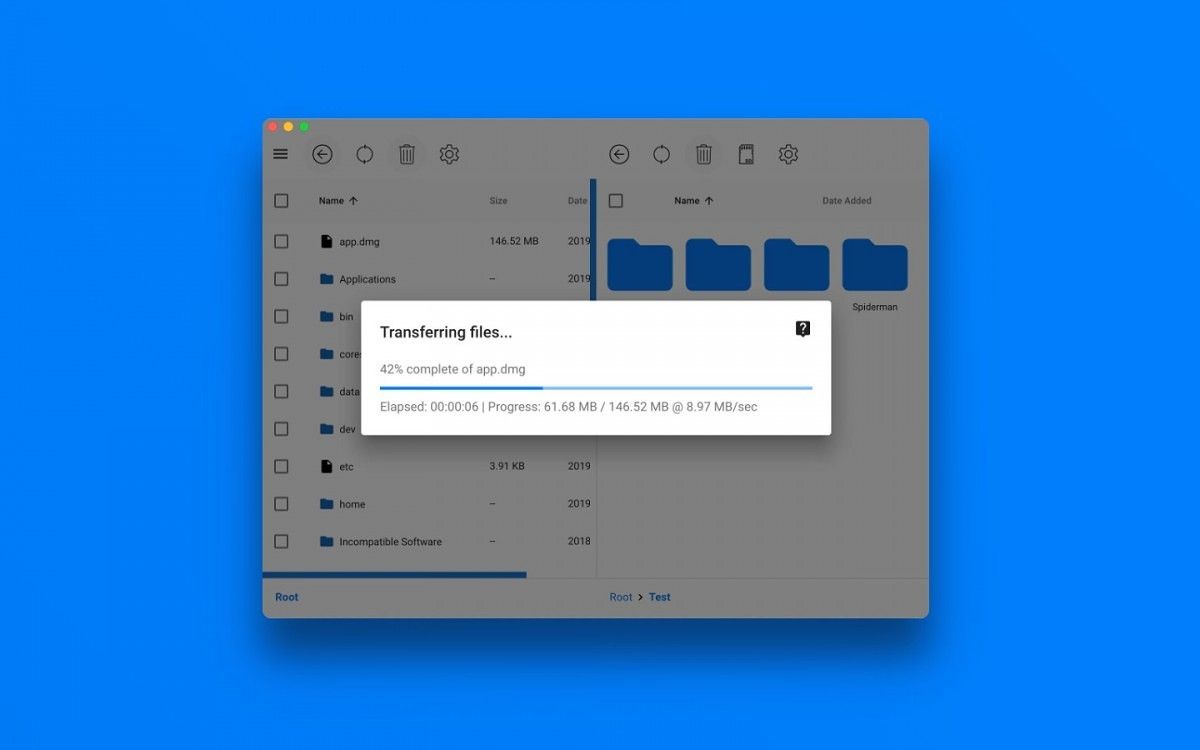
OpenMTP provides a hassle-free way to transfer files between your Mac computer and Android phone. Unlike other third-party solutions, which rely on WiFi or ADB for transferring files, OpenMTP offers high-speed data transfer via USB. You can send multiple files at once and there’s no arbitrary file size limit similar to the Android File Transfer tool.

OpenMTP’s main features

  • Connect via USB cable – Highest data transfer rates.
  • Transfer multiple files which are larger than 4GB in one go.
  • Select between Internal Memory and SD Card.
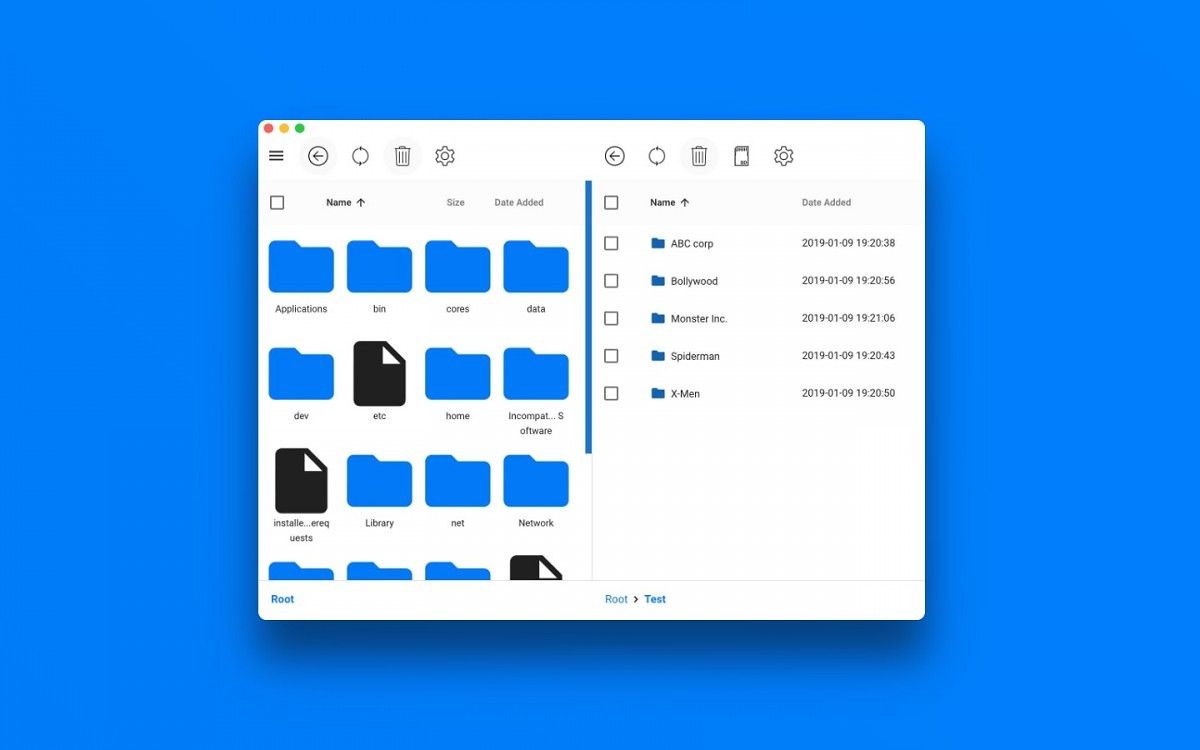
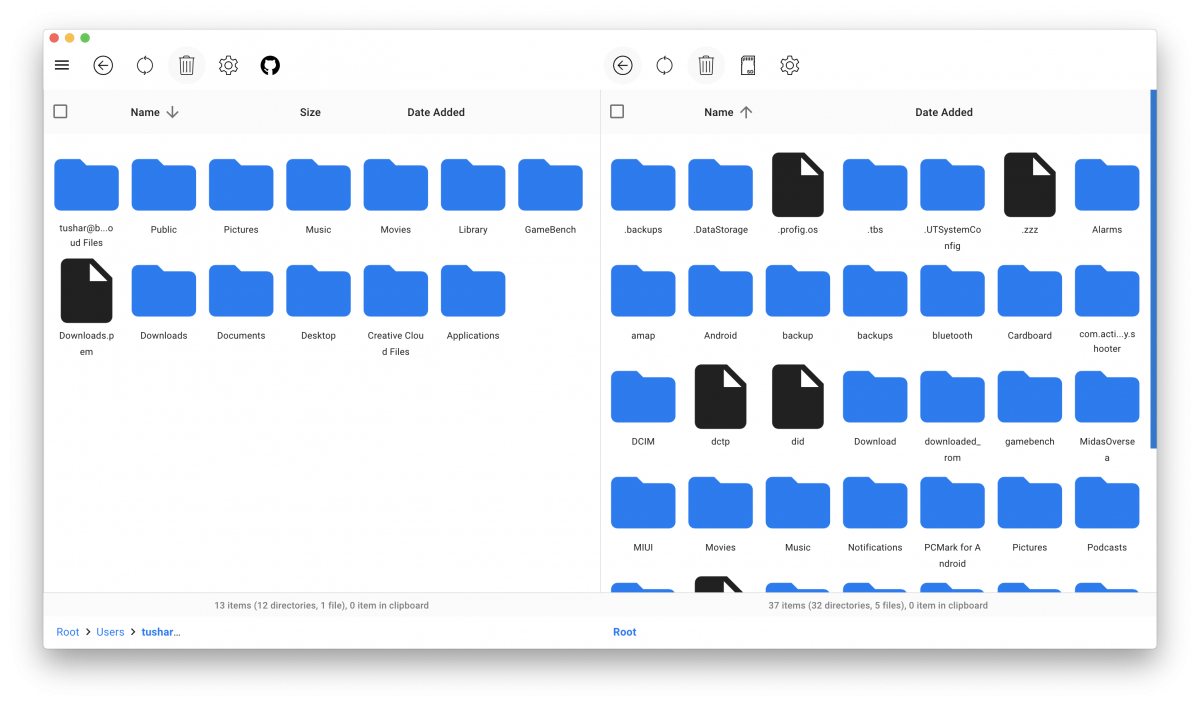
  • Split pane views for both Local Computer and Android device.
  • Drag ‘n Drop your files.
  • Choose between Grid and List view.
  • Use Keyboard Shortcuts to navigate through your files.
  • Free and open source

OpenMTP is free, open-source and works on any Mac device running macOS v10.10 or higher. To learn more about the project and download the app, visit the developer’s GitHub page from the link below.

Download OpenMTP for macOS

The post OpenMTP is an open source alternative to Android File Transfer for macOS appeared first on xda-developers.


from xda-developers https://ift.tt/37qtk9u
via IFTTT

OpenMTP is an open source alternative to Android File Transfer for macOS

Transferring files between Android and Windows is pretty straightforward. But for Mac owners, it’s a bit of a different story. Unlike Windows, Mac doesn’t let you access the file system of your Android phone when you connect it over USB. Google’s own Android File Transfer tool does let you browse and transfer files of your Android device but it’s severely limited in terms of functionality. For example, you can’t transfer files that are larger than 4GB. The tool also lacks basic features such as search bar, the ability to rename files and folders, and frequently disconnects in the middle of the transferring process. There are tons of other third-party services out there as well such as CommanderOne, Handshaker, Pushbullet, and more. But most of them are paid or offer very limited functionality in their free version. This is where OpenMTP comes into play.

OpenMTP provides a hassle-free way to transfer files between your Mac computer and Android phone. Unlike other third-party solutions, which rely on WiFi or ADB for transferring files, OpenMTP offers high-speed data transfer via USB. You can send multiple files at once and there’s no arbitrary file size limit similar to the Android File Transfer tool.

OpenMTP’s main features

  • Connect via USB cable – Highest data transfer rates.
  • Transfer multiple files which are larger than 4GB in one go.
  • Select between Internal Memory and SD Card.
  • Split pane views for both Local Computer and Android device.
  • Drag ‘n Drop your files.
  • Choose between Grid and List view.
  • Use Keyboard Shortcuts to navigate through your files.
  • Free and open source

OpenMTP is free, open-source and works on any Mac device running macOS v10.10 or higher. To learn more about the project and download the app, visit the developer’s GitHub page from the link below.

Download OpenMTP for macOS

The post OpenMTP is an open source alternative to Android File Transfer for macOS appeared first on xda-developers.


from xda-developers https://ift.tt/37qtk9u
via IFTTT

Samsung and LG are reportedly making portable monitors for smartphones

Smartphones these days are so powerful that you can use them for everything from playing demanding games to working on-the-go. However, there are some limitations as to what you can do and how efficiently you can do it on a smartphone. Take document or video editing for an example. Sure, you can get it done on any modern smartphone, but you’ll definitely spend a lot more time twiddling your thumbs on the touch screen than you would while doing the same tasks on a desktop.

In a bid to make the process a bit easier for users, Google introduced a new Desktop Mode in Android 10. This mode essentially allows users to connect their smartphones to a large display and get their work done efficiently. Samsung has offered a similar DeX Mode on its devices for quite a while and its Korean rival LG also introduced a similar experience in its Android 10 software release. Now, in order to make the process even more streamlined, Samsung and LG are working on a portable monitor for smartphones.

As per a recent report from ETNews, Samsung and LG are planning to release portable monitors for smartphones. The monitors are designed to allow users to leverage the computing power of their smartphones to the full potential using the larger display, even while they’re out and about. These upcoming portable monitors will have a lightweight design and will work over both wired and Bluetooth connections. The main goal behind this idea is to provide power users with a larger display for a better experience while watching content on-the-go, editing photos/videos, or getting some work done. Unlike Razer’s Project Linda, the portable display’s from Samsung and LG won’t have a built-in keyboard and will require users to connect their own peripherals.

Samsung has reportedly named its portable display Samsung DeXbook. The device will feature a 14.1-inch FHD display and a 10,000 mAh battery, while still weighing well under 1kg. LG’s counterpart, which it’s calling ‘Cloud Top’, will also offer a 14.1-inch FHD display, but it will feature a smaller 5,000 mAh battery that reduced its weight to just 600 grams. Both the products will be priced anywhere between 400,000-500,000 Won (~$340-420) and they will be launched sometime in the second quarter of 2020.


Source: ETNews

The post Samsung and LG are reportedly making portable monitors for smartphones appeared first on xda-developers.


from xda-developers https://ift.tt/2UPsTmK
via IFTTT

Samsung and LG are reportedly making portable monitors for smartphones

Smartphones these days are so powerful that you can use them for everything from playing demanding games to working on-the-go. However, there are some limitations as to what you can do and how efficiently you can do it on a smartphone. Take document or video editing for an example. Sure, you can get it done on any modern smartphone, but you’ll definitely spend a lot more time twiddling your thumbs on the touch screen than you would while doing the same tasks on a desktop.

In a bid to make the process a bit easier for users, Google introduced a new Desktop Mode in Android 10. This mode essentially allows users to connect their smartphones to a large display and get their work done efficiently. Samsung has offered a similar DeX Mode on its devices for quite a while and its Korean rival LG also introduced a similar experience in its Android 10 software release. Now, in order to make the process even more streamlined, Samsung and LG are working on a portable monitor for smartphones.

As per a recent report from ETNews, Samsung and LG are planning to release portable monitors for smartphones. The monitors are designed to allow users to leverage the computing power of their smartphones to the full potential using the larger display, even while they’re out and about. These upcoming portable monitors will have a lightweight design and will work over both wired and Bluetooth connections. The main goal behind this idea is to provide power users with a larger display for a better experience while watching content on-the-go, editing photos/videos, or getting some work done. Unlike Razer’s Project Linda, the portable display’s from Samsung and LG won’t have a built-in keyboard and will require users to connect their own peripherals.

Samsung has reportedly named its portable display Samsung DeXbook. The device will feature a 14.1-inch FHD display and a 10,000 mAh battery, while still weighing well under 1kg. LG’s counterpart, which it’s calling ‘Cloud Top’, will also offer a 14.1-inch FHD display, but it will feature a smaller 5,000 mAh battery that reduced its weight to just 600 grams. Both the products will be priced anywhere between 400,000-500,000 Won (~$340-420) and they will be launched sometime in the second quarter of 2020.


Source: ETNews

The post Samsung and LG are reportedly making portable monitors for smartphones appeared first on xda-developers.


from xda-developers https://ift.tt/2UPsTmK
via IFTTT