LightBlog

mercredi 12 février 2020

Gboard’s new “Emoji Kitchen” lets you create custom emoji mash-ups

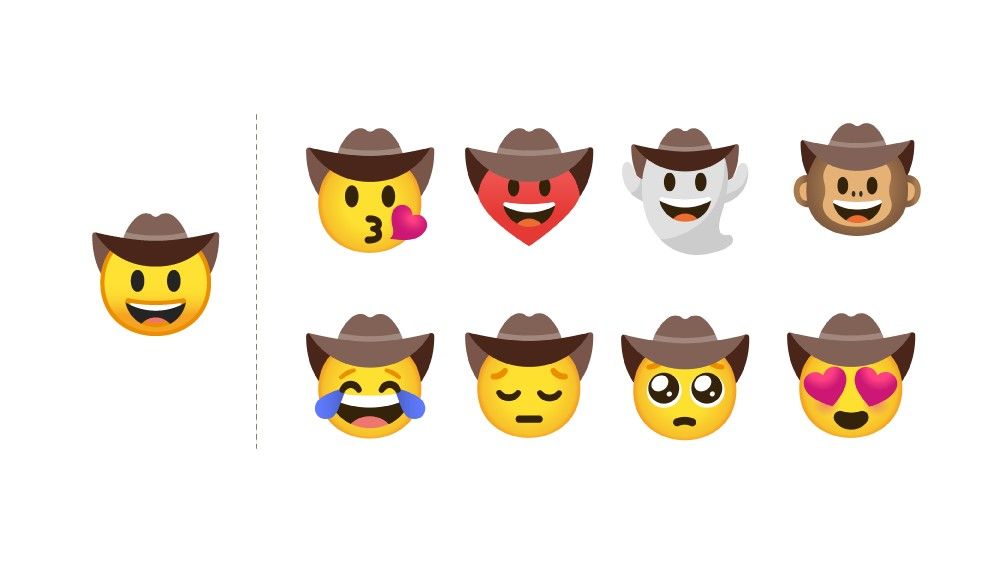
Google is always creating and experimenting with new features that it tests across its products. The latest is a fun tool for Gboard called “Emoji Kitchen.” A bizarre and whacky feature, Emoji Kitchen effectively merges two different emoji together into one large image, and they can be sent in conversations. I actually had the feature temporarily about a month back, but it disappeared again a few days later. While the feature is pretty fun to play with, I found it annoying as it pushes up the send button, meaning that I accidentally would send these custom emoji instead of sending a message.
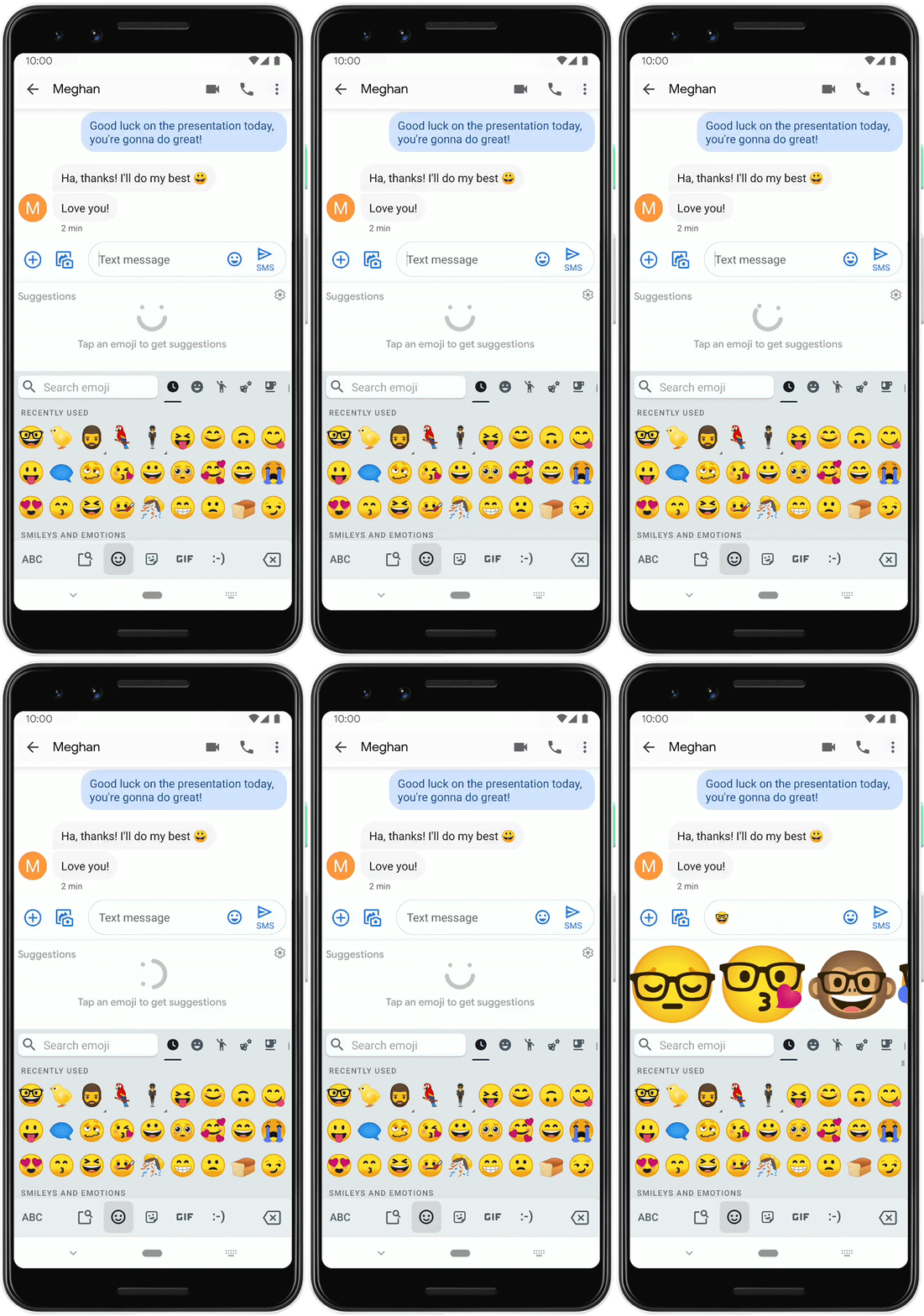
Emoji Kitchen Gboard

Ever wanted to have a supersized sad cowboy or a ghost with a cowboy hat on? Me neither, but if you ever have that craving, Emoji Kitchen allows you to create all of the emoji you ever dreamed of – which includes your nightmares, in the case of some of them. The images really are quite big in some apps, and I’ve already seen friends of mine accidentally hitting them and sending them in conversations.

The feature doesn’t work for all emoji and is limited mostly to faces and animals. In case you didn’t realize, the feature is called Emoji Kitchen as you can combine and create many different types of emoji simply through your keyboard. As Google puts, it, “Language is infinitely creative just like art and music,” which means that emoji are art too. The feature is rolling out in the latest Gboard beta, and you can enroll in the beta program here. You can also download the latest version of Gboard below.

Gboard - the Google Keyboard (Free, Google Play) →


Source: Google

The post Gboard’s new “Emoji Kitchen” lets you create custom emoji mash-ups appeared first on xda-developers.


from xda-developers https://ift.tt/2OOEf6J
via IFTTT

8 of the Best Courses to Prep for a Certification in Project Management

While the tech sector is mostly about code and design, every startup over a certain size needs project managers. Top professionals get the chance to work at companies like Apple and Google, while earning six figures. If you would like to get into project management or earn a promotion, these courses can help you pass important certification exams. Right now, you can save hundreds on the training via the XDA Developers Depot.

The Lean Six Sigma Expert Training Bundle

Used at many top companies, Lean Six Sigma combines (you guessed it) Lean and Six Sigma, two of the most popular management frameworks. This bundle prepares you to become a certified black belt through four video courses. You also learn how to use Minitab, a powerful statistical tool many project managers swear by. Normally $2,096, these courses are now just $49

The Complete 2020 Microsoft Azure Certification Prep Bundle

If you plan to lead a technical team, this Microsoft Azure training is the perfect compliment to your project management skills. Through 11 courses, you’ll learn about cloud computing and get full prep for five official exams. You should come away with developer-level skills. Worth $2,039.99, the bundle is now $42.90.

The Complete Six Sigma Training Suite Bundle

Bringing together 15 separate courses, this huge training suite helps you master both Six Sigma and Lean. You work through multiple levels for each framework, and you gain real-world knowledge of process mapping and Voice of Customer (VOC) techniques. Order now for $31 to get the full suite, worth $2843.91.

The Premium 2020 Project & Quality Management Certification Bundle

For any aspiring project manager, this bundle provides the ultimate education. You get 11 courses in total, covering PMP, Agile, Scrum, Six Sigma, and more touchstone topics through 120 hours of training. It’s worth $2,699, but you can pick up the bundle now for $45.99.

The Complete JIRA Agile Project Management Course

Many development teams use JIRA to manage projects. This course helps you master the cloud-based platform and integrate the Agile workflow in just one hour. Normally $200, the course is now $11.99.

Project Management Professional Certification Training Suite

PMP is considered the gold standard of certifications for project management professionals. This suite covers the whole curriculum, and the training counts as 35 contact hours towards your exam entry. You can get all five courses now for $39, saving over $1,200.

The Complete IT Project Management Certification Bundle

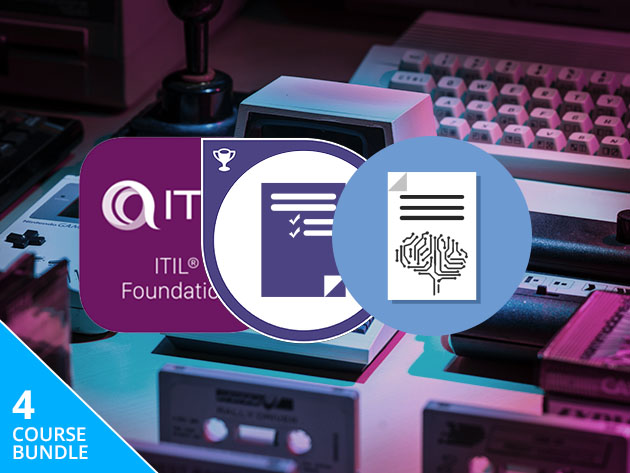
This bundle is a great first step for anyone who wants to lead a team in IT or cybersecurity. Through four courses, you get full prep for the highly respected PRINCE2 and ITIL certification exams. It even includes a guide to technical tests. Worth $796, the bundle is currently $29.

Deeply Practical Project Management

If you want to focus on practical skills, this PMI-based course offers eight hours of solid training. Along the way, you learn how to plan, schedule, budget, and assess risk for any project. The course also counts as 16 PDUs. Normally $200, this training is now $12.99.

Prices subject to change 

The post 8 of the Best Courses to Prep for a Certification in Project Management appeared first on xda-developers.


from xda-developers https://ift.tt/37qB4Zr
via IFTTT

8 of the Best Courses to Prep for a Certification in Project Management

While the tech sector is mostly about code and design, every startup over a certain size needs project managers. Top professionals get the chance to work at companies like Apple and Google, while earning six figures. If you would like to get into project management or earn a promotion, these courses can help you pass important certification exams. Right now, you can save hundreds on the training via the XDA Developers Depot.

The Lean Six Sigma Expert Training Bundle

Used at many top companies, Lean Six Sigma combines (you guessed it) Lean and Six Sigma, two of the most popular management frameworks. This bundle prepares you to become a certified black belt through four video courses. You also learn how to use Minitab, a powerful statistical tool many project managers swear by. Normally $2,096, these courses are now just $49

The Complete 2020 Microsoft Azure Certification Prep Bundle

If you plan to lead a technical team, this Microsoft Azure training is the perfect compliment to your project management skills. Through 11 courses, you’ll learn about cloud computing and get full prep for five official exams. You should come away with developer-level skills. Worth $2,039.99, the bundle is now $42.90.

The Complete Six Sigma Training Suite Bundle

Bringing together 15 separate courses, this huge training suite helps you master both Six Sigma and Lean. You work through multiple levels for each framework, and you gain real-world knowledge of process mapping and Voice of Customer (VOC) techniques. Order now for $31 to get the full suite, worth $2843.91.

The Premium 2020 Project & Quality Management Certification Bundle

For any aspiring project manager, this bundle provides the ultimate education. You get 11 courses in total, covering PMP, Agile, Scrum, Six Sigma, and more touchstone topics through 120 hours of training. It’s worth $2,699, but you can pick up the bundle now for $45.99.

The Complete JIRA Agile Project Management Course

Many development teams use JIRA to manage projects. This course helps you master the cloud-based platform and integrate the Agile workflow in just one hour. Normally $200, the course is now $11.99.

Project Management Professional Certification Training Suite

PMP is considered the gold standard of certifications for project management professionals. This suite covers the whole curriculum, and the training counts as 35 contact hours towards your exam entry. You can get all five courses now for $39, saving over $1,200.

The Complete IT Project Management Certification Bundle

This bundle is a great first step for anyone who wants to lead a team in IT or cybersecurity. Through four courses, you get full prep for the highly respected PRINCE2 and ITIL certification exams. It even includes a guide to technical tests. Worth $796, the bundle is currently $29.

Deeply Practical Project Management

If you want to focus on practical skills, this PMI-based course offers eight hours of solid training. Along the way, you learn how to plan, schedule, budget, and assess risk for any project. The course also counts as 16 PDUs. Normally $200, this training is now $12.99.

Prices subject to change 

The post 8 of the Best Courses to Prep for a Certification in Project Management appeared first on xda-developers.


from xda-developers https://ift.tt/37qB4Zr
via IFTTT

Google will require two-factor authentication for all Nest users

Smart devices are slowly making their way into every aspect of our lives. While these devices do go a long way in making things more comfortable, critics argue that there’s always an underlying threat to users’ privacy. Take the recent debacle with Xiaomi’s Mijia smart security cameras for example. Earlier this year in January, Google temporarily killed Mi Home integration with the Assistant due to a bug in the Xiaomi security camera which broadcasted stills from other people’s security cameras to an unsuspecting user. While both the companies involved have resolved the issue since then, a number of people are still apprehensive about bringing such smart devices into their lives. In a bid to secure its Nest family of smart devices and provide some much-needed reassurance to users, Google is now making two-factor authentication mandatory for all Nest users.

According to a recent blog post from the company, all Nest users who have not enabled two-factor authentication will be required to do so starting this spring. While the feature has been available to all users for quite a while, all Nest users will now have to take an extra step to verify their identity via email when logging into their account. Users will receive an email from account@nest.com every time they log into their account which will contain a six-digit verification code. Google will use the code to verify the users’ identity and users trying to log in without the code won’t be granted access to their accounts. The company claims that mandatory two-factor authentication will “greatly reduce the likelihood of an unauthorized person gaining access to your Nest account.”

The post also details some additional measures that Google has taken in the recent past to protect users from unauthorized access. Earlier this year, the company started applying a Google Cloud security technology called reCAPTCHA Enterprise to Nest accounts that can detect when an automated attack is attempted on an account and reduces the likelihood of it being successful. Back in December last year, the company rolled out login notifications to Nest accounts, which alert users whenever someone logs into their account and give them the chance to take action immediately if they detect any suspicious activity. Furthermore, Google has been using some additional protections to help keep Nest accounts secure, including a check to see password exposure in previously-known credential breaches, proactive account resets on detection of suspicious activity and more. On top of all that, Google has also highlighted best practices for users to help them secure their accounts.


Source: Google Blog

The post Google will require two-factor authentication for all Nest users appeared first on xda-developers.


from xda-developers https://ift.tt/2uvm6E3
via IFTTT

Google will require two-factor authentication for all Nest users

Smart devices are slowly making their way into every aspect of our lives. While these devices do go a long way in making things more comfortable, critics argue that there’s always an underlying threat to users’ privacy. Take the recent debacle with Xiaomi’s Mijia smart security cameras for example. Earlier this year in January, Google temporarily killed Mi Home integration with the Assistant due to a bug in the Xiaomi security camera which broadcasted stills from other people’s security cameras to an unsuspecting user. While both the companies involved have resolved the issue since then, a number of people are still apprehensive about bringing such smart devices into their lives. In a bid to secure its Nest family of smart devices and provide some much-needed reassurance to users, Google is now making two-factor authentication mandatory for all Nest users.

According to a recent blog post from the company, all Nest users who have not enabled two-factor authentication will be required to do so starting this spring. While the feature has been available to all users for quite a while, all Nest users will now have to take an extra step to verify their identity via email when logging into their account. Users will receive an email from account@nest.com every time they log into their account which will contain a six-digit verification code. Google will use the code to verify the users’ identity and users trying to log in without the code won’t be granted access to their accounts. The company claims that mandatory two-factor authentication will “greatly reduce the likelihood of an unauthorized person gaining access to your Nest account.”

The post also details some additional measures that Google has taken in the recent past to protect users from unauthorized access. Earlier this year, the company started applying a Google Cloud security technology called reCAPTCHA Enterprise to Nest accounts that can detect when an automated attack is attempted on an account and reduces the likelihood of it being successful. Back in December last year, the company rolled out login notifications to Nest accounts, which alert users whenever someone logs into their account and give them the chance to take action immediately if they detect any suspicious activity. Furthermore, Google has been using some additional protections to help keep Nest accounts secure, including a check to see password exposure in previously-known credential breaches, proactive account resets on detection of suspicious activity and more. On top of all that, Google has also highlighted best practices for users to help them secure their accounts.


Source: Google Blog

The post Google will require two-factor authentication for all Nest users appeared first on xda-developers.


from xda-developers https://ift.tt/2uvm6E3
via IFTTT

Google helped design the Galaxy Z Flip’s Flex Mode and will allow other phone makers to have access

Clamshell devices of yesteryears are making a comeback in 2020, thanks to innovations in display technology. Following the launch of the Galaxy Fold and Huawei Mate X last year, Motorola showcased the all-new Moto Razr — a phone that artfully combines the design of its namesake with a foldable display. Riding on the foldable phone wave, Samsung also announced its second foldable phone recently — the Galaxy Z Flip — which adopts the vertically folding design that is arguably more intuitive than the Galaxy Fold’s tablet-like form factor.

Galaxy Z Flip Flex Mode


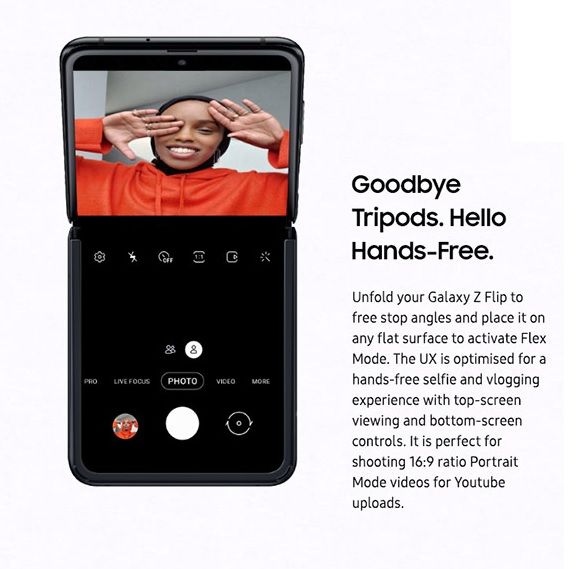
Unlike the Moto Razr and the Galaxy Fold, which can only be used in two orientations, the Galaxy Z Flip features a double pivot hinge that can be free locked into any angle between around 90 and 180 degrees. This opens up a whole new world of possibilities on the software front, allowing you to use the top and bottom half of the display for different purposes at the same time. Samsung calls this new feature “Flex Mode” and during the launch event, the company demonstrated the top half of the display being used to watch YouTube videos while the bottom half was used for reading comments or searching for other videos. Now, a recent report from The Verge reveals that this new Flex mode was developed by Samsung in partnership with Google and it will soon be available to other phone makers.


This is definitely great news as the new Flex mode could prove to be quite useful for future clamshell-style foldable devices. It could also prove useful for dual-screen devices like Microsoft’s Surface Duo, allowing users to utilize both displays for different purposes while using the same app. It’s worth noting that Microsoft has already published a preview SDK for making dual-screen Android apps which will allow developers to create apps that can be spanned across both displays when they’re in double-portrait or double-landscape mode.


Via: The Verge

The post Google helped design the Galaxy Z Flip’s Flex Mode and will allow other phone makers to have access appeared first on xda-developers.


from xda-developers https://ift.tt/2SlSyS4
via IFTTT

Google helped design the Galaxy Z Flip’s Flex Mode and will allow other phone makers to have access

Clamshell devices of yesteryears are making a comeback in 2020, thanks to innovations in display technology. Following the launch of the Galaxy Fold and Huawei Mate X last year, Motorola showcased the all-new Moto Razr — a phone that artfully combines the design of its namesake with a foldable display. Riding on the foldable phone wave, Samsung also announced its second foldable phone recently — the Galaxy Z Flip — which adopts the vertically folding design that is arguably more intuitive than the Galaxy Fold’s tablet-like form factor.

Galaxy Z Flip Flex Mode


Unlike the Moto Razr and the Galaxy Fold, which can only be used in two orientations, the Galaxy Z Flip features a double pivot hinge that can be free locked into any angle between around 90 and 180 degrees. This opens up a whole new world of possibilities on the software front, allowing you to use the top and bottom half of the display for different purposes at the same time. Samsung calls this new feature “Flex Mode” and during the launch event, the company demonstrated the top half of the display being used to watch YouTube videos while the bottom half was used for reading comments or searching for other videos. Now, a recent report from The Verge reveals that this new Flex mode was developed by Samsung in partnership with Google and it will soon be available to other phone makers.


This is definitely great news as the new Flex mode could prove to be quite useful for future clamshell-style foldable devices. It could also prove useful for dual-screen devices like Microsoft’s Surface Duo, allowing users to utilize both displays for different purposes while using the same app. It’s worth noting that Microsoft has already published a preview SDK for making dual-screen Android apps which will allow developers to create apps that can be spanned across both displays when they’re in double-portrait or double-landscape mode.


Via: The Verge

The post Google helped design the Galaxy Z Flip’s Flex Mode and will allow other phone makers to have access appeared first on xda-developers.


from xda-developers https://ift.tt/2SlSyS4
via IFTTT