LightBlog

vendredi 7 février 2020

[Update: Proper Homepage] Google Podcasts has a basic desktop interface for playback

Update (2/7/20 @ 4:00 PM ET): Google Podcasts finally has a proper homepage on the web, but it’s still missing a lot of features.

Google has been working to integrate podcasts into their services for a few years now. Back in 2016, we first started to see podcasts in the Google Play Music application. They were given their own section within the application where you could browse, sample, and subscribe to various podcasts. It was called Play Music Podcasts at the time since it was part of the Google Play Music application, but this was later rebranded to Google Podcasts and given its own separate app. Now, we have learned that the team behind the service has been working on creating a desktop interface (which is very basic and seems to be in its early stages at this time).

The feature was rebranded as Google Podcasts when the company launched a dedicated application for it. Not only was it given its own application, but it also had a global rollout and full integration with Google Assistant was available via Google Home devices as well. Google seemed to be dedicated to podcasts during this time as they also formed an advisory board in order to promote podcast production. It’s been a while since we’ve heard any news about this service but that changed this week.

Twitter user Omar Tosca recently discovered that we are now able to listen to podcasts directly on our desktop or laptop PC via the web browser. This is done by following a direct link to the podcast itself (such as this). These URLs are made available inside the dedicated Google Podcasts application and are generated when you share them with someone else. Before, these links were solely meant to be shared with those who also had the dedicated application installed as tapping on it would open the app to the podcast.

Now, if you visit these links on a device that does not have the application installed (like your typical desktop), then you’re taken to a very basic page for the podcast. You can listen to episodes and they sync with your account. likely that this UI is not finalized and is in early development as podcasts.google.com is still just an About page, so we will probably see this change as time goes on.

Via: 9to5Google


Update: Proper Homepage
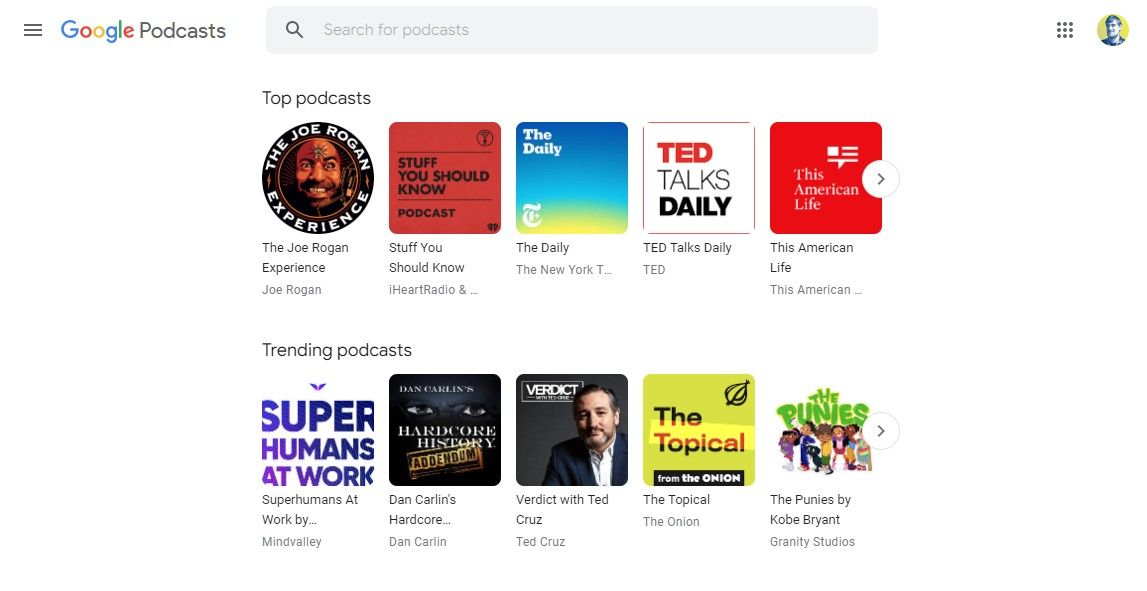
After getting a very barebones web player early last year, Google Podcasts finally has a proper homepage on the web. podcasts.google.com, which was previously just an “About” page, is now a full-blown web version of Google’s podcast service. You can see Top Podcasts, Trending Podcasts, and a number of other categories. There is also a search box at the top of the page. However, there is no way to see your subscriptions, meaning none of your activity will sync. Baby steps, Google.

Via: 9to5Google

The post [Update: Proper Homepage] Google Podcasts has a basic desktop interface for playback appeared first on xda-developers.


from xda-developers https://ift.tt/2FlA0de
via IFTTT

[Update: Proper Homepage] Google Podcasts has a basic desktop interface for playback

Update (2/7/20 @ 4:00 PM ET): Google Podcasts finally has a proper homepage on the web, but it’s still missing a lot of features.

Google has been working to integrate podcasts into their services for a few years now. Back in 2016, we first started to see podcasts in the Google Play Music application. They were given their own section within the application where you could browse, sample, and subscribe to various podcasts. It was called Play Music Podcasts at the time since it was part of the Google Play Music application, but this was later rebranded to Google Podcasts and given its own separate app. Now, we have learned that the team behind the service has been working on creating a desktop interface (which is very basic and seems to be in its early stages at this time).

The feature was rebranded as Google Podcasts when the company launched a dedicated application for it. Not only was it given its own application, but it also had a global rollout and full integration with Google Assistant was available via Google Home devices as well. Google seemed to be dedicated to podcasts during this time as they also formed an advisory board in order to promote podcast production. It’s been a while since we’ve heard any news about this service but that changed this week.

Twitter user Omar Tosca recently discovered that we are now able to listen to podcasts directly on our desktop or laptop PC via the web browser. This is done by following a direct link to the podcast itself (such as this). These URLs are made available inside the dedicated Google Podcasts application and are generated when you share them with someone else. Before, these links were solely meant to be shared with those who also had the dedicated application installed as tapping on it would open the app to the podcast.

Now, if you visit these links on a device that does not have the application installed (like your typical desktop), then you’re taken to a very basic page for the podcast. You can listen to episodes and they sync with your account. likely that this UI is not finalized and is in early development as podcasts.google.com is still just an About page, so we will probably see this change as time goes on.

Via: 9to5Google


Update: Proper Homepage

After getting a very barebones web player early last year, Google Podcasts finally has a proper homepage on the web. podcasts.google.com, which was previously just an “About” page, is now a full-blown web version of Google’s podcast service. You can see Top Podcasts, Trending Podcasts, and a number of other categories. There is also a search box at the top of the page. However, there is no way to see your subscriptions, meaning none of your activity will sync. Baby steps, Google.

Via: 9to5Google

The post [Update: Proper Homepage] Google Podcasts has a basic desktop interface for playback appeared first on xda-developers.


from xda-developers https://ift.tt/2FlA0de
via IFTTT

Huawei releases the FreeBuds 3 in new red colorway

The Huawei FreeBuds 3 were released back in September as the company’s latest truly wireless earbuds. They feature active noise cancellation and an Apple AirPods-esque design. At launch, the FreeBuds 3 came in two simple colors: white and black. Today, Huawei is announcing a new red option.

The FreeBuds 3 Red are the same great FreeBuds in a vibrant new color for Valentine’s Day. As mentioned, they feature active noise cancellation, which filters out background noise and enhances voice output during calls. This works despite having an open-fit design, which doesn’t create a seal in your ear.

Like any good earbuds, the FreeBuds 3 have a charging case. The case can provide up to 20 hours of battery life and can be charged wirelessly or through USB-C. The earbuds alone can get around 4 hours of music playback. The new red color can be purchased from Huawei’s website in select countries for €179.


Source: Huawei

The post Huawei releases the FreeBuds 3 in new red colorway appeared first on xda-developers.


from xda-developers https://ift.tt/38ac21x
via IFTTT

Huawei releases the FreeBuds 3 in new red colorway

The Huawei FreeBuds 3 were released back in September as the company’s latest truly wireless earbuds. They feature active noise cancellation and an Apple AirPods-esque design. At launch, the FreeBuds 3 came in two simple colors: white and black. Today, Huawei is announcing a new red option.

The FreeBuds 3 Red are the same great FreeBuds in a vibrant new color for Valentine’s Day. As mentioned, they feature active noise cancellation, which filters out background noise and enhances voice output during calls. This works despite having an open-fit design, which doesn’t create a seal in your ear.

Like any good earbuds, the FreeBuds 3 have a charging case. The case can provide up to 20 hours of battery life and can be charged wirelessly or through USB-C. The earbuds alone can get around 4 hours of music playback. The new red color can be purchased from Huawei’s website in select countries for €179.


Source: Huawei

The post Huawei releases the FreeBuds 3 in new red colorway appeared first on xda-developers.


from xda-developers https://ift.tt/38ac21x
via IFTTT

DarQ enables per-app forced dark mode on Android 10 without root

Android 10 brought a few useful features that made it an appreciated update over Android 9 Pie. Android 9’s iffy 2-button navigation system gave way for fully gestural navigation, which worked much better. Android 10 also brought a system-wide dark mode on apps that support it after Google realized the benefits of dark themes on premium OLED displays. Google’s first-party apps on Android were quickly updated to add dark themes. The system-wide dark mode feature was one that users had been requesting for years, and they finally got their wish in Android 10. However, there is still room for improvement. While Google added a developer option to force all apps to turn on dark mode (even those that hadn’t been specifically updated with the feature), there is no way in stock Android to enable a forced dark mode on a per-app basis. As expected, the XDA community came to the rescue. XDA Recognized Developer Quinny899 released the DarQ app in June, letting users enable per-app forced dark mode.

Android Q DarQ app

DarQ settings

The only limitation with DarQ was that it required root because it sent a shell command to enable the forced dark mode option that required elevated privileges. This meant that unrooted users were out of the action. Even custom user interfaces didn’t have the solution to the problem. OPPO’s ColorOS 7 has added a forced system-wide dark mode toggle in the display settings (bringing it out of Developer Options), but again, it can’t be toggled on a per-app basis. We can always trust the community to come up with innovative solutions, though. With version 1.2, DarQ has now been updated to support per-app dark mode on Android 10 without root. It does this by using an ADB script, which has to be downloaded separately. The app now requires the user to grant it ADB shell-level permissions so that it can run the same command of the forced dark mode option without needing root.

DarQ uses an Accessibility Service so that it can detect when the user’s selected apps are in the foreground to enable forced dark mode, and then disable dark mode when those apps aren’t in the foreground.

With version 1.2, the app now supports OnePlus’ OxygenOS. The update has also added a search box to the app list.

The full change-log is noted below:

DarQ v1.2 Changelog

v1.2
– DarQ now works without root! Use the ADB script from the XDA thread or GitHub repository to run the required background service to use DarQ without needing to root your device.
– Fixed root detection
– Added OxygenOS support
– Added a search box to the app list
– Added a filter for system apps (hidden by default) in the app list

Toggling forced dark mode on a per-app basis means that users can have dark mode enabled in apps like Twitter, for instance, while choosing to have it disabled on Facebook and Instagram. DarQ can also automatically enable dark mode at night. It enables user flexibility, which is nice to see. Can we expect an option like this to be provided as a developer option in the next Android release? We will have to wait until next month to find out.


Download DarQ from XDA Labs | XDA Forum Thread for DarQ

The post DarQ enables per-app forced dark mode on Android 10 without root appeared first on xda-developers.


from xda-developers https://ift.tt/38k6S32
via IFTTT

DarQ enables per-app forced dark mode on Android 10 without root

Android 10 brought a few useful features that made it an appreciated update over Android 9 Pie. Android 9’s iffy 2-button navigation system gave way for fully gestural navigation, which worked much better. Android 10 also brought a system-wide dark mode on apps that support it after Google realized the benefits of dark themes on premium OLED displays. Google’s first-party apps on Android were quickly updated to add dark themes. The system-wide dark mode feature was one that users had been requesting for years, and they finally got their wish in Android 10. However, there is still room for improvement. While Google added a developer option to force all apps to turn on dark mode (even those that hadn’t been specifically updated with the feature), there is no way in stock Android to enable a forced dark mode on a per-app basis. As expected, the XDA community came to the rescue. XDA Recognized Developer Quinny899 released the DarQ app in June, letting users enable per-app forced dark mode.

Android Q DarQ app

DarQ settings

The only limitation with DarQ was that it used an Accessibility Service, necessitating the use of root. This meant that unrooted users were out of the action. Even custom user interfaces didn’t have the solution to the problem. OPPO’s ColorOS 7 has added a forced system-wide dark mode toggle, but again, it can’t be toggled on a per-app basis. We can always trust the community to come up with innovative solutions, though. With version 1.2, DarQ has now been updated to support per-app dark mode on Android 10 without root. It does this by using an ADB script, which has to be downloaded separately. Rooted users still have the option of using the Accessibility Service method. The app now supports OnePlus’ OxygenOS. The update has also added a search box to the app list.

The full change-log is noted below:

DarQ v1.2 Changelog

v1.2
– DarQ now works without root! Use the ADB script from the XDA thread or GitHub repository to run the required background service to use DarQ without needing to root your device.
– Fixed root detection
– Added OxygenOS support
– Added a search box to the app list
– Added a filter for system apps (hidden by default) in the app list

Toggling forced dark mode on a per-app basis means that users can have dark mode enabled in apps like Twitter, for instance, while choosing to have it disabled on Facebook and Instagram. DarQ can also automatically enable dark mode at night. It enables user flexibility, which is nice to see. Can we expect an option like this to be provided as a developer option in the next Android release? We will have to wait until next month to find out.


Download DarQ from XDA Labs | XDA Forum Thread for DarQ

The post DarQ enables per-app forced dark mode on Android 10 without root appeared first on xda-developers.


from xda-developers https://ift.tt/38k6S32
via IFTTT

Moto G Power and Moto G Stylus officially announced with the Snapdragon 665 and Android 10

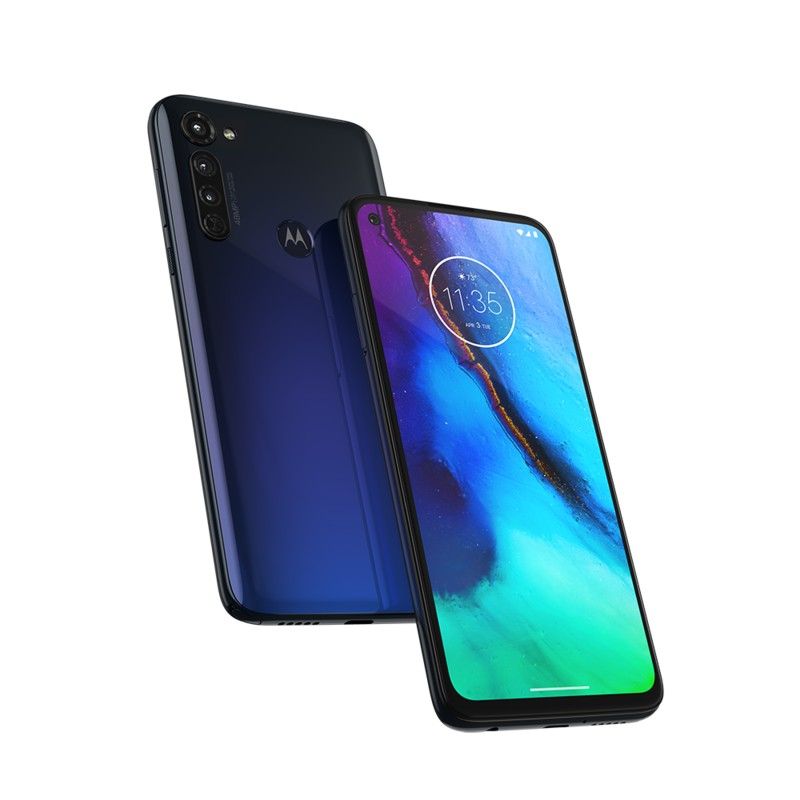
The Moto G Power (previously referred to as the “Moto G8 Power“) and Moto G Stylus have been popping up in headlines for a while now. Just yesterday, the Amazon listing revealed everything about the Moto G Power. The Moto G Stylus has been a little more mysterious, but we knew what to expect. Today, Motorola has officially announced both devices.

Moto G Power XDA Forums ||| Moto G Stylus XDA Forums

  Moto G Power Moto G Stylus
Size 159.85 x 75.84 x 9.63mm, 199g 158.55 x 75.8 x 9.2mm, 192g
SoC Snapdragon 665 Snapdragon 665
RAM 4GB 4GB
Storage 64GB 128GB
Display 6.4-inch, FHD+, LCD, hole-punch 6.4-inch, FHD+, LCD, hole-punch
Rear Cameras
  • 16MP (f/1.7, 1.12μm)
  • 2MP (f/2.2, 1.75μm) macro
  • 8MP (f/2.2, 1.12μm) 118° ultra-wide angle
  • 48MP (f/1.7, 1.6μm)
  • 2MP (f/2.2, 1.75μm) macro
  • Action Cam 16MP (f/2.2, 2.0μm, 117-degrees FOV)
Front Camera
  • 16MP (f/2.0, 1μ)
  • 16MP (f/2.0, 1μ)
Battery 5,000 mAh 4,000 mAh
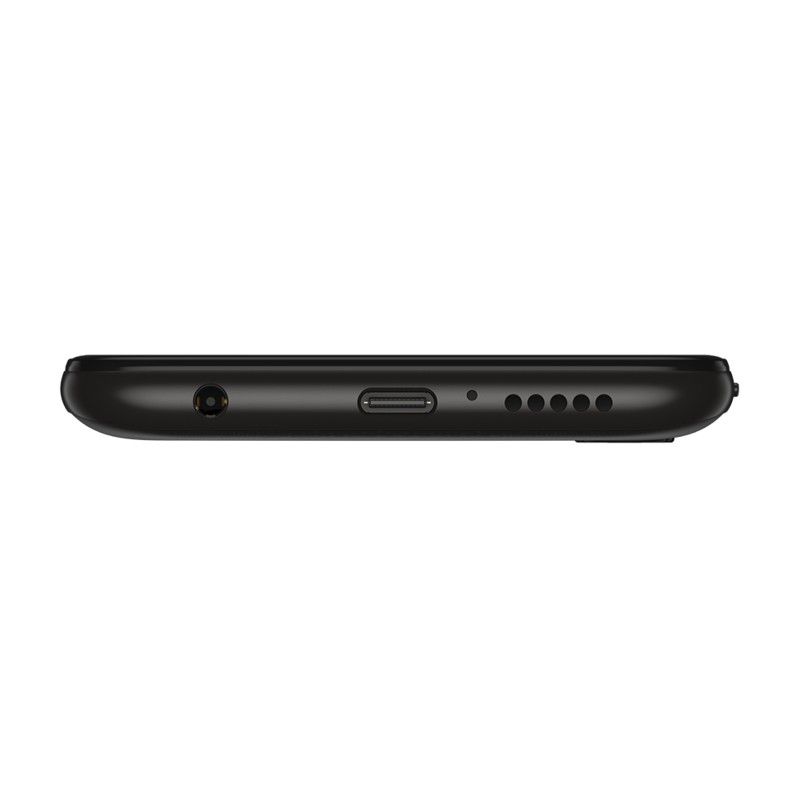
Ports USB-C, Headphone jack USB-C, Headphone jack
Software Android 10 Android 10

Similarities

Moto G Power

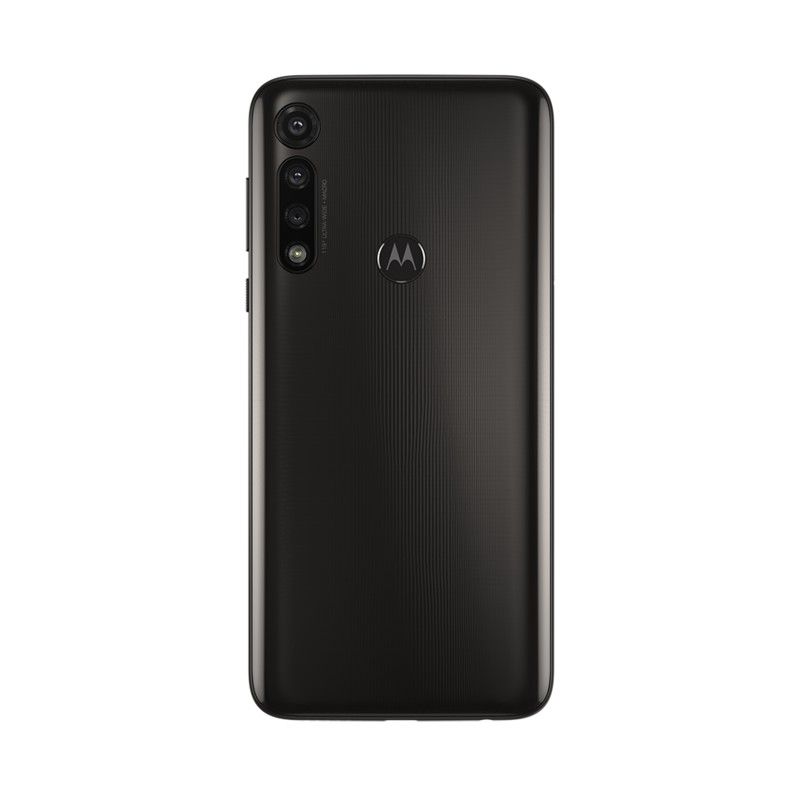
If you’ve been following the leaks, you know the Moto G Power and Moto G Stylus look a lot alike. They share the same basic design, which features 6.4-inch FHD+ displays, left-aligned punch-hole, minimal bezels, plastic back covers, and matching camera modules. At a glance, the devices are essentially identical.

They have a lot in common in terms of specifications as well. Both the Moto G Power and Moto G Stylus are rocking the Qualcomm Snapdragon 665 SoC with 4GB of RAM and 64/128GB of storage. Some of the other shared specifications include USB-C 10W charging, headphone jacks, stereo speakers, fingerprint scanners, and Android 10.

Speaking of Android 10, Motorola has included some new software with these devices. Moto Gametime is a basic customization suite for adjusting notifications and power settings while gaming.

Differences

Moto G Power

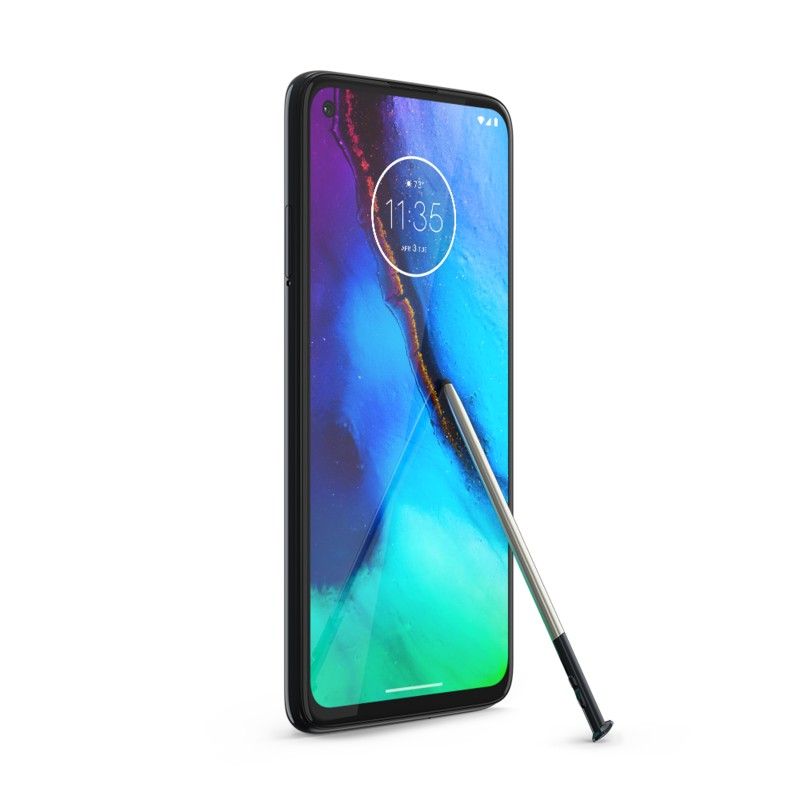
While the Moto G Power and Moto G Stylus have a surprising amount in common, there are some key differences. First and foremost, the Moto G Stylus has, well, a stylus. The stylus is housed in the bottom edge and it’s very thin. This is not a fancy Bluetooth stylus like you can find in the latest Galaxy Note. It’s capacitive, which means no pressure sensitivity. Motorola has included some basic note-taking software to go with it. These are mid-range devices and you’re getting a mid-range stylus experience.

Moto G Power

While the Moto G Power and Moto G Stylus appear to have the same camera setup, there are quite a few differences. Both have triple cameras, but they do very different things. The Power has a 16MP main camera, 2MP macro, and 8MP wide-angle. The Stylus has a 48MP main camera, 2MP macro, and 16MP “Action Cam.”

As you might expect by the name, the Moto G Power is packing a beefy 5,000 mAh battery. Motorola claims you can get up to 3 days of use before needing to plug in. The Moto G Stylus has a smaller, but still respectable, 4,000 mAh battery.

Pricing & Availability

Moto G Power

The Moto G Power and Moto Gy Stylus will be available unlocked in the US this Spring from Best Buy, B&H Photo, Walmart, and Amazon. They will eventually be available from Verizon, US Cellular, Consumer Cellular, Republic Wireless, and Xfinity Mobile as well. The Power costs $249.99 and the Stylus costs $299.99.

In Canada, the Power will be available at Videotron and at all Freedom Mobile locations, while the Stylus will only be at Videotron.


Source: Motorola

The post Moto G Power and Moto G Stylus officially announced with the Snapdragon 665 and Android 10 appeared first on xda-developers.


from xda-developers https://ift.tt/3bgFfdg
via IFTTT