LightBlog

dimanche 10 novembre 2019

Google App 10.83 tests “Lift to Talk” for Google Assistant on the Pixel 4

Thanks to multiple leaks, we knew pretty much everything about the Pixel 4 smartphones before launch. Some of the rumored features of the new Pixel devices have yet to materialize, however. One such feature was said to be a new way to launch the Google Assistant on the latest Pixel: raise to talk. According to 9to5Google, raise to talk is a feature that lets you lift your phone to start talking to the Google Assistant. Although the feature didn’t launch with the new Pixel, we did confirm on two separate occasions that the feature is in development. Now, we managed to get the feature partially working in Google App v10.83 while at the same time revealing more details about how it might work.

An APK teardown can often predict features that may arrive in a future update of an application, but it is possible that any of the features we mention here may not make it in a future release. This is because these features are currently unimplemented in the live build and may be pulled at any time by the developers in a future build.

Once (or rather, if) the feature goes live, you’ll see a new “Lift to talk” toggle in Settings > Apps & notifications > Assistant. The description for the feature says you’ll be able to “hold your phone to your face to talk to your Assistant.”

Google Assistant Lift to Talk setting

When I enabled the feature, the Google Assistant would activate whenever I unlocked the Pixel 4. However, this seems to be a bug in its behavior because the Google Assistant should only activate when the phone detects you’ve lifted it up to your face. In fact, each time that the Google Assistant is launched, I saw a toast notification at the bottom informing me that something is “missing data from sensors” including the gyroscope, accelerometer, swipe, and presence. Data from the gyroscope and accelerometer are likely used to determine the Pixel 4’s orientation and whether it was lifted or simply slightly moved from its current position. The “swipe” and “presence” sensors likely refer to data pulled from the Soli radar that powers Motion Sense gestures on the Pixel 4. Thus, it looks like “lift to talk” for Google Assistant might be limited to the Pixel 4 at launch.

Google Pixel 4 Forums ||| Google Pixel 4 XL Forums

I hope Google manages to implement the feature so there won’t be too many false positives, because I sure don’t want Google Assistant to activate every time I hold my phone up to unlock. If this feature starts rolling out or we manage to get it fully working to try for ourselves, we’ll let you know. You can download the latest version of the Google App from the Google Play Store link below.

Google (Free, Google Play) →


Thanks to PNF Software for providing us a license to use JEB Decompiler, a professional-grade reverse engineering tool for Android applications.

The post Google App 10.83 tests “Lift to Talk” for Google Assistant on the Pixel 4 appeared first on xda-developers.


from xda-developers https://ift.tt/32yKnnp
via IFTTT

Google App 10.83 tests “Lift to Talk” for Google Assistant on the Pixel 4

Thanks to multiple leaks, we knew pretty much everything about the Pixel 4 smartphones before launch. Some of the rumored features of the new Pixel devices have yet to materialize, however. One such feature was said to be a new way to launch the Google Assistant on the latest Pixel: raise to talk. According to 9to5Google, raise to talk is a feature that lets you lift your phone to start talking to the Google Assistant. Although the feature didn’t launch with the new Pixel, we did confirm on two separate occasions that the feature is in development. Now, we managed to get the feature partially working in Google App v10.83 while at the same time revealing more details about how it might work.

An APK teardown can often predict features that may arrive in a future update of an application, but it is possible that any of the features we mention here may not make it in a future release. This is because these features are currently unimplemented in the live build and may be pulled at any time by the developers in a future build.

Once (or rather, if) the feature goes live, you’ll see a new “Lift to talk” toggle in Settings > Apps & notifications > Assistant. The description for the feature says you’ll be able to “hold your phone to your face to talk to your Assistant.”

Google Assistant Lift to Talk setting

When I enabled the feature, the Google Assistant would activate whenever I unlocked the Pixel 4. However, this seems to be a bug in its behavior because the Google Assistant should only activate when the phone detects you’ve lifted it up to your face. In fact, each time that the Google Assistant is launched, I saw a toast notification at the bottom informing me that something is “missing data from sensors” including the gyroscope, accelerometer, swipe, and presence. Data from the gyroscope and accelerometer are likely used to determine the Pixel 4’s orientation and whether it was lifted or simply slightly moved from its current position. The “swipe” and “presence” sensors likely refer to data pulled from the Soli radar that powers Motion Sense gestures on the Pixel 4. Thus, it looks like “lift to talk” for Google Assistant might be limited to the Pixel 4 at launch.

Google Pixel 4 Forums ||| Google Pixel 4 XL Forums

I hope Google manages to implement the feature so there won’t be too many false positives, because I sure don’t want Google Assistant to activate every time I hold my phone up to unlock. If this feature starts rolling out or we manage to get it fully working to try for ourselves, we’ll let you know. You can download the latest version of the Google App from the Google Play Store link below.

Google (Free, Google Play) →


Thanks to PNF Software for providing us a license to use JEB Decompiler, a professional-grade reverse engineering tool for Android applications.

The post Google App 10.83 tests “Lift to Talk” for Google Assistant on the Pixel 4 appeared first on xda-developers.


from xda-developers https://ift.tt/32yKnnp
via IFTTT
samedi 9 novembre 2019

ASUS recruits Android 10 beta testers for the ROG Phone II

Last week, ASUS started rolling out the stable Android 10 update for the ZenFone 6/6Z, making it the first ASUS smartphone to run Android 10 software. The ZenFone 6 isn’t ASUS’ latest flagship smartphone, though. The ROG Phone II is currently the cream of the crop in ASUS’ smartphone lineup, and like the ZenFone 6, it launched with ZenUI 6 on top of Android 9 Pie. Since the first generation ROG Phone has yet to get a single major Android OS update, ROG Phone II users were worried about the update prospects for their device. We have good news to share, though: ASUS is now recruiting users to beta test the Android 10 update for the ROG Phone II.

As spotted by users on our forums, an ASUS employee published a thread on the ZenTalk Forums to recruit Android 10 beta testers for the ZS660KL model. That model name corresponds to the 12GB RAM/512GB storage model sold internationally and not the 8GB RAM/128GB storage Tencent model sold in China. The Tencent model receives updates separately from the international model, though the updates themselves bring most of the same features. Users on our forums figured out how to flash the international software onto the Tencent model, but we aren’t sure if a converted ROG Phone II will be able to flash the Android 10 beta update.

Regardless, if you’re interested in participating in this beta program, you’ll have to be an active member of the ZenTalk Forums, provide ASUS your IMEI/Serial Number, and post regular feedback about bugs on a restricted forum for beta testers. You can sign up for the beta program here.

ASUS ROG Phone II Forums

ASUS first recruited beta testers for the ZenFone 6’s Android 10 update on July 24th, 2019. They rolled out the stable Android 10 update for that device on November 3rd, 2019—about 3 months after recruiting beta testers. They also recruited Android 10 beta testers for the ZenFone 5Z on August 23rd, 2019 but have yet to roll out the stable update for that device. However, now that they’ve completed the Android 10 update for the ZenFone 6, it shouldn’t take them much longer to bring the update to the ZenFone 5Z or ROG Phone II. We’ll let you know when that happens, though.


Thanks to XDA Member Gc13psj for the tip!

The post ASUS recruits Android 10 beta testers for the ROG Phone II appeared first on xda-developers.


from xda-developers https://ift.tt/2p2c3Dt
via IFTTT

ASUS recruits Android 10 beta testers for the ROG Phone II

Last week, ASUS started rolling out the stable Android 10 update for the ZenFone 6/6Z, making it the first ASUS smartphone to run Android 10 software. The ZenFone 6 isn’t ASUS’ latest flagship smartphone, though. The ROG Phone II is currently the cream of the crop in ASUS’ smartphone lineup, and like the ZenFone 6, it launched with ZenUI 6 on top of Android 9 Pie. Since the first generation ROG Phone has yet to get a single major Android OS update, ROG Phone II users were worried about the update prospects for their device. We have good news to share, though: ASUS is now recruiting users to beta test the Android 10 update for the ROG Phone II.

As spotted by users on our forums, an ASUS employee published a thread on the ZenTalk Forums to recruit Android 10 beta testers for the ZS660KL model. That model name corresponds to the 12GB RAM/512GB storage model sold internationally and not the 8GB RAM/128GB storage Tencent model sold in China. The Tencent model receives updates separately from the international model, though the updates themselves bring most of the same features. Users on our forums figured out how to flash the international software onto the Tencent model, but we aren’t sure if a converted ROG Phone II will be able to flash the Android 10 beta update.

Regardless, if you’re interested in participating in this beta program, you’ll have to be an active member of the ZenTalk Forums, provide ASUS your IMEI/Serial Number, and post regular feedback about bugs on a restricted forum for beta testers. You can sign up for the beta program here.

ASUS ROG Phone II Forums

ASUS first recruited beta testers for the ZenFone 6’s Android 10 update on July 24th, 2019. They rolled out the stable Android 10 update for that device on November 3rd, 2019—about 3 months after recruiting beta testers. They also recruited Android 10 beta testers for the ZenFone 5Z on August 23rd, 2019 but have yet to roll out the stable update for that device. However, now that they’ve completed the Android 10 update for the ZenFone 6, it shouldn’t take them much longer to bring the update to the ZenFone 5Z or ROG Phone II. We’ll let you know when that happens, though.


Thanks to XDA Member Gc13psj for the tip!

The post ASUS recruits Android 10 beta testers for the ROG Phone II appeared first on xda-developers.


from xda-developers https://ift.tt/2p2c3Dt
via IFTTT

Discord 9.8.2 adds a hidden AMOLED dark theme on Android

If you play PC games, you may remember using applications like TeamSpeak, Ventrilo, or Mumble to communicate with your friends. Nowadays, though, most PC gamers have shifted to Discord. Discord started out as a chat service for gamers, but it has significantly grown in popularity among regular users as well. We even have a Discord server for XDA members to chat about Android and smartphones.

Due to Discord’s popularity as a general chat service, the mobile apps for Android and iOS are also quite popular. The Android app has had a dark theme for quite some time, but for those of you looking for an even darker theme, you’ll be happy to know that version 9.8.2 and above has finally included an AMOLED dark theme. Don’t expect this new AMOLED dark theme to save much battery life, though this new dark theme may make Discord more comfortable to use for some users. While it’s disappointing the new AMOLED dark theme doesn’t react to Android 10’s dark mode toggle, it is good to see that this new theme isn’t limited to Android 10.

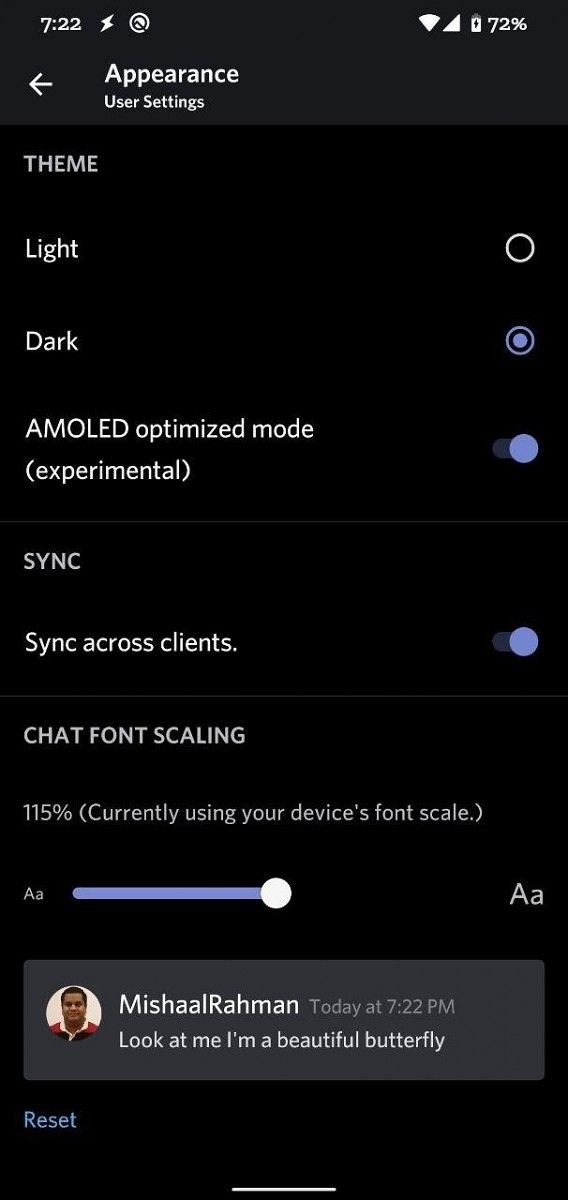
If you have version 9.8.2 or later, you’ll no longer have to edit shared preference files or install a modified version of Discord to unlock the AMOLED dark theme. Simply go to Settings then Appearance and tap on the “Dark” option 10 times. You should see a toast notification that says, “Brave one, the path to darkness opens!” Then, underneath the “Light” and “Dark” appearance settings, a new “AMOLED optimized mode (experimental)” option will appear. Enable this setting and then restart the app to change the background color of the settings screens, DMs, channels, and sidebar to black. Not every part of the app is themed AMOLED dark, but most of the important parts are.

Discord AMOLED dark mode Discord AMOLED dark mode

The latest beta versions aren’t available on the Google Play Store yet, but you can download version 9.8.3 from APKMirror. If you have one of the latest Samsung Galaxy smartphones, then don’t forget you can also enable Discord’s voice chat overlay.

Download Discord 9.8.3 Beta ||| Join the XDA Discord Server

The post Discord 9.8.2 adds a hidden AMOLED dark theme on Android appeared first on xda-developers.


from xda-developers https://ift.tt/2NyjjAH
via IFTTT

Discord 9.8.2 adds a hidden AMOLED dark theme on Android

If you play PC games, you may remember using applications like TeamSpeak, Ventrilo, or Mumble to communicate with your friends. Nowadays, though, most PC gamers have shifted to Discord. Discord started out as a chat service for gamers, but it has significantly grown in popularity among regular users as well. We even have a Discord server for XDA members to chat about Android and smartphones.

Due to Discord’s popularity as a general chat service, the mobile apps for Android and iOS are also quite popular. The Android app has had a dark theme for quite some time, but for those of you looking for an even darker theme, you’ll be happy to know that version 9.8.2 and above has finally included an AMOLED dark theme. Don’t expect this new AMOLED dark theme to save much battery life, though this new dark theme may make Discord more comfortable to use for some users. While it’s disappointing the new AMOLED dark theme doesn’t react to Android 10’s dark mode toggle, it is good to see that this new theme isn’t limited to Android 10.

If you have version 9.8.2 or later, you’ll no longer have to edit shared preference files or install a modified version of Discord to unlock the AMOLED dark theme. Simply go to Settings then Appearance and tap on the “Dark” option 10 times. You should see a toast notification that says, “Brave one, the path to darkness opens!” Then, underneath the “Light” and “Dark” appearance settings, a new “AMOLED optimized mode (experimental)” option will appear. Enable this setting and then restart the app to change the background color of the settings screens, DMs, channels, and sidebar to black. Not every part of the app is themed AMOLED dark, but most of the important parts are.

Discord AMOLED dark mode Discord AMOLED dark mode

The latest beta versions aren’t available on the Google Play Store yet, but you can download version 9.8.3 from APKMirror. If you have one of the latest Samsung Galaxy smartphones, then don’t forget you can also enable Discord’s voice chat overlay.

Download Discord 9.8.3 Beta ||| Join the XDA Discord Server

The post Discord 9.8.2 adds a hidden AMOLED dark theme on Android appeared first on xda-developers.


from xda-developers https://ift.tt/2NyjjAH
via IFTTT

XDA’s Daily Best Value Recommendations! – Singles’ Day Sale Day 1

The last week just brought to an end the Big Diwali sales frenzy which can be considered the equivalent of Black Friday in India. However, it seems the big shopping spree will continue as Singles’ Day approaches fast. If you’re not yet aware of what it is, let me bring you up to speed on why you should be tracking it. 

Singles’ Day takes place every year on 11/11 and while it started off as a way to celebrate being single, it is now literally the world’s biggest shopping festival. With almost $31 billion in retail sales last year alone, the yearly 24-hour 11/11 Global Shopping Festival is now bigger than Thanksgiving, Black Friday, Cyber Monday put together. More than 180,000 Chinese and international brands participate in this sale and we’ll be mentioning some of the products that are up for grabs on Banggood that are worth taking a look at. We will also be giving away coupons to redeem more discount on the deals mentioned below. So, here’s the list. 

Xiaomi 10000mAh Wireless Power Bank 10W

Xiaomi already sells a variety of power banks across different regions of the globe. However, its wireless power bank is not available in many places, especially in India. It’s a fast-charging battery pack that supports up to 10W (wireless) and 18W (wired) USB-A charging. It can charge two devices via the ports and do wireless charging simultaneously. Singles’ Day is a nice time to grab one of these from Banggood as it is being sold for ₹3,308.46 (₹2,212.07 with XDA Exclusive Coupon Code: BGXDAXMPB). 

Check it out with Coupon Code: BGXDAXMPB

Xiaomi Mijia SYB01 Quartz Watch

The Mijia Quartz Watch is another accessory that isn’t available outside of China. It looks like an analogue watch but does have a few smart and fitness features such as a calorie counter and a pedometer. It’s waterproof, has a 40mm dial, and comes in White, Gray, and Black colour options. The Mijia Quartz Watch can be paired to a smartphone app with Bluetooth 4.2 and works with both iOS and Android. (₹3,568.29 with XDA Exclusive Coupon Code: BGXDAMJSYB01). 

Check it out with Coupon Code: BGXDAMJSYB01

75W Type-C PD Multi-Port

QC3.0 Compatible Fast Charger 


This is a 75W multi-port charger with a Type-C, PD-45W, and a QC 3.0 port apart from two other USB-A outputs. Needless to say, it will work with compatible laptops, mobile phones, and tablets. It’s currently selling for a price of ₹2,399.23. (₹1,420.46 with XDA Exclusive Coupon Code: BGXDACharger).

Check it out with Coupon Code: BGXDACharger

Insta 360 Go AI Auto Editing Hands-free Sports Camera

The Insta 360 Go is one of those offerings that make the company stand out in its 360-degree video capture segment. It is truly tiny coming in at just two inches tall and an inch wide. It also features the Insta360’s FlowState stabilization which works wonders in smoothing the footage. It shoots clips at a resolution of up to 2720 x 2720, but it crops the image to 1080p. It also has the FlashCut auto-editing feature which uses AI to single out clips and stitch them together. It’s on sale for ₹18,460.(₹11,776.99 with XDA Exclusive Coupon Code: BGXDAInsta360).

Check it out with Coupon Code: BGXDAInsta360

Baseus Type-C PD Multi USB Fast Transfer Multi-function Converter Hub

This is a Type-C converter hub that will be super useful for laptops that have a USB-C port. It has 4 x USB 3.0 + PD slots as well as SD, 4K/HD and all of them can be used at the same time. It has a tough glass panel and 60W support. It also supports up to 5Gbps speeds with USB 3.0. You’ll be able to get it for ₹4,239. (₹3,354.15 with XDA Exclusive Coupon Code: BGXDAInsta360)

Check it out with Coupon Code: BGXDABaseus1

Apart from these deals, you can also check out India.xda.deals which is our daily updated portal focused on offers and deals for gadgets, accessories and more.  


The post XDA’s Daily Best Value Recommendations! – Singles’ Day Sale Day 1 appeared first on xda-developers.


from xda-developers https://ift.tt/2NxCVVq
via IFTTT