LightBlog

samedi 9 novembre 2019

XDA’s Daily Best Value Recommendations! – Singles’ Day Sale Day 1

The last week just brought to an end the Big Diwali sales frenzy which can be considered the equivalent of Black Friday in India. However, it seems the big shopping spree will continue as Singles’ Day approaches fast. If you’re not yet aware of what it is, let me bring you up to speed on why you should be tracking it. 

Singles’ Day takes place every year on 11/11 and while it started off as a way to celebrate being single, it is now literally the world’s biggest shopping festival. With almost $31 billion in retail sales last year alone, the yearly 24-hour 11/11 Global Shopping Festival is now bigger than Thanksgiving, Black Friday, Cyber Monday put together. More than 180,000 Chinese and international brands participate in this sale and we’ll be mentioning some of the products that are up for grabs on Banggood that are worth taking a look at. We will also be giving away coupons to redeem more discount on the deals mentioned below. So, here’s the list. 

Xiaomi 10000mAh Wireless Power Bank 10W

Xiaomi already sells a variety of power banks across different regions of the globe. However, its wireless power bank is not available in many places, especially in India. It’s a fast-charging battery pack that supports up to 10W (wireless) and 18W (wired) USB-A charging. It can charge two devices via the ports and do wireless charging simultaneously. Singles’ Day is a nice time to grab one of these from Banggood as it is being sold for ₹3,308.46 (₹2,212.07 with XDA Exclusive Coupon Code: BGXDAXMPB). 

Check it out with Coupon Code: BGXDAXMPB

Xiaomi Mijia SYB01 Quartz Watch

The Mijia Quartz Watch is another accessory that isn’t available outside of China. It looks like an analogue watch but does have a few smart and fitness features such as a calorie counter and a pedometer. It’s waterproof, has a 40mm dial, and comes in White, Gray, and Black colour options. The Mijia Quartz Watch can be paired to a smartphone app with Bluetooth 4.2 and works with both iOS and Android. (₹3,568.29 with XDA Exclusive Coupon Code: BGXDAMJSYB01). 

Check it out with Coupon Code: BGXDAMJSYB01

75W Type-C PD Multi-Port

QC3.0 Compatible Fast Charger 


This is a 75W multi-port charger with a Type-C, PD-45W, and a QC 3.0 port apart from two other USB-A outputs. Needless to say, it will work with compatible laptops, mobile phones, and tablets. It’s currently selling for a price of ₹2,399.23. (₹1,420.46 with XDA Exclusive Coupon Code: BGXDACharger).

Check it out with Coupon Code: BGXDACharger

Insta 360 Go AI Auto Editing Hands-free Sports Camera

The Insta 360 Go is one of those offerings that make the company stand out in its 360-degree video capture segment. It is truly tiny coming in at just two inches tall and an inch wide. It also features the Insta360’s FlowState stabilization which works wonders in smoothing the footage. It shoots clips at a resolution of up to 2720 x 2720, but it crops the image to 1080p. It also has the FlashCut auto-editing feature which uses AI to single out clips and stitch them together. It’s on sale for ₹18,460.(₹11,776.99 with XDA Exclusive Coupon Code: BGXDAInsta360).

Check it out with Coupon Code: BGXDAInsta360

Baseus Type-C PD Multi USB Fast Transfer Multi-function Converter Hub

This is a Type-C converter hub that will be super useful for laptops that have a USB-C port. It has 4 x USB 3.0 + PD slots as well as SD, 4K/HD and all of them can be used at the same time. It has a tough glass panel and 60W support. It also supports up to 5Gbps speeds with USB 3.0. You’ll be able to get it for ₹4,239. (₹3,354.15 with XDA Exclusive Coupon Code: BGXDAInsta360)

Check it out with Coupon Code: BGXDABaseus1

Apart from these deals, you can also check out India.xda.deals which is our daily updated portal focused on offers and deals for gadgets, accessories and more.  


The post XDA’s Daily Best Value Recommendations! – Singles’ Day Sale Day 1 appeared first on xda-developers.


from xda-developers https://ift.tt/2NxCVVq
via IFTTT

How to Copy Data from iOS to Android with MobileTrans

Transferring data from one smartphone to another shouldn’t be a difficult task. However, when you’re moving your personal files from an iPhone to and Android, it can get a little tricky. Many transfer methods require you to connect both devices to a computer to properly transfer all of your important files. The most convenient way to go about this would be to have an app that can transfer everything wirelessly without any need for a PC. This is where MobileTrans comes in. MobileTrans is a powerful iOS to Android transfer app that makes the process effortless. Completing a transfer manually can be slow and sometimes very difficult for certain type of files. MobileTrans will help you grab all of your files and get you setup on a new device.

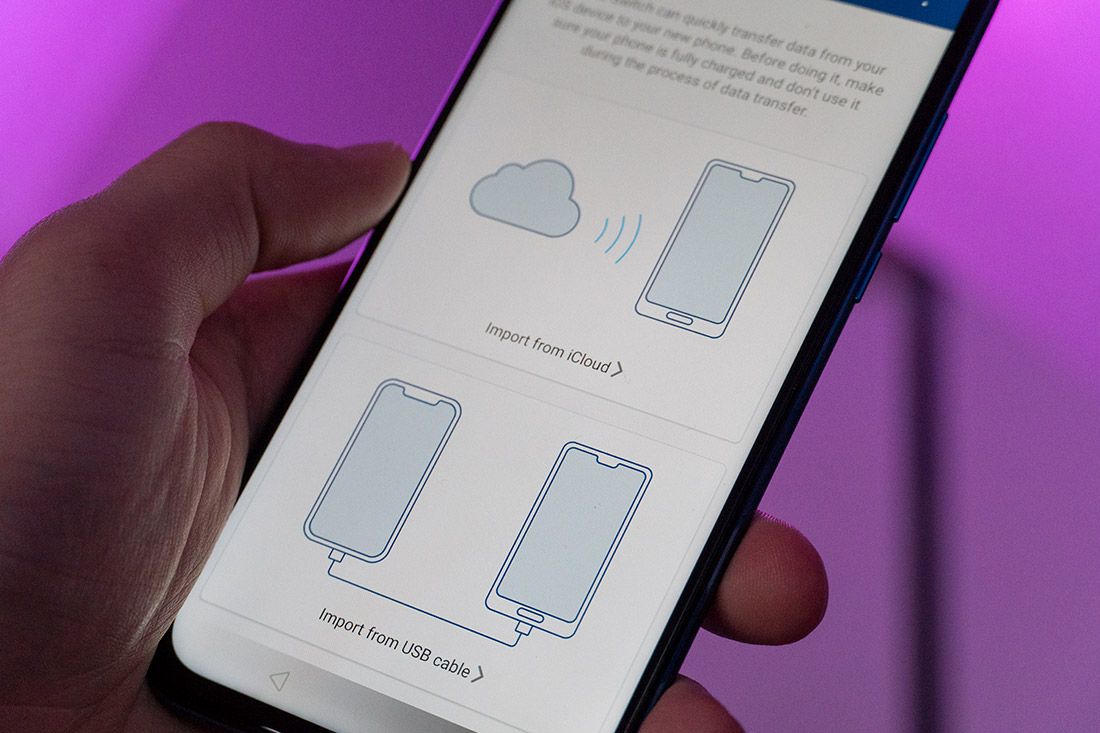
When you download the MobileTrans app, you can select your contacts, messages, videos, photos, music, apps, wallpapers and voice memos, and copy your data to Android. There are two ways for you to do this. The first way is by connecting the app to your iCloud account and pulling your backed up data from there. The second way is to use a USB cable for a direct tether from one phone to the other. Most file types are supported with up to 13 different types that are compatible with the iOS to Android transfer.

Using advanced data analysis technology, MobileTrans makes the file transfer process extremely fast. Compared to other data transfer apps, MobileTrans supports a much quicker process.

For MobileTrans to work with your phones, you must have compatible devices. MobileTrans is compatible with iCloud 8.0 and up , iOS 5.0 and up, and Android 4.1 and up. You can get the free version of MobileTrans which will allow you to transfer photos from iOS to Android. To transfer more file types, you can upgrade to the full version of the app.

MobileTrans – Copy Data to Android

MobileTrans - Copy Data to Android (Free+, Google Play) →

You can download the MobileTrans app for free from the Google Play Store, using the link above.

iCloud Transfer

Step 1: Download the app from the link above and install it on your Android phone and select import from iCloud.

Step 2: Log in to the iCloud account with your Apple ID and passcode. Enter the verification code if you have enabled the two-factor authentication.

Step 3: The app will scan your iCloud and detect all the different types of files. It will then list all the different types and allow you to choose which ones you’d like to transfer. Select your files and tap start importing.

Step 4: Now you just wait for the process to complete.

Direct Transfer

Step 1: Download the app from the link above and install it on your Android phone and select import from USB cable. You will need an iOS to Android adapter to connect the two phones. If you don’t have one, you can find them on Amazon.

Step 2: MobileTrans will begin scanning all of the data in your iPhone. The scan time will depend on the amount of data that you have stored on your phone.

Step 3. Once the software has scanned all of the data, a list of file types will be shown. You can select the types of file you want to transfer, then select start importing.

MobileTrans also has a detailed guide on how to sync everything between your two phones, just in case you get stuck somewhere.

About MobileTrans

MobileTrans in available for Windows, macOS, Android and iOS. The software supports just about any combination of operating systems. This includes Android, iOS, and even Windows Phone. MobileTrans also offers complete backup and restore solutions to help protect you from data loss. They even have a solution for transferring WhatsApp data from one device to another. While transferring photos is available in the free version of the app, you can check out their pricing to see what options they have for more features.

It is important to note that none of your data is stored on MobileTrans servers. Their methods use direct connections from transferring your personal files. Your data stays on your devices, which is important for those of you that care about your privacy.

Next time you are in need of a data transfer solution, check our MobileTrans and you’ll see for yourself how this software makes the entire process a whole lot easier.

We thank MobileTrans for sponsoring this post. Our sponsors help us pay for the many costs associated with running XDA, including server costs, full time developers, news writers, and much more. While you might see sponsored content (which will always be labeled as such) alongside Portal content, the Portal team is in no way responsible for these posts. Sponsored content, advertising and XDA Depot are managed by a separate team entirely. XDA will never compromise its journalistic integrity by accepting money to write favorably about a company, or alter our opinions or views in any way. Our opinion cannot be bought.

The post How to Copy Data from iOS to Android with MobileTrans appeared first on xda-developers.


from xda-developers https://ift.tt/32tw8As
via IFTTT

How to Copy Data from iOS to Android with MobileTrans

Transferring data from one smartphone to another shouldn’t be a difficult task. However, when you’re moving your personal files from an iPhone to and Android, it can get a little tricky. Many transfer methods require you to connect both devices to a computer to properly transfer all of your important files. The most convenient way to go about this would be to have an app that can transfer everything wirelessly without any need for a PC. This is where MobileTrans comes in. MobileTrans is a powerful iOS to Android transfer app that makes the process effortless. Completing a transfer manually can be slow and sometimes very difficult for certain type of files. MobileTrans will help you grab all of your files and get you setup on a new device.

When you download the MobileTrans app, you can select your contacts, messages, videos, photos, music, apps, wallpapers and voice memos, and copy your data to Android. There are two ways for you to do this. The first way is by connecting the app to your iCloud account and pulling your backed up data from there. The second way is to use a USB cable for a direct tether from one phone to the other. Most file types are supported with up to 13 different types that are compatible with the iOS to Android transfer.

Using advanced data analysis technology, MobileTrans makes the file transfer process extremely fast. Compared to other data transfer apps, MobileTrans supports a much quicker process.

For MobileTrans to work with your phones, you must have compatible devices. MobileTrans is compatible with iCloud 8.0 and up , iOS 5.0 and up, and Android 4.1 and up. You can get the free version of MobileTrans which will allow you to transfer photos from iOS to Android. To transfer more file types, you can upgrade to the full version of the app.

MobileTrans – Copy Data to Android

MobileTrans - Copy Data to Android (Free+, Google Play) →

You can download the MobileTrans app for free from the Google Play Store, using the link above.

iCloud Transfer

Step 1: Download the app from the link above and install it on your Android phone and select import from iCloud.

Step 2: Log in to the iCloud account with your Apple ID and passcode. Enter the verification code if you have enabled the two-factor authentication.

Step 3: The app will scan your iCloud and detect all the different types of files. It will then list all the different types and allow you to choose which ones you’d like to transfer. Select your files and tap start importing.

Step 4: Now you just wait for the process to complete.

Direct Transfer

Step 1: Download the app from the link above and install it on your Android phone and select import from USB cable. You will need an iOS to Android adapter to connect the two phones. If you don’t have one, you can find them on Amazon.

Step 2: MobileTrans will begin scanning all of the data in your iPhone. The scan time will depend on the amount of data that you have stored on your phone.

Step 3. Once the software has scanned all of the data, a list of file types will be shown. You can select the types of file you want to transfer, then select start importing.

MobileTrans also has a detailed guide on how to sync everything between your two phones, just in case you get stuck somewhere.

About MobileTrans

MobileTrans in available for Windows, macOS, Android and iOS. The software supports just about any combination of operating systems. This includes Android, iOS, and even Windows Phone. MobileTrans also offers complete backup and restore solutions to help protect you from data loss. They even have a solution for transferring WhatsApp data from one device to another. While transferring photos is available in the free version of the app, you can check out their pricing to see what options they have for more features.

It is important to note that none of your data is stored on MobileTrans servers. Their methods use direct connections from transferring your personal files. Your data stays on your devices, which is important for those of you that care about your privacy.

Next time you are in need of a data transfer solution, check our MobileTrans and you’ll see for yourself how this software makes the entire process a whole lot easier.

We thank MobileTrans for sponsoring this post. Our sponsors help us pay for the many costs associated with running XDA, including server costs, full time developers, news writers, and much more. While you might see sponsored content (which will always be labeled as such) alongside Portal content, the Portal team is in no way responsible for these posts. Sponsored content, advertising and XDA Depot are managed by a separate team entirely. XDA will never compromise its journalistic integrity by accepting money to write favorably about a company, or alter our opinions or views in any way. Our opinion cannot be bought.

The post How to Copy Data from iOS to Android with MobileTrans appeared first on xda-developers.


from xda-developers https://ift.tt/32tw8As
via IFTTT

vendredi 8 novembre 2019

Samsung Camera app hints at a future Galaxy phone having a 108MP camera

Samsung is currently the only image sensor vendor that makes a 108MP image sensor for smartphones. Even though they’re the ones to have made it, their own smartphones aren’t the ones using it right now. So far, only Xiaomi uses it in the Mi Mix Alpha and Mi Note 10/CC9 Pro, and the early results seem to be pretty good. Samsung isn’t leaving all the fun to Xiaomi, though. According to code we found in the latest version of the Samsung Camera app, Samsung will very likely be including a 108MP camera on one of their future smartphones.

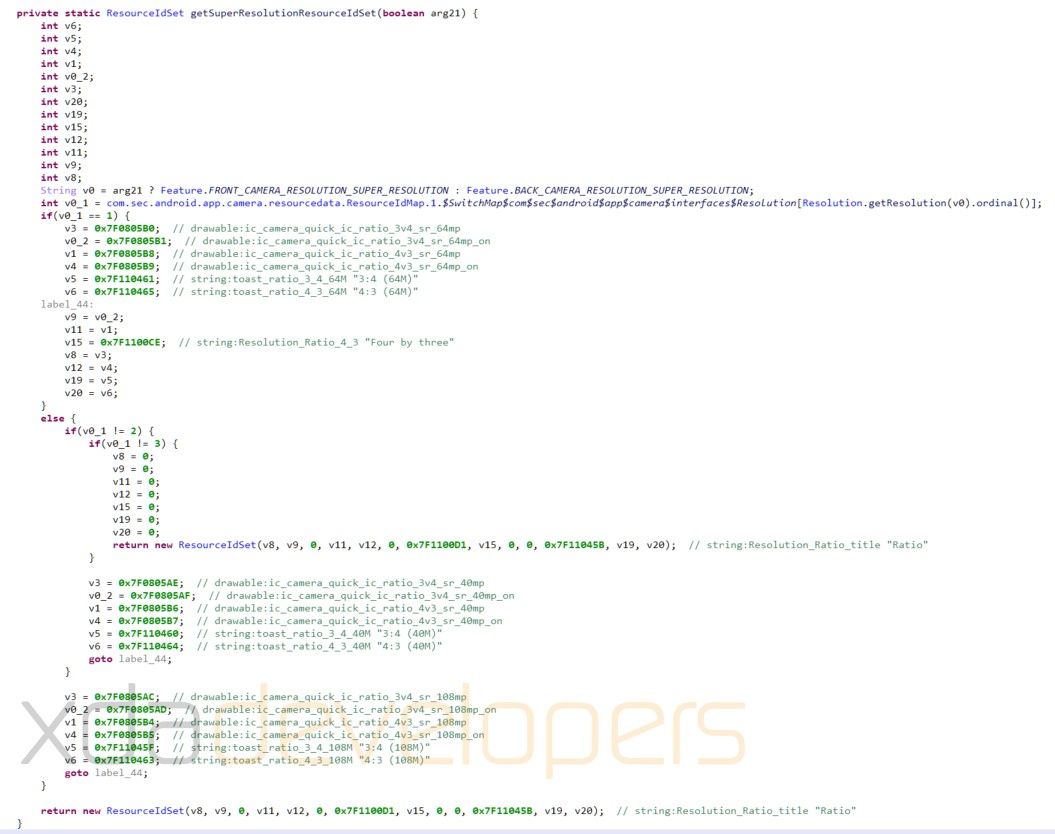
While delving into the Samsung Camera app from the third One UI 2.0 beta which was released yesterday for the Galaxy S10, I found code that adds 108MP output resolution support. We’ve heard rumors that Samsung is likely to put its 108MP image sensor in the Galaxy S11, but there’s nothing in the code confirming that this output resolution is specifically for the upcoming Galaxy S11. All we can say is that at least one of the upcoming Galaxy smartphones from Samsung will support it. We will likely know what phone will be using this sensor in early 2020 as more information leaks.

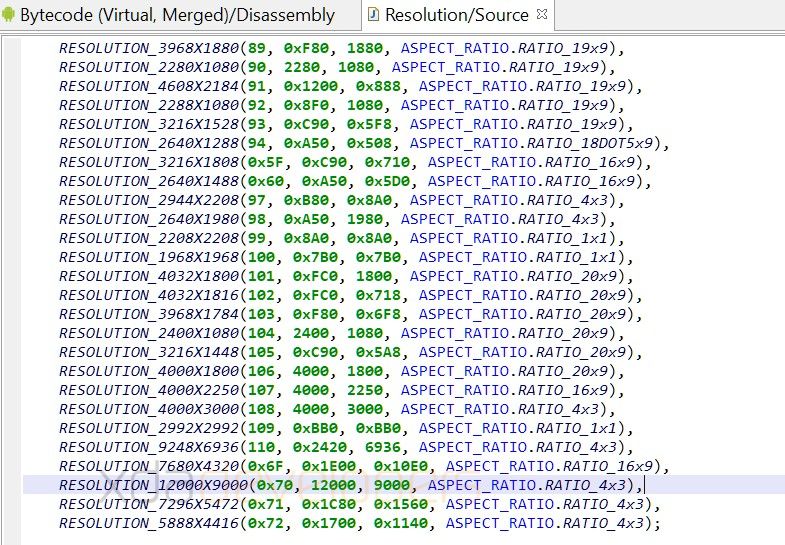
In the screenshots below, we can see that the Samsung Camera has added support for a resolution of 12,000 by 9,000 pixels. This is 108,000,000 total pixels, or 108MPs. Like the Mi Mix Alpha or Mi Note 10, Samsung will likely employ pixel binning to improve low-light shots. This means the Galaxy smartphone using this sensor likely won’t be outputting full 108MP resolution photos by default, but rather 27MP or 12MP photos by combining 4 or 9 pixels respectively and turning them into a single pixel, making each pixel effectively larger than any of the individual pixels.

108MP resolution support in Samsung Camera app 108MP resolution support in Samsung Camera app

In the past, Samsung hasn’t added support for a resolution or sensor unless they were actively working on shipping them in a future Samsung device. This is because the engineering and cost of development for software just aren’t worth it as a testbed for possible hardware. That means when we find support for a specific resolution or feature, it will very likely be making it into one of the future smartphones that Samsung is planning on launching.

We are very excited about these new 108MP smartphone cameras. Xiaomi is already doing wonders with it, and I think it’s really going to take Samsung’s cameras to the next level.


Thanks to PNF Software for providing us a license to use JEB Decompiler, a professional-grade reverse engineering tool for Android applications.

The post Samsung Camera app hints at a future Galaxy phone having a 108MP camera appeared first on xda-developers.


from xda-developers https://ift.tt/2NsJdWn
via IFTTT

I’ve used the Galaxy Fold for a month: Yeah, this is the future

There’s no getting around the fact that the Samsung Galaxy Fold is a hotly debated device. Since its inception, and throughout its fair share of turbulence, the phone has garnered a fair amount of critics. Given that this device presents such a radical departure from traditional form factors, such skepticism is not only expected but perhaps even healthy. Yet at the same time, many reviews have barely just arrived, and the verdict regarding its failures and triumphs is yet to be fully decided.

For a few years now, I’ve been really into phones. At first, I really only cared about the specifications. Truthfully, this got boring quickly. So for the past year or so, I’ve been more interested in unique and fun phones. The most fun, exciting, and just straight-up cool phone I’ve used is the Samsung Galaxy Fold.

Galaxy Fold XDA Forums

Before delving into the details, I want to just state off the bat that I think it’s worth the price. I am aware that many readers will disagree, but I hope to make my reasons clear by the end of this editorial. The fact is that using the Galaxy Fold is not like using any other phone. It’s thicker, heavier, more delicate, and weaker than most modern handsets. That doesn’t mean you need to baby it, but you can’t abuse it either, and we’ve subconsciously grown increasingly reliant on the respectable durability that modern flagships now offer. The Galaxy Fold is very special, and looking at videos and pictures, or even reading a review, can’t give you anything close to the idea of what using the phone is like.

Samsung Galaxy Fold
Display Type Main display: 7.3” QXGA+ Dynamic AMOLED Display (4.2:3) Infinity Flex Display, 2152×1536, 362ppi
Cover display: 4.6” HD+ Super AMOLED Display (21:9), 1680×720, 399ppi
Size Folded: 62.8 x 160.9 x 15.7mm ~ 17.1mm
Unfolded: 117.9 x 160.9 x 6.9mm ~ 7.6mm
Weight: 276g
Display Color Palette HDR10+ main display only
System-on-chip Snapdragon 855
RAM Capacity 12GB (LPDDR4X)
Storage Capacity 512GB UFS 3.0
Speaker System
  • Stereo speakers and earphones: Sound by AKG
  • Surround sound with Dolby Atmos technology
Headphone Jack
  • No
  • Samsung Galaxy Buds in the box
Front Camera Folded: 10MP 2PD AF F2.2 (80°)
Unfolded: 10MP 2PD AF F2.2 (80°) + 8MP depth camera
Rear Cameras Triple Camera
  • Ultra-Wide: 16MP F2.2 (123°)
  • Wide-angle: 12MP 2PD AF F1.5/F2.4 OIS (77°)
  • Telephoto: 12MP F2.4 OIS (45°)
Battery Capacity 4380mAh (typical) dual battery
Wireless Charging Yes, Fast Wireless Charging 2.0, Wireless Power Share 5W
Fast Charging
  • Yes, Samsung Adaptive Fast Charging, 15W PD
  • Adaptive fast charger in box
Biometrics Capacitive side fingerprint scanner
Water and Dust Resistance None
Software Android 9 Pie with One UI

About this article: Samsung did not provide this device for review. I purchased it myself for personal usage. 

In any other review or hands-on article, this section normally would be about the design of the phone, meaning color, aesthetics, and dimensions. Stuff like that isn’t really important when talking about a foldable, and the first real foldable in particular. I know people will want to know my take on it, though, so let me quickly just go through it.

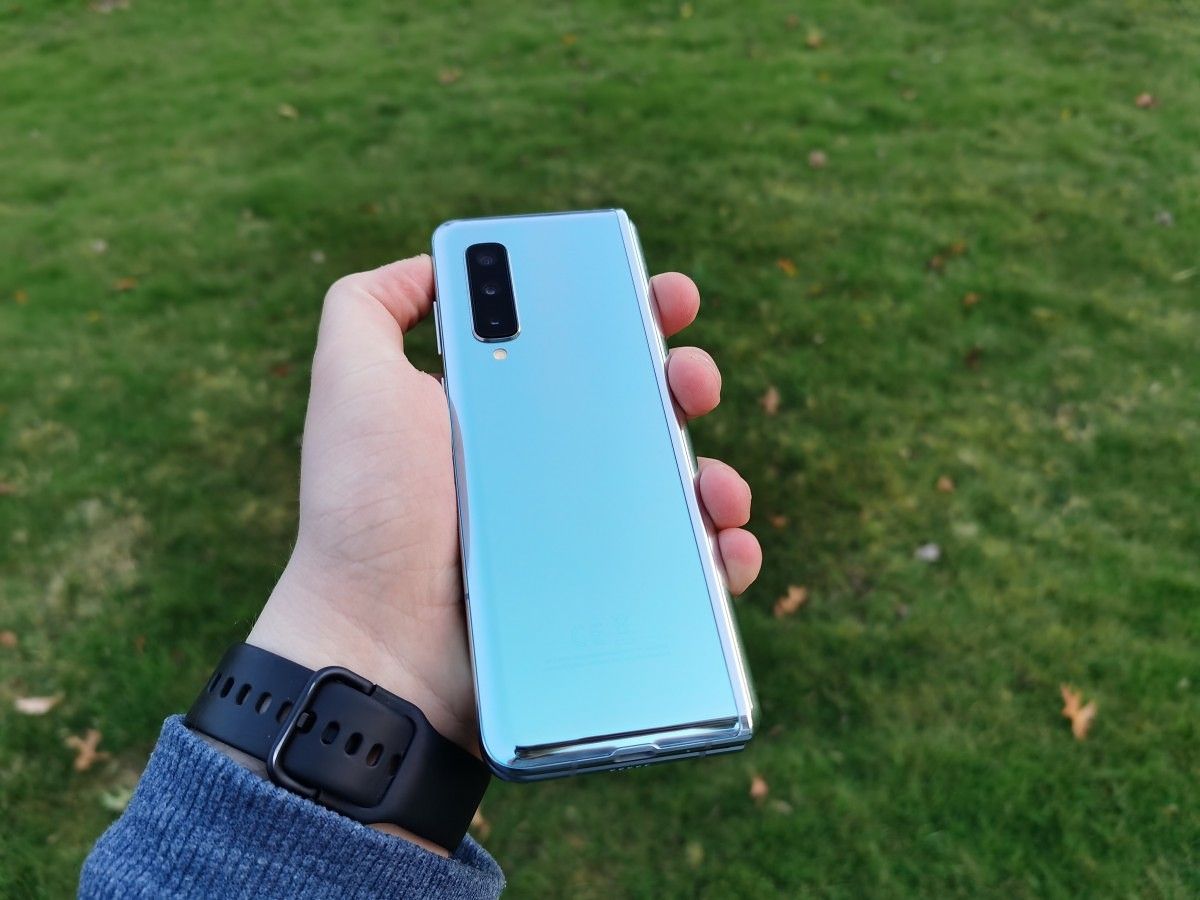
It has glass on the front and back which is sloped down into the aluminum rails. The hinge is made out of stainless steel which feels very premium. It is visible on the side of the phone while folded, and completely flat on the side, sloping down into the front and back panels. I have the silver model, which has a mirror finish and very subtle color-shifting effects with direct and strong light.


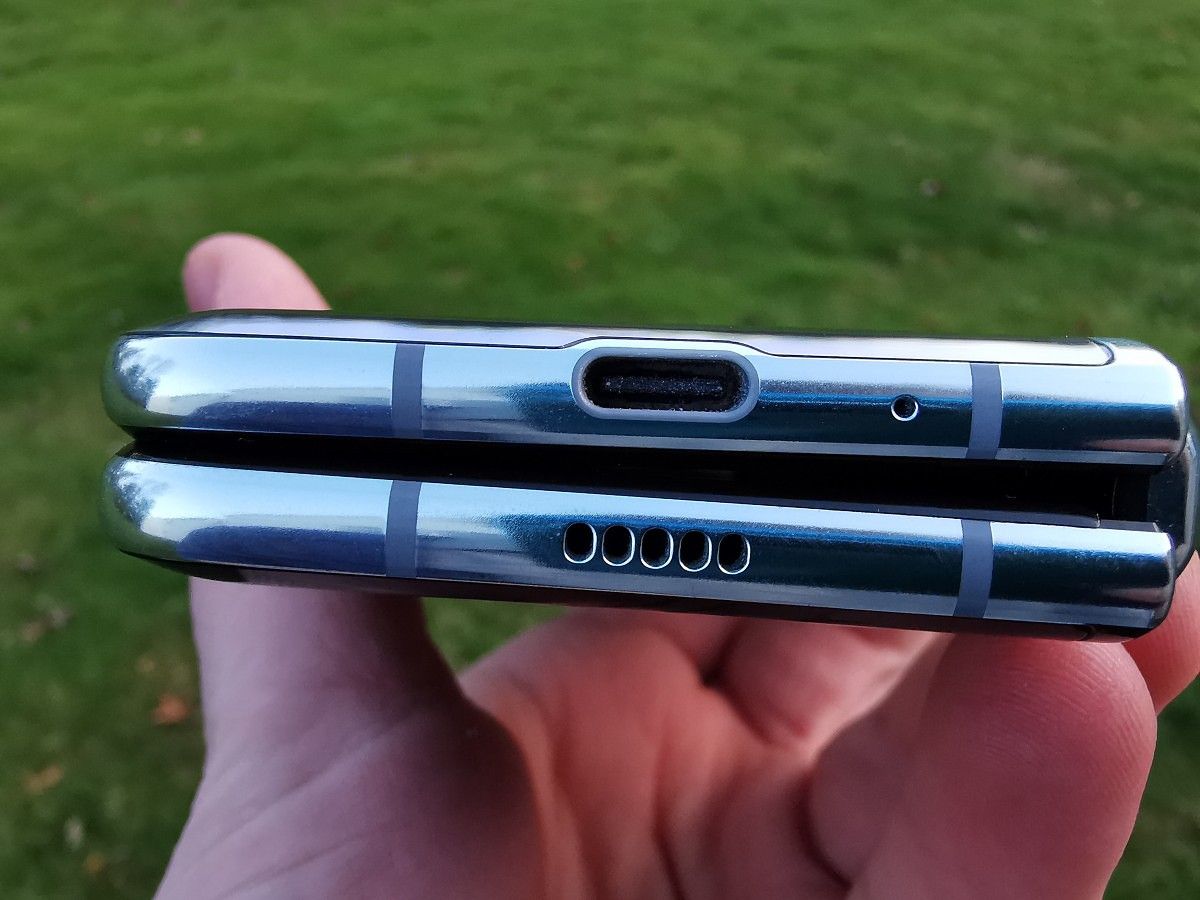
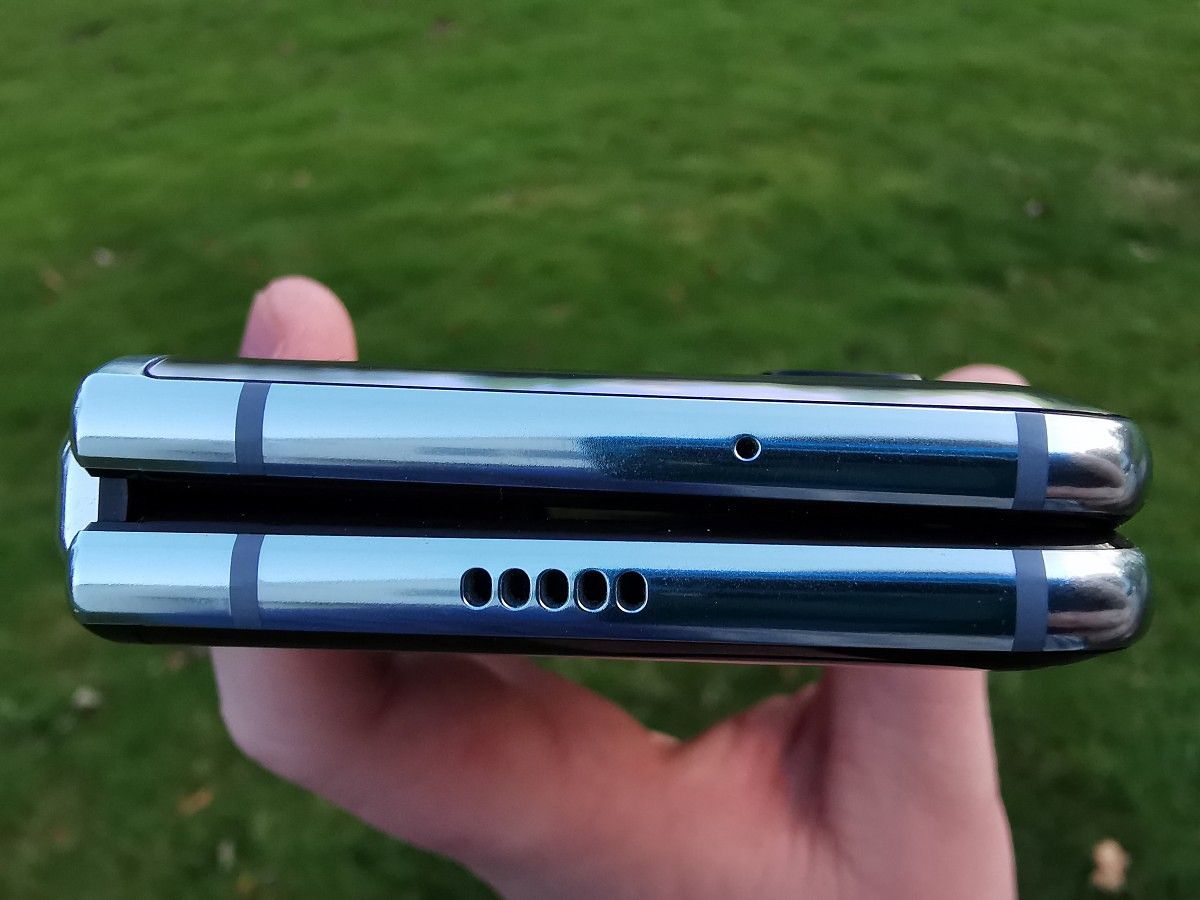
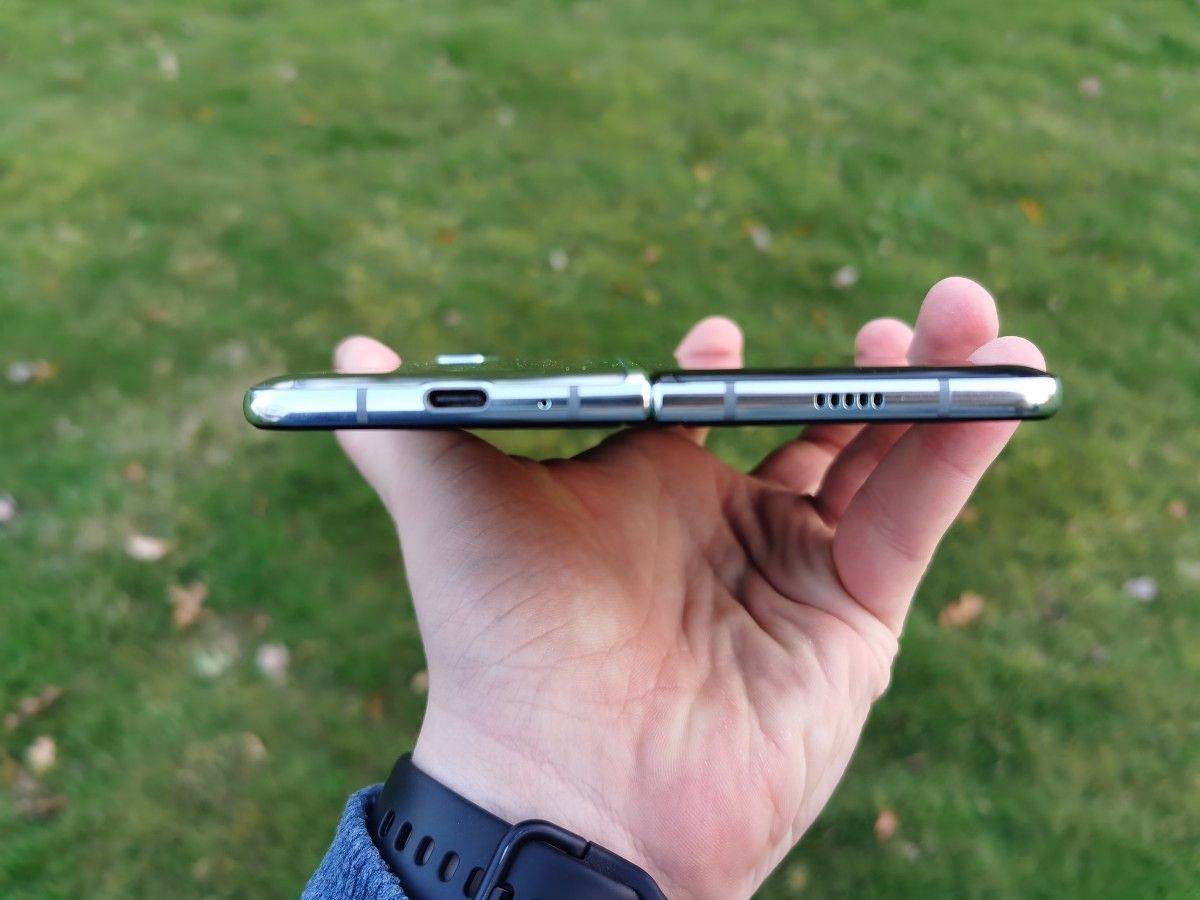
Let’s get to the crucial distinguishing component that enables the Fold to be so interesting: the hinge. It’s made of stainless steel and is visible on the side of the phone while folded. It is completely flat on the side and slopes down into the front and back panels. There is a very slight gap in-between the hinge and the panels of the phone. This is to let the hinge open and close smoothly but does leave it open to getting water or dust into the body.

Note 10+ vs Galaxy Fold Thickness

What is most important is the design of the foldable display and, to put it simply, how it folds. The Galaxy Fold has what I consider the best foldable design, at least in terms of where we are in the age of plastic foldable displays.

The body of the phone is made of glass and aluminum while the main display is plastic. While the phone is folded, the display is protected. While it is unfolded, it is you who must protect the display. The panel is very safe while closed because the gap between the phone isn’t large enough for really anything to fit in, and the additional caps Samsung added address some of the early issues that were reported regarding particle ingress. Sand and small pebbles will, of course, be able to fit into the gap, but that’s the nature of having a gap.

On the other half of the phone, you’ve got the  headphone jack USB C port. On that same right/bottom half of the phone, you have the fingerprint scanner, power button/Bixby button, and volume rockers. Unlike the Galaxy S10e, the power button and fingerprint scanner are different. At first, I didn’t like this because it just felt weird. As I used the Fold more, I actually really started liking it because it’s very easy to accidentally hit the buttons while holding the phone because of its size. It’s nice to have the fingerprint scanner only on while the display is on. It also has an option to swipe to bring the notification shade down, but again, I kept it off because I kept accidentally hitting it.

With that said, we have to talk about the display durability. This is the main “drawback” of foldable displays. The display is made of plastic, which is not optimal, but currently, there is no consumer-ready foldable glass. The concern is that there will be deep scratches, dents, or you could just crush the display if you press too hard. You know what, it’s true. Both of those could totally happen. The thing is, they likely won’t.

Looking through the gap of the Galaxy Fold while folded

For a deep scratch to appear, you would need to run sand over the display. Will this ever happen intentionally? Probably not, but stray hard particles might find their way onto the display or inside your pocket when out and about. For a dent, you would need to press down pretty hard with your fingernail. This is what Zach from Jerry Rig Everything did in his infamous durability video. Will you ever drag your fingernail through the display so hard it permanently dents the display? No, probably not, at least not intentionally. I can’t say I’ve ever done this on any phone ever, and I certainly would not do it on the Fold. What about crushing the display? You can’t put excess pressure onto the display, so while closing it you can’t be pressing down on the middle of the screen. Doing this will likely break the display over time. Samsung warns you about it as well, so as long as you pay attention to the documents in the box with the Fold, you’ll be good. It is possible to exert pressure by, say, accidentally sitting or laying on the phone while it’s hiding under a cushion or sheets. With a Fold, you have to be slightly more careful and aware of such situations.

It’s also important to talk about ingress. The Galaxy Fold is not IP68 rated. The Galaxy Fold can be damaged by entering into contact with sand or water. Samsung can’t fully seal the hinge into the body of the phone because of the design limitations. If it’s raining, you can’t have your phone out. If it’s snowing, you gotta keep it sheathed. If you’re at the beach, you better keep it in your car, as you don’t want sand in the hinge. These situations are all based around sand and water because that’s the main thing you have to worry about, otherwise, it’ll last through most people’s 9 to 5 job.

Software: One UI but it folds

I don’t want to re-review One UI because it’s honestly not worth it. I have a full One UI review you can check out for a good look into the software. The Galaxy Fold has the same basic One UI software and experience. Instead of just going over One UI again, let’s talk about how the software on the Galaxy Fold works, because it’s obviously not going to be the same as a device like the Galaxy Note 10, right?

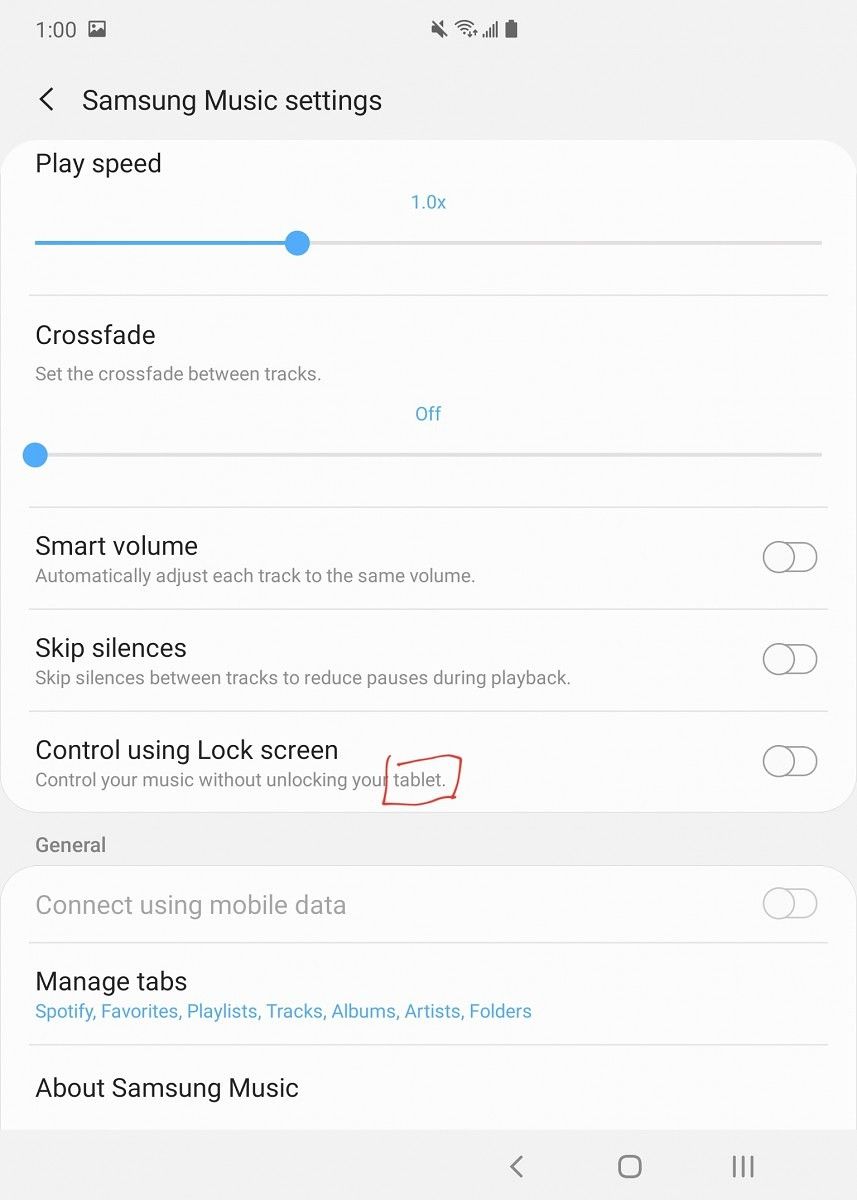
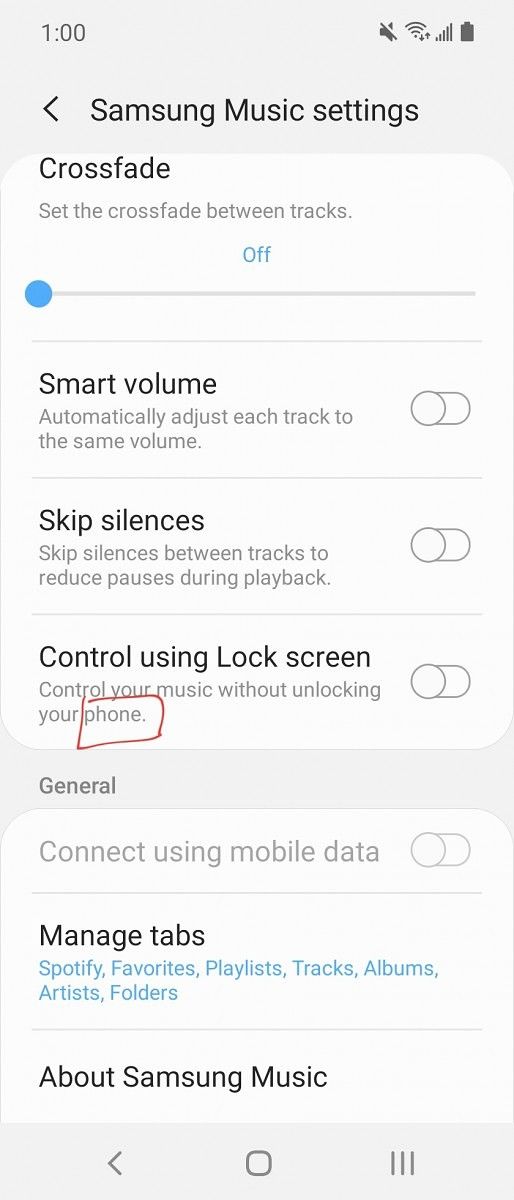
Well, it’s actually very similar and pretty intuitive. The base software is the same. You have access to all your apps on the front screen and main screen. While you are on the front screen, the phone thinks it’s a phone. When you unfold it, the Fold thinks it’s a tablet. This might be a little confusing so let me give you an example. While you have the Galaxy Fold closed and open Samsung Music, it says “Control your music without unlocking your phone.” Nothing to think twice about, right? Well, when you open the Galaxy Fold it says “Control your music without unlocking your tablet.” It’s a one-word difference but says a lot about the software experience.

The software on most Android tablets is absolutely horrible because most developers don’t design their apps for Android tablets, specifically, as these have awful sales. This is fair, we shouldn’t expect developers to make apps for devices that won’t be used as often. Most people would assume that foldables have the same general principle as tablets: if they won’t sell, why develop for them? Samsung knows this is going to be an issue so they made it easy for developers to develop for the Galaxy Fold. They also worked with hundreds of app developers to add Galaxy Fold support for app continuity out of the box. Samsung says hundreds of apps of the Google Play Store and Galaxy Store already support App Continuity. I can totally see this. Out of 131 apps installed on my Galaxy Fold, only 8 don’t support continuity. For those 8 apps, you just click the re-size button in the navbar and it will reload the app to the larger screen. Even some apps that haven’t been updated in a long time support it. I’m not sure what type of black magic Samsung is doing, but it is so good and so fast. It feels like complete and finished software.

Adobe Photoshop Mix doesn’t have continuity

App continuity is one of the really great features Samsung is really pushing. Saying “oh yeah the Fold has app continuity and it’s good” doesn’t really tell you anything about it. Let me give you an actually practical example I legitimately use every day. I get a lot of emails, as you would expect, and to quickly check one out, it’s not worth opening the main display. So I can read through them on the front and select the email I want to read and respond to. I open the email on the front display and realize, “man this is really small.” All I have to do is open the larger display, and I’m at the same place with the same info ready to work. It’s seamless as well, with no loading or awkward transitions in-between.

Besides App Continuity, there really are no Fold specific features. There is nothing new in the camera or in the UI. It’s got One UI 1.5 which means Your Phone from Microsoft is preinstalled and it has those fancy Live Focus Camera and AR Doodle modes. That’s seriously about it. That’s not a bad thing though. It has every setting you could ever need and more. One UI as an Android skin is extremely well done and it really didn’t need anything more for the Fold. Samsung did a very good job on the software.

Camera: bigger display is better

The camera on this phone is essentially the same as the Galaxy Note 10+. I highly recommend just going and reading the camera section on that review. In case you don’t want to go over to that review and read that entire section, here’s a small blurb that describes the camera very well.

Previous Samsung phones have had issues with their cameras. It wasn’t about quality or actual hardware issues, rather it was all about the color science. Samsung’s colors are usually cooler and the saturation is turned up to 11. This made the pictures straight out of the shutter in auto mode great for something like Instagram. If you wanted more true to life photos, though, this wasn’t really great. With the Galaxy Note 10+, Samsung changed things a bit. The photos are not as saturated as before. Don’t get me wrong, they’re still not perfectly true to life, but it’s much better than earlier devices.

You’ll likely want to see a few pics for yourself, so here are some shots I took with my Fold’s rear cameras. You can check out the full Google Photos album in the link right below.

Galaxy Fold Album Google Photos

Something photo samples won’t show is how good the Fold is for taking pictures. Unlike the monsters that take pictures with iPads, the Galaxy Fold doesn’t feel obnoxious. The big display is actually pretty great for photos. Every picture looks good on the viewfinder and it makes taking pictures fun. Using the smaller display, pictures are just alright. Photos are truly the main display task.

Experience: You can not imagine it until you use it

This “experience” section of the review is something I wouldn’t normally do. Most people know what using a phone is like. It’s a metal and glass slab with bright lights moving quickly. You’re probably reading this on one and you probably know what it’s like to use a normal old phone. I could give you a Pixel 4 XL or Redmi Go and they are basically the same experience. Sure, differences in cameras, software, speed, whatever. They are basically the same. The Galaxy Fold is something brand new.

When closed, it feels good. It’s heavy, but a good heavy. My Galaxy Fold has a little creaking to the hinge. According to Samsung, this is normal, because the hinge will loosen with time. If it gets too annoying, you can easily bring the Fold to a service center where they can tighten the hinge for you. The reason for the loosening in the first place is to keep it from snapping. The wiggle apparently keeps it loose and lets it fold for those 200,000 folds.

While unfolded, it feels very thin and even thinner than most flagship phones. It actually feels great to use unfolded, as it should. The weight distribution is insanely balanced and well-distributed, so it doesn’t feel very heavy. The thing is, it isn’t totally flat but features a 2 degree offset between screens. It’s almost flat and almost impossible to tell it isn’t under most conditions, but if you look closely you can see it. My Fold folded flat for the first 2 or 3 weeks of owning it. After close to a month, it’s less flat than when I unboxed it.

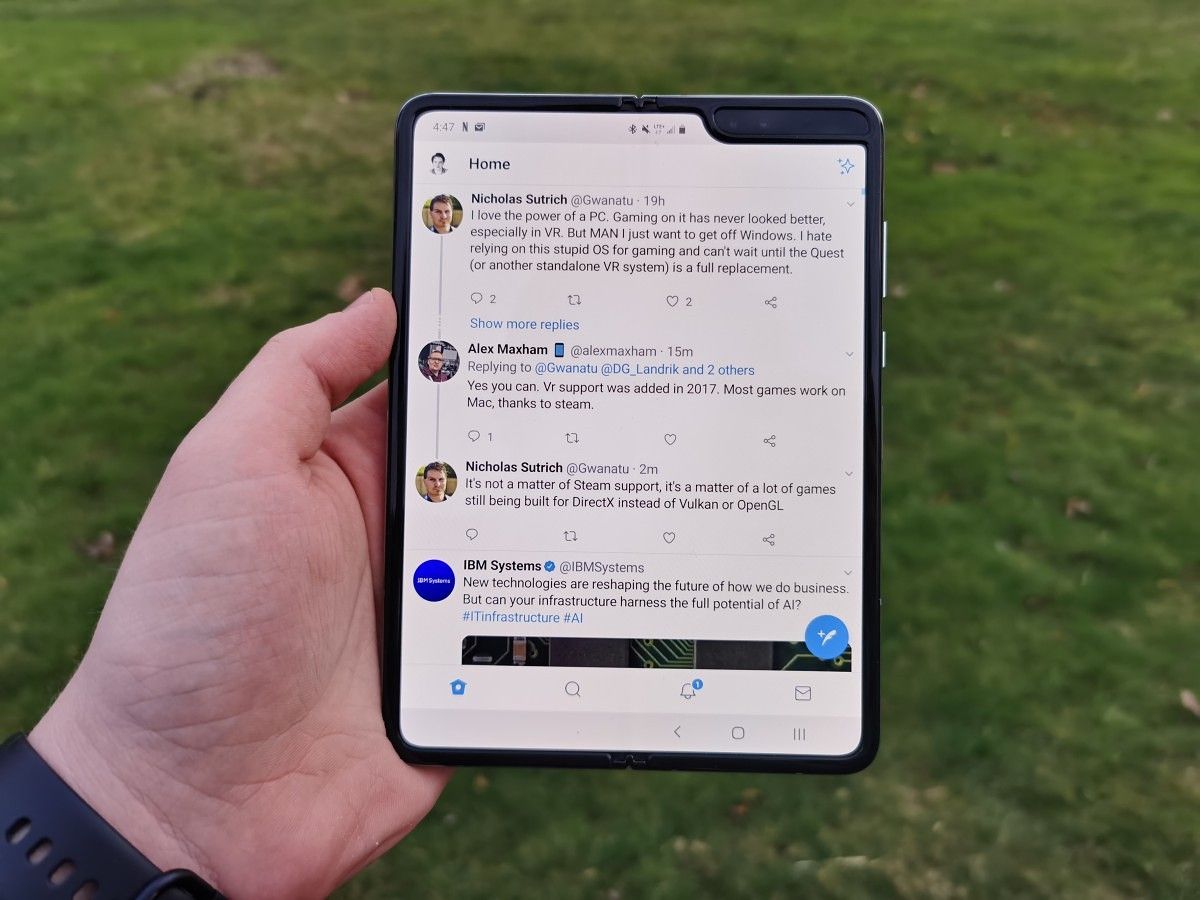
Even then, the user experience is absolutely amazing. It is not like using any other phone or tablet: the tablet size is actually very nice with a fine aspect ratio. It makes looking at Reddit, Twitter, Gmail, or just any other app more interesting. Everything is bigger, and as they say, bigger is better.

Something else Samsung didn’t tell you is that you can use the device while it’s not totally folded or unfolded. You can use the fold at a 90-degree angle, which might seem uncomfortable, and it is. Using the phone at around 135 degrees is actually pretty great. It makes it feel like you are reading a book. It’s not going to look the best, as there are some differences in the look of the display with colors and brightness, but it still works.

Folding the phone shut is also just amazing. Feeling the phone snap flat to a tablet is just something you can not describe in words. It’s such a satisfying feeling. Opening and closing it piques the interest of everyone, no matter what phone they use. Again, it’s hard to describe in words. It’s the type of device where you need to try it yourself to really understand how amazing the experience is.

Conclusion: The Future comes at a premium

When considering the Galaxy Fold, the first thing you’re likely going to think about is the price. It’s expensive, retailing at $1,980 — but in reality, you’ll end up spending a bit more. This is because of two reasons. First, because sales tax exists. I ended up paying $2,150.76 for mine from Best Buy. The second reason is actually due to availability. If you really want to get this phone, you’ll have to buy one from sites like eBay or Swappa. They are currently sold out around the world with stock being resupplied very slowly. As the basics of economics state, low inventory with high demand means higher prices.

The price isn’t a huge deal, even if it is a huge price. While the phone is too expensive compared to modern flagships, it is not meant to compete for the same customers, given it is in a category of its own: a paradigm-shifting luxury product. It’s a product targeted at a very particular segment that’s willing to pay a premium to be first. It’s not that it is not meant to be owned by everyone because it is luxurious or something, but rather because it is a first-generation foray into a new product category, and it is currently sought after by first-adopters.

To me, the Galaxy Fold is well worth the price. Yes, $2,000 is a large amount of money. It is a lot more than any person should spend on a regular phone. Luckily, the Galaxy Fold is more than that. It’s a luxury product, with both style and function. When you walk into a room, everyone wants to know what device you have. When you are walking around, it just looks stylish to hold. It’s also functional in a way no other phone on the market is, because it is an actual tablet that fits in your pocket. There is nothing more stylish and functional I can think of in the Android space, especially this well-engineered. Something like this isn’t going to be inexpensive, at least not yet, so for a starting price of a luxury item in a new product category, the price is right.

Galaxy Fold XDA Forums

At the end of the day, with something like the Galaxy Fold, it’s going to be hard to change anyone’s mind about it. Trust me, I’m not trying to. I’m just trying to say that after using it for about 5 weeks, it is my favorite phone I’ve ever used. There is no phone or experience like the Galaxy Fold. The Fold makes me excited for future foldables because after using it, I firmly believe foldables are going to be the future of mobile computing.

In the unlikely situation you would be interested in picking up the Galaxy Fold, it isn’t easy. It is only available in-store at specific carriers and Samsung stores around the world. In the US, you can only pick up the Galaxy Fold at specific AT&T and Best Buy stores along with the three Samsung Experience Stores. If you are interested, I recommend checking out your regional Samsung website. It really does vary by region.

The post I’ve used the Galaxy Fold for a month: Yeah, this is the future appeared first on xda-developers.


from xda-developers https://ift.tt/2p0POxT
via IFTTT

I’ve used the Galaxy Fold for a month: Yeah, this is the future

There’s no getting around the fact that the Samsung Galaxy Fold is a hotly debated device. Since its inception, and throughout its fair share of turbulence, the phone has garnered a fair amount of critics. Given that this device presents such a radical departure from traditional form factors, such skepticism is not only expected but perhaps even healthy. Yet at the same time, many reviews have barely just arrived, and the verdict regarding its failures and triumphs is yet to be fully decided.

For a few years now, I’ve been really into phones. At first, I really only cared about the specifications. Truthfully, this got boring quickly. So for the past year or so, I’ve been more interested in unique and fun phones. The most fun, exciting, and just straight-up cool phone I’ve used is the Samsung Galaxy Fold.

Galaxy Fold XDA Forums

Before delving into the details, I want to just state off the bat that I think it’s worth the price. I am aware that many readers will disagree, but I hope to make my reasons clear by the end of this editorial. The fact is that using the Galaxy Fold is not like using any other phone. It’s thicker, heavier, more delicate, and weaker than most modern handsets. That doesn’t mean you need to baby it, but you can’t abuse it either, and we’ve subconsciously grown increasingly reliant on the respectable durability that modern flagships now offer. The Galaxy Fold is very special, and looking at videos and pictures, or even reading a review, can’t give you anything close to the idea of what using the phone is like.

Samsung Galaxy Fold
Display Type Main display: 7.3” QXGA+ Dynamic AMOLED Display (4.2:3) Infinity Flex Display, 2152×1536, 362ppi
Cover display: 4.6” HD+ Super AMOLED Display (21:9), 1680×720, 399ppi
Size Folded: 62.8 x 160.9 x 15.7mm ~ 17.1mm
Unfolded: 117.9 x 160.9 x 6.9mm ~ 7.6mm
Weight: 276g
Display Color Palette HDR10+ main display only
System-on-chip Snapdragon 855
RAM Capacity 12GB (LPDDR4X)
Storage Capacity 512GB UFS 3.0
Speaker System
  • Stereo speakers and earphones: Sound by AKG
  • Surround sound with Dolby Atmos technology
Headphone Jack
  • No
  • Samsung Galaxy Buds in the box
Front Camera Folded: 10MP 2PD AF F2.2 (80°)
Unfolded: 10MP 2PD AF F2.2 (80°) + 8MP depth camera
Rear Cameras Triple Camera
  • Ultra-Wide: 16MP F2.2 (123°)
  • Wide-angle: 12MP 2PD AF F1.5/F2.4 OIS (77°)
  • Telephoto: 12MP F2.4 OIS (45°)
Battery Capacity 4380mAh (typical) dual battery
Wireless Charging Yes, Fast Wireless Charging 2.0, Wireless Power Share 5W
Fast Charging
  • Yes, Samsung Adaptive Fast Charging, 15W PD
  • Adaptive fast charger in box
Biometrics Capacitive side fingerprint scanner
Water and Dust Resistance None
Software Android 9 Pie with One UI

About this article: Samsung did not provide this device for review. I purchased it myself for personal usage. 

In any other review or hands-on article, this section normally would be about the design of the phone, meaning color, aesthetics, and dimensions. Stuff like that isn’t really important when talking about a foldable, and the first real foldable in particular. I know people will want to know my take on it, though, so let me quickly just go through it.

It has glass on the front and back which is sloped down into the aluminum rails. The hinge is made out of stainless steel which feels very premium. It is visible on the side of the phone while folded, and completely flat on the side, sloping down into the front and back panels. I have the silver model, which has a mirror finish and very subtle color-shifting effects with direct and strong light.


Let’s get to the crucial distinguishing component that enables the Fold to be so interesting: the hinge. It’s made of stainless steel and is visible on the side of the phone while folded. It is completely flat on the side and slopes down into the front and back panels. There is a very slight gap in-between the hinge and the panels of the phone. This is to let the hinge open and close smoothly but does leave it open to getting water or dust into the body.

Note 10+ vs Galaxy Fold Thickness

What is most important is the design of the foldable display and, to put it simply, how it folds. The Galaxy Fold has what I consider the best foldable design, at least in terms of where we are in the age of plastic foldable displays.

The body of the phone is made of glass and aluminum while the main display is plastic. While the phone is folded, the display is protected. While it is unfolded, it is you who must protect the display. The panel is very safe while closed because the gap between the phone isn’t large enough for really anything to fit in, and the additional caps Samsung added address some of the early issues that were reported regarding particle ingress. Sand and small pebbles will, of course, be able to fit into the gap, but that’s the nature of having a gap.

On the other half of the phone, you’ve got the  headphone jack USB C port. On that same right/bottom half of the phone, you have the fingerprint scanner, power button/Bixby button, and volume rockers. Unlike the Galaxy S10e, the power button and fingerprint scanner are different. At first, I didn’t like this because it just felt weird. As I used the Fold more, I actually really started liking it because it’s very easy to accidentally hit the buttons while holding the phone because of its size. It’s nice to have the fingerprint scanner only on while the display is on. It also has an option to swipe to bring the notification shade down, but again, I kept it off because I kept accidentally hitting it.

With that said, we have to talk about the display durability. This is the main “drawback” of foldable displays. The display is made of plastic, which is not optimal, but currently, there is no consumer-ready foldable glass. The concern is that there will be deep scratches, dents, or you could just crush the display if you press too hard. You know what, it’s true. Both of those could totally happen. The thing is, they likely won’t.

Looking through the gap of the Galaxy Fold while folded

For a deep scratch to appear, you would need to run sand over the display. Will this ever happen intentionally? Probably not, but stray hard particles might find their way onto the display or inside your pocket when out and about. For a dent, you would need to press down pretty hard with your fingernail. This is what Zach from Jerry Rig Everything did in his infamous durability video. Will you ever drag your fingernail through the display so hard it permanently dents the display? No, probably not, at least not intentionally. I can’t say I’ve ever done this on any phone ever, and I certainly would not do it on the Fold. What about crushing the display? You can’t put excess pressure onto the display, so while closing it you can’t be pressing down on the middle of the screen. Doing this will likely break the display over time. Samsung warns you about it as well, so as long as you pay attention to the documents in the box with the Fold, you’ll be good. It is possible to exert pressure by, say, accidentally sitting or laying on the phone while it’s hiding under a cushion or sheets. With a Fold, you have to be slightly more careful and aware of such situations.

It’s also important to talk about ingress. The Galaxy Fold is not IP68 rated. The Galaxy Fold can be damaged by entering into contact with sand or water. Samsung can’t fully seal the hinge into the body of the phone because of the design limitations. If it’s raining, you can’t have your phone out. If it’s snowing, you gotta keep it sheathed. If you’re at the beach, you better keep it in your car, as you don’t want sand in the hinge. These situations are all based around sand and water because that’s the main thing you have to worry about, otherwise, it’ll last through most people’s 9 to 5 job.

Software: One UI but it folds

I don’t want to re-review One UI because it’s honestly not worth it. I have a full One UI review you can check out for a good look into the software. The Galaxy Fold has the same basic One UI software and experience. Instead of just going over One UI again, let’s talk about how the software on the Galaxy Fold works, because it’s obviously not going to be the same as a device like the Galaxy Note 10, right?

Well, it’s actually very similar and pretty intuitive. The base software is the same. You have access to all your apps on the front screen and main screen. While you are on the front screen, the phone thinks it’s a phone. When you unfold it, the Fold thinks it’s a tablet. This might be a little confusing so let me give you an example. While you have the Galaxy Fold closed and open Samsung Music, it says “Control your music without unlocking your phone.” Nothing to think twice about, right? Well, when you open the Galaxy Fold it says “Control your music without unlocking your tablet.” It’s a one-word difference but says a lot about the software experience.

The software on most Android tablets is absolutely horrible because most developers don’t design their apps for Android tablets, specifically, as these have awful sales. This is fair, we shouldn’t expect developers to make apps for devices that won’t be used as often. Most people would assume that foldables have the same general principle as tablets: if they won’t sell, why develop for them? Samsung knows this is going to be an issue so they made it easy for developers to develop for the Galaxy Fold. They also worked with hundreds of app developers to add Galaxy Fold support for app continuity out of the box. Samsung says hundreds of apps of the Google Play Store and Galaxy Store already support App Continuity. I can totally see this. Out of 131 apps installed on my Galaxy Fold, only 8 don’t support continuity. For those 8 apps, you just click the re-size button in the navbar and it will reload the app to the larger screen. Even some apps that haven’t been updated in a long time support it. I’m not sure what type of black magic Samsung is doing, but it is so good and so fast. It feels like complete and finished software.

Adobe Photoshop Mix doesn’t have continuity

App continuity is one of the really great features Samsung is really pushing. Saying “oh yeah the Fold has app continuity and it’s good” doesn’t really tell you anything about it. Let me give you an actually practical example I legitimately use every day. I get a lot of emails, as you would expect, and to quickly check one out, it’s not worth opening the main display. So I can read through them on the front and select the email I want to read and respond to. I open the email on the front display and realize, “man this is really small.” All I have to do is open the larger display, and I’m at the same place with the same info ready to work. It’s seamless as well, with no loading or awkward transitions in-between.

Besides App Continuity, there really are no Fold specific features. There is nothing new in the camera or in the UI. It’s got One UI 1.5 which means Your Phone from Microsoft is preinstalled and it has those fancy Live Focus Camera and AR Doodle modes. That’s seriously about it. That’s not a bad thing though. It has every setting you could ever need and more. One UI as an Android skin is extremely well done and it really didn’t need anything more for the Fold. Samsung did a very good job on the software.

Camera: bigger display is better

The camera on this phone is essentially the same as the Galaxy Note 10+. I highly recommend just going and reading the camera section on that review. In case you don’t want to go over to that review and read that entire section, here’s a small blurb that describes the camera very well.

Previous Samsung phones have had issues with their cameras. It wasn’t about quality or actual hardware issues, rather it was all about the color science. Samsung’s colors are usually cooler and the saturation is turned up to 11. This made the pictures straight out of the shutter in auto mode great for something like Instagram. If you wanted more true to life photos, though, this wasn’t really great. With the Galaxy Note 10+, Samsung changed things a bit. The photos are not as saturated as before. Don’t get me wrong, they’re still not perfectly true to life, but it’s much better than earlier devices.

You’ll likely want to see a few pics for yourself, so here are some shots I took with my Fold’s rear cameras. You can check out the full Google Photos album in the link right below.

Galaxy Fold Album Google Photos

Something photo samples won’t show is how good the Fold is for taking pictures. Unlike the monsters that take pictures with iPads, the Galaxy Fold doesn’t feel obnoxious. The big display is actually pretty great for photos. Every picture looks good on the viewfinder and it makes taking pictures fun. Using the smaller display, pictures are just alright. Photos are truly the main display task.

Experience: You can not imagine it until you use it

This “experience” section of the review is something I wouldn’t normally do. Most people know what using a phone is like. It’s a metal and glass slab with bright lights moving quickly. You’re probably reading this on one and you probably know what it’s like to use a normal old phone. I could give you a Pixel 4 XL or Redmi Go and they are basically the same experience. Sure, differences in cameras, software, speed, whatever. They are basically the same. The Galaxy Fold is something brand new.

When closed, it feels good. It’s heavy, but a good heavy. My Galaxy Fold has a little creaking to the hinge. According to Samsung, this is normal, because the hinge will loosen with time. If it gets too annoying, you can easily bring the Fold to a service center where they can tighten the hinge for you. The reason for the loosening in the first place is to keep it from snapping. The wiggle apparently keeps it loose and lets it fold for those 200,000 folds.

While unfolded, it feels very thin and even thinner than most flagship phones. It actually feels great to use unfolded, as it should. The weight distribution is insanely balanced and well-distributed, so it doesn’t feel very heavy. The thing is, it isn’t totally flat but features a 2 degree offset between screens. It’s almost flat and almost impossible to tell it isn’t under most conditions, but if you look closely you can see it. My Fold folded flat for the first 2 or 3 weeks of owning it. After close to a month, it’s less flat than when I unboxed it.

Even then, the user experience is absolutely amazing. It is not like using any other phone or tablet: the tablet size is actually very nice with a fine aspect ratio. It makes looking at Reddit, Twitter, Gmail, or just any other app more interesting. Everything is bigger, and as they say, bigger is better.

Something else Samsung didn’t tell you is that you can use the device while it’s not totally folded or unfolded. You can use the fold at a 90-degree angle, which might seem uncomfortable, and it is. Using the phone at around 135 degrees is actually pretty great. It makes it feel like you are reading a book. It’s not going to look the best, as there are some differences in the look of the display with colors and brightness, but it still works.

Folding the phone shut is also just amazing. Feeling the phone snap flat to a tablet is just something you can not describe in words. It’s such a satisfying feeling. Opening and closing it piques the interest of everyone, no matter what phone they use. Again, it’s hard to describe in words. It’s the type of device where you need to try it yourself to really understand how amazing the experience is.

Conclusion: The Future comes at a premium

When considering the Galaxy Fold, the first thing you’re likely going to think about is the price. It’s expensive, retailing at $1,980 — but in reality, you’ll end up spending a bit more. This is because of two reasons. First, because sales tax exists. I ended up paying $2,150.76 for mine from Best Buy. The second reason is actually due to availability. If you really want to get this phone, you’ll have to buy one from sites like eBay or Swappa. They are currently sold out around the world with stock being resupplied very slowly. As the basics of economics state, low inventory with high demand means higher prices.

The price isn’t a huge deal, even if it is a huge price. While the phone is too expensive compared to modern flagships, it is not meant to compete for the same customers, given it is in a category of its own: a paradigm-shifting luxury product. It’s a product targeted at a very particular segment that’s willing to pay a premium to be first. It’s not that it is not meant to be owned by everyone because it is luxurious or something, but rather because it is a first-generation foray into a new product category, and it is currently sought after by first-adopters.

To me, the Galaxy Fold is well worth the price. Yes, $2,000 is a large amount of money. It is a lot more than any person should spend on a regular phone. Luckily, the Galaxy Fold is more than that. It’s a luxury product, with both style and function. When you walk into a room, everyone wants to know what device you have. When you are walking around, it just looks stylish to hold. It’s also functional in a way no other phone on the market is, because it is an actual tablet that fits in your pocket. There is nothing more stylish and functional I can think of in the Android space, especially this well-engineered. Something like this isn’t going to be inexpensive, at least not yet, so for a starting price of a luxury item in a new product category, the price is right.

Galaxy Fold XDA Forums

At the end of the day, with something like the Galaxy Fold, it’s going to be hard to change anyone’s mind about it. Trust me, I’m not trying to. I’m just trying to say that after using it for about 5 weeks, it is my favorite phone I’ve ever used. There is no phone or experience like the Galaxy Fold. The Fold makes me excited for future foldables because after using it, I firmly believe foldables are going to be the future of mobile computing.

In the unlikely situation you would be interested in picking up the Galaxy Fold, it isn’t easy. It is only available in-store at specific carriers and Samsung stores around the world. In the US, you can only pick up the Galaxy Fold at specific AT&T and Best Buy stores along with the three Samsung Experience Stores. If you are interested, I recommend checking out your regional Samsung website. It really does vary by region.

The post I’ve used the Galaxy Fold for a month: Yeah, this is the future appeared first on xda-developers.


from xda-developers https://ift.tt/2p0POxT
via IFTTT