LightBlog

mardi 5 novembre 2019

Motorola One Power is getting an Android 10 Beta update

While a couple of manufacturers have already rolled out stable Android 10 to a handful of devices, most others are still in the beta testing phase. A few Xiaomi devices have received closed beta updates for MIUI 11 based on Android 10, Huawei has started beta signups for the P30 and P30 Pro, and Samsung has announced the One UI 2.0 beta for the Galaxy S10 and Note 10 series. Most recently, LG launched an Android 10 preview for its flagship LG G8 ThinQ and now, Motorola is following suit.

Motorola One Power Android 10 beta Motorola One Power Android 10 beta

The company has started rolling out an Android 10 closed beta update for the Motorola One Power. As of now, the update is rolling out to Moto One Power owners who are registered on the Motorola Feedback Network. The update includes all the features introduced in Android 10, however, it’s still on the Android security patch for October 2019. It’s also worth noting that Google Pay doesn’t work in the current release (build version QPT30.52-2), but Motorola has ensured that it should be functional in a few days.

In case you wish to try out the update on your device, you can register on the Motorola Feedback Network by following this link. As of now, there’s no information from the company regarding a stable rollout.


Thanks to Telegram user @Hasaber8 for the tip and screenshots.

The post Motorola One Power is getting an Android 10 Beta update appeared first on xda-developers.


from xda-developers https://ift.tt/32nVdMW
via IFTTT

Motorola One Power is getting an Android 10 Beta update

While a couple of manufacturers have already rolled out stable Android 10 to a handful of devices, most others are still in the beta testing phase. A few Xiaomi devices have received closed beta updates for MIUI 11 based on Android 10, Huawei has started beta signups for the P30 and P30 Pro, and Samsung has announced the One UI 2.0 beta for the Galaxy S10 and Note 10 series. Most recently, LG launched an Android 10 preview for its flagship LG G8 ThinQ and now, Motorola is following suit.

Motorola One Power Android 10 beta Motorola One Power Android 10 beta

The company has started rolling out an Android 10 closed beta update for the Motorola One Power. As of now, the update is rolling out to Moto One Power owners who are registered on the Motorola Feedback Network. The update includes all the features introduced in Android 10, however, it’s still on the Android security patch for October 2019. It’s also worth noting that Google Pay doesn’t work in the current release (build version QPT30.52-2), but Motorola has ensured that it should be functional in a few days.

In case you wish to try out the update on your device, you can register on the Motorola Feedback Network by following this link. As of now, there’s no information from the company regarding a stable rollout.


Thanks to Telegram user @Hasaber8 for the tip and screenshots.

The post Motorola One Power is getting an Android 10 Beta update appeared first on xda-developers.


from xda-developers https://ift.tt/32nVdMW
via IFTTT

Adobe Photoshop Camera is an AI-powered camera app for Android and iOS

When it comes to third-party camera apps, there are quite a few options available on Android and iOS. These apps come with a variety of different features, including manual controls, live filters, built-in photo editors, and much more. Now, Adobe is jumping in on the action with its own AI-powered camera app called Adobe Photoshop Camera.

According to a recent report from The Verge, the Photoshop Camera app makes use of the company’s artificial intelligence platform Sensei to recognize subjects in photos and then automatically suggests which filters to apply. It allows users to try the filters in real-time or apply them to images taken from the camera roll. The app is currently available as a preview to a select group of users on Android and iOS and it features a variety of different filters from select artists.

The Adobe Photoshop Camera app aims to simplify the way users edit photos and completely eliminate the need to learn image editing in more powerful, yet complex, apps like Photoshop and Lightroom. In order to do so, the app will automatically make adjustments in the viewfinder, based on various aspects, including dynamic range, tonality, and scene type. This will help users make the right edits to their photos.

Adobe Photoshop Camera app

Additionally, the app will also give users manual controls over the edits so that they can fine-tune details like shadows, highlights, vibrance, and exposure. When the app finally rolls out to all users, it will also include a curated selection of lenses created by artists and influences and will also take applications from artists to create custom lenses for it. Adobe has already roped in Billie Eilish, who has released a limited edition lens for the app. Users will also be able to create their own lenses for the app using Photoshop and the process is expected to be simple enough for the average user.

Furthermore, the app will also include an auto-masking feature, which will make use of Sensei to automatically make a clean selection around the subject. This will allow users to make adjustments to the area around the subject without going through the tedious process of making a clean selection. If you wish to try out the Adobe Photoshop Camera app before it’s officially released and create lenses for the app, you can sign up for the limited preview by following the link below. The app is expected to roll out to users early next year.


Source: Adobe

Via: The Verge

The post Adobe Photoshop Camera is an AI-powered camera app for Android and iOS appeared first on xda-developers.


from xda-developers https://ift.tt/2WKxci7
via IFTTT

Adobe Photoshop Camera is an AI-powered camera app for Android and iOS

When it comes to third-party camera apps, there are quite a few options available on Android and iOS. These apps come with a variety of different features, including manual controls, live filters, built-in photo editors, and much more. Now, Adobe is jumping in on the action with its own AI-powered camera app called Adobe Photoshop Camera.

According to a recent report from The Verge, the Photoshop Camera app makes use of the company’s artificial intelligence platform Sensei to recognize subjects in photos and then automatically suggests which filters to apply. It allows users to try the filters in real-time or apply them to images taken from the camera roll. The app is currently available as a preview to a select group of users on Android and iOS and it features a variety of different filters from select artists.

The Adobe Photoshop Camera app aims to simplify the way users edit photos and completely eliminate the need to learn image editing in more powerful, yet complex, apps like Photoshop and Lightroom. In order to do so, the app will automatically make adjustments in the viewfinder, based on various aspects, including dynamic range, tonality, and scene type. This will help users make the right edits to their photos.

Adobe Photoshop Camera app

Additionally, the app will also give users manual controls over the edits so that they can fine-tune details like shadows, highlights, vibrance, and exposure. When the app finally rolls out to all users, it will also include a curated selection of lenses created by artists and influences and will also take applications from artists to create custom lenses for it. Adobe has already roped in Billie Eilish, who has released a limited edition lens for the app. Users will also be able to create their own lenses for the app using Photoshop and the process is expected to be simple enough for the average user.

Furthermore, the app will also include an auto-masking feature, which will make use of Sensei to automatically make a clean selection around the subject. This will allow users to make adjustments to the area around the subject without going through the tedious process of making a clean selection. If you wish to try out the Adobe Photoshop Camera app before it’s officially released and create lenses for the app, you can sign up for the limited preview by following the link below. The app is expected to roll out to users early next year.


Source: Adobe

Via: The Verge

The post Adobe Photoshop Camera is an AI-powered camera app for Android and iOS appeared first on xda-developers.


from xda-developers https://ift.tt/2WKxci7
via IFTTT

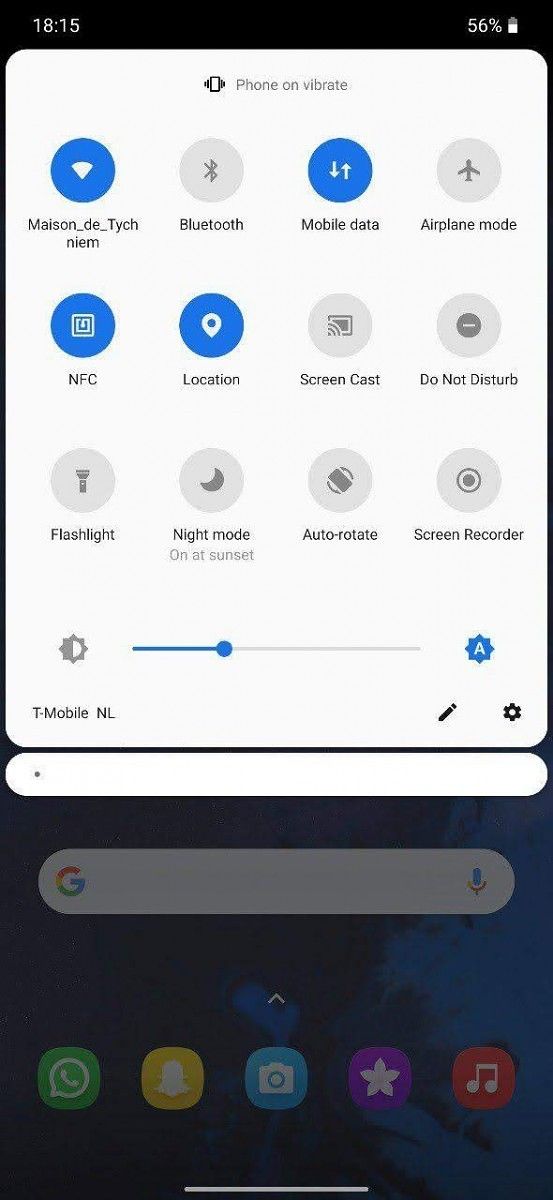
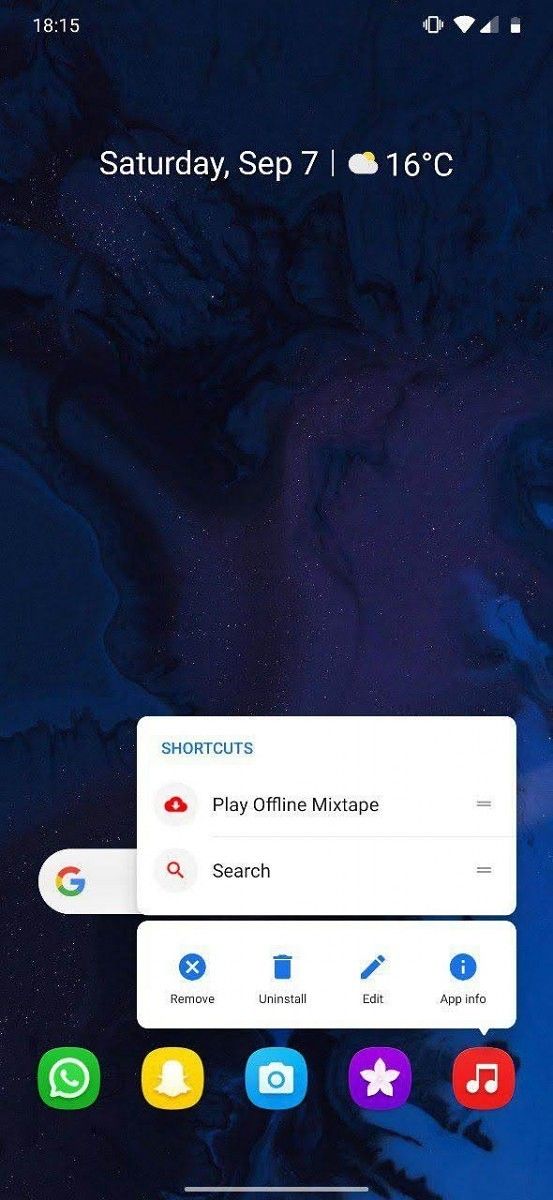
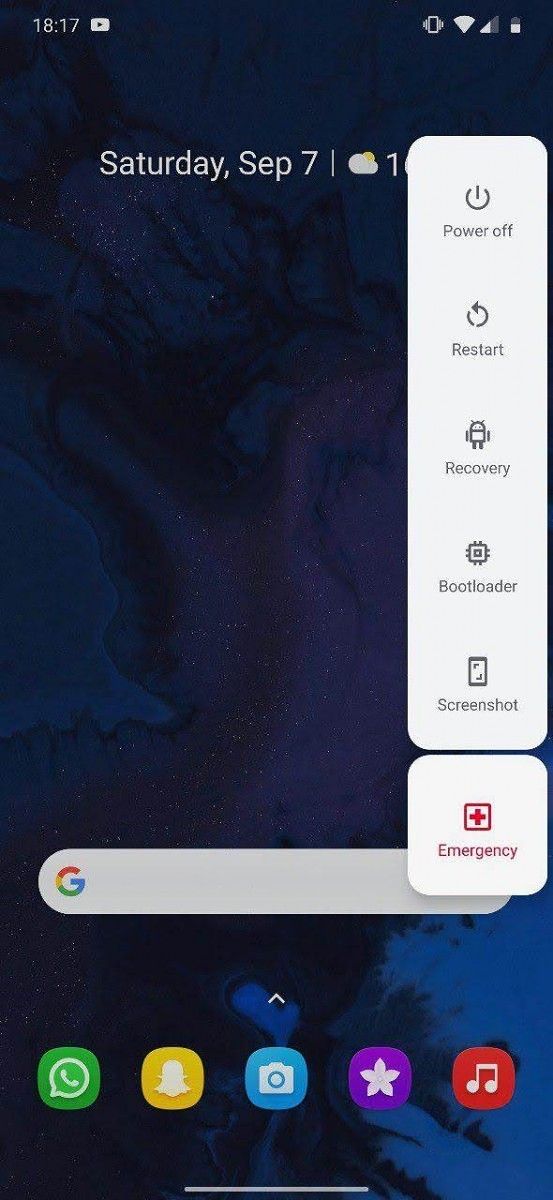
Make OxygenOS look more Pixel-like with the Out of Oxygen Substratum theme

OxygenOS by OnePlus is among the most loved Android interfaces. Drawing its philosophy from custom ROMs like yesteryears’ most popular ROM, CyanogenMod, OxygenOS features an almost-stock Android UI with several options for customization. Over the years, little changes in OxygenOS has magnified to the extent that it now has its own iconography and peculiar design elements. But if the old soul in you wants a look closer to AOSP on your OnePlus device, you can use a Magisk module called “Out of Oxygen” along with Substratum to get your OnePlus smartphone’s UI to look like a Google Pixel.

Substratum barely needs any introduction but if you’ve been out of the loop, it’s a theming engine that allows you to apply system-wide or per-app themes. This app comes in handy especially for devices, like those from OnePlus, that do not come with a native theme store. Further, while Substratum usually requires you to root your phone, you can use an add-on called Andromeda to utilize the goodness of Substratum even without root access on your phone.

Out of Oxygen Substratum theme on XDA Forums

To install “Out of Oxygen” by XDA Member tych_tych on your OnePlus device, make sure that your phone is rooted. Then, install the Out of Oxygen APK along with the Substratum theme engine app from the Play Store, and then, follow the steps from the thread linked above.

The theme supports Android 9 Pie as well as Android 10, the developer notes some features might not be available on Android Pie. Further, it has only been tested on OnePlus devices – the OnePlus 5T/6/7 Pro – and will not run on smartphones from other manufacturers.

oxygenos oneplus oxygenos oneplus oxygenos oneplus

The Out of Oxygen Substratum theme customizes the System UI, the status bar, the OnePlus launcher, Google app and the Google Assistant, WhatsApp, and Telegram X. It also includes certain wallpapers to go with the Pixel-like interface. Since Substratum allows modular customizations, you can choose to apply the theme only to certain elements or combine it with another Substratum theme.

substratum theme engine (Free, Google Play) →

The post Make OxygenOS look more Pixel-like with the Out of Oxygen Substratum theme appeared first on xda-developers.


from xda-developers https://ift.tt/36CpQl6
via IFTTT

Google will support most Chromebooks for another year

While Google pushes regular updates to ChromeOS devices, these updates depend on several device-specific non-Google hardware and software providers. Due to this reason, many older Chromebooks don’t receive updates indefinitely, leaving them vulnerable just a few years after their release. In contrast, traditional PCs continue to receive software updates until the hardware gives up. Google plans to change that and to that effect, the company has now extended the End-of-Life date for over 135 Chromebooks from different manufacturers.

As reported by Android Police, Google has updated its auto update policy for Chromebooks, promising regular updates to a number of devices until they reach their Auto Update Expiration (AUE). The company has extended the AUE date for many older Chromebooks by a year, with a few receiving a two year or a six-month extension. Most notably, the Asus Chromebook Flip C302, Google Chromebook Pixel 2015, Google Pixel Slate, and the Samsung Chromebook 3 have received updated AUE dates. However, the Prowise Chromebook Eduline has, unfortunately, had its support reduced by a year (June 2025 to June 2024).

In case you own a Chromebook, it’s quite likely that you’ll get automatic feature and security updates for another year. Just to be sure, you should head over to the Google Support page from the link below and check the AUE date for your device. For devices with the Chrome Education Upgrade or Chrome Enterprise Upgrade, the AUE date will be available in the Google Admin console. In case you own such a device, you’ll be able to check the AUE date from within the Chrome management setting on the admin console home page.


Source: Google Support

Via: Android Police

The post Google will support most Chromebooks for another year appeared first on xda-developers.


from xda-developers https://ift.tt/2NjBSs4
via IFTTT

Make OxygenOS look more Pixel-like with the Out of Oxygen Substratum theme

OxygenOS by OnePlus is among the most loved Android interfaces. Drawing its philosophy from custom ROMs like yesteryears’ most popular ROM, CyanogenMod, OxygenOS features an almost-stock Android UI with several options for customization. Over the years, little changes in OxygenOS has magnified to the extent that it now has its own iconography and peculiar design elements. But if the old soul in you wants a look closer to AOSP on your OnePlus device, you can use a Magisk module called “Out of Oxygen” along with Substratum to get your OnePlus smartphone’s UI to look like a Google Pixel.

Substratum barely needs any introduction but if you’ve been out of the loop, it’s a theming engine that allows you to apply system-wide or per-app themes. This app comes in handy especially for devices, like those from OnePlus, that do not come with a native theme store. Further, while Substratum usually requires you to root your phone, you can use an add-on called Andromeda to utilize the goodness of Substratum even without root access on your phone.

Out of Oxygen Substratum theme on XDA Forums

To install “Out of Oxygen” by XDA Member tych_tych on your OnePlus device, make sure that your phone is rooted. Then, install the Out of Oxygen APK along with the Substratum theme engine app from the Play Store, and then, follow the steps from the thread linked above.

The theme supports Android 9 Pie as well as Android 10, the developer notes some features might not be available on Android Pie. Further, it has only been tested on OnePlus devices – the OnePlus 5T/6/7 Pro – and will not run on smartphones from other manufacturers.

oxygenos oneplus oxygenos oneplus oxygenos oneplus

The Out of Oxygen Substratum theme customizes the System UI, the status bar, the OnePlus launcher, Google app and the Google Assistant, WhatsApp, and Telegram X. It also includes certain wallpapers to go with the Pixel-like interface. Since Substratum allows modular customizations, you can choose to apply the theme only to certain elements or combine it with another Substratum theme.

substratum theme engine (Free, Google Play) →

The post Make OxygenOS look more Pixel-like with the Out of Oxygen Substratum theme appeared first on xda-developers.


from xda-developers https://ift.tt/36CpQl6
via IFTTT